Solved Can't connect to the internet after reinstalling WIN7

KingKenny1

New member
Local time
9:11 AM
Messages
9
Hello,
I've reinstalled Windows 7(Ultimate 64 bit), installed my wireless adapter driver but I can't connect to the internet, usually it doesn't find any network and when it does, it claims that it couldn't connect to the network.
If it matters, my wireless adapter is Edimax EW-7612UAn.
What should I do?
 

My Computer My Computer

At a glance

Windows 7 Ultimate x64
OS
Windows 7 Ultimate x64
Welcome aboard, KingKenny1 :)

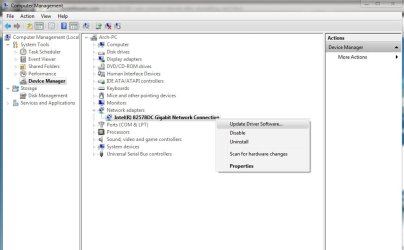
Place the driver CD in the DVD drive, right click on the computer icon on the desktop and Choose "manage" in the context menu. It will open the computer management window.

Click Device Manager > Expand Network Adapters > Right click on the result > Update driver software
1.jpg

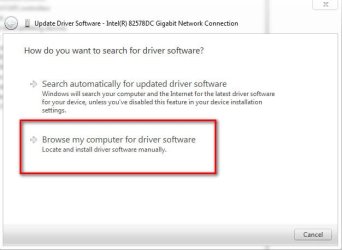
In the resulting dialog, click on "browse my computer for driver software"
2.jpg

The update procedure will find the appropriate driver and will install it properly.

Then, the network should be connected.
 

My Computer My Computer

At a glance

Microsoft Windows 10 Pro Insider Preview 64-bitIntel(R) Core(TM) i3-4130 CPU @ 3.40GHzCorsair Vengence 4GB x2 (8.00GB Dual-Channel ...2047MB GeForce GTS 450 (ZOTAC International)
Computer type
PC/Desktop
Computer Manufacturer/Model Number
Self Assembled
OS
Microsoft Windows 10 Pro Insider Preview 64-bit
CPU
Intel(R) Core(TM) i3-4130 CPU @ 3.40GHz
Motherboard
Gigabyte Technology Co., Ltd. B85M-D3H
Memory
Corsair Vengence 4GB x2 (8.00GB Dual-Channel DDR3 @ 798MHz)
Graphics Card(s)
2047MB GeForce GTS 450 (ZOTAC International)
Sound Card
Onboard (Realtek High Definition Audio)
Monitor(s) Displays
LG Flatron E2040T
Screen Resolution
1600x900
Hard Drives
Western Digital 1 TB
Seagate 500 GB
PSU
Corsair VS550
Case
Cooler Master K380
Cooling
Cooler Master Seidon 120V Plus
Keyboard
Logitech MK260r
Mouse
Logitech MK260r
Internet Speed
PMPL Broadband
Antivirus
Windows Defender + MBAM
Browser
Firefox
Other Info
Dell Studio 15" Laptop
First of all thanks for helping me.
Secondly, now it can connect to networks but it can't find my network(it finds only my neighbor's).
Before I reinstalled Windows it found my network so I guess it's not a problem with the adapter.
Is there any solution?
 

My Computer My Computer

At a glance

Windows 7 Ultimate x64
OS
Windows 7 Ultimate x64
now it can connect to networks but it can't find my network(it finds only my neighbor's).
Con you contact with your Internet Service Provider ? Or make it sure that the router is on ?
 

My Computer My Computer

At a glance

Microsoft Windows 10 Pro Insider Preview 64-bitIntel(R) Core(TM) i3-4130 CPU @ 3.40GHzCorsair Vengence 4GB x2 (8.00GB Dual-Channel ...2047MB GeForce GTS 450 (ZOTAC International)
Computer type
PC/Desktop
Computer Manufacturer/Model Number
Self Assembled
OS
Microsoft Windows 10 Pro Insider Preview 64-bit
CPU
Intel(R) Core(TM) i3-4130 CPU @ 3.40GHz
Motherboard
Gigabyte Technology Co., Ltd. B85M-D3H
Memory
Corsair Vengence 4GB x2 (8.00GB Dual-Channel DDR3 @ 798MHz)
Graphics Card(s)
2047MB GeForce GTS 450 (ZOTAC International)
Sound Card
Onboard (Realtek High Definition Audio)
Monitor(s) Displays
LG Flatron E2040T
Screen Resolution
1600x900
Hard Drives
Western Digital 1 TB
Seagate 500 GB
PSU
Corsair VS550
Case
Cooler Master K380
Cooling
Cooler Master Seidon 120V Plus
Keyboard
Logitech MK260r
Mouse
Logitech MK260r
Internet Speed
PMPL Broadband
Antivirus
Windows Defender + MBAM
Browser
Firefox
Other Info
Dell Studio 15" Laptop
Another thing to check-You have a wireless router and most of them require a user to log on using a security key. We use WPA2 and 20 digit keys. Without this you cannot connect to the internet. It does not matter if it is WPA or WEP-it is the key that is important. Your ISP can help with this. Also, if you have Verizon you will have to reset their settings using the Optimizer on their website.
 

My Computer My Computer

At a glance

Windows 7 Enterprise 64bit Desktops; Windows ...AMD Athlon 2 X3; I5-6200 6th gen (Dell)8 Gig Desktop, 8Gig Laptop, 16Gig LaptopRadeon R5450 1Gig
Computer type
PC/Desktop
Computer Manufacturer/Model Number
Custom Desktop (2 alike) Dell inspiron 13" W10 Laptop Dell Inspiron 17 5759
OS
Windows 7 Enterprise 64bit Desktops; Windows 7 Professional 64Bit 17"Laptop
CPU
AMD Athlon 2 X3; I5-6200 6th gen (Dell)
Motherboard
Gigabyte GA 78LMT-USB3 (2 Desktops)
Memory
8 Gig Desktop, 8Gig Laptop, 16Gig Laptop
Graphics Card(s)
Radeon R5450 1Gig
Sound Card
Creative SB X-Fi Titanium Extreme Audio Desktop 1
Monitor(s) Displays
Dell 2419
Screen Resolution
1920x1080
Hard Drives
Crucial M500 500GB SSD Desktop 1 and Laptops
Samsung 850EVO 250GB - Desktop 2
PSU
Thermaltake 600watt
Case
Rosewill
Cooling
Scythe Typhoon 120mm
Keyboard
Kensington
Mouse
Logitech M310
Internet Speed
50/50
Antivirus
Avast
Browser
Firefox 68
First of all thanks for helping me.
Secondly, now it can connect to networks but it can't find my network(it finds only my neighbor's).
Before I reinstalled Windows it found my network so I guess it's not a problem with the adapter.
Is there any solution?
Can you connect wired? Your wireless SSID is not listed but your neighbor's is?
Can another device (laptop,i-phone) device see the wireless router?

Was it always visible before?
 

My Computer My Computer

At a glance

Microsoft Windows 7 Home Premium 64-bits 7601...Intel(R) Core(TM) i3 CPU M 370 @ 2.40GHz4,00 GBATI Mobility Radeon HD 5400 Series
Computer type
Laptop
Computer Manufacturer/Model Number
ACER ASPIRE 5742G
OS
Microsoft Windows 7 Home Premium 64-bits 7601 Multiprocessor Free Service Pack 1
CPU
Intel(R) Core(TM) i3 CPU M 370 @ 2.40GHz
Motherboard
Acer Aspire 5742G
Memory
4,00 GB
Graphics Card(s)
ATI Mobility Radeon HD 5400 Series
Sound Card
(1) AMD High Definition Audio Device (2) Realtek High Defi
Screen Resolution
1366 x 768 x 32 bits (4294967296 colors) @ 60 Hz
Hard Drives
WDC WD5000BEVT-22ZAT0
If you're connected wirelessly.....

This....

Another thing to check-You have a wireless router and most of them require a user to log on using a security key. We use WPA2 and 20 digit keys. Without this you cannot connect to the internet. It does not matter if it is WPA or WEP-it is the key that is important. Your ISP can help with this. Also, if you have Verizon you will have to reset their settings using the Optimizer on their website.

Even though you say you're getting internet connection now, it is possible that you've latched onto someone's unsecureed network, and not yours.

That said, the above advice really needs to be looked into. You can check to see what network you're connected to by clicking the wireless icon in your system tray. If it shows you connected to any other network thant yours you have and issue and the advice given by jc needs to be followed, and it is also the reason you can't see your network.

Whether wirelessly or not.....

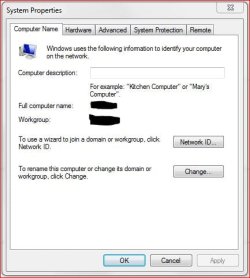
The other thing you need to do is make sure your router and PC are using the same "Workgroup" name. You do this by checking what your router has for a name and then making sure your PC is using the same name. If not change it....

Capture.JPG

Click the network ID button and change the workgorup name. You'll need to restart the PC for it to take affect.

I'm not an expert in networking so others may have to chime in here if that doesn't work.

Good luck.
 

My Computer My Computer

At a glance

Windows 10 ProIntel Core i7-4770K (3.5Ghz)32 gig Corsair Dominator Platinum (4x8Gig)Sapphire Tri-X R9 Fury
Computer type
PC/Desktop
Computer Manufacturer/Model Number
Custom built by me.
OS
Windows 10 Pro
CPU
Intel Core i7-4770K (3.5Ghz)
Motherboard
Gigabyte G1 Sniper 5 (F10 Bios)
Memory
32 gig Corsair Dominator Platinum (4x8Gig)
Graphics Card(s)
Sapphire Tri-X R9 Fury
Sound Card
Soundblaster ZXR
Monitor(s) Displays
NEC PA242W 24" LCD Monitor
Screen Resolution
1920 x 1200
Hard Drives
Primary - Samsung 850 Pro (512gig), Samsung 840 Pro (256gig), 2TB WD Caviar Black.
PSU
EVGA Supernova 1000 G2
Case
Cooler Master HAF X
Cooling
Corsair H100i with Corsair Air Series SP120 Quiet Fans
Keyboard
Logitech Wireless Wave
Mouse
Logitech Performance MX
Internet Speed
High Speed Cable
Antivirus
Norton Security
Browser
IE11
Other Info
Memory Timings - 1866MHz @ 9-9-9-27-1T @ 1.5 volts
The other thing you need to do is make sure your router and PC are using the same "Workgroup" name. You do this by checking what your router has for a name and then making sure your PC is using the same name. If not change it....

=>a router doesn't have a workgroup! And that part is irrelevant
 

My Computer My Computer

At a glance

Microsoft Windows 7 Home Premium 64-bits 7601...Intel(R) Core(TM) i3 CPU M 370 @ 2.40GHz4,00 GBATI Mobility Radeon HD 5400 Series
Computer type
Laptop
Computer Manufacturer/Model Number
ACER ASPIRE 5742G
OS
Microsoft Windows 7 Home Premium 64-bits 7601 Multiprocessor Free Service Pack 1
CPU
Intel(R) Core(TM) i3 CPU M 370 @ 2.40GHz
Motherboard
Acer Aspire 5742G
Memory
4,00 GB
Graphics Card(s)
ATI Mobility Radeon HD 5400 Series
Sound Card
(1) AMD High Definition Audio Device (2) Realtek High Defi
Screen Resolution
1366 x 768 x 32 bits (4294967296 colors) @ 60 Hz
Hard Drives
WDC WD5000BEVT-22ZAT0
The other thing you need to do is make sure your router and PC are using the same "Workgroup" name. You do this by checking what your router has for a name and then making sure your PC is using the same name. If not change it....

=>a router doesn't have a workgroup! And that part is irrelevant

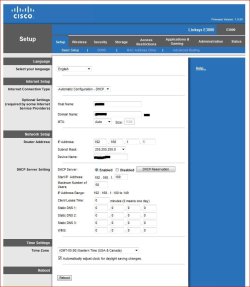
OK, I meant Domain Name. Which should be the same as the Workgroup name on the PC.

"If" you have a domain name in the router, you want that name in the workgroup of the PC or else you won't see your network. At least that's how it works on my router.

Capture.JPG

Perhaps explaining why you disagree would be more.... helpful?... instead of playing with exclamation points!
 

My Computer My Computer

At a glance

Windows 10 ProIntel Core i7-4770K (3.5Ghz)32 gig Corsair Dominator Platinum (4x8Gig)Sapphire Tri-X R9 Fury
Computer type
PC/Desktop
Computer Manufacturer/Model Number
Custom built by me.
OS
Windows 10 Pro
CPU
Intel Core i7-4770K (3.5Ghz)
Motherboard
Gigabyte G1 Sniper 5 (F10 Bios)
Memory
32 gig Corsair Dominator Platinum (4x8Gig)
Graphics Card(s)
Sapphire Tri-X R9 Fury
Sound Card
Soundblaster ZXR
Monitor(s) Displays
NEC PA242W 24" LCD Monitor
Screen Resolution
1920 x 1200
Hard Drives
Primary - Samsung 850 Pro (512gig), Samsung 840 Pro (256gig), 2TB WD Caviar Black.
PSU
EVGA Supernova 1000 G2
Case
Cooler Master HAF X
Cooling
Corsair H100i with Corsair Air Series SP120 Quiet Fans
Keyboard
Logitech Wireless Wave
Mouse
Logitech Performance MX
Internet Speed
High Speed Cable
Antivirus
Norton Security
Browser
IE11
Other Info
Memory Timings - 1866MHz @ 9-9-9-27-1T @ 1.5 volts
The other thing you need to do is make sure your router and PC are using the same "Workgroup" name. You do this by checking what your router has for a name and then making sure your PC is using the same name. If not change it....

=>a router doesn't have a workgroup! And that part is irrelevant

OK, I meant Domain Name. Which should be the same as the Workgroup name on the PC.

"If" you have a domain name in the router, you want that name in the workgroup of the PC or else you won't see your network. At least that's how it works on my router.

View attachment 223949

Perhaps explaining why you disagree would be more.... helpful?... instead of playing with exclamation points!
Domain Name is the domain suffix that you see as well in ipconfig/all.
Assume the "Domain name" is testdomain

ping somename.testdomain
ping somename
ping ip-address-of-somename

They are all the same. Sorry I used exclamation marks, didn't want to be rude.
It's difficult to explain everything. Talking too much about technical stuff just confuses most OP's. Most posters just want their problem to be solved.
Have a great time mate
 

My Computer My Computer

At a glance

Microsoft Windows 7 Home Premium 64-bits 7601...Intel(R) Core(TM) i3 CPU M 370 @ 2.40GHz4,00 GBATI Mobility Radeon HD 5400 Series
Computer type
Laptop
Computer Manufacturer/Model Number
ACER ASPIRE 5742G
OS
Microsoft Windows 7 Home Premium 64-bits 7601 Multiprocessor Free Service Pack 1
CPU
Intel(R) Core(TM) i3 CPU M 370 @ 2.40GHz
Motherboard
Acer Aspire 5742G
Memory
4,00 GB
Graphics Card(s)
ATI Mobility Radeon HD 5400 Series
Sound Card
(1) AMD High Definition Audio Device (2) Realtek High Defi
Screen Resolution
1366 x 768 x 32 bits (4294967296 colors) @ 60 Hz
Hard Drives
WDC WD5000BEVT-22ZAT0
Not trying to be argumentative but....

Domain Name is the domain suffix that you see as well in ipconfig/all.
Assume the "Domain name" is testdomain

ping somename.testdomain
ping somename
ping ip-address-of-somename

They are all the same. Sorry I used exclamation marks, didn't want to be rude.
It's difficult to explain everything. Talking too much about technical stuff just confuses most OP's. Most posters just want their problem to be solved.
Have a great time mate

Not trying to be argumentative but I’m not getting your explanation?

My suggestion was this…. if there is a name in the router's Domain Name slot, that same name should be used for the workgroup name on the PC.

Example: If the router has Go Daddy in the Domain Name box, the workgroup name on the PC should read Go Daddy as well.

This way any PC in the Go Daddy workgroup will be seen in the Go Daddy domain of the router.

This is the way it works (have it set up) on my network - If my PC isn’t in the workgroup listed on the router’s Domain Name, that PC won’t see the network. I was merely asking the OP the check whether this was the case.


Does it "have" to work this way? I don’t know, that’s where my lack of expertise hurts…. Thus an explanation of why you disagree? I could research it myself, but I was hoping you could provide the answer in your disagreement?

We are all here to learn; and I’ll be the first to admit I don’t know everything.


Thanks :cool:
 

My Computer My Computer

At a glance

Windows 10 ProIntel Core i7-4770K (3.5Ghz)32 gig Corsair Dominator Platinum (4x8Gig)Sapphire Tri-X R9 Fury
Computer type
PC/Desktop
Computer Manufacturer/Model Number
Custom built by me.
OS
Windows 10 Pro
CPU
Intel Core i7-4770K (3.5Ghz)
Motherboard
Gigabyte G1 Sniper 5 (F10 Bios)
Memory
32 gig Corsair Dominator Platinum (4x8Gig)
Graphics Card(s)
Sapphire Tri-X R9 Fury
Sound Card
Soundblaster ZXR
Monitor(s) Displays
NEC PA242W 24" LCD Monitor
Screen Resolution
1920 x 1200
Hard Drives
Primary - Samsung 850 Pro (512gig), Samsung 840 Pro (256gig), 2TB WD Caviar Black.
PSU
EVGA Supernova 1000 G2
Case
Cooler Master HAF X
Cooling
Corsair H100i with Corsair Air Series SP120 Quiet Fans
Keyboard
Logitech Wireless Wave
Mouse
Logitech Performance MX
Internet Speed
High Speed Cable
Antivirus
Norton Security
Browser
IE11
Other Info
Memory Timings - 1866MHz @ 9-9-9-27-1T @ 1.5 volts
Few things to try.

1.) Disable Windows Defender (Via control panel)
2.) Disable Firewall (via control panel).
Now type in Search Engine at start menu Windows Firewall and click the advanced setting tab that shows up. Go to windows firewall properties on the window that pops up. Be sure to make sure connection outbound and inbound nothing is marked as "to block". Now go to general outbound/inbound (I think it is this) and highlight all of the blocked (some will be green some will be black) by left clicking holding shift and scrolling down to the bottom and left clicking the last one. Right click the highlighted portion and click enable all. Do the same for outbound as you did inbound.

Should work.
 

My Computer My Computer

At a glance

windows 7 ultimate x64 sp14 GB ram ddr2Nvidia Geforce GT240
Computer Manufacturer/Model Number
Compaq Presario CQ5110F desktop
OS
windows 7 ultimate x64 sp1
Memory
4 GB ram ddr2
Graphics Card(s)
Nvidia Geforce GT240
Sound Card
Realtek HD audio
Monitor(s) Displays
Samsung sync 75hz
Screen Resolution
1280x1024
Keyboard
Steelseries Shift
Mouse
Logitech G400
Internet Speed
15 download 2 upload
Domain Name is the domain suffix that you see as well in ipconfig/all.
Assume the "Domain name" is testdomain

ping somename.testdomain
ping somename
ping ip-address-of-somename

They are all the same. Sorry I used exclamation marks, didn't want to be rude.
It's difficult to explain everything. Talking too much about technical stuff just confuses most OP's. Most posters just want their problem to be solved.
Have a great time mate

Not trying to be argumentative but I’m not getting your explanation?

My suggestion was this…. if there is a name in the router's Domain Name slot, that same name should be used for the workgroup name on the PC.

Example: If the router has Go Daddy in the Domain Name box, the workgroup name on the PC should read Go Daddy as well.

This way any PC in the Go Daddy workgroup will be seen in the Go Daddy domain of the router.

This is the way it works (have it set up) on my network - If my PC isn’t in the workgroup listed on the router’s Domain Name, that PC won’t see the network. I was merely asking the OP the check whether this was the case.


Does it "have" to work this way? I don’t know, that’s where my lack of expertise hurts…. Thus an explanation of why you disagree? I could research it myself, but I was hoping you could provide the answer in your disagreement?

We are all here to learn; and I’ll be the first to admit I don’t know everything.


Thanks :cool:
I changed my router's domainname to google.com and pinged www.
C:\Users\Ron>ping www
Pingen naar www.l.google.com [173.194.66.103] met 32 bytes aan gegevens:
Antwoord van 173.194.66.103: bytes=32 tijd=12 ms TTL=49
Antwoord van 173.194.66.103: bytes=32 tijd=13 ms TTL=49
Antwoord van 173.194.66.103: bytes=32 tijd=15 ms TTL=49

It's just a default DNS name suffix when accessing stuff using tcp/ip. WORKGROUP is a special windows thing for placing a few computers in a group.

His problem was he can't access the internet. domainname and workgroup aren't relevant then. Even an I-phone (without proper workgroup) or visitor's laptop can usually connect to internet using your router without issues.
 

My Computer My Computer

At a glance

Microsoft Windows 7 Home Premium 64-bits 7601...Intel(R) Core(TM) i3 CPU M 370 @ 2.40GHz4,00 GBATI Mobility Radeon HD 5400 Series
Computer type
Laptop
Computer Manufacturer/Model Number
ACER ASPIRE 5742G
OS
Microsoft Windows 7 Home Premium 64-bits 7601 Multiprocessor Free Service Pack 1
CPU
Intel(R) Core(TM) i3 CPU M 370 @ 2.40GHz
Motherboard
Acer Aspire 5742G
Memory
4,00 GB
Graphics Card(s)
ATI Mobility Radeon HD 5400 Series
Sound Card
(1) AMD High Definition Audio Device (2) Realtek High Defi
Screen Resolution
1366 x 768 x 32 bits (4294967296 colors) @ 60 Hz
Hard Drives
WDC WD5000BEVT-22ZAT0
Yes, I agree the workgroup isn't relevent to get on the internet.

However his second stated problem was he couldn't see his network... thus the solution I suggested; which does apply.

First of all thanks for helping me.
Secondly, now it can connect to networks but it can't find my network(it finds only my neighbor's).

Before I reinstalled Windows it found my network so I guess it's not a problem with the adapter.
Is there any solution?

Thanks.
 

My Computer My Computer

At a glance

Windows 10 ProIntel Core i7-4770K (3.5Ghz)32 gig Corsair Dominator Platinum (4x8Gig)Sapphire Tri-X R9 Fury
Computer type
PC/Desktop
Computer Manufacturer/Model Number
Custom built by me.
OS
Windows 10 Pro
CPU
Intel Core i7-4770K (3.5Ghz)
Motherboard
Gigabyte G1 Sniper 5 (F10 Bios)
Memory
32 gig Corsair Dominator Platinum (4x8Gig)
Graphics Card(s)
Sapphire Tri-X R9 Fury
Sound Card
Soundblaster ZXR
Monitor(s) Displays
NEC PA242W 24" LCD Monitor
Screen Resolution
1920 x 1200
Hard Drives
Primary - Samsung 850 Pro (512gig), Samsung 840 Pro (256gig), 2TB WD Caviar Black.
PSU
EVGA Supernova 1000 G2
Case
Cooler Master HAF X
Cooling
Corsair H100i with Corsair Air Series SP120 Quiet Fans
Keyboard
Logitech Wireless Wave
Mouse
Logitech Performance MX
Internet Speed
High Speed Cable
Antivirus
Norton Security
Browser
IE11
Other Info
Memory Timings - 1866MHz @ 9-9-9-27-1T @ 1.5 volts
Thanks for your help everyone, I solved the problem.
 

My Computer My Computer

At a glance

Windows 7 Ultimate x64
OS
Windows 7 Ultimate x64

My Computer My Computer

At a glance

Microsoft Windows 7 Home Premium 64-bits 7601...Intel(R) Core(TM) i3 CPU M 370 @ 2.40GHz4,00 GBATI Mobility Radeon HD 5400 Series
Computer type
Laptop
Computer Manufacturer/Model Number
ACER ASPIRE 5742G
OS
Microsoft Windows 7 Home Premium 64-bits 7601 Multiprocessor Free Service Pack 1
CPU
Intel(R) Core(TM) i3 CPU M 370 @ 2.40GHz
Motherboard
Acer Aspire 5742G
Memory
4,00 GB
Graphics Card(s)
ATI Mobility Radeon HD 5400 Series
Sound Card
(1) AMD High Definition Audio Device (2) Realtek High Defi
Screen Resolution
1366 x 768 x 32 bits (4294967296 colors) @ 60 Hz
Hard Drives
WDC WD5000BEVT-22ZAT0
Back
Top