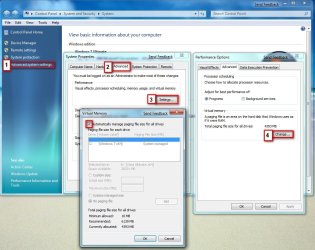
Virtual Memory Issue

Devil Jin

New member
Local time
1:09 PM
Messages
24
Hi Guys,

Not sure if this is the correct board to post this problem but here goes;
When ever I am trying to open photoshop Iam getting this error...

x4g2mo.png

Any Help is greatly appreciated..

Thank You
 

My Computer

Computer Manufacturer/Model Number
Home Made
OS
windows 7 (7000) Ultimate / Vista Ultimate
CPU
Quad Core Q 6600
Motherboard
Intel DG33FBC
Memory
2 * 2 DDR II 667 MHZ
Graphics Card(s)
XFX GeForce 8500 GT 512 MB
Sound Card
On Board Realtek 5.1 High Def
Monitor(s) Displays
AOC 19" 917Wx
Screen Resolution
1140*900
Hard Drives
160GB
Case
Circle Premium Cabinet
Keyboard
Splash Resistance Enter
Mouse
Logitec
It is telling you your page file is not big enough, have you disabled it or set it manualy, if so try making it larger or set it on Auto

2009-01-15_210946.jpg
 

My Computer

Computer Manufacturer/Model Number
Home Brew
OS
Windows 7 Ultimate Vista Ultimate x64
CPU
Core 2 Duo E8500 3.16Ghz @ 3.8Ghz
Motherboard
eVGA 750i FTW
Memory
2x2Gigs Patriot PC2-6400 LL
Graphics Card(s)
Inno3D GeForce GTX260 216 SP
Monitor(s) Displays
ASUS VW222U 22" 2ms Response time
Screen Resolution
1680x1050
Hard Drives
SATA 150GB
SATA II 250GB
USB IDE 750GB Ext.
PSU
HYTEC 600W & Thermaltake 650W Toughpower Power Exp
Case
Thermaltake Armor LCS (Liquid Cooling System)
Cooling
Liquid Cooling System
Keyboard
Logitech G15 Gaming Keyboard
Mouse
Logitech G9 Gaming Mouse
Its set to Auto Mr Grim..
 

My Computer

Computer Manufacturer/Model Number
Home Made
OS
windows 7 (7000) Ultimate / Vista Ultimate
CPU
Quad Core Q 6600
Motherboard
Intel DG33FBC
Memory
2 * 2 DDR II 667 MHZ
Graphics Card(s)
XFX GeForce 8500 GT 512 MB
Sound Card
On Board Realtek 5.1 High Def
Monitor(s) Displays
AOC 19" 917Wx
Screen Resolution
1140*900
Hard Drives
160GB
Case
Circle Premium Cabinet
Keyboard
Splash Resistance Enter
Mouse
Logitec
How much has it got allocated, try increasing it and see if that helps.
 

My Computer

Computer Manufacturer/Model Number
Home Brew
OS
Windows 7 Ultimate Vista Ultimate x64
CPU
Core 2 Duo E8500 3.16Ghz @ 3.8Ghz
Motherboard
eVGA 750i FTW
Memory
2x2Gigs Patriot PC2-6400 LL
Graphics Card(s)
Inno3D GeForce GTX260 216 SP
Monitor(s) Displays
ASUS VW222U 22" 2ms Response time
Screen Resolution
1680x1050
Hard Drives
SATA 150GB
SATA II 250GB
USB IDE 750GB Ext.
PSU
HYTEC 600W & Thermaltake 650W Toughpower Power Exp
Case
Thermaltake Armor LCS (Liquid Cooling System)
Cooling
Liquid Cooling System
Keyboard
Logitech G15 Gaming Keyboard
Mouse
Logitech G9 Gaming Mouse
Its not letting me change anything when ever I try to change it; it stops responding..

Btwn Currently Acllocate is 3621MB
 

My Computer

Computer Manufacturer/Model Number
Home Made
OS
windows 7 (7000) Ultimate / Vista Ultimate
CPU
Quad Core Q 6600
Motherboard
Intel DG33FBC
Memory
2 * 2 DDR II 667 MHZ
Graphics Card(s)
XFX GeForce 8500 GT 512 MB
Sound Card
On Board Realtek 5.1 High Def
Monitor(s) Displays
AOC 19" 917Wx
Screen Resolution
1140*900
Hard Drives
160GB
Case
Circle Premium Cabinet
Keyboard
Splash Resistance Enter
Mouse
Logitec
Seems like there is a more serious issue then and maybe you don't have a pagefile. that would explain the error you are getting on photoshop.

Can you fill in your system specs through the link on your post down the bottom where it says My System Specs, that way we can help diagnose the problem better. Also have you installed all your MB chipset drivers and updated all your drivers?

You might want to check out this thread for any hints to your problem Virtual memory - Pagefile problem: no drives in list!http://www.sevenforums.com/1938-virtual-memory-pagefile-problem-no-drives-list.html
 

My Computer

Computer Manufacturer/Model Number
Home Brew
OS
Windows 7 Ultimate Vista Ultimate x64
CPU
Core 2 Duo E8500 3.16Ghz @ 3.8Ghz
Motherboard
eVGA 750i FTW
Memory
2x2Gigs Patriot PC2-6400 LL
Graphics Card(s)
Inno3D GeForce GTX260 216 SP
Monitor(s) Displays
ASUS VW222U 22" 2ms Response time
Screen Resolution
1680x1050
Hard Drives
SATA 150GB
SATA II 250GB
USB IDE 750GB Ext.
PSU
HYTEC 600W & Thermaltake 650W Toughpower Power Exp
Case
Thermaltake Armor LCS (Liquid Cooling System)
Cooling
Liquid Cooling System
Keyboard
Logitech G15 Gaming Keyboard
Mouse
Logitech G9 Gaming Mouse
Sys Specs Updated..

I already went through the thread you mention my problem is different than that..

Well day before yesterday when I used photoshop it was fine, yesterday I reformated my PC and used the vista sidebar so even if my UAC is off I can use gagets and today when I installed Photoshop Iam getting this error. Another thig is Iam not eve able to close it using end task, have to reset my PC since its not allowing me to restart or shut down my PC one I open the virtual memony TAB in advance control..

2dazll2.png
 

My Computer

Computer Manufacturer/Model Number
Home Made
OS
windows 7 (7000) Ultimate / Vista Ultimate
CPU
Quad Core Q 6600
Motherboard
Intel DG33FBC
Memory
2 * 2 DDR II 667 MHZ
Graphics Card(s)
XFX GeForce 8500 GT 512 MB
Sound Card
On Board Realtek 5.1 High Def
Monitor(s) Displays
AOC 19" 917Wx
Screen Resolution
1140*900
Hard Drives
160GB
Case
Circle Premium Cabinet
Keyboard
Splash Resistance Enter
Mouse
Logitec
Have you used any hacks to remove watermarks or send feedback, I ask because it has caused lots of problems for anyone who uses them, regardless you should try a system restore to take it back to the time you installed photoshop or just after if you have the option.
 

My Computer

Computer Manufacturer/Model Number
Home Brew
OS
Windows 7 Ultimate Vista Ultimate x64
CPU
Core 2 Duo E8500 3.16Ghz @ 3.8Ghz
Motherboard
eVGA 750i FTW
Memory
2x2Gigs Patriot PC2-6400 LL
Graphics Card(s)
Inno3D GeForce GTX260 216 SP
Monitor(s) Displays
ASUS VW222U 22" 2ms Response time
Screen Resolution
1680x1050
Hard Drives
SATA 150GB
SATA II 250GB
USB IDE 750GB Ext.
PSU
HYTEC 600W & Thermaltake 650W Toughpower Power Exp
Case
Thermaltake Armor LCS (Liquid Cooling System)
Cooling
Liquid Cooling System
Keyboard
Logitech G15 Gaming Keyboard
Mouse
Logitech G9 Gaming Mouse
Hmm I did use orbit to remove waterwark and sendfeed back but I used it before also and didn`t face any problem photoshop was running before
 

My Computer

Computer Manufacturer/Model Number
Home Made
OS
windows 7 (7000) Ultimate / Vista Ultimate
CPU
Quad Core Q 6600
Motherboard
Intel DG33FBC
Memory
2 * 2 DDR II 667 MHZ
Graphics Card(s)
XFX GeForce 8500 GT 512 MB
Sound Card
On Board Realtek 5.1 High Def
Monitor(s) Displays
AOC 19" 917Wx
Screen Resolution
1140*900
Hard Drives
160GB
Case
Circle Premium Cabinet
Keyboard
Splash Resistance Enter
Mouse
Logitec
Restore it to the time before you hacked it and I think that will solve your problems, the ORBIT hack you speak of is the main one causing so many problems.
 

My Computer

Computer Manufacturer/Model Number
Home Brew
OS
Windows 7 Ultimate Vista Ultimate x64
CPU
Core 2 Duo E8500 3.16Ghz @ 3.8Ghz
Motherboard
eVGA 750i FTW
Memory
2x2Gigs Patriot PC2-6400 LL
Graphics Card(s)
Inno3D GeForce GTX260 216 SP
Monitor(s) Displays
ASUS VW222U 22" 2ms Response time
Screen Resolution
1680x1050
Hard Drives
SATA 150GB
SATA II 250GB
USB IDE 750GB Ext.
PSU
HYTEC 600W & Thermaltake 650W Toughpower Power Exp
Case
Thermaltake Armor LCS (Liquid Cooling System)
Cooling
Liquid Cooling System
Keyboard
Logitech G15 Gaming Keyboard
Mouse
Logitech G9 Gaming Mouse
Hmm thats kind of hard because I use Tune Up Utilities to remove all backup and unused files..
 
Last edited:

My Computer

Computer Manufacturer/Model Number
Home Made
OS
windows 7 (7000) Ultimate / Vista Ultimate
CPU
Quad Core Q 6600
Motherboard
Intel DG33FBC
Memory
2 * 2 DDR II 667 MHZ
Graphics Card(s)
XFX GeForce 8500 GT 512 MB
Sound Card
On Board Realtek 5.1 High Def
Monitor(s) Displays
AOC 19" 917Wx
Screen Resolution
1140*900
Hard Drives
160GB
Case
Circle Premium Cabinet
Keyboard
Splash Resistance Enter
Mouse
Logitec
I think in that case you will need to reinstall the OS, I am getting use to it now, I think I have reinstalled Windows 7 about a dozen times now LOL
 

My Computer

Computer Manufacturer/Model Number
Home Brew
OS
Windows 7 Ultimate Vista Ultimate x64
CPU
Core 2 Duo E8500 3.16Ghz @ 3.8Ghz
Motherboard
eVGA 750i FTW
Memory
2x2Gigs Patriot PC2-6400 LL
Graphics Card(s)
Inno3D GeForce GTX260 216 SP
Monitor(s) Displays
ASUS VW222U 22" 2ms Response time
Screen Resolution
1680x1050
Hard Drives
SATA 150GB
SATA II 250GB
USB IDE 750GB Ext.
PSU
HYTEC 600W & Thermaltake 650W Toughpower Power Exp
Case
Thermaltake Armor LCS (Liquid Cooling System)
Cooling
Liquid Cooling System
Keyboard
Logitech G15 Gaming Keyboard
Mouse
Logitech G9 Gaming Mouse
I just uninstalled photoshop and its allowing me to change it without hanging the system...

So now what do u advice Mr Grim..
 

My Computer

Computer Manufacturer/Model Number
Home Made
OS
windows 7 (7000) Ultimate / Vista Ultimate
CPU
Quad Core Q 6600
Motherboard
Intel DG33FBC
Memory
2 * 2 DDR II 667 MHZ
Graphics Card(s)
XFX GeForce 8500 GT 512 MB
Sound Card
On Board Realtek 5.1 High Def
Monitor(s) Displays
AOC 19" 917Wx
Screen Resolution
1140*900
Hard Drives
160GB
Case
Circle Premium Cabinet
Keyboard
Splash Resistance Enter
Mouse
Logitec
I would say a clean install is still the way to go, although it's a strange issue with the page file being disable only when Photoshop is installed unless their is some sort of conflict with photoshop but even then you said it worked when you first installed, I think the only way you are going to know for sure is to do a fresh install.
 

My Computer

Computer Manufacturer/Model Number
Home Brew
OS
Windows 7 Ultimate Vista Ultimate x64
CPU
Core 2 Duo E8500 3.16Ghz @ 3.8Ghz
Motherboard
eVGA 750i FTW
Memory
2x2Gigs Patriot PC2-6400 LL
Graphics Card(s)
Inno3D GeForce GTX260 216 SP
Monitor(s) Displays
ASUS VW222U 22" 2ms Response time
Screen Resolution
1680x1050
Hard Drives
SATA 150GB
SATA II 250GB
USB IDE 750GB Ext.
PSU
HYTEC 600W & Thermaltake 650W Toughpower Power Exp
Case
Thermaltake Armor LCS (Liquid Cooling System)
Cooling
Liquid Cooling System
Keyboard
Logitech G15 Gaming Keyboard
Mouse
Logitech G9 Gaming Mouse
Oh Man I really hate to re install the OS even though it only take 20 min to install...

Well will try to re install photoshop again and see if theres a problem if yes then will re install OS..

Thanks Mr Grim...
You are really helpful .. Hope I can be of some help to you one day...

PS: If you need any other stuff like Rapidshare Premium Acct or any other Appz feel free to PM me..

:D
 

My Computer

Computer Manufacturer/Model Number
Home Made
OS
windows 7 (7000) Ultimate / Vista Ultimate
CPU
Quad Core Q 6600
Motherboard
Intel DG33FBC
Memory
2 * 2 DDR II 667 MHZ
Graphics Card(s)
XFX GeForce 8500 GT 512 MB
Sound Card
On Board Realtek 5.1 High Def
Monitor(s) Displays
AOC 19" 917Wx
Screen Resolution
1140*900
Hard Drives
160GB
Case
Circle Premium Cabinet
Keyboard
Splash Resistance Enter
Mouse
Logitec
Your welcome and thanks for the offer I might take you up on the offer one day.
 

My Computer

Computer Manufacturer/Model Number
Home Brew
OS
Windows 7 Ultimate Vista Ultimate x64
CPU
Core 2 Duo E8500 3.16Ghz @ 3.8Ghz
Motherboard
eVGA 750i FTW
Memory
2x2Gigs Patriot PC2-6400 LL
Graphics Card(s)
Inno3D GeForce GTX260 216 SP
Monitor(s) Displays
ASUS VW222U 22" 2ms Response time
Screen Resolution
1680x1050
Hard Drives
SATA 150GB
SATA II 250GB
USB IDE 750GB Ext.
PSU
HYTEC 600W & Thermaltake 650W Toughpower Power Exp
Case
Thermaltake Armor LCS (Liquid Cooling System)
Cooling
Liquid Cooling System
Keyboard
Logitech G15 Gaming Keyboard
Mouse
Logitech G9 Gaming Mouse
Hmm problem still there re installing OS....

Your welcome Mr Grim waiting for your PM.. :)
 

My Computer

Computer Manufacturer/Model Number
Home Made
OS
windows 7 (7000) Ultimate / Vista Ultimate
CPU
Quad Core Q 6600
Motherboard
Intel DG33FBC
Memory
2 * 2 DDR II 667 MHZ
Graphics Card(s)
XFX GeForce 8500 GT 512 MB
Sound Card
On Board Realtek 5.1 High Def
Monitor(s) Displays
AOC 19" 917Wx
Screen Resolution
1140*900
Hard Drives
160GB
Case
Circle Premium Cabinet
Keyboard
Splash Resistance Enter
Mouse
Logitec
Hey Devil Jin...

Could you try assigning a drive letter to your hidden partition under disk management, and re-install Photoshop and let us know of what happens?

In Administrative Tools, Computer Management, Disk Management you will find a hidden partition of about 200 MB, or any size... Right Click it, Change drive letters and paths -> Add -> Select a drive letter.

Uninstall and re-install photoshop and let us know if you get the same error.
 

My Computer

Computer Manufacturer/Model Number
ENIAC
OS
Windows 7 RC 7100 32bit/64bit
CPU
Intel Core2Duo E4500 2.20 GHz
Motherboard
ASUS P5LD2-X/1333
Memory
2x1GB Kinsgston DDR2 800MHz
Graphics Card(s)
Nvidia 8500GT
Sound Card
Onboard High Definition Audio Device
Monitor(s) Displays
Sony Bravia 42"
Case
LINKW 2222
Cooling
Standard Intel
Keyboard
Some cheap one
Mouse
Microsoft Intellimouse something
Internet Speed
24MBps ADSL
Hi Mr Grim,

Re installed the OS and tried to use photoshop again it was giving me the same error..
Then Re-installed and checked to change the Page File Memory without installing Photoshop but the system still hangs and does not allow me to restart or shut down says Problem with interacting windows..

Have reported it to MS..

:)
 

My Computer

Computer Manufacturer/Model Number
Home Made
OS
windows 7 (7000) Ultimate / Vista Ultimate
CPU
Quad Core Q 6600
Motherboard
Intel DG33FBC
Memory
2 * 2 DDR II 667 MHZ
Graphics Card(s)
XFX GeForce 8500 GT 512 MB
Sound Card
On Board Realtek 5.1 High Def
Monitor(s) Displays
AOC 19" 917Wx
Screen Resolution
1140*900
Hard Drives
160GB
Case
Circle Premium Cabinet
Keyboard
Splash Resistance Enter
Mouse
Logitec
Hi Devil Jin, sorry to hear about that, I thought we were on the right track, i don't think you mentioned about drivers for your motherboard, did you manage to install all of them?
 

My Computer

Computer Manufacturer/Model Number
Home Brew
OS
Windows 7 Ultimate Vista Ultimate x64
CPU
Core 2 Duo E8500 3.16Ghz @ 3.8Ghz
Motherboard
eVGA 750i FTW
Memory
2x2Gigs Patriot PC2-6400 LL
Graphics Card(s)
Inno3D GeForce GTX260 216 SP
Monitor(s) Displays
ASUS VW222U 22" 2ms Response time
Screen Resolution
1680x1050
Hard Drives
SATA 150GB
SATA II 250GB
USB IDE 750GB Ext.
PSU
HYTEC 600W & Thermaltake 650W Toughpower Power Exp
Case
Thermaltake Armor LCS (Liquid Cooling System)
Cooling
Liquid Cooling System
Keyboard
Logitech G15 Gaming Keyboard
Mouse
Logitech G9 Gaming Mouse
Back
Top