Solved Bios screen freezes on startup

The cpu fan is connected correctly and the heat sink is the big silver heatsink and the fan is on top of the heat sink it points up ^. The cpu atx12v connectors is 4pin and 8pin compatible i have to use the 4 pins. It lets me split them up to be able to use it on a four pin connector. Will check that the connections are properly secured into the mobo.
 

Attachments
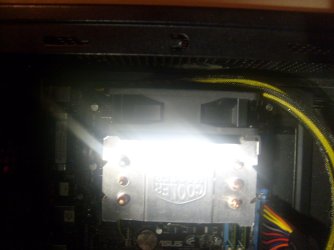
  • S6300594.JPG
    S6300594.JPG
    232.9 KB · Views: 3
  • S6300595.JPG
    S6300595.JPG
    226.1 KB · Views: 4
  • S6300597.JPG
    S6300597.JPG
    290.2 KB · Views: 4
  • S6300598.JPG
    S6300598.JPG
    428.5 KB · Views: 3
  • S6300599.JPG
    S6300599.JPG
    207.3 KB · Views: 4

My Computer My Computer

Computer type
PC/Desktop
Computer Manufacturer/Model Number
custom build
OS
Windows 10 64bit
CPU
AMD Phenom II X4 925 (Deneb)(2.8GHz) OC 3.4GHz
Motherboard
M5A78L-MLX Plus
Memory
Corsair Vengeance DDR3 4GBX2 (8192MB)
Graphics Card(s)
XFX HD 6870 1GB (OC)- 940MHz core, mem 1150MHz
Monitor(s) Displays
Vizio 26' 1920x1080 / Acer 1336x768
Screen Resolution
1920x1080 60Hz /1336x768
Hard Drives
Kingston Digital 60GB SSDNow V300/500gb HDD Western Digital 7200rpm (/WD 160GB HDD 7200rpm
PSU
CORSAIR CX600 600w
Case
AZZA Orion 202 EVO
Cooling
cooler master hyper TX3 cpu cooler
Keyboard
Razer DeathStalker
Mouse
Logitech Optical Gaming Mouse G400
Antivirus
Defualt on win 10
Browser
Firefox
Other Info
cpu is overclocked in bios
I see the CPU fan now. :)

It's too late now, but when I change a PSU I always count how many connections I pull off and make sure I reattach the same number when I put the new one in. A good alternative is to disconnect everything and remove any add-in cards (Video, etc) so you have a clear view of everything. Then attach power connectors like this:

1) Motherboard power connectors. They are buried deep once you get other stuff attached, so do them first.
2) Fans. I do them by order of importance, starting with the CPU fan(s).
3) Drives. Hard drives first, then DVD(s).
4) Stick any cards you have in there and attach power if needed (like the Video card).
5) Lighting, or whatever other odds and ends you have.

I'd also remove any "Y" adapters you are using for the power connectors and hook them up one at a time as you need them. For instance, if you have two SATA drives mounted near each other and are using a Molex-to-Twin SATA Power connector don't put it on until you're connecting the power to the drives. It's too easy to get a daisy chain of adapters which all plug into each other and don't connect to the PSU itself. :p

(Yeah, I did that once...) :o
 

My Computer My Computer

Computer Manufacturer/Model Number
Self
OS
Main - Windows 7 Pro SP1 64-Bit; 2nd - Windows Server 2008 R2
CPU
Main - Core i7 2600K; 2nd - Core i7 920
Motherboard
Main - Asus P8Z68-V Pro/Gen3; 2nd - Gigabyte GA-EX58-UDR3
Memory
Main - 16GB Corsair Vengeance; 2nd - 12GB Corsair Vengeance
Graphics Card(s)
Main - XFX Radeon 6870 1GB; 2nd - XFX Radeon 4870 1GB
Sound Card
Both: Onboard Realtek Azalia
Monitor(s) Displays
Main - Hann 25" + I-INC 25" + Acer 23"; 2nd - Upgrading Soon
Screen Resolution
Main - 1920x1080 (All Three Monitors); 2nd - Upgrading Soon
Hard Drives
Main - (1) Crucial M4 128GB (Boot)
Main - (1) Seagate 2TB 64MB Cache (Data)
Main - (1) Seagate 2TB 64MB Cache (Data Backup)
2nd - (1) Intel X25-M SSD 80GB (Boot)
2nd - (3) Seagate 1TB 32MB Cache (Data Backup)
2nd - (1) Seagate 320GB (Because)
PSU
Main - OCZ 600W Modular; 2nd - OCZ 600W
Case
Main - Thermaltake Element G; 2nd - NZXT something or other
Cooling
Main - Corsair H80; 2nd - Prolimatech Megahalems
Keyboard
Main - Razer Reclusa; 2nd - Old MS Keyboard
Mouse
Main - Logitech MX Revolution; 2nd - Old MS Mouse
Internet Speed
20Mbps Time-Warner Cable
If you hav'n't connected the power plugs for the graphics card, are using an onboard chip for display ?

I have read all previous posts, so answered my own question.
 
Last edited:

My Computer My Computer

Computer Manufacturer/Model Number
DIY
OS
Windows 7 home premium x64
CPU
AMD FX-4100 AM3+ 3.6GHz 12MB Black Edition
Motherboard
Asus M5A97 Pro
Memory
Crsair vengeance 12Gb DDR3 1600MHz CL9
Graphics Card(s)
Asus GTX 560 1GB
Sound Card
Realtek onboard
Monitor(s) Displays
Hanns G 1680x1050 native
Hard Drives
OCZ 128Gb Petrol ssd
2x500 Gb Samsung
PSU
OCZ StealthXstream II 500W
Internet Speed
8Mb or better
Same Problem.

I have recently run into the same problem. I disconnected me computer to bring to me gig. Connecting it to at me show, it booted fine, completely normal. Bringing it back to me house, connecting it back up... Booted fine. Shut Down. Next day, the problem began.

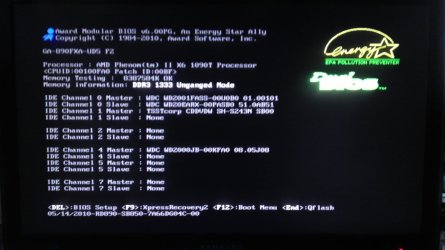
Me computer hangs in the POST SCREEN. Loads completely through the list of devices and then hangs. I can't command into BIOS, nor will it boot into HDD.

All devices work fine. (as far as I know)...

I sometimes /can/ get it too boot, but only with luck. Turning off the computer, waiting a bit, turning it back on.

I've also notice the Large case fan, on the side panel varies in speed (speeds up and slows down, but only when it will hang). When it booted normal, it runs at near constant rate. The side fan pulls power from the MOBO.

I'm thinking me MOBO has failed me, either that or it's shorting. I've gone through this forum and tried everything except, CMOS battery, and the mounting possibilities.

M1GU31 , What was the outcome of bringing your PC into the shop? did it end up being the MOBO?

Any help would be greatly appreciated.

(attached is a photo of me post screen)~ pretty sure that's the post screen, if not bios. please correct if i'm wrong.
 

Attachments

  • IMAG2972.jpg
    IMAG2972.jpg
    236.6 KB · Views: 24

My Computer My Computer

OS
64-bit windows 7
M1GU31 , What was the outcome of bringing your PC into the shop? did it end up being the MOBO?

Any help would be greatly appreciated.

(attached is a photo of me post screen)~ pretty sure that's the post screen, if not bios. please correct if i'm wrong.
Sorry about the super late post,just noticed it going through my emails :zip: but the outcome was that the mobo and cpu had been damaged due to a spike of voltage over 96volts over the limit with the old psu when I tried putting it back,they said they used some tool forgot what it's called to test out that stuff idk what they used.My mobo would just show the asus splash screen and it would just freeze right there with my old dead motherboard. :( Had to get a new motherboard and cpu but could only afford the same cpu and the new mobo i have is a bit faster then my old mobo. Everything started working when I replaced the mobo and the cpu. Eh kind of bummed me out and was costly to get fixed but the pc hasn't had any more problems and is working with the corsair supply I had gotten for it to replace the old no name brand one for my new video card. Hopefully in the future this will not happen again to me. Luckily it didn't burn out the ram sticks or anything else just the cpu and mobo which sucked,it still turned out but couldn't post anymore.Dudes said they tried to get it to post but they were 100% sure it burned it's self out,not totally but enough to get it to malfunction. The other reason they knew the cpu went bad is because they tried it with the new mobo I bought and it wouldn't post either so they tried with my old cpu with the new mobo and it did the same thing so with the new mobo and cpu it did post and logged into windows just fine.
 

My Computer My Computer

Computer type
PC/Desktop
Computer Manufacturer/Model Number
custom build
OS
Windows 10 64bit
CPU
AMD Phenom II X4 925 (Deneb)(2.8GHz) OC 3.4GHz
Motherboard
M5A78L-MLX Plus
Memory
Corsair Vengeance DDR3 4GBX2 (8192MB)
Graphics Card(s)
XFX HD 6870 1GB (OC)- 940MHz core, mem 1150MHz
Monitor(s) Displays
Vizio 26' 1920x1080 / Acer 1336x768
Screen Resolution
1920x1080 60Hz /1336x768
Hard Drives
Kingston Digital 60GB SSDNow V300/500gb HDD Western Digital 7200rpm (/WD 160GB HDD 7200rpm
PSU
CORSAIR CX600 600w
Case
AZZA Orion 202 EVO
Cooling
cooler master hyper TX3 cpu cooler
Keyboard
Razer DeathStalker
Mouse
Logitech Optical Gaming Mouse G400
Antivirus
Defualt on win 10
Browser
Firefox
Other Info
cpu is overclocked in bios
Thank you for your reply!

I'm happy to announce that I did not have the need of finding a replacement. Me problem was simply a faulty multi usb-port... or perhaps something connected to it. Which at first I thought odd, I do remember booting with minimal devices connected. Only discovered after I bought it down to me local shop, they checked me hardware, no problems.

Lesson Learned: Triple check connected devices.
 

My Computer My Computer

OS
64-bit windows 7
Odd, 2nd time in a week I've seen a USB device causing this.
 

My Computer My Computer

Computer type
PC/Desktop
Computer Manufacturer/Model Number
Home Built Desktop By DataTech
OS
Windows 7 Ultimate X64 SP1
CPU
Intel i5-2550K, Differing ~4.4-4.8GHz No built in GPU
Motherboard
ASUS P8Z68-V PRO/GEN3
Memory
16GB G.Skill Sniper 1866MHz @ 2133MHz 2x8GB
Graphics Card(s)
ASUS GTX650TIB-DC2OC-2GD5, (650TI Boost)
Sound Card
Onboard Realtek 5-1
Monitor(s) Displays
Samsung P2570HD
Screen Resolution
1920x1080
Hard Drives
Samsung 840 Pro 256GB SSD for OS, 500GB Seagate Constellation (Enterprise drive) for Data
PSU
Corsair HX650W
Case
Inwin Dragon Rider
Cooling
Hyper 212 EVO w/two Noctua fans, push-pull, @1300 RPM
Keyboard
E-Z Eyes, bright yellow keys with large characters
Mouse
steelseries SENSEI Laser Pro Gaming
Internet Speed
48-51Mbs Mbs down, 11 Mbs up Xfinity Cable
Antivirus
Norton Internet Security 2013
Browser
IE 10, Opera, Pale Moon if needed
Other Info
4 case fans, LG BluRay-RE, ASUS DVD-RW, Mr. Fusion power supply, 1.21 gigawatts.
Poor old power supplies. They are forgotten by many. Many don't even put them in their specs. No respect. To me it's the most important part in a computer. Everything else electrical/electronic in the computer depends on it. Your choice of a Corsair should serve you and your computer well.
 
Last edited:

My Computer My Computer

Computer type
PC/Desktop
Computer Manufacturer/Model Number
Home made Desktop
OS
Windows 10 Pro. 64/ version 1709 Windows 7 Pro/64
CPU
Intel i7-6800K @ 4.3
Motherboard
ASUS X-99 Deluxe II
Memory
Corsair Platinum 16 gig @2400
Graphics Card(s)
EVGA GTX 1070 OC
Monitor(s) Displays
Asus 27" LED LCD/VE278Q
Screen Resolution
1920-1080 or 1280-720 HDMI
Hard Drives
INTEL SSD 730-240 Gb Sata 3.0/
PSU
EVGA Platium 1200W
Case
Phanteks Luxe Tempered Glass 8 fans/ one radiator
Cooling
XSPC/ Water Cooled CPU
Keyboard
Das 4 Professional
Mouse
Logitech M705/MX Anywhere 2-S
Internet Speed
100 mbits
Antivirus
Microsoft Security Essentials/ Malwarebytes Premium 3.0/ SAS
Browser
I.E. 11 default/Firefox/ ISP Time Warner Cable/Spectrum
Other Info
LG BluRay Burner/
Sound system-KLipsch-THX/
Icy Dock ssd Hot Swap bays.
Back
Top