File Extension Icon - Change Default Icon

How to Change the Default Icon of a File Extension in Windows 7


   Information
This will show you how to change the default icon of any file extension to have a custom icon of your choice instead for it in Windows 7.
   Tip
By default, known file extension types are set to be hidden in Windows 7. You will need to unhide file extensions to see and know what the file extension is to make it easier to change the icon for the file extension.
   Note

  • You will need to use a 256x256 pixel icon for them to display properly at all of the available icon view sizes in Windows 7.
  • Some programs may automatically reset the default file extension icon back to the default one it uses even after you have changed it. This tutorial will not work for these programs.
  • If you change the default program for what opens the file extension, it will also change the icon of the file extension to be whatever it is for the program you selected uses.
   Warning

  • You will need to be logged on to a administrator account to do this.
  • Making changes in the registry can cause problems if you make a mistake. You should create a system restore point before proceeding in case you need to do a system restore with the restore point to undo a mistake made in the registry.

EXAMPLE: Default and New Icon for "MP3" File Extensions Default_MP3_file_Icon.jpgNew_MP3_file_Icon.jpg


OPTION ONE

To Change the Icon of a File Extension Using "FileTypesMan"

1. Click on the Download button below to go the bottom of that site to download, extract, and run the same 32-bit or 64-bit (x64) FileTypesMan as your 32-bit or 64-bit Windows 7 version.
Download


2. Double click on the file extension (ex: .mp3) that you want to change the icon of. (see screenshot below) Program-1.jpg
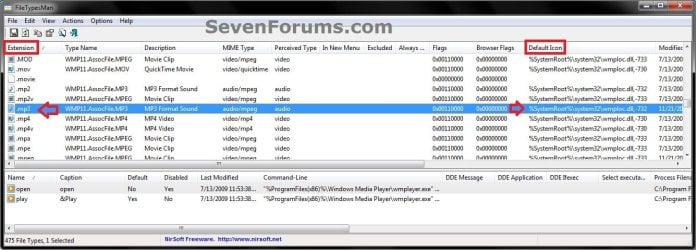
3. Click on the browse... button. (see screenshot below) Program-2.jpg
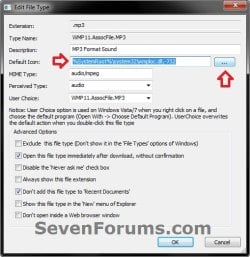
4. Browse to and select the icon you want to use, and click on OK. (see screenshot below) Program-3.jpg
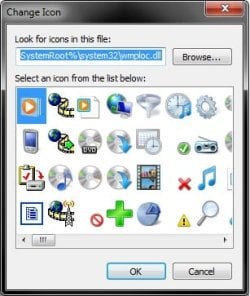
5. Click on OK. (see screenshot below step 3)

6. When finished, close FileTypesMan.


OPTION TWO

To Manually Change the Icon of a File Extension


NOTE: For an example in this option, I will be changing the default icon used for the MP3 file extension. You would just substitute the file extension that you want to change the default icon for instead. 1. Open the Start Menu, then type regedit in the search box and press enter.

2. If prompted by UAC, then click on Yes.

3. If Using the Default Program in Windows 7 to Open the File Extension With
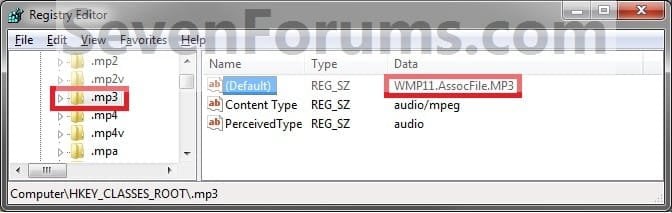
NOTE: You would use this option if you are using the default program that Windows 7 uses to open the file extension with, and not opens with a 3rd party program that you installed. A) In regedit, go to: (see screenshot below)
NOTE: Substitute .mp3 below with the file extension you want to change the icon for instead. HKEY_CLASSES_ROOT\.mp3
Step1.jpg
B) In the right pane of the file extension, make note of the Data value to the right of (Default). (see screenshot above)
NOTE: For example it is WMP11.AssocFile.MP3 for the .mp3 file extension.

C) Go to step 5.
4. If Using a 3rd Party Program as the Default Program to Open the File Extension With
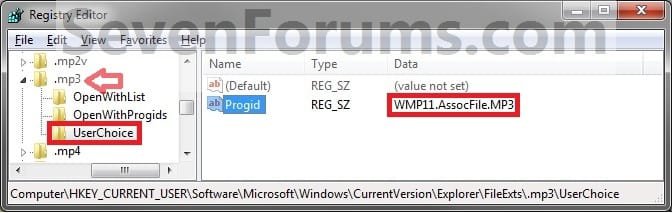
NOTE: You would do this option if you have changed the default program used by Windows 7 to open the file extension with to be opened by a installed 3rd party (not included in Windows 7) program instead. A) In regedit, go to: (see screenshot below)
NOTE: Substitute .mp3 below with the file extension you want to change the icon for instead.
Code:
HKEY_CURRENT_USER\Software\Microsoft\Windows\CurrentVersion\Explorer\FileExts\[B][COLOR=red].mp3[/COLOR][/B]\Userchoice
Step2.jpg
B) In the right pane, look at the Data value to the right of Progid. (see screenshot above)
NOTE: For example it is WMP11.AssocFile.MP3 for the .mp3 file extension type by default. Your value will vary depending on the default program you have set or installed to open this file extension with.
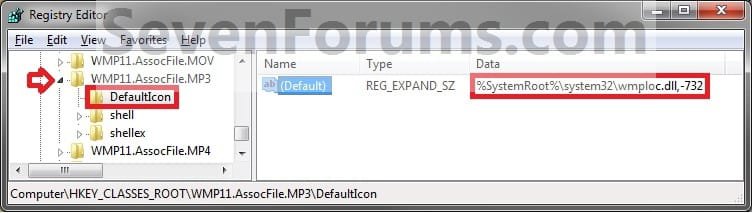
5. In regedit, scroll past the file extensions and go to: (see screenshot below)
NOTE: Substitute WMP11.AssocFile.MP3 with the Data value from step 3B or 4B for the file extension Data value that you want to change the icon for instead. HKEY_CLASSES_ROOT\WMP11.AssocFile.MP3
Step3.jpg
6. Click on the arrow next to for example WMP11.AssocFile.MP3 to expand the key (folder). (see screenshot above)
NOTE: Substitute WMP11.AssocFile.MP3 with the Data value from step 3B or 4B for the file extension Data value that you want to change the icon for instead.

   Tip
To Backup the Default File Extension Icon
NOTE: To restore the default file extension icon from this created backup below, right click on the .reg backup file and click on Merge. Next, approve the merge and log off and log on to apply the change to restore the default icon. A) In the left pane of regedit, right click on DefaultIcon and click on Export. (See screenshot below step 5)

B) Select a location to where you want to save the backup reg file to.

C) Type in a name and click on the Save button.
NOTE: Be sure to type in a name that is easily recognized by you for that file extension. For example, MP3 default icon.


7. In the right pane of DefaultIcon, right click on (Default) and click on Modify. (see screenshot below step 5)
NOTE: If you do not have DefaultIcon in the left pane of for example WMP11.AssocFile.MP3, then right click on WMP11.AssocFile.MP3, click on New and Key, type in DefaultIcon, and press Enter.

8. Select either Method One or Method Two below for what type of icon you want to replace the default file extension icon with.


Method One

To Use Another Icon Included in Windows 7

A. Download and install the same free 32-bit or 64-bit version of IconViewer as your 32-bit or 64-bit Windows 7 version.
NOTE: This program will add a Icons tab to files (ex: imageres.dll) that contain a icon library in them so you can see the icons available in it.

B. In Windows Explorer, navigate to C:\Windows\System32\imageres.dll and right click on imageres.dll, click on Properties, and click on the Icons tab.
NOTE: You can use any of the Windows 7 files that include icons in them that you want though. This is just the most common one.

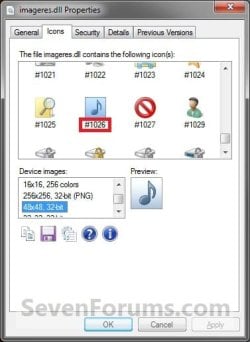
C. Scroll through the icons and make note of the icon number of the one you want to use to replace the default file extension icon with, then close the properties window. (see screenshot below)
NOTE: For example, icon number 1023. Icons.jpg
D) In the Modify window, type in (full path of the Windows 7 file with file extension),-#### and click on OK. (see screenshot below)
NOTE: For example, I would type in the location exactly as below for what I used in B and C above. C:\Windows\System32\imageres.dll,-1023
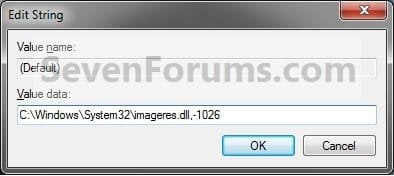
Modify.jpg
E) Go to step 9.


Method Two

To Use a Saved Custom Icon of Your Own

A) Create or download and save a icon (.ico file) of your choice to a location you wish to keep the icon stored at.
NOTE: See the Note box at the top of this tutorial for about what kind of icon to use. Be sure to save the icon at a location (ex: C:\Users\Public) that can be accessed by all users. The icon must stay at this location for as long as it is being used for the file extension.

B) In the Modify window, type in "full path of the icon file with file extension" and click on OK. (see screenshot below)
NOTE: For example, If I I had a icon store on my Desktop name New Icon Location.ico, I would type in the location exactly as below. Just substitute with your icons full path and name with file extension in quotes instead. "C:\Users\UserName\Desktop\New Icon Location.ico"
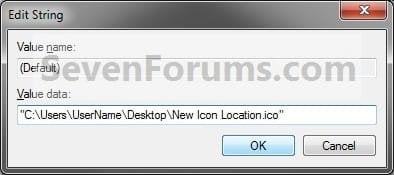
Modify_ICO_file.jpg
9. Close regedit.

10. Log off and log on, or restart the computer, to fully apply the icon change.

11. If this option did not work for you, then use OPTION ONE instead.
That's it,
Shawn


Last edited:
Hello Hanciong, and welcome to Seven Forums.

LOL, no problem. I'm happy to hear that you got it sorted. :)
 

My Computer My Computer

Computer type
PC/Desktop
Computer Manufacturer/Model Number
Self built custom
OS
64-bit Windows 11 Pro for Workstations
CPU
Intel i7-8700K OC'd to 5 GHz
Motherboard
ASUS ROG Maximus XI Formula Z390
Memory
64 GB (4x16GB) G.SKILL TridentZ RGB DDR4 3600 MHz
Graphics Card(s)
ASUS ROG-STRIX-GTX1080TI-O11G-GAMING
Sound Card
Integrated
Monitor(s) Displays
2 x Samsung Odyssey G7 27"
Screen Resolution
2560x1440
Hard Drives
1TB Samsung 990 PRO M.2,
4TB Samsung 990 PRO PRO M.2,
TerraMaster F8 SSD Plus NAS
PSU
Seasonic Prime Titanium 850W
Case
Thermaltake Core P3
Cooling
Corsair Hydro H115i
Keyboard
Logitech wireless K800
Mouse
Logitech MX Master 4
Internet Speed
2 Gb/s Download and 100 Mb/s Upload
Antivirus
Malwarebyte Anti-Malware Premium
Browser
Google Chrome
Other Info
Logitech Z625 speaker system,
Logitech BRIO 4K Pro webcam,
HP Color LaserJet Pro MFP M477fdn,
APC SMART-UPS RT 1000 XL - SURT1000XLI,
Galaxy S23 Plus phone
Hey Brink, hope you are doing well.

I've been reading your tutorials very often and they have helped me tweak my PC, so big thanks for that. And now in the process of changing my system icons, I have found a problem : .AVI and .MP4 share the same file icon. If I change the .avi, then the .MP4 changes to the same icon that .avi is using and vice versa.


.AVI:
23h7okj.png


.MP4:
2jcg3zl.png


As you can see, the path has been changed somehow. I've encounter this situation in a couple other files too. What do you think is causing this?

PD: Types and FileTypesMan x64 were used with same results.
 

My Computer My Computer

OS
windows 7
Hello Voiv,

As a test, see if manually changing the icons using OPTION TWO may work better for these two file extensions. :)

Hope this helps for now,
Shawn
 

My Computer My Computer

Computer type
PC/Desktop
Computer Manufacturer/Model Number
Self built custom
OS
64-bit Windows 11 Pro for Workstations
CPU
Intel i7-8700K OC'd to 5 GHz
Motherboard
ASUS ROG Maximus XI Formula Z390
Memory
64 GB (4x16GB) G.SKILL TridentZ RGB DDR4 3600 MHz
Graphics Card(s)
ASUS ROG-STRIX-GTX1080TI-O11G-GAMING
Sound Card
Integrated
Monitor(s) Displays
2 x Samsung Odyssey G7 27"
Screen Resolution
2560x1440
Hard Drives
1TB Samsung 990 PRO M.2,
4TB Samsung 990 PRO PRO M.2,
TerraMaster F8 SSD Plus NAS
PSU
Seasonic Prime Titanium 850W
Case
Thermaltake Core P3
Cooling
Corsair Hydro H115i
Keyboard
Logitech wireless K800
Mouse
Logitech MX Master 4
Internet Speed
2 Gb/s Download and 100 Mb/s Upload
Antivirus
Malwarebyte Anti-Malware Premium
Browser
Google Chrome
Other Info
Logitech Z625 speaker system,
Logitech BRIO 4K Pro webcam,
HP Color LaserJet Pro MFP M477fdn,
APC SMART-UPS RT 1000 XL - SURT1000XLI,
Galaxy S23 Plus phone
Hello Voiv,

As a test, see if manually changing the icons using OPTION TWO may work better for these two file extensions. :)

Hope this helps for now,
Shawn

Thanks for your time Brink, I checked what you recommended me. Here I’m trying to change the icon the .MP4 files:

1. I use JetAudio to play my videos and music, so I headed to STEP 4 from OPTION 2.
2na5mrc.png


2. Ok then ..ROOT\Applications\jetAudio.exe is where I have to go. As you can see, the icon JetAudio has attached to it is the one I’m using for my .AVIs files.
2hp3tc4.png


3. If I followed the tutorial and replaced that icon with the one i want for my MP4s, then JetAudio would have that new icon attached (in Application\JetAudio.exe) as in the pic above and then that icon would be used for my .AVIs aswell since:
2m4rcly.jpg


Any idea on what to try?
 

My Computer My Computer

OS
windows 7
Voiv,

That's what I was afraid of. Since both file extensions reference the same jetAudio.exe file as the default icon source, then there doesn't appear to be a way to set each file extension to have a different icon. It's a catch 22. :(
 

My Computer My Computer

Computer type
PC/Desktop
Computer Manufacturer/Model Number
Self built custom
OS
64-bit Windows 11 Pro for Workstations
CPU
Intel i7-8700K OC'd to 5 GHz
Motherboard
ASUS ROG Maximus XI Formula Z390
Memory
64 GB (4x16GB) G.SKILL TridentZ RGB DDR4 3600 MHz
Graphics Card(s)
ASUS ROG-STRIX-GTX1080TI-O11G-GAMING
Sound Card
Integrated
Monitor(s) Displays
2 x Samsung Odyssey G7 27"
Screen Resolution
2560x1440
Hard Drives
1TB Samsung 990 PRO M.2,
4TB Samsung 990 PRO PRO M.2,
TerraMaster F8 SSD Plus NAS
PSU
Seasonic Prime Titanium 850W
Case
Thermaltake Core P3
Cooling
Corsair Hydro H115i
Keyboard
Logitech wireless K800
Mouse
Logitech MX Master 4
Internet Speed
2 Gb/s Download and 100 Mb/s Upload
Antivirus
Malwarebyte Anti-Malware Premium
Browser
Google Chrome
Other Info
Logitech Z625 speaker system,
Logitech BRIO 4K Pro webcam,
HP Color LaserJet Pro MFP M477fdn,
APC SMART-UPS RT 1000 XL - SURT1000XLI,
Galaxy S23 Plus phone
Indeed. I guess I'll leave as it is because it's not affecting how the files look while navigating through folders.. the thumbnails view are enabled. Anyway the weird thing about this is .MP3 (in my first picture from my previous post) doesn't have the "UserChoice" folder which should be linking my .MP3 to "Applications\JetAudio.exe" like the .MP4 one. So I checked the tutorials' STEP 3 in OPTION 2 and realized that this JetAudio program has a different structure for the files association as you can see in the image below, being not specific at all unlike the default media player is in which you can modify each one: WMP11.AssocFile.MP3 / WMP11.AssocFile.MP4 / WMP11.AssocFile.AVI and so on.

vsor6a.png


PD: Creating the keys and strings that are needed to make it specific would work? I resist to give up lol.

Greetings
 
Last edited:

My Computer My Computer

OS
windows 7
LOL, but no I don't think it will work. :( It appears that the program is overriding them and using it's settings instead. If you were to make Windows Media Player the default program for those file extensions, you should be able to set a different icon for each one since WMP has a different registry entry for each one.
 

My Computer My Computer

Computer type
PC/Desktop
Computer Manufacturer/Model Number
Self built custom
OS
64-bit Windows 11 Pro for Workstations
CPU
Intel i7-8700K OC'd to 5 GHz
Motherboard
ASUS ROG Maximus XI Formula Z390
Memory
64 GB (4x16GB) G.SKILL TridentZ RGB DDR4 3600 MHz
Graphics Card(s)
ASUS ROG-STRIX-GTX1080TI-O11G-GAMING
Sound Card
Integrated
Monitor(s) Displays
2 x Samsung Odyssey G7 27"
Screen Resolution
2560x1440
Hard Drives
1TB Samsung 990 PRO M.2,
4TB Samsung 990 PRO PRO M.2,
TerraMaster F8 SSD Plus NAS
PSU
Seasonic Prime Titanium 850W
Case
Thermaltake Core P3
Cooling
Corsair Hydro H115i
Keyboard
Logitech wireless K800
Mouse
Logitech MX Master 4
Internet Speed
2 Gb/s Download and 100 Mb/s Upload
Antivirus
Malwarebyte Anti-Malware Premium
Browser
Google Chrome
Other Info
Logitech Z625 speaker system,
Logitech BRIO 4K Pro webcam,
HP Color LaserJet Pro MFP M477fdn,
APC SMART-UPS RT 1000 XL - SURT1000XLI,
Galaxy S23 Plus phone
I ended up associating the audio and video files to "Media Player Classic" just so it'd allow me customize each file extension icon with program "types". Now they complement nicely with my theme and stuff. My music and movies are still managed/played with JetAudio Plus tho.

Thanks for your time again Brink, I wouldn't have done it without your advice. See ya soon!
 

My Computer My Computer

OS
windows 7
That's great news voiv. I'm happy to hear that you got the icons you wanted to use for each of them. :)
 

My Computer My Computer

Computer type
PC/Desktop
Computer Manufacturer/Model Number
Self built custom
OS
64-bit Windows 11 Pro for Workstations
CPU
Intel i7-8700K OC'd to 5 GHz
Motherboard
ASUS ROG Maximus XI Formula Z390
Memory
64 GB (4x16GB) G.SKILL TridentZ RGB DDR4 3600 MHz
Graphics Card(s)
ASUS ROG-STRIX-GTX1080TI-O11G-GAMING
Sound Card
Integrated
Monitor(s) Displays
2 x Samsung Odyssey G7 27"
Screen Resolution
2560x1440
Hard Drives
1TB Samsung 990 PRO M.2,
4TB Samsung 990 PRO PRO M.2,
TerraMaster F8 SSD Plus NAS
PSU
Seasonic Prime Titanium 850W
Case
Thermaltake Core P3
Cooling
Corsair Hydro H115i
Keyboard
Logitech wireless K800
Mouse
Logitech MX Master 4
Internet Speed
2 Gb/s Download and 100 Mb/s Upload
Antivirus
Malwarebyte Anti-Malware Premium
Browser
Google Chrome
Other Info
Logitech Z625 speaker system,
Logitech BRIO 4K Pro webcam,
HP Color LaserJet Pro MFP M477fdn,
APC SMART-UPS RT 1000 XL - SURT1000XLI,
Galaxy S23 Plus phone
I tried the regedit procedure to change the HTML icon to d:\pic... but it did not work. :(

What I really hate about HTML icon soltuions is it only works for a little. I've even used "File Types Manager" it works for a while then reverts to a blank page. What's up with that?!
 
Last edited by a moderator:

My Computer My Computer

Computer Manufacturer/Model Number
HP Pavilion DV7-2157ca
OS
Windows 7 Home Premium 64bit
CPU
P7350
Memory
4 GB
Graphics Card(s)
ATI Mobility Radeon HD 4530
Sound Card
Altec Lansing
Monitor(s) Displays
1600x900 LED
Hard Drives
500 GB
I tried the regedit procedure to change the HTML icon to d:\pic... but it did not work. :(

What I really hate about HTML icon soltuions is it only works for a little. I've even used "File Types Manager" it works for a while then reverts to a blank page. What's up with that?!

Hello Pat,

Did you use HKEY_CLASSES_ROOT\htmlfile at step 5 in OPTION TWO for this?

In addition, what are you using for your custom icon?
 
Last edited:

My Computer My Computer

Computer type
PC/Desktop
Computer Manufacturer/Model Number
Self built custom
OS
64-bit Windows 11 Pro for Workstations
CPU
Intel i7-8700K OC'd to 5 GHz
Motherboard
ASUS ROG Maximus XI Formula Z390
Memory
64 GB (4x16GB) G.SKILL TridentZ RGB DDR4 3600 MHz
Graphics Card(s)
ASUS ROG-STRIX-GTX1080TI-O11G-GAMING
Sound Card
Integrated
Monitor(s) Displays
2 x Samsung Odyssey G7 27"
Screen Resolution
2560x1440
Hard Drives
1TB Samsung 990 PRO M.2,
4TB Samsung 990 PRO PRO M.2,
TerraMaster F8 SSD Plus NAS
PSU
Seasonic Prime Titanium 850W
Case
Thermaltake Core P3
Cooling
Corsair Hydro H115i
Keyboard
Logitech wireless K800
Mouse
Logitech MX Master 4
Internet Speed
2 Gb/s Download and 100 Mb/s Upload
Antivirus
Malwarebyte Anti-Malware Premium
Browser
Google Chrome
Other Info
Logitech Z625 speaker system,
Logitech BRIO 4K Pro webcam,
HP Color LaserJet Pro MFP M477fdn,
APC SMART-UPS RT 1000 XL - SURT1000XLI,
Galaxy S23 Plus phone
Hello Pat,

Did you use HKEY_CLASSES_ROOT\htmlfile at step 5 in OPTION TWO for this?

In addition, what are you using for your custom icon?

I have changed the Firefox icon using both the FileTypesMan and editing the icon in the registry. It works for a while. I wouldn't be surprised if Firefox icon reappeared but it's a blank icon. I convert a 256x256 gif to ico format: http://www.manotick.net/DisplayGold-256.ico

I also changed the icon for CSS and discovered later that it shared an icon with TXT so had to change it back since I had no idea how to separate them.
 
Last edited:

My Computer My Computer

Computer Manufacturer/Model Number
HP Pavilion DV7-2157ca
OS
Windows 7 Home Premium 64bit
CPU
P7350
Memory
4 GB
Graphics Card(s)
ATI Mobility Radeon HD 4530
Sound Card
Altec Lansing
Monitor(s) Displays
1600x900 LED
Hard Drives
500 GB
Pat,

Since it works for a while, my guess is that it may be from Firefox reinstalling when it updates itself causing the Firefox icon to be reapplied.

Did you change the icon for the htmlfile key though?
 

My Computer My Computer

Computer type
PC/Desktop
Computer Manufacturer/Model Number
Self built custom
OS
64-bit Windows 11 Pro for Workstations
CPU
Intel i7-8700K OC'd to 5 GHz
Motherboard
ASUS ROG Maximus XI Formula Z390
Memory
64 GB (4x16GB) G.SKILL TridentZ RGB DDR4 3600 MHz
Graphics Card(s)
ASUS ROG-STRIX-GTX1080TI-O11G-GAMING
Sound Card
Integrated
Monitor(s) Displays
2 x Samsung Odyssey G7 27"
Screen Resolution
2560x1440
Hard Drives
1TB Samsung 990 PRO M.2,
4TB Samsung 990 PRO PRO M.2,
TerraMaster F8 SSD Plus NAS
PSU
Seasonic Prime Titanium 850W
Case
Thermaltake Core P3
Cooling
Corsair Hydro H115i
Keyboard
Logitech wireless K800
Mouse
Logitech MX Master 4
Internet Speed
2 Gb/s Download and 100 Mb/s Upload
Antivirus
Malwarebyte Anti-Malware Premium
Browser
Google Chrome
Other Info
Logitech Z625 speaker system,
Logitech BRIO 4K Pro webcam,
HP Color LaserJet Pro MFP M477fdn,
APC SMART-UPS RT 1000 XL - SURT1000XLI,
Galaxy S23 Plus phone
Pat,
Since it works for a while, my guess is that it may be from Firefox reinstalling when it updates itself causing the Firefox icon to be reapplied.
Did you change the icon for the htmlfile key though?
The blank icon looks nothing like the Firefox (orange) icon.

Just to try again, I used FileTypeMan to change the icon for both HTML/HTM - worked fine. In regedit searched for key: htmlfile and the default icon is "%1". I searched again for the icon filename and found it in 4 other places:

HKEY_CLASSES_ROOT\FirefoxHTML\DefaultIcon
HKEY_CURRENT_USER\Software\Classes\FirefoxHTML\DefaultIcon
HKEY_USERS\S-1-5-21-51582075-1664964830-3029346245-1001\Software\Classes\FirefoxHTML\DefaultIcon
HKEY_USERS\S-1-5-21-51582075-1664964830-3029346245-1001_Classes\FirefoxHTML\DefaultIcon
 

My Computer My Computer

Computer Manufacturer/Model Number
HP Pavilion DV7-2157ca
OS
Windows 7 Home Premium 64bit
CPU
P7350
Memory
4 GB
Graphics Card(s)
ATI Mobility Radeon HD 4530
Sound Card
Altec Lansing
Monitor(s) Displays
1600x900 LED
Hard Drives
500 GB
That's great news Pat. I'm happy to hear that you got it sorted. Hopefully it'll stick.
 

My Computer My Computer

Computer type
PC/Desktop
Computer Manufacturer/Model Number
Self built custom
OS
64-bit Windows 11 Pro for Workstations
CPU
Intel i7-8700K OC'd to 5 GHz
Motherboard
ASUS ROG Maximus XI Formula Z390
Memory
64 GB (4x16GB) G.SKILL TridentZ RGB DDR4 3600 MHz
Graphics Card(s)
ASUS ROG-STRIX-GTX1080TI-O11G-GAMING
Sound Card
Integrated
Monitor(s) Displays
2 x Samsung Odyssey G7 27"
Screen Resolution
2560x1440
Hard Drives
1TB Samsung 990 PRO M.2,
4TB Samsung 990 PRO PRO M.2,
TerraMaster F8 SSD Plus NAS
PSU
Seasonic Prime Titanium 850W
Case
Thermaltake Core P3
Cooling
Corsair Hydro H115i
Keyboard
Logitech wireless K800
Mouse
Logitech MX Master 4
Internet Speed
2 Gb/s Download and 100 Mb/s Upload
Antivirus
Malwarebyte Anti-Malware Premium
Browser
Google Chrome
Other Info
Logitech Z625 speaker system,
Logitech BRIO 4K Pro webcam,
HP Color LaserJet Pro MFP M477fdn,
APC SMART-UPS RT 1000 XL - SURT1000XLI,
Galaxy S23 Plus phone
I'm getting really annoyed here.
I'm trying to change the file icon for .mp3 files to the old Win95 blue speaker icon that is still available in Win7's C:\Windows\System32\quartz.dll
When I use FileTypesManager to edit the icon, I find it also changes the .wav icon to the same one as .mp3.
I want to use the old XP .wav icon from XP's WMP10 wmplayer.exe executable, saved to my Win7's Program Files folder.
For some reason, FileTypesManager changes the icon to be the same for both mp3s and wavs. I can only have the same icon for both different file types at the same time. Any ideas on how to fix this? It makes audio file copying, converting and editing a real PITA.
 
Last edited:

My Computer My Computer

Computer type
PC/Desktop
Computer Manufacturer/Model Number
Self-Built
OS
Win10 Pro 64-bit
CPU
AMD Ryzen 7 3800X
Motherboard
Gigabyte X570 UD
Memory
32 GB Kingston DDR4-2666
Graphics Card(s)
MSI nVidia GT 710 (2GB)
Sound Card
Creative Audigy FX 5.1
Monitor(s) Displays
ViewSonic VG2439Smh 24"
Screen Resolution
1920x1080
Hard Drives
3xWD1TB; 1xSeagate 1TB... all spinning rust
PSU
EVGA 100-W1-0500-KR (500w)
Case
SilverStone PS10 (modified)
Cooling
CPU:AMD Wraith Prism. Case:3x Noctua 120mm
Keyboard
Compaq Professional PS/2
Mouse
Microsoft Basic Optical Mouse 2.0
Internet Speed
Fiber 1Gbit/sec down/up
Antivirus
Avast Free
Browser
FF, Chrome
Other Info
2x LG GH24NSC0 DVD burners, Mackie CR3 monitor speakers
Hello Tom,

If you're still using WMP as the default program for .mp3 files, then you might see if using OPTION TWO instead may work better to change the icon. Luckily, it uses .mp3 as the example to make it easy for what you want.

Hope this helps, :)
Shawn
 

My Computer My Computer

Computer type
PC/Desktop
Computer Manufacturer/Model Number
Self built custom
OS
64-bit Windows 11 Pro for Workstations
CPU
Intel i7-8700K OC'd to 5 GHz
Motherboard
ASUS ROG Maximus XI Formula Z390
Memory
64 GB (4x16GB) G.SKILL TridentZ RGB DDR4 3600 MHz
Graphics Card(s)
ASUS ROG-STRIX-GTX1080TI-O11G-GAMING
Sound Card
Integrated
Monitor(s) Displays
2 x Samsung Odyssey G7 27"
Screen Resolution
2560x1440
Hard Drives
1TB Samsung 990 PRO M.2,
4TB Samsung 990 PRO PRO M.2,
TerraMaster F8 SSD Plus NAS
PSU
Seasonic Prime Titanium 850W
Case
Thermaltake Core P3
Cooling
Corsair Hydro H115i
Keyboard
Logitech wireless K800
Mouse
Logitech MX Master 4
Internet Speed
2 Gb/s Download and 100 Mb/s Upload
Antivirus
Malwarebyte Anti-Malware Premium
Browser
Google Chrome
Other Info
Logitech Z625 speaker system,
Logitech BRIO 4K Pro webcam,
HP Color LaserJet Pro MFP M477fdn,
APC SMART-UPS RT 1000 XL - SURT1000XLI,
Galaxy S23 Plus phone
Thanks, Shawn. I'll give that a shot and report back. :)
Update: I admit that I'm not the brightest bulb in the lamp so I got confused with Option 2.

I opened FileTypeManager again and I noticed that for some reason, Nero Wave Editor was the default program to open these files. That's wrong... I want Winamp to open them.
I opened Winamp, reset my file associations to make sure that .wavs and .mp3s are opened with it, then went back to FileTypeManager and tried again.
Presto... Win95 quartz.dll blue speaker for .mp3, Play arrow and four colors from WMP10 for .wavs. Done!
 
Last edited:

My Computer My Computer

Computer type
PC/Desktop
Computer Manufacturer/Model Number
Self-Built
OS
Win10 Pro 64-bit
CPU
AMD Ryzen 7 3800X
Motherboard
Gigabyte X570 UD
Memory
32 GB Kingston DDR4-2666
Graphics Card(s)
MSI nVidia GT 710 (2GB)
Sound Card
Creative Audigy FX 5.1
Monitor(s) Displays
ViewSonic VG2439Smh 24"
Screen Resolution
1920x1080
Hard Drives
3xWD1TB; 1xSeagate 1TB... all spinning rust
PSU
EVGA 100-W1-0500-KR (500w)
Case
SilverStone PS10 (modified)
Cooling
CPU:AMD Wraith Prism. Case:3x Noctua 120mm
Keyboard
Compaq Professional PS/2
Mouse
Microsoft Basic Optical Mouse 2.0
Internet Speed
Fiber 1Gbit/sec down/up
Antivirus
Avast Free
Browser
FF, Chrome
Other Info
2x LG GH24NSC0 DVD burners, Mackie CR3 monitor speakers
That's great news OvenMaster. I'm glad you got it sorted. :)
 

My Computer My Computer

Computer type
PC/Desktop
Computer Manufacturer/Model Number
Self built custom
OS
64-bit Windows 11 Pro for Workstations
CPU
Intel i7-8700K OC'd to 5 GHz
Motherboard
ASUS ROG Maximus XI Formula Z390
Memory
64 GB (4x16GB) G.SKILL TridentZ RGB DDR4 3600 MHz
Graphics Card(s)
ASUS ROG-STRIX-GTX1080TI-O11G-GAMING
Sound Card
Integrated
Monitor(s) Displays
2 x Samsung Odyssey G7 27"
Screen Resolution
2560x1440
Hard Drives
1TB Samsung 990 PRO M.2,
4TB Samsung 990 PRO PRO M.2,
TerraMaster F8 SSD Plus NAS
PSU
Seasonic Prime Titanium 850W
Case
Thermaltake Core P3
Cooling
Corsair Hydro H115i
Keyboard
Logitech wireless K800
Mouse
Logitech MX Master 4
Internet Speed
2 Gb/s Download and 100 Mb/s Upload
Antivirus
Malwarebyte Anti-Malware Premium
Browser
Google Chrome
Other Info
Logitech Z625 speaker system,
Logitech BRIO 4K Pro webcam,
HP Color LaserJet Pro MFP M477fdn,
APC SMART-UPS RT 1000 XL - SURT1000XLI,
Galaxy S23 Plus phone
Help, I have tried all options and methods listed here to change for pdf file - no joy. The icon remains as some windows generic icon :
 

Attachments

  • pdf.jpg
    pdf.jpg
    41.7 KB · Views: 655

My Computer My Computer

Computer type
PC/Desktop
Computer Manufacturer/Model Number
HP (HP-P6212F)
OS
Microsoft Windows 7 Home Premium 64-bit 7601 Multiprocessor Free Service Pack 1
CPU
Pentium(R) Dual-Core CPU E5300 @ 2.60GHz
Motherboard
PEGATRON CORPORATION Benicia
Memory
6.00 GB
Graphics Card(s)
Intel(R) G33/G31 Express Chipset Family
Sound Card
Realtek High Definition Audio
Monitor(s) Displays
24'' HP WS LCD
Screen Resolution
1920 x 1080 x 32 bits (4294967296 colors) @ 60 Hz
Hard Drives
(1) ATA Hitachi HDT72106 SCSI Disk Device (2) Generic- Compact Flash USB Device (3) Generic- MS/MS-Pro USB Device (4) Generic- SD/MMC USB Device (5) Generic- SM/xD-Picture USB Device (6) Verbatim STORE N GO USB Device
Keyboard
Logitech G510s
Mouse
Logitech Trackball M570
Antivirus
Microsoft Security Essentials / Malwarebytes
Browser
IE / Firefox / Chrome
Back
Top