Overclock Successful? i7-2600-k

exitPr0gram

New member
Power User
VIP
Local time
6:01 PM
Messages
213
Hi....

I just upgraded my case and added liquid cooling due to my airconditioning going out and causing my PC to overheat... I think it made my thermal paste into crap...

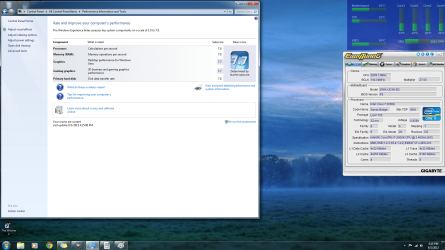
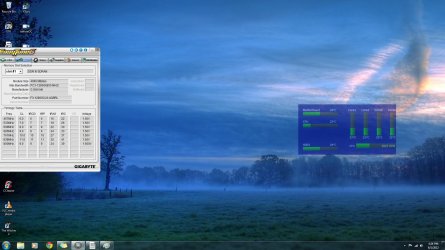
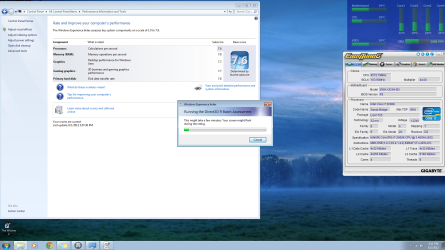
I've attached some photos of my Windows Experience Index before and after using the Easy Tune utility to OC.. The picture i took before i OC'd was with turbo boost off, though. Was suppose to be 7.7 not 7.6 .. After enabling TB in the BIOS and overclocking it jumped up to 7.8 ... Used easy tune to put Turbo Boost @ 4.3Ghz (According to what right clicking on My computer tells me.)

I've used an overclocking tool for the Turbo Boost feature on the i7 called Easy Tune. I downloaded it from the manufacturer of my Z68X-UD3H-B3. Check it out here. I am new to overclocking but the program seemed user friendly enough to use, and it was only effecting turbo boost feature. Plus i knew how to reset to defaults in BIOS so now biggie.

Based upon what you guy's see in these attachments, are my RAM readings OK? Anything you see i should watch for or i can improve on? Any other info i can give to help determine these things?

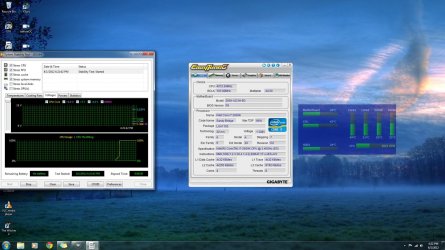
I've used Aida64 to monitor my temperature and perform a stability test. Highest temperature for the cores was 60 Celsius and that was only for a moment while OC'd. Highest for the overall CPU Temp was 46 Celsius. Correct me if i'm wrong but these temperatures are awesome, isn't it? I only did a 5 minute stress test with Aida though...

BTW as long as its not too complex and i feel confident i would like to lower Turbo Boost and increase the regular speed of 3.4 up to like 4ghz, if possible.

Thanks again guys. I love SevenForums. :D

Also ... When installing my RAM i skipped 1 slot ... idk why but i swear i remember hearing that doing this is a good idea. Right or wrong ??
 

Attachments
  • beforeOC.png
    beforeOC.png
    312.9 KB · Views: 66
  • AfterOC.png
    AfterOC.png
    342.7 KB · Views: 57
  • RAMinfo.jpg
    RAMinfo.jpg
    158 KB · Views: 43
  • VoltagesStress.jpg
    VoltagesStress.jpg
    201.7 KB · Views: 43
  • statisticsStress.jpg
    statisticsStress.jpg
    192.4 KB · Views: 47
Last edited by a moderator:

My Computer My Computer

Computer type
PC/Desktop
Computer Manufacturer/Model Number
Dell Inspiron 530
OS
Windows 7 Professional Version 6.1 Build 7601 SP1
CPU
Q6600
Motherboard
IDK
Memory
4GB Total
Graphics Card(s)
GeForce 9500GT =(
Sound Card
Onboard
Monitor(s) Displays
Smaller than what i want
Screen Resolution
Not up to par
Hard Drives
Not an SSD
PSU
350 Watt or W/E this model comes with
Case
Dell Inspiron 530
Cooling
Factory
Keyboard
Logitech G510
Mouse
Logitech G500
Internet Speed
Eh, its okay.
Browser
Aviator.
Other Info
I want my old computer back.
You have DDR3 Ram installed in a dual channel mother board. That's okay.
If your motherboard came with a manual and it should of. Install the ram exactly as the manual indicates. If you don't have the manual ask Fry's for it. If that doesn't work, download it or contact Gigabyte. You need the manual. Your computer should of come with all the manuals.
 

My Computer My Computer

Computer type
PC/Desktop
Computer Manufacturer/Model Number
Home made Desktop
OS
Windows 10 Pro. 64/ version 1709 Windows 7 Pro/64
CPU
Intel i7-6800K @ 4.3
Motherboard
ASUS X-99 Deluxe II
Memory
Corsair Platinum 16 gig @2400
Graphics Card(s)
EVGA GTX 1070 OC
Monitor(s) Displays
Asus 27" LED LCD/VE278Q
Screen Resolution
1920-1080 or 1280-720 HDMI
Hard Drives
INTEL SSD 730-240 Gb Sata 3.0/
PSU
EVGA Platium 1200W
Case
Phanteks Luxe Tempered Glass 8 fans/ one radiator
Cooling
XSPC/ Water Cooled CPU
Keyboard
Das 4 Professional
Mouse
Logitech M705/MX Anywhere 2-S
Internet Speed
100 mbits
Antivirus
Microsoft Security Essentials/ Malwarebytes Premium 3.0/ SAS
Browser
I.E. 11 default/Firefox/ ISP Time Warner Cable/Spectrum
Other Info
LG BluRay Burner/
Sound system-KLipsch-THX/
Icy Dock ssd Hot Swap bays.
You have DDR3 Ram installed in a dual channel mother board. That's okay.
If your motherboard came with a manual and it should of. Install the ram exactly as the manual indicates. If you don't have the manual ask Fry's for it. If that doesn't work, download it or contact Gigabyte. You need the manual. Your computer should of come with all the manuals.

OK i'll refer to the manual ... i didn't know it changed from machine to machine. I think i ended up doing it based off what i heard one day cause i was having problems and have been doign it since....

Thanks again.... But what do you think about the information on the OCing i put up ? Everything look stable and safe? From what i've read, making sure the temperature's are low is basically the main concern ... But i also know that some times things have to be done to the RAM. Or at least that certain brands/types are preferred.
 
Last edited:

My Computer My Computer

Computer type
PC/Desktop
Computer Manufacturer/Model Number
Dell Inspiron 530
OS
Windows 7 Professional Version 6.1 Build 7601 SP1
CPU
Q6600
Motherboard
IDK
Memory
4GB Total
Graphics Card(s)
GeForce 9500GT =(
Sound Card
Onboard
Monitor(s) Displays
Smaller than what i want
Screen Resolution
Not up to par
Hard Drives
Not an SSD
PSU
350 Watt or W/E this model comes with
Case
Dell Inspiron 530
Cooling
Factory
Keyboard
Logitech G510
Mouse
Logitech G500
Internet Speed
Eh, its okay.
Browser
Aviator.
Other Info
I want my old computer back.
Many people have opinions on many brands of ram. When I pick a brand of anything in my computer the first thing is reliability to my way of thinking. The fastest computer today that doesn't work tomorrow doesn't mean much. To make sure a overclock is working properly I run Prime 95 using Torture 100% and watch the temperatures closely. No two computers overclock the same even if they have the same parts. That why one persons setting might not work on another computer. It is trial and test and see if its right for your rig.
 

My Computer My Computer

Computer type
PC/Desktop
Computer Manufacturer/Model Number
Home made Desktop
OS
Windows 10 Pro. 64/ version 1709 Windows 7 Pro/64
CPU
Intel i7-6800K @ 4.3
Motherboard
ASUS X-99 Deluxe II
Memory
Corsair Platinum 16 gig @2400
Graphics Card(s)
EVGA GTX 1070 OC
Monitor(s) Displays
Asus 27" LED LCD/VE278Q
Screen Resolution
1920-1080 or 1280-720 HDMI
Hard Drives
INTEL SSD 730-240 Gb Sata 3.0/
PSU
EVGA Platium 1200W
Case
Phanteks Luxe Tempered Glass 8 fans/ one radiator
Cooling
XSPC/ Water Cooled CPU
Keyboard
Das 4 Professional
Mouse
Logitech M705/MX Anywhere 2-S
Internet Speed
100 mbits
Antivirus
Microsoft Security Essentials/ Malwarebytes Premium 3.0/ SAS
Browser
I.E. 11 default/Firefox/ ISP Time Warner Cable/Spectrum
Other Info
LG BluRay Burner/
Sound system-KLipsch-THX/
Icy Dock ssd Hot Swap bays.
Many people have opinions on many brands of ram. When I pick a brand of anything in my computer the first thing is reliability to my way of thinking. The fastest computer today that doesn't work tomorrow doesn't mean much. To make sure a overclock is working properly I run Prime 95 using Torture 100% and watch the temperatures closely. No two computers overclock the same even if they have the same parts. That why one persons setting might not work on another computer. It is trial and test and see if its right for your rig.

Yea i heard it comes from the fact that no 1 processor is exactly the same coming off the assembly line, so each one overclocks differently.

Oh well. My turbo boost is overclocked and stable so i'm happy.

I'm still open to suggestions or any type of input, though.
 

My Computer My Computer

Computer type
PC/Desktop
Computer Manufacturer/Model Number
Dell Inspiron 530
OS
Windows 7 Professional Version 6.1 Build 7601 SP1
CPU
Q6600
Motherboard
IDK
Memory
4GB Total
Graphics Card(s)
GeForce 9500GT =(
Sound Card
Onboard
Monitor(s) Displays
Smaller than what i want
Screen Resolution
Not up to par
Hard Drives
Not an SSD
PSU
350 Watt or W/E this model comes with
Case
Dell Inspiron 530
Cooling
Factory
Keyboard
Logitech G510
Mouse
Logitech G500
Internet Speed
Eh, its okay.
Browser
Aviator.
Other Info
I want my old computer back.
Based upon what you guy's see in these attachments, are my RAM readings OK? Anything you see i should watch for or i can improve on? Any other info i can give to help determine these things?

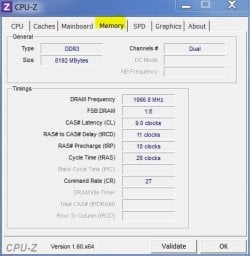
None of those screen shots show what the actual ram timings are. Download CPU-Z and post a pic of the memory tab.

ie:

mem.JPG


Correct me if i'm wrong but these temperatures are awesome, isn't it? I only did a 5 minute stress test with Aida though...

Temps are fine - but 5 mins is woefully inadequate for a stress test.


BTW as long as its not too complex and i feel confident i would like to lower Turbo Boost and increase the regular speed of 3.4 up to like 4ghz, if possible.

Better off ditching the OC app and doing it through the BIOS. It may appear daunting at first, but it's actually quite easy when you know what each setting does and what affects what.

For 4ghz, you could almost hit that on stock volts. All you'd really have to change would be to disable Turbo and adjust the multiplier to 40 for example.


Also ... When installing my RAM i skipped 1 slot ... idk why but i swear i remember hearing that doing this is a good idea. Right or wrong ??

Right. With two modules, and four slots, they have to be placed a slot apart S1/S3 S2/S4 to maintain dual channel mode. Placing two modules next to each other ie S1/S2 puts it into single channel mode which hampers performance.


Yea i heard it comes from the fact that no 1 processor is exactly the same coming off the assembly line, so each one overclocks differently.

Same applies to GPU's.

You can get good 'batches' where that particular run will perform better than others (ie Overclocks higher with less volts vs needing more volts to hit the same target, or even being unable to hit the same target.) But even within those batches each component is individual in it's capabilities.
 

My Computer My Computer

Computer type
PC/Desktop
Computer Manufacturer/Model Number
Systems by SmartEyeball
OS
8 Pro x64
CPU
i7 3770K 4.6GHz
Motherboard
ASUS P8Z77 WS
Memory
16GB G.Skill Trident X 2666mhz
Graphics Card(s)
x2 EVGA 780 Ti Superclocked SLI
Sound Card
SB X-FI Surround 5.1 PRO USB / ATH-AD900 Headphones
Monitor(s) Displays
x3 Dell U2410 / 58" Samsung
Screen Resolution
5760*1200/ 1920*1200
Hard Drives
2x Intel 520 240GB (RAID 0) * 2x WD Caviar Blacks 2TB (RAID 0) * 2TB WD Caviar Black * Sony Optirac DVD
PSU
Silverstone Strider Evolution 1200W
Case
Thermaltake Level 10 GT Snow Edition
Cooling
Noctua NH-D14
Keyboard
Topre Realforce // Ducky Shine MX Black // Filco Ninja TKL
Mouse
Thermaltake Theron (Highly Recommended) + Razer Imperator
Antivirus
MSE
Browser
IE, FF, WaterFox
Other Info
GT Extreme V2 Sim Racing Cockpit + 40" LCD and K/B Mouse stand ▼
Fanatec CSR Elite Wheel + Clubsport V1 Pedals + CSR shifter/7G-H ▼Saitek X52 Pro ▼ TrackIR 5 Pro
Buttkicker v2 Seat Rumbler with Dedicated 5.1 and Sub Woofer attached to frame ▼
=
Bloody Big Grin
You have 4 ram slots in two colors. Two stick install in matching colors. If you ever add ram you will need 2 more sticks. If you just install one more stick you will devert to single channel.
 

My Computer My Computer

Computer type
PC/Desktop
Computer Manufacturer/Model Number
Home made Desktop
OS
Windows 10 Pro. 64/ version 1709 Windows 7 Pro/64
CPU
Intel i7-6800K @ 4.3
Motherboard
ASUS X-99 Deluxe II
Memory
Corsair Platinum 16 gig @2400
Graphics Card(s)
EVGA GTX 1070 OC
Monitor(s) Displays
Asus 27" LED LCD/VE278Q
Screen Resolution
1920-1080 or 1280-720 HDMI
Hard Drives
INTEL SSD 730-240 Gb Sata 3.0/
PSU
EVGA Platium 1200W
Case
Phanteks Luxe Tempered Glass 8 fans/ one radiator
Cooling
XSPC/ Water Cooled CPU
Keyboard
Das 4 Professional
Mouse
Logitech M705/MX Anywhere 2-S
Internet Speed
100 mbits
Antivirus
Microsoft Security Essentials/ Malwarebytes Premium 3.0/ SAS
Browser
I.E. 11 default/Firefox/ ISP Time Warner Cable/Spectrum
Other Info
LG BluRay Burner/
Sound system-KLipsch-THX/
Icy Dock ssd Hot Swap bays.
You have 4 ram slots in two colors. Two stick install in matching colors. If you ever add ram you will need 2 more sticks. If you just install one more stick you will devert to single channel.

So overall it sounds like my machine is pretty well put together. Good to know.

I will refer back to the OCing thing when i have time.

Talk to you guys soon mwhahhaha :devil: lol
 

My Computer My Computer

Computer type
PC/Desktop
Computer Manufacturer/Model Number
Dell Inspiron 530
OS
Windows 7 Professional Version 6.1 Build 7601 SP1
CPU
Q6600
Motherboard
IDK
Memory
4GB Total
Graphics Card(s)
GeForce 9500GT =(
Sound Card
Onboard
Monitor(s) Displays
Smaller than what i want
Screen Resolution
Not up to par
Hard Drives
Not an SSD
PSU
350 Watt or W/E this model comes with
Case
Dell Inspiron 530
Cooling
Factory
Keyboard
Logitech G510
Mouse
Logitech G500
Internet Speed
Eh, its okay.
Browser
Aviator.
Other Info
I want my old computer back.
You have 4 ram slots in two colors. Two stick install in matching colors. If you ever add ram you will need 2 more sticks. If you just install one more stick you will devert to single channel.

So overall it sounds like my machine is pretty well put together. Good to know.

I will refer back to the OCing thing when i have time.

Talk to you guys soon mwhahhaha :devil: lol

Well .... i overclocked with the Easy Tune utility to the max which put turbo boost around 4ghz...

I had issues due to partitions and swap files and system partitions and all this crap and ended up getting that message again. Not sure if all that is related because my CPU temperature hardly ever got above 40 Celsius.

I do know that not all processors are created exactly the same so some processors can be OC'd a bunch, and others just a tad. I will run again at turbo boost being at 4ghz after fixing these issues i have. If it does it again, i'll reduce little by little to see if i'm going over what my processor can handle.

BTW i use that program cause it doesn't make me figure out all the hz and bus speeds and all that. Simple GUI. Click to overclock, Reboot. lol.

Oh ... And is there anything else that i have to watch out for other than temperature ?? And what program would i use to check it, if so?
 

My Computer My Computer

Computer type
PC/Desktop
Computer Manufacturer/Model Number
Dell Inspiron 530
OS
Windows 7 Professional Version 6.1 Build 7601 SP1
CPU
Q6600
Motherboard
IDK
Memory
4GB Total
Graphics Card(s)
GeForce 9500GT =(
Sound Card
Onboard
Monitor(s) Displays
Smaller than what i want
Screen Resolution
Not up to par
Hard Drives
Not an SSD
PSU
350 Watt or W/E this model comes with
Case
Dell Inspiron 530
Cooling
Factory
Keyboard
Logitech G510
Mouse
Logitech G500
Internet Speed
Eh, its okay.
Browser
Aviator.
Other Info
I want my old computer back.
Very good looking numbers dude
 

My Computer My Computer

Computer type
PC/Desktop
Computer Manufacturer/Model Number
custom build
OS
Windows 10 64bit
CPU
AMD Phenom II X4 925 (Deneb)(2.8GHz) OC 3.4GHz
Motherboard
M5A78L-MLX Plus
Memory
Corsair Vengeance DDR3 4GBX2 (8192MB)
Graphics Card(s)
XFX HD 6870 1GB (OC)- 940MHz core, mem 1150MHz
Monitor(s) Displays
Vizio 26' 1920x1080 / Acer 1336x768
Screen Resolution
1920x1080 60Hz /1336x768
Hard Drives
Kingston Digital 60GB SSDNow V300/500gb HDD Western Digital 7200rpm (/WD 160GB HDD 7200rpm
PSU
CORSAIR CX600 600w
Case
AZZA Orion 202 EVO
Cooling
cooler master hyper TX3 cpu cooler
Keyboard
Razer DeathStalker
Mouse
Logitech Optical Gaming Mouse G400
Antivirus
Defualt on win 10
Browser
Firefox
Other Info
cpu is overclocked in bios
Very good looking numbers dude

Thank you, thank you. Even when i OC'd to 4ghz Turbo Boost i looked up what the temperature's are suppose to be at idle, and it stayed around 40C the whole time during a stress test, which is the temp for idle. Amazing, right? Stress test and temperature were done and monitored with Aid64... if u know of a better program then let me know, fo sho lol

But as i said before .... is there anything else other than temperature i need to watch our for? If i keep it cooled down properly, i wont have to worry about shortening the lifespan of it, will i?

Thanks for the compliment, anyway =)
 

My Computer My Computer

Computer type
PC/Desktop
Computer Manufacturer/Model Number
Dell Inspiron 530
OS
Windows 7 Professional Version 6.1 Build 7601 SP1
CPU
Q6600
Motherboard
IDK
Memory
4GB Total
Graphics Card(s)
GeForce 9500GT =(
Sound Card
Onboard
Monitor(s) Displays
Smaller than what i want
Screen Resolution
Not up to par
Hard Drives
Not an SSD
PSU
350 Watt or W/E this model comes with
Case
Dell Inspiron 530
Cooling
Factory
Keyboard
Logitech G510
Mouse
Logitech G500
Internet Speed
Eh, its okay.
Browser
Aviator.
Other Info
I want my old computer back.
You have 4 ram slots in two colors. Two stick install in matching colors.

Not that board. All slots are black and not the usual Gigabyte white/blue.

So overall it sounds like my machine is pretty well put together. Good to know.

Still waiting on that CPU-Z mem screenshot...


Well .... i overclocked with the Easy Tune utility to the max which put turbo boost around 4ghz...
You do you realize that Turbo only Boosts a single core to 4ghz? For apps/games that use more than two cores, it drops down.


If it does it again, i'll reduce little by little to see if i'm going over what my processor can handle.
It's pretty much a guarantee that you'd at least hit 4.4ghz with minimum effort.


BTW i use that program cause it doesn't make me figure out all the hz and bus speeds and all that. Simple GUI. Click to overclock, Reboot. lol
.

Bios is still better. Ram, X.M.P profile - RAM sorted.

Adjust multiplier to 40 - 4ghz, done.

Oh ... And is there anything else that i have to watch out for other than temperature ?? And what program would i use to check it, if so?
The Cpu voltage. And use CPU-Z
 

My Computer My Computer

Computer type
PC/Desktop
Computer Manufacturer/Model Number
Systems by SmartEyeball
OS
8 Pro x64
CPU
i7 3770K 4.6GHz
Motherboard
ASUS P8Z77 WS
Memory
16GB G.Skill Trident X 2666mhz
Graphics Card(s)
x2 EVGA 780 Ti Superclocked SLI
Sound Card
SB X-FI Surround 5.1 PRO USB / ATH-AD900 Headphones
Monitor(s) Displays
x3 Dell U2410 / 58" Samsung
Screen Resolution
5760*1200/ 1920*1200
Hard Drives
2x Intel 520 240GB (RAID 0) * 2x WD Caviar Blacks 2TB (RAID 0) * 2TB WD Caviar Black * Sony Optirac DVD
PSU
Silverstone Strider Evolution 1200W
Case
Thermaltake Level 10 GT Snow Edition
Cooling
Noctua NH-D14
Keyboard
Topre Realforce // Ducky Shine MX Black // Filco Ninja TKL
Mouse
Thermaltake Theron (Highly Recommended) + Razer Imperator
Antivirus
MSE
Browser
IE, FF, WaterFox
Other Info
GT Extreme V2 Sim Racing Cockpit + 40" LCD and K/B Mouse stand ▼
Fanatec CSR Elite Wheel + Clubsport V1 Pedals + CSR shifter/7G-H ▼Saitek X52 Pro ▼ TrackIR 5 Pro
Buttkicker v2 Seat Rumbler with Dedicated 5.1 and Sub Woofer attached to frame ▼
=
Bloody Big Grin
You have 4 ram slots in two colors. Two stick install in matching colors.

Not that board. All slots are black and not the usual Gigabyte white/blue.

So overall it sounds like my machine is pretty well put together. Good to know.

Still waiting on that CPU-Z mem screenshot...


You do you realize that Turbo only Boosts a single core to 4ghz? For apps/games that use more than two cores, it drops down.


It's pretty much a guarantee that you'd at least hit 4.4ghz with minimum effort.


BTW i use that program cause it doesn't make me figure out all the hz and bus speeds and all that. Simple GUI. Click to overclock, Reboot. lol
.

Bios is still better. Ram, X.M.P profile - RAM sorted.

Adjust multiplier to 40 - 4ghz, done.

Oh ... And is there anything else that i have to watch out for other than temperature ?? And what program would i use to check it, if so?
The Cpu voltage. And use CPU-Z

Got any screen shots of how i would do the multiplier thing in the BIOS? i've gotten to know it well but i do not want to mess this up, i'm sure you understand.

I used easytune and it seemed to give me issues... motherboard said it ran in to issues restore to failsafe defaults, etc... so i did that.

Then i found the setting the reduces something so that when u overclock it improves performance, sorry i dont know the name of it, exactly unless i was in the BIOS. i know its in the Tweaking section where the overclocking stuff is...

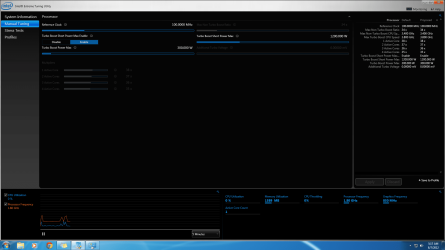
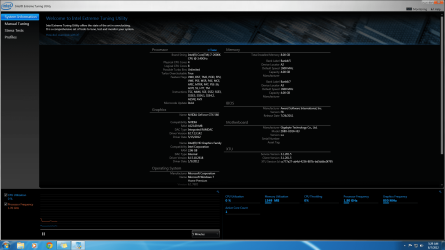
I would like to know how to use this utility. It seems a little more advanced butits made by intel, so maybe i will have better luck.

I've also attached a screenshot of it installed on my computer. maybe you can look at it and see if it contains that other info u said need to watch out for asides from the temp, the CPU Voltage.

Thanks for your help man. At the very least, at least my temps are AWESOME with this H100.
 

Attachments

  • howtousethis utility.png
    howtousethis utility.png
    62 KB · Views: 10
  • this too.png
    this too.png
    174.3 KB · Views: 8

My Computer My Computer

Computer type
PC/Desktop
Computer Manufacturer/Model Number
Dell Inspiron 530
OS
Windows 7 Professional Version 6.1 Build 7601 SP1
CPU
Q6600
Motherboard
IDK
Memory
4GB Total
Graphics Card(s)
GeForce 9500GT =(
Sound Card
Onboard
Monitor(s) Displays
Smaller than what i want
Screen Resolution
Not up to par
Hard Drives
Not an SSD
PSU
350 Watt or W/E this model comes with
Case
Dell Inspiron 530
Cooling
Factory
Keyboard
Logitech G510
Mouse
Logitech G500
Internet Speed
Eh, its okay.
Browser
Aviator.
Other Info
I want my old computer back.

My Computer My Computer

Computer type
PC/Desktop
Computer Manufacturer/Model Number
Dell Inspiron 530
OS
Windows 7 Professional Version 6.1 Build 7601 SP1
CPU
Q6600
Motherboard
IDK
Memory
4GB Total
Graphics Card(s)
GeForce 9500GT =(
Sound Card
Onboard
Monitor(s) Displays
Smaller than what i want
Screen Resolution
Not up to par
Hard Drives
Not an SSD
PSU
350 Watt or W/E this model comes with
Case
Dell Inspiron 530
Cooling
Factory
Keyboard
Logitech G510
Mouse
Logitech G500
Internet Speed
Eh, its okay.
Browser
Aviator.
Other Info
I want my old computer back.
Back
Top