Distributing wired and wireless broadband around the house, how?

TableLeg

New member
Member
Local time
7:59 AM
Messages
86
I hope some of you experts can offer some help.

With more and more electrical devices having network connections these days how do people get around splitting the single broadband connection to many many devices?

Example:

My devices are as follows-

1, Main router (router 1) connected to Master socket (BT Phone line) NTE5 faceplate.
Router has 4 ports connected as follows:
port 1 - Main PC
port 2 -Second PC
port 3 - Freenas server
port 4 - Second router in next room.

2, Second router (router 2) which is connected to router 1 via port 4 has following connections.
port 1 - TV
port 2 - Xbox
port 3 - Sky box
port 4 - To router 1

This works fine except I now need to add further connections.

I want to add another 2x pc's which not only gives access to the internet but allows for LAN gaming between them.
Plus I want to add Wifi into the same area where the 2x new pc's will be.

I have an old Non wireless Netgear router DG834 I could possibly use plus I have a WiFi 4 port extender Netgear WN2000RPT.

I wonder if anyone can suggest how this could be done?

Any help greatfully received.

:)
 
Last edited:

My Computer My Computer

At a glance

Windows 7 Ultimate x64
OS
Windows 7 Ultimate x64
I hope some of you experts can offer some help.

With more and more electrical devices having network connections these days how do people get around splitting the single broadband connection to many many devices?

Example:

My devices are as follows-

1, Main router (router 1) connected to Master socket (BT Phone line) NTE5 faceplate.
Router has 4 ports connected as follows:
port 1 - Main PC
port 2 -Second PC
port 3 - Freenas server
port 4 - Second router in next room.

2, Second router (router 2) which is connected to router 1 via port 4 has following connections.
port 1 - TV
port 2 - Xbox
port 3 - Sky box
port 4 - To router 1

This works fine except I now need to add further connections.

I want to add another 2x pc's which not only gives access to the internet but allows for LAN gaming between them.
Plus I want to add Wifi into the same area where the 2x new pc's will be.

I have an old Non wireless Netgear router DG834 I could possibly use plus I have a WiFi 4 port extender Netgear WN2000RPT.

I wonder if anyone can suggest how this could be done?

Any help greatfully received.

:)

Ok, in my opinion unless you have a very good reason for running more than one router in a single network I would stick to using a single DHCP enabled router.

If you just need more Ethernet ports use a regular gigabit switch instead of using another router. This will greatly simplify the network set up.

Dual routers can be made to work but there can be more settings and adjustments involved than you realize and even after the adjustments it may be unreliable depending on many factors.

If you need to have the wireless coverage in more rooms it's best to use a dedicated wireless access point which you would typically just plug into the router or switch's Ethernet ports. Some routers even have a wireless access point setting for this.
 

My Computer My Computer

At a glance

Windows 7 Ult, Windows 8.1 Pro,Q9650-4.275GHz, E8600 4.5GHz, E6750-3.8GHzG.Skill PC2 9600 1200Mhz 5 5 5 15 2TGTX480
Computer type
PC/Desktop
Computer Manufacturer/Model Number
Home built
OS
Windows 7 Ult, Windows 8.1 Pro,
CPU
Q9650-4.275GHz, E8600 4.5GHz, E6750-3.8GHz
Motherboard
Evga 780i FTW
Memory
G.Skill PC2 9600 1200Mhz 5 5 5 15 2T
Graphics Card(s)
GTX480
Sound Card
Asus Xonar D2
Monitor(s) Displays
HannsG
Screen Resolution
1680X1050
Hard Drives
GSkill Phoenix Pro 120GB SSD
PSU
ThermalTake Toughpower 1000Watt modular
Case
ThermalTake XaserV
Cooling
Xigmatek S1283
Keyboard
Logitech G15
Mouse
Logitech G9
Internet Speed
T1
I am no expert on this stuff

Just a homeowner, like you, that was experiencing growing pains exactly how you describe. Everything you buy these days has a socket for a network wire or a built in Wifi adapter.

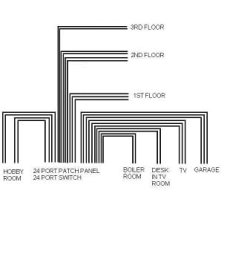
I just recently upgraded to the "Central Solution". I selected a small corner of the basement and ran Cat5e throughout the house to a patch panel.

Then, I looked around Ebay for a slightly used, gigabit speed, managed switch. You can find commercial grade $1500 switches for a dime on the dollar.

From this central location you can bring in a DSL, CABLE, or both, internet solution to a half decent router, and distribute it throughout the home. Whole home wireless is acheived by running a wire from the switch, to the heart of the home, and plugging in a WAP (wireless access point).

There is a lot of good, used, gigabit speed equipment out there.
 

Attachments

  • CAT5_DIAGRAM.JPG
    CAT5_DIAGRAM.JPG
    8.4 KB · Views: 9

My Computer My Computer

At a glance

MS Windows 7 Ultimate 64-bit SP1AMD Phenom II X4 965 Deneb 45nmCorsair 8.00 GB Dual-Channel DDR2 @ 1705MHz (...AMD Radeon HD 6700 Series (XFX Pine Group)
OS
MS Windows 7 Ultimate 64-bit SP1
CPU
AMD Phenom II X4 965 Deneb 45nm
Motherboard
ASUS M4A78 PRO AM2
Memory
Corsair 8.00 GB Dual-Channel DDR2 @ 1705MHz (5-5-5-18)
Graphics Card(s)
AMD Radeon HD 6700 Series (XFX Pine Group)
Sound Card
VIA1708S onboard, Sony HT-CT150 3D
Monitor(s) Displays
Dell M770 Standard VGA, Samsung UN 32D 5500
Hard Drives
112GB OCZ OCZ-VERTEX3 ATA Device (SSD)
2 TB Seagate ST2000DM001-9YN164 ATA Device (SATA)
3 TB Seagate ST3000DM001-1CH166 ATA Device (SATA)
PSU
Rosewill Hive 650 Watt
Case
Rosewill Blackhawk
Cooling
Antec Kuhler 620
Other Info
Burners=ATAPI iHBS312 BlueRay + ATAPI iHAS424 Cd Dvd,
Modem=Arris TM 722,
Router=Asus RT N56U,
Switch=24 Port - Dell PowerConnect 5324,
Coax Signal Amp=Motorola BDA S4.
Thank both of you for the replies :)

Just to add to my previous information, I already have the 2nd router running from the first providing the 3 extra ports used in the next room.

The 2nd pc as detailed as being fitting to router 1 will become one of the 2x pc's being added (its just that they are both to be in another room).

I had hoped to be able to make this function without the need for buying more equipment so I will have at look at both of your suggestions of using switches/panels.

I was under the impression (perhaps wrongly) that a 4 port router could be used as a switch as that is how I have the 2nd router currently running (thanks to the internet for setting up instructions).

Many thanks again.

:)
 

My Computer My Computer

At a glance

Windows 7 Ultimate x64
OS
Windows 7 Ultimate x64
You don't have to rewire the house

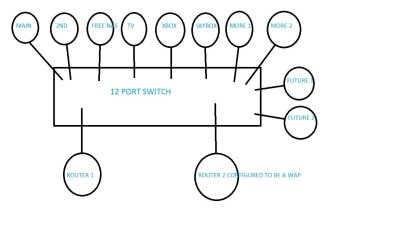
But at a minimum you should get a 12 port switch. You would have enough room to plug in all your stuff, and a couple spares for the future or for guests.

You could also maybe turn one of your routers into a WAP for wireless.
 

Attachments

  • 12PORTswitch.jpg
    12PORTswitch.jpg
    41.5 KB · Views: 13

My Computer My Computer

At a glance

MS Windows 7 Ultimate 64-bit SP1AMD Phenom II X4 965 Deneb 45nmCorsair 8.00 GB Dual-Channel DDR2 @ 1705MHz (...AMD Radeon HD 6700 Series (XFX Pine Group)
OS
MS Windows 7 Ultimate 64-bit SP1
CPU
AMD Phenom II X4 965 Deneb 45nm
Motherboard
ASUS M4A78 PRO AM2
Memory
Corsair 8.00 GB Dual-Channel DDR2 @ 1705MHz (5-5-5-18)
Graphics Card(s)
AMD Radeon HD 6700 Series (XFX Pine Group)
Sound Card
VIA1708S onboard, Sony HT-CT150 3D
Monitor(s) Displays
Dell M770 Standard VGA, Samsung UN 32D 5500
Hard Drives
112GB OCZ OCZ-VERTEX3 ATA Device (SSD)
2 TB Seagate ST2000DM001-9YN164 ATA Device (SATA)
3 TB Seagate ST3000DM001-1CH166 ATA Device (SATA)
PSU
Rosewill Hive 650 Watt
Case
Rosewill Blackhawk
Cooling
Antec Kuhler 620
Other Info
Burners=ATAPI iHBS312 BlueRay + ATAPI iHAS424 Cd Dvd,
Modem=Arris TM 722,
Router=Asus RT N56U,
Switch=24 Port - Dell PowerConnect 5324,
Coax Signal Amp=Motorola BDA S4.
Thank both of you for the replies :)

Just to add to my previous information, I already have the 2nd router running from the first providing the 3 extra ports used in the next room.

The 2nd pc as detailed as being fitting to router 1 will become one of the 2x pc's being added (its just that they are both to be in another room).

I had hoped to be able to make this function without the need for buying more equipment so I will have at look at both of your suggestions of using switches/panels.

I was under the impression (perhaps wrongly) that a 4 port router could be used as a switch as that is how I have the 2nd router currently running (thanks to the internet for setting up instructions).

Many thanks again.

:)

Using a router as a switch wouldn't be something I'd ever do if I wanted a reliable network. Sometimes it might work perfectly depending on the router and other factors, other times it will create problems or may not work reliably.

You were asking for advice or opinions right?

You might also be able to turn one of those routers into a wireless A/P, sometimes they have a setting just for that but only certain routers have that feature and in most cases you would be far better served using a dedicated wireless A/P.

Disabling DHCP on the secondary router is just one of the settings required to make that work but there are other settings that might be required not to mention the need to navigate through the routers firewall and ports which is something you don't need to worry about using a standard gigabit switch.
 

My Computer My Computer

At a glance

Windows 7 Ult, Windows 8.1 Pro,Q9650-4.275GHz, E8600 4.5GHz, E6750-3.8GHzG.Skill PC2 9600 1200Mhz 5 5 5 15 2TGTX480
Computer type
PC/Desktop
Computer Manufacturer/Model Number
Home built
OS
Windows 7 Ult, Windows 8.1 Pro,
CPU
Q9650-4.275GHz, E8600 4.5GHz, E6750-3.8GHz
Motherboard
Evga 780i FTW
Memory
G.Skill PC2 9600 1200Mhz 5 5 5 15 2T
Graphics Card(s)
GTX480
Sound Card
Asus Xonar D2
Monitor(s) Displays
HannsG
Screen Resolution
1680X1050
Hard Drives
GSkill Phoenix Pro 120GB SSD
PSU
ThermalTake Toughpower 1000Watt modular
Case
ThermalTake XaserV
Cooling
Xigmatek S1283
Keyboard
Logitech G15
Mouse
Logitech G9
Internet Speed
T1
Thanks again for the replies. Crash2009, thanks also for the drawing. I'll look and see if I can get hold of a switch as you suggest. :-)
 

My Computer My Computer

At a glance

Windows 7 Ultimate x64
OS
Windows 7 Ultimate x64
Just been searching the net looking at switches. Does it have to be a gigabit switch? Anything in particular I need to bare in mind in relation to switches for my use?
 

My Computer My Computer

At a glance

Windows 7 Ultimate x64
OS
Windows 7 Ultimate x64
So you have decided to get a switch

Here is where the problem starts. A few months ago I did some shopping for a 12 port switch. Most of the good ones were between $100 and $150 "consumer grade". Then I went over to e-bay and looked into some of the "Industrial strength" stuff. What I found out was that you can get used, high quality, industrial strength stuff (with more features) for the same price as new consumer grade.

Here is an example of what is out there selling for 1/10th of what they cost just a few years ago. powerconnect 5324 | eBay I am not saying this is the best of the best or anything, it's just an example. Bit of a pain to setup, but you only have to do that once. You might only need 12 ports today, but 24 ports will keep up to your upgrades for years to come.

My suggestion is to do the math, and look to the future.
 

My Computer My Computer

At a glance

MS Windows 7 Ultimate 64-bit SP1AMD Phenom II X4 965 Deneb 45nmCorsair 8.00 GB Dual-Channel DDR2 @ 1705MHz (...AMD Radeon HD 6700 Series (XFX Pine Group)
OS
MS Windows 7 Ultimate 64-bit SP1
CPU
AMD Phenom II X4 965 Deneb 45nm
Motherboard
ASUS M4A78 PRO AM2
Memory
Corsair 8.00 GB Dual-Channel DDR2 @ 1705MHz (5-5-5-18)
Graphics Card(s)
AMD Radeon HD 6700 Series (XFX Pine Group)
Sound Card
VIA1708S onboard, Sony HT-CT150 3D
Monitor(s) Displays
Dell M770 Standard VGA, Samsung UN 32D 5500
Hard Drives
112GB OCZ OCZ-VERTEX3 ATA Device (SSD)
2 TB Seagate ST2000DM001-9YN164 ATA Device (SATA)
3 TB Seagate ST3000DM001-1CH166 ATA Device (SATA)
PSU
Rosewill Hive 650 Watt
Case
Rosewill Blackhawk
Cooling
Antec Kuhler 620
Other Info
Burners=ATAPI iHBS312 BlueRay + ATAPI iHAS424 Cd Dvd,
Modem=Arris TM 722,
Router=Asus RT N56U,
Switch=24 Port - Dell PowerConnect 5324,
Coax Signal Amp=Motorola BDA S4.
If using a switch, could I use say an 8 port switch instead of a 12 and utilise the 4 ports on the router as well effectively giving 12 in total?

I only see i'll need 7 ports and can't see i'll need any more than that.
 
Last edited:

My Computer My Computer

At a glance

Windows 7 Ultimate x64
OS
Windows 7 Ultimate x64
Just been searching the net looking at switches. Does it have to be a gigabit switch? Anything in particular I need to bare in mind in relation to switches for my use?

Yes it has to be a gigabit switch as most every PC these days can send files at those speeds.

In most cases purchasing an 8 port non managed gigabit switch for a home network is the way to go which are only around 30- 80 bucks. The managed switches with more ports are much more expensive.

Standard non-managed gigabit 8 port switch.
http://www.newegg.com/Product/Product.aspx?Item=N82E16817111039

Dedicated access point, best on the market, with 4 gigabit Ethernet ports, needs to be plugged into switch and requires AC power.
http://www.newegg.com/Product/Product.aspx?Item=N82E16833127256
 

My Computer My Computer

At a glance

Windows 7 Ult, Windows 8.1 Pro,Q9650-4.275GHz, E8600 4.5GHz, E6750-3.8GHzG.Skill PC2 9600 1200Mhz 5 5 5 15 2TGTX480
Computer type
PC/Desktop
Computer Manufacturer/Model Number
Home built
OS
Windows 7 Ult, Windows 8.1 Pro,
CPU
Q9650-4.275GHz, E8600 4.5GHz, E6750-3.8GHz
Motherboard
Evga 780i FTW
Memory
G.Skill PC2 9600 1200Mhz 5 5 5 15 2T
Graphics Card(s)
GTX480
Sound Card
Asus Xonar D2
Monitor(s) Displays
HannsG
Screen Resolution
1680X1050
Hard Drives
GSkill Phoenix Pro 120GB SSD
PSU
ThermalTake Toughpower 1000Watt modular
Case
ThermalTake XaserV
Cooling
Xigmatek S1283
Keyboard
Logitech G15
Mouse
Logitech G9
Internet Speed
T1
Yes it has to be a gigabit switch as most every PC these days can send files at those speeds.

In most cases purchasing an 8 port non managed gigabit switch for a home network is the way to go which are only around 30- 80 bucks. The managed switches with more ports are much more expensive.

Thanks i'll have a look at some 8 port switches.

:D
 

My Computer My Computer

At a glance

Windows 7 Ultimate x64
OS
Windows 7 Ultimate x64
Just been searching the net looking at switches. Does it have to be a gigabit switch? Anything in particular I need to bare in mind in relation to switches for my use?

Are you streaming any video from Freenas?
What is Skybox?
 

My Computer My Computer

At a glance

MS Windows 7 Ultimate 64-bit SP1AMD Phenom II X4 965 Deneb 45nmCorsair 8.00 GB Dual-Channel DDR2 @ 1705MHz (...AMD Radeon HD 6700 Series (XFX Pine Group)
OS
MS Windows 7 Ultimate 64-bit SP1
CPU
AMD Phenom II X4 965 Deneb 45nm
Motherboard
ASUS M4A78 PRO AM2
Memory
Corsair 8.00 GB Dual-Channel DDR2 @ 1705MHz (5-5-5-18)
Graphics Card(s)
AMD Radeon HD 6700 Series (XFX Pine Group)
Sound Card
VIA1708S onboard, Sony HT-CT150 3D
Monitor(s) Displays
Dell M770 Standard VGA, Samsung UN 32D 5500
Hard Drives
112GB OCZ OCZ-VERTEX3 ATA Device (SSD)
2 TB Seagate ST2000DM001-9YN164 ATA Device (SATA)
3 TB Seagate ST3000DM001-1CH166 ATA Device (SATA)
PSU
Rosewill Hive 650 Watt
Case
Rosewill Blackhawk
Cooling
Antec Kuhler 620
Other Info
Burners=ATAPI iHBS312 BlueRay + ATAPI iHAS424 Cd Dvd,
Modem=Arris TM 722,
Router=Asus RT N56U,
Switch=24 Port - Dell PowerConnect 5324,
Coax Signal Amp=Motorola BDA S4.
Are you streaming any video from Freenas?
What is Skybox?

The Freenas is just a backup server, no streaming.

Sky box, is a satellite TV box.
 

My Computer My Computer

At a glance

Windows 7 Ultimate x64
OS
Windows 7 Ultimate x64

My Computer My Computer

At a glance

MS Windows 7 Ultimate 64-bit SP1AMD Phenom II X4 965 Deneb 45nmCorsair 8.00 GB Dual-Channel DDR2 @ 1705MHz (...AMD Radeon HD 6700 Series (XFX Pine Group)
OS
MS Windows 7 Ultimate 64-bit SP1
CPU
AMD Phenom II X4 965 Deneb 45nm
Motherboard
ASUS M4A78 PRO AM2
Memory
Corsair 8.00 GB Dual-Channel DDR2 @ 1705MHz (5-5-5-18)
Graphics Card(s)
AMD Radeon HD 6700 Series (XFX Pine Group)
Sound Card
VIA1708S onboard, Sony HT-CT150 3D
Monitor(s) Displays
Dell M770 Standard VGA, Samsung UN 32D 5500
Hard Drives
112GB OCZ OCZ-VERTEX3 ATA Device (SSD)
2 TB Seagate ST2000DM001-9YN164 ATA Device (SATA)
3 TB Seagate ST3000DM001-1CH166 ATA Device (SATA)
PSU
Rosewill Hive 650 Watt
Case
Rosewill Blackhawk
Cooling
Antec Kuhler 620
Other Info
Burners=ATAPI iHBS312 BlueRay + ATAPI iHAS424 Cd Dvd,
Modem=Arris TM 722,
Router=Asus RT N56U,
Switch=24 Port - Dell PowerConnect 5324,
Coax Signal Amp=Motorola BDA S4.
That's what I thought. Are you streaming Sky box's signals to any of your PC's?

No, I don't. The box can only output 1 viewing channel at a time.
 

My Computer My Computer

At a glance

Windows 7 Ultimate x64
OS
Windows 7 Ultimate x64
Yes it has to be a gigabit switch as most every PC these days can send files at those speeds.

Does it make any difference whether its a different make to the netgear router?
Im familiar with netgear products having used their routers for 15 years.

Does it require any kind of setting up or is it simply plug and go?
 

My Computer My Computer

At a glance

Windows 7 Ultimate x64
OS
Windows 7 Ultimate x64
That's what I thought. Are you streaming Sky box's signals to any of your PC's?

No, I don't. The box can only output 1 viewing channel at a time.

So the Sky box outputs to a television?
Why does it need to pe plugged in to the network?

Can you tell me a little more about it?
 

My Computer My Computer

At a glance

MS Windows 7 Ultimate 64-bit SP1AMD Phenom II X4 965 Deneb 45nmCorsair 8.00 GB Dual-Channel DDR2 @ 1705MHz (...AMD Radeon HD 6700 Series (XFX Pine Group)
OS
MS Windows 7 Ultimate 64-bit SP1
CPU
AMD Phenom II X4 965 Deneb 45nm
Motherboard
ASUS M4A78 PRO AM2
Memory
Corsair 8.00 GB Dual-Channel DDR2 @ 1705MHz (5-5-5-18)
Graphics Card(s)
AMD Radeon HD 6700 Series (XFX Pine Group)
Sound Card
VIA1708S onboard, Sony HT-CT150 3D
Monitor(s) Displays
Dell M770 Standard VGA, Samsung UN 32D 5500
Hard Drives
112GB OCZ OCZ-VERTEX3 ATA Device (SSD)
2 TB Seagate ST2000DM001-9YN164 ATA Device (SATA)
3 TB Seagate ST3000DM001-1CH166 ATA Device (SATA)
PSU
Rosewill Hive 650 Watt
Case
Rosewill Blackhawk
Cooling
Antec Kuhler 620
Other Info
Burners=ATAPI iHBS312 BlueRay + ATAPI iHAS424 Cd Dvd,
Modem=Arris TM 722,
Router=Asus RT N56U,
Switch=24 Port - Dell PowerConnect 5324,
Coax Signal Amp=Motorola BDA S4.
So the Sky box outputs to a television?
Why does it need to pe plugged in to the network?

Can you tell me a little more about it?

The network connection provides for downloadable TV content (Sky Anytime). You can look through a series of programs and select one to watch which is then downloaded to the box through the network connection. The box itself has a HDD for recording TV content.

This should give you some more specific info on the box
Sky+ HD - Wikipedia, the free encyclopedia

:D
 
Last edited:

My Computer My Computer

At a glance

Windows 7 Ultimate x64
OS
Windows 7 Ultimate x64
Yes it has to be a gigabit switch as most every PC these days can send files at those speeds.

Does it make any difference whether its a different make to the netgear router?
Im familiar with netgear products having used their routers for 15 years.

Does it require any kind of setting up or is it simply plug and go?

Netgear stuff is ok also, switches can work with any router doesn't matter. Plug and play on the switches for sure.

The wireless A/P's require the basic wireless set up procedure.
 

My Computer My Computer

At a glance

Windows 7 Ult, Windows 8.1 Pro,Q9650-4.275GHz, E8600 4.5GHz, E6750-3.8GHzG.Skill PC2 9600 1200Mhz 5 5 5 15 2TGTX480
Computer type
PC/Desktop
Computer Manufacturer/Model Number
Home built
OS
Windows 7 Ult, Windows 8.1 Pro,
CPU
Q9650-4.275GHz, E8600 4.5GHz, E6750-3.8GHz
Motherboard
Evga 780i FTW
Memory
G.Skill PC2 9600 1200Mhz 5 5 5 15 2T
Graphics Card(s)
GTX480
Sound Card
Asus Xonar D2
Monitor(s) Displays
HannsG
Screen Resolution
1680X1050
Hard Drives
GSkill Phoenix Pro 120GB SSD
PSU
ThermalTake Toughpower 1000Watt modular
Case
ThermalTake XaserV
Cooling
Xigmatek S1283
Keyboard
Logitech G15
Mouse
Logitech G9
Internet Speed
T1
Back
Top