Possible to covert a plain system part. copy to ISO and make bootable?

You see sort of picture as this:
Windows_XP_Disk_management_for_160_GB_disk.png


Both partitions are dark blue as seen in lower part of screenshot? Is the sequence in lower part C,D or D,C
Which partition is marked ACTIVE (D in screenshot above)?
 

My Computer My Computer

At a glance

Microsoft Windows 7 Home Premium 64-bits 7601...Intel(R) Core(TM) i3 CPU M 370 @ 2.40GHz4,00 GBATI Mobility Radeon HD 5400 Series
Computer type
Laptop
Computer Manufacturer/Model Number
ACER ASPIRE 5742G
OS
Microsoft Windows 7 Home Premium 64-bits 7601 Multiprocessor Free Service Pack 1
CPU
Intel(R) Core(TM) i3 CPU M 370 @ 2.40GHz
Motherboard
Acer Aspire 5742G
Memory
4,00 GB
Graphics Card(s)
ATI Mobility Radeon HD 5400 Series
Sound Card
(1) AMD High Definition Audio Device (2) Realtek High Defi
Screen Resolution
1366 x 768 x 32 bits (4294967296 colors) @ 60 Hz
Hard Drives
WDC WD5000BEVT-22ZAT0
C and D are on SAME physical harddrive?
How did you try to switch boot from partition C to Part D where the Windows 7 is?

Yes, C and D are on the same (and only internal) harddrive.

I switched the boot by G-parted, it worked (to switch the boot) but did not boot, I think I got the message "OS missing". I have also now realized that even if I´d succeed in making an ISO out of the files on part D (with win7 and all the other program etc files that were on the original partition) and make the part D boot, it would work, but to make things work after making an ISO out of the files on part D, I´d have to "recover" it back to part C by using the partition recovery function of EaseUS.
 

My Computer My Computer

At a glance

Windows 7 Home Premium
OS
Windows 7 Home Premium
You see sort of picture as this:
Windows_XP_Disk_management_for_160_GB_disk.png


Both partitions are dark blue as seen in lower part of screenshot? Is the sequence in lower part C,D or D,C
Which partition is marked ACTIVE (D in screenshot above)?

On my disk management picture the C partion (with a working WIN XP system) is marked by a LIGHT blue frame, whereas the second (D) partition is marked by a DARK blue frame. Both C and D say it is error free, but it does not say Active in either, but probably the "system start" in my language means active?, whereas on the D it only says "system".
 

My Computer My Computer

At a glance

Windows 7 Home Premium
OS
Windows 7 Home Premium
You see sort of picture as this:
Windows_XP_Disk_management_for_160_GB_disk.png


Both partitions are dark blue as seen in lower part of screenshot? Is the sequence in lower part C,D or D,C
Which partition is marked ACTIVE (D in screenshot above)?

On my disk management picture the C partion (with a working WIN XP system) is marked by a LIGHT blue frame, whereas the second (D) partition is marked by a DARK blue frame. Both C and D say it is error free, but it does not say Active in either, but probably the "system start" in my language means active?, whereas on the D it only says "system".

missed a few words, the "system start" note is in the picture of C partitiuon in di9sk management
 

My Computer My Computer

At a glance

Windows 7 Home Premium
OS
Windows 7 Home Premium
C and D are on SAME physical harddrive?
How did you try to switch boot from partition C to Part D where the Windows 7 is?

Yes, C and D are on the same (and only internal) harddrive.

I switched the boot by G-parted, it worked (to switch the boot) but did not boot, I think I got the message "OS missing". I have also now realized that even if I´d succeed in making an ISO out of the files on part D (with win7 and all the other program etc files that were on the original partition) and make the part D boot, it would work, but to make things work after making an ISO out of the files on part D, I´d have to "recover" it back to part C by using the partition recovery function of EaseUS.
C and D are just logical drive letters!! Can differ from OS to OS. Forget about it
 

My Computer My Computer

At a glance

Microsoft Windows 7 Home Premium 64-bits 7601...Intel(R) Core(TM) i3 CPU M 370 @ 2.40GHz4,00 GBATI Mobility Radeon HD 5400 Series
Computer type
Laptop
Computer Manufacturer/Model Number
ACER ASPIRE 5742G
OS
Microsoft Windows 7 Home Premium 64-bits 7601 Multiprocessor Free Service Pack 1
CPU
Intel(R) Core(TM) i3 CPU M 370 @ 2.40GHz
Motherboard
Acer Aspire 5742G
Memory
4,00 GB
Graphics Card(s)
ATI Mobility Radeon HD 5400 Series
Sound Card
(1) AMD High Definition Audio Device (2) Realtek High Defi
Screen Resolution
1366 x 768 x 32 bits (4294967296 colors) @ 60 Hz
Hard Drives
WDC WD5000BEVT-22ZAT0
So C drive is light blue instead of dark blue, correct? C has also a green border same like screenshot I posted?
 

My Computer My Computer

At a glance

Microsoft Windows 7 Home Premium 64-bits 7601...Intel(R) Core(TM) i3 CPU M 370 @ 2.40GHz4,00 GBATI Mobility Radeon HD 5400 Series
Computer type
Laptop
Computer Manufacturer/Model Number
ACER ASPIRE 5742G
OS
Microsoft Windows 7 Home Premium 64-bits 7601 Multiprocessor Free Service Pack 1
CPU
Intel(R) Core(TM) i3 CPU M 370 @ 2.40GHz
Motherboard
Acer Aspire 5742G
Memory
4,00 GB
Graphics Card(s)
ATI Mobility Radeon HD 5400 Series
Sound Card
(1) AMD High Definition Audio Device (2) Realtek High Defi
Screen Resolution
1366 x 768 x 32 bits (4294967296 colors) @ 60 Hz
Hard Drives
WDC WD5000BEVT-22ZAT0
I switched the boot by G-parted, it worked (to switch the boot) but did not boot, I think I got the message "OS missing". => C and D are the only partitions you see in disk management? C is listed to the left or right of D in disk management? They are on same physical drive?

Why not simply make a camerashot and post it. or put screenshot on usb stick and transfer to working computer
 

My Computer My Computer

At a glance

Microsoft Windows 7 Home Premium 64-bits 7601...Intel(R) Core(TM) i3 CPU M 370 @ 2.40GHz4,00 GBATI Mobility Radeon HD 5400 Series
Computer type
Laptop
Computer Manufacturer/Model Number
ACER ASPIRE 5742G
OS
Microsoft Windows 7 Home Premium 64-bits 7601 Multiprocessor Free Service Pack 1
CPU
Intel(R) Core(TM) i3 CPU M 370 @ 2.40GHz
Motherboard
Acer Aspire 5742G
Memory
4,00 GB
Graphics Card(s)
ATI Mobility Radeon HD 5400 Series
Sound Card
(1) AMD High Definition Audio Device (2) Realtek High Defi
Screen Resolution
1366 x 768 x 32 bits (4294967296 colors) @ 60 Hz
Hard Drives
WDC WD5000BEVT-22ZAT0
In winxp command prompt:
Code:
diskpart
list  disk    [COLOR=red](How many disks are listed? Detach extern drives first!)[/COLOR]
sel  disk  0
list  part
exit
How many partitions? What types? and tell me what is win7 and what's winxp (look at size)
 

My Computer My Computer

At a glance

Microsoft Windows 7 Home Premium 64-bits 7601...Intel(R) Core(TM) i3 CPU M 370 @ 2.40GHz4,00 GBATI Mobility Radeon HD 5400 Series
Computer type
Laptop
Computer Manufacturer/Model Number
ACER ASPIRE 5742G
OS
Microsoft Windows 7 Home Premium 64-bits 7601 Multiprocessor Free Service Pack 1
CPU
Intel(R) Core(TM) i3 CPU M 370 @ 2.40GHz
Motherboard
Acer Aspire 5742G
Memory
4,00 GB
Graphics Card(s)
ATI Mobility Radeon HD 5400 Series
Sound Card
(1) AMD High Definition Audio Device (2) Realtek High Defi
Screen Resolution
1366 x 768 x 32 bits (4294967296 colors) @ 60 Hz
Hard Drives
WDC WD5000BEVT-22ZAT0
In winxp command prompt:
Code:
diskpart
list  disk    [COLOR=red](How many disks are listed? Detach extern drives first!)[/COLOR]
sel  disk  0
list  part
exit
How many partitions? What types? and tell me what is win7 and what's winxp (look at size)

Quite a few questions, I´ll have to go now for about two and a half hours, so I´ll try to make and move over a disk management screenshot from my wife´s PC when I`m back. On the disk management side on my Asus (under WIN XP) ,the C partition is on the left side and has also a green frame apart from the light blue one. In diskpart I get only 1 HD (marked zero), it´s the only one internal hd drive in my Asus.
 

My Computer My Computer

At a glance

Windows 7 Home Premium
OS
Windows 7 Home Premium
Let me recap:

Only 1 disk.
C is listed first (on the left). It is light blue and has a green frame. So it's a logical partition.
D is dark blue and no green border. So it's a primary partition.
No other partitions shown in disk management? Sure!!?

If so... D is the boot partition, because only primary partition can be active.

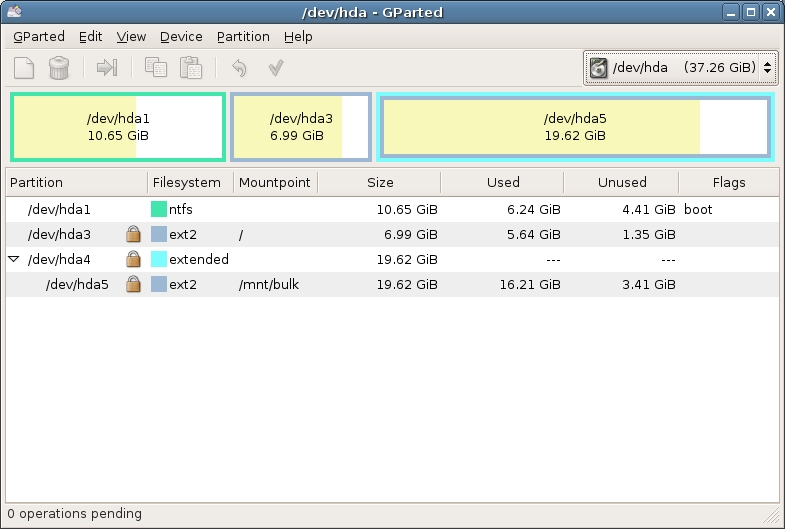
In gparted that partition is flagged as "boot".... correct? you also have an "extended" partition. Within that is WINXP
gparted_1_big.jpg
 

My Computer My Computer

At a glance

Microsoft Windows 7 Home Premium 64-bits 7601...Intel(R) Core(TM) i3 CPU M 370 @ 2.40GHz4,00 GBATI Mobility Radeon HD 5400 Series
Computer type
Laptop
Computer Manufacturer/Model Number
ACER ASPIRE 5742G
OS
Microsoft Windows 7 Home Premium 64-bits 7601 Multiprocessor Free Service Pack 1
CPU
Intel(R) Core(TM) i3 CPU M 370 @ 2.40GHz
Motherboard
Acer Aspire 5742G
Memory
4,00 GB
Graphics Card(s)
ATI Mobility Radeon HD 5400 Series
Sound Card
(1) AMD High Definition Audio Device (2) Realtek High Defi
Screen Resolution
1366 x 768 x 32 bits (4294967296 colors) @ 60 Hz
Hard Drives
WDC WD5000BEVT-22ZAT0
At long last, here´s the screenshot you wanted to see.


View attachment Disk management.docx


However, I have a feeling we are moving in circles, due tomy inadequate description of the problem at the beginning. A RECAP: My Asus had two partitions (C and D) on the same HD. On D there was the recovery partition, which was rendered unusable after touchpad repair. I then wiped out the D partition, formatted it (possibly resized it- don`t remember) and then made a clone/image of the working C partition by EaseUS on D. It worked fine and I could recover three or four times by EaseUS from the clone/image on D back to C from the image when I had problems with the system(usually after bad downloads). However, during my last partition C imaging with EaseUS ten days ago, something must have gone wrong and an image was not created on D, only what seems to be an exact files copy from C. As there is no image/clone on D, I can´t recover from there any more. If I could (don´t know if possible at all) make an image (ISO) of the files on D, then I could recover the system from D back to C ,as I did several times before.

By the way, at G-parted, the C partition (and not D) is marked as Boot - otherwise I would not be able to boot my XP installed on C. I hope this answers your question, if not, please ask again.
 

My Computer My Computer

At a glance

Windows 7 Home Premium
OS
Windows 7 Home Premium
At long last, here´s the screenshot you wanted to see.


View attachment 227860


However, I have a feeling we are moving in circles, due tomy inadequate description of the problem at the beginning. A RECAP: My Asus had two partitions (C and D) on the same HD. On D there was the recovery partition, which was rendered unusable after touchpad repair. I then wiped out the D partition, formatted it (possibly resized it- don`t remember) and then made a clone/image of the working C partition by EaseUS on D. It worked fine and I could recover three or four times by EaseUS from the clone/image on D back to C from the image when I had problems with the system(usually after bad downloads). However, during my last partition C imaging with EaseUS ten days ago, something must have gone wrong and an image was not created on D, only what seems to be an exact files copy from C. As there is no image/clone on D, I can´t recover from there any more. If I could (don´t know if possible at all) make an image (ISO) of the files on D, then I could recover the system from D back to C ,as I did several times before.

By the way, at G-parted, the C partition (and not D) is marked as Boot - otherwise I would not be able to boot my XP installed on C. I hope this answers your question, if not, please ask again.

The screenshot upload did not work, everything seems to go wrong, I´ll have to chek where I made a mistake and try again.
 

My Computer My Computer

At a glance

Windows 7 Home Premium
OS
Windows 7 Home Premium
I did see the disk management screenshot. Post gpart screenshot as well.... what you tell me can't be true!
 

My Computer My Computer

At a glance

Microsoft Windows 7 Home Premium 64-bits 7601...Intel(R) Core(TM) i3 CPU M 370 @ 2.40GHz4,00 GBATI Mobility Radeon HD 5400 Series
Computer type
Laptop
Computer Manufacturer/Model Number
ACER ASPIRE 5742G
OS
Microsoft Windows 7 Home Premium 64-bits 7601 Multiprocessor Free Service Pack 1
CPU
Intel(R) Core(TM) i3 CPU M 370 @ 2.40GHz
Motherboard
Acer Aspire 5742G
Memory
4,00 GB
Graphics Card(s)
ATI Mobility Radeon HD 5400 Series
Sound Card
(1) AMD High Definition Audio Device (2) Realtek High Defi
Screen Resolution
1366 x 768 x 32 bits (4294967296 colors) @ 60 Hz
Hard Drives
WDC WD5000BEVT-22ZAT0
On D is still what looks like the win7 stuff you copied? Actually you did a move (and maybe resize). You moved it to the new location (copy and later delete). But I can fix it.
 

My Computer My Computer

At a glance

Microsoft Windows 7 Home Premium 64-bits 7601...Intel(R) Core(TM) i3 CPU M 370 @ 2.40GHz4,00 GBATI Mobility Radeon HD 5400 Series
Computer type
Laptop
Computer Manufacturer/Model Number
ACER ASPIRE 5742G
OS
Microsoft Windows 7 Home Premium 64-bits 7601 Multiprocessor Free Service Pack 1
CPU
Intel(R) Core(TM) i3 CPU M 370 @ 2.40GHz
Motherboard
Acer Aspire 5742G
Memory
4,00 GB
Graphics Card(s)
ATI Mobility Radeon HD 5400 Series
Sound Card
(1) AMD High Definition Audio Device (2) Realtek High Defi
Screen Resolution
1366 x 768 x 32 bits (4294967296 colors) @ 60 Hz
Hard Drives
WDC WD5000BEVT-22ZAT0
You did install WINXP after making the clone to D? Sorry I ask you so many questions... but I have to know the situation now
 

My Computer My Computer

At a glance

Microsoft Windows 7 Home Premium 64-bits 7601...Intel(R) Core(TM) i3 CPU M 370 @ 2.40GHz4,00 GBATI Mobility Radeon HD 5400 Series
Computer type
Laptop
Computer Manufacturer/Model Number
ACER ASPIRE 5742G
OS
Microsoft Windows 7 Home Premium 64-bits 7601 Multiprocessor Free Service Pack 1
CPU
Intel(R) Core(TM) i3 CPU M 370 @ 2.40GHz
Motherboard
Acer Aspire 5742G
Memory
4,00 GB
Graphics Card(s)
ATI Mobility Radeon HD 5400 Series
Sound Card
(1) AMD High Definition Audio Device (2) Realtek High Defi
Screen Resolution
1366 x 768 x 32 bits (4294967296 colors) @ 60 Hz
Hard Drives
WDC WD5000BEVT-22ZAT0
In winxp "command prompt":

Code:
reg  load hklm\win7old D:\windows\system32\config\system
reg  query  hklm\system\mounteddevices  /f  \DosDevices\D:
reg  query  hklm\win7old\mounteddevices  /f  \DosDevices\C:
reg  unload  hklm\win7old

You get a long number as output from reg query command. something like:

C:\Windows\system32>reg query hklm\system\mounteddevices /f DosDevices\D:
HKEY_LOCAL_MACHINE\system\mounteddevices
\DosDevices\D: REG_BINARY 56E29668000060461C000000


Those 2 numbers are the same? If not post the first number EXACTLY. So output of:
reg query hklm\system\mounteddevices /f \DosDevices\D:
 
Last edited:

My Computer My Computer

At a glance

Microsoft Windows 7 Home Premium 64-bits 7601...Intel(R) Core(TM) i3 CPU M 370 @ 2.40GHz4,00 GBATI Mobility Radeon HD 5400 Series
Computer type
Laptop
Computer Manufacturer/Model Number
ACER ASPIRE 5742G
OS
Microsoft Windows 7 Home Premium 64-bits 7601 Multiprocessor Free Service Pack 1
CPU
Intel(R) Core(TM) i3 CPU M 370 @ 2.40GHz
Motherboard
Acer Aspire 5742G
Memory
4,00 GB
Graphics Card(s)
ATI Mobility Radeon HD 5400 Series
Sound Card
(1) AMD High Definition Audio Device (2) Realtek High Defi
Screen Resolution
1366 x 768 x 32 bits (4294967296 colors) @ 60 Hz
Hard Drives
WDC WD5000BEVT-22ZAT0
You did install WINXP after making the clone to D? Sorry I ask you so many questions... but I have to know the situation now

Please ask as many questions as necessary. I´m in a hurry to my Tai chi class, so I just checked G-parted again and to my surpise it looks somewhat different than when I checked it out the last time. I do not know how to make a screenshot (and then move it over to my wife´s computer) in G-parted, may try a digital photo later.

In words, G.-parted shows:

/dev/sda1 extended 119,47 GiB Flags:Iba

dev/sda5 ntfs 119,47 no flag

dev/sda2 ntfs WIN7 113,40GiB Flags:Boot

So you are right and I was wrong which partition was flagged as boot. I am sure I changed the flag before to boot on C, but something must have happened since then.

And yes, I installed WIN XP (yesterday) to C, in order to recover the "badly done" clone/image of C on D that I did about ten days ago, because the system on C was so badly soiled by the bad download (I even suspected a foul play) so I wiped out and re-formatted C before trying to recover from D by Ease US, but then I realized that I must have a WIN running to be able to run EaseUS and installed XP on C.

I´m sorry for all the trouble I`m giving you and admire your patience, I must admit I´ve started losing hope of fixing it and am even thinking of "biting in the sour apple" by buying the rescue DVDs from Asus, I do not mind the cost, but mind the bother with their ill reputed european shop, plus I`d hate to lose many useful programs I have with my now defunct WIN7 in case a salvage is impossible. I´ll be back here at about 9PM CET tonight.
 

My Computer My Computer

At a glance

Windows 7 Home Premium
OS
Windows 7 Home Premium
Take your time and don't get frustrated yet!! I gonna fix it for you! Do ehat I asked you to do in #36
 

My Computer My Computer

At a glance

Microsoft Windows 7 Home Premium 64-bits 7601...Intel(R) Core(TM) i3 CPU M 370 @ 2.40GHz4,00 GBATI Mobility Radeon HD 5400 Series
Computer type
Laptop
Computer Manufacturer/Model Number
ACER ASPIRE 5742G
OS
Microsoft Windows 7 Home Premium 64-bits 7601 Multiprocessor Free Service Pack 1
CPU
Intel(R) Core(TM) i3 CPU M 370 @ 2.40GHz
Motherboard
Acer Aspire 5742G
Memory
4,00 GB
Graphics Card(s)
ATI Mobility Radeon HD 5400 Series
Sound Card
(1) AMD High Definition Audio Device (2) Realtek High Defi
Screen Resolution
1366 x 768 x 32 bits (4294967296 colors) @ 60 Hz
Hard Drives
WDC WD5000BEVT-22ZAT0
You have win7 home premium? 32 bits or 64bits and what language? Do you have win7 install DVD? Have a win7 system repair disk? Other win7 machines in house?
You don't need recover DVD at all!! If all attempts fail... you can do a clean install

I think you're Swedish.. right?
If so:

Windows 7 Professional SP1-U ISO
Swedish x86: X17-59271.iso
Swedish x64: X17-59273.iso

So if you have 32bit win7 download the first one, otherwise the second one. You can unlock all versions (so also Home Premium) using
http://www.mydigitallife.info/creat...ction-on-install-with-ei-cfg-removal-utility/

After that burn the ISO using http://www.imgburn.com/ to DVD.
 

My Computer My Computer

At a glance

Microsoft Windows 7 Home Premium 64-bits 7601...Intel(R) Core(TM) i3 CPU M 370 @ 2.40GHz4,00 GBATI Mobility Radeon HD 5400 Series
Computer type
Laptop
Computer Manufacturer/Model Number
ACER ASPIRE 5742G
OS
Microsoft Windows 7 Home Premium 64-bits 7601 Multiprocessor Free Service Pack 1
CPU
Intel(R) Core(TM) i3 CPU M 370 @ 2.40GHz
Motherboard
Acer Aspire 5742G
Memory
4,00 GB
Graphics Card(s)
ATI Mobility Radeon HD 5400 Series
Sound Card
(1) AMD High Definition Audio Device (2) Realtek High Defi
Screen Resolution
1366 x 768 x 32 bits (4294967296 colors) @ 60 Hz
Hard Drives
WDC WD5000BEVT-22ZAT0
Take your time and don't get frustrated yet!! I gonna fix it for you! Do ehat I asked you to do in #36

Hi, I´m back again, I tried to do what you asked me in 36, entered the first line in the command line, i.e. C:\>reg load hklm\win7old\ D:\windows\system32\config\system ,then ENTER - a message "the command was carried out" appeared below the command.,I then entered the second line "reg query ..etc" ,ENTER and got the message "wrong command parameters", tried this several times, with the same result. It´s been 18 or 19 years since I last worked with the command line, so I´m lost here.

By the way, you´re in the assumption that swedish version of WIN7 home basic is installed on my Asus EeePC.
 

My Computer My Computer

At a glance

Windows 7 Home Premium
OS
Windows 7 Home Premium
Back
Top