Possible to covert a plain system part. copy to ISO and make bootable?

Download this bootsect7600x86.zip
Open that zip file. inside is an exe file. Put that exe file in C:\windows\system32 on winxp system

Tell me when done.
When done:
close windows explorer and close all open files on D (if any).

in command prompt:
Code:
bootsect/nt60  D:  /force
bootsect/nt60  D:  /force  /mbr

Both successfull?
This puts the win7 MBR on physical disk. First command updates the "volume bootsector" of D, so it loads bootmgr (instead of winxp ntldr).
 
Last edited:

My Computer My Computer

At a glance

Microsoft Windows 7 Home Premium 64-bits 7601...Intel(R) Core(TM) i3 CPU M 370 @ 2.40GHz4,00 GBATI Mobility Radeon HD 5400 Series
Computer type
Laptop
Computer Manufacturer/Model Number
ACER ASPIRE 5742G
OS
Microsoft Windows 7 Home Premium 64-bits 7601 Multiprocessor Free Service Pack 1
CPU
Intel(R) Core(TM) i3 CPU M 370 @ 2.40GHz
Motherboard
Acer Aspire 5742G
Memory
4,00 GB
Graphics Card(s)
ATI Mobility Radeon HD 5400 Series
Sound Card
(1) AMD High Definition Audio Device (2) Realtek High Defi
Screen Resolution
1366 x 768 x 32 bits (4294967296 colors) @ 60 Hz
Hard Drives
WDC WD5000BEVT-22ZAT0
Download this bootsect7600x86.zip
Open that zip file. inside is an exe file. Put that exe file in C:\windows\system32 on winxp system

Tell me when done.
When done:
close windows explorer and close all open files on D (if any).

in command prompt:
Code:
bootsect/nt60  D:  /force
bootsect/nt60  D:  /force  /mbr

Both successfull?
This puts the win7 MBR on physical disk. First command updates the "volume bootsector" of D, so it loads bootmgr (instead of winxp ntldr).

I had better cherck with you before I do something wrong. I downloaded the bootsect7600x86 (44kb zipped), unzipped it and it gave me a program bootsect (101kb), but I cannot extract any exe file from this, or is bootsect the exe file you mean? So do I just put "bootsect" in C:\windows\system32 (on a XP system)?
 

My Computer My Computer

At a glance

Windows 7 Home Premium
OS
Windows 7 Home Premium
If bootsect.exe is on C:\windows\system32 on winxp machine it's fine.
Do the 2 commands and post results
 

My Computer My Computer

At a glance

Microsoft Windows 7 Home Premium 64-bits 7601...Intel(R) Core(TM) i3 CPU M 370 @ 2.40GHz4,00 GBATI Mobility Radeon HD 5400 Series
Computer type
Laptop
Computer Manufacturer/Model Number
ACER ASPIRE 5742G
OS
Microsoft Windows 7 Home Premium 64-bits 7601 Multiprocessor Free Service Pack 1
CPU
Intel(R) Core(TM) i3 CPU M 370 @ 2.40GHz
Motherboard
Acer Aspire 5742G
Memory
4,00 GB
Graphics Card(s)
ATI Mobility Radeon HD 5400 Series
Sound Card
(1) AMD High Definition Audio Device (2) Realtek High Defi
Screen Resolution
1366 x 768 x 32 bits (4294967296 colors) @ 60 Hz
Hard Drives
WDC WD5000BEVT-22ZAT0
I´m afraid I got stuck again, , I try to put "bootsect" (in C:\WINDOWS\system32>bootsect) then RETURN and get the message bootsect is not a valid command. As I mentioned above, after unzipping the downloaded file, I get a bootsect program, on my list, but no ending .exe , is something wrong? Trying to work out this (unsuccesfully) took me quite a long time.
 

My Computer My Computer

At a glance

Windows 7 Home Premium
OS
Windows 7 Home Premium
sure you're in c:\windows\system32 on winxp?

Dir bootsect.*

what is the exact name and size?
 

My Computer My Computer

At a glance

Microsoft Windows 7 Home Premium 64-bits 7601...Intel(R) Core(TM) i3 CPU M 370 @ 2.40GHz4,00 GBATI Mobility Radeon HD 5400 Series
Computer type
Laptop
Computer Manufacturer/Model Number
ACER ASPIRE 5742G
OS
Microsoft Windows 7 Home Premium 64-bits 7601 Multiprocessor Free Service Pack 1
CPU
Intel(R) Core(TM) i3 CPU M 370 @ 2.40GHz
Motherboard
Acer Aspire 5742G
Memory
4,00 GB
Graphics Card(s)
ATI Mobility Radeon HD 5400 Series
Sound Card
(1) AMD High Definition Audio Device (2) Realtek High Defi
Screen Resolution
1366 x 768 x 32 bits (4294967296 colors) @ 60 Hz
Hard Drives
WDC WD5000BEVT-22ZAT0
103.312 is the filesize as seen: DIR bootsect

24-08-2012 16:35 103.312 bootsect.exe
 

My Computer My Computer

At a glance

Microsoft Windows 7 Home Premium 64-bits 7601...Intel(R) Core(TM) i3 CPU M 370 @ 2.40GHz4,00 GBATI Mobility Radeon HD 5400 Series
Computer type
Laptop
Computer Manufacturer/Model Number
ACER ASPIRE 5742G
OS
Microsoft Windows 7 Home Premium 64-bits 7601 Multiprocessor Free Service Pack 1
CPU
Intel(R) Core(TM) i3 CPU M 370 @ 2.40GHz
Motherboard
Acer Aspire 5742G
Memory
4,00 GB
Graphics Card(s)
ATI Mobility Radeon HD 5400 Series
Sound Card
(1) AMD High Definition Audio Device (2) Realtek High Defi
Screen Resolution
1366 x 768 x 32 bits (4294967296 colors) @ 60 Hz
Hard Drives
WDC WD5000BEVT-22ZAT0
sure you're in c:\windows\system32 on winxp?

Dir bootsect.*

what is the exact name and size?


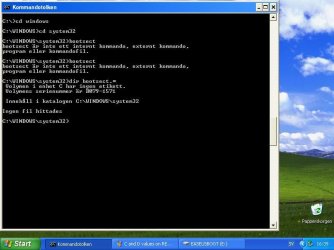
Here´s the screenshot, I have an unpleasant that feeling I´m out of the way and am lost now , am not sure what you mean by the above Dir bootsect.*


Bootsect problem screen shot.JPG
 

My Computer My Computer

At a glance

Windows 7 Home Premium
OS
Windows 7 Home Premium
In windows explorer you don't see extensions like xls, doc, exe etc!!! Unless you enable it.
Do it in command prompt!!

Code:
C:
CD \windows\system32
dir bootsect
 

My Computer My Computer

At a glance

Microsoft Windows 7 Home Premium 64-bits 7601...Intel(R) Core(TM) i3 CPU M 370 @ 2.40GHz4,00 GBATI Mobility Radeon HD 5400 Series
Computer type
Laptop
Computer Manufacturer/Model Number
ACER ASPIRE 5742G
OS
Microsoft Windows 7 Home Premium 64-bits 7601 Multiprocessor Free Service Pack 1
CPU
Intel(R) Core(TM) i3 CPU M 370 @ 2.40GHz
Motherboard
Acer Aspire 5742G
Memory
4,00 GB
Graphics Card(s)
ATI Mobility Radeon HD 5400 Series
Sound Card
(1) AMD High Definition Audio Device (2) Realtek High Defi
Screen Resolution
1366 x 768 x 32 bits (4294967296 colors) @ 60 Hz
Hard Drives
WDC WD5000BEVT-22ZAT0

My Computer My Computer

At a glance

Microsoft Windows 7 Home Premium 64-bits 7601...Intel(R) Core(TM) i3 CPU M 370 @ 2.40GHz4,00 GBATI Mobility Radeon HD 5400 Series
Computer type
Laptop
Computer Manufacturer/Model Number
ACER ASPIRE 5742G
OS
Microsoft Windows 7 Home Premium 64-bits 7601 Multiprocessor Free Service Pack 1
CPU
Intel(R) Core(TM) i3 CPU M 370 @ 2.40GHz
Motherboard
Acer Aspire 5742G
Memory
4,00 GB
Graphics Card(s)
ATI Mobility Radeon HD 5400 Series
Sound Card
(1) AMD High Definition Audio Device (2) Realtek High Defi
Screen Resolution
1366 x 768 x 32 bits (4294967296 colors) @ 60 Hz
Hard Drives
WDC WD5000BEVT-22ZAT0
Code:
dir/s c:\bootsect
dir/s d:\bootsect
Where the heck did you place it?
You did by using usb stick? Do it again
 

My Computer My Computer

At a glance

Microsoft Windows 7 Home Premium 64-bits 7601...Intel(R) Core(TM) i3 CPU M 370 @ 2.40GHz4,00 GBATI Mobility Radeon HD 5400 Series
Computer type
Laptop
Computer Manufacturer/Model Number
ACER ASPIRE 5742G
OS
Microsoft Windows 7 Home Premium 64-bits 7601 Multiprocessor Free Service Pack 1
CPU
Intel(R) Core(TM) i3 CPU M 370 @ 2.40GHz
Motherboard
Acer Aspire 5742G
Memory
4,00 GB
Graphics Card(s)
ATI Mobility Radeon HD 5400 Series
Sound Card
(1) AMD High Definition Audio Device (2) Realtek High Defi
Screen Resolution
1366 x 768 x 32 bits (4294967296 colors) @ 60 Hz
Hard Drives
WDC WD5000BEVT-22ZAT0
sure you're in c:\windows\system32 on winxp?

Dir bootsect.*

what is the exact name and size?


Here´s the screenshot, I have an unpleasant that feeling I´m out of the way and am lost now , am not sure what you mean by the above Dir bootsect.*


View attachment 228041


What confuses me tremendously, is that when I unzip the downloaded file Bootsect7600x86 I get a directory bootsect, opening that I just seee "bootsect" (but no ending ."exe - you wrote there would be an exe file after unzipping), the file size is 101kb.
 

My Computer My Computer

At a glance

Windows 7 Home Premium
OS
Windows 7 Home Premium
Once again... show me bootsect
Put it in some folder (most ideal would be windows\system32) and show me that's there!
 

My Computer My Computer

At a glance

Microsoft Windows 7 Home Premium 64-bits 7601...Intel(R) Core(TM) i3 CPU M 370 @ 2.40GHz4,00 GBATI Mobility Radeon HD 5400 Series
Computer type
Laptop
Computer Manufacturer/Model Number
ACER ASPIRE 5742G
OS
Microsoft Windows 7 Home Premium 64-bits 7601 Multiprocessor Free Service Pack 1
CPU
Intel(R) Core(TM) i3 CPU M 370 @ 2.40GHz
Motherboard
Acer Aspire 5742G
Memory
4,00 GB
Graphics Card(s)
ATI Mobility Radeon HD 5400 Series
Sound Card
(1) AMD High Definition Audio Device (2) Realtek High Defi
Screen Resolution
1366 x 768 x 32 bits (4294967296 colors) @ 60 Hz
Hard Drives
WDC WD5000BEVT-22ZAT0
Once again... show me bootsect
Put it in some folder (most ideal would be windows\system32) and show me that's there!

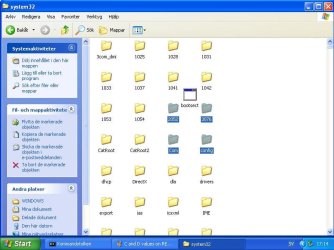
I am afraid I completely misunderstood the first part of your instruction in #82, I thought it meant working with the command line. This was partly due to my incompetence, partrly due to the fact that I mistook explorer for command prompt due to language confusion.

Now I put the Bootsect program in the system 32 folder as you can see on the screnshot and then I´ll continue with the second part of your instruction in #82 - now (hopefully correctly?) working with the command line.


Bottsect in system32 folder.JPG
 

My Computer My Computer

At a glance

Windows 7 Home Premium
OS
Windows 7 Home Premium
Download this bootsect7600x86.zip
Open that zip file. inside is an exe file. Put that exe file in C:\windows\system32 on winxp system

Tell me when done.
When done:
close windows explorer and close all open files on D (if any).

in command prompt:
Code:
bootsect/nt60  D:  /force
bootsect/nt60  D:  /force  /mbr

Both successfull?
This puts the win7 MBR on physical disk. First command updates the "volume bootsector" of D, so it loads bootmgr (instead of winxp ntldr).

At long last, both succesfull!
 

My Computer My Computer

At a glance

Windows 7 Home Premium
OS
Windows 7 Home Premium
Once again... show me bootsect
Put it in some folder (most ideal would be windows\system32) and show me that's there!

I am afraid I completely misunderstood the first part of your instruction in #82, I thought it meant working with the command line. This was partly due to my incompetence, partrly due to the fact that I mistook explorer for command prompt due to language confusion.

Now I put the Bootsect program in the system 32 folder as you can see on the screnshot and then I´ll continue with the second part of your instruction in #82 - now (hopefully correctly?) working with the command line.


View attachment 228045
I hope it's the system32 folder located within C:\windows (can't see it). And I hope you dragged it and dropped it in system32 (and not on antoher folder inside). The icon shows a bat, exe, or com file. Most likely the real name is bootsect.exe of course
 

My Computer My Computer

At a glance

Microsoft Windows 7 Home Premium 64-bits 7601...Intel(R) Core(TM) i3 CPU M 370 @ 2.40GHz4,00 GBATI Mobility Radeon HD 5400 Series
Computer type
Laptop
Computer Manufacturer/Model Number
ACER ASPIRE 5742G
OS
Microsoft Windows 7 Home Premium 64-bits 7601 Multiprocessor Free Service Pack 1
CPU
Intel(R) Core(TM) i3 CPU M 370 @ 2.40GHz
Motherboard
Acer Aspire 5742G
Memory
4,00 GB
Graphics Card(s)
ATI Mobility Radeon HD 5400 Series
Sound Card
(1) AMD High Definition Audio Device (2) Realtek High Defi
Screen Resolution
1366 x 768 x 32 bits (4294967296 colors) @ 60 Hz
Hard Drives
WDC WD5000BEVT-22ZAT0
Once again... show me bootsect
Put it in some folder (most ideal would be windows\system32) and show me that's there!

I am afraid I completely misunderstood the first part of your instruction in #82, I thought it meant working with the command line. This was partly due to my incompetence, partrly due to the fact that I mistook explorer for command prompt due to language confusion.

Now I put the Bootsect program in the system 32 folder as you can see on the screnshot and then I´ll continue with the second part of your instruction in #82 - now (hopefully correctly?) working with the command line.


View attachment 228045
I hope it's the system32 folder located within C:\windows (can't see it). And I hope you dragged it and dropped it in system32 (and not on antoher folder inside). The icon shows a bat, exe, or com file. Most likely the real name is bootsect.exe of course


Yes, it was in C:\WINDOWS and no, it was not dragged inside another folder. Anyway, the second part of your instruction in #82 was carried out succesfully. Now I must leave home for about 40 minutes, so I cannot reply to aqny questions from you during this time.
 

My Computer My Computer

At a glance

Windows 7 Home Premium
OS
Windows 7 Home Premium
Code:
bootsect/nt60 D: /force
bootsect/nt60 D: /force /mbr

both succesfull? If so try to boot normally. Does win7 boot up? If so:

Do this in WIN7 every time you modify the start point of partition (so also now)!

http://www.sevenforums.com/tutorials/330-system-protection-turn-off.html
Disable it for drives, even ghost drives listed there. Then enable it on C drive as described in point 7.
7. To Turn On System Protection for System Settings and Previous Versions of Files
You can also create a manual restore point in same dialog. Do it after adjusting settings.

-----------------
http://www.sevenforums.com/tutorials/11733-disk-defragmenter-open-use.html
On disk defragment page you can set a schedule. Modify it, because most likely is out of balance due to ghost drives.
 

My Computer My Computer

At a glance

Microsoft Windows 7 Home Premium 64-bits 7601...Intel(R) Core(TM) i3 CPU M 370 @ 2.40GHz4,00 GBATI Mobility Radeon HD 5400 Series
Computer type
Laptop
Computer Manufacturer/Model Number
ACER ASPIRE 5742G
OS
Microsoft Windows 7 Home Premium 64-bits 7601 Multiprocessor Free Service Pack 1
CPU
Intel(R) Core(TM) i3 CPU M 370 @ 2.40GHz
Motherboard
Acer Aspire 5742G
Memory
4,00 GB
Graphics Card(s)
ATI Mobility Radeon HD 5400 Series
Sound Card
(1) AMD High Definition Audio Device (2) Realtek High Defi
Screen Resolution
1366 x 768 x 32 bits (4294967296 colors) @ 60 Hz
Hard Drives
WDC WD5000BEVT-22ZAT0
Code:
bootsect/nt60 D: /force
bootsect/nt60 D: /force /mbr

both succesfull? If so try to boot normally. Does win7 boot up? If so:

Do this in WIN7 every time you modify the start point of partition (so also now)!

http://www.sevenforums.com/tutorials/330-system-protection-turn-off.html
Disable it for drives, even ghost drives listed there. Then enable it on C drive as described in point 7.
7. To Turn On System Protection for System Settings and Previous Versions of Files
You can also create a manual restore point in same dialog. Do it after adjusting settings.

-----------------
http://www.sevenforums.com/tutorials/11733-disk-defragmenter-open-use.html
On disk defragment page you can set a schedule. Modify it, because most likely is out of balance due to ghost drives.


At long last and greatly thanks to your knowledge and above all patience with me, I have my WIN7 back!! The PC seems to be a little slower than before, but that does not bother me. I´ll try to get rid of the immense bloatware that came with the PC. All functions work though and I could already salvage and save separately some of very important data. I´m very obliged to you and I feel bad that I can´t reciprocate in any way.
By the way, what happened with the WIN XP that was on the computer before? Was it deleted or are its files taking space somewhere? The system restore function does not work of course, because the restore partition is no longer there, so I´ll probably start making systemp images on DVD to make sure I do not get in the same fix as this time. In the long run, I may even do a clean install of WIN7 as per your advice in #39, if there is a way to transfer some of the useful software (like e. g. Microsoft Office 2007) that came with this computer and its WIN7. Anyway, thanks a lot!
 

My Computer My Computer

At a glance

Windows 7 Home Premium
OS
Windows 7 Home Premium
Stop we're not ready yet!! Did you do what is written in #97 . Do it
 

My Computer My Computer

At a glance

Microsoft Windows 7 Home Premium 64-bits 7601...Intel(R) Core(TM) i3 CPU M 370 @ 2.40GHz4,00 GBATI Mobility Radeon HD 5400 Series
Computer type
Laptop
Computer Manufacturer/Model Number
ACER ASPIRE 5742G
OS
Microsoft Windows 7 Home Premium 64-bits 7601 Multiprocessor Free Service Pack 1
CPU
Intel(R) Core(TM) i3 CPU M 370 @ 2.40GHz
Motherboard
Acer Aspire 5742G
Memory
4,00 GB
Graphics Card(s)
ATI Mobility Radeon HD 5400 Series
Sound Card
(1) AMD High Definition Audio Device (2) Realtek High Defi
Screen Resolution
1366 x 768 x 32 bits (4294967296 colors) @ 60 Hz
Hard Drives
WDC WD5000BEVT-22ZAT0

My Computer My Computer

At a glance

Microsoft Windows 7 Home Premium 64-bits 7601...Intel(R) Core(TM) i3 CPU M 370 @ 2.40GHz4,00 GBATI Mobility Radeon HD 5400 Series
Computer type
Laptop
Computer Manufacturer/Model Number
ACER ASPIRE 5742G
OS
Microsoft Windows 7 Home Premium 64-bits 7601 Multiprocessor Free Service Pack 1
CPU
Intel(R) Core(TM) i3 CPU M 370 @ 2.40GHz
Motherboard
Acer Aspire 5742G
Memory
4,00 GB
Graphics Card(s)
ATI Mobility Radeon HD 5400 Series
Sound Card
(1) AMD High Definition Audio Device (2) Realtek High Defi
Screen Resolution
1366 x 768 x 32 bits (4294967296 colors) @ 60 Hz
Hard Drives
WDC WD5000BEVT-22ZAT0
Back
Top