
This problem seems to be quite ubiquitous, however if I may beg an ear, please hear me out. Perhaps I can help others, even if I cannot be helped.
I would hate to start yet another thread on this problem as I have noticed since the last 3-4 weeks of research on the issue has lead me to hundreds of forums, with dozens of soultions. All of which have not been successful on my side of the screen unfortunately. I can only access the internet through SafeMode with Networking, or running a different operating system like Ubuntu or XP.
I'd imagine windows seven forums has been flooded with a great deal of new members with this particular issue, i myself joined today for this same problem and many windows 7 users seems to be having aswell (not blaming windows 7). Its quite embarrassing for me since I just started a new job in the IT field, but I'm still a newbie tho learning from the ground up.
Anyways, this problem (connected to network, with a good or strong signal - BUT! no internet access?) in the bottom right corner of the task bar. All my solutions listed below, I've found as of yet, have me running in an endless pithagorian spiral to nowhere.
I will now attempt to list my work for the past month on this issue. I may miss a few suggestions, but I am confident I have learned every possible solution with no luck, but I suspect human error and/or incompetence on my part... Here we go.
Step # Checklist - possible procedures to rule out or re-attempt. OK! = looks good.
1. Check if Network adapter in device manager is being detected and working properly, and drivers up to date. - OK!
2. Perform mundane common tasks like reset modem, wait 10 seconds, etc... - OK!
3. Investigate possible Anti-Virus conflictions - I have no anti-virus and no virus on my laptop to my knowledge.(details in conlusion) - seems OK!
4. Have a trained technitian run ComboFix diagnostics - OK!
5. Re-Image hard-drive partition with fresh install of Windows 7 Home x64 -OK!
6. Install Updates, excluding Bing, Bonjour services. - OK!
7. Repeat step 5 & 8, LOL!
8. Download, install and Run MalwareBytes, SUPER Aniti-Spyware. - OK!
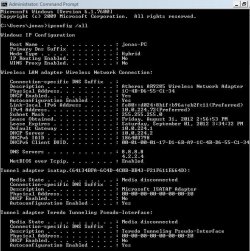
9. Run CMD as Administrator, initiate ipconfig - OK! Initiate ipconfig /all(will provide attachments for inpection below) - OK! Initiate ipconfig /flushdns -OK!
10. Initiate ping - times out in normal mode with 100% loss. <<
11. Open DNS settings, apply static IP - This doesn't work in normal mode, I suspect it may be something to do with DNS, I am currently stuck at this step since it seems to be the issue according to those most experienced users. However nothing I have tried seems to have worked, either due to my own incompetence or its not the issue at all.
12. Eliminate services and processes which could possibly interfer with internet connectivity, I have not really bothered with this step at this point. As I have a fresh install of Windows 7, with no updates, no programs(exept MalwareBytes andSUPER Spy-ware).
Conclusion.
I left out many other steps I was impatient in collecting and documenting the results thereof, I might be reaching my word count cap for this post if there is one. I wanted to start this thread to help people who may be in the same situation as myself. The ussual suspects, third party software, anti-virus, etc... have been rules out besides some confusion and insecurities in my understanding of DNS.
Hope this wasn't too long, messy and unspecific. Any help would be greatly appreciated, thanks for your assistance. Hopefully this gets somewhere.
I would hate to start yet another thread on this problem as I have noticed since the last 3-4 weeks of research on the issue has lead me to hundreds of forums, with dozens of soultions. All of which have not been successful on my side of the screen unfortunately. I can only access the internet through SafeMode with Networking, or running a different operating system like Ubuntu or XP.
I'd imagine windows seven forums has been flooded with a great deal of new members with this particular issue, i myself joined today for this same problem and many windows 7 users seems to be having aswell (not blaming windows 7). Its quite embarrassing for me since I just started a new job in the IT field, but I'm still a newbie tho learning from the ground up.
Anyways, this problem (connected to network, with a good or strong signal - BUT! no internet access?) in the bottom right corner of the task bar. All my solutions listed below, I've found as of yet, have me running in an endless pithagorian spiral to nowhere.
I will now attempt to list my work for the past month on this issue. I may miss a few suggestions, but I am confident I have learned every possible solution with no luck, but I suspect human error and/or incompetence on my part... Here we go.
Step # Checklist - possible procedures to rule out or re-attempt. OK! = looks good.
1. Check if Network adapter in device manager is being detected and working properly, and drivers up to date. - OK!
2. Perform mundane common tasks like reset modem, wait 10 seconds, etc... - OK!
3. Investigate possible Anti-Virus conflictions - I have no anti-virus and no virus on my laptop to my knowledge.(details in conlusion) - seems OK!
4. Have a trained technitian run ComboFix diagnostics - OK!
5. Re-Image hard-drive partition with fresh install of Windows 7 Home x64 -OK!
6. Install Updates, excluding Bing, Bonjour services. - OK!
7. Repeat step 5 & 8, LOL!
8. Download, install and Run MalwareBytes, SUPER Aniti-Spyware. - OK!
9. Run CMD as Administrator, initiate ipconfig - OK! Initiate ipconfig /all(will provide attachments for inpection below) - OK! Initiate ipconfig /flushdns -OK!
10. Initiate ping - times out in normal mode with 100% loss. <<
11. Open DNS settings, apply static IP - This doesn't work in normal mode, I suspect it may be something to do with DNS, I am currently stuck at this step since it seems to be the issue according to those most experienced users. However nothing I have tried seems to have worked, either due to my own incompetence or its not the issue at all.
12. Eliminate services and processes which could possibly interfer with internet connectivity, I have not really bothered with this step at this point. As I have a fresh install of Windows 7, with no updates, no programs(exept MalwareBytes andSUPER Spy-ware).
Conclusion.
I left out many other steps I was impatient in collecting and documenting the results thereof, I might be reaching my word count cap for this post if there is one. I wanted to start this thread to help people who may be in the same situation as myself. The ussual suspects, third party software, anti-virus, etc... have been rules out besides some confusion and insecurities in my understanding of DNS.
Hope this wasn't too long, messy and unspecific. Any help would be greatly appreciated, thanks for your assistance. Hopefully this gets somewhere.
Last edited:
My Computer
At a glance
Windows 7 Home Premium x64Intel(R) Core(TM) i3 2.13GHz, 2Installed Physical Memory (RAM) 4.00 GBStandard VGA Graphics Adapter
- Computer Manufacturer/Model Number
- System Manufacturer ASUSTeK Computer Inc. U50F
- OS
- Windows 7 Home Premium x64
- CPU
- Intel(R) Core(TM) i3 2.13GHz, 2
- Memory
- Installed Physical Memory (RAM) 4.00 GB
- Graphics Card(s)
- Standard VGA Graphics Adapter
- Sound Card
- Microsoft High Definition Audio Device
- Monitor(s) Displays
- Standard VGA Graphics Adapter
- Hard Drives
- 1 NTFS 500GB HDD

