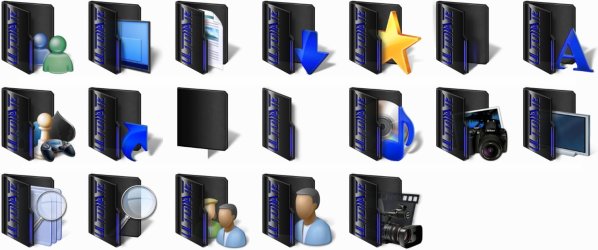
Custom Themes, Icons and Start Buttons.

Status
Not open for further replies.
Yeah I had the same problem as well when I started doing it, I found out I was saving them in the wrong format, you need to save them as a 32bit BMP, I was saving them as 24bit BMP and that's the same problem I was having.

Here you go I saved it in the correct format.

View attachment 2-6801-1033.bmp
 

My Computer

Computer Manufacturer/Model Number
Home Brew
OS
Windows 7 Ultimate Vista Ultimate x64
CPU
Core 2 Duo E8500 3.16Ghz @ 3.8Ghz
Motherboard
eVGA 750i FTW
Memory
2x2Gigs Patriot PC2-6400 LL
Graphics Card(s)
Inno3D GeForce GTX260 216 SP
Monitor(s) Displays
ASUS VW222U 22" 2ms Response time
Screen Resolution
1680x1050
Hard Drives
SATA 150GB
SATA II 250GB
USB IDE 750GB Ext.
PSU
HYTEC 600W & Thermaltake 650W Toughpower Power Exp
Case
Thermaltake Armor LCS (Liquid Cooling System)
Cooling
Liquid Cooling System
Keyboard
Logitech G15 Gaming Keyboard
Mouse
Logitech G9 Gaming Mouse
oh thanks so much, i'll try that out! can you give +rep to someone if you did not originally post a question thread?
 

My Computer

OS
Windows 7 RC build 7100
Work so far. :)

2009-08-04_121541.jpg
 

My Computer

Computer Manufacturer/Model Number
Home Brew
OS
Windows 7 Ultimate Vista Ultimate x64
CPU
Core 2 Duo E8500 3.16Ghz @ 3.8Ghz
Motherboard
eVGA 750i FTW
Memory
2x2Gigs Patriot PC2-6400 LL
Graphics Card(s)
Inno3D GeForce GTX260 216 SP
Monitor(s) Displays
ASUS VW222U 22" 2ms Response time
Screen Resolution
1680x1050
Hard Drives
SATA 150GB
SATA II 250GB
USB IDE 750GB Ext.
PSU
HYTEC 600W & Thermaltake 650W Toughpower Power Exp
Case
Thermaltake Armor LCS (Liquid Cooling System)
Cooling
Liquid Cooling System
Keyboard
Logitech G15 Gaming Keyboard
Mouse
Logitech G9 Gaming Mouse
That works so much better! thanks again! :)
 

My Computer

OS
Windows 7 RC build 7100
Should I post explorer.exe for people to use or is that pushing the forum rules? It would certainly be build specific though
 

My Computer

OS
Windows 7 RC build 7100
Should I post explorer.exe for people to use or is that pushing the forum rules? It would certainly be build specific though
I don' think it is against the rules but their is alot of variables here that could go wrong...explorer is your File Manager and I would never trust one (not saying you did anything to it) modified unless it was modified by myself
 

My Computer

Computer Manufacturer/Model Number
Compal JFT02 (Custom Build Laptop)
OS
Windows 7 Home Premium x64 - Mac OS X 10.6.4 x64
CPU
Intel Core 2 Duo T9300 2.5 GHz
Motherboard
JFT02
Memory
4GB Kingston DDR2-800
Graphics Card(s)
NVIDIA Geforce 8600M GT (512MB Model)
Sound Card
Realtek HD Audio
Monitor(s) Displays
WUXGA Standard Laptop Display
Screen Resolution
1680*1050
Hard Drives
Toshiba 320GB 5400RPM Laptop HD
PSU
Standard Laptop Power Supply
Case
Standard Laptop Case
Cooling
Standard Laptop Cooling
Keyboard
Standard Laptop 105 Key-Keyboard
Mouse
Synaptics Touchpad
Internet Speed
Verizion Online DSL 3360/864 kbs (dl/up)
that's probably a good asssumption to make; the restorator program itself being trialware might have inserted code into the executable anyway.

It seems like a solid program though and edits 64 bit resources. Think it would be worth $80 though? not sure about spending that kind of money on a resource editing tool
 

My Computer

OS
Windows 7 RC build 7100
Just experimenting with some new ideas and wanted to get some opinions.

View attachment 21232

I really like the Ultimate folder without the blue on it. That would fit into dark themes nicely.

I installed the black icons, and now my Win7 looks so much better. Thanks Grim and Generator!
 

My Computer

Computer type
PC/Desktop
Computer Manufacturer/Model Number
SuperBeast
OS
Windows 10 Tech Preview 9926 x64
CPU
AMD FX-8350
Motherboard
Gigabyte GA-990FXA-UD3
Memory
16GB DDR3 1333
Graphics Card(s)
Asus R9 290 DirectCU II OC, Gigabyte Windforce R9 290 OC
Sound Card
Integrated w/ Creative A250 2.1 speakers
Monitor(s) Displays
Main: Asus VN289H 28" Secondary: Acer G246HL 24"
Screen Resolution
1920x1080
Hard Drives
128 GB SanDisk Ultra Plus (Windows drive)

240 GB Crucial M500 SSD (Games drive)

1 TB WDC WD10EACS 7200RPM HDD (Data drive)

2 TB Seagate Expansion Desktop external HDD (Backup drive)
PSU
900w Antec HCG-900
Case
Raidmax Agusta Full ATX
Cooling
Corsair H80
Keyboard
Cooler Master Devastator MB24
Mouse
Cooler Master Devastator MS2K 1000/1600/2000 DPI
Internet Speed
100Mbps cable
Antivirus
Avast!
Browser
Chrome
hi its me again i have aproblem while i'm trying to oepn explore.exe i get this error mesege
capturew.jpg


when i clcik on yes i get this messege this time even i tried says no still same error

41762996.jpg


then click ok again get final messege

capture2x.jpg


any idea?

i use windows 7 ultimate 64 bit by the way>
 

My Computer

Computer Manufacturer/Model Number
Xpredator
OS
windows 7 Ultimate
CPU
i7 3770k 3.50 GHz
Motherboard
Asus Maximus V formula
Memory
G.Skills 8GB DDR 3 1866 MHz
Graphics Card(s)
Nvidia Asus GTX 680
Sound Card
Sounblaster 3D
Monitor(s) Displays
Achieva ShiMian IPSMS
Screen Resolution
2560x1440p
Hard Drives
120 GB SSD Gforce / 3 tb seagate 7200 rpm
PSU
Seasonic 760W ATX 80+ Gold
Case
Xpredator Black Edition
Cooling
Corsair h100
Keyboard
Cybrog v7
Mouse
Cyborg R.A.T 9
Internet Speed
20 mbite

My Computer

Computer Manufacturer/Model Number
Handy manny
OS
Windows 7 (x64)
CPU
i7 870
Motherboard
Evga P55 FTW
Memory
G.Skill Trident (F3-17066CL9D-4GBTDS 2x2GB) - 2133MHz
Graphics Card(s)
Evga GTX 460 EE 1GB
Sound Card
On Board
Monitor(s) Displays
Samsung P2350
Screen Resolution
1920x1080
Hard Drives
1 x 64GB G-Skill Falcon SSD
1 x 60GB Corsair Force Series SSD
1 x 1TB WD Caviar Black
2 x 640GB WD Caviar Black
1 x 1TB Samsung Spinpoint F3
PSU
Corsair 620w
Case
Corsair 800D
Cooling
Corsair H50
Keyboard
Logitech MX5500 Revolution
Mouse
Logitech MX5500 Revolution
Internet Speed
http://www.speedtest.net/result/939062765.png
Other Info
http://www.sevenforums.com/overclocking-case-mods/104136-show-us-your-rig-2-a-4.html#post937213
Alright Mr. GRiM your icons look great but I have a small issue...I installed your icons but it didn't replace the explorer icon:confused:...
 

My Computer

Computer Manufacturer/Model Number
Compal JFT02 (Custom Build Laptop)
OS
Windows 7 Home Premium x64 - Mac OS X 10.6.4 x64
CPU
Intel Core 2 Duo T9300 2.5 GHz
Motherboard
JFT02
Memory
4GB Kingston DDR2-800
Graphics Card(s)
NVIDIA Geforce 8600M GT (512MB Model)
Sound Card
Realtek HD Audio
Monitor(s) Displays
WUXGA Standard Laptop Display
Screen Resolution
1680*1050
Hard Drives
Toshiba 320GB 5400RPM Laptop HD
PSU
Standard Laptop Power Supply
Case
Standard Laptop Case
Cooling
Standard Laptop Cooling
Keyboard
Standard Laptop 105 Key-Keyboard
Mouse
Synaptics Touchpad
Internet Speed
Verizion Online DSL 3360/864 kbs (dl/up)
Thanks for this its excellent. Mr Grim how did you save as 32bit Bmp I cant seem to do it!
 

My Computer

OS
Win 7
It's included in the pack but the actual icon on the taskbar is located in explorer.exe so you need to change it manually.

To change it manually you will need to place an explorer shortcut on the desktop and right click on it and customize the icon with the new one in the imageres.dll, once you have the new icon on the desktop shortcut, unpin the old one and pin the new shortcut, job done.
 

My Computer

Computer Manufacturer/Model Number
Home Brew
OS
Windows 7 Ultimate Vista Ultimate x64
CPU
Core 2 Duo E8500 3.16Ghz @ 3.8Ghz
Motherboard
eVGA 750i FTW
Memory
2x2Gigs Patriot PC2-6400 LL
Graphics Card(s)
Inno3D GeForce GTX260 216 SP
Monitor(s) Displays
ASUS VW222U 22" 2ms Response time
Screen Resolution
1680x1050
Hard Drives
SATA 150GB
SATA II 250GB
USB IDE 750GB Ext.
PSU
HYTEC 600W & Thermaltake 650W Toughpower Power Exp
Case
Thermaltake Armor LCS (Liquid Cooling System)
Cooling
Liquid Cooling System
Keyboard
Logitech G15 Gaming Keyboard
Mouse
Logitech G9 Gaming Mouse
Thanks for this its excellent. Mr Grim how did you save as 32bit Bmp I cant seem to do it!

I had to use Photoshop to do it.

If you want one changed then upload it and I will save it for you as 32bit.
 

My Computer

Computer Manufacturer/Model Number
Home Brew
OS
Windows 7 Ultimate Vista Ultimate x64
CPU
Core 2 Duo E8500 3.16Ghz @ 3.8Ghz
Motherboard
eVGA 750i FTW
Memory
2x2Gigs Patriot PC2-6400 LL
Graphics Card(s)
Inno3D GeForce GTX260 216 SP
Monitor(s) Displays
ASUS VW222U 22" 2ms Response time
Screen Resolution
1680x1050
Hard Drives
SATA 150GB
SATA II 250GB
USB IDE 750GB Ext.
PSU
HYTEC 600W & Thermaltake 650W Toughpower Power Exp
Case
Thermaltake Armor LCS (Liquid Cooling System)
Cooling
Liquid Cooling System
Keyboard
Logitech G15 Gaming Keyboard
Mouse
Logitech G9 Gaming Mouse
It's included in the pack but the actual icon on the taskbar is located in explorer.exe so you need to change it manually.

To change it manually you will need to place an explorer shortcut on the desktop and right click on it and customize the icon with the new one in the imageres.dll, once you have the new icon on the desktop shortcut, unpin the old one and pin the new shortcut, job done.
I just realized about a minute or so ago that I could do that...the fix worked easily...maybe an addition could be made to the installer to automate the process or am I the only one that has ran into the problem?
 

My Computer

Computer Manufacturer/Model Number
Compal JFT02 (Custom Build Laptop)
OS
Windows 7 Home Premium x64 - Mac OS X 10.6.4 x64
CPU
Intel Core 2 Duo T9300 2.5 GHz
Motherboard
JFT02
Memory
4GB Kingston DDR2-800
Graphics Card(s)
NVIDIA Geforce 8600M GT (512MB Model)
Sound Card
Realtek HD Audio
Monitor(s) Displays
WUXGA Standard Laptop Display
Screen Resolution
1680*1050
Hard Drives
Toshiba 320GB 5400RPM Laptop HD
PSU
Standard Laptop Power Supply
Case
Standard Laptop Case
Cooling
Standard Laptop Cooling
Keyboard
Standard Laptop 105 Key-Keyboard
Mouse
Synaptics Touchpad
Internet Speed
Verizion Online DSL 3360/864 kbs (dl/up)
ah weird.. when I change the format to 32 bit the save as dbox in Photoshop only allows me to choose a limited number of file formats such as exr..no bmp thanks for the offer!
 

Attachments

My Computer

OS
Win 7
ah weird.. when I change the format to 32 bit the save as dbox in Photoshop only allows me to choose a limited number of file formats such as exr..no bmp thanks for the offer!

That ones already the right format.
 

My Computer

Computer Manufacturer/Model Number
Home Brew
OS
Windows 7 Ultimate Vista Ultimate x64
CPU
Core 2 Duo E8500 3.16Ghz @ 3.8Ghz
Motherboard
eVGA 750i FTW
Memory
2x2Gigs Patriot PC2-6400 LL
Graphics Card(s)
Inno3D GeForce GTX260 216 SP
Monitor(s) Displays
ASUS VW222U 22" 2ms Response time
Screen Resolution
1680x1050
Hard Drives
SATA 150GB
SATA II 250GB
USB IDE 750GB Ext.
PSU
HYTEC 600W & Thermaltake 650W Toughpower Power Exp
Case
Thermaltake Armor LCS (Liquid Cooling System)
Cooling
Liquid Cooling System
Keyboard
Logitech G15 Gaming Keyboard
Mouse
Logitech G9 Gaming Mouse
hmm dont know how I did that sorry for wasting your time..
 

My Computer

OS
Win 7
I just realized about a minute or so ago that I could do that...the fix worked easily...maybe an addition could be made to the installer to automate the process or am I the only one that has ran into the problem?

No, I ran into that problem too. Thanks for the explanation Grim!
 

My Computer

Computer type
PC/Desktop
Computer Manufacturer/Model Number
SuperBeast
OS
Windows 10 Tech Preview 9926 x64
CPU
AMD FX-8350
Motherboard
Gigabyte GA-990FXA-UD3
Memory
16GB DDR3 1333
Graphics Card(s)
Asus R9 290 DirectCU II OC, Gigabyte Windforce R9 290 OC
Sound Card
Integrated w/ Creative A250 2.1 speakers
Monitor(s) Displays
Main: Asus VN289H 28" Secondary: Acer G246HL 24"
Screen Resolution
1920x1080
Hard Drives
128 GB SanDisk Ultra Plus (Windows drive)

240 GB Crucial M500 SSD (Games drive)

1 TB WDC WD10EACS 7200RPM HDD (Data drive)

2 TB Seagate Expansion Desktop external HDD (Backup drive)
PSU
900w Antec HCG-900
Case
Raidmax Agusta Full ATX
Cooling
Corsair H80
Keyboard
Cooler Master Devastator MB24
Mouse
Cooler Master Devastator MS2K 1000/1600/2000 DPI
Internet Speed
100Mbps cable
Antivirus
Avast!
Browser
Chrome
i use windows 7 ultimate 64 bit by the way>

thats your problem, you cant edit a 64 bit resource with Resource Tuner at this point.

Try Restorator or similar program
 

My Computer

OS
Windows 7 RC build 7100
Status
Not open for further replies.
Back
Top