Hidden Files and Folders - Show or Hide

How to Show or Hide All Hidden Files, Folders, and Drives in Vista, Windows 7, and Windows 8

   Information
This tutorial will show you how to have all hidden files, folders, and drives to show or don't show in Windows 7. These are set to be hidden by default in Vista, Windows 7, and Windows 8.
   Note
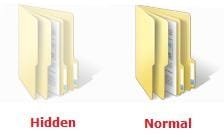
When you have these hidden files, folders, and drives set to show, the icon shows as transparent to indicate that they are set as hidden.

EXAMPLE: A Hidden and Normal Folder Example.jpg
EXAMPLE: A Hidden Protected Operating System File Protected_System_File.jpg



OPTION ONE

To Hide or Show Hidden Files using Folder Options


NOTE: This option only affects the current user. 1. Open Folder Options.

2. To Show Hidden Files, Folders, and Drives
NOTE: This will also allow hidden drives to show despite if Hide empty drives in the Computer folder is checked. A) Select (dot) Show hidden files, folders, and drives. (See screenshot below)
B) Click on the Apply button. Folder_Options-1.jpg
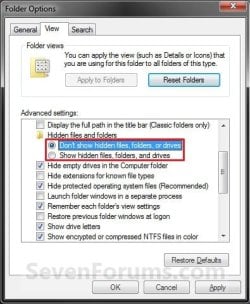
3. To Don't Show Hidden Files, Folders, and Drives A) Select (dot) Don't Show hidden files, folders, and drives. (See screenshot above)

B) Click on the Apply button.
4. To Show Protected Operating System Files
NOTE: For example, desktop.ini files. A) If you have not already, do step 2.

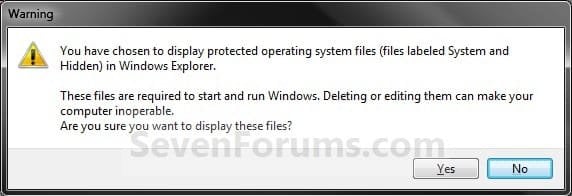
B) Uncheck the Hide protected operating system files box. (See screenshot below step 5B)

C) Click/tap on Yes to confirm, and go to step 6 below. (See screenshot below) Confirm.jpg5. To Hide Protected Operating System Files A) Check the Hide protected operating system files box, and go to step 6 below. (See screenshot below) Folder_Options-2.jpg
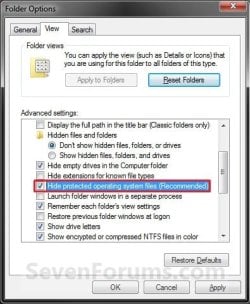
6. Click/tap on OK. (See screenshot above)


OPTION TWO

To Hide or Show Hidden Files using a BAT File Download


NOTE: This option only affects the current user. 1. To Show Hidden Files, Folders, and Drives
NOTE: This will also allow hidden drives to show despite if Hide empty drives in the Computer folder is checked. A) Click on the Download button below to download the file below. Show_hidden_files_folders_and_drives.bat


Download


B) Go to step 5.
2. To Don't Show Hidden Files, Folders, and Drives A) Click on the Download button below to download the file below. Don't_show_hidden_files_folders_and_drives.bat

Download


B) Go to step 5.
3. To Show Protected Operating System Files
NOTE: For example, desktop.ini files. This also applies step 1. A) Click on the Download button below to download the file below. Show_protected_operating_system_files.bat

Download


B) Go to step 5.
4. To Hide Protected Operating System Files A) Click on the Download button below to download the file below. Hide_protected_operating_system_files.bat

Download


5. Save the .bat file to your desktop, and run it.

6. If prompted, click/tap on Run.
NOTE: If you like, you can stop getting the Run prompt by unblocking the downloaded .bat file.

7. You will now notice a command prompt quckly open and close while applying the changes to your registry.

8. When finished, you can delete the downloaded .bat file(s) if you like.


OPTION THREE

To Hide or Show Hidden Files using Registry Editor

1. Open the Start Menu, then type regedit in the search line and press enter.

2. If prompted by UAC, then click on Yes.

3. In regedit, navigate to the location below. (see screenshot below) For Current User Only:
HKEY_CURRENT_USER\Software\Microsoft\Windows\CurrentVersion\Explorer\Advanced

For All Users: (Must be logged in as an administrator to be able to do this option)
HKEY_LOCAL_MACHINE\SOFTWARE\Microsoft\Windows\CurrentVersion\Explorer\Advanced
Reg1.jpg
4. To Show Hidden Files, Folders, and Drives
NOTE: This will also allow hidden drives to show despite if Hide empty drives in the Computer folderis checked. A) In the right pane of Advanced, right click on Hidden and click on Modify. (see screenshot above)

B) Type 1 and click on OK. (see screenshot below) Modify-1.jpg
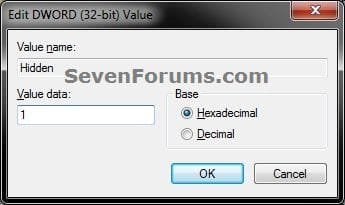
C) Go to step 8.
5. To Don't Show Hidden Files, Folders, and Drives A) In the right pane of Advanced, right click on Hidden and click on Modify. (see screenshot below step 3)

B) Type 0 and click on OK. (see screenshot below step 4B)

C) Go to step 8.
6. To Show Protected Operating System Files
NOTE: For example, desktop.ini files. A) Do step 4.

B) In the right pane of Advanced, right click on ShowSuperHidden and click on Modify. (see screenshot below step 3)

C) Type 1 and click on OK. (see screenshot below step 7B)

D) Go to step 8.
7. To Hide Protected Operating System Files A) In the right pane of Advanced, right click on ShowSuperHidden and click on Modify. (see screenshot below step 3)

B) Type 0 and click on OK. (see screenshot below ) Modify-2.jpg
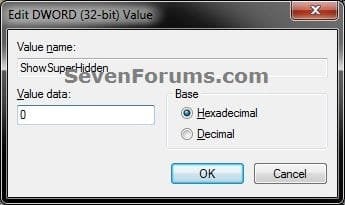
8. Close regedit.

9. Log off and log on, or restart the computer to apply.
That's it,
Shawn


Attachments

Last edited:

My Computer My Computer

At a glance

64-bit Windows 11 Pro for WorkstationsIntel i7-8700K OC'd to 5 GHz64 GB (4x16GB) G.SKILL TridentZ RGB DDR4 3600...ASUS ROG-STRIX-GTX1080TI-O11G-GAMING
Computer type
PC/Desktop
Computer Manufacturer/Model Number
Self built custom
OS
64-bit Windows 11 Pro for Workstations
CPU
Intel i7-8700K OC'd to 5 GHz
Motherboard
ASUS ROG Maximus XI Formula Z390
Memory
64 GB (4x16GB) G.SKILL TridentZ RGB DDR4 3600 MHz
Graphics Card(s)
ASUS ROG-STRIX-GTX1080TI-O11G-GAMING
Sound Card
Integrated
Monitor(s) Displays
2 x Samsung Odyssey G7 27"
Screen Resolution
2560x1440
Hard Drives
1TB Samsung 990 PRO M.2,
4TB Samsung 990 PRO PRO M.2,
TerraMaster F8 SSD Plus NAS
PSU
Seasonic Prime Titanium 850W
Case
Thermaltake Core P3
Cooling
Corsair Hydro H115i
Keyboard
Logitech wireless K800
Mouse
Logitech MX Master 4
Internet Speed
2 Gb/s Download and 100 Mb/s Upload
Antivirus
Malwarebyte Anti-Malware Premium
Browser
Google Chrome
Other Info
Logitech Z625 speaker system,
Logitech BRIO 4K Pro webcam,
HP Color LaserJet Pro MFP M477fdn,
APC SMART-UPS RT 1000 XL - SURT1000XLI,
Galaxy S23 Plus phone
To Brink

thank you very much, I have been searching where to hide the folders. I am using Windows 7 Home Premium and works perfectly as instructions shown.

thanks again


Darren
 

My Computer My Computer

At a glance

Windows 7 Home Premium 64bit
OS
Windows 7 Home Premium 64bit
You're most welcome Darren, and welcome to Seven Forums. :)
 

My Computer My Computer

At a glance

64-bit Windows 11 Pro for WorkstationsIntel i7-8700K OC'd to 5 GHz64 GB (4x16GB) G.SKILL TridentZ RGB DDR4 3600...ASUS ROG-STRIX-GTX1080TI-O11G-GAMING
Computer type
PC/Desktop
Computer Manufacturer/Model Number
Self built custom
OS
64-bit Windows 11 Pro for Workstations
CPU
Intel i7-8700K OC'd to 5 GHz
Motherboard
ASUS ROG Maximus XI Formula Z390
Memory
64 GB (4x16GB) G.SKILL TridentZ RGB DDR4 3600 MHz
Graphics Card(s)
ASUS ROG-STRIX-GTX1080TI-O11G-GAMING
Sound Card
Integrated
Monitor(s) Displays
2 x Samsung Odyssey G7 27"
Screen Resolution
2560x1440
Hard Drives
1TB Samsung 990 PRO M.2,
4TB Samsung 990 PRO PRO M.2,
TerraMaster F8 SSD Plus NAS
PSU
Seasonic Prime Titanium 850W
Case
Thermaltake Core P3
Cooling
Corsair Hydro H115i
Keyboard
Logitech wireless K800
Mouse
Logitech MX Master 4
Internet Speed
2 Gb/s Download and 100 Mb/s Upload
Antivirus
Malwarebyte Anti-Malware Premium
Browser
Google Chrome
Other Info
Logitech Z625 speaker system,
Logitech BRIO 4K Pro webcam,
HP Color LaserJet Pro MFP M477fdn,
APC SMART-UPS RT 1000 XL - SURT1000XLI,
Galaxy S23 Plus phone
Is there a way to change the view settings for a single folder? At least once a week I want to find something in AppData/... and have to change the setting back and forth....
Create a shortcut to it. Then you won't have to show it every time. (I know that question is old, but someone else might be looking for the same thing.)

I find this to be a great option to be able to quickly show and hide hidden files.

http://www.sevenforums.com/tutorials/156518-show-hide-hidden-files-add-context-menu.html
 

My Computer My Computer

At a glance

64-bit Windows 11 Pro for WorkstationsIntel i7-8700K OC'd to 5 GHz64 GB (4x16GB) G.SKILL TridentZ RGB DDR4 3600...ASUS ROG-STRIX-GTX1080TI-O11G-GAMING
Computer type
PC/Desktop
Computer Manufacturer/Model Number
Self built custom
OS
64-bit Windows 11 Pro for Workstations
CPU
Intel i7-8700K OC'd to 5 GHz
Motherboard
ASUS ROG Maximus XI Formula Z390
Memory
64 GB (4x16GB) G.SKILL TridentZ RGB DDR4 3600 MHz
Graphics Card(s)
ASUS ROG-STRIX-GTX1080TI-O11G-GAMING
Sound Card
Integrated
Monitor(s) Displays
2 x Samsung Odyssey G7 27"
Screen Resolution
2560x1440
Hard Drives
1TB Samsung 990 PRO M.2,
4TB Samsung 990 PRO PRO M.2,
TerraMaster F8 SSD Plus NAS
PSU
Seasonic Prime Titanium 850W
Case
Thermaltake Core P3
Cooling
Corsair Hydro H115i
Keyboard
Logitech wireless K800
Mouse
Logitech MX Master 4
Internet Speed
2 Gb/s Download and 100 Mb/s Upload
Antivirus
Malwarebyte Anti-Malware Premium
Browser
Google Chrome
Other Info
Logitech Z625 speaker system,
Logitech BRIO 4K Pro webcam,
HP Color LaserJet Pro MFP M477fdn,
APC SMART-UPS RT 1000 XL - SURT1000XLI,
Galaxy S23 Plus phone
Files and More.

I am not positive if this is where I should post but...here goes...just shove this post to wherever it should be and please excuse me if I placed it in the wrong section.
I have read the *File Tut* that was posted...excellent by the way. I am not sure what I should do.
I have the thumb gear looking thingy(quite techno minded aren't I ;)) on my desktop...it appears off and on and I am guessing by the Tutorial that transparent means it's showing...anyways I clicked to hide it and gone.TY. :)

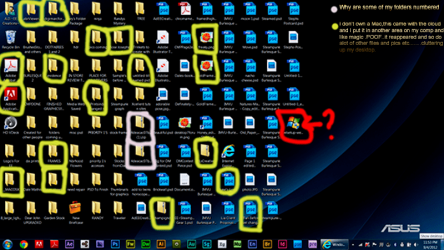
Next I have pics and some folders reappearing after I delete them...oh heck...just take a peek at my desktop please and if anyone knows who that fedging pixie was that leaped into my computer and played appear and disappear and number not letter on some of my files....slap him/her for me please:D.
Okay all seriousness...here is my desktop and I just added a little map so you can see what I mean. More of the reappearing files are not marked....but the numbered ones and the ? are/is marked.
Thanks in advance for any help. :)


7935438650_a9a86def0c_z.jpg
 
Last edited by a moderator:

My Computer My Computer

At a glance

Windows 7 home premium 64DDR3 1600 MHz SDRAM, 4 x SO-DIMMNVIDIA® GeForce® GTX 660M/670M with 2GB/3GB G...
Computer Manufacturer/Model Number
Asus G75 VW
OS
Windows 7 home premium 64
Memory
DDR3 1600 MHz SDRAM, 4 x SO-DIMM
Graphics Card(s)
NVIDIA® GeForce® GTX 660M/670M with 2GB/3GB GDDR5 VRAM
Sound Card
High definition
Monitor(s) Displays
17.3" HD with EWV (1366 x 768) / FHD 3D LED Backlight
Screen Resolution
1920x1080
Hard Drives
yep got 1
PSU
PSU?
Case
Lawyer? ;)
Cooling
Raised back cooling filter.
Keyboard
yep got 1 of those too...but keypad(laptop)
Mouse
Keypad but I use a Logic laser mouse
Internet Speed
Speedy gonzales fast
Other Info
2.5" SATA Dual HDD
1TB 5400rpm
750GB 5400rpm/7200rpm
500GB 5400rpm/7200rpm
750GB 7200rpm SSH
256GB SSD
RAID0/1 Support


Optical Drive

Blu-Ray DVD Combo
Super-Multi DVD
Blue-ray reader


Card Reader

3 -in-1 card reader ( SD/ MS/ MMC)


Camera

HD Web Camera


Networking

Integrated 802.11 b/g/n
Built-in Bluetooth™ V4.0 (Optional)
10/100/1000 Ba
Hello Angela,

I can't make out the file and folder names, but you might see if using the free program Unlocker may be able to permanently delete the ones you like. Do you have this issue in other user accounts as well?
 

My Computer My Computer

At a glance

64-bit Windows 11 Pro for WorkstationsIntel i7-8700K OC'd to 5 GHz64 GB (4x16GB) G.SKILL TridentZ RGB DDR4 3600...ASUS ROG-STRIX-GTX1080TI-O11G-GAMING
Computer type
PC/Desktop
Computer Manufacturer/Model Number
Self built custom
OS
64-bit Windows 11 Pro for Workstations
CPU
Intel i7-8700K OC'd to 5 GHz
Motherboard
ASUS ROG Maximus XI Formula Z390
Memory
64 GB (4x16GB) G.SKILL TridentZ RGB DDR4 3600 MHz
Graphics Card(s)
ASUS ROG-STRIX-GTX1080TI-O11G-GAMING
Sound Card
Integrated
Monitor(s) Displays
2 x Samsung Odyssey G7 27"
Screen Resolution
2560x1440
Hard Drives
1TB Samsung 990 PRO M.2,
4TB Samsung 990 PRO PRO M.2,
TerraMaster F8 SSD Plus NAS
PSU
Seasonic Prime Titanium 850W
Case
Thermaltake Core P3
Cooling
Corsair Hydro H115i
Keyboard
Logitech wireless K800
Mouse
Logitech MX Master 4
Internet Speed
2 Gb/s Download and 100 Mb/s Upload
Antivirus
Malwarebyte Anti-Malware Premium
Browser
Google Chrome
Other Info
Logitech Z625 speaker system,
Logitech BRIO 4K Pro webcam,
HP Color LaserJet Pro MFP M477fdn,
APC SMART-UPS RT 1000 XL - SURT1000XLI,
Galaxy S23 Plus phone
Hello Angela,

I can't make out the file and folder names, but you might see if using the free program Unlocker may be able to permanently delete the ones you like. Do you have this issue in other user accounts as well?

Hi Shawn and tyvm for your help. I guess I resized a little to small,I will add a larger picture so that you can take a closer look. I have a few issues with those darn pesky files.
As for other *does it happen with other user accounts. Not sure what you mean.
Also: Permanently delete the ones I like. I am not to sure I would do that. I have client graphs I like and definatey need to keep.
Thanks again in advance for your help Shawn...here is the larger version of my desktop.
 

Attachments

  • For 7 forumslarger.png
    For 7 forumslarger.png
    124.3 KB · Views: 614

My Computer My Computer

At a glance

Windows 7 home premium 64DDR3 1600 MHz SDRAM, 4 x SO-DIMMNVIDIA® GeForce® GTX 660M/670M with 2GB/3GB G...
Computer Manufacturer/Model Number
Asus G75 VW
OS
Windows 7 home premium 64
Memory
DDR3 1600 MHz SDRAM, 4 x SO-DIMM
Graphics Card(s)
NVIDIA® GeForce® GTX 660M/670M with 2GB/3GB GDDR5 VRAM
Sound Card
High definition
Monitor(s) Displays
17.3" HD with EWV (1366 x 768) / FHD 3D LED Backlight
Screen Resolution
1920x1080
Hard Drives
yep got 1
PSU
PSU?
Case
Lawyer? ;)
Cooling
Raised back cooling filter.
Keyboard
yep got 1 of those too...but keypad(laptop)
Mouse
Keypad but I use a Logic laser mouse
Internet Speed
Speedy gonzales fast
Other Info
2.5" SATA Dual HDD
1TB 5400rpm
750GB 5400rpm/7200rpm
500GB 5400rpm/7200rpm
750GB 7200rpm SSH
256GB SSD
RAID0/1 Support


Optical Drive

Blu-Ray DVD Combo
Super-Multi DVD
Blue-ray reader


Card Reader

3 -in-1 card reader ( SD/ MS/ MMC)


Camera

HD Web Camera


Networking

Integrated 802.11 b/g/n
Built-in Bluetooth™ V4.0 (Optional)
10/100/1000 Ba
Sorry, I meant that if you logged into another user account on your computer, does it do the same thing in that user account?

The text is still way to small for me to read in the screenshot, but usually when a number is added to a file name, it means that it's a duplicate since you already have a file name with the same name.

For example, if you copy/move another file named example.txt to your desktop, but already have a file named example.txt on the desktop. The one you are copying/moving to the desktop would be renamed example (2).txt.
example.txt
example (2).txt

I'm not sure about the files/folders dissappearing and reappearing after you delete them. Are you just saving them directly to your desktop?
 

My Computer My Computer

At a glance

64-bit Windows 11 Pro for WorkstationsIntel i7-8700K OC'd to 5 GHz64 GB (4x16GB) G.SKILL TridentZ RGB DDR4 3600...ASUS ROG-STRIX-GTX1080TI-O11G-GAMING
Computer type
PC/Desktop
Computer Manufacturer/Model Number
Self built custom
OS
64-bit Windows 11 Pro for Workstations
CPU
Intel i7-8700K OC'd to 5 GHz
Motherboard
ASUS ROG Maximus XI Formula Z390
Memory
64 GB (4x16GB) G.SKILL TridentZ RGB DDR4 3600 MHz
Graphics Card(s)
ASUS ROG-STRIX-GTX1080TI-O11G-GAMING
Sound Card
Integrated
Monitor(s) Displays
2 x Samsung Odyssey G7 27"
Screen Resolution
2560x1440
Hard Drives
1TB Samsung 990 PRO M.2,
4TB Samsung 990 PRO PRO M.2,
TerraMaster F8 SSD Plus NAS
PSU
Seasonic Prime Titanium 850W
Case
Thermaltake Core P3
Cooling
Corsair Hydro H115i
Keyboard
Logitech wireless K800
Mouse
Logitech MX Master 4
Internet Speed
2 Gb/s Download and 100 Mb/s Upload
Antivirus
Malwarebyte Anti-Malware Premium
Browser
Google Chrome
Other Info
Logitech Z625 speaker system,
Logitech BRIO 4K Pro webcam,
HP Color LaserJet Pro MFP M477fdn,
APC SMART-UPS RT 1000 XL - SURT1000XLI,
Galaxy S23 Plus phone
Hi!

Those .bat files to show/hide hidden stuffs are great! But every time I run them, all explorer windows are closing and my desktop rearrange after explorer restart. I don't like that. Is there any way to refresh explore.exe (and the desktop) instead of killing it?

Please help me! I want to use the code in a Rainmeter skin.

I hope somebody is reading this topic. :P
 
Last edited:

My Computer My Computer

At a glance

Windows 7 Home Premium x64 SP1Intel Core2 Duo E7300 2.66GHzGeIL 2x2GB, PC 6400, DDR2-800 (400MHz), Class 5NVIDIA GeForce GTS 450
Computer type
PC/Desktop
Computer Manufacturer/Model Number
Custom build
OS
Windows 7 Home Premium x64 SP1
CPU
Intel Core2 Duo E7300 2.66GHz
Motherboard
Gigabyte GA-EP31-DS3L
Memory
GeIL 2x2GB, PC 6400, DDR2-800 (400MHz), Class 5
Graphics Card(s)
NVIDIA GeForce GTS 450
Hard Drives
Maxtor 6B200P0 ATA Device (200 GB)
SAMSUNG SP2514N ATA Device (250 GB)
WD 10EAVS External USB Device (1 TB)
Antivirus
COMODO ISP
Browser
Firefox
Welcome to Sevenforums Hiromacu!

Since there is no command prompt command to do this, Shawn makes the change through the registry. In doing so, he needs to restart the explorer process for the change to take effect.

In Sevenforums, someone is always reading :D
 

My Computer My Computer

At a glance

Windows 7 Ultimate x64 Service Pack 1AMD Athlon II x4 Propus 2.9 GHz2 x 4GB Corsair XMS 3 DDR3 -1600 CL9AMD Radeon HD 5850 1GB GDDR5
Computer type
PC/Desktop
Computer Manufacturer/Model Number
Custom Build
OS
Windows 7 Ultimate x64 Service Pack 1
CPU
AMD Athlon II x4 Propus 2.9 GHz
Motherboard
ASRock N68C-GS FX
Memory
2 x 4GB Corsair XMS 3 DDR3 -1600 CL9
Graphics Card(s)
AMD Radeon HD 5850 1GB GDDR5
Sound Card
On-board 6-Channel HD Audio
Monitor(s) Displays
18' LG Flatron E1942TC-BN on DVI, 18' Chimei 95ND on HDMI
Screen Resolution
1366 x 768 x 2
Hard Drives
1 x 500 GB Seagate
1 x 1 TB Western Digital Caviar Green
1 x 1 TB Hitachi Touro Mobile USB 3
PSU
Seasonic S12II 520W
Case
Generic with Cable Management
Cooling
Deep Cool Gammaxx 200
Keyboard
Dragonwar Desert Eagle
Mouse
Logitech B85
Internet Speed
5Mb/s DL, 0.9Mb/s UL
Antivirus
ESET Nod32
Browser
Google Chrome 64 Bit
Other Info
LG G4 H818P - Rooted with Xposed Framework
Thanks for the fast reply!

Ehh I'm sad! In this case I have to comment out the task kill lines, and refresh explorer/desktop manually.
 

My Computer My Computer

At a glance

Windows 7 Home Premium x64 SP1Intel Core2 Duo E7300 2.66GHzGeIL 2x2GB, PC 6400, DDR2-800 (400MHz), Class 5NVIDIA GeForce GTS 450
Computer type
PC/Desktop
Computer Manufacturer/Model Number
Custom build
OS
Windows 7 Home Premium x64 SP1
CPU
Intel Core2 Duo E7300 2.66GHz
Motherboard
Gigabyte GA-EP31-DS3L
Memory
GeIL 2x2GB, PC 6400, DDR2-800 (400MHz), Class 5
Graphics Card(s)
NVIDIA GeForce GTS 450
Hard Drives
Maxtor 6B200P0 ATA Device (200 GB)
SAMSUNG SP2514N ATA Device (250 GB)
WD 10EAVS External USB Device (1 TB)
Antivirus
COMODO ISP
Browser
Firefox
Thanks for the fast reply!

Ehh I'm sad! In this case I have to comment out the task kill lines, and refresh explorer/desktop manually.

Sure thing. Yes, you can certainly do that. Cheers. Have a look around the forums especially the tutorial area. I learned a lot of things from this section ;)
 

My Computer My Computer

At a glance

Windows 7 Ultimate x64 Service Pack 1AMD Athlon II x4 Propus 2.9 GHz2 x 4GB Corsair XMS 3 DDR3 -1600 CL9AMD Radeon HD 5850 1GB GDDR5
Computer type
PC/Desktop
Computer Manufacturer/Model Number
Custom Build
OS
Windows 7 Ultimate x64 Service Pack 1
CPU
AMD Athlon II x4 Propus 2.9 GHz
Motherboard
ASRock N68C-GS FX
Memory
2 x 4GB Corsair XMS 3 DDR3 -1600 CL9
Graphics Card(s)
AMD Radeon HD 5850 1GB GDDR5
Sound Card
On-board 6-Channel HD Audio
Monitor(s) Displays
18' LG Flatron E1942TC-BN on DVI, 18' Chimei 95ND on HDMI
Screen Resolution
1366 x 768 x 2
Hard Drives
1 x 500 GB Seagate
1 x 1 TB Western Digital Caviar Green
1 x 1 TB Hitachi Touro Mobile USB 3
PSU
Seasonic S12II 520W
Case
Generic with Cable Management
Cooling
Deep Cool Gammaxx 200
Keyboard
Dragonwar Desert Eagle
Mouse
Logitech B85
Internet Speed
5Mb/s DL, 0.9Mb/s UL
Antivirus
ESET Nod32
Browser
Google Chrome 64 Bit
Other Info
LG G4 H818P - Rooted with Xposed Framework
Back
Top