Can't Turn On WiFi And Ethernet Doesn't Work

MasterLinuxer

New member
Local time
2:37 AM
Messages
7
Hello,

I have a new PC (notebook) that my friend gave me. It's name is "Gigabook" which is not very famous.. I suspect it is a small company that combines hardware into a notebook.

Anyways, I have installed Windows 7 on it but found out that the internet doesn't work. for some reason I can't turn on the WiFi to find out my network and when I connect an Ethernet cable to the notebook, nothing happens..

I thought it's the driver, could download it and transfer it to the notebook via USB drive. the problem is I can't find the software anywhere..

My network card is WAN Miniport. I can check any other hardware here, it's just that you won't find anything about Gigabook..

P.S.
a) this is my first post on your forums. please forgive me if I posted in the wrong place or made other noob mistake.
b) I come from the Mac and Linux world, so I don't have a lot experience on this OS.. I'll appreciate any help.

Thank you very much in advance.
 

My Computer My Computer

At a glance

Windows Ultimate x86
OS
Windows Ultimate x86
What was the original OS? Did you run the Win 7 Upgrade Advisor before you installed Win 7? It's possible the wifi/Ethernet cards do not have available Win 7 drivers. What is the model number of your machine?
 

My Computer My Computer

At a glance

Windows 7 64
OS
Windows 7 64
What was the original OS? Did you run the Win 7 Upgrade Advisor before you installed Win 7? It's possible the wifi/Ethernet cards do not have available Win 7 drivers. What is the model number of your machine?

The original OS was Windows XP.
I'm not sure what you mean by model number but at the back of the notebook there is written:

MODEL: M81P
PRODUCT CODE: M815P

As for the drivers, if there aren't drivers to Windows 7 (which honestly doesn't seem possible.. it's a new notebook after all) I'll downgrade to XP. The thing is I can't even do windows updates which often update drivers as well because I have absolutely no way of connecting it to the internet :confused:

Thanks for your answer. Any help is very appreciated.
 

My Computer My Computer

At a glance

Windows Ultimate x86
OS
Windows Ultimate x86
Were you able to connect to the Internet when the Windows XP operating system was installed?
 

My Computer My Computer

Computer type
Laptop
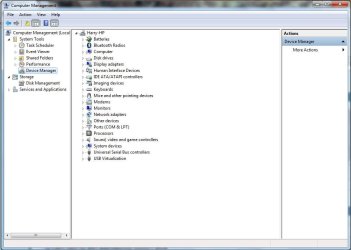
Okay, it's not a hardware problem, have you looked at device manager and the drivers?

Start > Computer > Right-Click Computer > Manage (need Admin rights) > Left pane (Under System Tools) > Device Manager

Here is some information for Device Manager to help you:

Device Manager - Wikipedia, the free encyclopedia
 

Attachments

  • Device.JPG
    Device.JPG
    61.5 KB · Views: 39

My Computer My Computer

Computer type
Laptop
Okay, it's not a hardware problem, have you looked at device manager and the drivers?

Start > Computer > Right-Click Computer > Manage (need Admin rights) > Left pane (Under System Tools) > Device Manager

Here is some information for Device Manager to help you:

Device Manager - Wikipedia, the free encyclopedia

OK. Got there and there is an error sign (yellow square) on these devices listen under "other devices":

-Base System Device
-Ethernet Controller
-Network Controller
-Video Controller

Seems like drivers to me. How can I get them without internet? In other words, How can I download them and transfer them to the PC with a USB device?

Thank you very much.

EDIT: When I try to "Update Driver Software" it says "Windows was unable to install your *Name of the device*".. =/
 

My Computer My Computer

At a glance

Windows Ultimate x86
OS
Windows Ultimate x86
We have found the problem at least, seems that Windows 7 doesn't recognise the drivers you have installed which work for Windows XP. Basically, as you know, you do not have the correct drivers for the network controller etc. which are compatible for Windows 7.

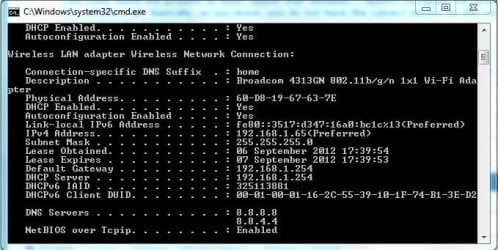
What is your network card called? Was it WAN Miniport?

Open command prompt: Start > Type within "Search Programs and Files" > cmd > type IPCONFIG /ALL (see my screenshot) should find the name of the network card (:

As a matter of interest, how are you connected to the internet at the moment? O.o
 

Attachments

  • Ipconfig.JPG
    Ipconfig.JPG
    50.4 KB · Views: 42

My Computer My Computer

Computer type
Laptop
We have found the problem at least, seems that Windows 7 doesn't recognise the drivers you have installed which work for Windows XP. Basically, as you know, you do not have the correct drivers for the network controller etc. which are compatible for Windows 7.

What is your network card called? Was it WAN Miniport?

Open command prompt: Start > Type within "Search Programs and Files" > cmd > type IPCONFIG /ALL (see my screenshot) should find the name of the network card (:

As a matter of interest, how are you connected to the internet at the moment? O.o

Weird thing happened.. the command's output was:

Windows IP Configuration

Host Name . . . . . . . . . . :Holder-PC
Primary Dns Suffix . . . . . . . . . . :
Node Type . . . . . . . . . . :Hybrid
IP Routing Enabled . . . . . . . . . . :No
WINS Proxy Enabled . . . . . . . . . . :No

Nothing else.. =/ Although I've checked through other place and yes, it was WAN Miniport.

And for your question, I'm writing this from another computer ;)

Any ideas?
 

My Computer My Computer

At a glance

Windows Ultimate x86
OS
Windows Ultimate x86
Okay, you could always ask a friend to download the drivers for you (if any are available for Windows 7).

This method (Re-installing WAN miniport devices) has seemed to help some people with the same problem.

You may want to create a backup before changing settings within the Registry.

How To Use Backup and Restore in Windows 7 - How-To Geek

EDIT: If no drivers can be found for Windows 7, then you may have to stay with Windows XP :(

Hope this helps,

Harry
 

My Computer My Computer

Computer type
Laptop
Looks like Gigabook is a local Israeli brand. Found a product listing here.

See if you can identify the make and model number of your Ethernet Network Adapter and/or your Wireless network adapter by following this guide. You need the VEN and DEV IDs of the device for identification. And you need the right drivers for the Internet to work.

Once you've identified the hardware components, it shouldn't be that hard to locate Win7 drivers for them. The first link clearly advertises the notebook with Windows 7, so drivers must exist.
 

My Computer My Computer

At a glance

Windows 7 HP / Ultimate x64Core i5 / X4 955 BE4GB DDR3 1333Mhz / 8GB DDR3 1600MhzHD5470 / HD5670
Computer Manufacturer/Model Number
Dell / Custom
OS
Windows 7 HP / Ultimate x64
CPU
Core i5 / X4 955 BE
Motherboard
OEM / Gigabyte 880GM-USB3
Memory
4GB DDR3 1333Mhz / 8GB DDR3 1600Mhz
Graphics Card(s)
HD5470 / HD5670
Sound Card
Onboard
Monitor(s) Displays
FullHD 15" / Dell 22" WS
Screen Resolution
1920x1080 / 1680x1050
Hard Drives
320GB / 1.5TB
PSU
CM
Case
CM
Cooling
CM, Antec
Keyboard
Logitech
Mouse
Logitech
Okay, you could always ask a friend to download the drivers for you (if any are available for Windows 7).

This method (Re-installing WAN miniport devices) has seemed to help some people with the same problem.

You may want to create a backup before changing settings within the Registry.

How To Use Backup and Restore in Windows 7 - How-To Geek

EDIT: If no drivers can be found for Windows 7, then you may have to stay with Windows XP :(

Hope this helps,

Harry

I've tried it, but for some reason I can't edit/delete/change the location of "netrasa.inf" file with an "access is denied" error. I've tried to change permissions but nothing works for me ><" I'll try and googling the solution for this problem.

Looks like Gigabook is a local Israeli brand. Found a product listing here.

See if you can identify the make and model number of your Ethernet Network Adapter and/or your Wireless network adapter by following this guide. You need the VEN and DEV IDs of the device for identification. And you need the right drivers for the Internet to work.

Once you've identified the hardware components, it shouldn't be that hard to locate Win7 drivers for them. The first link clearly advertises the notebook with Windows 7, so drivers must exist.

First, you're right. It is a local israeli brand :) In the website that barely give information about the network card.. let me translate you:

Wireless 802.11b/g network
10/100 network card (???)

When I tried finding out information about it, all I got (device manager -> unknown devices -> properties -> driver) is "unknown manufacturer" ...


This all is so frustrating.. :cry:

Thank you guys very much for your help!


EDIT: I have finally managed to edit netrasa.inf!! But now to another problem:

in this steps:
12. Start the Add Hardware Wizard from control panel
13. Select Yes, I have already connected the hardware, then Next
14. Select Add a new hardware device, then Next
15. Select Install the hardware that I manually select from a list (Advanced), then Next
16. Select Network Adapters, then Next
17. Select Microsoft in the Manufacturer section and then on the Network Adapter, select the desired WAN Miniport device, then Next and Finish the wizard

I got stuck. I haven't found "Add Hardware Wizard".. I did found "add a device" under "hardware and sound". The problem is even after a long time windows doesn't recognizes anything.. Any ideas? Thanks.
 
Last edited:

My Computer My Computer

At a glance

Windows Ultimate x86
OS
Windows Ultimate x86

Thank you Harry!
I've managed to get to the "add hardware wizard" by typing hdwwiz in the search box and I was led (of course..) to another problem in the way:

in this step:
17. Select Microsoft in the Manufacturer section and then on the Network Adapter, select the desired WAN Miniport device, then Next and Finish the wizard

I get this error:
"the following hardware was not installed:
WAN Miniport (PPPOE)

An error occurred during the installation of the device.
The system cannot find the file specified."


AW!! What now? :( It's so frustrating!

Thank you again for your help!
 

My Computer My Computer

At a glance

Windows Ultimate x86
OS
Windows Ultimate x86
We could check if any files are missing from your Windows 7 operating system with System File Checker:

http://www.sevenforums.com/tutorials/1538-sfc-scannow-command-system-file-checker.html

After, the System File Check, try this link with the Devcon.exe, which supposedly contains the drivers for the WAN Miniport (PPPOE) - http://www.ehow.com/info_12224857_pppoe-error-39-dell-wan-miniport.html

Devcon.exe - http://support.microsoft.com/kb/311272

Hope this helps,

Harry

I have read there are some compatibility issues with Devcon and Windows 7, however, it has been suggested it works fine with Windows XP, so you may have to stay with Windows XP :(
 
Last edited:

My Computer My Computer

Computer type
Laptop
Back
Top