Solved default system font loss after uninstalling game, please help

rinckeshawn

New member
Local time
8:25 PM
Messages
8
I was unisntalled a game i didn't use from control panel. Then it shows a warning about a file still used that is a font (i forget what is the font and the folder address)

I tought i was choose to keep the font and continue uninstall.
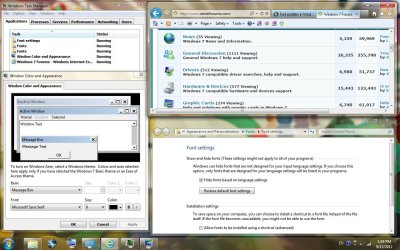
but then i found out that the font used in my computer was changed. I attaced the screen shot


my default font in several place was changed: (not all mentioned, i just give examples i can found)
  1. my web browser font was changed. I had tried change it via internet option and didn't work.
  2. the font in ok/cancel/apply button was changed.
  3. in my windows taks manager, the font in tab, button and the list of active programs was changed. but the font in drop down menu like file,option,view,windows was not changed.
i had search it and found about :

  • "restore default font setting". it didn't work.
  • i have change it manually via setting in "window color and appearce". it didn't work..
  • i have tried repair my microsoft office via control panel. It didn't work.
I really want to restore my font into default setting, please tell me what else I should try. Thanks.
 

Attachments

  • font sample.jpg
    font sample.jpg
    148.5 KB · Views: 31

My Computer My Computer

OS
Windows 7 proffesional 64-bit (6.1, build 7600)
As I see the font likely changed to bold style, I had checke.d and turn off all "ease of access" fuction. but that didn't help. :confused:
 

My Computer My Computer

OS
Windows 7 proffesional 64-bit (6.1, build 7600)
Hi and welcome to the Forum
Looks like you deketed a font so try this:
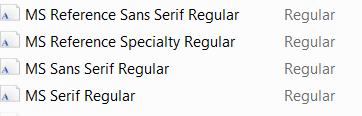
Navigate to Fonts as follows: C:\Windows\Fonts scroll down the list of fonts to Ms and you should see a block like this. See screenshot attched. Do you see them all?

fonts.PNG

I hope you will find one of the "Sans" fonts missing!
 

My Computer My Computer

Computer type
PC/Desktop
OS
Microsoft Windows 7 Home Premium 64-bit 7601 Multiprocessor Free Service Pack 1
CPU
Intel(R) Core(TM) i7-3770 CPU @ 3.40GHz
Motherboard
ASUSTeK COMPUTER INC. P8H77-M
Memory
8.00 GB
Graphics Card(s)
Intel(R) HD Graphics 4000
Sound Card
On Board
Monitor(s) Displays
Dell 24"
Screen Resolution
1920 x 1080
Hard Drives
(1) INTEL SSDSC2CT180A3 ATA Device (2) ST500DM002-1BD142 ATA Device (3) WDC WD3200AAKS-75L9A0 ATA Device (4) Generic- Compact Flash USB Device (5) Generic- MS/MS-Pro USB Device (6) Generic- SD/MMC USB Device (7) Generic- SM/xD-Picture USB
PSU
500w Corsair
Case
Cooler Master
Cooling
3 Fans
Keyboard
Logitech MK300
Mouse
Logitech WOM
Internet Speed
75Mb
Antivirus
Norton 360
Browser
Firefox, Opera, IE

My Computer My Computer

Computer Manufacturer/Model Number
Acer Aspire One 722 (AO722)
OS
Windows 7 Home Premium Service Pack 1 32-bit Build 7601
CPU
AMD C-50 Processor 1.0 Ghz
Memory
2 GB DDR3 RAM (1.73 usable in System Properties)
Graphics Card(s)
AMD Radeon HD 6200 series Graphics
Sound Card
High Definition Audio Device
Monitor(s) Displays
Generic PnP Monitor
Screen Resolution
1366 x 768 (recommended)
Hard Drives
320 GB HDD storage
298.09 GB in Disk Management (REAL)
Keyboard
Built-in on my laptop
Mouse
External mouse
Other Info
Installed Windows 7 Service Pack 1 by 9/9/2012

My Computer My Computer

Computer type
PC/Desktop
Computer Manufacturer/Model Number
Home made Desktop
OS
Windows 10 Pro. 64/ version 1709 Windows 7 Pro/64
CPU
Intel i7-6800K @ 4.3
Motherboard
ASUS X-99 Deluxe II
Memory
Corsair Platinum 16 gig @2400
Graphics Card(s)
EVGA GTX 1070 OC
Monitor(s) Displays
Asus 27" LED LCD/VE278Q
Screen Resolution
1920-1080 or 1280-720 HDMI
Hard Drives
INTEL SSD 730-240 Gb Sata 3.0/
PSU
EVGA Platium 1200W
Case
Phanteks Luxe Tempered Glass 8 fans/ one radiator
Cooling
XSPC/ Water Cooled CPU
Keyboard
Das 4 Professional
Mouse
Logitech M705/MX Anywhere 2-S
Internet Speed
100 mbits
Antivirus
Microsoft Security Essentials/ Malwarebytes Premium 3.0/ SAS
Browser
I.E. 11 default/Firefox/ ISP Time Warner Cable/Spectrum
Other Info
LG BluRay Burner/
Sound system-KLipsch-THX/
Icy Dock ssd Hot Swap bays.
this font? Segoe UI - Version 5.01 if you can reinstall office that comes with the default fonts and should repair the problem
I'm sorry I was looking at my old XP info. You are right Ginrummy with the font name but it comes with Windows 7 in version 5.01. Office 2007 only has version 1.0 and Office 2010 version0.97. No idea why they should be different.
 

My Computer My Computer

Computer type
PC/Desktop
OS
Microsoft Windows 7 Home Premium 64-bit 7601 Multiprocessor Free Service Pack 1
CPU
Intel(R) Core(TM) i7-3770 CPU @ 3.40GHz
Motherboard
ASUSTeK COMPUTER INC. P8H77-M
Memory
8.00 GB
Graphics Card(s)
Intel(R) HD Graphics 4000
Sound Card
On Board
Monitor(s) Displays
Dell 24"
Screen Resolution
1920 x 1080
Hard Drives
(1) INTEL SSDSC2CT180A3 ATA Device (2) ST500DM002-1BD142 ATA Device (3) WDC WD3200AAKS-75L9A0 ATA Device (4) Generic- Compact Flash USB Device (5) Generic- MS/MS-Pro USB Device (6) Generic- SD/MMC USB Device (7) Generic- SM/xD-Picture USB
PSU
500w Corsair
Case
Cooler Master
Cooling
3 Fans
Keyboard
Logitech MK300
Mouse
Logitech WOM
Internet Speed
75Mb
Antivirus
Norton 360
Browser
Firefox, Opera, IE
Hi and welcome to the Forum
Looks like you deketed a font so try this:
Navigate to Fonts as follows: C:\Windows\Fonts scroll down the list of fonts to Ms and you should see a block like this. See screenshot attched. Do you see them all?

View attachment 231382

I hope you will find one of the "Sans" fonts missing!

thanks mitchell, but i found all four of the fonts, and if i open it, the "install" button grey (cannot click). I think it is already installed
 

My Computer My Computer

OS
Windows 7 proffesional 64-bit (6.1, build 7600)
Last edited:

My Computer My Computer

OS
Windows 7 proffesional 64-bit (6.1, build 7600)
Default font broken?

I had change the default font via registry as told in http://www.sevenforums.com/tutorials/1175-fonts-change.html

which is
"MS Shell Dlg 2"="Tahoma"
"MS Shell Dlg"="Microsoft Sans Serif"

but the problem still presist, as seen in my first attachment. I thougt the font style is correct just turned into Bold style.
I had checked at "window color and apearance" for maybe accidentaly i clicked Bold, but i found it no bold.

now I had change it to "sagoe UI" for both dlg and dlg2 then restart my computer and the font already changed and seems normal.
But i wonder why when i use Tahoma and Sans serif i had it in bold?
 

My Computer My Computer

OS
Windows 7 proffesional 64-bit (6.1, build 7600)
I had change the default font via registry as told in http://www.sevenforums.com/tutorials/1175-fonts-change.html

which is
"MS Shell Dlg 2"="Tahoma"
"MS Shell Dlg"="Microsoft Sans Serif"

but the problem still presist, as seen in my first attachment. I thougt the font style is correct just turned into Bold style.
I had checked at "window color and apearance" for maybe accidentaly i clicked Bold, but i found it no bold.

now I had change it to "sagoe UI" for both dlg and dlg2 then restart my computer and the font already changed and seems normal.
But i wonder why when i use Tahoma and Sans serif i had it in bold?

Last time i was wrong when i said it seems normal. I can not found the font "tahoma" in fonts folder, but i found "tahoma bold". So i guess just the font tahoma is missing then the system go with tahoma bold.

So i tried to change the "MS Shell Dlg 2" to another font available, even i write it "microsoft sans serif regular". but now all my font i choose always shows in italic. i had tried to change it into another font using the word regular and not using regular. :confused:

maybe there is antoher registry key to set it into italic/bold?
 

My Computer My Computer

OS
Windows 7 proffesional 64-bit (6.1, build 7600)
I think you have changed so many things that it might be an idea to go back a pace or two. Why not restore your system to a point where the offending game was still installed and see if that puts the fonts right. If it does then try to uninstall the game but this time stop when you get the meassge "This action may affect other programs in your system" This should refer to a font uninstall, if it does then you should have the option to leave the font installed but carry on with the rest of the game uninstall!
When you get back to as it was before make sure you make a backup of your registry. I notice in the thread that you have edited the registry a number of times without mentioning if you had done registry backup. This is very important. One false move on the registry can mean real disaster. Always backup before editing! There are those that Have said that I over react on this subject but that's much better than not reacting at all (IMVHO, of course)
 

My Computer My Computer

Computer type
PC/Desktop
OS
Microsoft Windows 7 Home Premium 64-bit 7601 Multiprocessor Free Service Pack 1
CPU
Intel(R) Core(TM) i7-3770 CPU @ 3.40GHz
Motherboard
ASUSTeK COMPUTER INC. P8H77-M
Memory
8.00 GB
Graphics Card(s)
Intel(R) HD Graphics 4000
Sound Card
On Board
Monitor(s) Displays
Dell 24"
Screen Resolution
1920 x 1080
Hard Drives
(1) INTEL SSDSC2CT180A3 ATA Device (2) ST500DM002-1BD142 ATA Device (3) WDC WD3200AAKS-75L9A0 ATA Device (4) Generic- Compact Flash USB Device (5) Generic- MS/MS-Pro USB Device (6) Generic- SD/MMC USB Device (7) Generic- SM/xD-Picture USB
PSU
500w Corsair
Case
Cooler Master
Cooling
3 Fans
Keyboard
Logitech MK300
Mouse
Logitech WOM
Internet Speed
75Mb
Antivirus
Norton 360
Browser
Firefox, Opera, IE
A rule of the thumb to me is simple.
Any program game or not that wants to change things with Windows 7 basic installed files I don't want. Windows was not created for that game or program. Who ever makes those games or programs should do it to suit Windows 7. I will not chop up Windows 7 to suit a program.
 

My Computer My Computer

Computer type
PC/Desktop
Computer Manufacturer/Model Number
Home made Desktop
OS
Windows 10 Pro. 64/ version 1709 Windows 7 Pro/64
CPU
Intel i7-6800K @ 4.3
Motherboard
ASUS X-99 Deluxe II
Memory
Corsair Platinum 16 gig @2400
Graphics Card(s)
EVGA GTX 1070 OC
Monitor(s) Displays
Asus 27" LED LCD/VE278Q
Screen Resolution
1920-1080 or 1280-720 HDMI
Hard Drives
INTEL SSD 730-240 Gb Sata 3.0/
PSU
EVGA Platium 1200W
Case
Phanteks Luxe Tempered Glass 8 fans/ one radiator
Cooling
XSPC/ Water Cooled CPU
Keyboard
Das 4 Professional
Mouse
Logitech M705/MX Anywhere 2-S
Internet Speed
100 mbits
Antivirus
Microsoft Security Essentials/ Malwarebytes Premium 3.0/ SAS
Browser
I.E. 11 default/Firefox/ ISP Time Warner Cable/Spectrum
Other Info
LG BluRay Burner/
Sound system-KLipsch-THX/
Icy Dock ssd Hot Swap bays.
I am very sorry for I did not open this thread for long due to I was on travel. I found that my font Tahoma and Times was missing so I had replaced it with copies from my friends XP.
 

My Computer My Computer

OS
Windows 7 proffesional 64-bit (6.1, build 7600)
I tried reinstall all font I already had from my friends computer, it help, not perfectly, but enough for me
 

My Computer My Computer

OS
Windows 7 proffesional 64-bit (6.1, build 7600)
Back
Top