How do I group non-grouped applications in the taskbar?

odyssey

New member
Local time
12:13 AM
Messages
2
I know from this article, that applications use (or have automatically generated) an AppID that forces 7 to group them together.

Problem is that I now have an application that I run 30 instances of with different parameters. Since parameters are different they appearently get different AppID.

Can I somehow make a frontend-wrapper or in any other way tweak these to get grouped together?
 

My Computer My Computer

At a glance

Windows 7
OS
Windows 7
I know from this article, that applications use (or have automatically generated) an AppID that forces 7 to group them together.

Problem is that I now have an application that I run 30 instances of with different parameters. Since parameters are different they appearently get different AppID.

Can I somehow make a frontend-wrapper or in any other way tweak these to get grouped together?

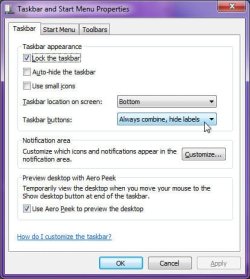
Try this:
  1. Right-click the Start Orb, then select "Properties"
  2. Click the "Taskbar" tab
  3. Make sure that the "Taskbar buttons:" setting is at "Always combine, hide labels"
  4. Click OK
group_icons.jpg
 

My Computer My Computer

At a glance

Windows 7 Professional 32-bit SP1AMD A4/A63.00GB EDOVMware SVGA 3D
Computer type
PC/Desktop
Computer Manufacturer/Model Number
Virtual Machine
OS
Windows 7 Professional 32-bit SP1
CPU
AMD A4/A6
Motherboard
Intel Corporation 440BX Desktop Reference Platform
Memory
3.00GB EDO
Graphics Card(s)
VMware SVGA 3D
Sound Card
High Definition Audio Device
Monitor(s) Displays
Generic Non-PnP Monitor on VMware SVGA 3D
Screen Resolution
1440x900
Hard Drives
1 x 60GB VMware Virtual SATA Hard Drive ATA Device
Antivirus
Kaspersky Total Security
Read my post carefully, and you'll see that I already are using grouping but only have problems with shortcuts that has DIFFERENT parameters - You could try yourself to see what I mean.

Different shortcuts may provide different start up command line parameters to the same executable and launch different applications (imagine a “launcher” application) that will be grouped under the same Taskbar button. In such cases, the OS has the ability to look into the specific shortcut that launched the application, to find the executable, the command line parameters, and so on.

However I've made a workaround. I found out that If I use vbscript or autoitscript to launch my program even with the parameters I need, they are grouped as I would expect.
 

My Computer My Computer

At a glance

Windows 7
OS
Windows 7
Read my post carefully, and you'll see that I already are using grouping but only have problems with shortcuts that has DIFFERENT parameters - You could try yourself to see what I mean.


However I've made a workaround. I found out that If I use vbscript or autoitscript to launch my program even with the parameters I need, they are grouped as I would expect.

When you use them before, and they are not grouped, are all of them using the same EXE file, just with different command-line parameters, or is each shortcut for a diffenent exe?
 

My Computer My Computer

At a glance

Windows 7 Professional 32-bit SP1AMD A4/A63.00GB EDOVMware SVGA 3D
Computer type
PC/Desktop
Computer Manufacturer/Model Number
Virtual Machine
OS
Windows 7 Professional 32-bit SP1
CPU
AMD A4/A6
Motherboard
Intel Corporation 440BX Desktop Reference Platform
Memory
3.00GB EDO
Graphics Card(s)
VMware SVGA 3D
Sound Card
High Definition Audio Device
Monitor(s) Displays
Generic Non-PnP Monitor on VMware SVGA 3D
Screen Resolution
1440x900
Hard Drives
1 x 60GB VMware Virtual SATA Hard Drive ATA Device
Antivirus
Kaspersky Total Security
Back
Top