System Image - what does it not include?

I just had another look at Windows System Image.

I tricked it into backing up only my Win 7 partition.

Speed was decent at 10 mins to back up 13.55gb used space.

Image size approx 10gb.

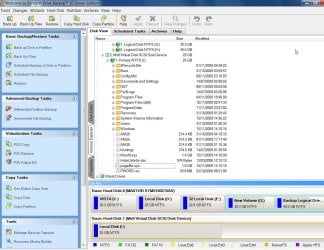
Examining the vhd revealed it does retain the pagefile and hibernation file - slightly odd as it is unnnecessary - but not a problem in itself - except without those, it would have been a little faster and smaller.

WINDOWS SYSTEM IMAGE-2009-11-15_152617.jpg
 

My Computers My Computers

  • At a glance

    7 X64i5 84002x8gb 3200mhz
    Computer type
    PC/Desktop
    OS
    7 X64
    CPU
    i5 8400
    Motherboard
    gigabyte b365m ds3h
    Memory
    2x8gb 3200mhz
    Hard Drives
    various
    PSU
    pure power 11 400w cm
    Case
    Coolermaster
    Cooling
    cryorig m9i
  • At a glance

    7x64g54008gb ddr4 2400
    Computer type
    PC/Desktop
    OS
    7x64
    CPU
    g5400
    Motherboard
    ga b365m ds3h
    Memory
    8gb ddr4 2400
    PSU
    xfx pro 450w
I need to reopen the discussion on this topic. I'm having MAJOR problems with my computer and I'm at a lost on how to fix it. Windows will not let me finish a backup.

Here's some background on how I got here. I have a Toshiba Sat L566 and last week, I was working on my website, and all of a sudden it froze. I could'nt do anything. I gave it 15 minutes, then I had to reboot the system. As windows was coming up, I got these messages.

the specified module could not be found. load library(pythondll) failed

I clicked the cancel button and then I got this message.

c:\program files (x86)\Uniblue\RegistryBooster\PYTHON26.DLL

Later that night my screen went black for a second and up pops this new error message. It said "windows has detected a problem with your hard drive, you need to back up your computer now". I didn't know which backup to run out of the 3 offered.....either a full backup, system image backup, or a system recovery backup.

I started with the full backup, and all was going well till I got to disk 7 (which I didn't think would take that many disk). That's when I got another error message. This one said that the backup could'nt go any futher.....something about something that was missing......so I just cancled it, after 3 hours of running the darn thing and it was on disk 7 and 50% done....

Then I tried the system image backup. I was told that it would take far less disk to do this one, but I was wrong. It only took me to disk 4 this time to get the "somethings missing" error. So that was stopped also.

I then decided to do the repair backup....since that was the only one left that I hadn't run.....so I tried it half way expecting to see the error message come up on the first disk, but suprise insert disk 2, disk 3 and disk 4. When I saw that maybe it was going to actually finish, I didn't realize it but I was holding my breath. It finished but now I don't know what I have. I'm not sure what all is on those four disk, and I need to also find out how I can get what I don't have on there....on there.

I don't know what is happening, and I don't know if there's a way to stop it from happening again. How do I know that the problem is my hard drive? What do I do to check to see if it is a malware problem.

Please folks I really need your help.
 

My Computer My Computer

At a glance

Windows 7 Home Premium 64bitIntel Pentium4.0 GB
Computer Manufacturer/Model Number
Toshiba Sat L655
OS
Windows 7 Home Premium 64bit
CPU
Intel Pentium
Memory
4.0 GB
What in the world is Uniblue and Registry Booster? Apparently a program you deliberately installed on your PC?

Is your personal data backed up safely, probably to some other hard drive (external)?

Do you have a valid Windows 7 installation disc and a valid Product Key?

Malwarebytes is a good malware detector, from Malwarebytes.org. It's free. I'd download it and run it.

Are you currently able to boot and use the PC?
 

My Computer My Computer

At a glance

Windows 7 Home Premium SP1, 64-bitIntel Skylake i5-6600K, not overclocked8 GB HyperX DDR4-2666 (2 x 4 GB)none; graphics are integrated on CPU
Computer type
PC/Desktop
Computer Manufacturer/Model Number
Ignatz Special; 4 speed manual gearbox; factory air conditioning; one of one
OS
Windows 7 Home Premium SP1, 64-bit
CPU
Intel Skylake i5-6600K, not overclocked
Motherboard
AsRock Z170M Extreme 4, micro ATX
Memory
8 GB HyperX DDR4-2666 (2 x 4 GB)
Graphics Card(s)
none; graphics are integrated on CPU
Sound Card
onboard: Realtek ALC1150; external: USB Behringer UF0-202
Monitor(s) Displays
Dell S2340M 23 inch IPS
Screen Resolution
1600 x 900
Hard Drives
System: Crucial MX100 series SSD, 128 GB;
Data: Samsung Spinpoint 103SJ, 1 TB;
Backup: WD Caviar Green WD30EZRX-00D8PB0, 3 TB
PSU
Rosewill SilentNight 500 watt fanless, semi-modular
Case
Antec Solo II
Cooling
Noctua NH-U12S; Noctua F12 intake, Noctua S12A exhaust
Keyboard
Microsoft 200 6JH-00001 USB
Mouse
Dell or Microsoft optical wired; USB
Antivirus
Microsoft Security Essentials and Malwarebytes Premium
Browser
Pale Moon
Other Info
All fans PWM; speeds at idle: CPU circa 500 rpm; intake circa 600 rpm; exhaust circa 600 rpm; CPU temps 27 idle and 47 C load in a warm room (27 C/81 F) when running Intel Extreme Tuning Utility stress test.
I have no idea what uniblue is or what it's for. It was on the computer when I bought it. The computer came with no disk of any kind. My daughter bought it for my husband last christmas. I've been using it and when I found out there were no disk, I knew that I needed to do a back up.

Is there anyway I can somehow backup windows 7, or do I even need to do since I have a good copy (hopefully) of the "repair disk"? What is included in the "repair disk" backup?

I'm using it right now. It seems to be working just fine. I haven't turned it off or anything. Can you tell me what is on the back up that I was able to get to finish and how I can get the files that I didn't get?

Thanks for replying. I hope that your able to help me figure this out.
 

My Computer My Computer

At a glance

Windows 7 Home Premium 64bitIntel Pentium4.0 GB
Computer Manufacturer/Model Number
Toshiba Sat L655
OS
Windows 7 Home Premium 64bit
CPU
Intel Pentium
Memory
4.0 GB
Texas Gal:

You say the PC is now working well.

If that is so, what is the current problem?

What program did you attempt to use to make these so-called backups? It's hard to say what's on those disks without more info.

Do you have a recovery partition on the laptop or have you made a set of recovery disks? Most likely, you do have a recovery partition, but you should also make recovery disks.

The purpose of the recovery partition and the recovery disks is to restore the PC to the state it was in the day you bought it. They would NOT recover whatever you may have added to the PC AFTER you bought it. If the recovery partition works properly, you would not need the recovery disks, but you should make them and keep them nevertheless.

Do you have a 25 character Product Key, most likely found on a sticker on the bottom or in the battery compartment? If you do, you can download a legal Windows 7 ISO file, burn it to a disc, and install from that disk anytime you want.

Have you backed up your personal files? Not Windows---your personal files.

In the meantime, you can make a repair disk using this tutorial, but it is not a "fix-all":

http://www.sevenforums.com/tutorials/2083-system-repair-disc-create.html

Further help pending answers to the above questions.
 

My Computer My Computer

At a glance

Windows 7 Home Premium SP1, 64-bitIntel Skylake i5-6600K, not overclocked8 GB HyperX DDR4-2666 (2 x 4 GB)none; graphics are integrated on CPU
Computer type
PC/Desktop
Computer Manufacturer/Model Number
Ignatz Special; 4 speed manual gearbox; factory air conditioning; one of one
OS
Windows 7 Home Premium SP1, 64-bit
CPU
Intel Skylake i5-6600K, not overclocked
Motherboard
AsRock Z170M Extreme 4, micro ATX
Memory
8 GB HyperX DDR4-2666 (2 x 4 GB)
Graphics Card(s)
none; graphics are integrated on CPU
Sound Card
onboard: Realtek ALC1150; external: USB Behringer UF0-202
Monitor(s) Displays
Dell S2340M 23 inch IPS
Screen Resolution
1600 x 900
Hard Drives
System: Crucial MX100 series SSD, 128 GB;
Data: Samsung Spinpoint 103SJ, 1 TB;
Backup: WD Caviar Green WD30EZRX-00D8PB0, 3 TB
PSU
Rosewill SilentNight 500 watt fanless, semi-modular
Case
Antec Solo II
Cooling
Noctua NH-U12S; Noctua F12 intake, Noctua S12A exhaust
Keyboard
Microsoft 200 6JH-00001 USB
Mouse
Dell or Microsoft optical wired; USB
Antivirus
Microsoft Security Essentials and Malwarebytes Premium
Browser
Pale Moon
Other Info
All fans PWM; speeds at idle: CPU circa 500 rpm; intake circa 600 rpm; exhaust circa 600 rpm; CPU temps 27 idle and 47 C load in a warm room (27 C/81 F) when running Intel Extreme Tuning Utility stress test.
You say the PC is now working well. If that is so, what is the current problem?

Here's some info on the computer i'm using:
Windows 7 Home Premium
Service Pack 1
Manufacturer: TOSHIBA
Model: Satellite L655
Processor: Intel(R) Pentium(R) CPU P6200 @ 2.13GHz 2.13GHz
Installed Memory 4.00 GB (3.80 GB usable)
System Type: 64 bit Operating System
Pen and Touch No Pen or Touch is available for this display


Yesterday, I turned on my laptop and I noticed that it was a little slower loading than it usually is and after it finished booting up, I got these strange error
messages:

the specified module could not be found. load library(pythondll) failed

c:\program files (x86)\Uniblue\RegistryBooster\PYTHON26.DLL


I had no idea what those meant so I googled it and read several post that said I should not use registry boosters, but I didn't download anything to my computer so i'm assuming that it either came with the computer or it got there thru a virus of some sorts.

I used it all day without any problems at all. Then wednesday when i turned it on, there was another message that was added to the first two.....

Windows detected a hard disk problem....you need to backup you files


Well, I tried that. In fact I tried to backup using all three of the choices given in windows 7. I first tried the "full backup", and got to disk 7 where I got this error message saying "backup couldn't continue, remove disk and try again".

It had taken me 5 hours, 7 disk and it wasn't even half way finished yet. So, i went back to the forums and told them what happened, and they said to create a "systems image" backup. It wouldn't take as many disk and I would have everything that I needed if the hard drive failed. Well that didn't work either. I got to disk 4 on that one, and I guess i didn't get to the disk in time to change it, because it said "backup had been canceld".

So I tried the last one, the "recovery backup". Believe it or not it finished using 4 disk and only taking 45 minutes. I dont know if this is what I need. What all does this backup cover? The OS, my files, my pics, music, favorites, WINDOWS 7? If all that's on there, then i'm good. I just dont understand why it took so long using the other 2 backup systems.

Any help you can give me will be apreciated.
 

My Computer My Computer

At a glance

Windows 7 Home Premium 64bitIntel Pentium4.0 GB
Computer Manufacturer/Model Number
Toshiba Sat L655
OS
Windows 7 Home Premium 64bit
CPU
Intel Pentium
Memory
4.0 GB
I need answers to the specific questions I asked in post 25 to point you in the right direction.

Your second post is largely a repeat of your first post and doesn't add much to my understanding.
 

My Computer My Computer

At a glance

Windows 7 Home Premium SP1, 64-bitIntel Skylake i5-6600K, not overclocked8 GB HyperX DDR4-2666 (2 x 4 GB)none; graphics are integrated on CPU
Computer type
PC/Desktop
Computer Manufacturer/Model Number
Ignatz Special; 4 speed manual gearbox; factory air conditioning; one of one
OS
Windows 7 Home Premium SP1, 64-bit
CPU
Intel Skylake i5-6600K, not overclocked
Motherboard
AsRock Z170M Extreme 4, micro ATX
Memory
8 GB HyperX DDR4-2666 (2 x 4 GB)
Graphics Card(s)
none; graphics are integrated on CPU
Sound Card
onboard: Realtek ALC1150; external: USB Behringer UF0-202
Monitor(s) Displays
Dell S2340M 23 inch IPS
Screen Resolution
1600 x 900
Hard Drives
System: Crucial MX100 series SSD, 128 GB;
Data: Samsung Spinpoint 103SJ, 1 TB;
Backup: WD Caviar Green WD30EZRX-00D8PB0, 3 TB
PSU
Rosewill SilentNight 500 watt fanless, semi-modular
Case
Antec Solo II
Cooling
Noctua NH-U12S; Noctua F12 intake, Noctua S12A exhaust
Keyboard
Microsoft 200 6JH-00001 USB
Mouse
Dell or Microsoft optical wired; USB
Antivirus
Microsoft Security Essentials and Malwarebytes Premium
Browser
Pale Moon
Other Info
All fans PWM; speeds at idle: CPU circa 500 rpm; intake circa 600 rpm; exhaust circa 600 rpm; CPU temps 27 idle and 47 C load in a warm room (27 C/81 F) when running Intel Extreme Tuning Utility stress test.
Texas Gal:

You say the PC is now working well.

If that is so, what is the current problem?

in last post is what's going on right now.

What program did you attempt to use to make these so-called backups? It's hard to say what's on those disks without more info.

I used the backup that was on my computer. The error message that said "hard disk failure" on it ask me to start backup now, remind me later, or exit. I used the backup now option the first time, then I had to go thru windows backup and restore.

Do you have a recovery partition on the laptop or have you made a set of recovery disks? Most likely, you do have a recovery partition, but you should also make recovery disks.

I dont understand what a recovery partition is. Like i said I was able to make a recovery disk because that was the only one that would work. I just dont know what all it backuped.

The purpose of the recovery partition and the recovery disks is to restore the PC to the state it was in the day you bought it. They would NOT recover whatever you may have added to the PC AFTER you bought it. If the recovery partition works properly, you would not need the recovery disks, but you should make them and keep them nevertheless.

Well at least I've got that one. Are you suppose to keep doing them over and over or do you only create it once? Where do i find if I have the recovery partition or not?. Will the recovery disk that I was able to create even be good if the hd is already messed up?

Do you have a 25 character Product Key, most likely found on a sticker on the bottom or in the battery compartment? If you do, you can download a legal Windows 7 ISO file, burn it to a disc, and install from that disk anytime you want.

I looked on the bottom of my laptop and the PK number is back there. Can you give me a link to where I can download a copy of this disk so that I can have it if I need it later on.

Have you backed up your personal files? Not Windows---your personal files.

I tried to do a full backup which i'm assuming that's where my personal files and stuff like that would have been, but like i mentioned....it didn't work and I was on disk 7 when it stopped and it wasn't even 1/2 way finished yet.

In the meantime, you can make a repair disk using this tutorial, but it is not a "fix-all":

http://www.sevenforums.com/tutorials/2083-system-repair-disc-create.html

If there is a problem and the hd is about to go out, would that repair fix it? Is the link above different from the recovery disk that I was able to create from my computer, if so what does it do?

Further help pending answers to the above questions.

I hope this better explains my situation......I've got to figure out how to do a backup before something happens, and I loose my internet business and website files. I hope that you can help me out. Thanks in advance.
 

My Computer My Computer

At a glance

Windows 7 Home Premium 64bitIntel Pentium4.0 GB
Computer Manufacturer/Model Number
Toshiba Sat L655
OS
Windows 7 Home Premium 64bit
CPU
Intel Pentium
Memory
4.0 GB
OK;

A few steps at a time, as follows:

Post a screen shot of Windows Disk Management.

http://www.sevenforums.com/tutorials/9733-screenshots-files-upload-post-seven-forums.html?ltr=S

You get to Disk Management by typing those two words into the start button search box and follow the prompts.

Second: download and run Speccy from here:

Speccy - System Information - Free Download

It will provide more basic info about your hardware. Use that info to further fill out your system specifications. We know little about it now. Toshiba has dozens of different Sat L655 models and you could have any of them.

Third: You need to find out if that hard drive message is accurate. You do that by downloading and running a hard drive utility from your hard drive manufacturer. Since I don't know your hard drive manufacturer, I can't point you to the right spot. So run that Speccy tool and maybe it will provide needed info.

Fourth: if you have any idea where your personal data is on that hard drive, you should immediately copy it to some other drive so it will not be lost if your hard drive drops dead. Typically, that would be an external drive, a USB thumb drive, or a burned CD/DVD.

Right now, you should be worrying about your personal files, before you worry about your hard drive or Windows.

Lastly: in the meantime, you can do this, preferably after you do the other steps:

Open a command prompt. Type chkdsk /r into that prompt and hit the enter key and let it finish. It might take hours. When it finishes, give us some idea of the results at the bottom of the screen.

Does that Product Key you said you found have this format: 25 characters in groups of 5, like this:

xxxxx-xxxxx-xxxxx-xxxxx-xxxxx

If it does, you can go to mydigitallife.info and download a Windows 7 ISO file and burn it to a disc and activate it with that product key.

Go here:

http://www.mydigitallife.info/official-windows-7-sp1-iso-from-digital-river/

and download this file: X17-58997.iso


That is for Window 7 64-bit Home Premium. If you have something else, advise.

 

My Computer My Computer

At a glance

Windows 7 Home Premium SP1, 64-bitIntel Skylake i5-6600K, not overclocked8 GB HyperX DDR4-2666 (2 x 4 GB)none; graphics are integrated on CPU
Computer type
PC/Desktop
Computer Manufacturer/Model Number
Ignatz Special; 4 speed manual gearbox; factory air conditioning; one of one
OS
Windows 7 Home Premium SP1, 64-bit
CPU
Intel Skylake i5-6600K, not overclocked
Motherboard
AsRock Z170M Extreme 4, micro ATX
Memory
8 GB HyperX DDR4-2666 (2 x 4 GB)
Graphics Card(s)
none; graphics are integrated on CPU
Sound Card
onboard: Realtek ALC1150; external: USB Behringer UF0-202
Monitor(s) Displays
Dell S2340M 23 inch IPS
Screen Resolution
1600 x 900
Hard Drives
System: Crucial MX100 series SSD, 128 GB;
Data: Samsung Spinpoint 103SJ, 1 TB;
Backup: WD Caviar Green WD30EZRX-00D8PB0, 3 TB
PSU
Rosewill SilentNight 500 watt fanless, semi-modular
Case
Antec Solo II
Cooling
Noctua NH-U12S; Noctua F12 intake, Noctua S12A exhaust
Keyboard
Microsoft 200 6JH-00001 USB
Mouse
Dell or Microsoft optical wired; USB
Antivirus
Microsoft Security Essentials and Malwarebytes Premium
Browser
Pale Moon
Other Info
All fans PWM; speeds at idle: CPU circa 500 rpm; intake circa 600 rpm; exhaust circa 600 rpm; CPU temps 27 idle and 47 C load in a warm room (27 C/81 F) when running Intel Extreme Tuning Utility stress test.
So in my case those "auxilliary files " files are 20 Gig? wow

And I used a System Image Backup....and then after I did a system repair disk right away.

The System Image Backup cannot be an exact copy or the size of the System Image Backup file would have been the same size as what my hard drive says my used space is...

correct?.....unless the system image backup is a "compressed" version of what was on my hard drive at the time of back up...
pagefile, hibernation file, restore points aren't backupped!
start regedit and open key HKEY_LOCAL_MACHINE\SYSTEM\CurrentControlSet\Control\BackupRestore\FilesNotToBackup

so FilesNotToBackup.... so excluded.

The backup image is actually a vhd file. The vhd file itself is not a compressed ntfs file. Never heard of vhd with compress capabilties. DISKPART CREATE VDISK has no command switch to do it. Very unlikely it's compressed.

after comparing the VHD size and the "used space minus the filesnotbackedup" I come to conclusion... not compressed.
 

My Computer My Computer

At a glance

Microsoft Windows 7 Home Premium 64-bits 7601...Intel(R) Core(TM) i3 CPU M 370 @ 2.40GHz4,00 GBATI Mobility Radeon HD 5400 Series
Computer type
Laptop
Computer Manufacturer/Model Number
ACER ASPIRE 5742G
OS
Microsoft Windows 7 Home Premium 64-bits 7601 Multiprocessor Free Service Pack 1
CPU
Intel(R) Core(TM) i3 CPU M 370 @ 2.40GHz
Motherboard
Acer Aspire 5742G
Memory
4,00 GB
Graphics Card(s)
ATI Mobility Radeon HD 5400 Series
Sound Card
(1) AMD High Definition Audio Device (2) Realtek High Defi
Screen Resolution
1366 x 768 x 32 bits (4294967296 colors) @ 60 Hz
Hard Drives
WDC WD5000BEVT-22ZAT0
I've answered some of your questions below .... I've attached 2 files for you to look at. The disk management screen shot and the systems info file.

OK;

A few steps at a time, as follows:

Post a screen shot of Windows Disk Management.

http://www.sevenforums.com/tutorials/9733-screenshots-files-upload-post-seven-forums.html?ltr=S

File attached

You get to Disk Management by typing those two words into the start button search box and follow the prompts.

Second: download and run Speccy from here:

Speccy - System Information - Free Download

It will provide more basic info about your hardware. Use that info to further fill out your system specifications. We know little about it now. Toshiba has dozens of different Sat L655 models and you could have any of them.

I downloaded and ran then attached the system info file here too

Third: You need to find out if that hard drive message is accurate. You do that by downloading and running a hard drive utility from your hard drive manufacturer. Since I don't know your hard drive manufacturer, I can't point you to the right spot. So run that Speccy tool and maybe it will provide needed info.

Once you've taken a look at the files i've attached we'll go from there, in the meantime I'm going to try and copy just the libraries, desktop and favorites.
I'm thinking that most of the data that i've saved on here has been in those locations. Do you think that it's possible to copy those locations to a DVD? Please let me know before I waste more disk than I already have. I've got 12 - 15 disk that I used on previous trys that I cant use because for some reason they are write protected. Do you know if that can be reversed so that I can use them again?

Fourth: if you have any idea where your personal data is on that hard drive, you should immediately copy it to some other drive so it will not be lost if your hard drive drops dead. Typically, that would be an external drive, a USB thumb drive, or a burned CD/DVD.

Right now, you should be worrying about your personal files, before you worry about your hard drive or Windows.

Lastly: in the meantime, you can do this, preferably after you do the other steps:

Open a command prompt. Type chkdsk /r into that prompt and hit the enter key and let it finish. It might take hours. When it finishes, give us some idea of the results at the bottom of the screen.

Does that Product Key you said you found have this format: 25 characters in groups of 5, like this:

Yes, the sticker says Windows 7 Home Prem OA then it gives me a sequence of letters and numbers in the format below. I'll go ahead and make this disk too.

xxxxx-xxxxx-xxxxx-xxxxx-xxxxx

If it does, you can go to mydigitallife.info and download a Windows 7 ISO file and burn it to a disc and activate it with that product key.

Go here:

Official Windows 7 SP1 ISO from Digital River « My Digital Life

and download this file: X17-58997.iso


That is for Window 7 64-bit Home Premium. If you have something else, advise.
 

Attachments

My Computer My Computer

At a glance

Windows 7 Home Premium 64bitIntel Pentium4.0 GB
Computer Manufacturer/Model Number
Toshiba Sat L655
OS
Windows 7 Home Premium 64bit
CPU
Intel Pentium
Memory
4.0 GB
You need to post the Windows Disk Management screen shot.

It appears you have a Toshiba hard drive. I'll try to find a tool for it.

Regarding your data: what you should do depends on the amount of data. You can buy a 16 GB capacity USB drive for under 15 bucks. An 8 GB one for under 10 bucks. You could use DVDs, but they are messier, slower, and not as reliable. It's up to you to find out how much data you have what it will take to store it. A DVD holds less than 5 GB. If you do use DVDs, don't use rewritables. Just regular DVDs.

Don't worry about those DVDs you've already made. Just set them aside for now.

Burn that Windows ISO file from mydigitallife.info to a DVD. It's not enough to just download that file.

Does that Uniblue Registry Booster thing appear in your list of installed programs?

You should fill out your system specs from info in that speccy file--using this data I just got from your speccy file:

CPU: Intel Pentium P6200 Arrandale

Motherboard: Intel PSK2CU-0Q001T

Graphics: Intel HD

Hard Drive: 500GB Toshiba MK5065GSXN

Optical Drive: MATSHITA DVD-RAM UJ890AS

Audio: Conexant SmartAudio HD
 

My Computer My Computer

At a glance

Windows 7 Home Premium SP1, 64-bitIntel Skylake i5-6600K, not overclocked8 GB HyperX DDR4-2666 (2 x 4 GB)none; graphics are integrated on CPU
Computer type
PC/Desktop
Computer Manufacturer/Model Number
Ignatz Special; 4 speed manual gearbox; factory air conditioning; one of one
OS
Windows 7 Home Premium SP1, 64-bit
CPU
Intel Skylake i5-6600K, not overclocked
Motherboard
AsRock Z170M Extreme 4, micro ATX
Memory
8 GB HyperX DDR4-2666 (2 x 4 GB)
Graphics Card(s)
none; graphics are integrated on CPU
Sound Card
onboard: Realtek ALC1150; external: USB Behringer UF0-202
Monitor(s) Displays
Dell S2340M 23 inch IPS
Screen Resolution
1600 x 900
Hard Drives
System: Crucial MX100 series SSD, 128 GB;
Data: Samsung Spinpoint 103SJ, 1 TB;
Backup: WD Caviar Green WD30EZRX-00D8PB0, 3 TB
PSU
Rosewill SilentNight 500 watt fanless, semi-modular
Case
Antec Solo II
Cooling
Noctua NH-U12S; Noctua F12 intake, Noctua S12A exhaust
Keyboard
Microsoft 200 6JH-00001 USB
Mouse
Dell or Microsoft optical wired; USB
Antivirus
Microsoft Security Essentials and Malwarebytes Premium
Browser
Pale Moon
Other Info
All fans PWM; speeds at idle: CPU circa 500 rpm; intake circa 600 rpm; exhaust circa 600 rpm; CPU temps 27 idle and 47 C load in a warm room (27 C/81 F) when running Intel Extreme Tuning Utility stress test.
I just had another look at Windows System Image.

I tricked it into backing up only my Win 7 partition.

Speed was decent at 10 mins to back up 13.55gb used space.

Image size approx 10gb.

Examining the vhd revealed it does retain the pagefile and hibernation file - slightly odd as it is unnnecessary - but not a problem in itself - except without those, it would have been a little faster and smaller.

View attachment 36973
Even Volume System information is there! Very strange as microsoft says (and registry key as well) those are not backed up. Very interested in what it doesn't backup... it's 10GB instead of 13.55GB
 

My Computer My Computer

At a glance

Microsoft Windows 7 Home Premium 64-bits 7601...Intel(R) Core(TM) i3 CPU M 370 @ 2.40GHz4,00 GBATI Mobility Radeon HD 5400 Series
Computer type
Laptop
Computer Manufacturer/Model Number
ACER ASPIRE 5742G
OS
Microsoft Windows 7 Home Premium 64-bits 7601 Multiprocessor Free Service Pack 1
CPU
Intel(R) Core(TM) i3 CPU M 370 @ 2.40GHz
Motherboard
Acer Aspire 5742G
Memory
4,00 GB
Graphics Card(s)
ATI Mobility Radeon HD 5400 Series
Sound Card
(1) AMD High Definition Audio Device (2) Realtek High Defi
Screen Resolution
1366 x 768 x 32 bits (4294967296 colors) @ 60 Hz
Hard Drives
WDC WD5000BEVT-22ZAT0
I just had another look at Windows System Image.

I tricked it into backing up only my Win 7 partition.

Speed was decent at 10 mins to back up 13.55gb used space.

Image size approx 10gb.

Examining the vhd revealed it does retain the pagefile and hibernation file - slightly odd as it is unnnecessary - but not a problem in itself - except without those, it would have been a little faster and smaller.

View attachment 36973
Even Volume System information is there! Very strange as microsoft says (and registry key as well) those are not backed up. Very interested in what it doesn't backup... it's 10GB instead of 13.55GB
I was wrong! It is a block level backup, not a file level backup. It backups all used blocks. (so all files). Don't know why it's smaller
 

My Computer My Computer

At a glance

Microsoft Windows 7 Home Premium 64-bits 7601...Intel(R) Core(TM) i3 CPU M 370 @ 2.40GHz4,00 GBATI Mobility Radeon HD 5400 Series
Computer type
Laptop
Computer Manufacturer/Model Number
ACER ASPIRE 5742G
OS
Microsoft Windows 7 Home Premium 64-bits 7601 Multiprocessor Free Service Pack 1
CPU
Intel(R) Core(TM) i3 CPU M 370 @ 2.40GHz
Motherboard
Acer Aspire 5742G
Memory
4,00 GB
Graphics Card(s)
ATI Mobility Radeon HD 5400 Series
Sound Card
(1) AMD High Definition Audio Device (2) Realtek High Defi
Screen Resolution
1366 x 768 x 32 bits (4294967296 colors) @ 60 Hz
Hard Drives
WDC WD5000BEVT-22ZAT0
Texas Gal:

Here are a couple of hard drive testing utilities that should work.

BUT----don’t bother with these until you first post that picture of Windows Disk Management and have your personal data files backed up.

Software Utilities

Download the first file listed: Windows Diagnostic Tool 1.12. File name Zipfjdtwin.exe, 464 KB. After downloading, right click it, choose “run as administrator”, choose your hard drive, and run the extended test. It could take a couple of hours.

For another testing tool, go here:

Downloads | Seagate

Scroll down to Utilities and locate SeaTools for DOS. Choose your operating system and click download to get SeaToolsDOS223ALL.ISO. Burn it to a CD or DVD. Boot your PC from that disc. Select Basic Tests and choose “Long Test”.

If it fails one or both of these tests, I’d say your drive is failing and needs to be replaced.

Let us know the results or preferably post a picture of the results page it shows you when the testing is finished.
 

My Computer My Computer

At a glance

Windows 7 Home Premium SP1, 64-bitIntel Skylake i5-6600K, not overclocked8 GB HyperX DDR4-2666 (2 x 4 GB)none; graphics are integrated on CPU
Computer type
PC/Desktop
Computer Manufacturer/Model Number
Ignatz Special; 4 speed manual gearbox; factory air conditioning; one of one
OS
Windows 7 Home Premium SP1, 64-bit
CPU
Intel Skylake i5-6600K, not overclocked
Motherboard
AsRock Z170M Extreme 4, micro ATX
Memory
8 GB HyperX DDR4-2666 (2 x 4 GB)
Graphics Card(s)
none; graphics are integrated on CPU
Sound Card
onboard: Realtek ALC1150; external: USB Behringer UF0-202
Monitor(s) Displays
Dell S2340M 23 inch IPS
Screen Resolution
1600 x 900
Hard Drives
System: Crucial MX100 series SSD, 128 GB;
Data: Samsung Spinpoint 103SJ, 1 TB;
Backup: WD Caviar Green WD30EZRX-00D8PB0, 3 TB
PSU
Rosewill SilentNight 500 watt fanless, semi-modular
Case
Antec Solo II
Cooling
Noctua NH-U12S; Noctua F12 intake, Noctua S12A exhaust
Keyboard
Microsoft 200 6JH-00001 USB
Mouse
Dell or Microsoft optical wired; USB
Antivirus
Microsoft Security Essentials and Malwarebytes Premium
Browser
Pale Moon
Other Info
All fans PWM; speeds at idle: CPU circa 500 rpm; intake circa 600 rpm; exhaust circa 600 rpm; CPU temps 27 idle and 47 C load in a warm room (27 C/81 F) when running Intel Extreme Tuning Utility stress test.
I dont know how long this is going to hold up. When I woke up around 5:30 or so I tried getting online and it's taken me till now to get to this screen. I'm afraid to close out anythng for fear of it not opening again. I'll try and attach the screen shot you're referring to. I wish there were someway you could tap into my computer from where you are cause i'm afraid it's about to go down.

I've just attached the file, i hope it's there this time.

How can I download my "favorites" in Internet Explorer. You know the one with the yellow star. I've saved lots of sites having to do with my business there, and if possible I would like to save that file too, but I don't know how.

I've got the files on my desktop and the libraries saved to a disk now. I just went to start, computer and right clicked on desktop and libraries and chose save to D: where my dvd drive is located. That's when I found out that I wasn't able to download my favorites from there.

If you can get back with me about the favorites so i can get that done, i should be able to move on to the other things you wanted me to do.

Thanks so very much for all your help here. Your a lifesaver.
 

My Computer My Computer

At a glance

Windows 7 Home Premium 64bitIntel Pentium4.0 GB
Computer Manufacturer/Model Number
Toshiba Sat L655
OS
Windows 7 Home Premium 64bit
CPU
Intel Pentium
Memory
4.0 GB
did the screenshot attach?
 

Attachments

  • screenshot-diskmanagment.JPG
    screenshot-diskmanagment.JPG
    45.1 KB · Views: 14

My Computer My Computer

At a glance

Windows 7 Home Premium 64bitIntel Pentium4.0 GB
Computer Manufacturer/Model Number
Toshiba Sat L655
OS
Windows 7 Home Premium 64bit
CPU
Intel Pentium
Memory
4.0 GB
I don't use Internet Explorer, but I think you can "export" favorites to another location.

Open Internet Explorer and go to the file menu. Do you see anything about import and export there? If so, choose export and choose a location where you would like to save them--a CD, a DVD, a USB drive, whatever you have. Follow the prompts from that file menu.

The Disk Management picture shows that you have a "recovery" partition and another 11.72 GB partition whose purpose is unknown. The odd thing about it is that both appear to be empty and so may not be of any use to you.

Given the shaky state of things, I'd move on and do these things in this order:

1: Download that Windows 7 ISO file and get it burned to a DVD.

2: Download both of those hard drive tools and use them to find out if your hard drive is in bad shape.

If it is bad, you will need to replace it.

Whether it is bad or not, you may have other issues and may have to reinstall Windows. That's why burning that Windows 7 ISO file is important.

I assume that other than your favorites, you have all personal data backed up?

Complete the steps in this post. Next steps will depend on the results of your hard drive tests and if you were able to successfully burn that ISO file to a DVD.

I'm going to get some sleep but will probably check back in 8 or 10 hours. Maybe someone else can step in until then.
 

My Computer My Computer

At a glance

Windows 7 Home Premium SP1, 64-bitIntel Skylake i5-6600K, not overclocked8 GB HyperX DDR4-2666 (2 x 4 GB)none; graphics are integrated on CPU
Computer type
PC/Desktop
Computer Manufacturer/Model Number
Ignatz Special; 4 speed manual gearbox; factory air conditioning; one of one
OS
Windows 7 Home Premium SP1, 64-bit
CPU
Intel Skylake i5-6600K, not overclocked
Motherboard
AsRock Z170M Extreme 4, micro ATX
Memory
8 GB HyperX DDR4-2666 (2 x 4 GB)
Graphics Card(s)
none; graphics are integrated on CPU
Sound Card
onboard: Realtek ALC1150; external: USB Behringer UF0-202
Monitor(s) Displays
Dell S2340M 23 inch IPS
Screen Resolution
1600 x 900
Hard Drives
System: Crucial MX100 series SSD, 128 GB;
Data: Samsung Spinpoint 103SJ, 1 TB;
Backup: WD Caviar Green WD30EZRX-00D8PB0, 3 TB
PSU
Rosewill SilentNight 500 watt fanless, semi-modular
Case
Antec Solo II
Cooling
Noctua NH-U12S; Noctua F12 intake, Noctua S12A exhaust
Keyboard
Microsoft 200 6JH-00001 USB
Mouse
Dell or Microsoft optical wired; USB
Antivirus
Microsoft Security Essentials and Malwarebytes Premium
Browser
Pale Moon
Other Info
All fans PWM; speeds at idle: CPU circa 500 rpm; intake circa 600 rpm; exhaust circa 600 rpm; CPU temps 27 idle and 47 C load in a warm room (27 C/81 F) when running Intel Extreme Tuning Utility stress test.
I've had some problems with the first test....I've explained below.

Texas Gal:

Here are a couple of hard drive testing utilities that should work.

BUT----don’t bother with these until you first post that picture of Windows Disk Management and have your personal data files backed up.

Software Utilities

OK, with the FUJITSU HDD Diagnostic Tool, I downloaded it to the desktop, right clicked on it and clicked run as admin, and a box came up with "drive information" on it. Under it was the Model Name: Toshiba MK5065GSXN ; Serial No: ZO3MB2CMB ; Firm: GH101M ; Result: empty ; Code: empty

It would not let me click on anything but the 4 buttons at the bottom of the box.
The "Short Test", "Extended Test", "Start" and "Exit".

You told me to choose my drive, but it would not let me, and when i clicked on extended test, it brought up a error box saying "please select a target drive to test", but I cant choose anything.

So basicly it wont work. Am I doing something wrong? I'm going to try the other one and get back to you with those results.

Download the first file listed: Windows Diagnostic Tool 1.12. File name Zipfjdtwin.exe, 464 KB. After downloading, right click it, choose “run as administrator”, choose your hard drive, and run the extended test. It could take a couple of hours.

For another testing tool, go here:

Downloads | Seagate

Scroll down to Utilities and locate SeaTools for DOS. Choose your operating system and click download to get SeaToolsDOS223ALL.ISO. Burn it to a CD or DVD. Boot your PC from that disc. Select Basic Tests and choose “Long Test”.

If it fails one or both of these tests, I’d say your drive is failing and needs to be replaced.

Let us know the results or preferably post a picture of the results page it shows you when the testing is finished.
 

My Computer My Computer

At a glance

Windows 7 Home Premium 64bitIntel Pentium4.0 GB
Computer Manufacturer/Model Number
Toshiba Sat L655
OS
Windows 7 Home Premium 64bit
CPU
Intel Pentium
Memory
4.0 GB
Answers below....


You need to post the Windows Disk Management screen shot.

It appears you have a Toshiba hard drive. I'll try to find a tool for it.

Regarding your data: what you should do depends on the amount of data. You can buy a 16 GB capacity USB drive for under 15 bucks. An 8 GB one for under 10 bucks. You could use DVDs, but they are messier, slower, and not as reliable. It's up to you to find out how much data you have what it will take to store it. A DVD holds less than 5 GB. If you do use DVDs, don't use rewritables. Just regular DVDs.

Don't worry about those DVDs you've already made. Just set them aside for now.

Burn that Windows ISO file from mydigitallife.info to a DVD. It's not enough to just download that file.

You're talking about the disk you told me to download that I would have to have the product key with right? Windows 7 Home Premium Recovery Disk. I wasn't sure if it worked right cause i've never burned any disk before, so when I finished running it, I did a virus scan and it had all windows files on it, like .dll files and such.

If it wasn't burned to the disk, nothing would have shown up right? I think that it worked though. Maybe I should do another one just to be safe.

Does that Uniblue Registry Booster thing appear in your list of installed programs?

Yes, it does and has since the day I bought it. Should I delete it?

You should fill out your system specs from info in that speccy file--using this data I just got from your speccy file:

I have no idea what you are talking about here. Where do I fill out my system specs at? I am sorry, but this is all a learning process for me. And believe me, I'm learning a lot. Thanks

CPU: Intel Pentium P6200 Arrandale

Motherboard: Intel PSK2CU-0Q001T

Graphics: Intel HD

Hard Drive: 500GB Toshiba MK5065GSXN

Optical Drive: MATSHITA DVD-RAM UJ890AS

Audio: Conexant SmartAudio HD
 

My Computer My Computer

At a glance

Windows 7 Home Premium 64bitIntel Pentium4.0 GB
Computer Manufacturer/Model Number
Toshiba Sat L655
OS
Windows 7 Home Premium 64bit
CPU
Intel Pentium
Memory
4.0 GB
Back
Top