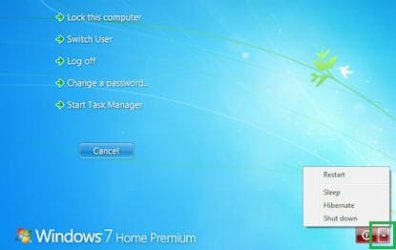
How can i enable "Restart" in the ctrl+alt+del screen?

piTu

New member
Local time
12:09 AM
Messages
3
If you press ctrl+alt+del you have options like "lock this computer", "log off", "show task manager" etc in the middle of the screen.
I would like to have the option "restart", too. i know, that i can get this option at this screen at the power-button but in our systems i have to disable the power-button to prevent that someone presses shut down. restart shoul be still available so i need a way to enable it in the described way.

i don´t want to have "restart" at any other way cause windows is completely closed for our users. they can only use the startet programs in full screen mode. they have no permissions to use the start-button or to see the desktop. only ctrl+alt+del is available to log out. therefore i need this "extraordinary" solution.

anyone has a hint? :o

the system is windows 7 prof 64bit.
 

My Computer My Computer

At a glance

windows 7 prof 64bit
OS
windows 7 prof 64bit
Hi PiTu, does it work?
windows-7-shutdown1.jpg

Click on the triangle, the option is there.
 

My Computer My Computer

At a glance

Microsoft Windows 10 Pro Insider Preview 64-bitIntel(R) Core(TM) i3-4130 CPU @ 3.40GHzCorsair Vengence 4GB x2 (8.00GB Dual-Channel ...2047MB GeForce GTS 450 (ZOTAC International)
Computer type
PC/Desktop
Computer Manufacturer/Model Number
Self Assembled
OS
Microsoft Windows 10 Pro Insider Preview 64-bit
CPU
Intel(R) Core(TM) i3-4130 CPU @ 3.40GHz
Motherboard
Gigabyte Technology Co., Ltd. B85M-D3H
Memory
Corsair Vengence 4GB x2 (8.00GB Dual-Channel DDR3 @ 798MHz)
Graphics Card(s)
2047MB GeForce GTS 450 (ZOTAC International)
Sound Card
Onboard (Realtek High Definition Audio)
Monitor(s) Displays
LG Flatron E2040T
Screen Resolution
1600x900
Hard Drives
Western Digital 1 TB
Seagate 500 GB
PSU
Corsair VS550
Case
Cooler Master K380
Cooling
Cooler Master Seidon 120V Plus
Keyboard
Logitech MK260r
Mouse
Logitech MK260r
Internet Speed
PMPL Broadband
Antivirus
Windows Defender + MBAM
Browser
Firefox
Other Info
Dell Studio 15" Laptop
i know, that i can get this option at this screen at the power-button but in our systems i have to disable the power-button to prevent that someone presses shut down.


hi, you have read that i´ve disabled the red power-button? this button is not available. therefore i need it displayed as a text between the 5 options in your screen:(.
 

My Computer My Computer

At a glance

windows 7 prof 64bit
OS
windows 7 prof 64bit
Sorry no more ideas :(

I asked the best person in this field for help, you may have to wait a bit.
 

My Computer My Computer

At a glance

Microsoft Windows 10 Pro Insider Preview 64-bitIntel(R) Core(TM) i3-4130 CPU @ 3.40GHzCorsair Vengence 4GB x2 (8.00GB Dual-Channel ...2047MB GeForce GTS 450 (ZOTAC International)
Computer type
PC/Desktop
Computer Manufacturer/Model Number
Self Assembled
OS
Microsoft Windows 10 Pro Insider Preview 64-bit
CPU
Intel(R) Core(TM) i3-4130 CPU @ 3.40GHz
Motherboard
Gigabyte Technology Co., Ltd. B85M-D3H
Memory
Corsair Vengence 4GB x2 (8.00GB Dual-Channel DDR3 @ 798MHz)
Graphics Card(s)
2047MB GeForce GTS 450 (ZOTAC International)
Sound Card
Onboard (Realtek High Definition Audio)
Monitor(s) Displays
LG Flatron E2040T
Screen Resolution
1600x900
Hard Drives
Western Digital 1 TB
Seagate 500 GB
PSU
Corsair VS550
Case
Cooler Master K380
Cooling
Cooler Master Seidon 120V Plus
Keyboard
Logitech MK260r
Mouse
Logitech MK260r
Internet Speed
PMPL Broadband
Antivirus
Windows Defender + MBAM
Browser
Firefox
Other Info
Dell Studio 15" Laptop
Hello piTu, and welcome to Seven Forums.

I'm assuming that you used the group policy setting in OPTION TWO to remove all shut down options like that. You might see if undoing that policy, then set the policy for "specific users" or "all users except administator" in step 1 of the same OPTION TWO to have the shut down option for you (administrator) and not other standard users.

http://www.sevenforums.com/tutorial...tart-sleep-hibernate-commands-add-remove.html

Hope this helps, :)
Shawn
 

My Computer My Computer

At a glance

64-bit Windows 11 Pro for WorkstationsIntel i7-8700K OC'd to 5 GHz64 GB (4x16GB) G.SKILL TridentZ RGB DDR4 3600...ASUS ROG-STRIX-GTX1080TI-O11G-GAMING
Computer type
PC/Desktop
Computer Manufacturer/Model Number
Self built custom
OS
64-bit Windows 11 Pro for Workstations
CPU
Intel i7-8700K OC'd to 5 GHz
Motherboard
ASUS ROG Maximus XI Formula Z390
Memory
64 GB (4x16GB) G.SKILL TridentZ RGB DDR4 3600 MHz
Graphics Card(s)
ASUS ROG-STRIX-GTX1080TI-O11G-GAMING
Sound Card
Integrated
Monitor(s) Displays
2 x Samsung Odyssey G7 27"
Screen Resolution
2560x1440
Hard Drives
1TB Samsung 990 PRO M.2,
4TB Samsung 990 PRO PRO M.2,
TerraMaster F8 SSD Plus NAS
PSU
Seasonic Prime Titanium 850W
Case
Thermaltake Core P3
Cooling
Corsair Hydro H115i
Keyboard
Logitech wireless K800
Mouse
Logitech MX Master 4
Internet Speed
2 Gb/s Download and 100 Mb/s Upload
Antivirus
Malwarebyte Anti-Malware Premium
Browser
Google Chrome
Other Info
Logitech Z625 speaker system,
Logitech BRIO 4K Pro webcam,
HP Color LaserJet Pro MFP M477fdn,
APC SMART-UPS RT 1000 XL - SURT1000XLI,
Galaxy S23 Plus phone
  • Like
Reactions: Arc
thx for the wellcome :).

sure, i´ve set this rule for "non-administrators".

but i´ve to allow the non-administrators to restart the system. but reboot should be not possible for them because the machines are in closed extra rooms and so they can´t start them again after shut down.


now i´ve implemented a button in the full-screen-programs to restart the system. it works but it´s not such a nice solution like my first idea :(.

maybe someone else has an idea how to bring restart as a text on the security screen. :)
 

My Computer My Computer

At a glance

windows 7 prof 64bit
OS
windows 7 prof 64bit
Back
Top