Severe HDD bottleneck on laptop

Windows i7 920

New member
Pro User
Local time
9:17 AM
Messages
544
According to a benchmark I ran on my laptop, the HDD is only getting a read speed of 1 MBps... that is literally a third of my internet download speed... The laptop is also VERY slow to boot up, and load anything off the HDD...

Specs of laptop:

8 GB 1333 MHz DDR3
500 GB 7200 RPM HDD 16MB cache SATA2
Intel Core i7 740 QM
ATI Mobility Radeon HD 5650 1 GB
Windows 7 x64 Ultimate Edition SP1

Is there anything I can do about this aside from replacing the HDD (definitely going for an SSD if I have to though)?
 

My Computer My Computer

Computer Manufacturer/Model Number
iBuyPower Chimera X58
OS
Windows 8 Pro x64
CPU
Intel Core i7 920
Motherboard
Asus P6T Deluxe V2
Memory
12GB (2GB x6) Triple Channel DDR3 1333 MHz
Graphics Card(s)
ATI Radeon HD 4870 X2 2GB GDDR5
Sound Card
Integrated Digital HD 7.1 Surround Sound
Monitor(s) Displays
24.6-inch ASUS VW246H 20000:1 Contrast, 2 ms response time,
Screen Resolution
1920x1080
Hard Drives
1 TB 7200 RPM SATA II 3 GBps 16MB cache
PSU
NZXT 800W Gaming Series
Case
Guardian Inferno (Custom Painted NZXT Guardian 921)
Cooling
Thermaltake V1 Fan Cooling System OC Proof
Keyboard
Razer Lycosa
Mouse
iBuyPower Ergonomical Internet Mouse
Internet Speed
11 MBps High-speed Cable
Hi,

Have you checked for disk fragmentation? Have you tried to run a chkdsk?

Regards,
Golden
 

My Computer My Computer

Computer type
PC/Desktop
Computer Manufacturer/Model Number
Golden Mk. I.4
OS
Windows 10 Pro x64 ; Xubuntu x64
CPU
Intel i7 860 @ 2.80 GHz O/C'ed to 4.0GHz
Motherboard
Gigabyte P55A-UD3R Rev.1. Award BIOS F13
Memory
16GB Corsair Vengance DDR3 @ 661 MHz Dual Channel (9-9-9-24)
Graphics Card(s)
EVGA NVidia GTX 560 1024MB
Sound Card
Realtek Integrated
Monitor(s) Displays
Dual Samsung SyncMaster 2494HS
Screen Resolution
1920*1080 and 1920*1080
Hard Drives
1*Samsung 840 EVO 120GB SSD;
1*OCZ Vertex 2 60GB SSD;
2*Samsung F3 SpinPoint 1TB in RAID0;
1*Samsung F1 SpinPoint 1TB;
2*Western Digital 1TB External USB 3.0
1*Western Digital 500GB External USB 3.0
1*Seagate 500GB External USB 2.0
PSU
Thermaltake ToughPower QFan 750W
Case
Thermaltake Element S VK60001W2Z
Cooling
Corsair H60 Water Cooling, 2*230mm and 2*80mm case fans
Keyboard
Logitech G110
Mouse
Logitech MX518
According to a benchmark I ran on my laptop, the HDD is only getting a read speed of 1 MBps... that is literally a third of my internet download speed... The laptop is also VERY slow to boot up, and load anything off the HDD...

Specs of laptop:

8 GB 1333 MHz DDR3
500 GB 7200 RPM HDD 16MB cache SATA2
Intel Core i7 740 QM
ATI Mobility Radeon HD 5650 1 GB
Windows 7 x64 Ultimate Edition SP1

Is there anything I can do about this aside from replacing the HDD (definitely going for an SSD if I have to though)?

First run chkdsk from an elevated command prompt.
run chkdsk on ALL "drives"

2nd. Using the Windows Defragmenter, defragment your drives.

General advice:
When running a disk check program or
when running a defragmenter program,
then
Do nothing else. Just sit back and wait. Watch a ballgame or whatever.

Go To an Elevated Command Prompt


Elevated command prompt = Run CMD.EXE as administrator

WIN | type CMD.EXE | do not hit Enter |
in the PROGRAMS list, right-click on CMD.EXE |
choose "Run as administrator" |

Click on the YES button (if such appears)

WIN key = key with Microsoft log on top

for the guru:
WIN | type CMD.EXE | CTRL+SHIFT+ENTER key combo | ALT+Y keycombo

========================================

This is the chkdsk command you need:
CHKDSK X: /R
where you substitute your actual "drive" letter of X

======================================
To run win 7 defragmenter:
WIN | type Disk Defrag | ENTER
WIN = key with Microsoft logo on top

Let us know when you have completed both of these.
 

My Computer My Computer

Computer Manufacturer/Model Number
Toshiba Satellite S875D-S7239 laptop
OS
MS Windows 7 Ultimate SP1 64-bit
CPU
AMD A10-4600M
Motherboard
AMD Pumori (Socket FT1)
Memory
6.00 GB Dual-Channel DDR3 @ 798MHz (11-11-12-28)
Graphics Card(s)
AMD Radeon HD 7660G
Sound Card
High Definition Audio Device
Monitor(s) Displays
Generic PnP Monitor (1600x900@60Hz)
Screen Resolution
1600x900@60Hz
Hard Drives
SSD 119GB Corsair CSSD-V128GB2 ATA Device
Keyboard
Standard PS/2 Keyboard
Mouse
HP Wireless Optical Mobile Mouse Model FHA-3410
Internet Speed
What the local pub, local coffee shop offers.
Other Info
Optical Drive:MATSHITA BD-CMB UJ160B ATA Device


Also have an Asus ha1002xp netbook with Win 7 Ultimate installed.
Check the smart status of the disk with Crystal Disk Info
 

My Computer My Computer

Computer type
PC/Desktop
OS
Microsoft Windows 10 Professional / Windows 7 Professional
CPU
Intel i5-3570
Motherboard
Lenovo Mahobay
Memory
16GB DDR3
Graphics Card(s)
AMD Radeon HD 7850 2GB
Sound Card
(1) Realtek HD Audio (2) AMD HD Audio
Monitor(s) Displays
LG LS192WS
Screen Resolution
1440 x 900 @ 32bit color
Hard Drives
(1) SUV300S37A/120G (2) ST3500413AS SATA Disk Device AHCI mode enabled.
PSU
Corsair HX620
Case
Thermaltake V4 Black Edition
Cooling
Cooler Master Hyper 212 + Artic Silver 5 on CPU/GPU
Keyboard
Dell SK-8115
Mouse
Razer Copperhead with MAPED mat (awesome!)
Internet Speed
100 Mbps up/down
Browser
Chrome
OldMX,

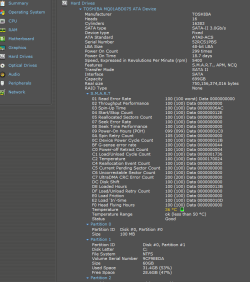
Another way of checking the S.M.A.R.T status is with SPECCY. Since many people already have Speccy installed, then I'm fond of using Speccy.

SPECCY | expand Hard Drive

Here is an example of the use:
smart data.PNG
 

My Computer My Computer

Computer Manufacturer/Model Number
Toshiba Satellite S875D-S7239 laptop
OS
MS Windows 7 Ultimate SP1 64-bit
CPU
AMD A10-4600M
Motherboard
AMD Pumori (Socket FT1)
Memory
6.00 GB Dual-Channel DDR3 @ 798MHz (11-11-12-28)
Graphics Card(s)
AMD Radeon HD 7660G
Sound Card
High Definition Audio Device
Monitor(s) Displays
Generic PnP Monitor (1600x900@60Hz)
Screen Resolution
1600x900@60Hz
Hard Drives
SSD 119GB Corsair CSSD-V128GB2 ATA Device
Keyboard
Standard PS/2 Keyboard
Mouse
HP Wireless Optical Mobile Mouse Model FHA-3410
Internet Speed
What the local pub, local coffee shop offers.
Other Info
Optical Drive:MATSHITA BD-CMB UJ160B ATA Device


Also have an Asus ha1002xp netbook with Win 7 Ultimate installed.
Nice, I wasnt aware of speccy being that complete, thanks Karl!
 

My Computer My Computer

Computer type
PC/Desktop
OS
Microsoft Windows 10 Professional / Windows 7 Professional
CPU
Intel i5-3570
Motherboard
Lenovo Mahobay
Memory
16GB DDR3
Graphics Card(s)
AMD Radeon HD 7850 2GB
Sound Card
(1) Realtek HD Audio (2) AMD HD Audio
Monitor(s) Displays
LG LS192WS
Screen Resolution
1440 x 900 @ 32bit color
Hard Drives
(1) SUV300S37A/120G (2) ST3500413AS SATA Disk Device AHCI mode enabled.
PSU
Corsair HX620
Case
Thermaltake V4 Black Edition
Cooling
Cooler Master Hyper 212 + Artic Silver 5 on CPU/GPU
Keyboard
Dell SK-8115
Mouse
Razer Copperhead with MAPED mat (awesome!)
Internet Speed
100 Mbps up/down
Browser
Chrome
Back
Top