My Computer
At a glance
windows7 home premium 64bitIntel core i3.4gb
- Computer Manufacturer/Model Number
- toshiba satellite c660 laptop
- OS
- windows7 home premium 64bit
- CPU
- Intel core i3.
- Memory
- 4gb


 rb:
rb:

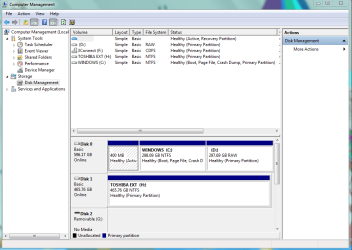
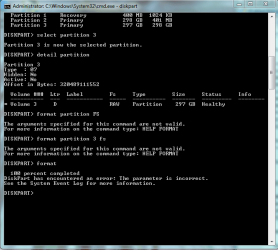
hi there.Ive performed all the actions that you suggested and ran the format.but it encountered a problem at the end..the saga continues.i dont know what to do now.Run DiskPart from an elevated command prompt.
Use following commands:
List Disk will list your disks
SELECT DISK 0 assuming that 0 is your desired disk
DETAIL DISK this will help you to confirm that you selected the correct disk
LIST PARTITION will list partitions on the selected disk
SELECT PARTITION n you specify the "raw" partition here
DETAIL PARTITION will help you confirm that you selected correctly
FORMAT PARTITIONN FS=NTFS will format the selected partition
EXIT will exit from DiskPart
EXIT will exit from the command shell
Now you can go back into DiskManagement and give your partition a name.
=====================================================
Go To an Elevated Command Prompt
Elevated command prompt = Run CMD.EXE as administrator
WIN | type CMD.EXE | do not hit Enter |
in the PROGRAMS list, right-click on CMD.EXE |
choose "Run as administrator" |
Click on the YES button (if such appears)
WIN key = key with Microsoft log on top
for the guru:
WIN | type CMD.EXE | CTRL+SHIFT+ENTER key combo | ALT+Y keycombo
what does parameter incorrect mean.?my typo:
that format command is:
FORMAT FS=NTFS
Will this command make any difference?my typo:
that format command is:
FORMAT FS=NTFS


This is the problem im having.it will not format and ive tried easeus but it doesnt indicate whether it is doing anything.i performed a diskpart format and at the end it says "parameter is incorrect"..Hi,
Yes, you can do that, but you need to format it first. Use EaseUS to format that partition if you don't need to recover any data from it.
Regards,
Golden