D drive has unrecognised file sytem.

Sentinel72

New member
Member
Local time
6:10 AM
Messages
54
Location
Lincolnshire.england.
I cannot open the D drive at all.It says it needs formatting and has a unrecognised file system.This is strange because ive only created windows images.
Any ideas what is happening here please.?:cry:
 

Attachments

  • Capture.PNG
    Capture.PNG
    41.2 KB · Views: 19

My Computer My Computer

Computer Manufacturer/Model Number
toshiba satellite c660 laptop
OS
windows7 home premium 64bit
CPU
Intel core i3.
Memory
4gb
Hi,

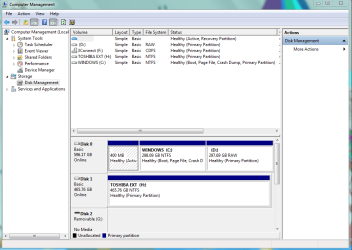
Please post a screen capture image of your Disk Management window.

1. Click :orb:
2. Right-click on Computer
3. Click Manage

In the window that open, click Disk Management. Maximise it and take the screen capture image.

Regards,
Golden
 

My Computer My Computer

Computer type
PC/Desktop
Computer Manufacturer/Model Number
Golden Mk. I.4
OS
Windows 10 Pro x64 ; Xubuntu x64
CPU
Intel i7 860 @ 2.80 GHz O/C'ed to 4.0GHz
Motherboard
Gigabyte P55A-UD3R Rev.1. Award BIOS F13
Memory
16GB Corsair Vengance DDR3 @ 661 MHz Dual Channel (9-9-9-24)
Graphics Card(s)
EVGA NVidia GTX 560 1024MB
Sound Card
Realtek Integrated
Monitor(s) Displays
Dual Samsung SyncMaster 2494HS
Screen Resolution
1920*1080 and 1920*1080
Hard Drives
1*Samsung 840 EVO 120GB SSD;
1*OCZ Vertex 2 60GB SSD;
2*Samsung F3 SpinPoint 1TB in RAID0;
1*Samsung F1 SpinPoint 1TB;
2*Western Digital 1TB External USB 3.0
1*Western Digital 500GB External USB 3.0
1*Seagate 500GB External USB 2.0
PSU
Thermaltake ToughPower QFan 750W
Case
Thermaltake Element S VK60001W2Z
Cooling
Corsair H60 Water Cooling, 2*230mm and 2*80mm case fans
Keyboard
Logitech G110
Mouse
Logitech MX518
D drive not recognised.

Hi Golden,sorry for late reply.
Here is my screenshot as requested.hope it helps.
Thanks.
 

Attachments

  • Capture.PNG
    Capture.PNG
    33 KB · Views: 20

My Computer My Computer

Computer Manufacturer/Model Number
toshiba satellite c660 laptop
OS
windows7 home premium 64bit
CPU
Intel core i3.
Memory
4gb
Sentinel,
Anything on D that you want?
 

My Computer My Computer

Computer Manufacturer/Model Number
Toshiba Satellite S875D-S7239 laptop
OS
MS Windows 7 Ultimate SP1 64-bit
CPU
AMD A10-4600M
Motherboard
AMD Pumori (Socket FT1)
Memory
6.00 GB Dual-Channel DDR3 @ 798MHz (11-11-12-28)
Graphics Card(s)
AMD Radeon HD 7660G
Sound Card
High Definition Audio Device
Monitor(s) Displays
Generic PnP Monitor (1600x900@60Hz)
Screen Resolution
1600x900@60Hz
Hard Drives
SSD 119GB Corsair CSSD-V128GB2 ATA Device
Keyboard
Standard PS/2 Keyboard
Mouse
HP Wireless Optical Mobile Mouse Model FHA-3410
Internet Speed
What the local pub, local coffee shop offers.
Other Info
Optical Drive:MATSHITA BD-CMB UJ160B ATA Device


Also have an Asus ha1002xp netbook with Win 7 Ultimate installed.
D drive not recognised

hi,
Yes i would suppose.it contains recovery data for the computer.if i want to reinstall the OS.unless there is another way.
I need a free data recovery program.
Any suggestions what i do here please.?:banghead:
 

My Computer My Computer

Computer Manufacturer/Model Number
toshiba satellite c660 laptop
OS
windows7 home premium 64bit
CPU
Intel core i3.
Memory
4gb
Hi,

The RAW format requires that you format the disk, but you should first try to recover data from it, before you do that.

Please have a look at this thread to help you with that.

Regards,
Golden
 

My Computer My Computer

Computer type
PC/Desktop
Computer Manufacturer/Model Number
Golden Mk. I.4
OS
Windows 10 Pro x64 ; Xubuntu x64
CPU
Intel i7 860 @ 2.80 GHz O/C'ed to 4.0GHz
Motherboard
Gigabyte P55A-UD3R Rev.1. Award BIOS F13
Memory
16GB Corsair Vengance DDR3 @ 661 MHz Dual Channel (9-9-9-24)
Graphics Card(s)
EVGA NVidia GTX 560 1024MB
Sound Card
Realtek Integrated
Monitor(s) Displays
Dual Samsung SyncMaster 2494HS
Screen Resolution
1920*1080 and 1920*1080
Hard Drives
1*Samsung 840 EVO 120GB SSD;
1*OCZ Vertex 2 60GB SSD;
2*Samsung F3 SpinPoint 1TB in RAID0;
1*Samsung F1 SpinPoint 1TB;
2*Western Digital 1TB External USB 3.0
1*Western Digital 500GB External USB 3.0
1*Seagate 500GB External USB 2.0
PSU
Thermaltake ToughPower QFan 750W
Case
Thermaltake Element S VK60001W2Z
Cooling
Corsair H60 Water Cooling, 2*230mm and 2*80mm case fans
Keyboard
Logitech G110
Mouse
Logitech MX518

My Computer My Computer

Computer Manufacturer/Model Number
Toshiba Satellite S875D-S7239 laptop
OS
MS Windows 7 Ultimate SP1 64-bit
CPU
AMD A10-4600M
Motherboard
AMD Pumori (Socket FT1)
Memory
6.00 GB Dual-Channel DDR3 @ 798MHz (11-11-12-28)
Graphics Card(s)
AMD Radeon HD 7660G
Sound Card
High Definition Audio Device
Monitor(s) Displays
Generic PnP Monitor (1600x900@60Hz)
Screen Resolution
1600x900@60Hz
Hard Drives
SSD 119GB Corsair CSSD-V128GB2 ATA Device
Keyboard
Standard PS/2 Keyboard
Mouse
HP Wireless Optical Mobile Mouse Model FHA-3410
Internet Speed
What the local pub, local coffee shop offers.
Other Info
Optical Drive:MATSHITA BD-CMB UJ160B ATA Device


Also have an Asus ha1002xp netbook with Win 7 Ultimate installed.
D drive not recognised.

hi,
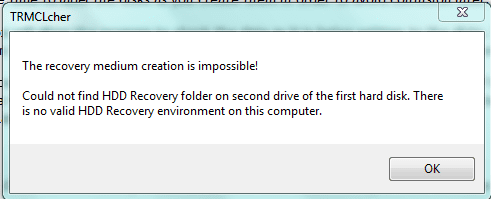
No luck with this.windows says it cannot even format the drive.
Also cannot create recovery disk.
 

Attachments

  • Capture.PNG
    Capture.PNG
    8 KB · Views: 3

My Computer My Computer

Computer Manufacturer/Model Number
toshiba satellite c660 laptop
OS
windows7 home premium 64bit
CPU
Intel core i3.
Memory
4gb
At this point you have rather well shot yourself in the foot.
You can order recovery media:
https://www.csd.toshiba.com/cgi-bin/tais/support/jsp/serviceUnitVerification.jsp?orderType=SFF

In the meantime, before I say just format the partition as NtFS, try:

TestDisk - data,partition, disk recovery software - cgsecurity

Recuva - Undelete, Unerase, File and Disk Recovery - Free Download

File recovery - photos,videos,docs - cgsecurity

Oemailrecovery CD DVD HDDVD Blu-Ray Recovery Free

following product is excellent and expensive
GRC Hard drive data recovery software

following product is excellent and not expensiveActive@ File-recovery
 

My Computer My Computer

Computer Manufacturer/Model Number
Toshiba Satellite S875D-S7239 laptop
OS
MS Windows 7 Ultimate SP1 64-bit
CPU
AMD A10-4600M
Motherboard
AMD Pumori (Socket FT1)
Memory
6.00 GB Dual-Channel DDR3 @ 798MHz (11-11-12-28)
Graphics Card(s)
AMD Radeon HD 7660G
Sound Card
High Definition Audio Device
Monitor(s) Displays
Generic PnP Monitor (1600x900@60Hz)
Screen Resolution
1600x900@60Hz
Hard Drives
SSD 119GB Corsair CSSD-V128GB2 ATA Device
Keyboard
Standard PS/2 Keyboard
Mouse
HP Wireless Optical Mobile Mouse Model FHA-3410
Internet Speed
What the local pub, local coffee shop offers.
Other Info
Optical Drive:MATSHITA BD-CMB UJ160B ATA Device


Also have an Asus ha1002xp netbook with Win 7 Ultimate installed.
D drive is not recognised

hi.
I dont see how this has happened but it must have been the reinstallation of os.
Im not going to waste any more time trying to download this and that to cure it.
Problem is it will not even let me format the drive.
I have easeus partition manager.can i not just merge them and eliminate this partition altogether?:cry:
 

My Computer My Computer

Computer Manufacturer/Model Number
toshiba satellite c660 laptop
OS
windows7 home premium 64bit
CPU
Intel core i3.
Memory
4gb
Run DiskPart from an elevated command prompt.

Use following commands:
List Disk will list your disks
SELECT DISK 0 assuming that 0 is your desired disk
DETAIL DISK this will help you to confirm that you selected the correct disk
LIST PARTITION will list partitions on the selected disk
SELECT PARTITION n you specify the "raw" partition here
DETAIL PARTITION will help you confirm that you selected correctly
FORMAT PARTITIONN FS=NTFS will format the selected partition
EXIT will exit from DiskPart
EXIT will exit from the command shell

Now you can go back into DiskManagement and give your partition a name.
=====================================================

Go To an Elevated Command Prompt


Elevated command prompt = Run CMD.EXE as administrator

WIN | type CMD.EXE | do not hit Enter |
in the PROGRAMS list, right-click on CMD.EXE |
choose "Run as administrator" |

Click on the YES button (if such appears)

WIN key = key with Microsoft log on top

for the guru:
WIN | type CMD.EXE | CTRL+SHIFT+ENTER key combo | ALT+Y keycombo
 

My Computer My Computer

Computer Manufacturer/Model Number
Toshiba Satellite S875D-S7239 laptop
OS
MS Windows 7 Ultimate SP1 64-bit
CPU
AMD A10-4600M
Motherboard
AMD Pumori (Socket FT1)
Memory
6.00 GB Dual-Channel DDR3 @ 798MHz (11-11-12-28)
Graphics Card(s)
AMD Radeon HD 7660G
Sound Card
High Definition Audio Device
Monitor(s) Displays
Generic PnP Monitor (1600x900@60Hz)
Screen Resolution
1600x900@60Hz
Hard Drives
SSD 119GB Corsair CSSD-V128GB2 ATA Device
Keyboard
Standard PS/2 Keyboard
Mouse
HP Wireless Optical Mobile Mouse Model FHA-3410
Internet Speed
What the local pub, local coffee shop offers.
Other Info
Optical Drive:MATSHITA BD-CMB UJ160B ATA Device


Also have an Asus ha1002xp netbook with Win 7 Ultimate installed.
Run DiskPart from an elevated command prompt.

Use following commands:
List Disk will list your disks
SELECT DISK 0 assuming that 0 is your desired disk
DETAIL DISK this will help you to confirm that you selected the correct disk
LIST PARTITION will list partitions on the selected disk
SELECT PARTITION n you specify the "raw" partition here
DETAIL PARTITION will help you confirm that you selected correctly
FORMAT PARTITIONN FS=NTFS will format the selected partition
EXIT will exit from DiskPart
EXIT will exit from the command shell

Now you can go back into DiskManagement and give your partition a name.
=====================================================

Go To an Elevated Command Prompt


Elevated command prompt = Run CMD.EXE as administrator

WIN | type CMD.EXE | do not hit Enter |
in the PROGRAMS list, right-click on CMD.EXE |
choose "Run as administrator" |

Click on the YES button (if such appears)

WIN key = key with Microsoft log on top

for the guru:
WIN | type CMD.EXE | CTRL+SHIFT+ENTER key combo | ALT+Y keycombo
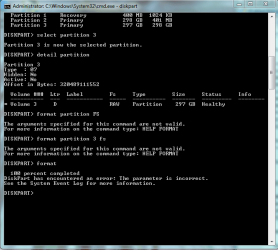
hi there.Ive performed all the actions that you suggested and ran the format.but it encountered a problem at the end..the saga continues.i dont know what to do now.
Thanks.below is a pictorial of the message.
 

Attachments

  • Capture.PNG
    Capture.PNG
    22.2 KB · Views: 6

My Computer My Computer

Computer Manufacturer/Model Number
toshiba satellite c660 laptop
OS
windows7 home premium 64bit
CPU
Intel core i3.
Memory
4gb
my typo:
that format command is:

FORMAT FS=NTFS
 

My Computer My Computer

Computer Manufacturer/Model Number
Toshiba Satellite S875D-S7239 laptop
OS
MS Windows 7 Ultimate SP1 64-bit
CPU
AMD A10-4600M
Motherboard
AMD Pumori (Socket FT1)
Memory
6.00 GB Dual-Channel DDR3 @ 798MHz (11-11-12-28)
Graphics Card(s)
AMD Radeon HD 7660G
Sound Card
High Definition Audio Device
Monitor(s) Displays
Generic PnP Monitor (1600x900@60Hz)
Screen Resolution
1600x900@60Hz
Hard Drives
SSD 119GB Corsair CSSD-V128GB2 ATA Device
Keyboard
Standard PS/2 Keyboard
Mouse
HP Wireless Optical Mobile Mouse Model FHA-3410
Internet Speed
What the local pub, local coffee shop offers.
Other Info
Optical Drive:MATSHITA BD-CMB UJ160B ATA Device


Also have an Asus ha1002xp netbook with Win 7 Ultimate installed.
Hi,

Yes, you can do that, but you need to format it first. Use EaseUS to format that partition if you don't need to recover any data from it.

Regards,
Golden
 

My Computer My Computer

Computer type
PC/Desktop
Computer Manufacturer/Model Number
Golden Mk. I.4
OS
Windows 10 Pro x64 ; Xubuntu x64
CPU
Intel i7 860 @ 2.80 GHz O/C'ed to 4.0GHz
Motherboard
Gigabyte P55A-UD3R Rev.1. Award BIOS F13
Memory
16GB Corsair Vengance DDR3 @ 661 MHz Dual Channel (9-9-9-24)
Graphics Card(s)
EVGA NVidia GTX 560 1024MB
Sound Card
Realtek Integrated
Monitor(s) Displays
Dual Samsung SyncMaster 2494HS
Screen Resolution
1920*1080 and 1920*1080
Hard Drives
1*Samsung 840 EVO 120GB SSD;
1*OCZ Vertex 2 60GB SSD;
2*Samsung F3 SpinPoint 1TB in RAID0;
1*Samsung F1 SpinPoint 1TB;
2*Western Digital 1TB External USB 3.0
1*Western Digital 500GB External USB 3.0
1*Seagate 500GB External USB 2.0
PSU
Thermaltake ToughPower QFan 750W
Case
Thermaltake Element S VK60001W2Z
Cooling
Corsair H60 Water Cooling, 2*230mm and 2*80mm case fans
Keyboard
Logitech G110
Mouse
Logitech MX518
Hi,

Yes, you can do that, but you need to format it first. Use EaseUS to format that partition if you don't need to recover any data from it.

Regards,
Golden
This is the problem im having.it will not format and ive tried easeus but it doesnt indicate whether it is doing anything.i performed a diskpart format and at the end it says "parameter is incorrect"..
Thanks.:eek:
 

My Computer My Computer

Computer Manufacturer/Model Number
toshiba satellite c660 laptop
OS
windows7 home premium 64bit
CPU
Intel core i3.
Memory
4gb
that's because the command was incorrect. Do you not read? See post #13.

Do you just want to fail or what?
 

My Computer My Computer

Computer Manufacturer/Model Number
Toshiba Satellite S875D-S7239 laptop
OS
MS Windows 7 Ultimate SP1 64-bit
CPU
AMD A10-4600M
Motherboard
AMD Pumori (Socket FT1)
Memory
6.00 GB Dual-Channel DDR3 @ 798MHz (11-11-12-28)
Graphics Card(s)
AMD Radeon HD 7660G
Sound Card
High Definition Audio Device
Monitor(s) Displays
Generic PnP Monitor (1600x900@60Hz)
Screen Resolution
1600x900@60Hz
Hard Drives
SSD 119GB Corsair CSSD-V128GB2 ATA Device
Keyboard
Standard PS/2 Keyboard
Mouse
HP Wireless Optical Mobile Mouse Model FHA-3410
Internet Speed
What the local pub, local coffee shop offers.
Other Info
Optical Drive:MATSHITA BD-CMB UJ160B ATA Device


Also have an Asus ha1002xp netbook with Win 7 Ultimate installed.
ive tried your commands to the letter.and it didnt work.at the end of the formatting it says "parameter is incorrect"..just admit you havent any idea how to solve this.Regards.
 

My Computer My Computer

Computer Manufacturer/Model Number
toshiba satellite c660 laptop
OS
windows7 home premium 64bit
CPU
Intel core i3.
Memory
4gb
does anybody on this forum know how to solve this???
The D partition WONT format at all.it is unrecognised.
I cant believe nobody on here knows how to solve this.im just going around in circles here.
 

My Computer My Computer

Computer Manufacturer/Model Number
toshiba satellite c660 laptop
OS
windows7 home premium 64bit
CPU
Intel core i3.
Memory
4gb
Back
Top