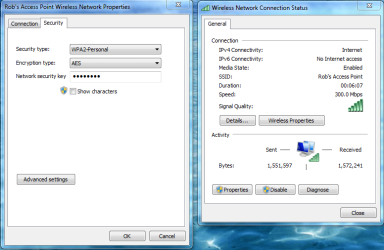
Can't get more than 65Mbps

bru

New member
Pro User
Local time
9:32 AM
Messages
417
Location
A suburb of Chicago
My foray into networking/wireless has been fraught with problems. For this thread I will focus on why I can't get better than 65Mbps speed when my laptop is connected wirelessly.

Laptop is new, has 802.11n. Router is new (Netgear N300). In theory I should be able to achieve 300 Mbps. I understand what effects speed but I know there is a problem.

If I have the laptop literally on top of the router it still never registers higher than 65Mbps. I know about interference...have no wireless phones in the house on the same frequency. I know about neighboring networks effecting speed, but shouldn't I occasionally be able to see higher speeds?

There are lots of settings on the adapter card and I have fiddled a bit to no avail. There are also settings for the router. Essentially it is at default which should allow "up to 150Mbps".

My desktop which is connected wired also has wireless. So to see how it would perform I enabled wireless and it did 72Mbps and it is literally an inch away from the router.

So knowing that neither computer can approach 150Mbps what does that tell me? Bad router?

I'm about ready to return everything.
 

Attachments

  • nw.JPG
    nw.JPG
    28.9 KB · Views: 21

My Computer My Computer

Computer Manufacturer/Model Number
HP p6608f
OS
Win 7 Home Premium x64
CPU
Intel Core i3-540 3.07 GHz
Motherboard
MS-7613 (Iona-GL8E)
Memory
4 GB (2 X 2) Dual-Channel PC-10600 DDR3 @ 665MHz (9-9-9-24)
Graphics Card(s)
Integrated Intel H57
Sound Card
Integrated Realtek ALC888S Audio
Monitor(s) Displays
17" SDM-HS73 (a vestige from my old computer)
Screen Resolution
1280 X 1024
Hard Drives
750GB SATA 7200 RPM
PSU
250W
Keyboard
HP USB keyboard
Mouse
HP USB optical mouse
Internet Speed
15Mbps/1Mbps
My foray into networking/wireless has been fraught with problems. For this thread I will focus on why I can't get better than 65Mbps speed when my laptop is connected wirelessly.

Laptop is new, has 802.11n. Router is new (Netgear N300). In theory I should be able to achieve 300 Mbps. I understand what effects speed but I know there is a problem.

If I have the laptop literally on top of the router it still never registers higher than 65Mbps. I know about interference...have no wireless phones in the house on the same frequency. I know about neighboring networks effecting speed, but shouldn't I occasionally be able to see higher speeds?

There are lots of settings on the adapter card and I have fiddled a bit to no avail. There are also settings for the router. Essentially it is at default which should allow "up to 150Mbps".

My desktop which is connected wired also has wireless. So to see how it would perform I enabled wireless and it did 72Mbps and it is literally an inch away from the router.

So knowing that neither computer can approach 150Mbps what does that tell me? Bad router?

I'm about ready to return everything.

In order to achieve 300Mbps with 802.11n you need to set the router to use the 802.11n Only setting, the mixed settings won't work for the higher speeds because wireless N needs to slow down in order to work with other slower standards like G,B or A. The N Only setting will only work if all clients are using wireless N.

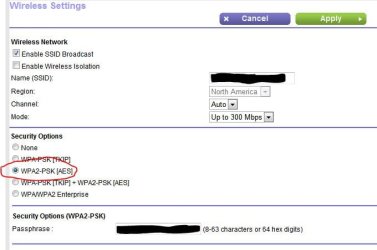
You will also need to use WPA2 security with AES encryption as both of these are made to work at wireless N speeds.
 

Attachments

  • 300mbps AES.PNG
    300mbps AES.PNG
    41.5 KB · Views: 108

My Computer My Computer

Computer type
PC/Desktop
Computer Manufacturer/Model Number
Home built
OS
Windows 7 Ult, Windows 8.1 Pro,
CPU
Q9650-4.275GHz, E8600 4.5GHz, E6750-3.8GHz
Motherboard
Evga 780i FTW
Memory
G.Skill PC2 9600 1200Mhz 5 5 5 15 2T
Graphics Card(s)
GTX480
Sound Card
Asus Xonar D2
Monitor(s) Displays
HannsG
Screen Resolution
1680X1050
Hard Drives
GSkill Phoenix Pro 120GB SSD
PSU
ThermalTake Toughpower 1000Watt modular
Case
ThermalTake XaserV
Cooling
Xigmatek S1283
Keyboard
Logitech G15
Mouse
Logitech G9
Internet Speed
T1
It can also be the wireless adapter(s) themselves. My wife has a laptop with a Broadcom wireless N in it and it can only do 65 Mbps as well, due to a limitation of the chip.

From what I could find from looking into it a year ago is that it looks like there is a surplus of these Broadcom chips (that are more like early draft N, than full spec N), and quite a few laptop manufacturers are still using them and advertising N speed wireless, without being able to achieve full N speed.
 

My Computer My Computer

Computer type
PC/Desktop
Computer Manufacturer/Model Number
Me
OS
Win 7 Ultimate x64
CPU
FX-8350 @ 4.6 GHz so far
Motherboard
Asus M5A97 EVO
Memory
ADATA XPG V1 Series Black 8GB DDR3 1600
Graphics Card(s)
Sapphire R9 270x Dual-X
Sound Card
Xonar DGX w/ Corsair Vengence 1300
Monitor(s) Displays
Acer S232HL Abid
Screen Resolution
1920x1080
Hard Drives
120 GB OCZ Vertex 3
500 GB Seagate 7200.12
PSU
Antec Earthwatts 650W Green
Case
Antec Three Hundred
Cooling
Cooler Master 212 EVO
Keyboard
Logitech G510
Mouse
Logitech G500s
Internet Speed
35000/3000
It can also be the wireless adapter(s) themselves. My wife has a laptop with a Broadcom wireless N in it and it can only do 65 Mbps as well, due to a limitation of the chip.

From what I could find from looking into it a year ago is that it looks like there is a surplus of these Broadcom chips (that are more like early draft N, than full spec N), and quite a few laptop manufacturers are still using them and advertising N speed wireless, without being able to achieve full N speed.

Do you have any links? I can't even find a model number for my Broadcom adapter, it just says Broadcom 802.11n. But I think I have to agree with you because I have tried everything. I have set everything on the router as it should be including security to WPA2-[AES]. I can't actually find the specific setting but I'm pretty sure the router is already set for n, not mixed.

Funny thing is this laptop replaced one I returned because I wanted a better CPU. But apparently I got an inferior wireless adapter. The other laptop had an Atheros adapter. I never specifically looked into its speed but this Broadcom also get worse reception than the Atheros did so I bet the Atheros will have better speed.

The manufacturer uses a variety of adapters so maybe I could exchange and get lucky and get an Atheros or I could just go back to the Laptop with the lower CPU if it means better wireless performance.
 

My Computer My Computer

Computer Manufacturer/Model Number
HP p6608f
OS
Win 7 Home Premium x64
CPU
Intel Core i3-540 3.07 GHz
Motherboard
MS-7613 (Iona-GL8E)
Memory
4 GB (2 X 2) Dual-Channel PC-10600 DDR3 @ 665MHz (9-9-9-24)
Graphics Card(s)
Integrated Intel H57
Sound Card
Integrated Realtek ALC888S Audio
Monitor(s) Displays
17" SDM-HS73 (a vestige from my old computer)
Screen Resolution
1280 X 1024
Hard Drives
750GB SATA 7200 RPM
PSU
250W
Keyboard
HP USB keyboard
Mouse
HP USB optical mouse
Internet Speed
15Mbps/1Mbps
No links at the moment. I think all I used was the DevID and/or ProdID (can find it through Device Manage to search for it.

The manufacturer uses a variety of adapters so maybe I could exchange and get lucky and get an Atheros or I could just go back to the Laptop with the lower CPU if it means better wireless performance.

Only possible if the chip isn't soldered to the motherboard.
 

My Computer My Computer

Computer type
PC/Desktop
Computer Manufacturer/Model Number
Me
OS
Win 7 Ultimate x64
CPU
FX-8350 @ 4.6 GHz so far
Motherboard
Asus M5A97 EVO
Memory
ADATA XPG V1 Series Black 8GB DDR3 1600
Graphics Card(s)
Sapphire R9 270x Dual-X
Sound Card
Xonar DGX w/ Corsair Vengence 1300
Monitor(s) Displays
Acer S232HL Abid
Screen Resolution
1920x1080
Hard Drives
120 GB OCZ Vertex 3
500 GB Seagate 7200.12
PSU
Antec Earthwatts 650W Green
Case
Antec Three Hundred
Cooling
Cooler Master 212 EVO
Keyboard
Logitech G510
Mouse
Logitech G500s
Internet Speed
35000/3000
The manufacturer shows drivers for three wireless adapters. So that would also mean three different motherboards too? Seems like a lot of components. My thought was that either of the three adapters could be used depending on what they had on hand. I think the other laptop I originally had with the lower end processor that had the Atheros was the same motherboard as this one.

Regardless, I went to a public Wi-Fi location and was able to get 72Mbps. So that rules out 65 max. Signal was still not great and certainly did not get 150 or 300. I am leaning toward an antenna issue. Or just a cheap wireless card. Right now I am outside my house and I only get two bars for signal strength. Speed is 39Mbps and fluctuating. Can't live with that.

BTW the computer support told me it was 300Mbps capable. Also that the adapter was new, Broadcom Foxconn 43227. Couldn't find a lot of info about it. I think they are full of BS.
 

My Computer My Computer

Computer Manufacturer/Model Number
HP p6608f
OS
Win 7 Home Premium x64
CPU
Intel Core i3-540 3.07 GHz
Motherboard
MS-7613 (Iona-GL8E)
Memory
4 GB (2 X 2) Dual-Channel PC-10600 DDR3 @ 665MHz (9-9-9-24)
Graphics Card(s)
Integrated Intel H57
Sound Card
Integrated Realtek ALC888S Audio
Monitor(s) Displays
17" SDM-HS73 (a vestige from my old computer)
Screen Resolution
1280 X 1024
Hard Drives
750GB SATA 7200 RPM
PSU
250W
Keyboard
HP USB keyboard
Mouse
HP USB optical mouse
Internet Speed
15Mbps/1Mbps
Theoretical speeds and Real world speeds are two different things. If all of your devices run off 802.11 N wireless cards, make sure your router is set to N, like Chev65 said. Also, depending on your wireless router and how many channels it has.......75Mbps might be your cap.
 

My Computer My Computer

Computer type
PC/Desktop
Computer Manufacturer/Model Number
Custom Built
OS
Windows 7 Professional 64bit SP1
CPU
Intel Core i5-3570K @ 4.5GHz
Motherboard
Asus Sabertooth Z77
Memory
Corsair Vengeance 16GB (4x4) @1866MHz CL 9-9-9-24 1T
Graphics Card(s)
EVGA GTX 750 Ti FTW
Sound Card
Onboard Audio
Monitor(s) Displays
Dell S2309W
Screen Resolution
1920x1080
Hard Drives
Samsung 830 128GB SSD - OS
(4) Seagate 5TB HDD
(1) Seagate 2TB HDD
PSU
Seasonic X750 80+ Gold Full Modular
Case
Antec Eleven Hundred Super Mid Tower
Cooling
Intel Liquid Cooler
Keyboard
Max Nighthawk X8 Mechanical keyboard
Mouse
Mionix Naos 7000
Internet Speed
50 Mbps Down / 10 Mbps Up
Antivirus
Microsoft Security Essentials/Malwarebytes Anti-Malware
Browser
Chrome/Firefox
Other Info
Klipsch ProMedia 2.1's
Asus RT-N66R Wireless Router
The router is "up to 300Mbps". The computer mfg says my wireless card (802.11n) is capable of 300Mbps. So how can I be capped?

As for setting the router to N. I see no setting for this. I assume it is set for N by default. But maybe that is wrong.

Does anyone have a Netgear and use Netgear Genie interface? I think the settings are similar for most of their consumer routers.
 

My Computer My Computer

Computer Manufacturer/Model Number
HP p6608f
OS
Win 7 Home Premium x64
CPU
Intel Core i3-540 3.07 GHz
Motherboard
MS-7613 (Iona-GL8E)
Memory
4 GB (2 X 2) Dual-Channel PC-10600 DDR3 @ 665MHz (9-9-9-24)
Graphics Card(s)
Integrated Intel H57
Sound Card
Integrated Realtek ALC888S Audio
Monitor(s) Displays
17" SDM-HS73 (a vestige from my old computer)
Screen Resolution
1280 X 1024
Hard Drives
750GB SATA 7200 RPM
PSU
250W
Keyboard
HP USB keyboard
Mouse
HP USB optical mouse
Internet Speed
15Mbps/1Mbps
Do you know if you have any other wireless devices that have an older standard, such as 802.11 G for example? And just because it is "capable" in no way means that is what you will get. It is just saying that is the maximum you can get if you have no other restrictions. Check this out for a quick run down on Wireless N......

802.11n Speed - How Can I Get an 802.11n Wi-Fi Speed Rating of 300 Mbps?
 

My Computer My Computer

Computer type
PC/Desktop
Computer Manufacturer/Model Number
Custom Built
OS
Windows 7 Professional 64bit SP1
CPU
Intel Core i5-3570K @ 4.5GHz
Motherboard
Asus Sabertooth Z77
Memory
Corsair Vengeance 16GB (4x4) @1866MHz CL 9-9-9-24 1T
Graphics Card(s)
EVGA GTX 750 Ti FTW
Sound Card
Onboard Audio
Monitor(s) Displays
Dell S2309W
Screen Resolution
1920x1080
Hard Drives
Samsung 830 128GB SSD - OS
(4) Seagate 5TB HDD
(1) Seagate 2TB HDD
PSU
Seasonic X750 80+ Gold Full Modular
Case
Antec Eleven Hundred Super Mid Tower
Cooling
Intel Liquid Cooler
Keyboard
Max Nighthawk X8 Mechanical keyboard
Mouse
Mionix Naos 7000
Internet Speed
50 Mbps Down / 10 Mbps Up
Antivirus
Microsoft Security Essentials/Malwarebytes Anti-Malware
Browser
Chrome/Firefox
Other Info
Klipsch ProMedia 2.1's
Asus RT-N66R Wireless Router
If your router isn't a dual band router, Wireless N will be affected by appliances in and around the home. If anything is not working correctly, I would think it would be the wireless card in your laptop before the router. Just out of curiosity, what is it that you can't do with your laptop because of it connecting at 65Mbps?
 

My Computer My Computer

Computer type
PC/Desktop
Computer Manufacturer/Model Number
Custom Built
OS
Windows 7 Professional 64bit SP1
CPU
Intel Core i5-3570K @ 4.5GHz
Motherboard
Asus Sabertooth Z77
Memory
Corsair Vengeance 16GB (4x4) @1866MHz CL 9-9-9-24 1T
Graphics Card(s)
EVGA GTX 750 Ti FTW
Sound Card
Onboard Audio
Monitor(s) Displays
Dell S2309W
Screen Resolution
1920x1080
Hard Drives
Samsung 830 128GB SSD - OS
(4) Seagate 5TB HDD
(1) Seagate 2TB HDD
PSU
Seasonic X750 80+ Gold Full Modular
Case
Antec Eleven Hundred Super Mid Tower
Cooling
Intel Liquid Cooler
Keyboard
Max Nighthawk X8 Mechanical keyboard
Mouse
Mionix Naos 7000
Internet Speed
50 Mbps Down / 10 Mbps Up
Antivirus
Microsoft Security Essentials/Malwarebytes Anti-Malware
Browser
Chrome/Firefox
Other Info
Klipsch ProMedia 2.1's
Asus RT-N66R Wireless Router
Netgear N300 User manual (PDF)

Netgear Router Comparison chart

It's interesting to note that the comparison chart states 300Mbps, but the manual states 145Mbps.

Regardless of either "rating" you'll probably never see these rates unless both the router and NIC are from the same mfgr. To get closer to the theoretical rates, you'll need a dual band router and run in 'n' mode only at 40hz. I don't believe the n300 has those capabilities though.

So what's wrong with 65Mbps? How fast is your internet connection (the tier speed from your provider - 10, 20, 30 Mbps?)

You might want to check Meraki Wi-Fi stumbler to see how many neighbors are on a specific channel. In the US, most automatically select 1, 6, or 11 - changing the channel might give you a better signal. Pick a channel one or two away from the least crowded. It isn't going to be magic, but you should see some improvement.

Good luck.

Edit: I use the Asus RT-N53 (~$60), it's bigger brother RT-N56 (~$110) is a gigabit router with 2 USB ports. Both are dual band. I had an issue with their firmware, but just backed off to the previous level and everything is good. I'm only getting between 36 and 72 Mbps (3 floors up from the router) but my internet speed tier is only 50 Mbps - so I'm more than happy with the performance.
 
Last edited:

My Computer My Computer

Computer type
Laptop
Computer Manufacturer/Model Number
HP Pavilion dv6-6c10us
OS
x64 (6.3.9600) Win8.1 Pro & soon dual boot x64 (6.1.7601) Win7_SP1 HomePrem
CPU
AMD A6-3420M APU with Radeon(tm) HD Graphics
Motherboard
Hewlett-Packard 1805
Memory
6.00 GB
Graphics Card(s)
AMD Radeon(TM) HD 6520G
Sound Card
(1) AMD High Definition Audio Device (2) IDT High Definiti
Monitor(s) Displays
HP W2072a 20" LCD (1600 x 900) @ 60 Hz
Screen Resolution
1366 x 768 x 32 bits (4294967296 colors) @ 60 Hz
Hard Drives
ST640LM0 00 HM641JI SATA Disk Device
Keyboard
Logitech k520 wireless KB
Mouse
Logitech m320 wireless mouse (bundled with KB)
Internet Speed
15/5 | 54 MB Wireless 'n'
Antivirus
Realtime: Defender or Avast | On-demand: Malwarebytes, ESET
Browser
IE 11 on Win8, IE 10 on win 7
Other Info
Media: [Gimp, Audacity, VLC] || Comm: [WEmail 2012, Skype] || Productivity: [OpenOffice,| Textpad] || Utils: [Sysinternals, cCleaner, Speccy, Defraggler]
No other wireless devices, only the laptop.

I read your link and many others and I do understand about limitations of N. The link says it may not report 300Mbps but it certainly should report 130-150Mbps. Mine is only reporting 65Mbps. So something is not right. And that 65Mbps means maybe I am really getting 35Mbps. Not acceptable in my mind for a new Wireless N router and a new Wireless N laptop.

I've tried everything to get more than 65Mbps. With the router customer support directing me I changed settings. Changed the channel too. No matter what I can't get more than 65Mbps at home and many times much less.

There has to be a reason for it. All I can assume now is it is a bad wireless card.

As for what my internet speed is, isn't that irrelevant? I am talking about wireless connection speed. Meaning how the wireless device communicates with the network. That's what I understood wireless connection speed means.

Otherwise who would care if wireless N is 300Mbps capable? Very few have that internet speed.

This is how it was explained to me:

The speed for the WiFi portion of the WNR2000 is the speed between a wireless device, like a laptop, and your router. This is part of your LAN (Local Area Network). Your router has 4 Ethernet ports that are rated for 100Mbps. This would be the absolute maximum theoretical speed between a computer connected by an Ethernet cable to your router. This has nothing to do with the speed of your internet service. You can set the router to 300Mbps and it will attempt that rate of communication with a wireless device that is in the 802.11n category, assuming the device has enough hardware in the WiFi setup to handle such speeds.

If you wanted to transfer a file, using WiFi, from the desktop to the laptop, then the 300Mbps 802.11n WiFi speed would result in a quicker transfer than the 54Mbps 802.11g WiFi speed. If you wanted to send something wirelessly from a laptop to a printer on your network, then the 300Mbps might help to do that quickly.

Another way to look at it is that inside a computer there are connections that can transmit data between components of the computer at 1000Mbps or faster. They function at that speed even though the external connection to the internet is only 15Mbps.
 

My Computer My Computer

Computer Manufacturer/Model Number
HP p6608f
OS
Win 7 Home Premium x64
CPU
Intel Core i3-540 3.07 GHz
Motherboard
MS-7613 (Iona-GL8E)
Memory
4 GB (2 X 2) Dual-Channel PC-10600 DDR3 @ 665MHz (9-9-9-24)
Graphics Card(s)
Integrated Intel H57
Sound Card
Integrated Realtek ALC888S Audio
Monitor(s) Displays
17" SDM-HS73 (a vestige from my old computer)
Screen Resolution
1280 X 1024
Hard Drives
750GB SATA 7200 RPM
PSU
250W
Keyboard
HP USB keyboard
Mouse
HP USB optical mouse
Internet Speed
15Mbps/1Mbps
Edit: I use the Asus RT-N53 (~$60), it's bigger brother RT-N56 (~$110) is a gigabit router with 2 USB ports. Both are dual band. I had an issue with their firmware, but just backed off to the previous level and everything is good. I'm only getting between 36 and 72 Mbps (3 floors up from the router) but my internet speed tier is only 50 Mbps - so I'm more than happy with the performance.

Do you mean your wireless connection status shows between 36 and 72Mbps, like my screenshot shows 65Mbps and chev65's shows 300Mbps?

Or is there another way you get those numbers?
 

My Computer My Computer

Computer Manufacturer/Model Number
HP p6608f
OS
Win 7 Home Premium x64
CPU
Intel Core i3-540 3.07 GHz
Motherboard
MS-7613 (Iona-GL8E)
Memory
4 GB (2 X 2) Dual-Channel PC-10600 DDR3 @ 665MHz (9-9-9-24)
Graphics Card(s)
Integrated Intel H57
Sound Card
Integrated Realtek ALC888S Audio
Monitor(s) Displays
17" SDM-HS73 (a vestige from my old computer)
Screen Resolution
1280 X 1024
Hard Drives
750GB SATA 7200 RPM
PSU
250W
Keyboard
HP USB keyboard
Mouse
HP USB optical mouse
Internet Speed
15Mbps/1Mbps
Only one way to get the numbers I posted.

That is to use an adaptor and router that are capable of full 802.11n speeds and set the router up on 802.11n Only setting, you do need to use the correct security and encryption also.

With 5 bands signal strength and with a clean channel you should have no problems achieving the full 300Mbps. Less bands will mean less speed.

When I see someone stuck at 65Mbps that usually means they are using N and G Mixed mode which is limited to 802.11g speeds.

Channel bonding can help but isn't required to achieve the full 300Mbps. Channel bonding only works well when there is nearly 5 bars signal strength and can actually hurt performance if the signal strength isn't very strong. Yes I have tested this out. To turn on channel bonding there will be a setting in the router that says 20-40Mhz or 20Mhz, first one is channel bonding mode.

Most of that extra speed will be noticed when moving files on the LAN, online streaming and LAN streaming of movies will also work much better. My ISP speed on the wired LAN is close to 30Mbps but when testing from the wireless machines it's 20Mbps.
 

My Computer My Computer

Computer type
PC/Desktop
Computer Manufacturer/Model Number
Home built
OS
Windows 7 Ult, Windows 8.1 Pro,
CPU
Q9650-4.275GHz, E8600 4.5GHz, E6750-3.8GHz
Motherboard
Evga 780i FTW
Memory
G.Skill PC2 9600 1200Mhz 5 5 5 15 2T
Graphics Card(s)
GTX480
Sound Card
Asus Xonar D2
Monitor(s) Displays
HannsG
Screen Resolution
1680X1050
Hard Drives
GSkill Phoenix Pro 120GB SSD
PSU
ThermalTake Toughpower 1000Watt modular
Case
ThermalTake XaserV
Cooling
Xigmatek S1283
Keyboard
Logitech G15
Mouse
Logitech G9
Internet Speed
T1
When I see someone stuck at 65Mbps that usually means they are using N and G Mixed mode which is limited to 802.11g speeds.

You've mentioned this several times, please tell me how I can find this setting. The manufacturer didn't even know what I meant when I asked about it.

Also my ISP speed is almost 16Mbps but on the wireless, once I move in to the next room or upstairs it is half that or worse. I know it will degrade but if I started at 300Mbps (or even 150Mbps) it certainly should be better.

I found a review of my router where someone said they also could not get more than 65Mbps. Their laptop has a Broadcom wireless adapter too. This Netgear router apparently has an Atheros CPU. I read that it is better to match up the manufacturers.

I think I will try a Linksys that I'm pretty sure is Broadcom based and see if that shows any difference.

Other than that I really have no other ideas. I may just return the laptop too. I'm pretty convinced there is something wrong with either the card, antenna or both. I sit in a McDonald's and can't even get five full bars for signal strength, that can't be right.
 

My Computer My Computer

Computer Manufacturer/Model Number
HP p6608f
OS
Win 7 Home Premium x64
CPU
Intel Core i3-540 3.07 GHz
Motherboard
MS-7613 (Iona-GL8E)
Memory
4 GB (2 X 2) Dual-Channel PC-10600 DDR3 @ 665MHz (9-9-9-24)
Graphics Card(s)
Integrated Intel H57
Sound Card
Integrated Realtek ALC888S Audio
Monitor(s) Displays
17" SDM-HS73 (a vestige from my old computer)
Screen Resolution
1280 X 1024
Hard Drives
750GB SATA 7200 RPM
PSU
250W
Keyboard
HP USB keyboard
Mouse
HP USB optical mouse
Internet Speed
15Mbps/1Mbps
When I see someone stuck at 65Mbps that usually means they are using N and G Mixed mode which is limited to 802.11g speeds.

You've mentioned this several times, please tell me how I can find this setting. The manufacturer didn't even know what I meant when I asked about it.

Also my ISP speed is almost 16Mbps but on the wireless, once I move in to the next room or upstairs it is half that or worse. I know it will degrade but if I started at 300Mbps (or even 150Mbps) it certainly should be better.

I found a review of my router where someone said they also could not get more than 65Mbps. Their laptop has a Broadcom wireless adapter too. This Netgear router apparently has an Atheros CPU. I read that it is better to match up the manufacturers.

I think I will try a Linksys that I'm pretty sure is Broadcom based and see if that shows any difference.

Other than that I really have no other ideas. I may just return the laptop too. I'm pretty convinced there is something wrong with either the card, antenna or both. I sit in a McDonald's and can't even get five full bars for signal strength, that can't be right.

All routers have this setting, it's just a simple mixed mode setting that should be on the routers wireless set up page. I just looked up in your routers user manual that max for this router is 145Mbps so it seems your router has limits for 802.11n speeds.

If you can post a screen shot of the routers wireless set up page I can most likely find the setting for you. With good signal strength channel bonding is another useful option.

5 bars at McDonalds should be pretty good.
 

My Computer My Computer

Computer type
PC/Desktop
Computer Manufacturer/Model Number
Home built
OS
Windows 7 Ult, Windows 8.1 Pro,
CPU
Q9650-4.275GHz, E8600 4.5GHz, E6750-3.8GHz
Motherboard
Evga 780i FTW
Memory
G.Skill PC2 9600 1200Mhz 5 5 5 15 2T
Graphics Card(s)
GTX480
Sound Card
Asus Xonar D2
Monitor(s) Displays
HannsG
Screen Resolution
1680X1050
Hard Drives
GSkill Phoenix Pro 120GB SSD
PSU
ThermalTake Toughpower 1000Watt modular
Case
ThermalTake XaserV
Cooling
Xigmatek S1283
Keyboard
Logitech G15
Mouse
Logitech G9
Internet Speed
T1
But I don't get 5 bars, only 4. On the phone now with Netgear. They assure me I am operating in N wireless only mode. They say it is related to the security settings.

If it is 145Mbps max how can they say "up to 300Mbps". Regardless I'd be happy to get 145Mbps.
 

My Computer My Computer

Computer Manufacturer/Model Number
HP p6608f
OS
Win 7 Home Premium x64
CPU
Intel Core i3-540 3.07 GHz
Motherboard
MS-7613 (Iona-GL8E)
Memory
4 GB (2 X 2) Dual-Channel PC-10600 DDR3 @ 665MHz (9-9-9-24)
Graphics Card(s)
Integrated Intel H57
Sound Card
Integrated Realtek ALC888S Audio
Monitor(s) Displays
17" SDM-HS73 (a vestige from my old computer)
Screen Resolution
1280 X 1024
Hard Drives
750GB SATA 7200 RPM
PSU
250W
Keyboard
HP USB keyboard
Mouse
HP USB optical mouse
Internet Speed
15Mbps/1Mbps
I just spent another 30 minutes with Netgear support. Although they won't specifically say it they allude to the laptop being the problem. And I think it has to be true. If it was functioning correct why at a public Wi-Fi spot would I only get 72Mbps? If it was my router then at a public spot I would think I would get at least the 145Mbps.

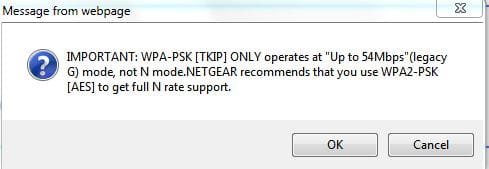
This is from the set up page. They claim this setting means it is Wireless N mode.
 

Attachments

  • wless.JPG
    wless.JPG
    33.8 KB · Views: 37
  • wless2.JPG
    wless2.JPG
    18.7 KB · Views: 11

My Computer My Computer

Computer Manufacturer/Model Number
HP p6608f
OS
Win 7 Home Premium x64
CPU
Intel Core i3-540 3.07 GHz
Motherboard
MS-7613 (Iona-GL8E)
Memory
4 GB (2 X 2) Dual-Channel PC-10600 DDR3 @ 665MHz (9-9-9-24)
Graphics Card(s)
Integrated Intel H57
Sound Card
Integrated Realtek ALC888S Audio
Monitor(s) Displays
17" SDM-HS73 (a vestige from my old computer)
Screen Resolution
1280 X 1024
Hard Drives
750GB SATA 7200 RPM
PSU
250W
Keyboard
HP USB keyboard
Mouse
HP USB optical mouse
Internet Speed
15Mbps/1Mbps
Bandwidth and throughput my friends. Your router can push out 300mbps but your modem may only get to 65mbps.
 

My Computer My Computer

OS
7 home premium x64
Bandwidth and throughput my friends. Your router can push out 300mbps but your modem may only get to 65mbps.
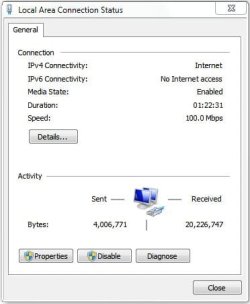
If only. Wired connection shows 100Mbps as it should. It has to be the laptops's wireless card. Whether it is limited to 72Mbps or some other reason.
 

Attachments

  • wired.JPG
    wired.JPG
    25.5 KB · Views: 8

My Computer My Computer

Computer Manufacturer/Model Number
HP p6608f
OS
Win 7 Home Premium x64
CPU
Intel Core i3-540 3.07 GHz
Motherboard
MS-7613 (Iona-GL8E)
Memory
4 GB (2 X 2) Dual-Channel PC-10600 DDR3 @ 665MHz (9-9-9-24)
Graphics Card(s)
Integrated Intel H57
Sound Card
Integrated Realtek ALC888S Audio
Monitor(s) Displays
17" SDM-HS73 (a vestige from my old computer)
Screen Resolution
1280 X 1024
Hard Drives
750GB SATA 7200 RPM
PSU
250W
Keyboard
HP USB keyboard
Mouse
HP USB optical mouse
Internet Speed
15Mbps/1Mbps
Back
Top