
VERY high mem usage

blah380

New member
Local time
6:00 AM
Messages
24
Hey guys, I have Windows 7 RC1 (build 7000) x64 in English. While idling, Windows is using ~7GB of RAM (I have 12GB total).
6c6fc305.jpg


I have NOTHING running that comes even CLOSE to this amount of usage, so what's going on?

Also, why the hell did it decide that 1GB isn't enough memory for my Nvidia 285GTX? 7 has assigned 3.5GB of my system RAM to be "shared" with my video card (my motherboard has NO integrated video).

Specs:
Core i7 @ 3.2Ghz
12GB DDR3 @ 1600Mhz
Nvidia 285GTX 1GB DDR3
 

My Computer My Computer

Computer Manufacturer/Model Number
OEM
OS
Windows 7 x64, Windows XP x86
CPU
Core i7 920 @ 3.2Ghz
Motherboard
EVGA X58 SLI LE
Memory
6x 2GB DDR3 @ 1600mhz
Graphics Card(s)
EVGA Nvidia 285 GTX
Sound Card
Integrated 8.0 Surround
Monitor(s) Displays
Acer P223W
Screen Resolution
1680 x 1050
Hard Drives
Patriot 256GB SSD
WD 750GB HDD
WD 750GB HDD
PSU
Antec 850W PSU
Case
Antec 900
Keyboard
Logitech G11
Mouse
Razer Copperhead
Other Info
In the end, we will remember not the words of our enemies, but the silence of our friends.
Hello Blah, and welcome to Seven Forums.

You might check in Resource Monitor under the Memory tab to see if it can help determine what is using your active memory up.

Resource_Monitor.jpg

Hope this helps,
Shawn
 
Last edited:

My Computer My Computer

Computer type
PC/Desktop
Computer Manufacturer/Model Number
Self built custom
OS
64-bit Windows 11 Pro for Workstations
CPU
Intel i7-8700K OC'd to 5 GHz
Motherboard
ASUS ROG Maximus XI Formula Z390
Memory
64 GB (4x16GB) G.SKILL TridentZ RGB DDR4 3600 MHz
Graphics Card(s)
ASUS ROG-STRIX-GTX1080TI-O11G-GAMING
Sound Card
Integrated
Monitor(s) Displays
2 x Samsung Odyssey G7 27"
Screen Resolution
2560x1440
Hard Drives
1TB Samsung 990 PRO M.2,
4TB Samsung 990 PRO PRO M.2,
TerraMaster F8 SSD Plus NAS
PSU
Seasonic Prime Titanium 850W
Case
Thermaltake Core P3
Cooling
Corsair Hydro H115i
Keyboard
Logitech wireless K800
Mouse
Logitech MX Master 4
Internet Speed
2 Gb/s Download and 100 Mb/s Upload
Antivirus
Malwarebyte Anti-Malware Premium
Browser
Google Chrome
Other Info
Logitech Z625 speaker system,
Logitech BRIO 4K Pro webcam,
HP Color LaserJet Pro MFP M477fdn,
APC SMART-UPS RT 1000 XL - SURT1000XLI,
Galaxy S23 Plus phone
Thanks for the welcome, Brink.

I did check it out, and got the same memory usage - it MAY add up to 2GB, but not 7.
 

My Computer My Computer

Computer Manufacturer/Model Number
OEM
OS
Windows 7 x64, Windows XP x86
CPU
Core i7 920 @ 3.2Ghz
Motherboard
EVGA X58 SLI LE
Memory
6x 2GB DDR3 @ 1600mhz
Graphics Card(s)
EVGA Nvidia 285 GTX
Sound Card
Integrated 8.0 Surround
Monitor(s) Displays
Acer P223W
Screen Resolution
1680 x 1050
Hard Drives
Patriot 256GB SSD
WD 750GB HDD
WD 750GB HDD
PSU
Antec 850W PSU
Case
Antec 900
Keyboard
Logitech G11
Mouse
Razer Copperhead
Other Info
In the end, we will remember not the words of our enemies, but the silence of our friends.
Does is continue like this if you log off and log on, or restart the computer?
 

My Computer My Computer

Computer type
PC/Desktop
Computer Manufacturer/Model Number
Self built custom
OS
64-bit Windows 11 Pro for Workstations
CPU
Intel i7-8700K OC'd to 5 GHz
Motherboard
ASUS ROG Maximus XI Formula Z390
Memory
64 GB (4x16GB) G.SKILL TridentZ RGB DDR4 3600 MHz
Graphics Card(s)
ASUS ROG-STRIX-GTX1080TI-O11G-GAMING
Sound Card
Integrated
Monitor(s) Displays
2 x Samsung Odyssey G7 27"
Screen Resolution
2560x1440
Hard Drives
1TB Samsung 990 PRO M.2,
4TB Samsung 990 PRO PRO M.2,
TerraMaster F8 SSD Plus NAS
PSU
Seasonic Prime Titanium 850W
Case
Thermaltake Core P3
Cooling
Corsair Hydro H115i
Keyboard
Logitech wireless K800
Mouse
Logitech MX Master 4
Internet Speed
2 Gb/s Download and 100 Mb/s Upload
Antivirus
Malwarebyte Anti-Malware Premium
Browser
Google Chrome
Other Info
Logitech Z625 speaker system,
Logitech BRIO 4K Pro webcam,
HP Color LaserJet Pro MFP M477fdn,
APC SMART-UPS RT 1000 XL - SURT1000XLI,
Galaxy S23 Plus phone
Yes. Because my primary drive is a SSD, I had page file disabled, and my memory usage was at 8GB (all available RAM used). I reenabled page file and rebooted, and it jumped to 7GB.

After exploring a bit, I have disabled Aero (or at least made it the Basic theme), and disabled page file again, and my memory usage is staying at ~1.3GB. So, it seems Aero is the source of it, but how and why? Perhaps this is addressed in a later build?
 

My Computer My Computer

Computer Manufacturer/Model Number
OEM
OS
Windows 7 x64, Windows XP x86
CPU
Core i7 920 @ 3.2Ghz
Motherboard
EVGA X58 SLI LE
Memory
6x 2GB DDR3 @ 1600mhz
Graphics Card(s)
EVGA Nvidia 285 GTX
Sound Card
Integrated 8.0 Surround
Monitor(s) Displays
Acer P223W
Screen Resolution
1680 x 1050
Hard Drives
Patriot 256GB SSD
WD 750GB HDD
WD 750GB HDD
PSU
Antec 850W PSU
Case
Antec 900
Keyboard
Logitech G11
Mouse
Razer Copperhead
Other Info
In the end, we will remember not the words of our enemies, but the silence of our friends.
Strange. What build do you have? I have the 7600 RTM build with Aero enabled without transparency, and no high memory usage like this.
 

My Computer My Computer

Computer type
PC/Desktop
Computer Manufacturer/Model Number
Self built custom
OS
64-bit Windows 11 Pro for Workstations
CPU
Intel i7-8700K OC'd to 5 GHz
Motherboard
ASUS ROG Maximus XI Formula Z390
Memory
64 GB (4x16GB) G.SKILL TridentZ RGB DDR4 3600 MHz
Graphics Card(s)
ASUS ROG-STRIX-GTX1080TI-O11G-GAMING
Sound Card
Integrated
Monitor(s) Displays
2 x Samsung Odyssey G7 27"
Screen Resolution
2560x1440
Hard Drives
1TB Samsung 990 PRO M.2,
4TB Samsung 990 PRO PRO M.2,
TerraMaster F8 SSD Plus NAS
PSU
Seasonic Prime Titanium 850W
Case
Thermaltake Core P3
Cooling
Corsair Hydro H115i
Keyboard
Logitech wireless K800
Mouse
Logitech MX Master 4
Internet Speed
2 Gb/s Download and 100 Mb/s Upload
Antivirus
Malwarebyte Anti-Malware Premium
Browser
Google Chrome
Other Info
Logitech Z625 speaker system,
Logitech BRIO 4K Pro webcam,
HP Color LaserJet Pro MFP M477fdn,
APC SMART-UPS RT 1000 XL - SURT1000XLI,
Galaxy S23 Plus phone
I'm currently on RC1 (build 7000).

I have been using 7 since build 6048 or some junk on both my desktop and laptop, but I have not seen memory usage like this until now, either (I just updated my PC with new parts).

Once again, my theme is set to Aero Basic.
 

My Computer My Computer

Computer Manufacturer/Model Number
OEM
OS
Windows 7 x64, Windows XP x86
CPU
Core i7 920 @ 3.2Ghz
Motherboard
EVGA X58 SLI LE
Memory
6x 2GB DDR3 @ 1600mhz
Graphics Card(s)
EVGA Nvidia 285 GTX
Sound Card
Integrated 8.0 Surround
Monitor(s) Displays
Acer P223W
Screen Resolution
1680 x 1050
Hard Drives
Patriot 256GB SSD
WD 750GB HDD
WD 750GB HDD
PSU
Antec 850W PSU
Case
Antec 900
Keyboard
Logitech G11
Mouse
Razer Copperhead
Other Info
In the end, we will remember not the words of our enemies, but the silence of our friends.
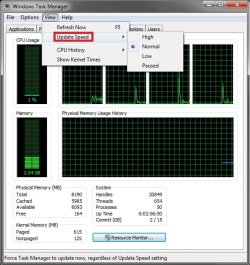
It may have just been a temporary glitch with Task Manager not updating the graph properly. It worked fine in the 7000 build for me to. :confused:

Update.jpg
 

My Computer My Computer

Computer type
PC/Desktop
Computer Manufacturer/Model Number
Self built custom
OS
64-bit Windows 11 Pro for Workstations
CPU
Intel i7-8700K OC'd to 5 GHz
Motherboard
ASUS ROG Maximus XI Formula Z390
Memory
64 GB (4x16GB) G.SKILL TridentZ RGB DDR4 3600 MHz
Graphics Card(s)
ASUS ROG-STRIX-GTX1080TI-O11G-GAMING
Sound Card
Integrated
Monitor(s) Displays
2 x Samsung Odyssey G7 27"
Screen Resolution
2560x1440
Hard Drives
1TB Samsung 990 PRO M.2,
4TB Samsung 990 PRO PRO M.2,
TerraMaster F8 SSD Plus NAS
PSU
Seasonic Prime Titanium 850W
Case
Thermaltake Core P3
Cooling
Corsair Hydro H115i
Keyboard
Logitech wireless K800
Mouse
Logitech MX Master 4
Internet Speed
2 Gb/s Download and 100 Mb/s Upload
Antivirus
Malwarebyte Anti-Malware Premium
Browser
Google Chrome
Other Info
Logitech Z625 speaker system,
Logitech BRIO 4K Pro webcam,
HP Color LaserJet Pro MFP M477fdn,
APC SMART-UPS RT 1000 XL - SURT1000XLI,
Galaxy S23 Plus phone
You might services starting that are wasting your memory. Is there any chance you have a virus or something that is running in the background and wasting your memory. Just a couple of questions.
 

My Computer My Computer

Computer Manufacturer/Model Number
HP DV7-1129wm Laptop
OS
Vista Home Premium 64-bit SP2
CPU
AMD TurionX2 64 @ 2.1GHz
Memory
4GB DDR2 400MHz
Graphics Card(s)
256 MB Dedicated ATI Radeon HD 3200
Sound Card
IDT High Definition Audio/HDMI
Monitor(s) Displays
17" Laptop Screen
Screen Resolution
1440x900
Hard Drives
250GB SATA Hitachi
Keyboard
Full Keyboard with Full NumPad
Mouse
Microsoft Wireless Mobile Mouse 3000 / Touchpad
Internet Speed
Comact 12-20 Mbps
Other Info
Used Primarily for CAD Design/Engineering
Try running this Process Explorer
add a column called Private Bytes on the Process Memory tab in select columns then sort by that.
 

My Computer My Computer

Computer Manufacturer/Model Number
Home Built
OS
Windows 7 x64
CPU
Intel Core 2 Quad Q6700 @ 3.2 GHz
Motherboard
Gigabyte GA-965P-DQ6
Memory
4 Gig
Graphics Card(s)
ATI Radeon HD 4870
Sound Card
Creative X-Fi XtremeMusic
Monitor(s) Displays
Samsung SyncMaster 226BW
Screen Resolution
1680 x 1050
PSU
Antec TruePower TP-550
Case
Antec P180
Cooling
Zalman CNPS9700, 3 Antec TriCool 120mm
Keyboard
Logitech G15
I had this happen to me today. I was trying to run a chkdsk on an external HD. I have the paging file disabled (with SSD and 8GB RAM) build 7229 and it told me I was running low on memory.

I looked at resource monitor and "explorer.exe" was using 7.5 GB or RAM.

I restarted and it went away. Never seen this before....

Just for everyones information.
 

My Computer My Computer

Computer Manufacturer/Model Number
Keeps changing - (Custom)
OS
Windows 7 Professional x64
CPU
Intel Core i7 860
Motherboard
Gigabyte GA-P55-UD4P
Memory
4GB DDR3 Mushkin 1600Mhz @ 7-8-7-20
Graphics Card(s)
MSI GTS250 1GB DDR3 Twin Frozr
Sound Card
Onboard realtek
Monitor(s) Displays
Samsung SyncMaster 24" P2450 + Samsung 20" 2033
Screen Resolution
1920 X 1080 and 1600 X 900 (#2 system 1440 X 900)
Hard Drives
Patriot Inferno 120GB SSD + 3 WD Blue 640GB drives
PSU
Corsair 750 HX Modular
Case
Lancool PC-K62
Cooling
Cooler Master TX3 CPU cooler and 4-140mm and 1-120mm case
Keyboard
Gigabyte USB keyboard
Mouse
Microsoft wireless laser mouse 5000
Internet Speed
7 Mb down 1.5 up
Other Info
System #2: AMD Phenom II X6 1055T (Freezer 7 Pro cooler) - Gigabyte 880GMA-UD2H - WD 500GB Black - 9500GT (1GB) 500W OCZ modular PSU - Antec 200 case. System #3 (LapTop) Core 2 Duo T6670 - 320GB 7200RPM HD - 4GB DDR3 RAM.

My Computer My Computer

Computer Manufacturer/Model Number
Home Built
OS
Windows 7 x64
CPU
Intel Core 2 Quad Q6700 @ 3.2 GHz
Motherboard
Gigabyte GA-965P-DQ6
Memory
4 Gig
Graphics Card(s)
ATI Radeon HD 4870
Sound Card
Creative X-Fi XtremeMusic
Monitor(s) Displays
Samsung SyncMaster 226BW
Screen Resolution
1680 x 1050
PSU
Antec TruePower TP-550
Case
Antec P180
Cooling
Zalman CNPS9700, 3 Antec TriCool 120mm
Keyboard
Logitech G15
Update speed was normal;

It was (and still is) a clean install of Windows, so no, no chance of infection;

The services were default;

I tried Process Explorer, it showed a total of about 3GB worth of programs under process memory tab;

This is not 7 RTM, it's RC1.

Rebooting did not fix the issue. The primary drive is a brand new SSD, so I doubt it's fragmentation or data corruption.
 

My Computer My Computer

Computer Manufacturer/Model Number
OEM
OS
Windows 7 x64, Windows XP x86
CPU
Core i7 920 @ 3.2Ghz
Motherboard
EVGA X58 SLI LE
Memory
6x 2GB DDR3 @ 1600mhz
Graphics Card(s)
EVGA Nvidia 285 GTX
Sound Card
Integrated 8.0 Surround
Monitor(s) Displays
Acer P223W
Screen Resolution
1680 x 1050
Hard Drives
Patriot 256GB SSD
WD 750GB HDD
WD 750GB HDD
PSU
Antec 850W PSU
Case
Antec 900
Keyboard
Logitech G11
Mouse
Razer Copperhead
Other Info
In the end, we will remember not the words of our enemies, but the silence of our friends.

My Computer My Computer

Computer Manufacturer/Model Number
Keeps changing - (Custom)
OS
Windows 7 Professional x64
CPU
Intel Core i7 860
Motherboard
Gigabyte GA-P55-UD4P
Memory
4GB DDR3 Mushkin 1600Mhz @ 7-8-7-20
Graphics Card(s)
MSI GTS250 1GB DDR3 Twin Frozr
Sound Card
Onboard realtek
Monitor(s) Displays
Samsung SyncMaster 24" P2450 + Samsung 20" 2033
Screen Resolution
1920 X 1080 and 1600 X 900 (#2 system 1440 X 900)
Hard Drives
Patriot Inferno 120GB SSD + 3 WD Blue 640GB drives
PSU
Corsair 750 HX Modular
Case
Lancool PC-K62
Cooling
Cooler Master TX3 CPU cooler and 4-140mm and 1-120mm case
Keyboard
Gigabyte USB keyboard
Mouse
Microsoft wireless laser mouse 5000
Internet Speed
7 Mb down 1.5 up
Other Info
System #2: AMD Phenom II X6 1055T (Freezer 7 Pro cooler) - Gigabyte 880GMA-UD2H - WD 500GB Black - 9500GT (1GB) 500W OCZ modular PSU - Antec 200 case. System #3 (LapTop) Core 2 Duo T6670 - 320GB 7200RPM HD - 4GB DDR3 RAM.
Interesting. But I wasn't running a check disk... I HAD opened a game (Unreal Tournament 3). It was closed, and the process was ended, however.
 

My Computer My Computer

Computer Manufacturer/Model Number
OEM
OS
Windows 7 x64, Windows XP x86
CPU
Core i7 920 @ 3.2Ghz
Motherboard
EVGA X58 SLI LE
Memory
6x 2GB DDR3 @ 1600mhz
Graphics Card(s)
EVGA Nvidia 285 GTX
Sound Card
Integrated 8.0 Surround
Monitor(s) Displays
Acer P223W
Screen Resolution
1680 x 1050
Hard Drives
Patriot 256GB SSD
WD 750GB HDD
WD 750GB HDD
PSU
Antec 850W PSU
Case
Antec 900
Keyboard
Logitech G11
Mouse
Razer Copperhead
Other Info
In the end, we will remember not the words of our enemies, but the silence of our friends.
You have to remember - most people don't have that much RAM and thus don't have the ability to have all their stuff in RAM - you do - so it is not surprising to see it using that much b/c it has that much available an still has 5 GB free.

*and* you had your pagefile off b/c of the SSD....
 

My Computers My Computers

System One System Two

  • Computer type
    PC/Desktop
    Computer Manufacturer/Model Number
    The Beast Model A (homebrew)
    OS
    Windows 11 21H2 Current build
    CPU
    AMD Ryzen 9 3950X
    Motherboard
    MSI MEG X570 GODLIKE
    Memory
    4 * 32 GB - Corsair Vengeance 3600 MHz
    Graphics Card(s)
    EVGA GeForce RTX 3080 Ti XC3 ULTRA GAMING (12G-P5-3955-KR)
    Sound Card
    Realtek® ALC1220 Codec
    Monitor(s) Displays
    2x Eve Spectrum ES07D03 4K Gaming Monitor (Matte) | Eve Spec
    Screen Resolution
    3x 3840 x 2160
    Hard Drives
    3x Samsung 980 Pro NVMe PCIe 4 M.2 2 TB SSD (MZ-V8P2T0B/AM) } 3x Sabrent Rocket NVMe 4.0 1 TB SSD
    PSU
    PC Power & Cooling’s Silencer Series 1050 Watt, 80 Plus Plat
    Case
    Fractal Design Define 7 XL Dark ATX Full Tower Case
    Cooling
    SteelSeries Apex Pro Wired Gaming Keyboard
    Keyboard
    SteelSeries Apex Pro
    Mouse
    Logitech MX Master 3S | MX Master 3 for business
    Internet Speed
    AT&T LightSpeed Gigabit Duplex Ftth
    Antivirus
    Windows Defender + MB 3
    Browser
    Nightly (default) + Firefox (stable),Chrome, Edge
  • Computer type
    PC/Desktop
    System Manufacturer/Model Number
    Dell Latitude E5470
    OS
    ChromeOS Flex Dev Channel (current)
    CPU
    Intel(R) Core(TM) i5-6300U CPU @ 2.40GHz, 2501 Mhz, 2 Core(s), 4 Logical Processor(s)
    Motherboard
    Dell
    Memory
    16 GB
    Graphics Card(s)
    Intel(R) HD Graphics 520
    Sound Card
    Intel(R) HD Graphics 520 + RealTek Audio
    Monitor(s) Displays
    Dell laptop display 15"
    Screen Resolution
    1920 * 1080
    Hard Drives
    Toshiba 128GB M.2 22300 drive
    INTEL Cherryville 520 Series SSDSC2CW180A 180 GB SATA III SSD
    PSU
    Dell
    Case
    Dell
    Cooling
    Dell
    Keyboard
    Dell
    Mouse
    Logitech MX Master 3S (shared w. Sys 1) | Dell TouchPad
    Internet Speed
    AT&T LightSpeed Gigabit Duplex Ftth
Hey guys, I have Windows 7 RC1 (build 7000) x64 in English. While idling, Windows is using ~7GB of RAM (I have 12GB total).
I have NOTHING running that comes even CLOSE to this amount of usage, so what's going on?

Well in the old days of Windows XP you could install more RAM and you would receive a performance boost.

Nowdays Windows Vista / WIndows 7 will cache applications off HDD to all of your RAM like in my case powerpoint, excel and a host of other apps I rarely use. Awesome use of my RAM huh!

I've found foreground applications / the desktop in Vista and Windows 7 slower than Windows XP as a result.
 

My Computer My Computer

Computer Manufacturer/Model Number
Dell 8400
OS
Windows XP Professional
CPU
3.4Ghz HT
Motherboard
Dell
Memory
3.3GB
Graphics Card(s)
ATI X800 XT 256Mb
Sound Card
Sound Blaster
Monitor(s) Displays
Samsung
You have to remember - most people don't have that much RAM and thus don't have the ability to have all their stuff in RAM - you do - so it is not surprising to see it using that much b/c it has that much available an still has 5 GB free.

*and* you had your pagefile off b/c of the SSD....
So what you're saying is, Windows detects how good a computer you have and runs more applications if you have more memory?

This is complete and utter ****. Windows runs the same apps if you have 512MB of RAM or 128GB of it.

Having my page file off does not affect my current memory usage by 6GB, especially when nothing except the OS, Firefox, and Pidgin are running.

Perhaps you don't understand page filing - it's space on your hard drive that's used as if it was RAM. Since I had nothing running, it doesn't matter if page filing is enabled or not - nothing would have been page filed.
 

My Computer My Computer

Computer Manufacturer/Model Number
OEM
OS
Windows 7 x64, Windows XP x86
CPU
Core i7 920 @ 3.2Ghz
Motherboard
EVGA X58 SLI LE
Memory
6x 2GB DDR3 @ 1600mhz
Graphics Card(s)
EVGA Nvidia 285 GTX
Sound Card
Integrated 8.0 Surround
Monitor(s) Displays
Acer P223W
Screen Resolution
1680 x 1050
Hard Drives
Patriot 256GB SSD
WD 750GB HDD
WD 750GB HDD
PSU
Antec 850W PSU
Case
Antec 900
Keyboard
Logitech G11
Mouse
Razer Copperhead
Other Info
In the end, we will remember not the words of our enemies, but the silence of our friends.
It's happening again.

2745682b.jpg
 

My Computer My Computer

Computer Manufacturer/Model Number
OEM
OS
Windows 7 x64, Windows XP x86
CPU
Core i7 920 @ 3.2Ghz
Motherboard
EVGA X58 SLI LE
Memory
6x 2GB DDR3 @ 1600mhz
Graphics Card(s)
EVGA Nvidia 285 GTX
Sound Card
Integrated 8.0 Surround
Monitor(s) Displays
Acer P223W
Screen Resolution
1680 x 1050
Hard Drives
Patriot 256GB SSD
WD 750GB HDD
WD 750GB HDD
PSU
Antec 850W PSU
Case
Antec 900
Keyboard
Logitech G11
Mouse
Razer Copperhead
Other Info
In the end, we will remember not the words of our enemies, but the silence of our friends.
So what you're saying is, Windows detects how good a computer you have and runs more applications if you have more memory?

This is complete and utter ****. Windows runs the same apps if you have 512MB of RAM or 128GB of it.

Having my page file off does not affect my current memory usage by 6GB, especially when nothing except the OS, Firefox, and Pidgin are running.

Perhaps you don't understand page filing - it's space on your hard drive that's used as if it was RAM. Since I had nothing running, it doesn't matter if page filing is enabled or not - nothing would have been page filed.

Im actually having the same Issue, but Im using 32-bit with 3GB of RAM.
Heres what Ive noticed
After a fresh reboot, my RAM usage is below 800MB and ESET NOD32 AntiVirus V4 is using 40MB of RAM.
For no reason, the RAM likes to go up and uses about 75% of my 3GB. Here, ESET lowers its self to 10MB.
And on my VERY OLD pc running windows XP performance edition, 256MB of RAM. Ive seen ESET go UNDER 1MB of RAM usage.
Now thats good performance!!!
I think its the same for most other pcs...
Look at mcafee, it uses 300MB of RAM during a scan if you have like 3GB RAM+++
OR 100MB if you have 526MB (Which is still, HORRIBLE considering ESET uses 10MB to scan with 256MB RAM, ROFL)
Weird....
Oh well, Firefox loves to eat 200MB. Thats nothing.
WTF is using my RAM? It should be lower than 1GB!!!
 

My Computer My Computer

Computer Manufacturer/Model Number
HP
OS
Windows 7 Enterprise x64
CPU
AMD Athlon II X4 @ 2.6ghz
Memory
8GB
Graphics Card(s)
Galaxy 250 GTS 512MB Super-Clocked
Screen Resolution
1600x900
Hard Drives
640GB hard Drive
1.5TB External Hard Drive
PSU
700W OCZ StealthxStreme
Cooling
2 Heatsink and 3 Fans
Internet Speed
3MB/sec download, 322kb/sec upload
Back
Top