Need to know what I can delete from Program files.

miarunsthrough

New member
Local time
7:44 AM
Messages
7
Location
Florida
I have alot of random folders in my program files86x folder. I got this laptop refurbished from Radio shack and it was a comp that was out to look at.

Im guessing that alot of random stuff has gotten on it over the years.

only have 32g lift!

anyway heres a list of things that i am wanting to delete but i wanna make sure i dont need the file && its ok!
Here we go!
*Micro= Microsoft
~AC3 Filter
~ATI Technologies
~Bonjour
~Citrix
~Corel
~File Type Assistant
~Internet Explorer (I use crome & only Crome)
~Micro Application Virtualization Client
~Micro Digital Experance
~Micro Office (dont have word,pwr point excel installed)
~micro silverlight
~Micro skydrive
~Micro SQL Server Compact Edition
~Microsoft.NET
~Fierfox
~MSBuild
~Nortan PC check up ( I use Malware anti-malwear * Iv tryed to delete this but it says its in use)
~Oracle
~Playready
~realtek
~realtek WLAN Driver
~REfrence Assemblies
~SMPlayer
~TOSHIBA
~Toshiba Online Backup
~Windows Defender
~Windows Mail
~Windows NT
~Windows Portable Devices
~Windows Sidebar
~DVD MAKER
~Ipod (Dont have one)
~Elantech


OK thats the list! Anything you know that I can delete for sure & wont affect my comp in a negitive way let me know. Also If you could give INFO on each thing so i know what it is would be great! Sorry its alot! xD
 

My Computer

OS
not sure honestly!
You need to look in Control Panel/Programs and Features to see what programs are listed there as available to uninstall.

I can tell you that the following are not shown in my Windows installation, but that doesn't mean they aren't useful to you:

AC3 filter
ATI technologies
bonjour
citrix
corel
file type assistant
micro application virtualization
micro digital experance
micro skydrive
Micro SQL Server Compact Edition
~Nortan PC check up
~Oracle
~SMPlayer
~TOSHIBA
~Toshiba Online Backup
~DVD MAKER
~Ipod (Dont have one)
~Elantech
 

My Computer

Computer type
PC/Desktop
Computer Manufacturer/Model Number
Ignatz Special; 4 speed manual gearbox; factory air conditioning; one of one
OS
Windows 7 Home Premium SP1, 64-bit
CPU
Intel Skylake i5-6600K, not overclocked
Motherboard
AsRock Z170M Extreme 4, micro ATX
Memory
8 GB HyperX DDR4-2666 (2 x 4 GB)
Graphics Card(s)
none; graphics are integrated on CPU
Sound Card
onboard: Realtek ALC1150; external: USB Behringer UF0-202
Monitor(s) Displays
Dell S2340M 23 inch IPS
Screen Resolution
1600 x 900
Hard Drives
System: Crucial MX100 series SSD, 128 GB;
Data: Samsung Spinpoint 103SJ, 1 TB;
Backup: WD Caviar Green WD30EZRX-00D8PB0, 3 TB
PSU
Rosewill SilentNight 500 watt fanless, semi-modular
Case
Antec Solo II
Cooling
Noctua NH-U12S; Noctua F12 intake, Noctua S12A exhaust
Keyboard
Microsoft 200 6JH-00001 USB
Mouse
Dell or Microsoft optical wired; USB
Antivirus
Microsoft Security Essentials and Malwarebytes Premium
Browser
Pale Moon
Other Info
All fans PWM; speeds at idle: CPU circa 500 rpm; intake circa 600 rpm; exhaust circa 600 rpm; CPU temps 27 idle and 47 C load in a warm room (27 C/81 F) when running Intel Extreme Tuning Utility stress test.

My Computer

Computer type
Laptop
Computer Manufacturer/Model Number
Sager NP9170
OS
Win 7 Pro x64 / Win 10 Pro
CPU
Intel(R) Core(TM) i7-3630QM CPU @ 2.40GHz
Motherboard
CLEVO P170EM
Memory
12 GB
Graphics Card(s)
(1) Intel(R) HD Graphics 4000 (2) NVIDIA GeForce GTX 675M
Sound Card
(1) Realtek High Definition Audio (2) Intel(R) Display Aud
Monitor(s) Displays
17.3
Screen Resolution
1920x1080
Hard Drives
(1) Samsung 860 EVO 500GB(OS) (1) Samsung 860 EVO 500GB(Data)
Keyboard
Backlite
Antivirus
MSE, Malwarebytes Pro
Browser
Firefox
Other Info
DESKTOP: Custom-built.
OS: Win 10 Pro x64.
CASE: Rosewill R5.
CPU: Intel I5 4670K CPU @ 3.40GHz.
CPU COOLER: Cool Master Hyper 212 EVO.
MOTHERBOARD: Asus Z87-A.
MEMORY: Kingston HyperX 2x4 GB.
GPU: Nvidia Geforce 650 TI.
PSU: Corsair TX750.
DRIVES: (1) Samsung 840 120 GB SSD (2) Western Digital blue 500 GB 7200 RPM.

My Computer

Computer Manufacturer/Model Number
HP, Dell, Gateway, Toshiba - 4 laptops and 2 desktops
OS
Vista, Windows7, Mint Mate, Zorin, Windows 8
CPU
from 1.6GHz Duo to i7
Monitor(s) Displays
2x HP w2207
Hard Drives
5x HDD, 7x SSD, 12x Externals
Keyboard
with trackball - no mices
Mouse
Trackball mice
Internet Speed
DSL 6000
I dont think i could factory reset my laptop i would looses everything i have.
 

My Computer

OS
not sure honestly!

My Computer

Computer type
PC/Desktop
Computer Manufacturer/Model Number
Ignatz Special; 4 speed manual gearbox; factory air conditioning; one of one
OS
Windows 7 Home Premium SP1, 64-bit
CPU
Intel Skylake i5-6600K, not overclocked
Motherboard
AsRock Z170M Extreme 4, micro ATX
Memory
8 GB HyperX DDR4-2666 (2 x 4 GB)
Graphics Card(s)
none; graphics are integrated on CPU
Sound Card
onboard: Realtek ALC1150; external: USB Behringer UF0-202
Monitor(s) Displays
Dell S2340M 23 inch IPS
Screen Resolution
1600 x 900
Hard Drives
System: Crucial MX100 series SSD, 128 GB;
Data: Samsung Spinpoint 103SJ, 1 TB;
Backup: WD Caviar Green WD30EZRX-00D8PB0, 3 TB
PSU
Rosewill SilentNight 500 watt fanless, semi-modular
Case
Antec Solo II
Cooling
Noctua NH-U12S; Noctua F12 intake, Noctua S12A exhaust
Keyboard
Microsoft 200 6JH-00001 USB
Mouse
Dell or Microsoft optical wired; USB
Antivirus
Microsoft Security Essentials and Malwarebytes Premium
Browser
Pale Moon
Other Info
All fans PWM; speeds at idle: CPU circa 500 rpm; intake circa 600 rpm; exhaust circa 600 rpm; CPU temps 27 idle and 47 C load in a warm room (27 C/81 F) when running Intel Extreme Tuning Utility stress test.
What can you lose. Backup your data and off you go. Programs can be easily reinstalled. That system looks like it has undergone a lot of beating and is probably a slow performer.
 

My Computer

Computer Manufacturer/Model Number
HP, Dell, Gateway, Toshiba - 4 laptops and 2 desktops
OS
Vista, Windows7, Mint Mate, Zorin, Windows 8
CPU
from 1.6GHz Duo to i7
Monitor(s) Displays
2x HP w2207
Hard Drives
5x HDD, 7x SSD, 12x Externals
Keyboard
with trackball - no mices
Mouse
Trackball mice
Internet Speed
DSL 6000
I dont even know how to back up my data. If i do that all my photos/vids would be saved?
 

My Computer

OS
not sure honestly!
Screenshot please

I love helping people clean out their pc from crapware and useless applications.

Could you upload a screenshot of the uninstall programs list?

I know you typed the list above but i want to see what it looks like in windows.
 

My Computer

Computer type
Laptop
Computer Manufacturer/Model Number
HP 4530s
OS
Windows 7 Ultimate x64 SP1
CPU
Intel i5 2.4GHz
Memory
8GB
Graphics Card(s)
1GB AMD Radeon HD 7470M
Sound Card
IDT High Definition Audio
Monitor(s) Displays
Asus VX238H 16:9 23.6" 1ms Gaming Monitor
Screen Resolution
1920 x 1080
Hard Drives
500GB Internal
1.5TB External
Keyboard
Logitech K270
Mouse
Logitech M185
Internet Speed
1.5mb/s
Antivirus
Malwarebytes Antimalware Premium 2.0.4.1028
Browser
Firefox
You must learn how to backup your data - that's vital. Do this:

1. Get an external disk that attaches via USB - e.g. something like this Newegg.com - Western Digital Caviar Blue WD5000AAKX 500GB 7200 RPM 16MB Cache SATA 6.0Gb/s 3.5" Internal Hard Drive -Bare Drive

2. Install this function and COPY your files to that disk - http://www.sevenforums.com/tutorials/516-context-menu-add-copy-folder-move-folder.html

3. If you do not have too much data, you can even use a 32GB USB stick like this. It is only $20 after rebate - http://www.newegg.com/Product/Produ..._mmc=EMC-GD091712-_-index-_-Item-_-20-220-654
 

My Computer

Computer Manufacturer/Model Number
HP, Dell, Gateway, Toshiba - 4 laptops and 2 desktops
OS
Vista, Windows7, Mint Mate, Zorin, Windows 8
CPU
from 1.6GHz Duo to i7
Monitor(s) Displays
2x HP w2207
Hard Drives
5x HDD, 7x SSD, 12x Externals
Keyboard
with trackball - no mices
Mouse
Trackball mice
Internet Speed
DSL 6000
I love helping people clean out their pc from crapware and useless applications.

Could you upload a screenshot of the uninstall programs list?

I know you typed the list above but i want to see what it looks like in windows.

Yeah give me 2 sec.
 

My Computer

OS
not sure honestly!
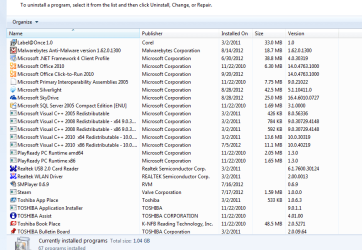
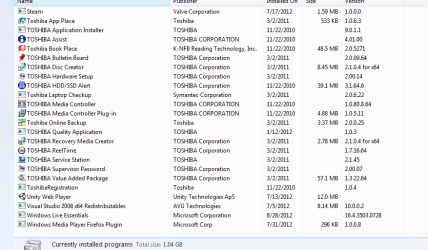
heres the screen shots in attachments.
 

Attachments

  • 1111.PNG
    1111.PNG
    29.3 KB · Views: 18
  • 22.PNG
    22.PNG
    29.7 KB · Views: 16
  • 33.PNG
    33.PNG
    26.6 KB · Views: 16

My Computer

OS
not sure honestly!
Is there a way to factory reset my laptop? This is all alot of trouble and id rather rest my laptop completly & just download what I use again. I only use 5 applications on my laptop.
google crome, itunes, utorrent, dvix, & final video downloader
Also. Dose anyone know a site that I can back up my movies/ video to? I dont have an external hard drive to use and i have no CDs
 

My Computer

OS
not sure honestly!
@mia: A factory restore will overwrite your data. Essentially, you need the mfgr recovery disc to do this - it will reformat the drive, partitions it and installs software as it was when it was manufactured.

Bongo and WHS suggest something different - a CLEAN reinstall of Windows using your license key (COA). They provided two different paths to the same end result - a squeaky clean machine.

It is by far the best and safest thing to do - especially with a floor model. The only thing you have to be concerned with is your personal files. They will have to be backed up to something. External drives are relatively inexpensive now, pennies per megabyte.

Figure out how much data you have - a ballpark inumber will do. Subtract the free space on your drive from the total capacity. Let's say your c:\ drive is 120 Gb and there is 70 Gb free - you, the OS, and programs have used 50 Gb.
An 80 Gb external drive would suffice for your back purposes.

Search this forum for a tutorial on how to back up your data. Then take the plunge. You can always reinstall only the software you want and you'll be certain there's nothing lurking in the shadows from the floor model.
 

My Computer

Computer type
Laptop
Computer Manufacturer/Model Number
HP Pavilion dv6-6c10us
OS
x64 (6.3.9600) Win8.1 Pro & soon dual boot x64 (6.1.7601) Win7_SP1 HomePrem
CPU
AMD A6-3420M APU with Radeon(tm) HD Graphics
Motherboard
Hewlett-Packard 1805
Memory
6.00 GB
Graphics Card(s)
AMD Radeon(TM) HD 6520G
Sound Card
(1) AMD High Definition Audio Device (2) IDT High Definiti
Monitor(s) Displays
HP W2072a 20" LCD (1600 x 900) @ 60 Hz
Screen Resolution
1366 x 768 x 32 bits (4294967296 colors) @ 60 Hz
Hard Drives
ST640LM0 00 HM641JI SATA Disk Device
Keyboard
Logitech k520 wireless KB
Mouse
Logitech m320 wireless mouse (bundled with KB)
Internet Speed
15/5 | 54 MB Wireless 'n'
Antivirus
Realtime: Defender or Avast | On-demand: Malwarebytes, ESET
Browser
IE 11 on Win8, IE 10 on win 7
Other Info
Media: [Gimp, Audacity, VLC] || Comm: [WEmail 2012, Skype] || Productivity: [OpenOffice,| Textpad] || Utils: [Sysinternals, cCleaner, Speccy, Defraggler]
Also. Dose anyone know a site that I can back up my movies/ video to? I dont have an external hard drive to use and i have no CDs

You can backup anything you want to online services such as Carbonite.

But.......it costs money, you may have to agree to a contract, and it will take some time to get everything backed up. I hear it is quite a slow process.

Nor am I sure how reliable it is.

An external hard drive is a far better choice---the most reliable and the cheapest per gigabyte.

You can get a 500 GB external hard drive for maybe $70 or $80.

http://www.newegg.com/Product/Produ...07601 600361773&IsNodeId=1&name=300GB - 500GB

DVDs are a possibility, but they hold less than 5 GB each and are not highly reliable.

You could use a USB thumb drive, but they are relatively low capacity and relatively high cost per gigabyte.
 

My Computer

Computer type
PC/Desktop
Computer Manufacturer/Model Number
Ignatz Special; 4 speed manual gearbox; factory air conditioning; one of one
OS
Windows 7 Home Premium SP1, 64-bit
CPU
Intel Skylake i5-6600K, not overclocked
Motherboard
AsRock Z170M Extreme 4, micro ATX
Memory
8 GB HyperX DDR4-2666 (2 x 4 GB)
Graphics Card(s)
none; graphics are integrated on CPU
Sound Card
onboard: Realtek ALC1150; external: USB Behringer UF0-202
Monitor(s) Displays
Dell S2340M 23 inch IPS
Screen Resolution
1600 x 900
Hard Drives
System: Crucial MX100 series SSD, 128 GB;
Data: Samsung Spinpoint 103SJ, 1 TB;
Backup: WD Caviar Green WD30EZRX-00D8PB0, 3 TB
PSU
Rosewill SilentNight 500 watt fanless, semi-modular
Case
Antec Solo II
Cooling
Noctua NH-U12S; Noctua F12 intake, Noctua S12A exhaust
Keyboard
Microsoft 200 6JH-00001 USB
Mouse
Dell or Microsoft optical wired; USB
Antivirus
Microsoft Security Essentials and Malwarebytes Premium
Browser
Pale Moon
Other Info
All fans PWM; speeds at idle: CPU circa 500 rpm; intake circa 600 rpm; exhaust circa 600 rpm; CPU temps 27 idle and 47 C load in a warm room (27 C/81 F) when running Intel Extreme Tuning Utility stress test.
In the long run, you will not survive without an external hard drive. On-line backups take a lot of time (because of the limits of the internet speed), may cost money and are not always safe.

If you don't use an external drive for frequent imaging and backup of your data, I will guarantee that you will be in a lot of trouble one day. Losing your data will be one of the problems.
 

My Computer

Computer Manufacturer/Model Number
HP, Dell, Gateway, Toshiba - 4 laptops and 2 desktops
OS
Vista, Windows7, Mint Mate, Zorin, Windows 8
CPU
from 1.6GHz Duo to i7
Monitor(s) Displays
2x HP w2207
Hard Drives
5x HDD, 7x SSD, 12x Externals
Keyboard
with trackball - no mices
Mouse
Trackball mice
Internet Speed
DSL 6000
miarunsthrough
The first thing you must decide is whether you want to learn how to do the things you are requesting. You have been given great methods of how to complete your desired objectives. Some of the people trying to help you have decades of experience doing just what you are requesting. The Tutorials have been successfully use by tens of thousands of people. If you don't have external media for backup you will have to get some; we can't do that for you. The good people here can guide you through the process but they can't do it for you. It's time to put on your learning cap and let these people guide you.
http://www.sevenforums.com/member.php?u=241914
 

My Computer

Computer type
PC/Desktop
Computer Manufacturer/Model Number
Home made Desktop
OS
Windows 10 Pro. 64/ version 1709 Windows 7 Pro/64
CPU
Intel i7-6800K @ 4.3
Motherboard
ASUS X-99 Deluxe II
Memory
Corsair Platinum 16 gig @2400
Graphics Card(s)
EVGA GTX 1070 OC
Monitor(s) Displays
Asus 27" LED LCD/VE278Q
Screen Resolution
1920-1080 or 1280-720 HDMI
Hard Drives
INTEL SSD 730-240 Gb Sata 3.0/
PSU
EVGA Platium 1200W
Case
Phanteks Luxe Tempered Glass 8 fans/ one radiator
Cooling
XSPC/ Water Cooled CPU
Keyboard
Das 4 Professional
Mouse
Logitech M705/MX Anywhere 2-S
Internet Speed
100 mbits
Antivirus
Microsoft Security Essentials/ Malwarebytes Premium 3.0/ SAS
Browser
I.E. 11 default/Firefox/ ISP Time Warner Cable/Spectrum
Other Info
LG BluRay Burner/
Sound system-KLipsch-THX/
Icy Dock ssd Hot Swap bays.
Find big files

From the screenshots i cant see anything thats taking up alot of space and most of the things there are drivers or useful software.

I would recommend you use WinDirStat to find the large files on your computer and decide whether you need them or not. Download HERE.

I recently looked at my friends computer and his was full of movies that he could easily put on his external HD. He only had 29 GB left and had 250GB+ of movies.
 

My Computer

Computer type
Laptop
Computer Manufacturer/Model Number
HP 4530s
OS
Windows 7 Ultimate x64 SP1
CPU
Intel i5 2.4GHz
Memory
8GB
Graphics Card(s)
1GB AMD Radeon HD 7470M
Sound Card
IDT High Definition Audio
Monitor(s) Displays
Asus VX238H 16:9 23.6" 1ms Gaming Monitor
Screen Resolution
1920 x 1080
Hard Drives
500GB Internal
1.5TB External
Keyboard
Logitech K270
Mouse
Logitech M185
Internet Speed
1.5mb/s
Antivirus
Malwarebytes Antimalware Premium 2.0.4.1028
Browser
Firefox
Back
Top