Solved System deleted two partitions instead of one

mbps

New member
Local time
5:23 PM
Messages
8
System deleted three partitions instead of one

Hi everyone,

at the beginning, sry for my english.

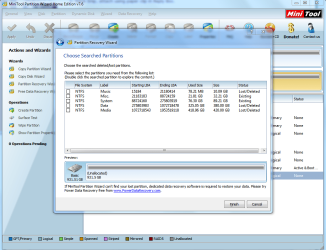
Now the problem. In Windows7's Disk Management I deleted one simple volume (10GB) and system deleted another two (totaly 800GB). Don't know why and how... Can I restore two or three of this volumes? I just downloaded Paragon Partition Manager 12 program and it found one deleted partition (only the smaller one - 10GB). I didn't restore it yet, I'm afraid if I do something wrong I will be permanently unable to restore my data.

I'm begging for help.
 

My Computer My Computer

At a glance

Win 7 Ultimate x64
OS
Win 7 Ultimate x64
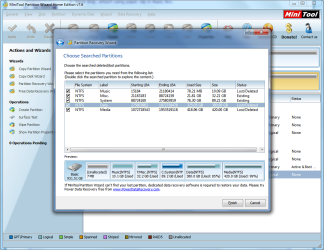
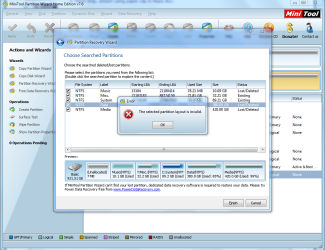
Wow, this program finding(!) lost partitions and it is very quickly! But I have another problem now - there's order to "select partitions you need from the following list". And there are listed partitions that exists, so to not to delete them I need to select them too. But when I do this I receive an error "Selected partition layout is invalid". So to restore one or all deleted partitions, I need to delete one of the existing. But I don't want to sacrifice one partition to restore another.

And thank you very much for helping me so far. I appreciate that.
 

My Computer My Computer

At a glance

Win 7 Ultimate x64
OS
Win 7 Ultimate x64
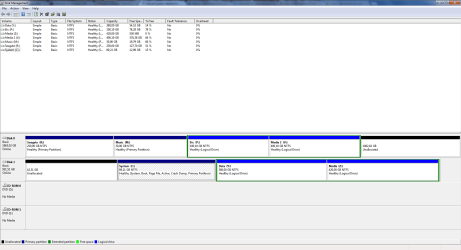
Please post a screen shot of the Disk Management Window, All of it not just part of it.

Normally Removing a partition will not do what you are seeing.
 

My Computer My Computer

At a glance

7 x64
OS
7 x64
L8Uew.png
 

My Computer My Computer

At a glance

Win 7 Ultimate x64
OS
Win 7 Ultimate x64
Please post back a screenshot of your maximized Disk Management drive map and listings:

1. Type Disk Management in Start Search box.
2. Open Disk Mgmt. window and maximize it.
3. Type Snipping Tool in Start Search box.
4. Open Snipping Tool, choose Rectangular Snip, draw a box around full map and all listings.
5, Save Snip, attach using paper clip in Reply Box.

Tell us what is on each partition.

Attach another screenshot of the maximized Partition Recovery results.

If you didn't partition over the missing partition then it will not be blocked by anything for recovery. So you need to figure out if it's actually the lost partition found for Recovery or another one which was previously there and formatted over.
 
IMHO your drive setup and OS install is all screwy. The OS is installed on a Logical drive in an Extended Partition with 10GBs+ free space at the front of that physical drive. Not sure but if the Logical Drive you tried to delete was in front of another Logical drive when you removed that drive it included the drive after it.

Sorry but I have no suggestion to get your drive back. As it really isn't a Partition. The Partition is the Complete physical drive, IE An Extended Partition with Logical Drives. The Extended Partition with Logical Drives should only be used for secondary physical drives and only for Specific reasons. Mainly for Drive letter assignments but with NTFS this isn't need as much as it was with FAT formatted drives.

I suspect that Drive, what you are calling a Partition, and the data included on it is gone for good.

If this was my system I would SAVE my important Data and Start new with a Clean install. But maybe Greg will have some other options you can try.

Good Luck.
 

My Computer My Computer

At a glance

7 x64
OS
7 x64
Capture.PNG

Capture1.PNG

Capture2.PNG

Capture3.PNG

Right after loss partitions I was looking for help on google. First result directed me to SevenForums.com, but I didn't find answer that could help me. So I decided to write new post. Since then I only downloaded Paragaon Partition Manager and used recovery partition tool but didn't accept any changes, because it not found all partitions that I lost. So there was no changes on partitions.
 

My Computer My Computer

At a glance

Win 7 Ultimate x64
OS
Win 7 Ultimate x64
IMHO your drive setup and OS install is all screwy. The OS is installed on a Logical drive in an Extended Partition with 10GBs+ free space at the front of that physical drive. Not sure but if the Logical Drive you tried to delete was in front of another Logical drive when you removed that drive it included the drive after it.

Sorry but I have no suggestion to get your drive back. As it really isn't a Partition. The Partition is the Complete physical drive, IE An Extended Partition with Logical Drives. The Extended Partition with Logical Drives should only be used for secondary physical drives and only for Specific reasons. Mainly for Drive letter assignments but with NTFS this isn't need as much as it was with FAT formatted drives.

I suspect that Drive, what you are calling a Partition, and the data included on it is gone for good.

If this was my system I would SAVE my important Data and Start new with a Clean install. But maybe Greg will have some other options you can try.

Good Luck.

I had one primary partition and extended partition with few logical drives. But I needed relocate free space in past using 3rd party applications. And after that I have one extended partition with logical drives. I must admit I was always confused in 'Partitions' topic. Thank you for help anyway.
 

My Computer My Computer

At a glance

Win 7 Ultimate x64
OS
Win 7 Ultimate x64
To keep it short a Primary Partition is both a separate Partition and a Drive. You can only have 4 Primary partitions on any one Physical hard drive.

To get around the limit of 4 Partitions/Drives on any one physical drive they came up with Extended Partitions with Logical drives. In any Extended Partition you can have any # of Logical drives in that partition. Well past the limit of four drives.

Not sure I have really helped but thanks anyway for the "Thank You".
 

My Computer My Computer

At a glance

7 x64
OS
7 x64
To keep it short a Primary Partition is both a separate Partition and a Drive. You can only have 4 Primary partitions on any one Physical hard drive.

To get around the limit of 4 Partitions/Drives on any one physical drive they came up with Extended Partitions with Logical drives. In any Extended Partition you can have any # of Logical drives in that partition. Well past the limit of four drives.

Not sure I have really helped but thanks anyway for the "Thank You".
Yeah, I remember that when I have first contact with Windows 98 and I understand everything above. What I don't understand is why deleting one volume pull another two and another two left untouched.


Problem solved I think. Somehow I needed to sacrifice one existing volume and I did it. But before that I copied everything to another partition. When deleted volumes appears in the Partition Wizard all I needed to do was assign a letter.

Again, thank both of you for your time and effort to help :)
 

My Computer My Computer

At a glance

Win 7 Ultimate x64
OS
Win 7 Ultimate x64
Partition [1], Part [2], Part [3], Part [4], Part [5].

Deleting Partition [3] could remove Part [4] & [5] in a Logical drive configuration as I don't think, IIRC, there can be Free Space between Logical drives. They are created one after the other. you use either all of the remaining space for a logical drive or define a set size and it is created after the last one you created. You can't skip a section leaving free space. But then why do you have a 10GBs at the front of the drive? You got me. Maybe for the same reason Windows is install on a Logical drive. That 10GB section may just need to be formatted.
 

My Computer My Computer

At a glance

7 x64
OS
7 x64
If I were you I would move all of my data to the non-System drive, boot into PW CD to T, Resize C all the way to the left and right by dragging the borders. The OS partition should be on the left-hand side nearest to where the disk reader parks. Partition Wizard Resize Partition Video Help.
How to set partition as Primary or Logical.

Then I would move the data back onto the System HD and repartition the other HD with one or two partitions at most. changing the cables so the System drive is in Disk0.
 
Last edited:
Quite obviously the three partitions you deleted are there ready to be recovered in the Partition Recovery Wizard results Window. They are labeled Lost/Deleted.

I don't know why you also chose the two partitions which were not deleted but that is what it's prompting you about. Uncheck Misc and System partitions. Then Finish the Recovery.
Because PW wanted to delete all that what was unchecked. And it's confirmed, I unchecked "Misc." and checked all the rest, after applying changes "Misc" volume was deleted.

You have one of the worst partitioning messes I've ever seen in thousands of provided screenshots . Why you would want such a garble is beyond us but if I were you I would move all of my data to the non-System drive, boot into PW CD to T, Resize C all the way to the left and right by dragging the borders. The OS partition should be on the left-hand side nearest to where the disk reader parks. Partition Wizard Resize Partition Video Help.
How to set partition as Primary or Logical.

Then I would move the data back onto the System HD and repartition the other HD with one or two partitions at most. changing the cables so the System drive is in Disk0.

That's how it all looks after restoration (and before your advice):
Capture4.PNG

Somehow System partition changed to primary.
Is there any risk to do this resize You talking about with System partition without moving those two Logical Drives? Do I have to move data from those to another Drive to perform to resize System partition?

Again sry for my english. I can imagine that is bigger mess than my partitioning ;p
 

My Computer My Computer

At a glance

Win 7 Ultimate x64
OS
Win 7 Ultimate x64
I see what you mean and congratulate you for getting your data partitions back. But I'm still not sure how those partitions deleted themselves or C converted to Primary by itself. :huh:

It already looks better. :geek:

Now to make it easier I would download, burn to CD using WIndows Image Burner, then boot into Partition Wizard CD which is needed for failsafe resizing to the left. Rightclick C to Resize, drag left border to the left, click OK, Apply step.

It wasn't as bad as I first thought. And your English is flawless.
 
I see what you mean and congratulate you for getting your data partitions back. But I'm still not sure how those partitions deleted themselves or C converted to Primary by itself. :huh:

It already looks better. :geek:

Now to make it easier I would download, burn to CD using WIndows Image Burner, then boot into Partition Wizard CD which is needed for failsafe resizing to the left. Rightclick C to Resize, drag left border to the left, click OK, Apply step.

Have no idea either, lol. Wow, that was really learning experience. One more time - Thank both you for your time, effort and struggle with my english ;))

//Added
It wasn't as bad as I first thought. And your English is flawless.
Well, Thank You :))
 

My Computer My Computer

At a glance

Win 7 Ultimate x64
OS
Win 7 Ultimate x64
Back
Top