Solved GTX 680 4gb: Not impressed with performance. Why?

xiroc

New member
Local time
9:41 AM
Messages
28
**UPDATE** Its has been suggested that my CPU may be bottlenecking my GPU. If this is true, please make a CPU recommendation. From my research, evidently AMD sucks and I should get a new MOBO and CPU to get the most performance from my new GPU.


I recently upgraded to a 680 4gb from a GTX 560 Ti 1gb. I'm not really impressed by the difference in these two cards. I thought a GTX 680 would be a huge upgrade; however, games like Sniper Elite V2, Sleeping Dogs, Max Payne 3 only benchmark at an average 30 fps on the highest (Ultra or Extreme) settings. Sure on the next to highest settings (High) the game will run at 80-115 fps, but whats the point with 60hz monitors? My 560 Ti ran those games on high at 60fps anyway. Doesn't really do much for me.


Is something wrong with my other system specs or a windows setting that may be holding my new GTX 680 back from it's true potential? Why am I only getting 30 FPS on Sniper Elite V2, Max Payne 3, and Sleeping Dogs on the highest settings? For nearly $600 I would expect 60FPS on the highest settings for all new games.

You cant get much better than a GTX 680 right? It was to my understanding that a GTX 690, although better than a 680, was not better by much and practically overkill.


SYSTEM SPECS:
OS: Windows 7 Professional 64 bit
MOBO: ASUS Crosshair V Formula
CPU: AMD X4 820 2.81 GHz
RAM: GSkill Ripjaws DDR3 1600 (PC3 12800) 4x4GB = 16GB
GPU: EVGA GTX 680 FTW 4gb
HD: Western Digital 2TB 7200 RPM 64MB Cache 6Gb/s
PSU: 850W
CASE: Cooler Master HAF 932 ADV BLUE ED
MONITOR: ASUS 27'' and Gateway 19'' (old flat screen hand-me-down)


MORE INFO
NEWEGG LINKS:

MOBO: http://www.newegg.com/Product/Prod [...] 6813131735
CPU: http://www.newegg.com/Product/Prod [...] 6819103824
RAM: http://www.newegg.com/Product/Prod [...] 6820231314
GPU: http://www.newegg.com/Product/Prod [...] 6814130798
HD: http://www.newegg.com/Product/Prod [...] 6817171048
PSU: http://www.newegg.com/Product/Prod [...] 6817171048
CASE: http://www.newegg.com/Product/Prod [...] 6811119213
MONITOR: http://www.newegg.com/Product/Prod [...] 6824236101


Thanks!
 

My Computer My Computer

At a glance

Windows 7 Pro 64bit
OS
Windows 7 Pro 64bit
Are you firm on an AMD based system?
 

My Computer My Computer

At a glance

Windows 7 Professional 64bit SP1Intel Core i5-3570K @ 4.5GHzCorsair Vengeance 16GB (4x4) @1866MHz CL 9-9-...EVGA GTX 750 Ti FTW
Computer type
PC/Desktop
Computer Manufacturer/Model Number
Custom Built
OS
Windows 7 Professional 64bit SP1
CPU
Intel Core i5-3570K @ 4.5GHz
Motherboard
Asus Sabertooth Z77
Memory
Corsair Vengeance 16GB (4x4) @1866MHz CL 9-9-9-24 1T
Graphics Card(s)
EVGA GTX 750 Ti FTW
Sound Card
Onboard Audio
Monitor(s) Displays
Dell S2309W
Screen Resolution
1920x1080
Hard Drives
Samsung 830 128GB SSD - OS
(4) Seagate 5TB HDD
(1) Seagate 2TB HDD
PSU
Seasonic X750 80+ Gold Full Modular
Case
Antec Eleven Hundred Super Mid Tower
Cooling
Intel Liquid Cooler
Keyboard
Max Nighthawk X8 Mechanical keyboard
Mouse
Mionix Naos 7000
Internet Speed
50 Mbps Down / 10 Mbps Up
Antivirus
Microsoft Security Essentials/Malwarebytes Anti-Malware
Browser
Chrome/Firefox
Other Info
Klipsch ProMedia 2.1's
Asus RT-N66R Wireless Router
Are you firm on an AMD based system?


I guess not. I want the best performance out of my new expensive graphics card. Period.

I used intel chipsets years ago and was disappointed. If there's a good reason to go back to Intel then I will. I'm curious if there is anything on the AMD horizon that will beat an i5.
 

My Computer My Computer

At a glance

Windows 7 Pro 64bit
OS
Windows 7 Pro 64bit
What are your temps while gaming? With EVGA Precision X you can set a custom fan profile to keep temps down. You shouldn't have any problems with temps, but some do. The GTX 600's will begin to throttle at 70C. Did you ever run any benchmarks with your 560 TI? If so run them with the 680. The 680 should more than double anything you can get with a 560 TI. You should also be running driver 306.23 which can be downloaded from the Nvidia web site. I really don't know if your CPU is holding you back or not. But, if you do decide to change, I would consider a Z77 board and an Ivy Bridge CPU. That will give you PCIe 3.0 rather than PCIE 2.0. Whether that is an advantage or not is debatable, but it was for me.

Try running Ungine Heaven 3.0 (free basic edition) with all settings maxed out. As soon as it finishes loading press F9 to run the benchmark. You can compare your scores with the ones in this thread. http://www.sevenforums.com/overcloc...-us-your-unigine-heaven-benchmark-scores.html

It should give you some idea.
 

My Computers My Computers

  • At a glance

    Windows 11 ProRyzen 9 5900X32GB G Skill DDR4-3600EVGA RTX 3080 FTW 3 Ultra
    Computer type
    PC/Desktop
    Computer Manufacturer/Model Number
    ALWAYS UNDER CONSTRUCTION
    OS
    Windows 11 Pro
    CPU
    Ryzen 9 5900X
    Motherboard
    Asus X570 Crosshair Viii Hero
    Memory
    32GB G Skill DDR4-3600
    Graphics Card(s)
    EVGA RTX 3080 FTW 3 Ultra
    Sound Card
    On Board/Sennheiser PC37X Headset
    Monitor(s) Displays
    3 X Asus 27"
    Screen Resolution
    2560x1440
    Hard Drives
    2 X 1 TB NVME drives
    PSU
    EVGA 850
    Case
    Phanteks Eclipse P400A
    Cooling
    EVGA 280 AIO
    Keyboard
    Logitech G510s/ Logitech G13
    Mouse
    Logitech G502
    Internet Speed
    24/1
    Antivirus
    ESET/MBAM Pro/SAS Pro
    Browser
    Chrome/ Firefox/ Edge
  • At a glance

    Windows 11 ProIntel Ultra 9 288V32 GB LPDDR5X 8533
    Computer type
    Laptop
    System Manufacturer/Model Number
    Dell 16 Plus
    OS
    Windows 11 Pro
    CPU
    Intel Ultra 9 288V
    Memory
    32 GB LPDDR5X 8533
    Monitor(s) Displays
    16" Mini-LED HDR600 Touch 90 Hz
    Screen Resolution
    2560X1600
    Hard Drives
    1 TB NVME
have been looking at the new Nvidia cards myself, new cards 600 series are PCIe 3.0 your board runs Only PCI 2.0 not sure what affect this would have but theres a good chance this could be your problem
 

My Computer My Computer

At a glance

window 7 ultimate 64 bitfx8120Corsair Vengeance LP 16GB 1600mhzGainward GTX 570 Golden Sample 1280MB
Computer Manufacturer/Model Number
Desktop Home Built
OS
window 7 ultimate 64 bit
CPU
fx8120
Motherboard
Gigabyte GA-970A-DS3
Memory
Corsair Vengeance LP 16GB 1600mhz
Graphics Card(s)
Gainward GTX 570 Golden Sample 1280MB
Sound Card
Creative Labs Sound Blaster X-Fi Xtreme
Monitor(s) Displays
Acer P236Hbmid 23"
Screen Resolution
1920*1080
Hard Drives
OCZ Agility 3 SATA III 2.5" 60GB Ssd
WD 500GB Caviar Blue
WD 1TB Caviar Green
WD 1TB Caviar Green
PSU
jeantek storm
Case
Cooler Master 690 II Advanced Case
Cooling
Thermaltake Frio Advanced
Keyboard
Digital Media Keyboard 3000
Mouse
Logitech G5
Internet Speed
10mbit
Max Payne 3 Graphics and CPU Performance Tested, DirectX 11 Showcased - TechSpot Reviews

You can compare your system with the hardware they used. There were tests done using a PII x4 645 and the GTX 680. You can probably find tests for the other games that interest you also.

This is from the developer's website;


+ Max Payne 3 Review (9/10)

Minimum System Requirements

* OS: Windows XP SP3, Vista SP2 or Windows 7
* CPU: Intel Dual Core 2.4 GHZ or AMD Dual Core 2.6 GHZ
* RAM: 2 GB
* HDD: 35 GB free disk space
* Graphics: 512 MB Graphics Memory
* Sound Card: DirectX 9 Compatible
* DirectX: Version 9

Recommended System Requirements

* OS: Windows XP SP3, Vista SP2 or Windows 7
* CPU: Intel i7 3930K 6 Core x 3.06 GHZ or MD FX8150 8 Core x 3.6 GHZ
* RAM: 4 – 8 GB
* HDD: 35 GB free disk space
* Graphics: 1 GB Graphics Memory
* Sound Card: DirectX 9 Compatible
* DirectX: Version 9

Supported Graphics Cards:
Minimum – NVIDIA 8600 GT or Radeon HD 3400
Recommended – NVIDIA GeForce GTX 680 2GB or Radeon HD 7970 3GB

The TechSpot Review website implies a "lowly" x4 AMD chip, with a 680, does almost as well as the six core Intel 39.. CPU and a 680 while the developer's website implies you need the latest and greatest CPU and GPU to get the most out of the game. Your call....Good Luck.....
 
Last edited:

My Computer My Computer

At a glance

Windows 7 Home Pro SP1 64bitIntel Xeon E-3 1240v28GBNVIDIA 300
Computer type
PC/Desktop
Computer Manufacturer/Model Number
Home Built
OS
Windows 7 Home Pro SP1 64bit
CPU
Intel Xeon E-3 1240v2
Motherboard
HP
Memory
8GB
Graphics Card(s)
NVIDIA 300
Sound Card
Onboard
Monitor(s) Displays
Hanns G 25"
Screen Resolution
1920x1080
Hard Drives
Hitachi 2GB
PSU
Seasonic 430W
Case
Antec
Cooling
Stock
Keyboard
Logitech
Mouse
Logitech
Internet Speed
5MB
Are you firm on an AMD based system?


I guess not. I want the best performance out of my new expensive graphics card. Period.

I used intel chipsets years ago and was disappointed. If there's a good reason to go back to Intel then I will. I'm curious if there is anything on the AMD horizon that will beat an i5.


For everyday tasks, there's very few AMD CPU's that will top some i3's. The new Intel CPU's are just that good. If you need a slew of CPU cores and want to do it on a budget, by all means, get a multi-core AMD processor. If you use a computer for web browsing, gaming, video/picture editing and things of that nature, get a good i3 or an i5. I know you have a high-end graphics card, but if you do any video encoding, transcoding, etc, you may want a CPU with the Intel HD4000 graphics with Quicksync.........it makes SHORT work of those types of projects.

This is probably the best value i3 CPU..... Newegg.com - Intel Core i3-3225 Ivy Bridge 3.3GHz LGA 1155 55W Dual-Core Desktop Processor Intel HD Graphics 4000 BX80637I33225

If you don't care about the HD 4000 graphics and want 4 physical cores, then just about any i5 will do the trick.

Pair that up with a Z77 motherboard and 8GB of RAM and you'll be set!
 

My Computer My Computer

At a glance

Windows 7 Professional 64bit SP1Intel Core i5-3570K @ 4.5GHzCorsair Vengeance 16GB (4x4) @1866MHz CL 9-9-...EVGA GTX 750 Ti FTW
Computer type
PC/Desktop
Computer Manufacturer/Model Number
Custom Built
OS
Windows 7 Professional 64bit SP1
CPU
Intel Core i5-3570K @ 4.5GHz
Motherboard
Asus Sabertooth Z77
Memory
Corsair Vengeance 16GB (4x4) @1866MHz CL 9-9-9-24 1T
Graphics Card(s)
EVGA GTX 750 Ti FTW
Sound Card
Onboard Audio
Monitor(s) Displays
Dell S2309W
Screen Resolution
1920x1080
Hard Drives
Samsung 830 128GB SSD - OS
(4) Seagate 5TB HDD
(1) Seagate 2TB HDD
PSU
Seasonic X750 80+ Gold Full Modular
Case
Antec Eleven Hundred Super Mid Tower
Cooling
Intel Liquid Cooler
Keyboard
Max Nighthawk X8 Mechanical keyboard
Mouse
Mionix Naos 7000
Internet Speed
50 Mbps Down / 10 Mbps Up
Antivirus
Microsoft Security Essentials/Malwarebytes Anti-Malware
Browser
Chrome/Firefox
Other Info
Klipsch ProMedia 2.1's
Asus RT-N66R Wireless Router
Just to clairify, my numbers were based off the benchmark in the game options of all three games.
These are not in game fps numbers with fraps or anything.:I'm not sure how CPU intensive that is (ie: if Ai or bullet trajectories are being calculated.

I am currently using driver 306.23.

I'm considering getting a new mobo and CPU now :( Although after spending 600 for a graphics card it may be a while.
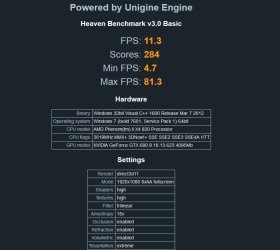
Thank you everyone for your replies.
 

My Computer My Computer

At a glance

Windows 7 Pro 64bit
OS
Windows 7 Pro 64bit
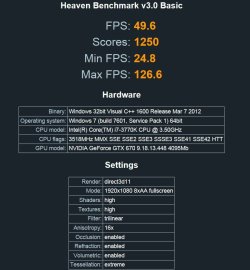
Try the Ungine Heaven I linked to. It's a good benchmarking tool. Max everything out in the options and run the benchmark. To compare, here is my 670's score.

670 1250.JPG
 

My Computers My Computers

  • At a glance

    Windows 11 ProRyzen 9 5900X32GB G Skill DDR4-3600EVGA RTX 3080 FTW 3 Ultra
    Computer type
    PC/Desktop
    Computer Manufacturer/Model Number
    ALWAYS UNDER CONSTRUCTION
    OS
    Windows 11 Pro
    CPU
    Ryzen 9 5900X
    Motherboard
    Asus X570 Crosshair Viii Hero
    Memory
    32GB G Skill DDR4-3600
    Graphics Card(s)
    EVGA RTX 3080 FTW 3 Ultra
    Sound Card
    On Board/Sennheiser PC37X Headset
    Monitor(s) Displays
    3 X Asus 27"
    Screen Resolution
    2560x1440
    Hard Drives
    2 X 1 TB NVME drives
    PSU
    EVGA 850
    Case
    Phanteks Eclipse P400A
    Cooling
    EVGA 280 AIO
    Keyboard
    Logitech G510s/ Logitech G13
    Mouse
    Logitech G502
    Internet Speed
    24/1
    Antivirus
    ESET/MBAM Pro/SAS Pro
    Browser
    Chrome/ Firefox/ Edge
  • At a glance

    Windows 11 ProIntel Ultra 9 288V32 GB LPDDR5X 8533
    Computer type
    Laptop
    System Manufacturer/Model Number
    Dell 16 Plus
    OS
    Windows 11 Pro
    CPU
    Intel Ultra 9 288V
    Memory
    32 GB LPDDR5X 8533
    Monitor(s) Displays
    16" Mini-LED HDR600 Touch 90 Hz
    Screen Resolution
    2560X1600
    Hard Drives
    1 TB NVME
Yeah something is wrong. My performance should be much better. Is everyone in agreement its my CPU and not a software problem?
 

My Computer My Computer

At a glance

Windows 7 Pro 64bit
OS
Windows 7 Pro 64bit

My Computer My Computer

At a glance

Windows 7 Pro 64bit
OS
Windows 7 Pro 64bit
Assuming everything works right, that is a good buy. It is not the 'top of the line' set up, but is a very good board and CPU. If iy sll runs well, you made a very good deal. I am still not convinced that your CPU was holding your 680 back that much. But, we will find out when you put the card in this new rig.
 

My Computers My Computers

  • At a glance

    Windows 11 ProRyzen 9 5900X32GB G Skill DDR4-3600EVGA RTX 3080 FTW 3 Ultra
    Computer type
    PC/Desktop
    Computer Manufacturer/Model Number
    ALWAYS UNDER CONSTRUCTION
    OS
    Windows 11 Pro
    CPU
    Ryzen 9 5900X
    Motherboard
    Asus X570 Crosshair Viii Hero
    Memory
    32GB G Skill DDR4-3600
    Graphics Card(s)
    EVGA RTX 3080 FTW 3 Ultra
    Sound Card
    On Board/Sennheiser PC37X Headset
    Monitor(s) Displays
    3 X Asus 27"
    Screen Resolution
    2560x1440
    Hard Drives
    2 X 1 TB NVME drives
    PSU
    EVGA 850
    Case
    Phanteks Eclipse P400A
    Cooling
    EVGA 280 AIO
    Keyboard
    Logitech G510s/ Logitech G13
    Mouse
    Logitech G502
    Internet Speed
    24/1
    Antivirus
    ESET/MBAM Pro/SAS Pro
    Browser
    Chrome/ Firefox/ Edge
  • At a glance

    Windows 11 ProIntel Ultra 9 288V32 GB LPDDR5X 8533
    Computer type
    Laptop
    System Manufacturer/Model Number
    Dell 16 Plus
    OS
    Windows 11 Pro
    CPU
    Intel Ultra 9 288V
    Memory
    32 GB LPDDR5X 8533
    Monitor(s) Displays
    16" Mini-LED HDR600 Touch 90 Hz
    Screen Resolution
    2560X1600
    Hard Drives
    1 TB NVME
Assuming everything works right, that is a good buy. It is not the 'top of the line' set up, but is a very good board and CPU. If iy sll runs well, you made a very good deal. I am still not convinced that your CPU was holding your 680 back that much. But, we will find out when you put the card in this new rig.


What do you think it is? My Unigine scores were horrible compared to others with 680's and those with video cards below that lol.

If you have any other ideas I'd be grateful to hear them, but the proof is in the pudding, there is definitely something wrong.
 

My Computer My Computer

At a glance

Windows 7 Pro 64bit
OS
Windows 7 Pro 64bit
I honestly have no idea what is wrong. I'm sure you have checked your wiring and that all cables are completely seated. I have used them, but EVGA has excellent customer support and will help you figure out what is wrong. Their forums (if you have your card registered) is an excellent place too. The tech reps visit often also. I would suggest calling EVGA.
 

My Computers My Computers

  • At a glance

    Windows 11 ProRyzen 9 5900X32GB G Skill DDR4-3600EVGA RTX 3080 FTW 3 Ultra
    Computer type
    PC/Desktop
    Computer Manufacturer/Model Number
    ALWAYS UNDER CONSTRUCTION
    OS
    Windows 11 Pro
    CPU
    Ryzen 9 5900X
    Motherboard
    Asus X570 Crosshair Viii Hero
    Memory
    32GB G Skill DDR4-3600
    Graphics Card(s)
    EVGA RTX 3080 FTW 3 Ultra
    Sound Card
    On Board/Sennheiser PC37X Headset
    Monitor(s) Displays
    3 X Asus 27"
    Screen Resolution
    2560x1440
    Hard Drives
    2 X 1 TB NVME drives
    PSU
    EVGA 850
    Case
    Phanteks Eclipse P400A
    Cooling
    EVGA 280 AIO
    Keyboard
    Logitech G510s/ Logitech G13
    Mouse
    Logitech G502
    Internet Speed
    24/1
    Antivirus
    ESET/MBAM Pro/SAS Pro
    Browser
    Chrome/ Firefox/ Edge
  • At a glance

    Windows 11 ProIntel Ultra 9 288V32 GB LPDDR5X 8533
    Computer type
    Laptop
    System Manufacturer/Model Number
    Dell 16 Plus
    OS
    Windows 11 Pro
    CPU
    Intel Ultra 9 288V
    Memory
    32 GB LPDDR5X 8533
    Monitor(s) Displays
    16" Mini-LED HDR600 Touch 90 Hz
    Screen Resolution
    2560X1600
    Hard Drives
    1 TB NVME
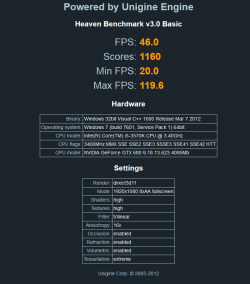
Just upgraded my system. Bought an ASRock Z77 Extreme 4 and an i5 3570K. See new benchmark image.

However, I think it may still be low.


SYSTEM SPECS:
OS: Windows 7 Professional 64 bit
MOBO: ASROCK Z77 Extreme 4
CPU: Intel i5 3570K 3.4 GHz
RAM: GSkill Ripjaws DDR3 1600 (PC3 12800) 4x4GB = 16GB
GPU: EVGA GTX 680 FTW 4gb
HD: Western Digital 2TB 7200 RPM 64MB Cache 6Gb/s
PSU: 850W
CASE: Cooler Master HAF 932 ADV BLUE ED
MONITOR: ASUS 27'' and Gateway 19'' (old flat screen hand-me-down)
 

Attachments

  • my680 benchmark.png
    my680 benchmark.png
    18 KB · Views: 15

My Computer My Computer

At a glance

Windows 7 Pro 64bit
OS
Windows 7 Pro 64bit
Assuming everything works right, that is a good buy. It is not the 'top of the line' set up, but is a very good board and CPU. If iy sll runs well, you made a very good deal. I am still not convinced that your CPU was holding your 680 back that much. But, we will find out when you put the card in this new rig.


What do you think it is? My Unigine scores were horrible compared to others with 680's and those with video cards below that lol.

If you have any other ideas I'd be grateful to hear them, but the proof is in the pudding, there is definitely something wrong.


To be honest other people and hardware is just that people have there own configurations and maybe some of them are overclocked sli or may have something else giving them awesome scores you can't and will probally never matches anyone performance it is luck of the draw and how you tweek your rig

If you havn't solved it by the advice of the gentlemen that helped you then the next and best thing to do is tweek your unit and pray for a driver to boost your Gpu
 

My Computer My Computer

At a glance

Windows 10 Home Premium 64bit sp1Intel I7-6700K @ 4.6 Ghz 1.344 volts everyday OC32GB G-Skill TridentZ 3200mhz 16-18-18-38 DDR4Sli Gigabyte Windforce GTX 980 G1
Computer type
PC/Desktop
Computer Manufacturer/Model Number
CoreI7-6700K MrFingerIII Special Builds
OS
Windows 10 Home Premium 64bit sp1
CPU
Intel I7-6700K @ 4.6 Ghz 1.344 volts everyday OC
Motherboard
Asrock Fatality K6 Z170 Socket 1151
Memory
32GB G-Skill TridentZ 3200mhz 16-18-18-38 DDR4
Graphics Card(s)
Sli Gigabyte Windforce GTX 980 G1
Sound Card
AC97 Creative Rage Tactic 3D Headphones Bluetooth
Monitor(s) Displays
27" Asus ROG Swift PG278Q G-Sync 48" Vizio Smart HD TV
Screen Resolution
2560x1440p 27"- 48" Currently Gaming at 2560x1440p Res 2K
Hard Drives
250GB Samsung Evo840SSD Seagate baracuda 500 GB WD Mybook 500Gb 1TB Seagate Barracuda
PSU
HX1050w Corsair Silver 80plus certified crosfire/sli
Case
Enthod Pro Full Tower
Cooling
Corsair H110i GT 280 mm High Performance WaterBlock
Keyboard
Logitech wireless keyboard
Mouse
Logitech wireless mouse
Internet Speed
Cox Cable 100+ mb
Antivirus
WebRoot Spysweeper with Antivirus
Browser
IE-10, Chrome, Opera
Other Info
My Other Rig is a AMD FX8320E @4.6Ghz 16GB Ballistic Sport Ram
Mobo Asrock Fatality 990FX 120GB OCZ SSD 1TB Seagate Barracuda Corsair H75 Cooling PSU Corsair CX750
GPU GTX Gigabyte 970G1
Solarstarshines is correct. Scores can depend on numerous things. What CPU, is it overclocked, ram amount and frequency, is the card overclocked, some boards are better for cards than others and many other things. I think you have to admit, this recent score is considerably better than the first score you showed. What drivers are you running? They should be 306.23. If not, they can be downloaded from Nvidia's site. Be sure to install them correctly. That score is not a bad score, the first one was.
 

My Computers My Computers

  • At a glance

    Windows 11 ProRyzen 9 5900X32GB G Skill DDR4-3600EVGA RTX 3080 FTW 3 Ultra
    Computer type
    PC/Desktop
    Computer Manufacturer/Model Number
    ALWAYS UNDER CONSTRUCTION
    OS
    Windows 11 Pro
    CPU
    Ryzen 9 5900X
    Motherboard
    Asus X570 Crosshair Viii Hero
    Memory
    32GB G Skill DDR4-3600
    Graphics Card(s)
    EVGA RTX 3080 FTW 3 Ultra
    Sound Card
    On Board/Sennheiser PC37X Headset
    Monitor(s) Displays
    3 X Asus 27"
    Screen Resolution
    2560x1440
    Hard Drives
    2 X 1 TB NVME drives
    PSU
    EVGA 850
    Case
    Phanteks Eclipse P400A
    Cooling
    EVGA 280 AIO
    Keyboard
    Logitech G510s/ Logitech G13
    Mouse
    Logitech G502
    Internet Speed
    24/1
    Antivirus
    ESET/MBAM Pro/SAS Pro
    Browser
    Chrome/ Firefox/ Edge
  • At a glance

    Windows 11 ProIntel Ultra 9 288V32 GB LPDDR5X 8533
    Computer type
    Laptop
    System Manufacturer/Model Number
    Dell 16 Plus
    OS
    Windows 11 Pro
    CPU
    Intel Ultra 9 288V
    Memory
    32 GB LPDDR5X 8533
    Monitor(s) Displays
    16" Mini-LED HDR600 Touch 90 Hz
    Screen Resolution
    2560X1600
    Hard Drives
    1 TB NVME
What are your temps while gaming? With EVGA Precision X you can set a custom fan profile to keep temps down. You shouldn't have any problems with temps, but some do. The GTX 600's will begin to throttle at 70C. Did you ever run any benchmarks with your 560 TI? If so run them with the 680. The 680 should more than double anything you can get with a 560 TI. You should also be running driver 306.23 which can be downloaded from the Nvidia web site. I really don't know if your CPU is holding you back or not. But, if you do decide to change, I would consider a Z77 board and an Ivy Bridge CPU. That will give you PCIe 3.0 rather than PCIE 2.0. Whether that is an advantage or not is debatable, but it was for me.

Try running Ungine Heaven 3.0 (free basic edition) with all settings maxed out. As soon as it finishes loading press F9 to run the benchmark. You can compare your scores with the ones in this thread. http://www.sevenforums.com/overcloc...-us-your-unigine-heaven-benchmark-scores.html

It should give you some idea.


I'm closing this and marking it as solved. This was the best answer and the advice I took. It did greatly increase my scores although not what I expected. Thank you everyone who gave their time to help. Thank you Essenbe for your sound advice.
 

My Computer My Computer

At a glance

Windows 7 Pro 64bit
OS
Windows 7 Pro 64bit
I hope you get it like you were expecting it to be, but you have made a great improvement. I know with the way your card is running now, you can play any game with no problems. New cards always have to wait for drivers to catch up. I hope they hurry up too. Good luck and hang around there is a wealth of knowledge here.
 

My Computers My Computers

  • At a glance

    Windows 11 ProRyzen 9 5900X32GB G Skill DDR4-3600EVGA RTX 3080 FTW 3 Ultra
    Computer type
    PC/Desktop
    Computer Manufacturer/Model Number
    ALWAYS UNDER CONSTRUCTION
    OS
    Windows 11 Pro
    CPU
    Ryzen 9 5900X
    Motherboard
    Asus X570 Crosshair Viii Hero
    Memory
    32GB G Skill DDR4-3600
    Graphics Card(s)
    EVGA RTX 3080 FTW 3 Ultra
    Sound Card
    On Board/Sennheiser PC37X Headset
    Monitor(s) Displays
    3 X Asus 27"
    Screen Resolution
    2560x1440
    Hard Drives
    2 X 1 TB NVME drives
    PSU
    EVGA 850
    Case
    Phanteks Eclipse P400A
    Cooling
    EVGA 280 AIO
    Keyboard
    Logitech G510s/ Logitech G13
    Mouse
    Logitech G502
    Internet Speed
    24/1
    Antivirus
    ESET/MBAM Pro/SAS Pro
    Browser
    Chrome/ Firefox/ Edge
  • At a glance

    Windows 11 ProIntel Ultra 9 288V32 GB LPDDR5X 8533
    Computer type
    Laptop
    System Manufacturer/Model Number
    Dell 16 Plus
    OS
    Windows 11 Pro
    CPU
    Intel Ultra 9 288V
    Memory
    32 GB LPDDR5X 8533
    Monitor(s) Displays
    16" Mini-LED HDR600 Touch 90 Hz
    Screen Resolution
    2560X1600
    Hard Drives
    1 TB NVME
Back
Top