Running a .bat file from server

DanRex

Skilled Troublemaker
Power User
Local time
1:48 AM
Messages
156
Location
Pargas, Finland
Hello!
I've got a .bat file on my server that I would like to run on the Server. If I go the server/domain (whatever you like to call it) to the URL where my .bat file is, it would just download the file. But I would like to be able to make the server run the .bat. Is that possible?
Thanks!
 

My Computer

Computer Manufacturer/Model Number
HP Pavilion Phoenix H9-1060sc
OS
Windows 8 Pro 64-Bit
CPU
Intel Core i7 (2nd Gen) 2600 / 3.4 GHz
Motherboard
IPISB-CH2 (Chicago)
Memory
16 GB
Graphics Card(s)
Nvidia GeForce GTX 580
Sound Card
Integrated IDT 92HD89E Audio
Monitor(s) Displays
Samsung 23" SyncMaster SA750D
Screen Resolution
1920 x 1080
Hard Drives
120 GB Solid State & 2 TB 7200 RPM 3.0 Gb/sec
PSU
Internal 600 Watt (100V-240V)
Case
HP Tower: Height: 41.3 cm Width: 17.3 cm
Keyboard
HP Wireless, Shipped with Computer
Mouse
Came with Keyboard as bundle
Internet Speed
Never Enough aka 8 mb/s
Hello!
I've got a .bat file on my server that I would like to run on the Server. If I go the server/domain (whatever you like to call it) to the URL where my .bat file is, it would just download the file. But I would like to be able to make the server run the .bat. Is that possible?
Thanks!

DanRex, the only ways to run a batch file on a server is to connect via Remote Desktop Program and execute it or place the batch file in the task manager of the server.

Just mapping a drive to the server just adds another drive letter to your local machine.

Rich
 

My Computer

Computer type
Laptop
Computer Manufacturer/Model Number
Toshiba Laptop Qosimo X870
OS
Windows 7 Pro x64 SP1
CPU
Intel Core I7
Motherboard
Toshiba Qosmio
Memory
16 Gigs
Graphics Card(s)
NVIDIA GeForce GTX 670M
Monitor(s) Displays
17.7" laptop
Screen Resolution
1600 x 900
Hard Drives
256 Gig SanDisk SSD for C
256 Gig Intel SSD for D
Internet Speed
50/25 FIOS
Antivirus
Vipre (all you can eat for 10 machines)
Browser
IE and FF
Other Info
I have dos 6.22, wfwg 3.11, win98, 2000 and xp VHD's available for testing. MS's Virtual PC works great.
Okay, thanks! I'll try to do that! :)
 

My Computer

Computer Manufacturer/Model Number
HP Pavilion Phoenix H9-1060sc
OS
Windows 8 Pro 64-Bit
CPU
Intel Core i7 (2nd Gen) 2600 / 3.4 GHz
Motherboard
IPISB-CH2 (Chicago)
Memory
16 GB
Graphics Card(s)
Nvidia GeForce GTX 580
Sound Card
Integrated IDT 92HD89E Audio
Monitor(s) Displays
Samsung 23" SyncMaster SA750D
Screen Resolution
1920 x 1080
Hard Drives
120 GB Solid State & 2 TB 7200 RPM 3.0 Gb/sec
PSU
Internal 600 Watt (100V-240V)
Case
HP Tower: Height: 41.3 cm Width: 17.3 cm
Keyboard
HP Wireless, Shipped with Computer
Mouse
Came with Keyboard as bundle
Internet Speed
Never Enough aka 8 mb/s
Okay, so can you help me with how to connect to the server via the Remote Desktop program? I just can't figure out how. I'm using W7:s built in program which can be accessed from Start => All Programs => Accessories => Remote Desktop Connection.
 

My Computer

Computer Manufacturer/Model Number
HP Pavilion Phoenix H9-1060sc
OS
Windows 8 Pro 64-Bit
CPU
Intel Core i7 (2nd Gen) 2600 / 3.4 GHz
Motherboard
IPISB-CH2 (Chicago)
Memory
16 GB
Graphics Card(s)
Nvidia GeForce GTX 580
Sound Card
Integrated IDT 92HD89E Audio
Monitor(s) Displays
Samsung 23" SyncMaster SA750D
Screen Resolution
1920 x 1080
Hard Drives
120 GB Solid State & 2 TB 7200 RPM 3.0 Gb/sec
PSU
Internal 600 Watt (100V-240V)
Case
HP Tower: Height: 41.3 cm Width: 17.3 cm
Keyboard
HP Wireless, Shipped with Computer
Mouse
Came with Keyboard as bundle
Internet Speed
Never Enough aka 8 mb/s
Okay, so can you help me with how to connect to the server via the Remote Desktop program? I just can't figure out how. I'm using W7:s built in program which can be accessed from Start => All Programs => Accessories => Remote Desktop Connection.

DanRex,

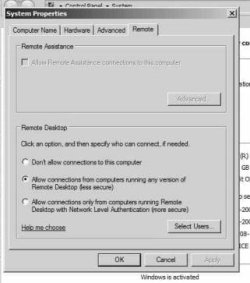
You will have to go to the server system properties and under options, you need to make sure that the box is checked as follows.


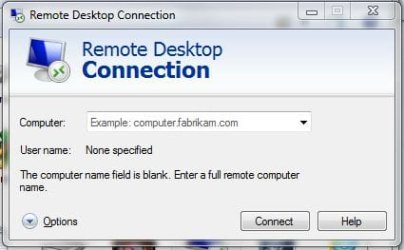
If your trying to connect via rdp on your local network. just put in the IP for the server and then your login credentials. and you should be able to get into the server as a remote desktop.

Rich
 

Attachments

  • rdp-access-win2008.JPG
    rdp-access-win2008.JPG
    28.6 KB · Views: 4
  • rdp-access-screen1.JPG
    rdp-access-screen1.JPG
    30.5 KB · Views: 3

My Computer

Computer type
Laptop
Computer Manufacturer/Model Number
Toshiba Laptop Qosimo X870
OS
Windows 7 Pro x64 SP1
CPU
Intel Core I7
Motherboard
Toshiba Qosmio
Memory
16 Gigs
Graphics Card(s)
NVIDIA GeForce GTX 670M
Monitor(s) Displays
17.7" laptop
Screen Resolution
1600 x 900
Hard Drives
256 Gig SanDisk SSD for C
256 Gig Intel SSD for D
Internet Speed
50/25 FIOS
Antivirus
Vipre (all you can eat for 10 machines)
Browser
IE and FF
Other Info
I have dos 6.22, wfwg 3.11, win98, 2000 and xp VHD's available for testing. MS's Virtual PC works great.
Back
Top