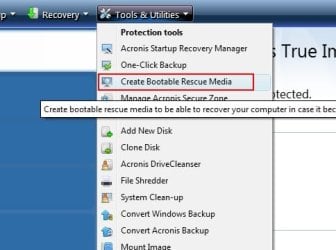
Any Acronis True Image users out there ?

trinaz

New member
Member
VIP
Local time
5:13 AM
Messages
477
Location
Phoenix
Feel really dumb about this but how do you restore a ".tib" file creates with Acronis True Image software ?

I've looked around on the help files on their site but still not sure what to do ?

Since it's a tib file....will it load using Windows installation DVD...?...or do you somehow have to create an Acronis "loader" DVD and then restart the PC ?

Is there any real difference in an Acronis "tib" (image) system backup and Win 7's save a system image under Backup/Restore in the Control panel ?

Thanks....Tim
 

My Computer My Computer

At a glance

Windows 7 Pro 64bit SP1AMD FX-6100 Six-Core Processor2ea Corsair-1333MHz-PC3-10666-240-pin-CMX4GX3...NVIDIA GeForce GT 630 - 1023MB (EVGA)
Computer type
PC/Desktop
Computer Manufacturer/Model Number
Self built
OS
Windows 7 Pro 64bit SP1
CPU
AMD FX-6100 Six-Core Processor
Motherboard
M5A78L-M LX PLUS
Memory
2ea Corsair-1333MHz-PC3-10666-240-pin-CMX4GX3M1A1333C9
Graphics Card(s)
NVIDIA GeForce GT 630 - 1023MB (EVGA)
Sound Card
OnBoard Via High Def Audio
Monitor(s) Displays
Samsung 204B main - ASUS VS228 secondary
Screen Resolution
1920x1080 main - 1920x1080 secondary
Hard Drives
Samsung SSD 840 128GB Win7 Pro 64bit - Western Digital WDC 465GB - Seagate 640GB Sata B/U - Maxtor 500GB Sata B/U - Maxtor 200GB Sata
PSU
Antec 650 watt
Cooling
Multiple case fans
Keyboard
MS USB dual Wireless Keyboard - IntelliType Pro
Mouse
MS USB dual Wireless Mouse - IntelliPoint
Internet Speed
Cox Cable
Antivirus
Bitdefender IS 2014
Browser
FireFox Primary - IE 11
Other Info
Hauppaguge Win TV HVR-1250 (Model 22xxx, Hybrid ATSC/QAM)
Samsung HD103SI USB 1TB Desktop Drive - Backup & Disk Image storage
They differ by far... You'll have to create bootable media disk using Acronis and then boot from the CD to restore...:D
 

My Computer My Computer

At a glance

Seven ultimate 32bitCore2Duo E57003GB DDR2HD5670
Computer Manufacturer/Model Number
Asus
OS
Seven ultimate 32bit
CPU
Core2Duo E5700
Motherboard
Asus p5qlem
Memory
3GB DDR2
Graphics Card(s)
HD5670
Sound Card
Onboard
Monitor(s) Displays
Philips 18.5 widescreen
Screen Resolution
Depends
Hard Drives
500GB Samsung 7200RPM
PSU
500w Sparta
Case
Aerocool
Cooling
Standard + 2x 40's inserted
Keyboard
Multimedia
Mouse
Genius
Internet Speed
10meg.
trinaz:

You don't have to make a boot dvd to recover files/partitions with Acronis.


  • Run Acronis
  • Find the Recover Option in the menu
  • Acronis will prompt you for which .tib file to use for recovery.
  • If the file or partition is in use by the Operating System, Acronis will re-boot the computer, do the recovery, then re-start Windows.
It's still not a bad idea to have Acronis make a boot disk for you, however.
It could prove very useful if you can not get Windows started.

Incidentally, .tib (true image backup) files are associated with Acronis when it is installed.

Acronis also provides a monitor so you can read these files directly. All you need to do is open one from within Windows Explorer.

Hope this helps,
 

My Computer My Computer

At a glance

Windows 7 Home Premium x64AMD Phenom II X6 1600T16GB PC3-10700 (1342MHz)ATI Radeon 5770 HD (x2) CrossFire
Computer Manufacturer/Model Number
OEM - Me
OS
Windows 7 Home Premium x64
CPU
AMD Phenom II X6 1600T
Motherboard
GigaByte GZ-990FXA-UD3
Memory
16GB PC3-10700 (1342MHz)
Graphics Card(s)
ATI Radeon 5770 HD (x2) CrossFire
Sound Card
On-board RealTek chipset
Monitor(s) Displays
3x Hanns-G 1920x1080 Monitors
Screen Resolution
3x Hanns-G 1920x1080 Monitors
Hard Drives
Intel 25-V SSD 40GB: 218 MB/s AT: 0.1ms
Intel X-25M SSD 80GB: 230MB/s AT: 0.1ms
Seagate 750GB: 133 MB/s AT: 13ms (perpendicular storage)
Buffalo HD-PCTU3 1TB External drive
PSU
OCZ Stealth X Stream 750W
Case
Cheap (unknown)
Cooling
Stock
Keyboard
HP USB
Mouse
LogiTech USB
Internet Speed
1.5 Mbps - Slow - At the tail-end of a rural network
Other Info
Printer: Epson Stylus C-84
Scanner: HP 3500C Flatbed
DVD-RW: Plextor
DVD-ROM: Unknown
WEI: 7.4
I think you can also boot the Acronis CD and use it to restore from the .tib file. I have ATI Home 2010 and "I think" it's bootable. I'm not sure about this and don't want to reboot to try it right now.

Edit: I finally checked this and I do not have an Acronis CD as I did not buy it in a store, but downloaded it from Acronis so the above is not true. I did create an Acronis Rescue disc and it works so that is definitely the way to go.
 
Last edited:

My Computer My Computer

At a glance

Windows 10 Pro X64Intel Quad Core i7-4770 @ 3.4Ghz16.0GB PC3-12800 DDR3 SDRAM 1600 MHzIntel Integrated HD Graphics
Computer type
PC/Desktop
Computer Manufacturer/Model Number
Lenovo IdeaCenter 450
OS
Windows 10 Pro X64
CPU
Intel Quad Core i7-4770 @ 3.4Ghz
Memory
16.0GB PC3-12800 DDR3 SDRAM 1600 MHz
Graphics Card(s)
Intel Integrated HD Graphics
Sound Card
Realtek HD Audio
Monitor(s) Displays
HP 22" LCD
Screen Resolution
1680 x 1050
Hard Drives
250GB Samsung EVO SATA-3 SSD
2TB Seagate ST2000DM001 SATA-2
1.5TB Seagate ST3150041AS SATA
Keyboard
Dell USB
Mouse
Lenovo USB
Internet Speed
Cable via Road Runner 3MB Upload, 30MB Download
Antivirus
Windows Defender, MBAM Pro, MBAE
Browser
Seamonkey
Other Info
UEFI/GPT
PLDS DVD-RW DH16AERSH
You can recover your system or files while Windows is running from within Acronis.
Just choose the "Recover My Discs" option or "Recover My Files" option, whichever is appropriate for what you want to do.

If you are restoring a disc, (the OS for example) it will then show you all your Backups. Choose the one you want and hit proceed.
Acronis will prompt you to restart your computer at which point it will wipe the drive, and restore the image.


If for some reason you can not boot into Windows, you will need to boot from the rescue CD.
It will be the same procedure once Acronis boots, but you may need to point it to the location your backups are saved.

I strongly recommend burning a Recue Boot Disc just in case. You never know when it may be required.
Not only for a case in which Windows will not boot, but also if you replace your HD and want to restore the entire image to the new drive.


The option to do so is in the Tools menu, and it will guide you through the process.
1.jpg

For the most part, a restore can be initiated from within Windows, and complete upon reboot.
 

My Computer My Computer

At a glance

Windows 7 Home Premium 64bitIntel Core i7 2700k8GB Mushkin Redline Ridgebacks @1866EVGA GTX570 SC
Computer Manufacturer/Model Number
Custom (Self Build)
OS
Windows 7 Home Premium 64bit
CPU
Intel Core i7 2700k
Motherboard
eVGA P67 SLI
Memory
8GB Mushkin Redline Ridgebacks @1866
Graphics Card(s)
EVGA GTX570 SC
Sound Card
XiFi Titanium HD
Monitor(s) Displays
LG W2453V
Screen Resolution
1920x1080
Hard Drives
Intel 320 80GB -- Intel X25-V 40GB --WD Black 1TB x2 -- WD Blue 640GB
PSU
Seasonic x750
Case
Corsair 600T SE White
Cooling
eVGA Superclocked CPU Cooler
Keyboard
Saitek Cyborg
Antivirus
Kaspersky
Browser
IE
Other Info
LG BD/DVD
I generally restore from within windows. But if system won't boot, the Boot Disc is a must.

You can also mount the image as a drive to explore, or retrieve individual files.

Mount.jpg

A Guy
 

My Computer My Computer

At a glance

Windows 10 Home x64INTEL Core i5-750 Quad-Core 3.37GHzHyperX Fury Black Series 8GB (2 x 4GB) 1866MhzEVGA GeForce GTX 750 Superclocked 1GB 128-Bit...
Computer type
PC/Desktop
OS
Windows 10 Home x64
CPU
INTEL Core i5-750 Quad-Core 3.37GHz
Motherboard
ASUS P7P55D
Memory
HyperX Fury Black Series 8GB (2 x 4GB) 1866Mhz
Graphics Card(s)
EVGA GeForce GTX 750 Superclocked 1GB 128-Bit GDDR5
Monitor(s) Displays
LG 32MA68HY 32" IPS
Screen Resolution
1920 x 1080
Hard Drives
Samsung 840 Evo 120GB, SEAGATE 500GB Barracuda® 7200.12, SATA 3 Gb/s, 7200 RPM, 16MB cache
PSU
ANTEC TruePower New TP-550, 80 PLUS, 550W
Case
ANTEC Three Hundred Illusion
Cooling
COOLER MASTER Hyper 212 Plus, 4 x 120mm 1 x 140mm Noctua's
Internet Speed
85 + Mbps
Antivirus
Avast
Browser
Vivaldi
Yep

Acronis is great !

Listen to the above replies and MAKE THE BOOT DISC !!!!!

I personally use the disc to restore and have found over the years that a majority of times when the process gets to the black window with "Loadind Acronis" is shown in the upper left hand corner, it will do nothing at all and I have to "control-alt-delete to start the process over again which seems to always work this time.

If you save your backup to a different hard drive than the drive you will be restoring your operating system to then the process will go twice as fast (at least for me). I have an old AMD 3600+ and it usually takes about 8 or 9 minutes compared to 20 if .tib image is on same HDD.

My computer is so tweaked visually (hours spent changing icons and such) that this is my favorite software by far.
 

My Computer My Computer

At a glance

windows 7 x 64 ultPhenom II x4 840Corsair XMS3 2x4 GBHIS Radeon 5770
Computer Manufacturer/Model Number
Microsoft
OS
windows 7 x 64 ult
CPU
Phenom II x4 840
Motherboard
Gigabyte GA-990FXA-UD3
Memory
Corsair XMS3 2x4 GB
Graphics Card(s)
HIS Radeon 5770
Sound Card
Realtek onboard
Monitor(s) Displays
Acer P221w + Samsung T220 HD
Screen Resolution
1024x768
Hard Drives
Various
PSU
430w Corsair Builders Series
Case
HP
Cooling
Freezer 64 Pro v1
Keyboard
Logitech G15 v1 + Belkin n52te SpeedPad
Mouse
Logitech M570 Wireless Trackball
Internet Speed
1000mbs
Other Info
Extra front intake fan installed in two of my 5.2" bays which blows directly into my Freezer Pro CPU fan. Dropped temp nearly 10c.
& ?:cool: Did you manage?:D
 

My Computer My Computer

At a glance

Seven ultimate 32bitCore2Duo E57003GB DDR2HD5670
Computer Manufacturer/Model Number
Asus
OS
Seven ultimate 32bit
CPU
Core2Duo E5700
Motherboard
Asus p5qlem
Memory
3GB DDR2
Graphics Card(s)
HD5670
Sound Card
Onboard
Monitor(s) Displays
Philips 18.5 widescreen
Screen Resolution
Depends
Hard Drives
500GB Samsung 7200RPM
PSU
500w Sparta
Case
Aerocool
Cooling
Standard + 2x 40's inserted
Keyboard
Multimedia
Mouse
Genius
Internet Speed
10meg.
I know your question has since been answered, but I too am an Acronis True Image user.
 

My Computer My Computer

At a glance

Windows 7 Ultimate x64Intel Q9550 2.83Ghz OC'd to 3.40Ghz8GB G.Skill PI DDR2-800, 4-4-4-12 timingsEVGA 1280MB Nvidia GeForce GTX570
Computer Manufacturer/Model Number
Self-Built in July 2009
OS
Windows 7 Ultimate x64
CPU
Intel Q9550 2.83Ghz OC'd to 3.40Ghz
Motherboard
Gigabyte GA-EP45-UD3R rev. 1.1, F12 BIOS
Memory
8GB G.Skill PI DDR2-800, 4-4-4-12 timings
Graphics Card(s)
EVGA 1280MB Nvidia GeForce GTX570
Sound Card
Realtek ALC899A 8 channel onboard audio
Monitor(s) Displays
23" Acer x233H
Screen Resolution
1920x1080
Hard Drives
Intel X25-M 80GB Gen 2 SSD
Western Digital 1TB Caviar Black, 32MB cache. WD1001FALS
PSU
Corsair 620HX modular
Case
Antec P182
Cooling
stock
Keyboard
ABS M1 Mechanical
Mouse
Logitech G9 Laser Mouse
Internet Speed
15/2 cable modem
Other Info
Windows and Linux enthusiast. Logitech G35 Headset.
Hi there
in conjunction with GPARTED or other partitioning software Acronis is also a great tool if you re-jig your partitions around - if you do this remember to set to ACTIVE any boot partitions you move around when doing Acronis restore.

You can also create a bootable USB stick if your computer can boot from these devices.

If you get into a real bind - so long as the archive is on an INTERNAL HDD on a different partition to the Windows OS you can usually restore using the SAFE version -- that is without Network or USB drivers.

The Acronis software is basically a small Linux system -- I've had on a few "Unbranded" Laptops the bootable restore program failing because the Linux kernel has got hosed when trying to load a USB driver when I select the FULL program on Restore.

Using the SAFE mode has never failed me yet. - Modern computers don't seem to have the problems with USB drivers and Acronis - but just in case you do then follow solution outlined above.

Cheers
jimbo
 

My Computer My Computer

At a glance

Linux CENTOS 7 / various Windows OS'es and se...Intel i7 Intel i58GB, 16GBOn Motherboard
Computer type
PC/Desktop
Computer Manufacturer/Model Number
Custom built, several laptops HP/ASUS
OS
Linux CENTOS 7 / various Windows OS'es and servers
CPU
Intel i7 Intel i5
Memory
8GB, 16GB
Graphics Card(s)
On Motherboard
Sound Card
Realtek HD audio
Monitor(s) Displays
Apple Cinema display, Samsung LCD
Screen Resolution
1920 X 1080
Hard Drives
4 X 1TB SATA
Mouse
Toshiba wireless laser
Internet Speed
> 20MB up
I use acronis, although for some wierd reason , I like version2010 better. I have bought over a dozen copies for my clients where I have them setup to automatically create a full image each sunday morning at 2am. It just works the way I want it to and has saved me (and my clients) much time in a couple of instances where their C drive went south or for some unknown reason they clicked on an attachment when they were supposed to.

I love it and have it on all my home machines. I always make an image before I do microsoft updates or install some program that I feel could put me in jeopardy. I buy mine from the user group store at a cheap price. ugr.com is their web site and the price is $25 for user group members. I don't have any financial interest, just like Gene and linda Barlow who have supported user groups for many years.

Rich
 

My Computer My Computer

At a glance

Windows 7 Pro x64 SP1Intel Core I716 GigsNVIDIA GeForce GTX 670M
Computer type
Laptop
Computer Manufacturer/Model Number
Toshiba Laptop Qosimo X870
OS
Windows 7 Pro x64 SP1
CPU
Intel Core I7
Motherboard
Toshiba Qosmio
Memory
16 Gigs
Graphics Card(s)
NVIDIA GeForce GTX 670M
Monitor(s) Displays
17.7" laptop
Screen Resolution
1600 x 900
Hard Drives
256 Gig SanDisk SSD for C
256 Gig Intel SSD for D
Internet Speed
50/25 FIOS
Antivirus
Vipre (all you can eat for 10 machines)
Browser
IE and FF
Other Info
I have dos 6.22, wfwg 3.11, win98, 2000 and xp VHD's available for testing. MS's Virtual PC works great.
I did my first Acronis True Image full back of my Windows 7 32 bit installation using Acronis True Image 11 from a booted rescue disc. I felt the backup took an inordinate amount of time: approx. 13 hours. Is this the norm? Would I be just as better off imaging from within Windows or is this wrong? Thanks very much

The hard drive is a WD 320gig 7200 on a Dell Inspiron e1505 laptop with a 1.6gig T2050 processor and 2gigs ram.
 

My Computer My Computer

At a glance

Windows 7 32bitintel core duo 1.6 gig T20502 GIGSATI 1400
Computer Manufacturer/Model Number
Dell Inspiron e1505
OS
Windows 7 32bit
CPU
intel core duo 1.6 gig T2050
Motherboard
dell mm061
Memory
2 GIGS
Graphics Card(s)
ATI 1400
Sound Card
USB DAC AUNE/sigmatel audio
Monitor(s) Displays
integral
Hard Drives
WD 320GIG 7200 rpm
PSU
Dell
Cooling
laptop
I did my first Acronis True Image full back of my Windows 7 32 bit installation using Acronis True Image 11 from a booted rescue disc. I felt the backup took an inordinate amount of time: approx. 13 hours. Is this the norm? Would I be just as better off imaging from within Windows or is this wrong? Thanks very much

The hard drive is a WD 320gig 7200 on a Dell Inspiron e1505 laptop with a 1.6gig T2050 processor and 2gigs ram.

Where were you storing the image file. ,I never do backups or restores from inside Windows. I always use a Boot USB thumb that has Acronis TI on it and to image about 35+GBs take about 8 minutes to another internal drive and maybe 15-20 to a USB 2 external drive. That is on my desktop and it is about the same on my Dell E6420 notebook.

If you are imaging to a Network drive the time would be longer.
It all depends on how much data you are imaging. I have multiple drives in my desktop and 2 drives in my notebook and only image the physical drive that has the OS and programs install on it as I have all other data on multiple computers and multiple external drives.
 

My Computer My Computer

At a glance

7 x64
OS
7 x64
[/QUOTE]
Where were you storing the image file. ,I never do backups or restores from inside Windows. I always use a Boot USB thumb that has Acronis TI on it and to image about 35+GBs take about 8 minutes to another internal drive and maybe 15-20 to a USB 2 external drive. That is on my desktop and it is about the same on my Dell E6420 notebook.

If you are imaging to a Network drive the time would be longer.
It all depends on how much data you are imaging. I have multiple drives in my desktop and 2 drives in my notebook and only image the physical drive that has the OS and programs install on it as I have all other data on multiple computers and multiple external drives.[/QUOTE]

The drive has all my OS, programs and data on it and is the sole drive.I have over 100gigs of music files on this drive. I backup to an external USB2 500gig. I have always used the rescue disc to create my images when I had Win XP then Vista and now Win 7.I was just curious about creating an image from within Windows.
 

My Computer My Computer

At a glance

Windows 7 32bitintel core duo 1.6 gig T20502 GIGSATI 1400
Computer Manufacturer/Model Number
Dell Inspiron e1505
OS
Windows 7 32bit
CPU
intel core duo 1.6 gig T2050
Motherboard
dell mm061
Memory
2 GIGS
Graphics Card(s)
ATI 1400
Sound Card
USB DAC AUNE/sigmatel audio
Monitor(s) Displays
integral
Hard Drives
WD 320GIG 7200 rpm
PSU
Dell
Cooling
laptop
I make all my images from within windows. I have also done all my restores from within windows as the issues have never been that windows would not boot. I also use internal data drives for my backups. The full backup of about 35GB of data takes about 8 minutes this way.

A larger amount of data as you have, coupled with USB2 speeds would certaily take longer, but the time yours took is extreme. Did you also validate the image after creation?

Acronis does fine making images from within windows from my experience. And I continue to surf while they are being created with no performance issues.

A Guy
 

My Computer My Computer

At a glance

Windows 10 Home x64INTEL Core i5-750 Quad-Core 3.37GHzHyperX Fury Black Series 8GB (2 x 4GB) 1866MhzEVGA GeForce GTX 750 Superclocked 1GB 128-Bit...
Computer type
PC/Desktop
OS
Windows 10 Home x64
CPU
INTEL Core i5-750 Quad-Core 3.37GHz
Motherboard
ASUS P7P55D
Memory
HyperX Fury Black Series 8GB (2 x 4GB) 1866Mhz
Graphics Card(s)
EVGA GeForce GTX 750 Superclocked 1GB 128-Bit GDDR5
Monitor(s) Displays
LG 32MA68HY 32" IPS
Screen Resolution
1920 x 1080
Hard Drives
Samsung 840 Evo 120GB, SEAGATE 500GB Barracuda® 7200.12, SATA 3 Gb/s, 7200 RPM, 16MB cache
PSU
ANTEC TruePower New TP-550, 80 PLUS, 550W
Case
ANTEC Three Hundred Illusion
Cooling
COOLER MASTER Hyper 212 Plus, 4 x 120mm 1 x 140mm Noctua's
Internet Speed
85 + Mbps
Antivirus
Avast
Browser
Vivaldi
Always done backups from within Windows and System restores from within Windows without issue as well.
Just start the restore and wait for Acronis to ask for a reboot.

Only actually had to use the CD once or twice. But you should certainly make one ASAP, as you never know when you'll need it.


In regards to how long, many variables ...
On my system, Windows and apps only are on a 80GB HD. It takes 5-6minutes to do a Backup, to a secondary internal mechanical drive and the same to restore.

On another machine, it takes longer as both drives are mechanical, and is in the 15-20min range. (To be fair, this one is a single drive system with lot of DATA on it, music/videos etc -- dedicated Acronis Drive though))


If you are backing up to a partition on the same physical drive, it will increase the time required drastically. You really should have a place for Acronis to store backup, preferably a dedicated disk either internal or external.
 

My Computer My Computer

At a glance

Windows 7 Home Premium 64bitIntel Core i7 2700k8GB Mushkin Redline Ridgebacks @1866EVGA GTX570 SC
Computer Manufacturer/Model Number
Custom (Self Build)
OS
Windows 7 Home Premium 64bit
CPU
Intel Core i7 2700k
Motherboard
eVGA P67 SLI
Memory
8GB Mushkin Redline Ridgebacks @1866
Graphics Card(s)
EVGA GTX570 SC
Sound Card
XiFi Titanium HD
Monitor(s) Displays
LG W2453V
Screen Resolution
1920x1080
Hard Drives
Intel 320 80GB -- Intel X25-V 40GB --WD Black 1TB x2 -- WD Blue 640GB
PSU
Seasonic x750
Case
Corsair 600T SE White
Cooling
eVGA Superclocked CPU Cooler
Keyboard
Saitek Cyborg
Antivirus
Kaspersky
Browser
IE
Other Info
LG BD/DVD
I make all my images from within windows. I have also done all my restores from within windows as the issues have never been that windows would not boot. I also use internal data drives for my backups. The full backup of about 35GB of data takes about 8 minutes this way.

A larger amount of data as you have, coupled with USB2 speeds would certaily take longer, but the time yours took is extreme. Did you also validate the image after creation?

Acronis does fine making images from within windows from my experience. And I continue to surf while they are being created with no performance issues.

A Guy

Yes I validated my backup from within Windows using Acronis and it is fine.
 

My Computer My Computer

At a glance

Windows 7 32bitintel core duo 1.6 gig T20502 GIGSATI 1400
Computer Manufacturer/Model Number
Dell Inspiron e1505
OS
Windows 7 32bit
CPU
intel core duo 1.6 gig T2050
Motherboard
dell mm061
Memory
2 GIGS
Graphics Card(s)
ATI 1400
Sound Card
USB DAC AUNE/sigmatel audio
Monitor(s) Displays
integral
Hard Drives
WD 320GIG 7200 rpm
PSU
Dell
Cooling
laptop
On Win XP I have to reboot between the time I create a backup and the time I validate it.

I found a fix to increase my Kernel Memory maximum to over 300,000K because Acronis uses a ton of Kernel memory in XP especially for long backups of several hundred GB to over 1 TB, and without enough Kernel memory Acronis crashes. Rebooting resets the Kernel Memory so it can do the Validation as a separate job successfully.

I have no idea what this means for Windows 7.

It takes about 24 hours to backup 1.3 TB on USB 2.0 to USB 2.0 drives, validation is extra.

I expect Win 7 would support USB 3.0 drives, but if permissions get in the way I wouldn't trust my external HDD on Win 7.
 

My Computer My Computer

At a glance

Windows 7 Home Premium 64 bitIntel Core i7 3610QM @2.3Ghz w 3.3 Ghz boostIntel HD Graphics 4000
Computer Manufacturer/Model Number
HP Pavillion m7-1015dx
OS
Windows 7 Home Premium 64 bit
CPU
Intel Core i7 3610QM @2.3Ghz w 3.3 Ghz boost
Graphics Card(s)
Intel HD Graphics 4000
Screen Resolution
1600 x 900
Keyboard
Laptop
Mouse
M$ Optical
Internet Speed
10 mbps/1.0 mbps
Back
Top