Solved Registry Key deletion - Home Premium & Ultimate are different

rfdes

New member
Local time
4:46 AM
Messages
5
I have two computers, a laptop with Home Premium and a desktop with Ultimate. I'm setup as admin on both and installed an application on both that I ended up removing. There were a couple of registry keys that are giving me 'fits' and need removing. I am struggling to get these keys removed.

Using Regedit, I have no issues removing the keys on the Ultimate desktop machine. However, I get the typical error message "Access Denied" message on the Home Premium laptop. Of course I've made sure that my permissions are set to OWNER, etc. but still no luck.

Would this imply that I have a GROUP POLICY issue between the two machines? I understand that some of the differences between the Home Premium and the Ultimate versions of Win 7 are related to GROUP POLICY. Does anyone have any thoughts that would help with this problem. I've heard that it is possible to copy the group policy from one machine to another. Is this possible and if so, how?

Any help would be appreciated.
thanks
Jim
 

My Computer My Computer

At a glance

Windows 7
OS
Windows 7
I have two computers, a laptop with Home Premium and a desktop with Ultimate. I'm setup as admin on both and installed an application on both that I ended up removing. There were a couple of registry keys that are giving me 'fits' and need removing. I am struggling to get these keys removed.

Using Regedit, I have no issues removing the keys on the Ultimate desktop machine. However, I get the typical error message "Access Denied" message on the Home Premium laptop. Of course I've made sure that my permissions are set to OWNER, etc. but still no luck.

Would this imply that I have a GROUP POLICY issue between the two machines? I understand that some of the differences between the Home Premium and the Ultimate versions of Win 7 are related to GROUP POLICY. Does anyone have any thoughts that would help with this problem. I've heard that it is possible to copy the group policy from one machine to another. Is this possible and if so, how?

Any help would be appreciated.
thanks
Jim

You can seize ownership of any registry key;
Right-click the key, click Permissions, click Advanced.
Then set any permission you need.

However, there are two restrictions:
- You cannot do this in bulk.
- In nested keys you must frequently set ownership from inside out. Doing it on the main key only may fail.


I don't use Group Policy, so I have no answer for that part of your question.

HTH
 

My Computer My Computer

At a glance

Windows 7 Professional x64Intel i5 quad processor16 GBRadeon HD 5770
Computer type
PC/Desktop
Computer Manufacturer/Model Number
Custom Built
OS
Windows 7 Professional x64
CPU
Intel i5 quad processor
Motherboard
DP67BG
Memory
16 GB
Graphics Card(s)
Radeon HD 5770
Sound Card
Realtek High Definition Audio
Monitor(s) Displays
Samsung SyncMaster
Screen Resolution
1920X1080
Hard Drives
WD 2TB (SATA Internal)
WD 1TB (USB External)
PSU
Corsair GS800
Case
Tower (Generic)
Cooling
3 Internal Fans
Keyboard
MS Wireless
Mouse
MS Optical Wired
Internet Speed
54 mbps
Antivirus
Emsisoft
Browser
IE-Version 9, Palemoon-Version 24.2.0
Thanks for the response. As far as permissions, I have set the permissions as you mentioned. In fact I set myself as the OWNER but still get the access denied message. There is something that I am missing and am definitely confused.

Jim
 

My Computer My Computer

At a glance

Windows 7
OS
Windows 7
Thanks for the response. As far as permissions, I have set the permissions as you mentioned. In fact I set myself as the OWNER but still get the access denied message. There is something that I am missing and am definitely confused.

Jim

Give this a try;

psexec -i -d -s c:\windows\regedit.exe

psexec is available from Microsoft here
http://technet.microsoft.com/en-us/sysinternals/bb897553.aspx

This should give you full access to the registry; definitely be careful with this sort of access.
 

My Computer My Computer

At a glance

Windows 7 Professional x64Intel i5 quad processor16 GBRadeon HD 5770
Computer type
PC/Desktop
Computer Manufacturer/Model Number
Custom Built
OS
Windows 7 Professional x64
CPU
Intel i5 quad processor
Motherboard
DP67BG
Memory
16 GB
Graphics Card(s)
Radeon HD 5770
Sound Card
Realtek High Definition Audio
Monitor(s) Displays
Samsung SyncMaster
Screen Resolution
1920X1080
Hard Drives
WD 2TB (SATA Internal)
WD 1TB (USB External)
PSU
Corsair GS800
Case
Tower (Generic)
Cooling
3 Internal Fans
Keyboard
MS Wireless
Mouse
MS Optical Wired
Internet Speed
54 mbps
Antivirus
Emsisoft
Browser
IE-Version 9, Palemoon-Version 24.2.0
Hi, Sir George -
I tried your suggestion, but when attempting to run the service I get the error message:
Couldn't install PsExec Service:
Access Denied

Boy, very frustrating, one problem turns into another...

I appreciate the response.
Jim
 

My Computer My Computer

At a glance

Windows 7
OS
Windows 7

My Computer My Computer

At a glance

Windows 10 Pro. 64/ version 1709 Windows 7 Pr...Intel i7-6800K @ 4.3Corsair Platinum 16 gig @2400EVGA GTX 1070 OC
Computer type
PC/Desktop
Computer Manufacturer/Model Number
Home made Desktop
OS
Windows 10 Pro. 64/ version 1709 Windows 7 Pro/64
CPU
Intel i7-6800K @ 4.3
Motherboard
ASUS X-99 Deluxe II
Memory
Corsair Platinum 16 gig @2400
Graphics Card(s)
EVGA GTX 1070 OC
Monitor(s) Displays
Asus 27" LED LCD/VE278Q
Screen Resolution
1920-1080 or 1280-720 HDMI
Hard Drives
INTEL SSD 730-240 Gb Sata 3.0/
PSU
EVGA Platium 1200W
Case
Phanteks Luxe Tempered Glass 8 fans/ one radiator
Cooling
XSPC/ Water Cooled CPU
Keyboard
Das 4 Professional
Mouse
Logitech M705/MX Anywhere 2-S
Internet Speed
100 mbits
Antivirus
Microsoft Security Essentials/ Malwarebytes Premium 3.0/ SAS
Browser
I.E. 11 default/Firefox/ ISP Time Warner Cable/Spectrum
Other Info
LG BluRay Burner/
Sound system-KLipsch-THX/
Icy Dock ssd Hot Swap bays.
Hi, Sir George -
I tried your suggestion, but when attempting to run the service I get the error message:
Couldn't install PsExec Service:
Access Denied

Boy, very frustrating, one problem turns into another...

I appreciate the response.
Jim

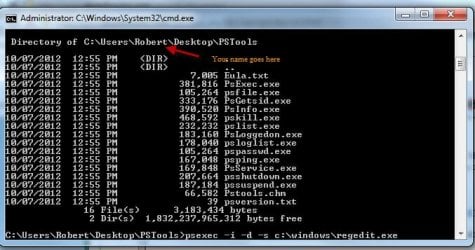
The downloaded file is in a "zip" format. Extract the contents to a folder of your choice, then make a note of the file path, you will need it to run the executable.

Next open an elevated command prompt;

http://www.sevenforums.com/tutorials/783-elevated-command-prompt.html

The results should appear as in the attachment, assuming you extract the contents to your desktop. The last line in the attachment is the one I provided in my other post, which is;

psexec -i -d -s c:\windows\regedit.exe
 

Attachments

  • Command Window.jpg
    Command Window.jpg
    44.9 KB · Views: 11

My Computer My Computer

At a glance

Windows 7 Professional x64Intel i5 quad processor16 GBRadeon HD 5770
Computer type
PC/Desktop
Computer Manufacturer/Model Number
Custom Built
OS
Windows 7 Professional x64
CPU
Intel i5 quad processor
Motherboard
DP67BG
Memory
16 GB
Graphics Card(s)
Radeon HD 5770
Sound Card
Realtek High Definition Audio
Monitor(s) Displays
Samsung SyncMaster
Screen Resolution
1920X1080
Hard Drives
WD 2TB (SATA Internal)
WD 1TB (USB External)
PSU
Corsair GS800
Case
Tower (Generic)
Cooling
3 Internal Fans
Keyboard
MS Wireless
Mouse
MS Optical Wired
Internet Speed
54 mbps
Antivirus
Emsisoft
Browser
IE-Version 9, Palemoon-Version 24.2.0
Thanks for sticking with me on this...

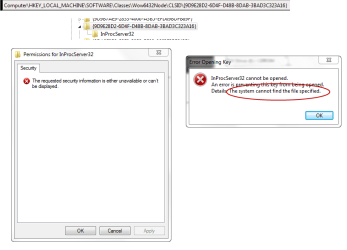
I took your advise and this time I was successful in getting PEexec to run as you suggested. Again, I cannot delete one of the keys that is giving me the problem. I get an error message regarding a 'FILE' not being found?? Here are some snapshots of what I have experienced: thanks gain for your help...
 

Attachments

  • keydel.png
    keydel.png
    17.1 KB · Views: 12

My Computer My Computer

At a glance

Windows 7
OS
Windows 7
Thanks for sticking with me on this...

I took your advise and this time I was successful in getting PEexec to run as you suggested. Again, I cannot delete one of the keys that is giving me the problem. I get an error message regarding a 'FILE' not being found?? Here are some snapshots of what I have experienced: thanks gain for your help...

This is a "best guess" on my part; try rebooting and see if the entry is still present.

If that doesn't work, I have another suggestion to try afterwards.

Let me know.
 

My Computer My Computer

At a glance

Windows 7 Professional x64Intel i5 quad processor16 GBRadeon HD 5770
Computer type
PC/Desktop
Computer Manufacturer/Model Number
Custom Built
OS
Windows 7 Professional x64
CPU
Intel i5 quad processor
Motherboard
DP67BG
Memory
16 GB
Graphics Card(s)
Radeon HD 5770
Sound Card
Realtek High Definition Audio
Monitor(s) Displays
Samsung SyncMaster
Screen Resolution
1920X1080
Hard Drives
WD 2TB (SATA Internal)
WD 1TB (USB External)
PSU
Corsair GS800
Case
Tower (Generic)
Cooling
3 Internal Fans
Keyboard
MS Wireless
Mouse
MS Optical Wired
Internet Speed
54 mbps
Antivirus
Emsisoft
Browser
IE-Version 9, Palemoon-Version 24.2.0
Well -
I did some more reading and it turns out that the key has some embedded null characters. SysInternals has a tool called RegDelNull.exe which did the trick. Seems so easy when all is said. Boy, what a pain. I don't understand why you cannot del a key with embedded nulls but evidently so. If you have any further knowledge I would be most grateful.

thanks
Jiim
 

My Computer My Computer

At a glance

Windows 7
OS
Windows 7
Well -
I did some more reading and it turns out that the key has some embedded null characters. SysInternals has a tool called RegDelNull.exe which did the trick. Seems so easy when all is said. Boy, what a pain. I don't understand why you cannot del a key with embedded nulls but evidently so. If you have any further knowledge I would be most grateful.

thanks
Jiim

Nothing else I can contribute at this time. Glad you got it resolved. That's not to say I don't have further knowledge, but just not on this subject.:D
 

My Computer My Computer

At a glance

Windows 7 Professional x64Intel i5 quad processor16 GBRadeon HD 5770
Computer type
PC/Desktop
Computer Manufacturer/Model Number
Custom Built
OS
Windows 7 Professional x64
CPU
Intel i5 quad processor
Motherboard
DP67BG
Memory
16 GB
Graphics Card(s)
Radeon HD 5770
Sound Card
Realtek High Definition Audio
Monitor(s) Displays
Samsung SyncMaster
Screen Resolution
1920X1080
Hard Drives
WD 2TB (SATA Internal)
WD 1TB (USB External)
PSU
Corsair GS800
Case
Tower (Generic)
Cooling
3 Internal Fans
Keyboard
MS Wireless
Mouse
MS Optical Wired
Internet Speed
54 mbps
Antivirus
Emsisoft
Browser
IE-Version 9, Palemoon-Version 24.2.0
Back
Top