How to get the view sorting bar back to w7 ?

Yes, unfortuantely even looking at an example of the details sort bar on a non details view just /looks/ like an eror in the UI.

Even though it had utility, it just looks like a mistake, I can completely see why it was removed.

me too. Makes more sense. It was a true design flaw to have left it like it was in vista.

But it sure was easy :(
 

My Computer My Computer

At a glance

vista x64/ win 7 x64phenom 9950 BE8 gbnvidia gts 250
Computer Manufacturer/Model Number
me and myself
OS
vista x64/ win 7 x64
CPU
phenom 9950 BE
Motherboard
ASUS M2A-VM HDMI
Memory
8 gb
Graphics Card(s)
nvidia gts 250
Sound Card
realtek HD onboard
Monitor(s) Displays
dual hd 19" tft
Screen Resolution
1440x900
Hard Drives
2 x 500 gb WDC
1 x 500 gb Seagate
1 x 1000 gb Seagate
1 80 gb raptor
1 usb 160 gb
Cooling
standard issue
Keyboard
logitech g11
Mouse
usb wireless MS laser 6000
Internet Speed
18 mb (according to my provider :)

My Computer My Computer

At a glance

Windows 7 Ultimate X64 RTMQ6600 @ 3.4Ghz8GB DDR2-800GTX285 1GB
OS
Windows 7 Ultimate X64 RTM
CPU
Q6600 @ 3.4Ghz
Motherboard
Abit IP35-E
Memory
8GB DDR2-800
Graphics Card(s)
GTX285 1GB
Sound Card
Creative X-Fi Extreme Music
Monitor(s) Displays
Samsung T220
Hard Drives
Samsung F1 Spinpoint 1TB
PSU
Silverstone Zues 750ZF
Case
Lian Li PC-P80
Cooling
Thermalright Ultra 120-Extreme
Yeah RSI, and i do a lot of view sorting on a day to day basis, part of how I get things done.

When summer is over and the days lengthen i'll write a handler to easysort. It's something that's been on the backburner in my head.
 

My Computer My Computer

At a glance

vista x64/ win 7 x64phenom 9950 BE8 gbnvidia gts 250
Computer Manufacturer/Model Number
me and myself
OS
vista x64/ win 7 x64
CPU
phenom 9950 BE
Motherboard
ASUS M2A-VM HDMI
Memory
8 gb
Graphics Card(s)
nvidia gts 250
Sound Card
realtek HD onboard
Monitor(s) Displays
dual hd 19" tft
Screen Resolution
1440x900
Hard Drives
2 x 500 gb WDC
1 x 500 gb Seagate
1 x 1000 gb Seagate
1 80 gb raptor
1 usb 160 gb
Cooling
standard issue
Keyboard
logitech g11
Mouse
usb wireless MS laser 6000
Internet Speed
18 mb (according to my provider :)

My Computer My Computer

At a glance

Win7 Build 7600 x86Pentium II 300MHz32mb EDO RAMDiamond Viper
OS
Win7 Build 7600 x86
CPU
Pentium II 300MHz
Motherboard
Asus
Memory
32mb EDO RAM
Graphics Card(s)
Diamond Viper
Sound Card
Soundblaster 16
Monitor(s) Displays
14" AOC CRT 16K color
Screen Resolution
800x600
Hard Drives
300mb Quantum fireball
PSU
110 Watts
Cooling
Passive
Keyboard
Trust Ergonomic
Mouse
Generic
Internet Speed
256K u 128K d
You did good Petrossa, that's much better than people only complaining and doing nothing.


You do realize that XP also had this same issues? :D ;) just teasing.

Quit XP the moment Vista SP1 came out :D
But that was not in the poll.....
 

My Computer My Computer

At a glance

vista x64/ win 7 x64phenom 9950 BE8 gbnvidia gts 250
Computer Manufacturer/Model Number
me and myself
OS
vista x64/ win 7 x64
CPU
phenom 9950 BE
Motherboard
ASUS M2A-VM HDMI
Memory
8 gb
Graphics Card(s)
nvidia gts 250
Sound Card
realtek HD onboard
Monitor(s) Displays
dual hd 19" tft
Screen Resolution
1440x900
Hard Drives
2 x 500 gb WDC
1 x 500 gb Seagate
1 x 1000 gb Seagate
1 80 gb raptor
1 usb 160 gb
Cooling
standard issue
Keyboard
logitech g11
Mouse
usb wireless MS laser 6000
Internet Speed
18 mb (according to my provider :)
Quit XP the moment Vista SP1 came out :D
But that was not in the poll.....

Lmao,

But why do you punish yourself running Win7? :D
Not masochistic are you? :D <-- don't answer that. too much input. lol
 

My Computer My Computer

At a glance

Win7 Build 7600 x86Pentium II 300MHz32mb EDO RAMDiamond Viper
OS
Win7 Build 7600 x86
CPU
Pentium II 300MHz
Motherboard
Asus
Memory
32mb EDO RAM
Graphics Card(s)
Diamond Viper
Sound Card
Soundblaster 16
Monitor(s) Displays
14" AOC CRT 16K color
Screen Resolution
800x600
Hard Drives
300mb Quantum fireball
PSU
110 Watts
Cooling
Passive
Keyboard
Trust Ergonomic
Mouse
Generic
Internet Speed
256K u 128K d
When summer is over and the days lengthen i'll write a handler to easysort. It's something that's been on the backburner in my head.

Im guessing thats something i would use, PM me when you get that stuff done and ill gladly test it out for ya.
 

My Computer My Computer

At a glance

Windows 7 Ultimate X64 RTMQ6600 @ 3.4Ghz8GB DDR2-800GTX285 1GB
OS
Windows 7 Ultimate X64 RTM
CPU
Q6600 @ 3.4Ghz
Motherboard
Abit IP35-E
Memory
8GB DDR2-800
Graphics Card(s)
GTX285 1GB
Sound Card
Creative X-Fi Extreme Music
Monitor(s) Displays
Samsung T220
Hard Drives
Samsung F1 Spinpoint 1TB
PSU
Silverstone Zues 750ZF
Case
Lian Li PC-P80
Cooling
Thermalright Ultra 120-Extreme
Im guessing thats something i would use, PM me when you get that stuff done and ill gladly test it out for ya.

as it will be a hell of a job, if possible to put the headers back, any suggestion is welcome as the modus operandi.

Small applet with sort modes kept on screen, will send wm_messages to active window was my initial thought. The applet can be really tiny, just buttons with a few of the most useful sorts.
 

My Computer My Computer

At a glance

vista x64/ win 7 x64phenom 9950 BE8 gbnvidia gts 250
Computer Manufacturer/Model Number
me and myself
OS
vista x64/ win 7 x64
CPU
phenom 9950 BE
Motherboard
ASUS M2A-VM HDMI
Memory
8 gb
Graphics Card(s)
nvidia gts 250
Sound Card
realtek HD onboard
Monitor(s) Displays
dual hd 19" tft
Screen Resolution
1440x900
Hard Drives
2 x 500 gb WDC
1 x 500 gb Seagate
1 x 1000 gb Seagate
1 80 gb raptor
1 usb 160 gb
Cooling
standard issue
Keyboard
logitech g11
Mouse
usb wireless MS laser 6000
Internet Speed
18 mb (according to my provider :)
The sort bar in thumbnail view was one of the best improvements over XP. I can't believe Win7 took a step back; no wonder so many people are switching to MAC.
 

My Computer My Computer

At a glance

Windows 74 GB
Computer Manufacturer/Model Number
HP Pavillion 9v
OS
Windows 7
Memory
4 GB
I registered just to vent my frustrations with Win7. I was so used to this "sort in list view" toolbar that I don't understand why M$ decided to remove it. They really do have some geniuses there. And for goodness' sake, this was not a bug in Vista (as some have indicated). It was a feature that has been removed. MS you have ditched us again. With every release of windows, we are going backwards. I am now seriously going to Linux.

And yes, it is annoying now that I have to right click and then left click to do sort, when this could have been done with one left click.

And just for the record, if it was not there in XP, it doesn't mean it should not be there in 7.


Also, just for the record, its 1 step forward, 2 steps back. :cry: :eek:
 

My Computer My Computer

At a glance

Windows 7 64 bit
OS
Windows 7 64 bit
Enjoy Linux, it's about 580 steps backwards (use it every day) :)

Explorer has a couple of bad quirks to it, though it's not like there arent TONS of replacements for it that are better and have always been better. try Explorer++ - A small and fast file manager for Windows

Don't forget, in Linux there is no ONE of anything, you need to choose between about 15 different mostly fail versions of the same thing...
 

My Computer My Computer

At a glance

Windows 7 x64 Ultimatei7 96012 Gig Corsair DominatorNvidia 480
Computer Manufacturer/Model Number
Scratch built
OS
Windows 7 x64 Ultimate
CPU
i7 960
Motherboard
Asus P6X58D
Memory
12 Gig Corsair Dominator
Graphics Card(s)
Nvidia 480
Sound Card
Maudio Delta 44 + breakout box
Monitor(s) Displays
Dell UltraSharp U2410 24in and Samsung 21 dual monitors
Screen Resolution
1920x1200 and 1280x1024
Hard Drives
Primary: Intel X-25M G2 160G SSD
Secondary: Segate baracuda 1.0 TB
HDs in AHCI mode.
PSU
Corasair TX850
Case
Cooler Master HAF
Cooling
Corsair H50
Keyboard
Logitech G15 + N52 game pad
Mouse
Logitech MX518
Internet Speed
15kbs down 4.5kbps up
Other Info
WEI 7.6
CPU & RAM 7.6
Graphics 7.9
Hard disk 7.7
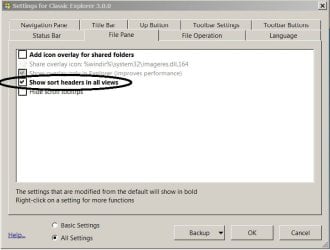
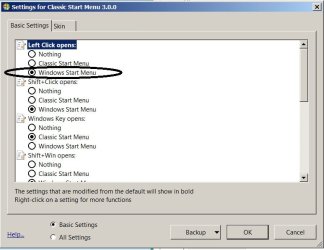
found a solution.. in fact it was the same solution I used in vista to get back the up one level button (XP feature removed from Vista)

Welcome to Classic Shell

Some settings that need to be done:

(see attachments)
 

Attachments

  • shell settings.jpg
    shell settings.jpg
    38.5 KB · Views: 23
  • menu settings.jpg
    menu settings.jpg
    45.1 KB · Views: 16

My Computer My Computer

At a glance

Windows 7 64 bit
OS
Windows 7 64 bit
Hi Earlz,

Like I promised, I've done some research on internet and went through the registry with a tooth comb.

Bad news is, that it's not there and there is no way to get it back.

Microsoft decided that details bar belongs to details view.

However there is good news too.

And I think if you take some time to get used to it, you might even come to love it. (as is the case with many new things)
------------------------------------------------

In all the views that don't have the bar, you can rightclick on a empty space in the view. (hence not on a file or folder)

You'll find that in the contextmenu are two options named "sort by" and "group by".

The "sort by" option will give you the same options you had with the "sort bar", but much more powerfull.

By default the "Sort by" menu show the properties you are used to, like "Name, Date, Type, etc...."
But when you look down a bit you'll see "More".

When you click that, you'll find an insane list of properties you can set, to tweak your views to the max.

So worst case for you, is that you instead of one click like in Vista, now you have to rightclick/leftclick to get the same result.

I take it you can live with that.

Now, that's not all.

The "Group by" option in the context menu is nothing short of a gem!

You have the same set of parameters, and under the "more" option is the same insane list of properties you can set.

Go and experiment for an hour or so with it, give it some time, and you might just fall in love with it.


If not?

Hey, I did my best. Hope you appreciate it. :D

.

Well I, for one, definitely appreciate it! Great work, Squonk! Rep + to you!
 

My Computer My Computer

At a glance

Vista 64 bit and 32 bit (SP2)Intel(R) Core(TM)2 Duo Processor T9400 (2.53 GHz4GB DDR2 System Memory (2 Dimm)512 MB NVIDIA GeForce 9600M GT
Computer Manufacturer/Model Number
HP Pavillion dv5t (generation 1)
OS
Vista 64 bit and 32 bit (SP2)
CPU
Intel(R) Core(TM)2 Duo Processor T9400 (2.53 GHz
Memory
4GB DDR2 System Memory (2 Dimm)
Graphics Card(s)
512 MB NVIDIA GeForce 9600M GT
Monitor(s) Displays
15.4" diagonal WSXGA+ High-Definition HP BrightView Widescre
Screen Resolution
1680 x 1050
Hard Drives
320GB 5400RPM SATA Hard Drive with HP ProtectSmart Hard Drive Protection
Keyboard
Built-in HP
Mouse
Built in - Synaptics TouchPad V6.5 on PS/2 Port
Internet Speed
Max
Other Info
~ Intel Next-Gen Wireless-N Mini-card w/Bluetooth ~ Blu-Ray ROM DVD+/-R/RW ~ Integ. HDTV Hybrid Tuner ~ 12 Cell Battery ~ MS Office (Home Premium) 2007 ~
squonk's been gone a long time now...:(
 

My Computer My Computer

At a glance

ultimate 64 sp1i5 2500K [email protected]8 gigs GSkill Ripjaws 1600amd hd6950
Computer Manufacturer/Model Number
mickey megabyte 1234
OS
ultimate 64 sp1
CPU
i5 2500K [email protected]
Motherboard
MSI P67A-GD53
Memory
8 gigs GSkill Ripjaws 1600
Graphics Card(s)
amd hd6950
Sound Card
creative x-fi gamer
Monitor(s) Displays
samsung 24"
Screen Resolution
1920x1080
Hard Drives
ocz vertex 2e 60 gig, samsung f3 1tb, buffalo 2tb ext
PSU
antec 550
Case
antec three hundred
Cooling
i'm a cooling fan
Keyboard
saitek eclipse ii
Mouse
logitech g3
Internet Speed
about 4 Mbps
Other Info
i love win7
Back
Top