Unable to create/locate system partition.. Dual boot

wkw427

New member
Member
VIP
Local time
9:26 AM
Messages
135
I need to dual boot both 64 and 32bit windows 7.. I have a device that just will not work on 64bit..

So, I'm trying to put a 32bit install on a 50gb partition of one of my disks.
However, when I go to select the partition, the install says
Windows was unable to create a system partition or locate an existing partition

Can I have some help, here? :X
 

My Computer My Computer

At a glance

XP, 7 32/64biti5 2500k, variousEnough560
Computer Manufacturer/Model Number
Myself
OS
XP, 7 32/64bit
CPU
i5 2500k, various
Motherboard
Gigabyte ga z68xp-ud3
Memory
Enough
Graphics Card(s)
560
Hard Drives
Far too many to keep track of
Internet Speed
Faster than yours, maybe.
Please post what device this is. And have you checked to see if that device will work at all with Windows 7? Could be it doesn't have drivers for 7. As far as I know there are no Devices that would not work on 64bit 7 and would work on 32bit 7. It either works on 7, 32 or 64 bit, or it doesn't.
 

My Computer My Computer

At a glance

7 x64
OS
7 x64
It is an adaptec gamebridge. It has no 64bit drivers. I had it working on an older computer, running 32bit win 7, but I have a newer one that I put 64bit on.
And yes, I am 100% sure it does not work under 64bit windows :(
 

My Computer My Computer

At a glance

XP, 7 32/64biti5 2500k, variousEnough560
Computer Manufacturer/Model Number
Myself
OS
XP, 7 32/64bit
CPU
i5 2500k, various
Motherboard
Gigabyte ga z68xp-ud3
Memory
Enough
Graphics Card(s)
560
Hard Drives
Far too many to keep track of
Internet Speed
Faster than yours, maybe.
It is a usb installer I made from my disk. It has worked before.
I can not wipe the target disk because as I said, it is a partition on one of my data drives.

I think the issue may be with the fact that I do not have a "system reserved" partition on C. I somehow got rid of it when I had to restore to a backup image of my drive due to a virus.

If all fails, I can just unplug the drives and put in an 80gb notebook drive I have.. And then put that in a usb enclousure to get what I need off of it when I've recorded :X
Not ideal... But it is all I can do.
 

My Computer My Computer

At a glance

XP, 7 32/64biti5 2500k, variousEnough560
Computer Manufacturer/Model Number
Myself
OS
XP, 7 32/64bit
CPU
i5 2500k, various
Motherboard
Gigabyte ga z68xp-ud3
Memory
Enough
Graphics Card(s)
560
Hard Drives
Far too many to keep track of
Internet Speed
Faster than yours, maybe.
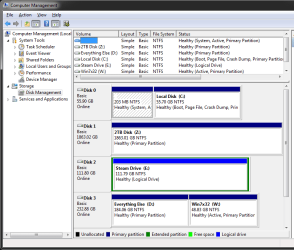
Please post a full screen shot of the Disk Management window.
 

My Computer My Computer

At a glance

7 x64
OS
7 x64
here you go.

Disk 0 is my boot drive, and has the messed up "system reserve" on it.
Disk 1, 2, and 3 are data. 3 has my desktop, but also the most free space. It is where I intended to put the other os
 

Attachments

  • disk management.png
    disk management.png
    26.6 KB · Views: 17

My Computer My Computer

At a glance

XP, 7 32/64biti5 2500k, variousEnough560
Computer Manufacturer/Model Number
Myself
OS
XP, 7 32/64bit
CPU
i5 2500k, various
Motherboard
Gigabyte ga z68xp-ud3
Memory
Enough
Graphics Card(s)
560
Hard Drives
Far too many to keep track of
Internet Speed
Faster than yours, maybe.
Yeah why do you have a 203MB Sys Reserve partition?

If you run the installer from inside Windows you may be able to install on that partition. But then we are dealing with the legal issue of having 2 installs of Win 7 with only one License key. That is a No No according to this forums TOU and supposedly the Windows EULA. Even if it is installed on the same hardware and only one instance is running at any one time. As apposed to using the same license in a Virtual Machine hosted by the same license.

Best thing to do is get another hard drive and install on that one with all others disconnected and then edit the BCD file to add the second install to the Boot Menu.
 

My Computer My Computer

At a glance

7 x64
OS
7 x64
Dang.. That makes no sense :S
How would one share usb ports through virtual pc, then? My 64bit install only picks up the device as "unknown device"
 

My Computer My Computer

At a glance

XP, 7 32/64biti5 2500k, variousEnough560
Computer Manufacturer/Model Number
Myself
OS
XP, 7 32/64bit
CPU
i5 2500k, various
Motherboard
Gigabyte ga z68xp-ud3
Memory
Enough
Graphics Card(s)
560
Hard Drives
Far too many to keep track of
Internet Speed
Faster than yours, maybe.
Well the sharing of devices, like USB ports, is all handled by the Virtual Machine software program and works very well.

I use Virtual Machines for all OTHER OS installs. Whether it is Windows on a Mac or Win XP on my 7 PCs or any flavor of Linux I chose to installed. All of these VM OS's can see and use USB ports, DVD drives whatever hardware in then system. And it accesses installed RAM and part of the CPU directly. To the amount of RAM you have allocated to it and the number of CPU cores you have assigned to the VM.

But if you go the Virtual Machine rout you will need a second License for Windows 7, retail or Sys Builders OEM type or a Retail or sys builders OEM type license for XP.

Whether the Licensing make sense or not is not the point. It is all about the Terms of Use of this forum.
 

My Computer My Computer

At a glance

7 x64
OS
7 x64
Alright. We'll just leave it as it is then, thanks.
 

My Computer My Computer

At a glance

XP, 7 32/64biti5 2500k, variousEnough560
Computer Manufacturer/Model Number
Myself
OS
XP, 7 32/64bit
CPU
i5 2500k, various
Motherboard
Gigabyte ga z68xp-ud3
Memory
Enough
Graphics Card(s)
560
Hard Drives
Far too many to keep track of
Internet Speed
Faster than yours, maybe.
Alright. We'll just leave it as it is then, thanks.

I should clarify the Virtual Machine stuff. When you install any OS in a VM it is considered another set of hardware, and it actually is another set of hardware although most of it is Virtual hardware. that is why you Must Have a valid license for that VM install.

So if you were to install the 32bit version of Win 7 on a 64bit Win 7 PC as the host system that 32bit install is actually running on totally different hardware, although mainly Virtual Hardware. It is still install on another computer. So that is why you need a valid license for that install. In this case a second license for Windows 7.
 

My Computer My Computer

At a glance

7 x64
OS
7 x64
I'd unplug all other HD's to install to that partition on HD, setting it first to boot in BIOS setup. During booted Custom install delete and recreate the partition.
 
Hm.. Well, you say that dual booting with the same license is against the MS rules.. As well as putting it on a virtual machine.
What is the policy of installing it to a separate physical disk, and instead of dual booting via windows, just selecting which DISK to boot from? Seems to work just fine, if I remember which disk has which OS on it ;)
 

My Computer My Computer

At a glance

XP, 7 32/64biti5 2500k, variousEnough560
Computer Manufacturer/Model Number
Myself
OS
XP, 7 32/64bit
CPU
i5 2500k, various
Motherboard
Gigabyte ga z68xp-ud3
Memory
Enough
Graphics Card(s)
560
Hard Drives
Far too many to keep track of
Internet Speed
Faster than yours, maybe.
Hm.. Well, you say that dual booting with the same license is against the MS rules.. As well as putting it on a virtual machine.
What is the policy of installing it to a separate physical disk, and instead of dual booting via windows, just selecting which DISK to boot from? Seems to work just fine, if I remember which disk has which OS on it ;)

From all reports every time you copy, clone, image another hard drive you are supposed to have another license for it.

I'mm not going to go any father with that. Do what you think best for you is all I can say.

As far as Virtual Machines. That is Totally against the EULA as now you do have one license installed on TWO (2) different computers. Each VM is considered another set of hardware.

Foolish maybe but that is the way it is.
 

My Computer My Computer

At a glance

7 x64
OS
7 x64
So hardware aside, you are only allowed to have the license activated on ONE pc (real or virtual) at a time?

Right then.. Lock/delete this, I don't want to be booted from this site :s
 

My Computer My Computer

At a glance

XP, 7 32/64biti5 2500k, variousEnough560
Computer Manufacturer/Model Number
Myself
OS
XP, 7 32/64bit
CPU
i5 2500k, various
Motherboard
Gigabyte ga z68xp-ud3
Memory
Enough
Graphics Card(s)
560
Hard Drives
Far too many to keep track of
Internet Speed
Faster than yours, maybe.
If you didn't know then you're good as long as you use one license per Win7 going forward.

This is how you learn. :geek:
 
Back
Top