Change Start Menu Orb?

mbuhgakeruh

New member
Local time
10:55 PM
Messages
8
sorry for the interuption, but now it cross my mind.
can we change the orb logo of the start menu?
 
Last edited by a moderator:

My Computer

Computer Manufacturer/Model Number
HP Compaq Presario V3804AU Notebook
OS
Windows 7 build 7260
CPU
AMD Turion64 X2 TL-60 2.00 GHz
Motherboard
NVidia
Memory
3.00 GHz
Graphics Card(s)
NVidia GeForce 7150M / nForce 630M
Sound Card
Conexant High Definition SmartAudio 221
Monitor(s) Displays
LCD Display
Screen Resolution
1280x800 pixel
Hard Drives
Seagate 160 Giga 5200rpm

My Computer

Computer Manufacturer/Model Number
eMachines W3503
OS
7 Pro Build 7600.16385x64 [2.0 WEI]
CPU
Intel(R) Celeron(R) D CPU 3.33GHz
Memory
2.00 GB RAM (1.87 GB usable)
Graphics Card(s)
ATI Radeon™ X300 based integrated graphics
Sound Card
6-channel (5.1) ATI High Definition Audio
Monitor(s) Displays
eMachines® 17" LCD Flat Panel Monitor (17F3)
Screen Resolution
1024 x 768 @ 85Hz
Hard Drives
160GB HDD (7200rpm, 2MB cache)
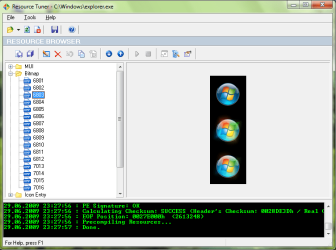
yes you can..
first download resource tuner.
Then open explorer.exe with resource tuner then find the orb bitmap.
Then replace the bitmap with one of you own.
save the new explorer.exe in any other dir.
Take ownership of the original explorer.exe and then rename it to explorer.exe.bak.
Then past the new explorer.exe there and restart.

And you are done.
 

Attachments

  • Untitled.png
    Untitled.png
    25.7 KB · Views: 1,673

My Computer

Computer Manufacturer/Model Number
Custom made
OS
Window 7 build 7600, Xp pro(VM)
CPU
Amd Athlon 2000 xp+
Motherboard
Asus x series
Memory
kingstone(1gb+256MB)
Graphics Card(s)
Nvdia 6200(256 mb+255mb(shared))
Sound Card
soundmax
Monitor(s) Displays
Lg Flatron w1943
Screen Resolution
1360x768
Hard Drives
segate 80GB
Case
i-ball
Keyboard
i-ball
Mouse
i-ball
Internet Speed
256kbps up and 256 kbps down

Just seen some of his newer themes and they look nice.

Verdesh SteelFlash For Win7 by ~alkhan on deviantART

Verdesh_SteelFlash_For_Win7_by_alkhan.jpg
 

My Computer

Computer Manufacturer/Model Number
Home Brew
OS
Windows 7 Ultimate Vista Ultimate x64
CPU
Core 2 Duo E8500 3.16Ghz @ 3.8Ghz
Motherboard
eVGA 750i FTW
Memory
2x2Gigs Patriot PC2-6400 LL
Graphics Card(s)
Inno3D GeForce GTX260 216 SP
Monitor(s) Displays
ASUS VW222U 22" 2ms Response time
Screen Resolution
1680x1050
Hard Drives
SATA 150GB
SATA II 250GB
USB IDE 750GB Ext.
PSU
HYTEC 600W & Thermaltake 650W Toughpower Power Exp
Case
Thermaltake Armor LCS (Liquid Cooling System)
Cooling
Liquid Cooling System
Keyboard
Logitech G15 Gaming Keyboard
Mouse
Logitech G9 Gaming Mouse

My Computer

Computer Manufacturer/Model Number
Compaq Desktop
OS
Windows 7 Ultimate x64
CPU
AMD Sempron Dual Core
Memory
3GB
Graphics Card(s)
NVIDIA GeForce 6150SE nForce 430
Screen Resolution
1024x768
Hard Drives
150GB Sata
That theme blow me out.:D Man that looks nice.
I specially like the gadgets, WMP and the black look..
 

My Computer

Computer Manufacturer/Model Number
Custom made
OS
Window 7 build 7600, Xp pro(VM)
CPU
Amd Athlon 2000 xp+
Motherboard
Asus x series
Memory
kingstone(1gb+256MB)
Graphics Card(s)
Nvdia 6200(256 mb+255mb(shared))
Sound Card
soundmax
Monitor(s) Displays
Lg Flatron w1943
Screen Resolution
1360x768
Hard Drives
segate 80GB
Case
i-ball
Keyboard
i-ball
Mouse
i-ball
Internet Speed
256kbps up and 256 kbps down
yes you can..
first download resource tuner.
Then open explorer.exe with resource tuner then find the orb bitmap.
Then replace the bitmap with one of you own.
save the new explorer.exe in any other dir.
Take ownership of the original explorer.exe and then rename it to explorer.exe.bak.
Then past the new explorer.exe there and restart.

And you are done.

Does resource tuner support x64 bit files now? Last time I checked it didn't....
 

My Computer

Computer Manufacturer/Model Number
It's a Custom Build.....
OS
Windows 7 Ultimate x64, 7600.20647 RTM
CPU
Intel Core2Quad Q9505 @ 4.0Ghz
Motherboard
Intel Skyburg DP45SG
Memory
6GB Transcend DDR3-1333 Dual Channel
Graphics Card(s)
ASUS GTX285 1GB GDDR3
Sound Card
OnBoard Intel IDT HD Audio
Monitor(s) Displays
HP w2207h 22" WideScreen LCD, VGA & HDMI
Screen Resolution
1680x1050, 60Hz
Hard Drives
1TB WD Caviar Black, Green Power...
1TB Dell, 32Mb/s, Internal SATA
320GB Seagate Internal SATA (3 Partitions)
PSU
Omega 600W ATX2.0 Dual Rail, 2x Fans
Case
Cooler Master HAF 922
Cooling
Corsair Hydro H50 in Push-Pull mode, 4 Case Fans with LED
Keyboard
White aigo keyboard with blue LED on the keys....
Mouse
Genius Mini Tracer
Internet Speed
I'm ashamed to say...
Other Info
Aigo wireless keyboard(black) and a 2.1 Speaker System(white)

My Computer

Computer Manufacturer/Model Number
Self Built
OS
Windows 7 Rtm x64
CPU
Intel Core i5 750 3.0 ( Overclocked )
Motherboard
Asus P7P55D Pro
Memory
2x2 GB DDR3 1333 Mhz
Graphics Card(s)
Sapphire HD6850 1gb
Sound Card
Onboard
Monitor(s) Displays
Samsung SyncMaster B1930
Screen Resolution
1366x768
PSU
Coolermaster 750W
Hi,
anyone got those gadgets to work? :confused: i have them but they dont seem to work at all
 

My Computer

Computer Manufacturer/Model Number
HP Laptop
OS
Windows 7 64-bit
CPU
intel core 2 duo t5500 @1.6 Ghz
Memory
2 gb
Graphics Card(s)
intel gma 945
is User Account Control completely disable ?
 

My Computer

Computer Manufacturer/Model Number
Self Built
OS
Windows 7 Rtm x64
CPU
Intel Core i5 750 3.0 ( Overclocked )
Motherboard
Asus P7P55D Pro
Memory
2x2 GB DDR3 1333 Mhz
Graphics Card(s)
Sapphire HD6850 1gb
Sound Card
Onboard
Monitor(s) Displays
Samsung SyncMaster B1930
Screen Resolution
1366x768
PSU
Coolermaster 750W
I've tried changing icons ans things with restorator but somehow they just won't paste, i think it's a bit trickier to work with restorator rather than restuner, I might be doing it incorrectly, I assume you open a file with restorator, go to the resource and paste what you had copied to the clipboard... I'm confused.... I'll try Anolis and see if it helps me better.....
 

My Computer

Computer Manufacturer/Model Number
It's a Custom Build.....
OS
Windows 7 Ultimate x64, 7600.20647 RTM
CPU
Intel Core2Quad Q9505 @ 4.0Ghz
Motherboard
Intel Skyburg DP45SG
Memory
6GB Transcend DDR3-1333 Dual Channel
Graphics Card(s)
ASUS GTX285 1GB GDDR3
Sound Card
OnBoard Intel IDT HD Audio
Monitor(s) Displays
HP w2207h 22" WideScreen LCD, VGA & HDMI
Screen Resolution
1680x1050, 60Hz
Hard Drives
1TB WD Caviar Black, Green Power...
1TB Dell, 32Mb/s, Internal SATA
320GB Seagate Internal SATA (3 Partitions)
PSU
Omega 600W ATX2.0 Dual Rail, 2x Fans
Case
Cooler Master HAF 922
Cooling
Corsair Hydro H50 in Push-Pull mode, 4 Case Fans with LED
Keyboard
White aigo keyboard with blue LED on the keys....
Mouse
Genius Mini Tracer
Internet Speed
I'm ashamed to say...
Other Info
Aigo wireless keyboard(black) and a 2.1 Speaker System(white)
I've tried changing icons ans things with restorator but somehow they just won't paste, i think it's a bit trickier to work with restorator rather than restuner, I might be doing it incorrectly, I assume you open a file with restorator, go to the resource and paste what you had copied to the clipboard... I'm confused.... I'll try Anolis and see if it helps me better.....

Restorator is what I use for all my customizing and it's very easy to use.

You simply drag restorator to one side of the desktop and open it up on half of the screen, then open exlorer on the other side and drag the dll you want to change into the left pane.

Open the folder in the directory with the image you want to replace and simply drag and drop the image you want to use onto it in the left pane, in the right pane on Restorator you will notice the preview screen and the image should change as soon as you drop another one onto it.

Once you have made your modification you will want to save (Make sure you have taken ownership of the file you are customizing) and once you have done that successfully you will notice a backup file of the one you customized with the extension .BAK.

If you don't have a backup and instead the file name just has a 1 added to it means that you have not successfully made the changes because either the file was in use or you haven't taken ownership correctly.
 

My Computer

Computer Manufacturer/Model Number
Home Brew
OS
Windows 7 Ultimate Vista Ultimate x64
CPU
Core 2 Duo E8500 3.16Ghz @ 3.8Ghz
Motherboard
eVGA 750i FTW
Memory
2x2Gigs Patriot PC2-6400 LL
Graphics Card(s)
Inno3D GeForce GTX260 216 SP
Monitor(s) Displays
ASUS VW222U 22" 2ms Response time
Screen Resolution
1680x1050
Hard Drives
SATA 150GB
SATA II 250GB
USB IDE 750GB Ext.
PSU
HYTEC 600W & Thermaltake 650W Toughpower Power Exp
Case
Thermaltake Armor LCS (Liquid Cooling System)
Cooling
Liquid Cooling System
Keyboard
Logitech G15 Gaming Keyboard
Mouse
Logitech G9 Gaming Mouse

My Computer

Computer Manufacturer/Model Number
It's a Custom Build.....
OS
Windows 7 Ultimate x64, 7600.20647 RTM
CPU
Intel Core2Quad Q9505 @ 4.0Ghz
Motherboard
Intel Skyburg DP45SG
Memory
6GB Transcend DDR3-1333 Dual Channel
Graphics Card(s)
ASUS GTX285 1GB GDDR3
Sound Card
OnBoard Intel IDT HD Audio
Monitor(s) Displays
HP w2207h 22" WideScreen LCD, VGA & HDMI
Screen Resolution
1680x1050, 60Hz
Hard Drives
1TB WD Caviar Black, Green Power...
1TB Dell, 32Mb/s, Internal SATA
320GB Seagate Internal SATA (3 Partitions)
PSU
Omega 600W ATX2.0 Dual Rail, 2x Fans
Case
Cooler Master HAF 922
Cooling
Corsair Hydro H50 in Push-Pull mode, 4 Case Fans with LED
Keyboard
White aigo keyboard with blue LED on the keys....
Mouse
Genius Mini Tracer
Internet Speed
I'm ashamed to say...
Other Info
Aigo wireless keyboard(black) and a 2.1 Speaker System(white)
Restorator is what I use for all my customizing and it's very easy to use.

You simply drag restorator to one side of the desktop and open it up on half of the screen, then open exlorer on the other side and drag the dll you want to change into the left pane.

Open the folder in the directory with the image you want to replace and simply drag and drop the image you want to use onto it in the left pane, in the right pane on Restorator you will notice the preview screen and the image should change as soon as you drop another one onto it.

Once you have made your modification you will want to save (Make sure you have taken ownership of the file you are customizing) and once you have done that successfully you will notice a backup file of the one you customized with the extension .BAK.

If you don't have a backup and instead the file name just has a 1 added to it means that you have not successfully made the changes because either the file was in use or you haven't taken ownership correctly.
Cool, I've somehow managed to change the star menu orb, but couldn't change the icons on the imageres.dll file, it seems they're no longer in png format but instead in .ico format, which makes pasting a 256x256 png icon impossible.... the windows vista imageres.dll file has png icons, it was very easy changing the icons with restuner, I don't know why MS changed to .ico, or could it be that restorator is detecting them as .ico..... I find myself having to manually convert the png files into ico files in order to paste them with restorator, that's quite painful, because I'm transfering the pngs that were in vista's imageres.dll into windows 7's... I had changed virtually every icon resource back then....
 

My Computer

Computer Manufacturer/Model Number
It's a Custom Build.....
OS
Windows 7 Ultimate x64, 7600.20647 RTM
CPU
Intel Core2Quad Q9505 @ 4.0Ghz
Motherboard
Intel Skyburg DP45SG
Memory
6GB Transcend DDR3-1333 Dual Channel
Graphics Card(s)
ASUS GTX285 1GB GDDR3
Sound Card
OnBoard Intel IDT HD Audio
Monitor(s) Displays
HP w2207h 22" WideScreen LCD, VGA & HDMI
Screen Resolution
1680x1050, 60Hz
Hard Drives
1TB WD Caviar Black, Green Power...
1TB Dell, 32Mb/s, Internal SATA
320GB Seagate Internal SATA (3 Partitions)
PSU
Omega 600W ATX2.0 Dual Rail, 2x Fans
Case
Cooler Master HAF 922
Cooling
Corsair Hydro H50 in Push-Pull mode, 4 Case Fans with LED
Keyboard
White aigo keyboard with blue LED on the keys....
Mouse
Genius Mini Tracer
Internet Speed
I'm ashamed to say...
Other Info
Aigo wireless keyboard(black) and a 2.1 Speaker System(white)
In Vista they are also ico and if you use restorator to extract the whole ico folder from imageres.dll by dragging it straight to the desktop, you can then just drag individual icons back on to the one you were trying to change, it's easy when you know how. ;)

I actually already have all the Vista icons here.

And the theme you are talking about was never tried by me, I just found that theme on Deviant art and posted the screen shot, if you need any help you should ask the author, although I think I remember reading some other comments at the time saying they couldn't install it either.
 

My Computer

Computer Manufacturer/Model Number
Home Brew
OS
Windows 7 Ultimate Vista Ultimate x64
CPU
Core 2 Duo E8500 3.16Ghz @ 3.8Ghz
Motherboard
eVGA 750i FTW
Memory
2x2Gigs Patriot PC2-6400 LL
Graphics Card(s)
Inno3D GeForce GTX260 216 SP
Monitor(s) Displays
ASUS VW222U 22" 2ms Response time
Screen Resolution
1680x1050
Hard Drives
SATA 150GB
SATA II 250GB
USB IDE 750GB Ext.
PSU
HYTEC 600W & Thermaltake 650W Toughpower Power Exp
Case
Thermaltake Armor LCS (Liquid Cooling System)
Cooling
Liquid Cooling System
Keyboard
Logitech G15 Gaming Keyboard
Mouse
Logitech G9 Gaming Mouse
And the theme you are talking about was never tried by me, I just found that theme on Deviant art and posted the screen shot, if you need any help you should ask the author, although I think I remember reading some other comments at the time saying they couldn't install it either
Oh, bummer:(

In Vista they are also ico and if you use restorator to extract the whole ico folder from imageres.dll by dragging it straight to the desktop, you can then just drag individual icons back on to the one you were trying to change, it's easy when you know how. ;)

I actually already have all the Vista icons here.

I think you misunderstood me, I don't need the regular vista icons, a few years back I took vista's imageres.dll(which has both png icon format & ico format mixed in the dll) and replaced all the resources that had png icons with my own collection of 256x256 pngs and some that had '.ico' with a few custom icos I that took from the internet, and saved the dll on my vista install DVD so that the icons were applied automatically with vista's installation, as well as custom logon screens, etc... Back then I was using a 32bit Vista and so used ResTuner to replace the icon resources; but now I've moved on to Windows 7 64bit and I can't use ResTuner anymore, instead I have to use Restorator, the thing I didn't like about restorator is that it detects all the Icons as being in the .ico format, even the png icons, so now I have to convert my pngs into ico format so that restorator can accept them, that didn't happen with ResTuner, if ResTuner could support 64bit files than it would have been able to distinguish between both formats and I could have just immediatelly replaced the png resources, Restuner simply would be the best out there because of its ease of use...

I've tried using restorator to open both 32bit & 64bit imageres.dll and it still detects everything as .ico....
 

My Computer

Computer Manufacturer/Model Number
It's a Custom Build.....
OS
Windows 7 Ultimate x64, 7600.20647 RTM
CPU
Intel Core2Quad Q9505 @ 4.0Ghz
Motherboard
Intel Skyburg DP45SG
Memory
6GB Transcend DDR3-1333 Dual Channel
Graphics Card(s)
ASUS GTX285 1GB GDDR3
Sound Card
OnBoard Intel IDT HD Audio
Monitor(s) Displays
HP w2207h 22" WideScreen LCD, VGA & HDMI
Screen Resolution
1680x1050, 60Hz
Hard Drives
1TB WD Caviar Black, Green Power...
1TB Dell, 32Mb/s, Internal SATA
320GB Seagate Internal SATA (3 Partitions)
PSU
Omega 600W ATX2.0 Dual Rail, 2x Fans
Case
Cooler Master HAF 922
Cooling
Corsair Hydro H50 in Push-Pull mode, 4 Case Fans with LED
Keyboard
White aigo keyboard with blue LED on the keys....
Mouse
Genius Mini Tracer
Internet Speed
I'm ashamed to say...
Other Info
Aigo wireless keyboard(black) and a 2.1 Speaker System(white)
Oh, bummer:(


I think you misunderstood me, I don't need the regular vista icons, a few years back I took vista's imageres.dll(which has both png icon format & ico format mixed in the dll) and replaced all the resources that had png icons with my own collection of 256x256 pngs and some that had '.ico' with a few custom icos I that took from the internet, and saved the dll on my vista install DVD so that the icons were applied automatically with vista's installation, as well as custom logon screens, etc... Back then I was using a 32bit Vista and so used ResTuner to replace the icon resources; but now I've moved on to Windows 7 64bit and I can't use ResTuner anymore, instead I have to use Restorator, the thing I didn't like about restorator is that it detects all the Icons as being in the .ico format, even the png icons, so now I have to convert my pngs into ico format so that restorator can accept them, that didn't happen with ResTuner, if ResTuner could support 64bit files than it would have been able to distinguish between both formats and I could have just immediatelly replaced the png resources, Restuner simply would be the best out there because of its ease of use...

I've tried using restorator to open both 32bit & 64bit imageres.dll and it still detects everything as .ico....


No worries, if you want to upload your png's I will make them into icons for you.
 

My Computer

Computer Manufacturer/Model Number
Home Brew
OS
Windows 7 Ultimate Vista Ultimate x64
CPU
Core 2 Duo E8500 3.16Ghz @ 3.8Ghz
Motherboard
eVGA 750i FTW
Memory
2x2Gigs Patriot PC2-6400 LL
Graphics Card(s)
Inno3D GeForce GTX260 216 SP
Monitor(s) Displays
ASUS VW222U 22" 2ms Response time
Screen Resolution
1680x1050
Hard Drives
SATA 150GB
SATA II 250GB
USB IDE 750GB Ext.
PSU
HYTEC 600W & Thermaltake 650W Toughpower Power Exp
Case
Thermaltake Armor LCS (Liquid Cooling System)
Cooling
Liquid Cooling System
Keyboard
Logitech G15 Gaming Keyboard
Mouse
Logitech G9 Gaming Mouse

My Computer

Computer Manufacturer/Model Number
Homebrew called "The Beastmaster"
OS
Windows 7 x64 (Build 7600 RTM)
CPU
AMD Athlon X2 5000+ Black Edition (OC'd to 3.3gHz)
Motherboard
MSI K9A2 790FX SB600
Memory
4GB (2x2GB) OCZ SLI-Edition DDR2 800
Graphics Card(s)
Visiontek ATi HD4850
Sound Card
Creative X-Fi Xtrememusic
Monitor(s) Displays
17" Samsung 740n
Screen Resolution
1280x1024
Hard Drives
250GB Western Digital Caviar
PSU
Corsair HX520
Case
Lian-Li PC61
Cooling
Xigmatek S1283 Rifle CPU Cooler
Keyboard
Microsoft Comfort Curve 2000
Mouse
Logitech MX518
Internet Speed
Crappy AT&T DSL
Other Info
I just love your brain!
hey man how can you change start menu skin ? is that windows blinds 7 ?

I've been looking around and would love to get my start menu black. any ideas?
 

My Computer

Computer Manufacturer/Model Number
tw33k
OS
Windows 7 Ultimate (x64) SP1
CPU
Intel 3770k 4.6GHz
Motherboard
ASUS Maximus V Formula
Memory
8GB (2x 4GB) Crucial Ballistix
Graphics Card(s)
Sapphire 7950 (1060/1600)
Sound Card
On Board Realtek HD Audio
Monitor(s) Displays
27" Acer B273HU (via HDMI)
Screen Resolution
2048 x 1152
Hard Drives
Crucial M4 128GB
2TB WD Black
1TB Samsung F3 SATA
1TB WD Elite External
2TB WD USB 3.0
PSU
Corsair AX750 Gold
Case
Corsair Obsidian 800DW
Cooling
Corsair H100 (2x AP-121/2x UK-3000 push/pull)
Keyboard
Microsoft Wireless 5000
Mouse
Microsoft Wireless 5000
Internet Speed
5mb/s
Other Info
Logitech z-2300 2.1 speakers
Lamptron FC-5 v2
Back
Top