HP Laptop keeps on freezing recently, any help?

LordLuBu

Banned
Local time
6:38 AM
Messages
8
Location
Singapore
Since it is my first post sorry if the title is bad.

I have been very concerned about an issue regarding my laptop lately, it keeps on freezing(stop responding) randomly, everything freezes, keyboard and mouse dont work, so does ctrl+alt+del. The likelihood of it to stop responding is the highest when I am watching youtube video, playing high-end FPS games like CoD, L4D2,etc. I'd been monitoring my laptop CPU Usage, usually it will stay at 40% when idle, and sometimes peak to 100% when I am using programs like games and browsers. I have tried some suggestions online: Untick some startup programs to reduce CPU Usage, but the CPU Usage of my laptop is still high, especially during hot day, so I am also thinking that I need to replace a better fan on my laptop.

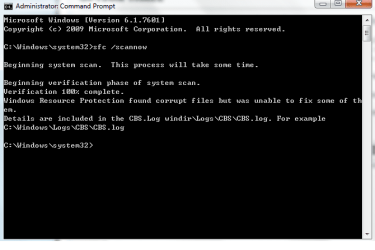
I am not new to this issue, because I had been researching it for the past few weeks, I have taken certain procedures and measures such as chkdsk, system file checker, monitoring of laptop's temperature, checking of clashing of audio devices, clashing of Anti-virus programs, etc. All of them are OK, no serious problem found. I found that when I did the system file checker the message appears 'Windows Resource Protection found some corrupt files but was unable to fix some of them.' I am suspecting that my laptop was infected by malware or virus but I did a lot of virus and spyware scanning but to no avail nothing was found. I had been using different anti-virus programs. I also suspect that my laptop is encountering hardware problem(RAM, drivers or even motherboard). One thing to note about is that I could not perform Memtest86+ due to some private and personal restriction(the low accessibility of wireless)

Anyway, here is my system specs:
Model:HP G42 Notebook PC
Processor:Intel(R) Core(TM) i5 CPU M460 @2.53GHz 2.53GHz
Installed memory RAM:6.00GB(5.86GB Usable)
System Type: 64-bit Operating System


I am getting really fed up and frustrated regarding this issue, I've been making sure that all my drivers and programs are up-to-date, but still my HP Laptop is encountering this problem. I will probably be sending this laptop to the technician to repair if things are still not going to get sorted out, the freezes have been very disruptive to me as I have to save a lot of data inside my laptop. So if anyone has any idea on how to solve the freezing of the laptop, please kindly help me. Thanks!

(BTW, I am using this laptop to type this, so it means that it still work fine, at least I don't have to resort to using safe mode to gain access to this laptop)
 

My Computer My Computer

At a glance

Window 7 Home Premium 64bit
OS
Window 7 Home Premium 64bit
What is the temperature of the hardware when you are gaming?

Use CPUID HWMontior and post a screenshot of the temperatures after gaming:


Download Speccy, and then fill out all your System Specifications fully, by using the information from the Speccy program. Go to your UserCP, and then to Edit System Spec which is located in the left pane of the UserCP.

Run a Full Scan using:


Have you got a Windows 7 Installation DVD?
 

My Computer My Computer

Computer type
Laptop
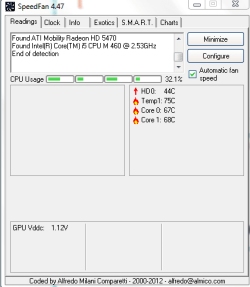
Regarding the temperature part, when I am playing, let's say, CoD:MW3, the temperature reaches 85C at its peak, usually between 75C to 85C. I am using Speedfan to monitor my laptop temperature, i was playing CoD:MW3 at that time, sound is turned off.
Temp.png

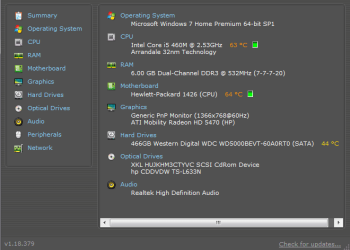
The detailed System Specs:
System Specs.png

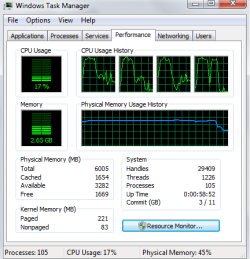
My CPU Usage:
Usage.png
Notice the sudden decrease, I close the game and screenshot it. So I guess it's probably about 60~70% at that time.

For the TDSSKiller I will try it tomorrow since it is already late night for me. Anything I will reply tomorrow. I am using MSE currently and have performed several full scans but nothing, not even a single virus is found.

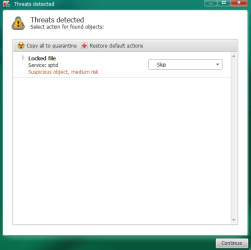
Edit: I ran the anti-rootkit TDSSKiller this morning and results are shown below:
TDSS Scan result.png

I did some searching and found out that sptd.sys is one of the driver of Daemon Tools, I am still using Daemon Tools so I guess it isn't a malware. This is the only threat the scanning had found, I have ran repeated scans to ensure accurate results. Results are the same.
 
Last edited:

My Computer My Computer

At a glance

Window 7 Home Premium 64bit
OS
Window 7 Home Premium 64bit
85C is very high, overheating may be cause of the freezing, have you considered using something to lift the laptop (around few CM) and purchasing a cooling pad?

Your graphics card seems to (based on some YouTube footage) be able to handle games like COD.

Have you performed a memory test with;

http://www.sevenforums.com/tutorials/105647-ram-test-memtest86.html

Test each RAM stick individually, and if an error is found, then place the same RAM stick in a different slot, if an error is found within each slot of the motherboard then you have a faulty RAM module. If a error does not occur in a different RAM slot for the same RAM module, then you have a faulty RAM slot and therefore will need to get a new motherboard.

You may also like to stress test the graphics card with;

http://www.sevenforums.com/tutorials/100356-video-card-stress-test-furmark.html

Please create a backup of any important data, just in case of any hardware failures, and also read the instructions within each tutorial very carefully; stressing the hardware is a good method for diagnosing bad hardware components but can cause damage if your not careful.

You may want to create a Windows 7 Installation DVD, by following the first few steps of this tutorial;

http://www.sevenforums.com/tutorials/219487-clean-reinstall-factory-oem-windows-7-a.html

After creating the DVD, you can perform a Repair Install to attempt to replace the corrupted files, in which the System File Checker found.

To summarise the above points:

1) Create a Windows 7 Installation DVD and do a Repair Install (will provide a link)
2) Clean the laptop's vents and create a raised platform to create better air circulation
3) Perform Furmark and Memtest86+ tests
 

My Computer My Computer

Computer type
Laptop
Regarding the high temperature problem, I have been using a high quality cooling pad which lift my laptop up by about 7 cm(its design is like the inclined slope). I had also cleared my vents three months ago, I don't think that the dusts will accumulate so fast that it is able to block my vent again. So I think if such high temperature persists I probably have to replace my internal laptop fan. The detail below shows my graphic card specs:
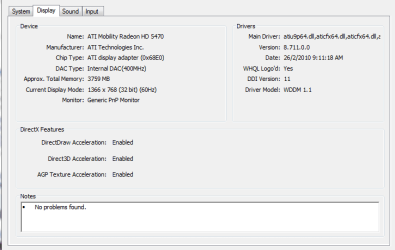
Graphic card specs.png

One thing I also notice recently is that whenever I use a program(eg browsers, games, microsoft offices) my CPU Usage can peak really high to about >80%. It is kinda weird as I will have expect my laptop to perform better as a laptop with Intel i5 Core. Multitasking or even running just few simple programs should not have been a problem to it, at the past I was able to watch videos & movies and play high-end games simultaneously while maintaining the CPU Usage at about 70% at maximum. Could it be some undetectable virus or could it be the indication of faulty Local Disk (C: ) Drive?(My files are all stored at C: Drive)

I will run Memtest86+ as soon as I buy a DVD to burn my ISO files, probably it will be done after few days. Memtest86+ is one of the major checkups I haven't been running yet. This also applies to backup as I need to find a DVD to store my backup files, after storing my backup files I will also try to run Repair Install to return certain devices to its factory settings, thought I am not sure if it will cause more troubles to my laptop.

A question here: Should I run furmark already as I have not stored any backup for my files yet? I am afraid that hardware failures may occur and I will lose all my important data.

Since there are many restrictions to me now due to the lack of CDs and DVDs and low accessibility of Internet(I am a student studying oversea staying at a boarding school, normally school wireless sets a lot of restrictions.), I may not have performed some checkups so I cannot determine what problem is harming my laptop, so do you also have any advice regarding my stated issue above on this post?
 
Last edited:

My Computer My Computer

At a glance

Window 7 Home Premium 64bit
OS
Window 7 Home Premium 64bit
You would be surprised at how fast the dust can accumulate. I would clean out all vents on a weekly/bi-weekly basis.

Next, I agree with your assumption to virus and malware lurking on the system. It can't hurt to run any virus software and malware software you have. Then will proceed from there.
 

My Computer My Computer

At a glance

Windows 7 Ultimate 64 bitAMD Phenom II X4 965 Black EditionGSkill 4 X 2 GB PC 8500XFX Radeon HD 6790 D
Computer Manufacturer/Model Number
Custom built
OS
Windows 7 Ultimate 64 bit
CPU
AMD Phenom II X4 965 Black Edition
Motherboard
Gigabyte GA-MA790X-DS4
Memory
GSkill 4 X 2 GB PC 8500
Graphics Card(s)
XFX Radeon HD 6790 D
Sound Card
On board RealTek HD
Monitor(s) Displays
Dual monitors:Samsung SyncMaster S20B300
Screen Resolution
1600 X 900
Hard Drives
Seagate Barracuda 1TB (primary)
Seagate Barracuda 2 X 320 GB
PSU
Ultra X4 750 watt fully modular
Case
Thermaltake Overseer RX 1 full tower
Cooling
Core-Contact 92 mm CPU Cooler
Keyboard
Logitech G510
Mouse
Razor DeathAdder
Internet Speed
50/5 Mbps UL/DL
Other Info
Optical: Super Muliti DVD burner w/lightscribe, Hauppauge WinTV HVR-1800
Hmmm, I think I should clean my vent then, but the question is, how do you clean it? The last time I cleaned it I sent this laptop to the technician to do the job, it is quite costly to be honest. I also asked that if I should buy a blower(they call it air-gun) to blow the dust out on a weekly basis, but the technician told me that it carried some risks as I might damage the leaves of the fan, so I am wondering how did you clean the vent? I do not want to dismantle and take off my cover to clean my fan as I am afraid that I might damage internal hardware due to carelessness.

Also regarding the virus and malware which might be present in the laptop, I am not sure if my laptop is totally free from viruses, but from what all the virus full scans I have performed using different Anti-Virus software I was told that my computer is safe and no threat detected, is there anyway to find undetectable virus manually?
 

My Computer My Computer

At a glance

Window 7 Home Premium 64bit
OS
Window 7 Home Premium 64bit
You can use a can of compressed air which can purchased from most PC shops, it will help to shift any accumulation of dust from the vents and within the case.

For the stress tests, wait until you have some DVDs to save your data to, and then perform the tests. You also have corrupted Windows files, so when you can create a Windows 7 DVD then do so; run System File Checker again with the Windows 7 DVD or perform a Repair Install to fix the corrupted/missing files.

For the Daemon tools, I would uninstall the program completely from your system, even though it may not be strictly malware, it is known to cause problems such as BSODs; many of our BSOD specialists always recommend OPs to remove Daemon tools.
 

My Computer My Computer

Computer type
Laptop
From you post #1
-----------------------
I found that when I did the system file checker the message appears 'Windows Resource Protection found some corrupt files but was unable to fix some of them.
This must be corrected.
-----------------------
You say your system is clean and that is good. Here is another option. Read and understand completely.
http://www.sevenforums.com/tutorials/3413-repair-install.html
Which anti virus and firewall do you have installed?
Do you have SP-1 and all Windows 7 updates installed?
 

My Computer My Computer

At a glance

Windows 10 Pro. 64/ version 1709 Windows 7 Pr...Intel i7-6800K @ 4.3Corsair Platinum 16 gig @2400EVGA GTX 1070 OC
Computer type
PC/Desktop
Computer Manufacturer/Model Number
Home made Desktop
OS
Windows 10 Pro. 64/ version 1709 Windows 7 Pro/64
CPU
Intel i7-6800K @ 4.3
Motherboard
ASUS X-99 Deluxe II
Memory
Corsair Platinum 16 gig @2400
Graphics Card(s)
EVGA GTX 1070 OC
Monitor(s) Displays
Asus 27" LED LCD/VE278Q
Screen Resolution
1920-1080 or 1280-720 HDMI
Hard Drives
INTEL SSD 730-240 Gb Sata 3.0/
PSU
EVGA Platium 1200W
Case
Phanteks Luxe Tempered Glass 8 fans/ one radiator
Cooling
XSPC/ Water Cooled CPU
Keyboard
Das 4 Professional
Mouse
Logitech M705/MX Anywhere 2-S
Internet Speed
100 mbits
Antivirus
Microsoft Security Essentials/ Malwarebytes Premium 3.0/ SAS
Browser
I.E. 11 default/Firefox/ ISP Time Warner Cable/Spectrum
Other Info
LG BluRay Burner/
Sound system-KLipsch-THX/
Icy Dock ssd Hot Swap bays.
Googling your model + overheating to read how others have dealt with the issue. The most common solutions are to open the case enough to blow out (not in) the dust, replace the fan, clean and repaste the heatsink. Until you get there I'd elevate the back or use the cooling pad.

If you still have the HP preinstall you have the worst load of sponsored crapware and useless duplicate utilities in the industry. Most tech enthusiasts would not run such a compromised Win7, instead choosing to get the vastly superior Clean Reinstall - Factory OEM Windows 7.

Once you have a baseline perfect reinstall if the overheating problem persists then you'll need to consider strongly cleaning the laptop, replacing the fan and if that doesn't bring the temps down repasting the CPU heatsink which is a major project but a great learning experience. Your laptop won't live long without it if the temps keep rising.
 
Thank you guys for the replies. I had not been playing some high-end games these few days because I did not want my laptop to freeze again, I did some registry cleaning again and some reliability monitor checking, I found that my Apple software was causing a lot of problems. When I check my reliability monitor, the Apple software, though not really sure about the specific program, had caused 600+ critical errors everyday, 2 errors occur every minute, so I uninstall the Apple software for now.

An improvement in my laptop performance can be seen, although there might still be problems in my laptop I am unaware of, the random freezing such as during startup or surfing Internet had stopped, possibly due to the lower average CPU Usage in my laptop, I disabled some startups, I cleaned some registry and I did several full scans using Microsoft Security Essential, additionally malware checking using Malwarebytes Anti-Malware.

I think I really need to replace my fan, at idle stage my laptop's temperature reached 55C(without any program opening and few background programs aka startups) even though I had been using cooling pad to help reduce the temperature. Also regarding the SFC issue I will do the Repair Install as soon as possible, are the "corrupt files" referring to some corrupted software(mostly caused by windows update I guess?) inside my laptop? I probably will also leave repasting the CPU heatsink to the technician while he is replacing my fan. I also carried out updates on my laptop regularly by downloading all the optional and important updates in Windows Update.

I updated my graphic card yesterday and somehow the name changed from ATI Mobility Radeon HD 5470 to ATI Mobility Radeon HD 5400, not sure if this is considered as upgrading or downgrading, but anyhow I think I will leave stress test as least priority. BSODs rarely occur on my laptop, when it freezes, it just freeze, BSOD do not come out most of the time and I have to carry out hard shutdown. So far Daemon tools have not caused any major problem to my laptop yet, but I may uninstall because I also seldom used it.

So that's all for now, I will bring back some updates after carrying out Repair Install and see how it goes.
 

My Computer My Computer

At a glance

Window 7 Home Premium 64bit
OS
Window 7 Home Premium 64bit
Okay keep us posted (: if you get BSODs you can always upload them to this thread, we have some really good BSOD specialists which will be able to directly pinpoint the problem from your BSODs.
 

My Computer My Computer

Computer type
Laptop

My Computer My Computer

At a glance

Windows 10 Pro. 64/ version 1709 Windows 7 Pr...Intel i7-6800K @ 4.3Corsair Platinum 16 gig @2400EVGA GTX 1070 OC
Computer type
PC/Desktop
Computer Manufacturer/Model Number
Home made Desktop
OS
Windows 10 Pro. 64/ version 1709 Windows 7 Pro/64
CPU
Intel i7-6800K @ 4.3
Motherboard
ASUS X-99 Deluxe II
Memory
Corsair Platinum 16 gig @2400
Graphics Card(s)
EVGA GTX 1070 OC
Monitor(s) Displays
Asus 27" LED LCD/VE278Q
Screen Resolution
1920-1080 or 1280-720 HDMI
Hard Drives
INTEL SSD 730-240 Gb Sata 3.0/
PSU
EVGA Platium 1200W
Case
Phanteks Luxe Tempered Glass 8 fans/ one radiator
Cooling
XSPC/ Water Cooled CPU
Keyboard
Das 4 Professional
Mouse
Logitech M705/MX Anywhere 2-S
Internet Speed
100 mbits
Antivirus
Microsoft Security Essentials/ Malwarebytes Premium 3.0/ SAS
Browser
I.E. 11 default/Firefox/ ISP Time Warner Cable/Spectrum
Other Info
LG BluRay Burner/
Sound system-KLipsch-THX/
Icy Dock ssd Hot Swap bays.
What registry cleaning did you do? I hope you didn't use a sales-scam Registry Cleaner which is Public Enemy #1 for Win7 and likely has caused the broken System files. I would only use the the tools and methods shown in the Clean Reinstall tutorial or Clean Up Factory Bloatware.

You can also install SpeedFan to see if there is any variability of fan speed. Replacing the fan is one of the suggested remedies for the overheating problems for your model which I wrote about earlier and you ignored.
 
Bought my wife a Acer top of the line laptop a few years back 1400 bucks worth of self destructing portable electronics. I had it cleaned within the first year and within no time it got all plugged up again with dust. I did everything I could to cool it down, laptop pad, raising it off the ground, put icepack under the fan vent and it still ran red hot all the time. Eventually it just died cause of the overheating with a 600 dollar plus to repair it.
A valuable expensive lesson learned that I will never buy a laptop again. I got 2 1/2 years out of that laptop and now sits in the basement.
 

My Computer My Computer

At a glance

Microsoft Windows 7 Ultimate 64-bitIntel(R) Pentium(R) CPU G2030 @ 3.00GHz12.00 GB Kingston DIMM 3x4 gig sticksAMD Radeon HD 5450
Computer Manufacturer/Model Number
Custom Build
OS
Microsoft Windows 7 Ultimate 64-bit
CPU
Intel(R) Pentium(R) CPU G2030 @ 3.00GHz
Motherboard
ASUSTeK COMPUTER INC. P8H77-V LE
Memory
12.00 GB Kingston DIMM 3x4 gig sticks
Graphics Card(s)
AMD Radeon HD 5450
Sound Card
AMD High Definition Audio Device
Monitor(s) Displays
Dual displays
Screen Resolution
1280 x 1024 x 4294967296 colors
Hard Drives
ST3500320AS 465.76 GB
WDC WD10EZEX-00BN5A0 931.51 GB
WDC WD10 EARS-00MVWB0 USB Device 931.51 GB
PSU
XION SuperNova 600 watt
Keyboard
Razer Tarantula Gaming Keyboard
Mouse
Razer Imperator Gaming Mouse
Internet Speed
DSL 6 down & 1 up with Netgear R6300 Wireless router
What registry cleaning did you do? I hope you didn't use a sales-scam Registry Cleaner which is Public Enemy #1 for Win7 and likely has caused the broken System files. I would only use the the tools and methods shown in the Clean Reinstall tutorial or Clean Up Factory Bloatware.

You can also install SpeedFan to see if there is any variability of fan speed. Replacing the fan is one of the suggested remedies for the overheating problems for your model which I wrote about earlier and you ignored.

I did read your post, and I had to agree that HP came with a lot of pre-installations when I first received this laptop. I did some overheating research in Google, and I found that HP was one of the more overheating-prone laptop's model. As for the repaste of the heatsink, I would leave the job to the technician since it requires me to dismantle the cover and repaste the heatsink with thermal paste.(Not sure if this is correct as I got quite confused after doing some readings online) I am also considering to replace my fan since the cleaning of fan is not helping much.

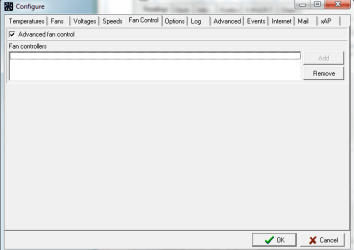
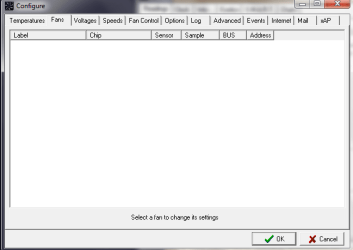
I am using CCleaner to help cleaning my registry, my friend recommends this program to me and I found it to be quite useful, though I am also not sure if CCleaner also causes certain troubles to my laptop. In post#3, I have screenshot a picture of my laptop's temperature using SpeedFan, I guess it is the latest version I am using. When I switch to the 'fan' tab, there is nothing to show, possibly suggesting that I cannot alter the speed of the fan manually as it is not shown as any device.

Speedfan.png
Speedfan(2).png

I performed the System File Checker again after uninstalling Apple software and did some cleaning. The result is still the same:
Command Prompt.png

@AlterUrEgo: Probably you could have saved your laptop if you replace the entire fan since it may be broken :)
 

My Computer My Computer

At a glance

Window 7 Home Premium 64bit
OS
Window 7 Home Premium 64bit
CCleaner is fine, so no worries there.

You can consider a Repair Install as a last resort before Clean Reinstall - Factory OEM Windows 7 but I would at least Clean Up Factory Bloatware first. THis may help with performance.

Since SpeedFan apparently can't help I'd install Core Temp which will park your temps in the SysTray for monitoring.

My experience with hiring a tech to repaste processor is it is prohibitively expensive on most laptops, which is why I do it myself as a last resort and for a learning experience since the PC is worth little anyway if it's burning up. But first I'd monitor temps and compare with the max for your CPU which are available by googling.
 
Back
Top