
Chkdsk Accidentally deleted an important .dll file

Rain08

New member
Member
VIP
Local time
12:54 AM
Messages
265
Location
Manila, Philippines
Here's my situation after running a memory test my PC restarted and then went to Chkdsk. After scanning in Stage 1, It scanned the index files if I can remember and then it showed that "something"explorer.dll is unindexed. Chkdsk tried to find the host but it didn't find it and it was deleted. After that my PC restarted and then on log-on screen during "Welcome" a popup appeared saying "something"explorer.dll is missing and after "Welcome" its was all black. I tried to run taskmanager and then manually started explorer.exe but "something"explorer.dll is missing. I system restore my PC and it worked properly explorer.exe is working fine now. Its ok now that its works normally now but what will I do to prevent Chkdsk deleting that .dll file. I don't have a recovery disk. Also I wrote this thread during safe mode so I can make sure that everything is working fine for now.
System Specs:
OS: Windows 7 Home Basic 32-bit (6.1, Build 7601)
CPU: Pentium® Dual Core CPU E6700 @ 3.20 GHz
Memory: 2048 MB RAM Samsung 2rx8 PC3 10600u
GPU: Intel® G41 Express Chipset
HDD's: Seagate Barracuda ST3320418AS 320 GB (The drive that was Chkdsk)
Western Digital 32000BEV External HDD 298.09 GB
 
Last edited:

My Computer My Computer

At a glance

Windows 7 Professional 64-bit (6.1, Build 7601)Intel Pentium G3258 @ 3.80 GHz (OC'd)Team Elite 4 GB DDR3 1600 MHzPalit GTX 1060 6 GB Super JetStream
Computer type
PC/Desktop
Computer Manufacturer/Model Number
Built
OS
Windows 7 Professional 64-bit (6.1, Build 7601)
CPU
Intel Pentium G3258 @ 3.80 GHz (OC'd)
Motherboard
Gigabyte Z97-HD3
Memory
Team Elite 4 GB DDR3 1600 MHz
Graphics Card(s)
Palit GTX 1060 6 GB Super JetStream
Monitor(s) Displays
HP x20 LED Series Wide LCD Monitor
Screen Resolution
1600x900 pixels
Hard Drives
Western Digital Caviar Blue WD10EZRZ 1TB @ 7200 RPM,
Western Digital 3200BEV External HDD 298.09 GB, WD Elements WDBUZG0010BBK-05 External HDD 1TB
PSU
Seasonic G-550 550W 80+ Gold
Keyboard
Corsair K70 Rapidfire RGB
Mouse
Logitech G300S and G502
Internet Speed
2.00 Mbps
Antivirus
MSE, MBAM, MBAE
Browser
IE, Google Chrome, FF, Safari.
Other Info
Old PC:
HP Pavilion P6640D, Windows 7 Ultimate 32-bit (6.1, Build 7601), Intel Pentium Dual Core CPU E6700 @ 3.20 GHz, Foxconn 2A8C, Kingmax 2 GB DDR3 1066 MHz, Palit NVIDIA GeForce GT 610 2048 MB, Western Digital WD Blue WD5000AAKX 500 GB @ 7200 RPM, Seagate Barracuda ST3320418AS 320 GB @ 7200 RPM (former drive), Bestec ATX-250-12Z 250 Watts
Chkdsk has messed me over pretty good a couple times. I try to avoid using it at all costs.
my 2 cents.
 

My Computer My Computer

At a glance

Windows 8 Professional x64AMD X3 440 Rana @3.60GHz OC8GB DDR3 RAM 1600MHz9800 GT
OS
Windows 8 Professional x64
CPU
AMD X3 440 Rana @3.60GHz OC
Motherboard
MSi AM3 Mobo
Memory
8GB DDR3 RAM 1600MHz
Graphics Card(s)
9800 GT
Sound Card
mobo
Monitor(s) Displays
Duo Display
Hard Drives
1 250GB dedicated OS
1 1TB Storage
PSU
600w
Case
Raidmax
Cooling
Rosewill copper-base/pipe tower
I don't want to avoid chkdsk, I just need to find a fix so chkdsk won't mess up with important .dll files or other OS files. If its unfixable then avoiding chkdsk is the only way.
 

My Computer My Computer

At a glance

Windows 7 Professional 64-bit (6.1, Build 7601)Intel Pentium G3258 @ 3.80 GHz (OC'd)Team Elite 4 GB DDR3 1600 MHzPalit GTX 1060 6 GB Super JetStream
Computer type
PC/Desktop
Computer Manufacturer/Model Number
Built
OS
Windows 7 Professional 64-bit (6.1, Build 7601)
CPU
Intel Pentium G3258 @ 3.80 GHz (OC'd)
Motherboard
Gigabyte Z97-HD3
Memory
Team Elite 4 GB DDR3 1600 MHz
Graphics Card(s)
Palit GTX 1060 6 GB Super JetStream
Monitor(s) Displays
HP x20 LED Series Wide LCD Monitor
Screen Resolution
1600x900 pixels
Hard Drives
Western Digital Caviar Blue WD10EZRZ 1TB @ 7200 RPM,
Western Digital 3200BEV External HDD 298.09 GB, WD Elements WDBUZG0010BBK-05 External HDD 1TB
PSU
Seasonic G-550 550W 80+ Gold
Keyboard
Corsair K70 Rapidfire RGB
Mouse
Logitech G300S and G502
Internet Speed
2.00 Mbps
Antivirus
MSE, MBAM, MBAE
Browser
IE, Google Chrome, FF, Safari.
Other Info
Old PC:
HP Pavilion P6640D, Windows 7 Ultimate 32-bit (6.1, Build 7601), Intel Pentium Dual Core CPU E6700 @ 3.20 GHz, Foxconn 2A8C, Kingmax 2 GB DDR3 1066 MHz, Palit NVIDIA GeForce GT 610 2048 MB, Western Digital WD Blue WD5000AAKX 500 GB @ 7200 RPM, Seagate Barracuda ST3320418AS 320 GB @ 7200 RPM (former drive), Bestec ATX-250-12Z 250 Watts
I don't want to avoid chkdsk, I just need to find a fix so chkdsk won't mess up with import .dll files or other OS files. If its unfixable then avoiding chkdsk is the only way.

I wish I wouldn't have to avoid it either, but after I ran it and it ended up deleted my entire hard drive, I decided I would never use it again and I will find a work around.

I am still not 100% sure what caused it but getting out of a shower to see your Chkdsk deleting all of your files (after the reboot) is not a good feeling. It should never happen, ever. After that I have never used Chkdisk for anything and find a work around to my problems.

Also: If anyone can tell me why they think this happened to me, I would appreciate it, thanks.
 

My Computer My Computer

At a glance

Windows 8 Professional x64AMD X3 440 Rana @3.60GHz OC8GB DDR3 RAM 1600MHz9800 GT
OS
Windows 8 Professional x64
CPU
AMD X3 440 Rana @3.60GHz OC
Motherboard
MSi AM3 Mobo
Memory
8GB DDR3 RAM 1600MHz
Graphics Card(s)
9800 GT
Sound Card
mobo
Monitor(s) Displays
Duo Display
Hard Drives
1 250GB dedicated OS
1 1TB Storage
PSU
600w
Case
Raidmax
Cooling
Rosewill copper-base/pipe tower
Here's my situation after running a memory test my PC restarted and then went to Chkdsk. After scanning in Stage 1, It scanned the index files if I can remember and then it showed that "something"explorer.dll is unindexed. Chkdsk tried to find the host but it didn't find it and it was deleted. After that my PC restarted and then on log-on screen during "Welcome" a popup appeared saying "something"explorer.dll is missing and after "Welcome" its was all black. I tried to run taskmanager and then manually started explorer.exe but "something"explorer.dll is missing. I system restore my PC and it worked properly explorer.exe is working fine now. Its ok now that its works normally now but what will I do to prevent Chkdsk deleting that .dll file. I don't have a recovery disk. Also I wrote this thread during safe mode so I can make sure that everything is working fine for now.
System Specs:
OS: Windows 7 Home Basic 32-bit (6.1, Build 7601)
CPU: Pentium® Dual Core CPU E6700 @ 3.20 GHz
Memory: 2048 MB RAM Samsung 2rx8 PC3 10600u
GPU: Intel® G41 Express Chipset
HDD's: Seagate Barracuda ST3320418AS 320 GB (The drive that was Chkdsk)
Western Digital 32000BEV External HDD 298.09 GB

I doubt that check disk is your problem, but rather either malware or hardware failing or corrupted system files. Try running a scan with a reputable AV and MalwareBytes AntiMalware.

HTH
 

My Computer My Computer

At a glance

Windows 7 Professional x64Intel i5 quad processor16 GBRadeon HD 5770
Computer type
PC/Desktop
Computer Manufacturer/Model Number
Custom Built
OS
Windows 7 Professional x64
CPU
Intel i5 quad processor
Motherboard
DP67BG
Memory
16 GB
Graphics Card(s)
Radeon HD 5770
Sound Card
Realtek High Definition Audio
Monitor(s) Displays
Samsung SyncMaster
Screen Resolution
1920X1080
Hard Drives
WD 2TB (SATA Internal)
WD 1TB (USB External)
PSU
Corsair GS800
Case
Tower (Generic)
Cooling
3 Internal Fans
Keyboard
MS Wireless
Mouse
MS Optical Wired
Internet Speed
54 mbps
Antivirus
Emsisoft
Browser
IE-Version 9, Palemoon-Version 24.2.0
My scan is done and my PC is clean also before chkdsk stage 2 of 3 there were no bad sectors scanned in my HDD. And if hardware failing would it be the HDD first because when I use my PC the temperature of my HDD is around 37-42 C° . And if its corrupted file systems will it be the registry or the HDD ?
Also the .dll file is explorerframe.dll.
 
Last edited:

My Computer My Computer

At a glance

Windows 7 Professional 64-bit (6.1, Build 7601)Intel Pentium G3258 @ 3.80 GHz (OC'd)Team Elite 4 GB DDR3 1600 MHzPalit GTX 1060 6 GB Super JetStream
Computer type
PC/Desktop
Computer Manufacturer/Model Number
Built
OS
Windows 7 Professional 64-bit (6.1, Build 7601)
CPU
Intel Pentium G3258 @ 3.80 GHz (OC'd)
Motherboard
Gigabyte Z97-HD3
Memory
Team Elite 4 GB DDR3 1600 MHz
Graphics Card(s)
Palit GTX 1060 6 GB Super JetStream
Monitor(s) Displays
HP x20 LED Series Wide LCD Monitor
Screen Resolution
1600x900 pixels
Hard Drives
Western Digital Caviar Blue WD10EZRZ 1TB @ 7200 RPM,
Western Digital 3200BEV External HDD 298.09 GB, WD Elements WDBUZG0010BBK-05 External HDD 1TB
PSU
Seasonic G-550 550W 80+ Gold
Keyboard
Corsair K70 Rapidfire RGB
Mouse
Logitech G300S and G502
Internet Speed
2.00 Mbps
Antivirus
MSE, MBAM, MBAE
Browser
IE, Google Chrome, FF, Safari.
Other Info
Old PC:
HP Pavilion P6640D, Windows 7 Ultimate 32-bit (6.1, Build 7601), Intel Pentium Dual Core CPU E6700 @ 3.20 GHz, Foxconn 2A8C, Kingmax 2 GB DDR3 1066 MHz, Palit NVIDIA GeForce GT 610 2048 MB, Western Digital WD Blue WD5000AAKX 500 GB @ 7200 RPM, Seagate Barracuda ST3320418AS 320 GB @ 7200 RPM (former drive), Bestec ATX-250-12Z 250 Watts
I also made a back-up of files a year ago (I don't know what files are back-upped, But I think all the files were back-upped.), will it solve the problem?
 

My Computer My Computer

At a glance

Windows 7 Professional 64-bit (6.1, Build 7601)Intel Pentium G3258 @ 3.80 GHz (OC'd)Team Elite 4 GB DDR3 1600 MHzPalit GTX 1060 6 GB Super JetStream
Computer type
PC/Desktop
Computer Manufacturer/Model Number
Built
OS
Windows 7 Professional 64-bit (6.1, Build 7601)
CPU
Intel Pentium G3258 @ 3.80 GHz (OC'd)
Motherboard
Gigabyte Z97-HD3
Memory
Team Elite 4 GB DDR3 1600 MHz
Graphics Card(s)
Palit GTX 1060 6 GB Super JetStream
Monitor(s) Displays
HP x20 LED Series Wide LCD Monitor
Screen Resolution
1600x900 pixels
Hard Drives
Western Digital Caviar Blue WD10EZRZ 1TB @ 7200 RPM,
Western Digital 3200BEV External HDD 298.09 GB, WD Elements WDBUZG0010BBK-05 External HDD 1TB
PSU
Seasonic G-550 550W 80+ Gold
Keyboard
Corsair K70 Rapidfire RGB
Mouse
Logitech G300S and G502
Internet Speed
2.00 Mbps
Antivirus
MSE, MBAM, MBAE
Browser
IE, Google Chrome, FF, Safari.
Other Info
Old PC:
HP Pavilion P6640D, Windows 7 Ultimate 32-bit (6.1, Build 7601), Intel Pentium Dual Core CPU E6700 @ 3.20 GHz, Foxconn 2A8C, Kingmax 2 GB DDR3 1066 MHz, Palit NVIDIA GeForce GT 610 2048 MB, Western Digital WD Blue WD5000AAKX 500 GB @ 7200 RPM, Seagate Barracuda ST3320418AS 320 GB @ 7200 RPM (former drive), Bestec ATX-250-12Z 250 Watts
My scan is done and my PC is clean also before chkdsk stage 2 of 3 there were no bad sectors scanned in my HDD. And if hardware failing would it be the HDD first because when I use my PC the temperature of my HDD is around 37-42 C° . And if its corrupted file systems will it be the registry or the HDD ?
Also the .dll file is explorerframe.dll.

At this point, I would say the system appears to be OK. Did you recently download any Windows themes?
 

My Computer My Computer

At a glance

Windows 7 Professional x64Intel i5 quad processor16 GBRadeon HD 5770
Computer type
PC/Desktop
Computer Manufacturer/Model Number
Custom Built
OS
Windows 7 Professional x64
CPU
Intel i5 quad processor
Motherboard
DP67BG
Memory
16 GB
Graphics Card(s)
Radeon HD 5770
Sound Card
Realtek High Definition Audio
Monitor(s) Displays
Samsung SyncMaster
Screen Resolution
1920X1080
Hard Drives
WD 2TB (SATA Internal)
WD 1TB (USB External)
PSU
Corsair GS800
Case
Tower (Generic)
Cooling
3 Internal Fans
Keyboard
MS Wireless
Mouse
MS Optical Wired
Internet Speed
54 mbps
Antivirus
Emsisoft
Browser
IE-Version 9, Palemoon-Version 24.2.0
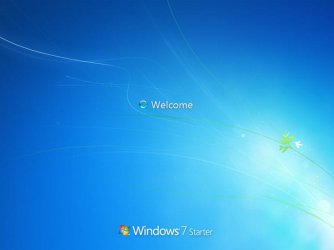
@Sir George: I downloaded dreamscene seven but it wasn't installed because no Aero themes were detected. My UI, Welcome screen changed from usual dark to light gradient to that Welcome Screen. And asked my self why I thought that it was an update but there were no updates that day.
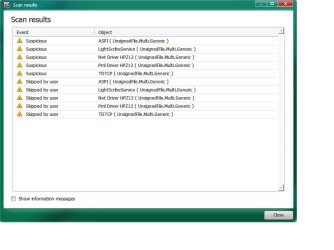
@x BlueRobot: Those are the results, What should I do?
*I was on safe mode because of BSOD's happening while on normal mode.
 

Attachments

  • New W7 theme.jpg
    New W7 theme.jpg
    31.2 KB · Views: 5
  • Scan.jpg
    Scan.jpg
    48.9 KB · Views: 8
  • Scan 1.jpg
    Scan 1.jpg
    51.1 KB · Views: 7

My Computer My Computer

At a glance

Windows 7 Professional 64-bit (6.1, Build 7601)Intel Pentium G3258 @ 3.80 GHz (OC'd)Team Elite 4 GB DDR3 1600 MHzPalit GTX 1060 6 GB Super JetStream
Computer type
PC/Desktop
Computer Manufacturer/Model Number
Built
OS
Windows 7 Professional 64-bit (6.1, Build 7601)
CPU
Intel Pentium G3258 @ 3.80 GHz (OC'd)
Motherboard
Gigabyte Z97-HD3
Memory
Team Elite 4 GB DDR3 1600 MHz
Graphics Card(s)
Palit GTX 1060 6 GB Super JetStream
Monitor(s) Displays
HP x20 LED Series Wide LCD Monitor
Screen Resolution
1600x900 pixels
Hard Drives
Western Digital Caviar Blue WD10EZRZ 1TB @ 7200 RPM,
Western Digital 3200BEV External HDD 298.09 GB, WD Elements WDBUZG0010BBK-05 External HDD 1TB
PSU
Seasonic G-550 550W 80+ Gold
Keyboard
Corsair K70 Rapidfire RGB
Mouse
Logitech G300S and G502
Internet Speed
2.00 Mbps
Antivirus
MSE, MBAM, MBAE
Browser
IE, Google Chrome, FF, Safari.
Other Info
Old PC:
HP Pavilion P6640D, Windows 7 Ultimate 32-bit (6.1, Build 7601), Intel Pentium Dual Core CPU E6700 @ 3.20 GHz, Foxconn 2A8C, Kingmax 2 GB DDR3 1066 MHz, Palit NVIDIA GeForce GT 610 2048 MB, Western Digital WD Blue WD5000AAKX 500 GB @ 7200 RPM, Seagate Barracuda ST3320418AS 320 GB @ 7200 RPM (former drive), Bestec ATX-250-12Z 250 Watts

My Computer My Computer

At a glance

Windows 10 Pro x64 ; Xubuntu x64Intel i7 860 @ 2.80 GHz O/C'ed to 4.0GHz16GB Corsair Vengance DDR3 @ 661 MHz Dual Cha...EVGA NVidia GTX 560 1024MB
Computer type
PC/Desktop
Computer Manufacturer/Model Number
Golden Mk. I.4
OS
Windows 10 Pro x64 ; Xubuntu x64
CPU
Intel i7 860 @ 2.80 GHz O/C'ed to 4.0GHz
Motherboard
Gigabyte P55A-UD3R Rev.1. Award BIOS F13
Memory
16GB Corsair Vengance DDR3 @ 661 MHz Dual Channel (9-9-9-24)
Graphics Card(s)
EVGA NVidia GTX 560 1024MB
Sound Card
Realtek Integrated
Monitor(s) Displays
Dual Samsung SyncMaster 2494HS
Screen Resolution
1920*1080 and 1920*1080
Hard Drives
1*Samsung 840 EVO 120GB SSD;
1*OCZ Vertex 2 60GB SSD;
2*Samsung F3 SpinPoint 1TB in RAID0;
1*Samsung F1 SpinPoint 1TB;
2*Western Digital 1TB External USB 3.0
1*Western Digital 500GB External USB 3.0
1*Seagate 500GB External USB 2.0
PSU
Thermaltake ToughPower QFan 750W
Case
Thermaltake Element S VK60001W2Z
Cooling
Corsair H60 Water Cooling, 2*230mm and 2*80mm case fans
Keyboard
Logitech G110
Mouse
Logitech MX518
@Golden I have already a thread. I'll just update it.
 

My Computer My Computer

At a glance

Windows 7 Professional 64-bit (6.1, Build 7601)Intel Pentium G3258 @ 3.80 GHz (OC'd)Team Elite 4 GB DDR3 1600 MHzPalit GTX 1060 6 GB Super JetStream
Computer type
PC/Desktop
Computer Manufacturer/Model Number
Built
OS
Windows 7 Professional 64-bit (6.1, Build 7601)
CPU
Intel Pentium G3258 @ 3.80 GHz (OC'd)
Motherboard
Gigabyte Z97-HD3
Memory
Team Elite 4 GB DDR3 1600 MHz
Graphics Card(s)
Palit GTX 1060 6 GB Super JetStream
Monitor(s) Displays
HP x20 LED Series Wide LCD Monitor
Screen Resolution
1600x900 pixels
Hard Drives
Western Digital Caviar Blue WD10EZRZ 1TB @ 7200 RPM,
Western Digital 3200BEV External HDD 298.09 GB, WD Elements WDBUZG0010BBK-05 External HDD 1TB
PSU
Seasonic G-550 550W 80+ Gold
Keyboard
Corsair K70 Rapidfire RGB
Mouse
Logitech G300S and G502
Internet Speed
2.00 Mbps
Antivirus
MSE, MBAM, MBAE
Browser
IE, Google Chrome, FF, Safari.
Other Info
Old PC:
HP Pavilion P6640D, Windows 7 Ultimate 32-bit (6.1, Build 7601), Intel Pentium Dual Core CPU E6700 @ 3.20 GHz, Foxconn 2A8C, Kingmax 2 GB DDR3 1066 MHz, Palit NVIDIA GeForce GT 610 2048 MB, Western Digital WD Blue WD5000AAKX 500 GB @ 7200 RPM, Seagate Barracuda ST3320418AS 320 GB @ 7200 RPM (former drive), Bestec ATX-250-12Z 250 Watts
Which one? You need to sort out the BSOD first before anything else.
 

My Computer My Computer

At a glance

Windows 10 Pro x64 ; Xubuntu x64Intel i7 860 @ 2.80 GHz O/C'ed to 4.0GHz16GB Corsair Vengance DDR3 @ 661 MHz Dual Cha...EVGA NVidia GTX 560 1024MB
Computer type
PC/Desktop
Computer Manufacturer/Model Number
Golden Mk. I.4
OS
Windows 10 Pro x64 ; Xubuntu x64
CPU
Intel i7 860 @ 2.80 GHz O/C'ed to 4.0GHz
Motherboard
Gigabyte P55A-UD3R Rev.1. Award BIOS F13
Memory
16GB Corsair Vengance DDR3 @ 661 MHz Dual Channel (9-9-9-24)
Graphics Card(s)
EVGA NVidia GTX 560 1024MB
Sound Card
Realtek Integrated
Monitor(s) Displays
Dual Samsung SyncMaster 2494HS
Screen Resolution
1920*1080 and 1920*1080
Hard Drives
1*Samsung 840 EVO 120GB SSD;
1*OCZ Vertex 2 60GB SSD;
2*Samsung F3 SpinPoint 1TB in RAID0;
1*Samsung F1 SpinPoint 1TB;
2*Western Digital 1TB External USB 3.0
1*Western Digital 500GB External USB 3.0
1*Seagate 500GB External USB 2.0
PSU
Thermaltake ToughPower QFan 750W
Case
Thermaltake Element S VK60001W2Z
Cooling
Corsair H60 Water Cooling, 2*230mm and 2*80mm case fans
Keyboard
Logitech G110
Mouse
Logitech MX518
@Golden: What do you mean which one? And sorting the BSOD?
 

My Computer My Computer

At a glance

Windows 7 Professional 64-bit (6.1, Build 7601)Intel Pentium G3258 @ 3.80 GHz (OC'd)Team Elite 4 GB DDR3 1600 MHzPalit GTX 1060 6 GB Super JetStream
Computer type
PC/Desktop
Computer Manufacturer/Model Number
Built
OS
Windows 7 Professional 64-bit (6.1, Build 7601)
CPU
Intel Pentium G3258 @ 3.80 GHz (OC'd)
Motherboard
Gigabyte Z97-HD3
Memory
Team Elite 4 GB DDR3 1600 MHz
Graphics Card(s)
Palit GTX 1060 6 GB Super JetStream
Monitor(s) Displays
HP x20 LED Series Wide LCD Monitor
Screen Resolution
1600x900 pixels
Hard Drives
Western Digital Caviar Blue WD10EZRZ 1TB @ 7200 RPM,
Western Digital 3200BEV External HDD 298.09 GB, WD Elements WDBUZG0010BBK-05 External HDD 1TB
PSU
Seasonic G-550 550W 80+ Gold
Keyboard
Corsair K70 Rapidfire RGB
Mouse
Logitech G300S and G502
Internet Speed
2.00 Mbps
Antivirus
MSE, MBAM, MBAE
Browser
IE, Google Chrome, FF, Safari.
Other Info
Old PC:
HP Pavilion P6640D, Windows 7 Ultimate 32-bit (6.1, Build 7601), Intel Pentium Dual Core CPU E6700 @ 3.20 GHz, Foxconn 2A8C, Kingmax 2 GB DDR3 1066 MHz, Palit NVIDIA GeForce GT 610 2048 MB, Western Digital WD Blue WD5000AAKX 500 GB @ 7200 RPM, Seagate Barracuda ST3320418AS 320 GB @ 7200 RPM (former drive), Bestec ATX-250-12Z 250 Watts
He means, you should straighten out your BSOD issue in normal mode b4 you fix this problem. I reckon.
 

My Computer My Computer

At a glance

Windows 10 Pro x64Intel Core i7 6700KGSkill TridentZ RGB 16GB 3600 16-16-16-36EVGA GTX 980 Ti SC x2
Computer type
PC/Desktop
Computer Manufacturer/Model Number
Skylake Special #666
OS
Windows 10 Pro x64
CPU
Intel Core i7 6700K
Motherboard
Asus Sabertooth Z170 Mark 1
Memory
GSkill TridentZ RGB 16GB 3600 16-16-16-36
Graphics Card(s)
EVGA GTX 980 Ti SC x2
Sound Card
Realtek High Definition
Monitor(s) Displays
AOC G2460PG
Screen Resolution
1920 x 1080 144Hz
Hard Drives
Samsung 860 Pro 256GB, Seagate Barracuda 4TB x2
PSU
EVGA 1000 P2, EVGA White Custom Braided Cables
Case
Corsair Vengeance C70 Gunmetal Black
Cooling
Corsair H100i v2, Corsair ML120 x2, Thermal Grizzly Kryonaut
Keyboard
Logitech G910 Orion Spectrum
Mouse
Logitech G700s
Internet Speed
Verizon Fios Quantum Gateway 75/75
Antivirus
Windows Defender, Malwarebytes Free 3.8.3
Browser
Chrome
Other Info
Corsair SP120 x4, LG Blu-ray Drive, Durabrand HT-395 100 Watt Dolby Digital Amp, Corsair H2100 Wireless 7.1 Headset
you can't 'avoid' chkdsk, if your disk is marked by the system, it will run automatically prior to login. there is no other utility that does what chkdsk does to repair a faulty file system.

if you can't run explorer, but can get to task manager or a command prompt (or safe mode with command prompt at startup via the f8 key) try running 'sfc /scannow' (without quotes of course) to replace any damaged system files.
 

My Computer My Computer

At a glance

Win 7 ultimate x64 sp1Intel i7 4 core 3770k ivy bridge o/c to 4.2ghz16 GBNvidia geforce GTX650
Computer type
PC/Desktop
Computer Manufacturer/Model Number
Custom build Nanu by 3SX
OS
Win 7 ultimate x64 sp1
CPU
Intel i7 4 core 3770k ivy bridge o/c to 4.2ghz
Motherboard
Asus p8z77-i Deluxe
Memory
16 GB
Graphics Card(s)
Nvidia geforce GTX650
Sound Card
Realtek on mb
Monitor(s) Displays
24in. lcd/led
Screen Resolution
1920x1080
Hard Drives
128GB Kingston SSD
500GB seagate maximus xt hybrid
500GB hitachi HD
500GB external WD Passport usb3
PSU
Silverstone 450 watt
Case
Silverstone FT03 Black Fortress
Cooling
Water cooler
Keyboard
Logitech wireless kbd/mouse mk300
Mouse
Logitech wireless kbd/mouse mk300
Internet Speed
8mb adsl (actuall speed is around 6mb)
Other Info
Asus DSL-N55U wireless router
SONY BC-5850H 6X BLURAY writer
OUTPOST Security Suite
I doubt that check disk is your problem, but rather either malware or hardware failing or corrupted system files. Try running a scan with a reputable AV and MalwareBytes AntiMalware.

HTH

Not to take the thread off track, but I've got to agree with Sir George. Then again, maybe I'm not taking it off track if the BSOD issue is going to be addressed in a new thread.

Either way, it seems the negativity regarding the use of chkdsk should be addressed.

It's not likely caused by chkdsk. A chkdsk run that fouls things up is typically caused by something else. Most often (my experience) it's going to be a problem with the drive itself. The drive is having problems whether chkdsk is run on it or not (but running chkdsk can aggravate recovery attempts). But it could be a memory problem as well. Whatever it is, it's almost always caused by something else.

Only use the symptoms for analyzing what the source of the problem may really be.

Matter of fact, a memory or hard drive issue could be the source of the BSOD troubles as well.
 

My Computer My Computer

At a glance

Windows 7 Ultimate x64
OS
Windows 7 Ultimate x64
He means, you should straighten out your BSOD issue in normal mode b4 you fix this problem. I reckon.

Correct - the problem is the BSOD, not chkdsk. Which thread contains your BSOD information? You need to solve that first, before trying to solve chkdsk problems.
 

My Computer My Computer

At a glance

Windows 10 Pro x64 ; Xubuntu x64Intel i7 860 @ 2.80 GHz O/C'ed to 4.0GHz16GB Corsair Vengance DDR3 @ 661 MHz Dual Cha...EVGA NVidia GTX 560 1024MB
Computer type
PC/Desktop
Computer Manufacturer/Model Number
Golden Mk. I.4
OS
Windows 10 Pro x64 ; Xubuntu x64
CPU
Intel i7 860 @ 2.80 GHz O/C'ed to 4.0GHz
Motherboard
Gigabyte P55A-UD3R Rev.1. Award BIOS F13
Memory
16GB Corsair Vengance DDR3 @ 661 MHz Dual Channel (9-9-9-24)
Graphics Card(s)
EVGA NVidia GTX 560 1024MB
Sound Card
Realtek Integrated
Monitor(s) Displays
Dual Samsung SyncMaster 2494HS
Screen Resolution
1920*1080 and 1920*1080
Hard Drives
1*Samsung 840 EVO 120GB SSD;
1*OCZ Vertex 2 60GB SSD;
2*Samsung F3 SpinPoint 1TB in RAID0;
1*Samsung F1 SpinPoint 1TB;
2*Western Digital 1TB External USB 3.0
1*Western Digital 500GB External USB 3.0
1*Seagate 500GB External USB 2.0
PSU
Thermaltake ToughPower QFan 750W
Case
Thermaltake Element S VK60001W2Z
Cooling
Corsair H60 Water Cooling, 2*230mm and 2*80mm case fans
Keyboard
Logitech G110
Mouse
Logitech MX518
Could you please post a link relating to the BSOD thread, then we can help you solve the BSOD, and see if it is causing the problems with the Disk Check program.
 

My Computer My Computer

Computer type
Laptop

My Computer My Computer

At a glance

Windows 7 Professional 64-bit (6.1, Build 7601)Intel Pentium G3258 @ 3.80 GHz (OC'd)Team Elite 4 GB DDR3 1600 MHzPalit GTX 1060 6 GB Super JetStream
Computer type
PC/Desktop
Computer Manufacturer/Model Number
Built
OS
Windows 7 Professional 64-bit (6.1, Build 7601)
CPU
Intel Pentium G3258 @ 3.80 GHz (OC'd)
Motherboard
Gigabyte Z97-HD3
Memory
Team Elite 4 GB DDR3 1600 MHz
Graphics Card(s)
Palit GTX 1060 6 GB Super JetStream
Monitor(s) Displays
HP x20 LED Series Wide LCD Monitor
Screen Resolution
1600x900 pixels
Hard Drives
Western Digital Caviar Blue WD10EZRZ 1TB @ 7200 RPM,
Western Digital 3200BEV External HDD 298.09 GB, WD Elements WDBUZG0010BBK-05 External HDD 1TB
PSU
Seasonic G-550 550W 80+ Gold
Keyboard
Corsair K70 Rapidfire RGB
Mouse
Logitech G300S and G502
Internet Speed
2.00 Mbps
Antivirus
MSE, MBAM, MBAE
Browser
IE, Google Chrome, FF, Safari.
Other Info
Old PC:
HP Pavilion P6640D, Windows 7 Ultimate 32-bit (6.1, Build 7601), Intel Pentium Dual Core CPU E6700 @ 3.20 GHz, Foxconn 2A8C, Kingmax 2 GB DDR3 1066 MHz, Palit NVIDIA GeForce GT 610 2048 MB, Western Digital WD Blue WD5000AAKX 500 GB @ 7200 RPM, Seagate Barracuda ST3320418AS 320 GB @ 7200 RPM (former drive), Bestec ATX-250-12Z 250 Watts
Back
Top