drive not recognized, is there any way to get my data?

airworks

New member
Local time
2:41 PM
Messages
9
Hi,

I recently had an issue where my computer would not login to windows. I decided to just force restart my machine. From then I had the error bootmgr missing. I tried to do the startup repair but it failed each time. Later I tried using the system recovery command prompt, with commands such as bootrec fix boot, etc. Afterwards I think I started getting a different error such as invalid system partition. Going back to the cmd I tried other things such as chkdsk /scannow , list disk, etc. But I was not able to see my drive. From this point I think the issue got even worse and it said insert boot ddevice.

I decided to take out the hard drive and test on my brothers computer instead. Going into disk management the hard drive would not show up, not even as a blank device. Originally when I first tried the startup repair it would take a long time, probably because I had other hard drives connected as well. After unplugging them the startup repair is almost instant but it can,t repair it of course. Does this mean the disk is totally wiped now? Another thing to mention is that in bios, the hard drive doesn't,t show up with a name, it,s just called hard drive. Am I out of luck or is there still some way to recover my data?

Thank you for reading, apologies for errors and inaccurate command names. I.m using a tablet, so there are some inconveniences.
 

My Computer My Computer

At a glance

windows 7 64 bit
OS
windows 7 64 bit
Sounds like the drive is DEAD. Sorry the only way to recover your data is from a Data Recovery service. Which is very expensive. This is why, FOR YEARS, there has been a built in backup system in Windows and countless other program for Backing Up Your Data. As it is a simple fact that if you do not back up and or have multiple copies of your data you Will Lose it All at some point. You are at that point.
 

My Computer My Computer

At a glance

7 x64
OS
7 x64
I do back up my very important stuff, just not some other stuff that I tend to forget.

When you say dead, do you also mean I also wouldn't be able to reformat it to use again? Although I probably wouldn't risk on using it again. It seems that even when I plug it into my brothers computer, it slows down his computer a lot when booting up.

I have heard about stuff like linux CD's, other random utilities or what not. Those can't be used in my case right?
 

My Computer My Computer

At a glance

windows 7 64 bit
OS
windows 7 64 bit
Yes dead means Dead. If it is not showing in the BIOS then it is TOAST.
 

My Computer My Computer

At a glance

7 x64
OS
7 x64
Yea it just says "Hard Drive". Hmm, you mentioned that data recovery is very expensive, then how do you still recover from a completely dead drive? Or did you only say that because you weren't sure that it was completely dead yet?

Another thing to mention is that there was a storm in my area half a week ago, but the drive only died yesterday/today. Do you think it's related? I also installed virtualbox about a week ago and was playing with some linux distributions. I have heard something about grub, and the linux OS had that. Also not sure if it's related.
 

My Computer My Computer

At a glance

windows 7 64 bit
OS
windows 7 64 bit
These data recovery services take the drive apart and get the data off the platters by mounting them in a Like drive or other device. That is why it is expensive.

IMHO the storm and your problem are not related.

If the drive is DEAD it is DEAD. If it doesn't show in the BIOS it is DEAD. Not sure how else to say it.
 

My Computer My Computer

At a glance

7 x64
OS
7 x64
What do you mean it says Hard Drive in BIOS? Is it showing up under storage? If so run the maker's HD Diagnostic extended CD scan to confirm it's condition.
 
What I meant about it saying hard drive in bios is when you try to select the boot sequence. Normally of might say something like data with some letters and numbers.
 

My Computer My Computer

At a glance

windows 7 64 bit
OS
windows 7 64 bit
Last edited:
What he is referring to is Boot Priority, it will always say Hard Drive there, you have to look at your BIOS main screen to see if it is showing up there, if it isn't you are out a Hard Drive, if it is, then you might be able to use it as a secondary Hard Drive and try to pull files off of it, but if that doesn't work your best bet would be to just get a new one and take this lesson to heart to keep a backup copy of your files.
 

My Computer My Computer

At a glance

Windows 8 64-bit (6.2, Build 9200) (9200.win8...AMD Quad-Core A10-4600M APU 2.3Ghz Turbo to 3.48GB DDR3AMD Radeon HD 7660G
Computer Manufacturer/Model Number
HP C2N70UA#ABA Laptop
OS
Windows 8 64-bit (6.2, Build 9200) (9200.win8_rtm.120725-1247)
CPU
AMD Quad-Core A10-4600M APU 2.3Ghz Turbo to 3.4
Memory
8GB DDR3
Graphics Card(s)
AMD Radeon HD 7660G
Sound Card
Altec Lansing with SRS Premium Sound
Monitor(s) Displays
17" Laptop HD Display (720p)
Screen Resolution
1600*900
Hard Drives
750GB (5400 RPM), with smart protect
Western Digital 1TB Passport
Cooling
HP Cool Sense
Keyboard
Island Style
Mouse
Logitech 625 Wireless
Internet Speed
30MBps
:) Welcome airworks

Is this a Destop or laptop HD ? Is it a SATA or IDE HD ?

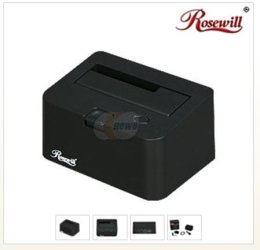
You might try an inexpensive HD Dock to connect it to your brothers computer. If it recognizes it you might be able to copy & save some of your data. ;)
 

Attachments

  • HD_Dock_Unit.JPG
    HD_Dock_Unit.JPG
    19.3 KB · Views: 3

My Computer My Computer

At a glance

Win7 Enterprise, Win7 x86 (Ult 7600), Win7 x6...AMD fx8350 4ghz, AMD-32 2400mhz, AMD-64 3200m...2gb, 4gb on the Ult 7600, 4gb on Technet RTM,...Draw my own Graphics, several nVidia cards
Computer type
PC/Desktop
Computer Manufacturer/Model Number
Built them myself, Science Experiments !
OS
Win7 Enterprise, Win7 x86 (Ult 7600), Win7 x64 Ult 7600, TechNet RTM on AMD x64 (2.8Ghz)
CPU
AMD fx8350 4ghz, AMD-32 2400mhz, AMD-64 3200mhz, AMDx64 2.8G
Motherboard
SIS 755, ECS-K8M890M-M (Ult 7600), GigaByte & others
Memory
2gb, 4gb on the Ult 7600, 4gb on Technet RTM, 32gb on FX8350
Graphics Card(s)
Draw my own Graphics, several nVidia cards
Sound Card
on motherboard
Monitor(s) Displays
19" flat scr, 28" I-Inc widescr,22" Emprex Widescr, 23" Acer
Screen Resolution
1280 x 1024, 1440 x 900, 1920 x 1080
Hard Drives
6 pata Ide HD's & 2 Sata HD's
added 80gb external on Ult 7600 computer,
numerous extra 1tb, 2TB, 3Tb SATA HD's
A collection of ext HD Docks w/ HDs
PSU
430w, 550w, 600w, 700, 800, etc
Case
All Generic Full Towers
Cooling
Open Air & a few fans, some w/ colored LEDs
Keyboard
Compaq & Dell recycled from GoodWill
Mouse
Made in China Optical Wired Mouse
Internet Speed
Fast Cable InterNet
Antivirus
AVG Free on 24 different Desktops, NO Problems!
Browser
IE 8 is preferred, but use FireFox sometimes
Other Info
Linksys Routers, switches, & Hubs
Too Many USB Flash Drives to count, Biggest is 64GB !
Eight computers in my home network.
Sixteen computers at my business network.
Linked via TeamViewer !
Lots of old used spare computer parts everywhere!
Normally if the BIOS won't recognize the Hard Drive, neither will a Dock or Transfer Cable. If it is IDEE then the IRQ for the Hard Drive is normally handled by the BIOS, if it is SATA or eSATA then Windows will handle IRQ and this might work but there is only about a 5-10% chance. I use a data transfer cable I bought off of Newegg for like $15 that handles IDEE, SATA (Both Laptop and Desktop) to do data transfers for my customers.
 

My Computer My Computer

At a glance

Windows 8 64-bit (6.2, Build 9200) (9200.win8...AMD Quad-Core A10-4600M APU 2.3Ghz Turbo to 3.48GB DDR3AMD Radeon HD 7660G
Computer Manufacturer/Model Number
HP C2N70UA#ABA Laptop
OS
Windows 8 64-bit (6.2, Build 9200) (9200.win8_rtm.120725-1247)
CPU
AMD Quad-Core A10-4600M APU 2.3Ghz Turbo to 3.4
Memory
8GB DDR3
Graphics Card(s)
AMD Radeon HD 7660G
Sound Card
Altec Lansing with SRS Premium Sound
Monitor(s) Displays
17" Laptop HD Display (720p)
Screen Resolution
1600*900
Hard Drives
750GB (5400 RPM), with smart protect
Western Digital 1TB Passport
Cooling
HP Cool Sense
Keyboard
Island Style
Mouse
Logitech 625 Wireless
Internet Speed
30MBps
This is a desktop and data ssd hard drive.
What he is referring to is Boot Priority, it will always say Hard Drive there, you have to look at your BIOS main screen to see if it is showing up there, if it isn't you are out a Hard Drive, if it is, then you might be able to use it as a secondary Hard Drive and try to pull files off of it, but if that doesn't work your best bet would be to just get a new one and take this lesson to heart to keep a backup copy of your files.

Weird because before on the boot tab I managed to see sata with the serial number as well for the drive. When I look at the main tab it shows 6 lines from sata 1 to sata 6. All of them state not detected. I've already tried setting it as a secondary drive on another comp, but it wasn't recognized there either.
 

My Computer My Computer

At a glance

windows 7 64 bit
OS
windows 7 64 bit
This is a desktop and data ssd hard drive.
What he is referring to is Boot Priority, it will always say Hard Drive there, you have to look at your BIOS main screen to see if it is showing up there, if it isn't you are out a Hard Drive, if it is, then you might be able to use it as a secondary Hard Drive and try to pull files off of it, but if that doesn't work your best bet would be to just get a new one and take this lesson to heart to keep a backup copy of your files.

Weird because before on the boot tab I managed to see sata with the serial number as well for the drive. When I look at the main tab it shows 6 lines from sata 1 to sata 6. All of them state not detected. I've already tried setting it as a secondary drive on another comp, but it wasn't recognized there either.

When you tested it on another computer did you try the same cables or did you use a different one, SATA cables do tend to wear out easily. The factory red ones with black ends are the worst at this.

Another thing you can do is test it as a primary on another computer, it will Blue Screen on boot, but at least you know the drive is at least booting.
 

My Computer My Computer

At a glance

Windows 8 64-bit (6.2, Build 9200) (9200.win8...AMD Quad-Core A10-4600M APU 2.3Ghz Turbo to 3.48GB DDR3AMD Radeon HD 7660G
Computer Manufacturer/Model Number
HP C2N70UA#ABA Laptop
OS
Windows 8 64-bit (6.2, Build 9200) (9200.win8_rtm.120725-1247)
CPU
AMD Quad-Core A10-4600M APU 2.3Ghz Turbo to 3.4
Memory
8GB DDR3
Graphics Card(s)
AMD Radeon HD 7660G
Sound Card
Altec Lansing with SRS Premium Sound
Monitor(s) Displays
17" Laptop HD Display (720p)
Screen Resolution
1600*900
Hard Drives
750GB (5400 RPM), with smart protect
Western Digital 1TB Passport
Cooling
HP Cool Sense
Keyboard
Island Style
Mouse
Logitech 625 Wireless
Internet Speed
30MBps
They were different cables. Lol my bro was afraid to test it any further because it slowed down his PC a lot... his PC has problems of its own, weird noises and such. I'll try asking him about putting it as a primary drive.
 

My Computer My Computer

At a glance

windows 7 64 bit
OS
windows 7 64 bit
If it slowed down the PC that means the drive is shot, only option if you are desperate to get your files off of it is to get a transfer cable or case, I am assuming it is a Desktop SATA drive? If so this Case would work, and to me having one of these are handy if you like to tinker around with your computer a lot.

Vantec NexStar TX 2.5" SATA to USB 2.0 External Hard Drive/SSD Enclosure
 

My Computer My Computer

At a glance

Windows 8 64-bit (6.2, Build 9200) (9200.win8...AMD Quad-Core A10-4600M APU 2.3Ghz Turbo to 3.48GB DDR3AMD Radeon HD 7660G
Computer Manufacturer/Model Number
HP C2N70UA#ABA Laptop
OS
Windows 8 64-bit (6.2, Build 9200) (9200.win8_rtm.120725-1247)
CPU
AMD Quad-Core A10-4600M APU 2.3Ghz Turbo to 3.4
Memory
8GB DDR3
Graphics Card(s)
AMD Radeon HD 7660G
Sound Card
Altec Lansing with SRS Premium Sound
Monitor(s) Displays
17" Laptop HD Display (720p)
Screen Resolution
1600*900
Hard Drives
750GB (5400 RPM), with smart protect
Western Digital 1TB Passport
Cooling
HP Cool Sense
Keyboard
Island Style
Mouse
Logitech 625 Wireless
Internet Speed
30MBps
I provided a free and easy method to immediately rescue data if you can't slave the HD to another PC and don't want to wait for an adapter cable, providing the HD is still working or can be repaired enough to recover data:


If you will answer the other questions in my post we can help you better. THere's a possibility that the data may not be seen until the HD is repaired enough to remove it using HD Diagnostic extended CD scan and Disk Check from installer/repair CD Command line. If it's not seen at all then sometimes after slaving it in another PC, Partition Wizard will see and repair the file system enough that data can be rescued.

I'd also change the cables.
 
Greg if the drive doesn't show in the BIOS or Disk Management there is no way to get any data off it from any Boot DVD or thumb drive. The bad drive simple is not seen, IE it is dead.
 

My Computer My Computer

At a glance

7 x64
OS
7 x64
OP has not answered my last post to check in the correct location in BIOS setup to see if HD is detected.

BIOS boot order which is not where storage drives are registered by the BIOS.
 
If you will answer the other questions in my post we can help you better. THere's a possibility that the data may not be seen until the HD is repaired enough to remove it using HD Diagnostic extended CD scan and Disk Check from installer/repair CD Command line. If it's not seen at all then sometimes after slaving it in another PC, Partition Wizard will see and repair the file system enough that data can be rescued.

I'd also change the cables.

Hi sorry about that, still using my tablet and not the easiest to navigate between posts when replying. When I try the copy paste with windows DVD I don't see the drive listed to be able to copy to. I will try the other methods but currently not able to burn a CD.
 

My Computer My Computer

At a glance

windows 7 64 bit
OS
windows 7 64 bit
Back
Top