trojan rootkit and virus prevention

You know, there's one last test you need to do...


Use the image you created and prove to yourself that it'll work (and that you can do it yourself). ;)

Not saying to do it now, though. The best way to do this, for the first time test, is to write that image to some unused hard drive you might have. And then boot from it to ensure it works to your satisfaction.


of course!! that is such a logical excellent idea.

F5ing I do not have an unused hard drive. I guess I should get one. could you possibly please recommend one for me to get?
 

My Computer My Computer

At a glance

Microsoft Windows 7 Home Premium 64-bit 7601 ...Intel(R) Core(TM) i5-2430M CPU @ 2.40GHz6.00 GBIntel(R) HD Graphics Family
Computer Manufacturer/Model Number
sony vaio vpcsc31fm
OS
Microsoft Windows 7 Home Premium 64-bit 7601 Multiprocessor Free Service Pack 1
CPU
Intel(R) Core(TM) i5-2430M CPU @ 2.40GHz
Motherboard
Sony Corporation VAIO
Memory
6.00 GB
Graphics Card(s)
Intel(R) HD Graphics Family
Sound Card
(1) High Definition Audio Device (2) Bluetooth Hands-free
Screen Resolution
1366 x 768 x 32 bits (4294967296 colors) @ 59 Hz
Hard Drives
ST95005620AS
Went to the Sony website to check your specs. Couldn't find anything particularly specific about your hard drive, other than it might be a hybrid drive. Can you fill out your system specs:

http://www.sevenforums.com/tutorials/180324-system-info-see-your-system-specs.html

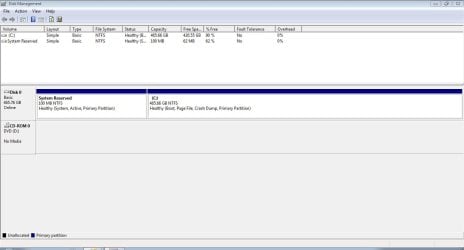
Also I'd like a screenshot of your Disk Management, window maximized, columns/panes adjusted to show maximum info.

BTW, when I said in my prior post that you don't need to do it now, I should've qualified it. The sooner you do it the better. You never know when it's gonna hit the fan...
 

My Computer My Computer

At a glance

Windows 7 Ultimate x64
OS
Windows 7 Ultimate x64
I attached a jpeg of my disk management.
I don't remember hearing anything about my sony vaio having a SS drive if thats what you mean by a hybrid.


update: hey F5ing I just added my system specs for my sony vaio.
 

Attachments

  • Capture.JPG
    Capture.JPG
    61 KB · Views: 10
Last edited:

My Computer My Computer

At a glance

Microsoft Windows 7 Home Premium 64-bit 7601 ...Intel(R) Core(TM) i5-2430M CPU @ 2.40GHz6.00 GBIntel(R) HD Graphics Family
Computer Manufacturer/Model Number
sony vaio vpcsc31fm
OS
Microsoft Windows 7 Home Premium 64-bit 7601 Multiprocessor Free Service Pack 1
CPU
Intel(R) Core(TM) i5-2430M CPU @ 2.40GHz
Motherboard
Sony Corporation VAIO
Memory
6.00 GB
Graphics Card(s)
Intel(R) HD Graphics Family
Sound Card
(1) High Definition Audio Device (2) Bluetooth Hands-free
Screen Resolution
1366 x 768 x 32 bits (4294967296 colors) @ 59 Hz
Hard Drives
ST95005620AS
Yes, it is a hybrid. It's not an SSD, nor an HDD. More like an SSHD; speed of an SSD coupled with the capacity of an HDD.

Don't know too much about them though. From what I read about them, however, they're treated the same as a standard HDD. The drive itself seems to handle whatever data it thinks should be copied to SSD (for improved access speed) and when the host requires data the drive determines where to get it from, SS or HD (whichever is quicker if there is a choice).

I'm going to have to investigate further to make sure I understand all implications.


There are at least a couple ways of trying this clone/image test. So in the meantime, let me ask some more questions:
  • Did you save the image to standard USB hard drive?
  • If you did save the image to a USB HDD, is it larger (byte-wise) than your laptop drive?
  • If the answer to both of the first two questions is 'yes', can you move all of the USB HDD's data somewhere else temporarily for a test?
  • Do you want to buy a bare hard drive that sits around and does nothing for you on a day-to-day basis, it's just ready for installation if/when the need arises?
  • If you want to buy a spare bare hard drive, do you want to buy a more expensive hybrid or a standard HDD?
Answer those questions and let more explore a little more about hybrids. There's internet info and probably at least a few users here on the forum I can ask...
 

My Computer My Computer

At a glance

Windows 7 Ultimate x64
OS
Windows 7 Ultimate x64
thank you F5ing.

note: there is a switch on my sony vaio laptop. you can switch it between stamina and speed. I have left it on stamina ever since my recent problem.......... I had been leaving it there for a while previous to the problem. the sony vaio ran just fine in stamina. and it was quiet. with it in the speed position, the hard drive would sometimes (even often) rev up and be loud.

anyway, just didn't think it would hurt to mention that.

I am a little afraid to move it to the speed position.

really I like it the way it is so now, I am leary of doing anything that might mess it up again.

the same goes for my desktop. I am very inclined to hold off on testing. I know that might sound really bad.
its just that, as a guy who has worked in the repair field for decades (I'm a stationary engineer), and who has worked on many broken systems, I wonder if the risk/reward is really worth it here for either computer.

anyway I am flexible. (fascinating about the hybrid SSHD. makes me think that its probably a really good one.)

to answer your questions:
-yes
-yes
-I have a gateway laptop. I'm not sure if it would hold the entire contents of my seagate external hard drive.
-I am not opposed to buying a bare hard drive that sits around and does nothing for me on a day-to-day basis and is just ready for installation.
note: when it comes to installing a hard drive, I've only done a couple. I swapped a couple on desktops at work. I actually got a broken one going. fumbled my way through it. had almost no idea what I was doing. I saved a ton of valuable info that I had written over the years about the building that I take care of. I then backed up the info in many places.
-am open to your thoughts about what hard drive to buy.
 

My Computer My Computer

At a glance

Microsoft Windows 7 Home Premium 64-bit 7601 ...Intel(R) Core(TM) i5-2430M CPU @ 2.40GHz6.00 GBIntel(R) HD Graphics Family
Computer Manufacturer/Model Number
sony vaio vpcsc31fm
OS
Microsoft Windows 7 Home Premium 64-bit 7601 Multiprocessor Free Service Pack 1
CPU
Intel(R) Core(TM) i5-2430M CPU @ 2.40GHz
Motherboard
Sony Corporation VAIO
Memory
6.00 GB
Graphics Card(s)
Intel(R) HD Graphics Family
Sound Card
(1) High Definition Audio Device (2) Bluetooth Hands-free
Screen Resolution
1366 x 768 x 32 bits (4294967296 colors) @ 59 Hz
Hard Drives
ST95005620AS
note: there is a switch on my sony vaio laptop. you can switch it between stamina and speed. I have left it on stamina ever since my recent problem.......... I had been leaving it there for a while previous to the problem. the sony vaio ran just fine in stamina. and it was quiet. with it in the speed position, the hard drive would sometimes (even often) rev up and be loud.

anyway, just didn't think it would hurt to mention that.

I am a little afraid to move it to the speed position.

really I like it the way it is so now, I am leary of doing anything that might mess it up again.

Saw that yesterday when checking out your specs. Looked again today and it appears to be a switch that allows you to utilize a separate, higher performance video card in the "Speed" position, and in the "Stamina" position it switches to the integrated video on the motherboard (as well as automatically turning off components when the system isn't using them).

the same goes for my desktop. I am very inclined to hold off on testing. I know that might sound really bad.
its just that, as a guy who has worked in the repair field for decades (I'm a stationary engineer), and who has worked on many broken systems, I wonder if the risk/reward is really worth it here for either computer.

Some other problem there?

anyway I am flexible. (fascinating about the hybrid SSHD. makes me think that its probably a really good one.)

to answer your questions:
-yes
-yes
-I have a gateway laptop. I'm not sure if it would hold the entire contents of my seagate external hard drive.
-I am not opposed to buying a bare hard drive that sits around and does nothing for me on a day-to-day basis and is just ready for installation.
note: when it comes to installing a hard drive, I've only done a couple. I swapped a couple on desktops at work. I actually got a broken one going. fumbled my way through it. had almost no idea what I was doing. I saved a ton of valuable info that I had written over the years about the building that I take care of. I then backed up the info in many places.
-am open to your thoughts about what hard drive to buy.

Still researching on new drive. Don't worry about trying to move that data off of your external. Thinking more on it I believe it's not worth using it as a test to prove your image. The install would likely be troublesome and therefore it wouldn't really prove much of anything.

FYI on hybrids:

https://en.wikipedia.org/wiki/Hybrid_drive
 

My Computer My Computer

At a glance

Windows 7 Ultimate x64
OS
Windows 7 Ultimate x64
thanks very much F5ing. am psyched to read about the hybrid drive.

both computers are running excellent. and thanks in great part to you.

also thanks in huge part to you, I most likely have successfully create system images.

that gives me a good feeling with regards to if things get goofed up here again someday.
 

My Computer My Computer

At a glance

Microsoft Windows 7 Home Premium 64-bit 7601 ...Intel(R) Core(TM) i5-2430M CPU @ 2.40GHz6.00 GBIntel(R) HD Graphics Family
Computer Manufacturer/Model Number
sony vaio vpcsc31fm
OS
Microsoft Windows 7 Home Premium 64-bit 7601 Multiprocessor Free Service Pack 1
CPU
Intel(R) Core(TM) i5-2430M CPU @ 2.40GHz
Motherboard
Sony Corporation VAIO
Memory
6.00 GB
Graphics Card(s)
Intel(R) HD Graphics Family
Sound Card
(1) High Definition Audio Device (2) Bluetooth Hands-free
Screen Resolution
1366 x 768 x 32 bits (4294967296 colors) @ 59 Hz
Hard Drives
ST95005620AS
I've read quite a bit about hybrid drives over the last couple of days, and I'm fairly sure there's only one precaution that needs to be taken that you don't really need to worry about too much when cloning/imaging standard HDDs, and that's making sure you run the cloning/imaging program from removable media (as you've done). Wish I had one to play with and test!!

That said, I've created a new thread on this issue here (to get some feedback):

http://www.sevenforums.com/backup-r...imaging-hybrid-drive-ssd-hdd.html#post2173335

I've also asked for input from the many experienced members of the forum. Hopefully we'll get some good info that either confirms or recommends additional precautions to ensure success each and every time.
 

My Computer My Computer

At a glance

Windows 7 Ultimate x64
OS
Windows 7 Ultimate x64
thank you F5ing. thank you for your generosity and kindness.

just checked the new thread.

wow. you are very bright. I already knew that. but wow.
 

My Computer My Computer

At a glance

Microsoft Windows 7 Home Premium 64-bit 7601 ...Intel(R) Core(TM) i5-2430M CPU @ 2.40GHz6.00 GBIntel(R) HD Graphics Family
Computer Manufacturer/Model Number
sony vaio vpcsc31fm
OS
Microsoft Windows 7 Home Premium 64-bit 7601 Multiprocessor Free Service Pack 1
CPU
Intel(R) Core(TM) i5-2430M CPU @ 2.40GHz
Motherboard
Sony Corporation VAIO
Memory
6.00 GB
Graphics Card(s)
Intel(R) HD Graphics Family
Sound Card
(1) High Definition Audio Device (2) Bluetooth Hands-free
Screen Resolution
1366 x 768 x 32 bits (4294967296 colors) @ 59 Hz
Hard Drives
ST95005620AS
thank you F5ing. thank you for your generosity and kindness.

going to check the new thread now.

You're welcome!

But I'd bet there's not much there yet as I just recently created it, but make sure to subscribe to it (thread tools link at the top of the page) so you can keep abreast of new posts.
 

My Computer My Computer

At a glance

Windows 7 Ultimate x64
OS
Windows 7 Ultimate x64
thank you F5ing. thank you for your generosity and kindness.

going to check the new thread now.

You're welcome!

But I'd bet there's not much there yet as I just recently created it, but make sure to subscribe to it (thread tools link at the top of the page) so you can keep abreast of new posts.


roger that. thanks F5ing!! :)
 

My Computer My Computer

At a glance

Microsoft Windows 7 Home Premium 64-bit 7601 ...Intel(R) Core(TM) i5-2430M CPU @ 2.40GHz6.00 GBIntel(R) HD Graphics Family
Computer Manufacturer/Model Number
sony vaio vpcsc31fm
OS
Microsoft Windows 7 Home Premium 64-bit 7601 Multiprocessor Free Service Pack 1
CPU
Intel(R) Core(TM) i5-2430M CPU @ 2.40GHz
Motherboard
Sony Corporation VAIO
Memory
6.00 GB
Graphics Card(s)
Intel(R) HD Graphics Family
Sound Card
(1) High Definition Audio Device (2) Bluetooth Hands-free
Screen Resolution
1366 x 768 x 32 bits (4294967296 colors) @ 59 Hz
Hard Drives
ST95005620AS
Back
Top