DNS server not responding even after uninstalling Bonjour

Avidly awaiting

New member
Local time
1:01 PM
Messages
9
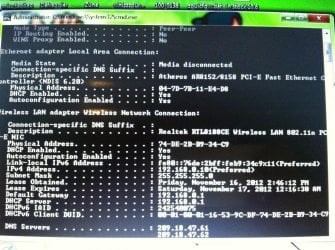
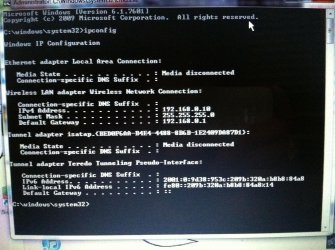
Hi everyone. I recently got a new iPhone (I'm actually having to post from it now) and like many others, I also encountered the issue with bonjour causing DNS issues. So I uninstalled it and iTunes. However, I am still getting the "Dns is not responding" error. I tried the suggestion of changing the addresses to 8 8 8 8 and 8 8 4 4, and that seems to let me use google with very fast speeds but not much else. I'm not sure what else to do.
 

Attachments
  • image.jpg
    image.jpg
    590.4 KB · Views: 19

My Computer My Computer

At a glance

Windows 7 64 bit
OS
Windows 7 64 bit

My Computer My Computer

At a glance

Windows 7 Ult, Windows 8.1 Pro,Q9650-4.275GHz, E8600 4.5GHz, E6750-3.8GHzG.Skill PC2 9600 1200Mhz 5 5 5 15 2TGTX480
Computer type
PC/Desktop
Computer Manufacturer/Model Number
Home built
OS
Windows 7 Ult, Windows 8.1 Pro,
CPU
Q9650-4.275GHz, E8600 4.5GHz, E6750-3.8GHz
Motherboard
Evga 780i FTW
Memory
G.Skill PC2 9600 1200Mhz 5 5 5 15 2T
Graphics Card(s)
GTX480
Sound Card
Asus Xonar D2
Monitor(s) Displays
HannsG
Screen Resolution
1680X1050
Hard Drives
GSkill Phoenix Pro 120GB SSD
PSU
ThermalTake Toughpower 1000Watt modular
Case
ThermalTake XaserV
Cooling
Xigmatek S1283
Keyboard
Logitech G15
Mouse
Logitech G9
Internet Speed
T1
Well I definitely don't have mcaffe installed and never have. And I can't seem to find bonjour anywhere in my services, unless its called something else. . .

Oh and I should also mention that ipv6 is showing up as having "no network access"
 
Last edited:

My Computer My Computer

At a glance

Windows 7 64 bit
OS
Windows 7 64 bit
Well I definitely don't have mcaffe installed and never have. And I can't seem to find bonjour anywhere in my services, unless its called something else. . .

Oh and I should also mention that ipv6 is showing up as having "no network access"

IPv6 always says that as most of us are still using IPv4 to access the internet.

You should go down the list in the last link I posted which shows how to fix this type of problem.
 

My Computer My Computer

At a glance

Windows 7 Ult, Windows 8.1 Pro,Q9650-4.275GHz, E8600 4.5GHz, E6750-3.8GHzG.Skill PC2 9600 1200Mhz 5 5 5 15 2TGTX480
Computer type
PC/Desktop
Computer Manufacturer/Model Number
Home built
OS
Windows 7 Ult, Windows 8.1 Pro,
CPU
Q9650-4.275GHz, E8600 4.5GHz, E6750-3.8GHz
Motherboard
Evga 780i FTW
Memory
G.Skill PC2 9600 1200Mhz 5 5 5 15 2T
Graphics Card(s)
GTX480
Sound Card
Asus Xonar D2
Monitor(s) Displays
HannsG
Screen Resolution
1680X1050
Hard Drives
GSkill Phoenix Pro 120GB SSD
PSU
ThermalTake Toughpower 1000Watt modular
Case
ThermalTake XaserV
Cooling
Xigmatek S1283
Keyboard
Logitech G15
Mouse
Logitech G9
Internet Speed
T1
Sorry for the delay, the problem went away on its own so I thought it was solved, but it started acting up again. Tried all of the suggestions in that link plus a few more I found with no luck :(

I also performed some ping tests which came back perfectly. Every other program on my computer is able to use the Internet except the three browsers I have installed
 
Last edited:

My Computer My Computer

At a glance

Windows 7 64 bit
OS
Windows 7 64 bit
Well I definitely don't have mcaffe installed and never have. And I can't seem to find bonjour anywhere in my services, unless its called something else. . .

Oh and I should also mention that ipv6 is showing up as having "no network access"

Yes bonjour is called something else, it will say ID string followed by a bunch of numbers and it's usually at the top of the Windows services page, you need to disable that one as it causes problems on many systems.

As for the browser's not being able to go anywhere, that usually has to do with winsock or the TCP/IP stack being corrupted.

Winsock entries tells Windows 7 how to access your network services. Additionally, your TCP/IP protocol can be corrupted. The TCP/IP protocol is a stack of 4 layers that includes several transport layers, but when this stack is corrupt you will constantly have connectivity issues. Type the following two commands one at a time into an elevated command prompt, hit enter after each one then reboot the machine.
netsh winsock reset catalog (reset winsock entries)

netsh int ip reset reset.log hit (reset TCP/IP stack)

If you are only able to go to Google sites that may have to do with an outdated modem being used.
 
Last edited:

My Computer My Computer

At a glance

Windows 7 Ult, Windows 8.1 Pro,Q9650-4.275GHz, E8600 4.5GHz, E6750-3.8GHzG.Skill PC2 9600 1200Mhz 5 5 5 15 2TGTX480
Computer type
PC/Desktop
Computer Manufacturer/Model Number
Home built
OS
Windows 7 Ult, Windows 8.1 Pro,
CPU
Q9650-4.275GHz, E8600 4.5GHz, E6750-3.8GHz
Motherboard
Evga 780i FTW
Memory
G.Skill PC2 9600 1200Mhz 5 5 5 15 2T
Graphics Card(s)
GTX480
Sound Card
Asus Xonar D2
Monitor(s) Displays
HannsG
Screen Resolution
1680X1050
Hard Drives
GSkill Phoenix Pro 120GB SSD
PSU
ThermalTake Toughpower 1000Watt modular
Case
ThermalTake XaserV
Cooling
Xigmatek S1283
Keyboard
Logitech G15
Mouse
Logitech G9
Internet Speed
T1
Couldn't find anything called ID string, so I guess it's not on my computer (at least I hope it's not).

I entered the first command you posted, but when I tried the second one I was told that command didn't exist?

I'm not sure about the modem. I live in an apartment complex where everyone's Internet is included in the rent and everyone else's Internet is working fine, plus we just had a new router put in
 

My Computer My Computer

At a glance

Windows 7 64 bit
OS
Windows 7 64 bit
Couldn't find anything called ID string, so I guess it's not on my computer (at least I hope it's not).

I entered the first command you posted, but when I tried the second one I was told that command didn't exist?

I'm not sure about the modem. I live in an apartment complex where everyone's Internet is included in the rent and everyone else's Internet is working fine, plus we just had a new router put in

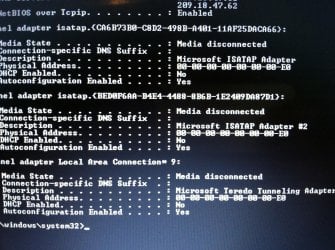
It might help if I could see the ipconfig/all not just the ipconfig, because there is some information missing from that one.

You have to hit enter after each command then reboot the machine.

http://www.sevenforums.com/tutorials/783-elevated-command-prompt.html
 
Last edited:

My Computer My Computer

At a glance

Windows 7 Ult, Windows 8.1 Pro,Q9650-4.275GHz, E8600 4.5GHz, E6750-3.8GHzG.Skill PC2 9600 1200Mhz 5 5 5 15 2TGTX480
Computer type
PC/Desktop
Computer Manufacturer/Model Number
Home built
OS
Windows 7 Ult, Windows 8.1 Pro,
CPU
Q9650-4.275GHz, E8600 4.5GHz, E6750-3.8GHz
Motherboard
Evga 780i FTW
Memory
G.Skill PC2 9600 1200Mhz 5 5 5 15 2T
Graphics Card(s)
GTX480
Sound Card
Asus Xonar D2
Monitor(s) Displays
HannsG
Screen Resolution
1680X1050
Hard Drives
GSkill Phoenix Pro 120GB SSD
PSU
ThermalTake Toughpower 1000Watt modular
Case
ThermalTake XaserV
Cooling
Xigmatek S1283
Keyboard
Logitech G15
Mouse
Logitech G9
Internet Speed
T1
Sure thing. And I've been using elevated command prompt his whole time. And I did hit enter after each prompt line. . . The first prompt went through, but the second one didn't. :(

Also I can't quite figure out how to attach two images at once from this phone, so the first half of that screen will be coming up shortly!
 

Attachments

  • image.jpg
    image.jpg
    722.8 KB · Views: 6

My Computer My Computer

At a glance

Windows 7 64 bit
OS
Windows 7 64 bit
Second part!
 

Attachments

  • image.jpg
    image.jpg
    664.3 KB · Views: 5

My Computer My Computer

At a glance

Windows 7 64 bit
OS
Windows 7 64 bit
Everything looks perfectly normal with the ipconfig's. You must have an installed program causing this problem or maybe a DNS misdirection virus it's hard to say.
 

My Computer My Computer

At a glance

Windows 7 Ult, Windows 8.1 Pro,Q9650-4.275GHz, E8600 4.5GHz, E6750-3.8GHzG.Skill PC2 9600 1200Mhz 5 5 5 15 2TGTX480
Computer type
PC/Desktop
Computer Manufacturer/Model Number
Home built
OS
Windows 7 Ult, Windows 8.1 Pro,
CPU
Q9650-4.275GHz, E8600 4.5GHz, E6750-3.8GHz
Motherboard
Evga 780i FTW
Memory
G.Skill PC2 9600 1200Mhz 5 5 5 15 2T
Graphics Card(s)
GTX480
Sound Card
Asus Xonar D2
Monitor(s) Displays
HannsG
Screen Resolution
1680X1050
Hard Drives
GSkill Phoenix Pro 120GB SSD
PSU
ThermalTake Toughpower 1000Watt modular
Case
ThermalTake XaserV
Cooling
Xigmatek S1283
Keyboard
Logitech G15
Mouse
Logitech G9
Internet Speed
T1
I haven't done anything too differently. All of the programs I have installed are programs I had when my browser worked. I've run full Microsoft security essentials scans a dozen times and I come up clean. Would the virus be the reason I can't use that second command prompt you gave me?
 

My Computer My Computer

At a glance

Windows 7 64 bit
OS
Windows 7 64 bit
I haven't done anything too differently. All of the programs I have installed are programs I had when my browser worked. I've run full Microsoft security essentials scans a dozen times and I come up clean. Would the virus be the reason I can't use that second command prompt you gave me?

If that command can't be run then yes I'd say there is a problem though it may be a system file corruption problem.

You should run the sfc/scannow command and see what it says.

System restore can be used to go back in time to when your system was working.

You may need to run a start up repair from the Windows CD, running it three times can fix file corruption or boot file problems.
 

My Computer My Computer

At a glance

Windows 7 Ult, Windows 8.1 Pro,Q9650-4.275GHz, E8600 4.5GHz, E6750-3.8GHzG.Skill PC2 9600 1200Mhz 5 5 5 15 2TGTX480
Computer type
PC/Desktop
Computer Manufacturer/Model Number
Home built
OS
Windows 7 Ult, Windows 8.1 Pro,
CPU
Q9650-4.275GHz, E8600 4.5GHz, E6750-3.8GHz
Motherboard
Evga 780i FTW
Memory
G.Skill PC2 9600 1200Mhz 5 5 5 15 2T
Graphics Card(s)
GTX480
Sound Card
Asus Xonar D2
Monitor(s) Displays
HannsG
Screen Resolution
1680X1050
Hard Drives
GSkill Phoenix Pro 120GB SSD
PSU
ThermalTake Toughpower 1000Watt modular
Case
ThermalTake XaserV
Cooling
Xigmatek S1283
Keyboard
Logitech G15
Mouse
Logitech G9
Internet Speed
T1
"Windows resource protection did not find any integrity violations" T-T

I recently ran a defrag, so my restore points are gone :(

I'll have to try to figure out how to do that without the original disc because I have no idea where it is D:

Update: I found some directions on how to run startup repair without a disc, but when a run it, it says it "could not detect a problem"

Now the browsers are giving me "server not found" and timeout errors instead of dns ones, but they're probably one and the same

Update #2 - I tried that second command prompt and it finally worked! Unfortunately, the problem persists. I'm really doubting that I have a virus because MSE keeps coming up with nothing, and it usually finds things when other programs don't.
 
Last edited:

My Computer My Computer

At a glance

Windows 7 64 bit
OS
Windows 7 64 bit
Well the problem still persists, but I am now getting this error: "your computer appears to be correctly configured, but the device or resource (Microsoft Home Page | Devices and Services) is not responding." I've tried everything I could find online. I can still use Internet other places, it's just at home where I can't.
 

My Computer My Computer

At a glance

Windows 7 64 bit
OS
Windows 7 64 bit
Back
Top