0xc000007b error for all VS2012 applications even with the redists

CorruptedTNC

New member
Local time
12:07 PM
Messages
22
Running x64 Windows 7

Got a free copy of VS2012 ultimate from my university's Microsoft program a few days ago and I got that error when running it, along with any program built with VS2012. After installing the redists from the Microsoft Download Center I tried again and the same error appears.

I've tried installing the x86 and x64 by themselves, and both at the same time but to no avail. I still have the 2010 redist installed if that makes a difference, however I could find no way to remove them as they don't appear anywhere.

Have also chkdsk'd and repaired my installation from cd to no avail.
 
Last edited:

My Computer My Computer

At a glance

Windows 7 Home Premium x642.2 GHz Intel Core i7-2670QM8 GB DDR3NVIDIA GeForce GT 630M (1 GB DDR3 dedicated)
OS
Windows 7 Home Premium x64
CPU
2.2 GHz Intel Core i7-2670QM
Memory
8 GB DDR3
Graphics Card(s)
NVIDIA GeForce GT 630M (1 GB DDR3 dedicated)
Sound Card
Beats Audio with HP Triple Bass Reflex Subwoofer
Screen Resolution
1600x900
Hard Drives
2x 1TB SATA (5400RPM)
438 views and no replies? D:
 

My Computer My Computer

At a glance

Windows 7 Home Premium x642.2 GHz Intel Core i7-2670QM8 GB DDR3NVIDIA GeForce GT 630M (1 GB DDR3 dedicated)
OS
Windows 7 Home Premium x64
CPU
2.2 GHz Intel Core i7-2670QM
Memory
8 GB DDR3
Graphics Card(s)
NVIDIA GeForce GT 630M (1 GB DDR3 dedicated)
Sound Card
Beats Audio with HP Triple Bass Reflex Subwoofer
Screen Resolution
1600x900
Hard Drives
2x 1TB SATA (5400RPM)
See the 3rd post in this thread , note the correct spacing after devenv :

Please first verify .NET Framework with this tool

.NET Framework Setup Verification Tool User's Guide - Aaron Stebner's WebLog - Site Home - MSDN Blogs

Then try these common steps to see if it works for you:
Open Visual Studio Command Prompt (2010) under Start menu -> All Programs -> Microsoft Visual Studio 2010 -> Visual Studio Tools (run it with Administrator privilege: right-click the program -> Run as administrator);
Try some devenv switches in command prompt:
Run devenv /Resetsettings to eliminate the cause of corrupted settings.
Run devenv /ResetSkipPkgs in Command Prompt.
Run devenv /Safemode to see if you can apply it correctly. This can eliminate the possibility that third party Add-ins or packages are causing problems.
Reboot the machine in SafeMode. This can isolate some third party application/driver's interference.
Switch and try a new user account. This can rule out the possibility of corrupted user profile.

If you still failed, please try devenv.exe /log <log path> in Command Prompt. I’d like to check the logs of Visual Studio to see the error. (The log will be generated on the path your typed and called Activity.xml by default).

A Guy
 

My Computer My Computer

At a glance

Windows 10 Home x64INTEL Core i5-750 Quad-Core 3.37GHzHyperX Fury Black Series 8GB (2 x 4GB) 1866MhzEVGA GeForce GTX 750 Superclocked 1GB 128-Bit...
Computer type
PC/Desktop
OS
Windows 10 Home x64
CPU
INTEL Core i5-750 Quad-Core 3.37GHz
Motherboard
ASUS P7P55D
Memory
HyperX Fury Black Series 8GB (2 x 4GB) 1866Mhz
Graphics Card(s)
EVGA GeForce GTX 750 Superclocked 1GB 128-Bit GDDR5
Monitor(s) Displays
LG 32MA68HY 32" IPS
Screen Resolution
1920 x 1080
Hard Drives
Samsung 840 Evo 120GB, SEAGATE 500GB Barracuda® 7200.12, SATA 3 Gb/s, 7200 RPM, 16MB cache
PSU
ANTEC TruePower New TP-550, 80 PLUS, 550W
Case
ANTEC Three Hundred Illusion
Cooling
COOLER MASTER Hyper 212 Plus, 4 x 120mm 1 x 140mm Noctua's
Internet Speed
85 + Mbps
Antivirus
Avast
Browser
Vivaldi
See the 3rd post in this thread , note the correct spacing after devenv :

Please first verify .NET Framework with this tool

.NET Framework Setup Verification Tool User's Guide - Aaron Stebner's WebLog - Site Home - MSDN Blogs

Then try these common steps to see if it works for you:
Open Visual Studio Command Prompt (2010) under Start menu -> All Programs -> Microsoft Visual Studio 2010 -> Visual Studio Tools (run it with Administrator privilege: right-click the program -> Run as administrator);
Try some devenv switches in command prompt:
Run devenv /Resetsettings to eliminate the cause of corrupted settings.
Run devenv /ResetSkipPkgs in Command Prompt.
Run devenv /Safemode to see if you can apply it correctly. This can eliminate the possibility that third party Add-ins or packages are causing problems.
Reboot the machine in SafeMode. This can isolate some third party application/driver's interference.
Switch and try a new user account. This can rule out the possibility of corrupted user profile.

If you still failed, please try devenv.exe /log <log path> in Command Prompt. I’d like to check the logs of Visual Studio to see the error. (The log will be generated on the path your typed and called Activity.xml by default).

A Guy
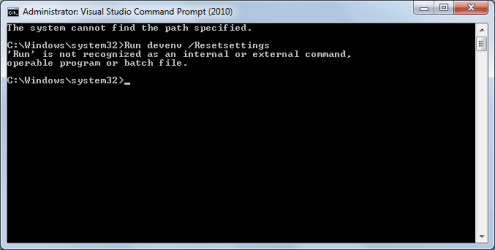
See attached picture. Really lost over here D:
 

Attachments

  • what.png
    what.png
    8.8 KB · Views: 35

My Computer My Computer

At a glance

Windows 7 Home Premium x642.2 GHz Intel Core i7-2670QM8 GB DDR3NVIDIA GeForce GT 630M (1 GB DDR3 dedicated)
OS
Windows 7 Home Premium x64
CPU
2.2 GHz Intel Core i7-2670QM
Memory
8 GB DDR3
Graphics Card(s)
NVIDIA GeForce GT 630M (1 GB DDR3 dedicated)
Sound Card
Beats Audio with HP Triple Bass Reflex Subwoofer
Screen Resolution
1600x900
Hard Drives
2x 1TB SATA (5400RPM)
To make it clearer ;) After the command prompt is open, Type

devenv /Resetsettings

Enter

And/or

devenv /ResetSkipPkgs

Enter

And/or

devenv /Safemode

Enter

A Guy
 

My Computer My Computer

At a glance

Windows 10 Home x64INTEL Core i5-750 Quad-Core 3.37GHzHyperX Fury Black Series 8GB (2 x 4GB) 1866MhzEVGA GeForce GTX 750 Superclocked 1GB 128-Bit...
Computer type
PC/Desktop
OS
Windows 10 Home x64
CPU
INTEL Core i5-750 Quad-Core 3.37GHz
Motherboard
ASUS P7P55D
Memory
HyperX Fury Black Series 8GB (2 x 4GB) 1866Mhz
Graphics Card(s)
EVGA GeForce GTX 750 Superclocked 1GB 128-Bit GDDR5
Monitor(s) Displays
LG 32MA68HY 32" IPS
Screen Resolution
1920 x 1080
Hard Drives
Samsung 840 Evo 120GB, SEAGATE 500GB Barracuda® 7200.12, SATA 3 Gb/s, 7200 RPM, 16MB cache
PSU
ANTEC TruePower New TP-550, 80 PLUS, 550W
Case
ANTEC Three Hundred Illusion
Cooling
COOLER MASTER Hyper 212 Plus, 4 x 120mm 1 x 140mm Noctua's
Internet Speed
85 + Mbps
Antivirus
Avast
Browser
Vivaldi
To make it clearer ;) After the command prompt is open, Type

devenv /Resetsettings

Enter

And/or

devenv /ResetSkipPkgs

Enter

And/or

devenv /Safemode

Enter

A Guy

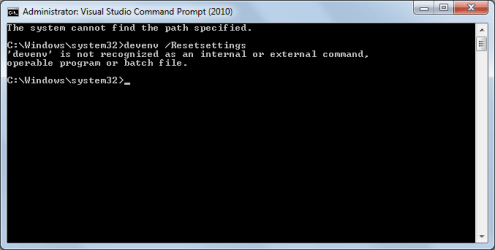
'devenv' is not recognized as an internal or external command. Well this is embarassing.
 

Attachments

  • devenv.png
    devenv.png
    8.9 KB · Views: 13

My Computer My Computer

At a glance

Windows 7 Home Premium x642.2 GHz Intel Core i7-2670QM8 GB DDR3NVIDIA GeForce GT 630M (1 GB DDR3 dedicated)
OS
Windows 7 Home Premium x64
CPU
2.2 GHz Intel Core i7-2670QM
Memory
8 GB DDR3
Graphics Card(s)
NVIDIA GeForce GT 630M (1 GB DDR3 dedicated)
Sound Card
Beats Audio with HP Triple Bass Reflex Subwoofer
Screen Resolution
1600x900
Hard Drives
2x 1TB SATA (5400RPM)
Yikes! The command you did is correct:

Devenv Command Line Switches

I see reference to a devenv.exe it may be devnev.exe /Resetsettings

Perhaps confirm the presence of devenv.exe at

C:\Program Files (x86)\Microsoft Visual Studio 11.0\Common7\IDE\devenv.ex

I hope I am not sending you on a wild goose chase, it was just something I found googling. I can look more tomorrow when I have time to help here.

A Guy
 

My Computer My Computer

At a glance

Windows 10 Home x64INTEL Core i5-750 Quad-Core 3.37GHzHyperX Fury Black Series 8GB (2 x 4GB) 1866MhzEVGA GeForce GTX 750 Superclocked 1GB 128-Bit...
Computer type
PC/Desktop
OS
Windows 10 Home x64
CPU
INTEL Core i5-750 Quad-Core 3.37GHz
Motherboard
ASUS P7P55D
Memory
HyperX Fury Black Series 8GB (2 x 4GB) 1866Mhz
Graphics Card(s)
EVGA GeForce GTX 750 Superclocked 1GB 128-Bit GDDR5
Monitor(s) Displays
LG 32MA68HY 32" IPS
Screen Resolution
1920 x 1080
Hard Drives
Samsung 840 Evo 120GB, SEAGATE 500GB Barracuda® 7200.12, SATA 3 Gb/s, 7200 RPM, 16MB cache
PSU
ANTEC TruePower New TP-550, 80 PLUS, 550W
Case
ANTEC Three Hundred Illusion
Cooling
COOLER MASTER Hyper 212 Plus, 4 x 120mm 1 x 140mm Noctua's
Internet Speed
85 + Mbps
Antivirus
Avast
Browser
Vivaldi
Right, well after several reinstalls of Visual Studio 2010 it has decided to work again. Alas after entering the commands, Visual Studio 2012 (and all programs built with it) are still refusing to work.

Attempting to open the devenv DOS application in the visual studio 11.0\common7 etc folder gives me the application error originally stated >.<
 
Last edited:

My Computer My Computer

At a glance

Windows 7 Home Premium x642.2 GHz Intel Core i7-2670QM8 GB DDR3NVIDIA GeForce GT 630M (1 GB DDR3 dedicated)
OS
Windows 7 Home Premium x64
CPU
2.2 GHz Intel Core i7-2670QM
Memory
8 GB DDR3
Graphics Card(s)
NVIDIA GeForce GT 630M (1 GB DDR3 dedicated)
Sound Card
Beats Audio with HP Triple Bass Reflex Subwoofer
Screen Resolution
1600x900
Hard Drives
2x 1TB SATA (5400RPM)
Still unable to solve this, last call for help before I just reinstall w7
 

My Computer My Computer

At a glance

Windows 7 Home Premium x642.2 GHz Intel Core i7-2670QM8 GB DDR3NVIDIA GeForce GT 630M (1 GB DDR3 dedicated)
OS
Windows 7 Home Premium x64
CPU
2.2 GHz Intel Core i7-2670QM
Memory
8 GB DDR3
Graphics Card(s)
NVIDIA GeForce GT 630M (1 GB DDR3 dedicated)
Sound Card
Beats Audio with HP Triple Bass Reflex Subwoofer
Screen Resolution
1600x900
Hard Drives
2x 1TB SATA (5400RPM)
I'll post to the Gurus, see if anyone with personal experience can help.

A Guy
 

My Computer My Computer

At a glance

Windows 10 Home x64INTEL Core i5-750 Quad-Core 3.37GHzHyperX Fury Black Series 8GB (2 x 4GB) 1866MhzEVGA GeForce GTX 750 Superclocked 1GB 128-Bit...
Computer type
PC/Desktop
OS
Windows 10 Home x64
CPU
INTEL Core i5-750 Quad-Core 3.37GHz
Motherboard
ASUS P7P55D
Memory
HyperX Fury Black Series 8GB (2 x 4GB) 1866Mhz
Graphics Card(s)
EVGA GeForce GTX 750 Superclocked 1GB 128-Bit GDDR5
Monitor(s) Displays
LG 32MA68HY 32" IPS
Screen Resolution
1920 x 1080
Hard Drives
Samsung 840 Evo 120GB, SEAGATE 500GB Barracuda® 7200.12, SATA 3 Gb/s, 7200 RPM, 16MB cache
PSU
ANTEC TruePower New TP-550, 80 PLUS, 550W
Case
ANTEC Three Hundred Illusion
Cooling
COOLER MASTER Hyper 212 Plus, 4 x 120mm 1 x 140mm Noctua's
Internet Speed
85 + Mbps
Antivirus
Avast
Browser
Vivaldi
Hi Corrupted,

If you were able to execute devenv skip to the next post (when there is one)

If not, try searching for it - a command line might be easier

open an elevated command line (right click - run as administrator)
in the command prompt window type:
dir /s /a devenv*.*
If it is found, the Change Directories (CD) to the location and execute the commands A Guy provided before.
cd \location-devenv-was-found
and execute the commands A Guy previously provided

It's possible that devenv is hidden or is a system file and it won't be available when you try to run it.
see what the attrinbutes are on the file if this is the case
attrib devenv*.*

It sounds as though you found many of the things that turned up in my quick search, so I'll leave it at that. good luck.

Bill
.
 

My Computer My Computer

At a glance

x64 (6.3.9600) Win8.1 Pro & soon dual boot x6...AMD A6-3420M APU with Radeon(tm) HD Graphics6.00 GBAMD Radeon(TM) HD 6520G
Computer type
Laptop
Computer Manufacturer/Model Number
HP Pavilion dv6-6c10us
OS
x64 (6.3.9600) Win8.1 Pro & soon dual boot x64 (6.1.7601) Win7_SP1 HomePrem
CPU
AMD A6-3420M APU with Radeon(tm) HD Graphics
Motherboard
Hewlett-Packard 1805
Memory
6.00 GB
Graphics Card(s)
AMD Radeon(TM) HD 6520G
Sound Card
(1) AMD High Definition Audio Device (2) IDT High Definiti
Monitor(s) Displays
HP W2072a 20" LCD (1600 x 900) @ 60 Hz
Screen Resolution
1366 x 768 x 32 bits (4294967296 colors) @ 60 Hz
Hard Drives
ST640LM0 00 HM641JI SATA Disk Device
Keyboard
Logitech k520 wireless KB
Mouse
Logitech m320 wireless mouse (bundled with KB)
Internet Speed
15/5 | 54 MB Wireless 'n'
Antivirus
Realtime: Defender or Avast | On-demand: Malwarebytes, ESET
Browser
IE 11 on Win8, IE 10 on win 7
Other Info
Media: [Gimp, Audacity, VLC] || Comm: [WEmail 2012, Skype] || Productivity: [OpenOffice,| Textpad] || Utils: [Sysinternals, cCleaner, Speccy, Defraggler]
Did you read the page at the bottom of Microsoft Visual C++ 2010 Redistributable Package (x64)?
Additional information: Visual Studio 2010 Readme
I'm hardly a guru and have no experience with VS, but I've mucked around in MS forever.

I might have missed it, but did you check Aaron's blog? It is dated, but supports all .NET releases up to 4.5 (current)
Did you run the NET verifier?

Aaron said:
The .NET Framework setup verification tool is available for download at the following locations:
The .zip file that contains the tool also contains a file named history.txt that lists when the most recent version of the tool was published and what changes have been made to the tool over time.
Also on Aaron's blog, he mentions how to remove orphaned ms c runtimes. Or, you could go with your orignal thought and reinstall win7. I'm not certain you won't have the same issue afterwards though. The common thread found is C runtime and .NET.

If you do reinstall Windows, I suggest installing VS2012 only - do not install VS2010.
Still unable to solve this, last call for help before I just reinstall w7
 

My Computer My Computer

At a glance

x64 (6.3.9600) Win8.1 Pro & soon dual boot x6...AMD A6-3420M APU with Radeon(tm) HD Graphics6.00 GBAMD Radeon(TM) HD 6520G
Computer type
Laptop
Computer Manufacturer/Model Number
HP Pavilion dv6-6c10us
OS
x64 (6.3.9600) Win8.1 Pro & soon dual boot x64 (6.1.7601) Win7_SP1 HomePrem
CPU
AMD A6-3420M APU with Radeon(tm) HD Graphics
Motherboard
Hewlett-Packard 1805
Memory
6.00 GB
Graphics Card(s)
AMD Radeon(TM) HD 6520G
Sound Card
(1) AMD High Definition Audio Device (2) IDT High Definiti
Monitor(s) Displays
HP W2072a 20" LCD (1600 x 900) @ 60 Hz
Screen Resolution
1366 x 768 x 32 bits (4294967296 colors) @ 60 Hz
Hard Drives
ST640LM0 00 HM641JI SATA Disk Device
Keyboard
Logitech k520 wireless KB
Mouse
Logitech m320 wireless mouse (bundled with KB)
Internet Speed
15/5 | 54 MB Wireless 'n'
Antivirus
Realtime: Defender or Avast | On-demand: Malwarebytes, ESET
Browser
IE 11 on Win8, IE 10 on win 7
Other Info
Media: [Gimp, Audacity, VLC] || Comm: [WEmail 2012, Skype] || Productivity: [OpenOffice,| Textpad] || Utils: [Sysinternals, cCleaner, Speccy, Defraggler]
Back
Top