Remove read only write protection on micro sd 2GB memory card

Talhaayyan

New member
Local time
8:14 AM
Messages
13
When I used my 2GB micro sd card to save my personal data it automaticlly became write protected. I can't make any change in it even it is not formatted due to write protected error and I can't change its attributes also. I have tried many ways like command prompt, registry and format it though disk management but can't. Please give me a simple and authentic way to remove its write protection. Please help me..
 

My Computer My Computer

OS
Windows 7 ultimate x32
Turn the Lock switch to off on the card.
 

My Computer My Computer

OS
7 x64
There is no any lock on my card. It is without switch or lock. It is a simple micro sd card
 

My Computer My Computer

OS
Windows 7 ultimate x32
I think you will find the lock is on the adapter that you put your micro card into before inserting it in the card reader!
 

My Computer My Computer

Computer type
PC/Desktop
OS
Microsoft Windows 7 Home Premium 64-bit 7601 Multiprocessor Free Service Pack 1
CPU
Intel(R) Core(TM) i7-3770 CPU @ 3.40GHz
Motherboard
ASUSTeK COMPUTER INC. P8H77-M
Memory
8.00 GB
Graphics Card(s)
Intel(R) HD Graphics 4000
Sound Card
On Board
Monitor(s) Displays
Dell 24"
Screen Resolution
1920 x 1080
Hard Drives
(1) INTEL SSDSC2CT180A3 ATA Device (2) ST500DM002-1BD142 ATA Device (3) WDC WD3200AAKS-75L9A0 ATA Device (4) Generic- Compact Flash USB Device (5) Generic- MS/MS-Pro USB Device (6) Generic- SD/MMC USB Device (7) Generic- SM/xD-Picture USB
PSU
500w Corsair
Case
Cooler Master
Cooling
3 Fans
Keyboard
Logitech MK300
Mouse
Logitech WOM
Internet Speed
75Mb
Antivirus
Norton 360
Browser
Firefox, Opera, IE
No i found no lock. When i attach my card to laptop attrib.exe error is occured in which it is written 'disk is write protected. Remove write protection by going to volume of it.
 

My Computer My Computer

OS
Windows 7 ultimate x32
Is this a new card ? ?
Did anyone else use it ? ?
Is there data on it you need ? ?
 

My Computer My Computer

Computer Manufacturer/Model Number
Self-Built
OS
Vista Ultimate X64/ Windows 7 Dual-boot
CPU
Q6600
Motherboard
ASUS P5K
Memory
4G OCZ PC2 8500 Platinum
Graphics Card(s)
EVGA 8800GTS Vid Card
Hard Drives
500G Seagate SATA
200G Seagate SATA
100G WD Caviar SATA
80G WD Caviar IDE
PSU
OCZ Elite 800W PSU
Case
RaidMax Smilodon Case
All Micro SD card adapters have a lock on them. It'll be a little slider on the left-hand side of the SD card adapter. It's there.
 

My Computer My Computer

Computer type
PC/Desktop
Computer Manufacturer/Model Number
Custom Built By Me.
OS
Windows 10 Pro 64 bit
CPU
AMD FX 9590 8 Core Black Edition
Motherboard
MSI 990FXA GAMING (MS-7893)
Memory
Corsair Vengeance 16GB DDR3
Graphics Card(s)
AMD Radeon (TM) R9 380 Gaming Series
Sound Card
AMD High Definition
Monitor(s) Displays
Samsung 32" 60Hz 4ms Curved PLS LED
Screen Resolution
1920 X 1080
Hard Drives
C: 223 GB SSD = E: 465 GB HDD = F: 931 GB HDD = G: 149 GB HDD = H: 931 GB HDD
PSU
EVGA Supernova NEX750B 750W ATX EPS12V 80PLUS Bronze
Case
Cool Master
Cooling
Noctua NH-D15 Premium Cooler with 2x NF-A15 PWM 140mm Fan
Internet Speed
Fiber Optic: Download 332.7 Mbps / Upload 331.5 Mbps
Antivirus
Windows Defender
Browser
Slimjet (64bit)
You haven't said that you have looked at the adapter. You have to use an adapter to put the card into a card reader. It may well be that you leave the adapter in the card reader and have forgotten thatyou can remove it from the reader. please look! If you have no adapter you do not have a Micro SD card!
 

My Computer My Computer

Computer type
PC/Desktop
OS
Microsoft Windows 7 Home Premium 64-bit 7601 Multiprocessor Free Service Pack 1
CPU
Intel(R) Core(TM) i7-3770 CPU @ 3.40GHz
Motherboard
ASUSTeK COMPUTER INC. P8H77-M
Memory
8.00 GB
Graphics Card(s)
Intel(R) HD Graphics 4000
Sound Card
On Board
Monitor(s) Displays
Dell 24"
Screen Resolution
1920 x 1080
Hard Drives
(1) INTEL SSDSC2CT180A3 ATA Device (2) ST500DM002-1BD142 ATA Device (3) WDC WD3200AAKS-75L9A0 ATA Device (4) Generic- Compact Flash USB Device (5) Generic- MS/MS-Pro USB Device (6) Generic- SD/MMC USB Device (7) Generic- SM/xD-Picture USB
PSU
500w Corsair
Case
Cooler Master
Cooling
3 Fans
Keyboard
Logitech MK300
Mouse
Logitech WOM
Internet Speed
75Mb
Antivirus
Norton 360
Browser
Firefox, Opera, IE
No it is not a new card. It was going perfect I have problem with it only few days. No any one else has used it. And the data in it i d'nt need. It has no adapter i put it in card reader directly.
 

My Computer My Computer

OS
Windows 7 ultimate x32
To my knowledge there is NO Micro SD card reader. They all have to go into a adpater that looks like a Standard SD card.

So you either have an SD card, A Standard SD card, or it is a Micro SD in an Adapter. In either case there is a switch on the upper left hand side that Locks the card from writing to it.

If that lock is not all the UP, closest to the connection point, then it is Lock. If it is all the way up and it is an older card the card has probably failed and need to be replaced.
 

My Computer My Computer

OS
7 x64
Ok fine thanks a lot for nice cooperation.
 

My Computer My Computer

OS
Windows 7 ultimate x32
If your MicroSD card had been working fine all along and suddenly turned write-protected, that means it's in failsafe mode. All reserved sectors for mapping the bad sectors are exhausted and it is not letting you write anything which will only result in corrupt files. Replacement is the only option.
 

My Computer My Computer

OS
Windows 7 Home Premium 32 bit
As a final go at this. I would re iterate what I and others have said. There is no card reader that will take a micro SD without an adapter and that adapter will have the lock facility! So I have no idea what the OP has! Perhaps he could photograph the face of the card and post it here and possibly a photo of his card reader!
 

My Computer My Computer

Computer type
PC/Desktop
OS
Microsoft Windows 7 Home Premium 64-bit 7601 Multiprocessor Free Service Pack 1
CPU
Intel(R) Core(TM) i7-3770 CPU @ 3.40GHz
Motherboard
ASUSTeK COMPUTER INC. P8H77-M
Memory
8.00 GB
Graphics Card(s)
Intel(R) HD Graphics 4000
Sound Card
On Board
Monitor(s) Displays
Dell 24"
Screen Resolution
1920 x 1080
Hard Drives
(1) INTEL SSDSC2CT180A3 ATA Device (2) ST500DM002-1BD142 ATA Device (3) WDC WD3200AAKS-75L9A0 ATA Device (4) Generic- Compact Flash USB Device (5) Generic- MS/MS-Pro USB Device (6) Generic- SD/MMC USB Device (7) Generic- SM/xD-Picture USB
PSU
500w Corsair
Case
Cooler Master
Cooling
3 Fans
Keyboard
Logitech MK300
Mouse
Logitech WOM
Internet Speed
75Mb
Antivirus
Norton 360
Browser
Firefox, Opera, IE
As a final go at this. I would re iterate what I and others have said. There is no card reader that will take a micro SD without an adapter and that adapter will have the lock facility! So I have no idea what the OP has! Perhaps he could photograph the face of the card and post it here and possibly a photo of his card reader!

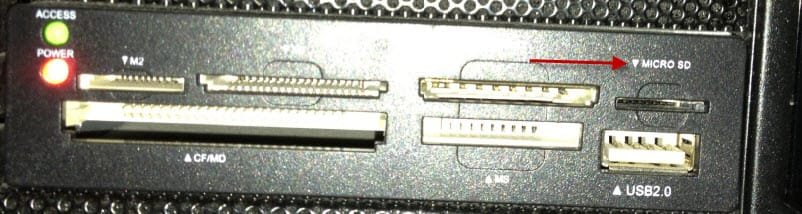
Just a heads up on the reader issue. I purchased a multi-card reader and it does read a Micro SD without an adaptor, see image;

Micro SD Reader.jpg

SD's do have a limited life span and the problem for the OP may be the one he's trying to read has come to EOL. I do know that every micro card I have used has no lock.
 

My Computer My Computer

Computer type
PC/Desktop
Computer Manufacturer/Model Number
Custom Built
OS
Windows 7 Professional x64
CPU
Intel i5 quad processor
Motherboard
DP67BG
Memory
16 GB
Graphics Card(s)
Radeon HD 5770
Sound Card
Realtek High Definition Audio
Monitor(s) Displays
Samsung SyncMaster
Screen Resolution
1920X1080
Hard Drives
WD 2TB (SATA Internal)
WD 1TB (USB External)
PSU
Corsair GS800
Case
Tower (Generic)
Cooling
3 Internal Fans
Keyboard
MS Wireless
Mouse
MS Optical Wired
Internet Speed
54 mbps
Antivirus
Emsisoft
Browser
IE-Version 9, Palemoon-Version 24.2.0

My Computer My Computer

Computer type
PC/Desktop
OS
Microsoft Windows 7 Home Premium 64-bit 7601 Multiprocessor Free Service Pack 1
CPU
Intel(R) Core(TM) i7-3770 CPU @ 3.40GHz
Motherboard
ASUSTeK COMPUTER INC. P8H77-M
Memory
8.00 GB
Graphics Card(s)
Intel(R) HD Graphics 4000
Sound Card
On Board
Monitor(s) Displays
Dell 24"
Screen Resolution
1920 x 1080
Hard Drives
(1) INTEL SSDSC2CT180A3 ATA Device (2) ST500DM002-1BD142 ATA Device (3) WDC WD3200AAKS-75L9A0 ATA Device (4) Generic- Compact Flash USB Device (5) Generic- MS/MS-Pro USB Device (6) Generic- SD/MMC USB Device (7) Generic- SM/xD-Picture USB
PSU
500w Corsair
Case
Cooler Master
Cooling
3 Fans
Keyboard
Logitech MK300
Mouse
Logitech WOM
Internet Speed
75Mb
Antivirus
Norton 360
Browser
Firefox, Opera, IE
Back
Top