SATA Drivers - Slipstream into Windows XP CD

How to slipstream SATA drivers into Windows XP setup CD, on your dual boot PC with Windows 7 or Vista

When you install Win XP, setup can not find your Hard Drive.

1.PNG

2.PNG


1) Download & Install nLite
nLite - Deployment Tool for the bootable Unattended Windows installation

2) Make a new folder for your Windows XP image.
Note: for this example, I am using the name Win XP Sata.

3) Insert XP CD & start nLite

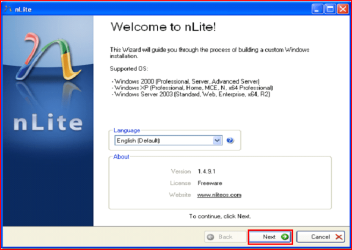
4) Click Next.
3.PNG
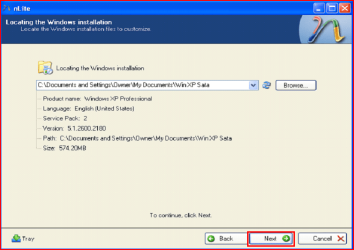
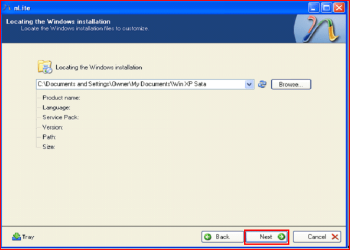
5) Choose your Windows XP image folder, & Click Next, than OK.
Note: nLite will put the image into your folder.
4.PNG

5.PNG
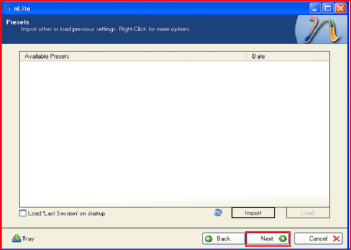
6) Click Next.
6.PNG
7) Click Next.
7.PNG
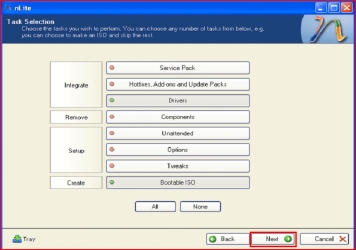
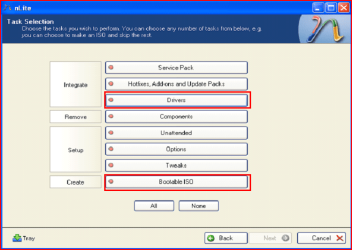
8) Choose Integrate Drivers & Create Bootable ISO
8.PNG
9) Click Next.
9.PNG
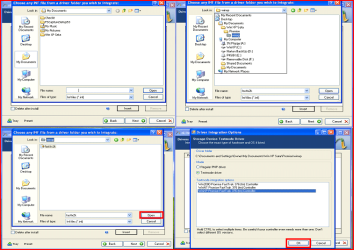
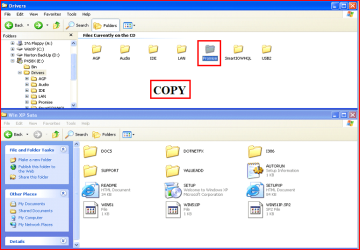
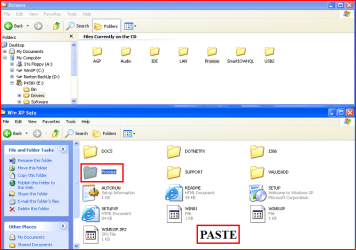
10) Copy & Paste your Sata Driver to your image folder.
Note: for this example, I am using Promise Fastrak 376.
10.PNG

11.PNG
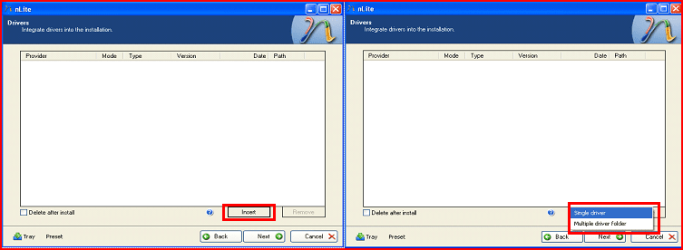
11) Click Insect, than Single Driver.
12.PNG
12) Locate your Sata Setup Inf file.
Click Open, than OK.
Note: for this example the file is called fasttx2k.
Note: for this example, I am using Promise Fastrak 376.
13.PNG
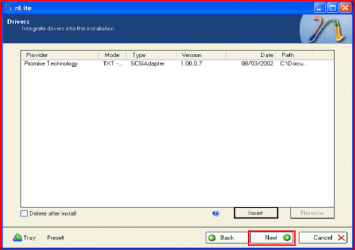
13) Click Next.
14.PNG
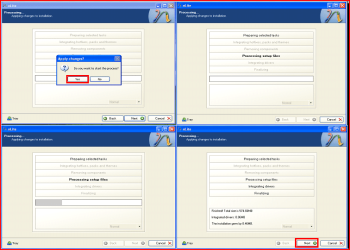
14) Click Yes, than Next.
15.PNG
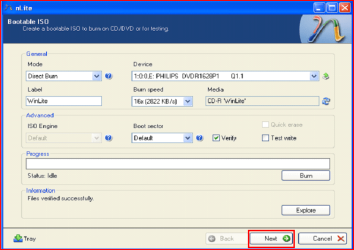
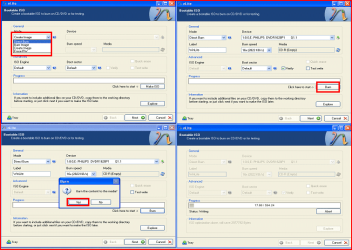
15) Choose Direct Burn.
Click Burn, than Yes.
Note: nLite will now burn your new CD.
16.PNG
16) Click Next.
17.PNG
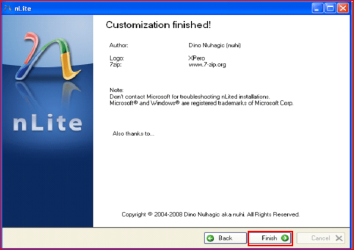
17) Click Finish.
18.PNG
Your Sata drive will now show up in setup.
19.PNG

 
Last edited by a moderator:
I ended up by initially installing XP in IDE mode on a spare second hard disk which I installed in the computer. I then followed the method in this link to install the correct SATA AHCI driver for my motherboard and then change the BIOS to AHCI:

http://h20000.www2.hp.com/bizsuppor...=5056942&prodTypeId=321957&objectID=c03101776

Having now got XP installed in AHCI mode on my spare hard disk, I made an image backup of it and restored the image to a separate partition on my Windows 7 hard drive. Finally, I downloaded a program called EasyBCD which made it simple to add XP to the master boot record.

A bit long winded perhaps, but I can now dual boot XP and Windows 7.

Well, good job!
 

My Computer My Computer

Computer Manufacturer/Model Number
HP Pavilion dm1-4000AU
OS
Windows 7 Home Premium 32-bit
CPU
AMD E-450 APU
Motherboard
HP 3387 with AMD A40/A50 Series FCH
Memory
2GB SO-DIMM DDR3
Graphics Card(s)
ATi Mobility Radeon HD 6320
Sound Card
IDT High Definition Audio with Beats by dr. Dre
Monitor(s) Displays
HP Brightview LED 11.6"
Screen Resolution
1366x768 pixels, 32-bit Colour
Hard Drives
Hitachi HTS547550A9E384
500GB SATA II
PSU
HP Battery OEM
Case
HP OEM
Cooling
HP OEM
Keyboard
Just an ordinary island style 101-102 keys keyboard
Mouse
Synaptics Touchpad
Internet Speed
1 Mbps
Thanks so much, theog.

This is valuable help now that XP installer no longer can keep up with SATA drives.

The use of screenshots is also far beyond anything else out there on the web for this.

Will be giving this out several times per week, I'm sure.

Where i can find my driver installer in my HP Pavilion dv6-3120tx laptop...?
 

My Computer My Computer

Computer type
Laptop
Computer Manufacturer/Model Number
HP Pavilion dv6-3120tx
OS
Windows 7 Home Premium x64bit
CPU
Intel(R) Core(TM) i3 CPU M370 @ 2.40Ghz
Motherboard
HP Pavilion dv6 Notebook PC
Memory
3GB
Graphics Card(s)
ATI Mobility radeon(TM) Premium Graphics HD 5470
Sound Card
IDT High Definition audio codec & ATI HD audio device
Screen Resolution
1366*768
Hard Drives
Hitachi 320GB
Thanks so much, theog.

This is valuable help now that XP installer no longer can keep up with SATA drives.

The use of screenshots is also far beyond anything else out there on the web for this.

Will be giving this out several times per week, I'm sure.

Where i can find my driver installer in my HP Pavilion dv6-3120tx laptop...?

First check for all the Win XP drivers for your hardware.
HP Support & Drivers | United States

If your Win XP CD, does not support your Sata Controller, you will need to load drivers to uses at F6.
Load Sata Controller drivers with a floppy disk is the best way.
http://www.sevenforums.com/tutorials/66010-sata-drivers-load-windows-xp-setup-dual-boot.html
OR
http://www.sevenforums.com/tutorials/72185-sata-drivers-slipstream-into-windows-xp-cd.html

You can download your F6 Sata Controller drivers from here:
Note: Please read this thread fully.
General XP Downgrade Guide for HP Laptops - HP Support Forum

http://www.sevenforums.com/tutorials/8057-dual-boot-installation-windows-7-xp.html?ltr=D
 

My Computer My Computer

OS
ME/XP/Vista/Win7
I was advised to join this thread for assistance, since that's what I'm trying to achieve and I am a noobie in this area. I can change hardware and do installations, but not afraid to dwell in new areas.
System is a HP Pavilion P6310f Win 7 64bit, mobo M2N78-LA, Athalon II x4 630, GeForce 8600GT PCIe card, 6gb ram, 1tb hd and I believe the SATA controller is Nvidia Nforce MCP78S (GeForce 8200) AHCI.

My quest: Dual boot with 7 and XP.
Reading through Blink's tutorial, my only option is to slipstream the sata drivers. I have yet to partition the existing drive to install XP, because reading through the tutorial, it suggests to download the drivers from the manufacturer's site. For my unit, HP lists Win7 32, Win7 64, Vista and Vista 64. When I hover the cursor over to "...OS not listed.." I get "If your operating system is not listed, HP does not have software or downloads available for this product in that operating system."
Then I tried searching for the mobo and I could not find what I need. I was also wondering, should I also have drivers for the rest of the hardware installed in the machine besides the SATA drive? Sometimes I feel this stuff is over my head. But the tutorials like this with screen shots are awesome and motivating.
I do not have the HP install cd, but I made the recovery dvd's (3) shortly after I got the machine. I also have a new, still in the wrapper, retail copy of XP Pro SP2.
Request: Help finding any drivers to complete this dual boot. Thanks.
 

My Computer My Computer

Computer Manufacturer/Model Number
HP Pavilion P6310f
OS
Windows7 Home 64bit
CPU
AMD Athlon II x4 630
Motherboard
M2N78-LA (Violet6)
Memory
6gb PC3-10600
Graphics Card(s)
EVGA GeForce 8600GT
Sound Card
Integrated Realtek ALC888S
Monitor(s) Displays
HP2909 20"
Hard Drives
WD 1Tb SATA
PSU
300w
I was advised to join this thread for assistance, since that's what I'm trying to achieve and I am a noobie in this area. I can change hardware and do installations, but not afraid to dwell in new areas.
System is a HP Pavilion P6310f Win 7 64bit, mobo M2N78-LA, Athalon II x4 630, GeForce 8600GT PCIe card, 6gb ram, 1tb hd and I believe the SATA controller is Nvidia Nforce MCP78S (GeForce 8200) AHCI.

My quest: Dual boot with 7 and XP.
Reading through Blink's tutorial, my only option is to slipstream the sata drivers. I have yet to partition the existing drive to install XP, because reading through the tutorial, it suggests to download the drivers from the manufacturer's site. For my unit, HP lists Win7 32, Win7 64, Vista and Vista 64. When I hover the cursor over to "...OS not listed.." I get "If your operating system is not listed, HP does not have software or downloads available for this product in that operating system."
Then I tried searching for the mobo and I could not find what I need. I was also wondering, should I also have drivers for the rest of the hardware installed in the machine besides the SATA drive? Sometimes I feel this stuff is over my head. But the tutorials like this with screen shots are awesome and motivating.
I do not have the HP install cd, but I made the recovery dvd's (3) shortly after I got the machine. I also have a new, still in the wrapper, retail copy of XP Pro SP2.
Request: Help finding any drivers to complete this dual boot. Thanks.

You can check your HP/compaq PC here:
General XP Downgrade Guide for HP Laptops - HP Support Forum
NOTE: Please read this thread fully.
As some HP/compaq PC have a BIOS problem with Win XP
 

My Computer My Computer

OS
ME/XP/Vista/Win7
Well I read all of the downgrade guide and unless I missed something (after I read it twice), I read the guide is for laptops not desktops. Also the model numbers are no were near mine (P6310f). I appreciate the input, but did I miss something?
 

My Computer My Computer

Computer Manufacturer/Model Number
HP Pavilion P6310f
OS
Windows7 Home 64bit
CPU
AMD Athlon II x4 630
Motherboard
M2N78-LA (Violet6)
Memory
6gb PC3-10600
Graphics Card(s)
EVGA GeForce 8600GT
Sound Card
Integrated Realtek ALC888S
Monitor(s) Displays
HP2909 20"
Hard Drives
WD 1Tb SATA
PSU
300w
Well I read all of the downgrade guide and unless I missed something (after I read it twice), I read the guide is for laptops not desktops. Also the model numbers are no were near mine (P6310f). I appreciate the input, but did I miss something?

Your Nvidia drivers are listed in the thread.
 

My Computer My Computer

OS
ME/XP/Vista/Win7
I appologize if this is spoon feeding. I'm embarassed about it, but I think my Nvidia SATA controller is GeForce 8200. Which catagory is my desktop in? Easy, Moderate or Difficult? There's so much for rookies like myself to absorb, it crosses my mind that I should not be attempting any of this. Thanks.
 

My Computer My Computer

Computer Manufacturer/Model Number
HP Pavilion P6310f
OS
Windows7 Home 64bit
CPU
AMD Athlon II x4 630
Motherboard
M2N78-LA (Violet6)
Memory
6gb PC3-10600
Graphics Card(s)
EVGA GeForce 8600GT
Sound Card
Integrated Realtek ALC888S
Monitor(s) Displays
HP2909 20"
Hard Drives
WD 1Tb SATA
PSU
300w
I believe I am retarded. I use Greddy emanage ultimate software to tune my car. I was told it used xp, so I was given a notebook with xp and managed to DL and install the software and life was great. Then my notebook died. Then I bought a notebook. Then I discovered the driver will only work on a 32 bit OS. My notebook is win7 64bit. In attempt to dualboot I ended up here.

Cliff notes:
Lenovo z580 notebook win7 64bit

Bought win xp 32bit OS

DL nlite

Copied win xp to a folder

Went to Lenovo site and DL'd chipset drivers

Cannot find .inf file to add to nlite in order to create disc

Is the chipset files the right DL? How do I find the .inf file?

Any help would be greatly appreciated I am sick of my car running not so great.
 

My Computer My Computer

OS
Windows 7 home premium 64 bit
I believe I am retarded. I use Greddy emanage ultimate software to tune my car. I was told it used xp, so I was given a notebook with xp and managed to DL and install the software and life was great. Then my notebook died. Then I bought a notebook. Then I discovered the driver will only work on a 32 bit OS. My notebook is win7 64bit. In attempt to dualboot I ended up here.

Cliff notes:
Lenovo z580 notebook win7 64bit

Bought win xp 32bit OS

DL nlite

Copied win xp to a folder

Went to Lenovo site and DL'd chipset drivers

Cannot find .inf file to add to nlite in order to create disc

Is the chipset files the right DL? How do I find the .inf file?

Any help would be greatly appreciated I am sick of my car running not so great.


If the Lenovo z580 has a uEFI BIOS, Win XP will not install.

For Drivers D/L the F6 drivers.

If Intel link for drivers here:
http://downloadcenter.intel.com/Detail_Desc.aspx?agr=Y&DwnldID=17412&lang=eng

Have you looked at using XP Mode, Virtual Player, VMWare, or Virtual Box.
http://www.sevenforums.com/tutorials/8247-windows-xp-mode-install-setup.html?ltr=W
 

My Computer My Computer

OS
ME/XP/Vista/Win7
I have no idea how to determine if I have a uEFI bios. I will try the drivers in the link you provided, thank you very much! I do know that I haven't had the error in the original post saying hard disk not found, only an error and shut it down. Both before and after I partitioned the drive.

I assume xp mode is the reason the software will load just fine. Vmware still didn't allow the driver to work, assume virtual box will be the same.

If these drivers don't work I will be dual booting win7 32 bit because I know for a fact the program works on that OS or buying a netbook with a compatible OS for the sole purpose of tuning my car which would not be horrible either.
 

My Computer My Computer

OS
Windows 7 home premium 64 bit
tried the .inf files in the link provided and got an error screen different than any in the beginning of this tutorial. Said something along the lines of not being able to find power management files to support the type of hard disk I have. I disabled the uefi boot, so guessing what you were saying about xp not working with a uefi bios and this message means I will be out of luck with this notebook for xp. I tried vmware and it wouldn't recognize my driver, also tried compatibility mode and ran as an admin, no dice. Guess the next step is to purchase win7 32 bit and see what that does.
 

My Computer My Computer

OS
Windows 7 home premium 64 bit
I was correct, I am retarded. Vmware worked for my app. My gf set it up, I went back in and set USB compatibility to 1.1. I then had to manually direct the device to it's driver via the device manager. No need for me to actually utilize a full dual boot setup. Thanks for your patience and help.
 

My Computer My Computer

OS
Windows 7 home premium 64 bit
Hi, I'm having some problems installing this.

Computer: Toshiba Satellite L655-S5083
Pre-installed OS: Windows 7 Home Edition 64 bit
Desired secondary OS: Windows XP Home SP3 32 bit
HDD: SATA 320GB

My problem is finding the drivers. I've tried the ones here Integration of Intel's SATA AHCI and RAID drivers - MSFN Forum (the 32-bit one listed under b) but I don't know if that's the correct one to use. I've tried moving them to the D-Drive like the picture suggests, but it won't let me overwrite it.
 

My Computer My Computer

OS
Windows 7 Home Premium 64-bit
nvm
 
Last edited:

My Computer My Computer

Computer type
PC/Desktop
Computer Manufacturer/Model Number
dell xps & toshiba tecra a11
OS
Win 7 Home 64
Browser
firefox
Hello ezpkns, and welcome to Seven Forums.

You should be able to get your SATA driver from either your PC or motherboard manufacturer's driver download support page for your specific brand and model number.

If you like, post back with what brand and model of PC or motherboard this is for, and we may be able to help lookup it's SATA driver. :)
 

My Computer My Computer

Computer type
PC/Desktop
Computer Manufacturer/Model Number
Self built custom
OS
64-bit Windows 11 Pro for Workstations
CPU
Intel i7-8700K OC'd to 5 GHz
Motherboard
ASUS ROG Maximus XI Formula Z390
Memory
64 GB (4x16GB) G.SKILL TridentZ RGB DDR4 3600 MHz
Graphics Card(s)
ASUS ROG-STRIX-GTX1080TI-O11G-GAMING
Sound Card
Integrated
Monitor(s) Displays
2 x Samsung Odyssey G7 27"
Screen Resolution
2560x1440
Hard Drives
1TB Samsung 990 PRO M.2,
4TB Samsung 990 PRO PRO M.2,
TerraMaster F8 SSD Plus NAS
PSU
Seasonic Prime Titanium 850W
Case
Thermaltake Core P3
Cooling
Corsair Hydro H115i
Keyboard
Logitech wireless K800
Mouse
Logitech MX Master 4
Internet Speed
2 Gb/s Download and 100 Mb/s Upload
Antivirus
Malwarebyte Anti-Malware Premium
Browser
Google Chrome
Other Info
Logitech Z625 speaker system,
Logitech BRIO 4K Pro webcam,
HP Color LaserJet Pro MFP M477fdn,
APC SMART-UPS RT 1000 XL - SURT1000XLI,
Galaxy S23 Plus phone
Sorry to be so dense, but since I'd be doing the dual boot with Win7 already pre-installed, using my retail unused XP Pro 32-bit CDs

1) How do I know what my SATA drivers ARE? Seems that in either the slipstream or the floppy-disk scenario (thank God I have some external floppy drives that hook up with USB) -- where do I find the SATA drivers I need? I don't even know where to look for them.

2) Since at least in Dell Win7 machines, Windows 7 default is RAID on, what happens if I turn it off (for there is no real RAID configuration on the machine, it's just a setting in the BIOS). So
3) what setting should I use in BIOS?

Thank you for any answers you care to give. I'm trying to do the dual-boot before April 8.
 

My Computer My Computer

Computer type
PC/Desktop
Computer Manufacturer/Model Number
Dell Dimension Optiplex and Latitude
OS
Win7 Pro 32-bit and XP Pro (17 windows machines)
CPU
Core 2 Duo i7 quad 1st gen i5 3rd gen Pentium 4
Motherboard
I don't know, Go by Dell brand name
Memory
1.5 GB to 8 GB in quad core
Graphics Card(s)
varies nVidia in the quad core laptop
Sound Card
varies
Monitor(s) Displays
Dell FP several models
Screen Resolution
Dell FP 1280 x 1024, 1600x900, 1920x1080
Hard Drives
Varies from 80 GB to 1TB
PSU
don't know what that is, sorry
Case
Dell chassis
Cooling
none
Keyboard
Dell
Mouse
Dell wireless and wired and many others
Internet Speed
XFINITY 1 GIG
Antivirus
varies
Browser
Firefox
Other Info
XP die-hard just starting into Win7.
Hello Brainout, :)

1) The SATA drivers would be available at either location below. You would only need the SATA drivers if you are asked for them though.

Motherboard driver download page at manufacturer's website.

OR

OEM computer's driver download page.

2) If you don't have a RAID setup, then there's no need to have it enabled. It won't hurt anything to have it enabled though.

3) Usually you would want to have it set to AHCI/SATA.
 

My Computer My Computer

Computer type
PC/Desktop
Computer Manufacturer/Model Number
Self built custom
OS
64-bit Windows 11 Pro for Workstations
CPU
Intel i7-8700K OC'd to 5 GHz
Motherboard
ASUS ROG Maximus XI Formula Z390
Memory
64 GB (4x16GB) G.SKILL TridentZ RGB DDR4 3600 MHz
Graphics Card(s)
ASUS ROG-STRIX-GTX1080TI-O11G-GAMING
Sound Card
Integrated
Monitor(s) Displays
2 x Samsung Odyssey G7 27"
Screen Resolution
2560x1440
Hard Drives
1TB Samsung 990 PRO M.2,
4TB Samsung 990 PRO PRO M.2,
TerraMaster F8 SSD Plus NAS
PSU
Seasonic Prime Titanium 850W
Case
Thermaltake Core P3
Cooling
Corsair Hydro H115i
Keyboard
Logitech wireless K800
Mouse
Logitech MX Master 4
Internet Speed
2 Gb/s Download and 100 Mb/s Upload
Antivirus
Malwarebyte Anti-Malware Premium
Browser
Google Chrome
Other Info
Logitech Z625 speaker system,
Logitech BRIO 4K Pro webcam,
HP Color LaserJet Pro MFP M477fdn,
APC SMART-UPS RT 1000 XL - SURT1000XLI,
Galaxy S23 Plus phone
Hello Brainout, :)

1) The SATA drivers would be available at either location below. You would only need the SATA drivers if you are asked for them though.

Motherboard driver download page at manufacturer's website.

OR

OEM computer's driver download page.

2) If you don't have a RAID setup, then there's no need to have it enabled. It won't hurt anything to have it enabled though.

3) Usually you would want to have it set to AHCI/SATA.
Well, Brink, I did have RAID, it was the Dell default. So that had to be handled, first. Besides, I have no idea what my SATA drivers are; but if you click here, you'll see how I solved the RAID problem -- by eliminating driver restrictions altogether. Yay.

XP is installing right now on the partition. Did I really need to disable SATA and enable 'Legacy' on my Dell machine? I truly don't know. I own a business; I'm not an IT person, but instead just someone trying to get past all the jargon and rigamarole. So, since I didn't understand how to decipher which inf files were for my drivers, I just edited the registry, as explained in that link. Presumably those WERE the SATA or other controllers of relevance, because XP is installing on my Win7 machine right now..33 minutes left. Same screens as I remembered from 2005 when I got my first retail copy.

You guys have helped me SO much over the past 18 months, I truly hope this helps you too. If not, yell at me and I'll try to do something better.
 
Last edited:

My Computer My Computer

Computer type
PC/Desktop
Computer Manufacturer/Model Number
Dell Dimension Optiplex and Latitude
OS
Win7 Pro 32-bit and XP Pro (17 windows machines)
CPU
Core 2 Duo i7 quad 1st gen i5 3rd gen Pentium 4
Motherboard
I don't know, Go by Dell brand name
Memory
1.5 GB to 8 GB in quad core
Graphics Card(s)
varies nVidia in the quad core laptop
Sound Card
varies
Monitor(s) Displays
Dell FP several models
Screen Resolution
Dell FP 1280 x 1024, 1600x900, 1920x1080
Hard Drives
Varies from 80 GB to 1TB
PSU
don't know what that is, sorry
Case
Dell chassis
Cooling
none
Keyboard
Dell
Mouse
Dell wireless and wired and many others
Internet Speed
XFINITY 1 GIG
Antivirus
varies
Browser
Firefox
Other Info
XP die-hard just starting into Win7.
Glad you got it sorted. :)
 

My Computer My Computer

Computer type
PC/Desktop
Computer Manufacturer/Model Number
Self built custom
OS
64-bit Windows 11 Pro for Workstations
CPU
Intel i7-8700K OC'd to 5 GHz
Motherboard
ASUS ROG Maximus XI Formula Z390
Memory
64 GB (4x16GB) G.SKILL TridentZ RGB DDR4 3600 MHz
Graphics Card(s)
ASUS ROG-STRIX-GTX1080TI-O11G-GAMING
Sound Card
Integrated
Monitor(s) Displays
2 x Samsung Odyssey G7 27"
Screen Resolution
2560x1440
Hard Drives
1TB Samsung 990 PRO M.2,
4TB Samsung 990 PRO PRO M.2,
TerraMaster F8 SSD Plus NAS
PSU
Seasonic Prime Titanium 850W
Case
Thermaltake Core P3
Cooling
Corsair Hydro H115i
Keyboard
Logitech wireless K800
Mouse
Logitech MX Master 4
Internet Speed
2 Gb/s Download and 100 Mb/s Upload
Antivirus
Malwarebyte Anti-Malware Premium
Browser
Google Chrome
Other Info
Logitech Z625 speaker system,
Logitech BRIO 4K Pro webcam,
HP Color LaserJet Pro MFP M477fdn,
APC SMART-UPS RT 1000 XL - SURT1000XLI,
Galaxy S23 Plus phone
Back
Top