Solved mouse not responding on certain areas of Internet

DarrylGF

New member
Local time
10:51 AM
Messages
9
mouse not responding in certain areas of screen on Internet. I am on a HP laptop and either on MSN or Firefox my mouse will not respond to a area (across the whole screen) from about 1 inch down to about 2 inches down. I don't believe it is my computer as I go to Auto Sketch and it works fine anywhere on the screen.
DarrylGF
 

My Computer My Computer

At a glance

Windows 7 Pro 64 bit
Computer Manufacturer/Model Number
HP G62-144DX Notebook
OS
Windows 7 Pro 64 bit
Hiyya Daryl and welcome do you mean just at the top of the screen? or a certain strip of the screen and the sides ok?
 

My Computer My Computer

At a glance

Desk1 7 Home Prem / Desk2 10 Pro / Main lap A...Desk1 i5 3750K / Laptop i7 GTX 860M / Desk2 i...Desk1 8GB (1866) / Desk2 16GB (1333) / Laptop...Desk 1& 2NVidia GTX 650 & Laptops on board Intel
Computer type
PC/Desktop
Computer Manufacturer/Model Number
Own build (new) Desk1 / Asus ROG Win 7 / Desk2 1st build
OS
Desk1 7 Home Prem / Desk2 10 Pro / Main lap Asus ROG 10 Pro 2 laptop Toshiba 7 Pro Asus P2520 7 & 10
CPU
Desk1 i5 3750K / Laptop i7 GTX 860M / Desk2 i5 2500
Motherboard
Desk1 Asus P877-V / Desk2 Gigabyte H67 UD3H / Laptop ?
Memory
Desk1 8GB (1866) / Desk2 16GB (1333) / Laptop 8Gb DDR3
Graphics Card(s)
Desk 1& 2NVidia GTX 650 & Laptops on board Intel
Sound Card
Desk 1 & 2 -XONAR DG Realtek High Def audio Laptop
Monitor(s) Displays
Desk 1 Benq HD 2450 / Desk2 Philips 24" / Laptop 17.5"
Screen Resolution
1920x1080 D1 & D2 & Laptop 1
Hard Drives
Desk1 Samsung 120GB 830 SSD
Asus ROG 256GB 850 Pro SSD
Desk2 Samsung 840 256 SSD
Toshiba 120GB EVO
PSU
Desk 1 Corsair HX 1050/ Laptop ? / Desk 2 Corsair HX 650
Case
Desk 1 Cooler HAF XM ? Toshiba laptop / Desk2 Coolermaster
Cooling
Fans on all Desk1 -2 Desk2 - all Coolermasters 5 Laptop ?
Keyboard
Desk 1 MS Sidewinder X6 Desk 2 MS Sidewinder X 4
Mouse
Desk 1&2 - Gigabyte MS 900 gamer - laptop - Logitec wireless
Internet Speed
ADSL2+
Other Info
One other Desktop (tester) and spare Toshba laptop both with SSD's
Running Kaspersky 2016 ISS on all machines config'd identically
Logitec audio stereo systems on each machine (x3)
Canon MG5250MFC
Router/modem TP-Link running WPA2SK
portion that mouse won't work

I sort of followed the attachment file and if I click on the paper clip I see it is attached.
It is the upper portion of the web page all across the page. I am guessing the dimensions, about from 1" down to about 2 or 2 1/2" down.

Some how the other day (there was a rectangular box with a cross hair in it). I Think maybe it may have something to do with Google Chrome (which I don't like). Anyways I clicked on it and there was data there. Well dummy me clicked on one of the lines, Chrome went away as did the box and that is when my trouble started (I think).
 

Attachments

  • portion that mouse wont work.jpg
    portion that mouse wont work.jpg
    30.7 KB · Views: 5

My Computer My Computer

At a glance

Windows 7 Pro 64 bit
Computer Manufacturer/Model Number
HP G62-144DX Notebook
OS
Windows 7 Pro 64 bit
Well if you don't like Chrome Darryl just get rid of it in Programs and Features.

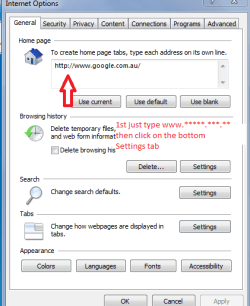
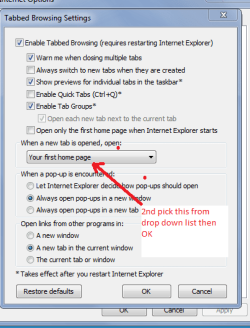
Then set your preferred search ie Google in the Internet options (Tools in the toolbar) > Internet options > General tab > type in the web address (just www.***.***.** will do) > go to the bottom Settings tab > set as your first home page > OK > Apply > close that window and the address you typed in will show on each and every tab you open.

Try this for starters.
 

Attachments

  • GOO2.PNG
    GOO2.PNG
    14.8 KB · Views: 3
  • GOO1.PNG
    GOO1.PNG
    16.8 KB · Views: 3

My Computer My Computer

At a glance

Desk1 7 Home Prem / Desk2 10 Pro / Main lap A...Desk1 i5 3750K / Laptop i7 GTX 860M / Desk2 i...Desk1 8GB (1866) / Desk2 16GB (1333) / Laptop...Desk 1& 2NVidia GTX 650 & Laptops on board Intel
Computer type
PC/Desktop
Computer Manufacturer/Model Number
Own build (new) Desk1 / Asus ROG Win 7 / Desk2 1st build
OS
Desk1 7 Home Prem / Desk2 10 Pro / Main lap Asus ROG 10 Pro 2 laptop Toshiba 7 Pro Asus P2520 7 & 10
CPU
Desk1 i5 3750K / Laptop i7 GTX 860M / Desk2 i5 2500
Motherboard
Desk1 Asus P877-V / Desk2 Gigabyte H67 UD3H / Laptop ?
Memory
Desk1 8GB (1866) / Desk2 16GB (1333) / Laptop 8Gb DDR3
Graphics Card(s)
Desk 1& 2NVidia GTX 650 & Laptops on board Intel
Sound Card
Desk 1 & 2 -XONAR DG Realtek High Def audio Laptop
Monitor(s) Displays
Desk 1 Benq HD 2450 / Desk2 Philips 24" / Laptop 17.5"
Screen Resolution
1920x1080 D1 & D2 & Laptop 1
Hard Drives
Desk1 Samsung 120GB 830 SSD
Asus ROG 256GB 850 Pro SSD
Desk2 Samsung 840 256 SSD
Toshiba 120GB EVO
PSU
Desk 1 Corsair HX 1050/ Laptop ? / Desk 2 Corsair HX 650
Case
Desk 1 Cooler HAF XM ? Toshiba laptop / Desk2 Coolermaster
Cooling
Fans on all Desk1 -2 Desk2 - all Coolermasters 5 Laptop ?
Keyboard
Desk 1 MS Sidewinder X6 Desk 2 MS Sidewinder X 4
Mouse
Desk 1&2 - Gigabyte MS 900 gamer - laptop - Logitec wireless
Internet Speed
ADSL2+
Other Info
One other Desktop (tester) and spare Toshba laptop both with SSD's
Running Kaspersky 2016 ISS on all machines config'd identically
Logitec audio stereo systems on each machine (x3)
Canon MG5250MFC
Router/modem TP-Link running WPA2SK
I think the OP should at least run a MalwareBytes scan to make sure the system is free of at least the obvious malware. Quick Scan only takes about 5 or 6 minutes.
 

My Computer My Computer

At a glance

Windows 7 32 bitAMD 5200+ dual core2 GBNVidia GeForce 6150SE 128 MB
Computer Manufacturer/Model Number
HP Media Center
OS
Windows 7 32 bit
CPU
AMD 5200+ dual core
Memory
2 GB
Graphics Card(s)
NVidia GeForce 6150SE 128 MB
Monitor(s) Displays
CRT
Screen Resolution
1280x1024
Hard Drives
500 GB Sata internal :

SIIG USB 3.0 docking stations w/WD Caviar Black 6 Gb/s drives
Keyboard
PS/2
Mouse
PS/2 Wheel Mouse
Other Info
SIIG USB 3.0 PCIexpress card.
I think the OP should at least run a MalwareBytes scan to make sure the system is free of at least the obvious malware. Quick Scan only takes about 5 or 6 minutes.
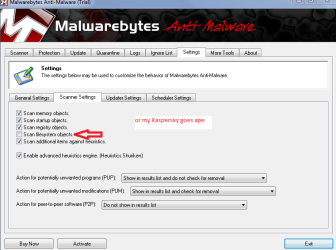
Hum thats a good idea Miles and maybe a SuperAntiSpyware as well - I find that pretty good at picking up trackers. Now perhaps I have a fast system or something cos MBAM scan on mine takes a few seconds maybe a minute or just over. Just surprised at your times. Mind you I do set the Scanner settings to not scan or my Kaspersky starts spitting the dummy :geek:

SUPERAntiSpyware | Remove Malware | Remove Spyware - AntiMalware, AntiSpyware, AntiAdware!
 

Attachments

  • MBAM.PNG
    MBAM.PNG
    35.7 KB · Views: 6

My Computer My Computer

At a glance

Desk1 7 Home Prem / Desk2 10 Pro / Main lap A...Desk1 i5 3750K / Laptop i7 GTX 860M / Desk2 i...Desk1 8GB (1866) / Desk2 16GB (1333) / Laptop...Desk 1& 2NVidia GTX 650 & Laptops on board Intel
Computer type
PC/Desktop
Computer Manufacturer/Model Number
Own build (new) Desk1 / Asus ROG Win 7 / Desk2 1st build
OS
Desk1 7 Home Prem / Desk2 10 Pro / Main lap Asus ROG 10 Pro 2 laptop Toshiba 7 Pro Asus P2520 7 & 10
CPU
Desk1 i5 3750K / Laptop i7 GTX 860M / Desk2 i5 2500
Motherboard
Desk1 Asus P877-V / Desk2 Gigabyte H67 UD3H / Laptop ?
Memory
Desk1 8GB (1866) / Desk2 16GB (1333) / Laptop 8Gb DDR3
Graphics Card(s)
Desk 1& 2NVidia GTX 650 & Laptops on board Intel
Sound Card
Desk 1 & 2 -XONAR DG Realtek High Def audio Laptop
Monitor(s) Displays
Desk 1 Benq HD 2450 / Desk2 Philips 24" / Laptop 17.5"
Screen Resolution
1920x1080 D1 & D2 & Laptop 1
Hard Drives
Desk1 Samsung 120GB 830 SSD
Asus ROG 256GB 850 Pro SSD
Desk2 Samsung 840 256 SSD
Toshiba 120GB EVO
PSU
Desk 1 Corsair HX 1050/ Laptop ? / Desk 2 Corsair HX 650
Case
Desk 1 Cooler HAF XM ? Toshiba laptop / Desk2 Coolermaster
Cooling
Fans on all Desk1 -2 Desk2 - all Coolermasters 5 Laptop ?
Keyboard
Desk 1 MS Sidewinder X6 Desk 2 MS Sidewinder X 4
Mouse
Desk 1&2 - Gigabyte MS 900 gamer - laptop - Logitec wireless
Internet Speed
ADSL2+
Other Info
One other Desktop (tester) and spare Toshba laptop both with SSD's
Running Kaspersky 2016 ISS on all machines config'd identically
Logitec audio stereo systems on each machine (x3)
Canon MG5250MFC
Router/modem TP-Link running WPA2SK
The OP's first post states he/she uses Auto Sketch. Could that be the problem.
 

My Computer My Computer

At a glance

Windows 10 Pro. 64/ version 1709 Windows 7 Pr...Intel i7-6800K @ 4.3Corsair Platinum 16 gig @2400EVGA GTX 1070 OC
Computer type
PC/Desktop
Computer Manufacturer/Model Number
Home made Desktop
OS
Windows 10 Pro. 64/ version 1709 Windows 7 Pro/64
CPU
Intel i7-6800K @ 4.3
Motherboard
ASUS X-99 Deluxe II
Memory
Corsair Platinum 16 gig @2400
Graphics Card(s)
EVGA GTX 1070 OC
Monitor(s) Displays
Asus 27" LED LCD/VE278Q
Screen Resolution
1920-1080 or 1280-720 HDMI
Hard Drives
INTEL SSD 730-240 Gb Sata 3.0/
PSU
EVGA Platium 1200W
Case
Phanteks Luxe Tempered Glass 8 fans/ one radiator
Cooling
XSPC/ Water Cooled CPU
Keyboard
Das 4 Professional
Mouse
Logitech M705/MX Anywhere 2-S
Internet Speed
100 mbits
Antivirus
Microsoft Security Essentials/ Malwarebytes Premium 3.0/ SAS
Browser
I.E. 11 default/Firefox/ ISP Time Warner Cable/Spectrum
Other Info
LG BluRay Burner/
Sound system-KLipsch-THX/
Icy Dock ssd Hot Swap bays.
I think the OP should at least run a MalwareBytes scan to make sure the system is free of at least the obvious malware. Quick Scan only takes about 5 or 6 minutes.
Hum thats a good idea Miles and maybe a SuperAntiSpyware as well - I find that pretty good at picking up trackers. Now perhaps I have a fast system or something cos MBAM scan on mine takes a few seconds maybe a minute or just over. Just surprised at your times. Mind you I do set the Scanner settings to not scan or my Kaspersky starts spitting the dummy :geek:

SUPERAntiSpyware | Remove Malware | Remove Spyware - AntiMalware, AntiSpyware, AntiAdware!

Naturally file system scan takes a lot longer than in memory only. So I guess you answered your own question.

Another freebie that's good for in memory scan is ClamWin. I like the home made look to the Gui.
 

My Computer My Computer

At a glance

Windows 7 32 bitAMD 5200+ dual core2 GBNVidia GeForce 6150SE 128 MB
Computer Manufacturer/Model Number
HP Media Center
OS
Windows 7 32 bit
CPU
AMD 5200+ dual core
Memory
2 GB
Graphics Card(s)
NVidia GeForce 6150SE 128 MB
Monitor(s) Displays
CRT
Screen Resolution
1280x1024
Hard Drives
500 GB Sata internal :

SIIG USB 3.0 docking stations w/WD Caviar Black 6 Gb/s drives
Keyboard
PS/2
Mouse
PS/2 Wheel Mouse
Other Info
SIIG USB 3.0 PCIexpress card.
I think the OP should at least run a MalwareBytes scan to make sure the system is free of at least the obvious malware. Quick Scan only takes about 5 or 6 minutes.
Hum thats a good idea Miles and maybe a SuperAntiSpyware as well - I find that pretty good at picking up trackers. Now perhaps I have a fast system or something cos MBAM scan on mine takes a few seconds maybe a minute or just over. Just surprised at your times. Mind you I do set the Scanner settings to not scan or my Kaspersky starts spitting the dummy :geek:

SUPERAntiSpyware | Remove Malware | Remove Spyware - AntiMalware, AntiSpyware, AntiAdware!

Naturally file system scan takes a lot longer than in memory only. So I guess you answered your own question.

Another freebie that's good for in memory scan is ClamWin. I like the home made look to the Gui.
Ok I'll try the can in fie system too it is my new build - the Sandy does take a tad longer

Sorry OP for intrusion.
 

My Computer My Computer

At a glance

Desk1 7 Home Prem / Desk2 10 Pro / Main lap A...Desk1 i5 3750K / Laptop i7 GTX 860M / Desk2 i...Desk1 8GB (1866) / Desk2 16GB (1333) / Laptop...Desk 1& 2NVidia GTX 650 & Laptops on board Intel
Computer type
PC/Desktop
Computer Manufacturer/Model Number
Own build (new) Desk1 / Asus ROG Win 7 / Desk2 1st build
OS
Desk1 7 Home Prem / Desk2 10 Pro / Main lap Asus ROG 10 Pro 2 laptop Toshiba 7 Pro Asus P2520 7 & 10
CPU
Desk1 i5 3750K / Laptop i7 GTX 860M / Desk2 i5 2500
Motherboard
Desk1 Asus P877-V / Desk2 Gigabyte H67 UD3H / Laptop ?
Memory
Desk1 8GB (1866) / Desk2 16GB (1333) / Laptop 8Gb DDR3
Graphics Card(s)
Desk 1& 2NVidia GTX 650 & Laptops on board Intel
Sound Card
Desk 1 & 2 -XONAR DG Realtek High Def audio Laptop
Monitor(s) Displays
Desk 1 Benq HD 2450 / Desk2 Philips 24" / Laptop 17.5"
Screen Resolution
1920x1080 D1 & D2 & Laptop 1
Hard Drives
Desk1 Samsung 120GB 830 SSD
Asus ROG 256GB 850 Pro SSD
Desk2 Samsung 840 256 SSD
Toshiba 120GB EVO
PSU
Desk 1 Corsair HX 1050/ Laptop ? / Desk 2 Corsair HX 650
Case
Desk 1 Cooler HAF XM ? Toshiba laptop / Desk2 Coolermaster
Cooling
Fans on all Desk1 -2 Desk2 - all Coolermasters 5 Laptop ?
Keyboard
Desk 1 MS Sidewinder X6 Desk 2 MS Sidewinder X 4
Mouse
Desk 1&2 - Gigabyte MS 900 gamer - laptop - Logitec wireless
Internet Speed
ADSL2+
Other Info
One other Desktop (tester) and spare Toshba laptop both with SSD's
Running Kaspersky 2016 ISS on all machines config'd identically
Logitec audio stereo systems on each machine (x3)
Canon MG5250MFC
Router/modem TP-Link running WPA2SK
portion that mouse won't work

Auto Sketch is ran or run in virtual PC as my older version of Auto sketch will not run on Windows 7 or pro for that matter. The computer has to have Virtual Technology to be able to run Auto Sketch so I got a i core 3 laptop. I have had it installed for 2-3 years now and never been a problem before.
As for getting rid of Google Chrome and running just Google, Google is going to stop just standard Google and force anyone to go to Google Chrome or not at all. I will probably switch to Yahoo.
This mouse problem also exists on MSN also. I will try loading Malware Bites and see if that helps.
The problem all seemed to start after I clicked on that darn Icon that was on Google Chrome. Hard to explain what the Icon looked like. It was a blueish gray rectangular box with rounded corners, a cross hair (similar to a rifle scope cross hair) thru the whole thing and a whitish circle in the middle. When I clicked on it a window opened and I clicked on something, thinking it would go away. Sure enough it went away and never came back but then my mouse problem started.
My wife has her laptop running and has no problems and running Vista.
I have a desktop in my shop and there is no problem with it. But it is running XP Pro.
I am on Cox Internet and they furnish McAfee security and it has found a couple of bugs.
I was amazed when on the shop desktop, I was going to load a First person game called Siberia ll and McAfee blocked a virus and didn't allow the game install to continue. Then another incident, I down loaded 7 Zip and somehow a virus attached to it and McAfee found a blocked it.
Sorry, I get carried away and start jabbering so much.
Darryl GF

 
Last edited:

My Computer My Computer

At a glance

Windows 7 Pro 64 bit
Computer Manufacturer/Model Number
HP G62-144DX Notebook
OS
Windows 7 Pro 64 bit
If you are running a VM it would be helpful to mention it at the start. VM is responsible for capturing the mouse on mouse over. That's why you have to hit a hotkey to release the mouse back to the full desktop. It's likely a VM issue. I'd try on a forum dedicated to the VM you are using for widest readership germane to the issue. Although there is a virtualization sub-forum here. You should probably ask the Mod to move your post there. But I'd try a VM specific forum if you haven't already.
 

My Computer My Computer

At a glance

Windows 7 32 bitAMD 5200+ dual core2 GBNVidia GeForce 6150SE 128 MB
Computer Manufacturer/Model Number
HP Media Center
OS
Windows 7 32 bit
CPU
AMD 5200+ dual core
Memory
2 GB
Graphics Card(s)
NVidia GeForce 6150SE 128 MB
Monitor(s) Displays
CRT
Screen Resolution
1280x1024
Hard Drives
500 GB Sata internal :

SIIG USB 3.0 docking stations w/WD Caviar Black 6 Gb/s drives
Keyboard
PS/2
Mouse
PS/2 Wheel Mouse
Other Info
SIIG USB 3.0 PCIexpress card.
portion that mouse won't work

Not quite sure what you are saying but I think it has something to do with the Virtual machine. I do not go into the virtual machine very often but it is there if I need it.
The mouse problem is only on the Internet. It works fine on any other program on my computer. I have down loaded Microsoft "Fix it". Doesn't work on this problem. I can be on any browser whether it be MSN, Firefox, Yahoo and well I haven't tried any others. My emails are stacking up and I can't delete them. I down loaded Malware bites and that found several bugs and supposedly got rid of them but no improvement.
 

My Computer My Computer

At a glance

Windows 7 Pro 64 bit
Computer Manufacturer/Model Number
HP G62-144DX Notebook
OS
Windows 7 Pro 64 bit
Mouse not responding

I think my problem is solved. I tried everything I could think of even tried to do a system restore but there is no restore point except earlier this month (when the problem started.
I down loaded something and all of a sudden I got Ask.com as my browser. Well I didn't want that so I went into Internet options and got back on Google and once there the site wanted me to sign up for Google Chrome. I said what the heck and low and behold now the mouse works fine everywhere.
Thanks for your input folks.
 

My Computer My Computer

At a glance

Windows 7 Pro 64 bit
Computer Manufacturer/Model Number
HP G62-144DX Notebook
OS
Windows 7 Pro 64 bit
I think my problem is solved. I tried everything I could think of even tried to do a system restore but there is no restore point except earlier this month (when the problem started.
I down loaded something and all of a sudden I got Ask.com as my browser. Well I didn't want that so I went into Internet options and got back on Google and once there the site wanted me to sign up for Google Chrome. I said what the heck and low and behold now the mouse works fine everywhere.
Thanks for your input folks.
Hum so did you delete Ask if you didn't mate might be an idea to check because I find those sorts of ratbag things lurk.

Revo is quite at uninstalling as it checks the registry for you. You can always (if you are game enough) check in regedit H_KEY Current User and Local Machine > Software. I have often found stuff still there too even when Revo has rooted it out.

But only if you are comfortable with it.

Download Revo Uninstaller Freeware - Free and Full Download - Uninstall software, remove programs, solve uninstall problems
 

My Computer My Computer

At a glance

Desk1 7 Home Prem / Desk2 10 Pro / Main lap A...Desk1 i5 3750K / Laptop i7 GTX 860M / Desk2 i...Desk1 8GB (1866) / Desk2 16GB (1333) / Laptop...Desk 1& 2NVidia GTX 650 & Laptops on board Intel
Computer type
PC/Desktop
Computer Manufacturer/Model Number
Own build (new) Desk1 / Asus ROG Win 7 / Desk2 1st build
OS
Desk1 7 Home Prem / Desk2 10 Pro / Main lap Asus ROG 10 Pro 2 laptop Toshiba 7 Pro Asus P2520 7 & 10
CPU
Desk1 i5 3750K / Laptop i7 GTX 860M / Desk2 i5 2500
Motherboard
Desk1 Asus P877-V / Desk2 Gigabyte H67 UD3H / Laptop ?
Memory
Desk1 8GB (1866) / Desk2 16GB (1333) / Laptop 8Gb DDR3
Graphics Card(s)
Desk 1& 2NVidia GTX 650 & Laptops on board Intel
Sound Card
Desk 1 & 2 -XONAR DG Realtek High Def audio Laptop
Monitor(s) Displays
Desk 1 Benq HD 2450 / Desk2 Philips 24" / Laptop 17.5"
Screen Resolution
1920x1080 D1 & D2 & Laptop 1
Hard Drives
Desk1 Samsung 120GB 830 SSD
Asus ROG 256GB 850 Pro SSD
Desk2 Samsung 840 256 SSD
Toshiba 120GB EVO
PSU
Desk 1 Corsair HX 1050/ Laptop ? / Desk 2 Corsair HX 650
Case
Desk 1 Cooler HAF XM ? Toshiba laptop / Desk2 Coolermaster
Cooling
Fans on all Desk1 -2 Desk2 - all Coolermasters 5 Laptop ?
Keyboard
Desk 1 MS Sidewinder X6 Desk 2 MS Sidewinder X 4
Mouse
Desk 1&2 - Gigabyte MS 900 gamer - laptop - Logitec wireless
Internet Speed
ADSL2+
Other Info
One other Desktop (tester) and spare Toshba laptop both with SSD's
Running Kaspersky 2016 ISS on all machines config'd identically
Logitec audio stereo systems on each machine (x3)
Canon MG5250MFC
Router/modem TP-Link running WPA2SK
Revo uninstaller

I have already downloaded Revo and it does a lot better job than Windows uninstaller.
I will do a Revo uninstall on ASK.com. I should pay more attention to what I am downloading. Kind of like the riders that congress pass without looking at the bills. I also go to Cnet.com and download the so called "Free" cleaners and once they scan and find a bunch of leftover junk, then you need to register to get it to clean up the mess for $29.99. My browser went back to Ask.com even tho I changed my Internet option to Google.
Darryl
 

My Computer My Computer

At a glance

Windows 7 Pro 64 bit
Computer Manufacturer/Model Number
HP G62-144DX Notebook
OS
Windows 7 Pro 64 bit
I have already downloaded Revo and it does a lot better job than Windows uninstaller.
I will do a Revo uninstall on ASK.com. I should pay more attention to what I am downloading. Kind of like the riders that congress pass without looking at the bills. I also go to Cnet.com and download the so called "Free" cleaners and once they scan and find a bunch of leftover junk, then you need to register to get it to clean up the mess for $29.99. My browser went back to Ask.com even tho I changed my Internet option to Google.
Darryl
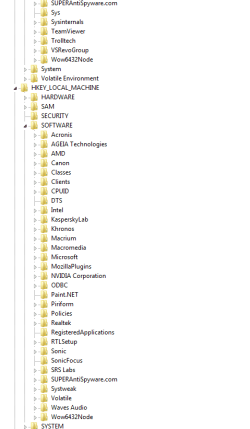
Darryl if you want to have a look at what is in your registry go to Start > type in "regedit" ( without quotation marks) > right click on the little light blue window at the top of Start > Yes > you will get a list of H_KEY entries go to H_KEY_CURRENT USER > click on the little arrow it will drop down a list like you see in my pics > go Software and clcik on the little arrow again it will drop down a further list of what software you have - again see my pics.
Do the same for H_KEY_LOCAL MACHINE and see what you have a lot of things will "double" entries.

If the software reference is not there do a Google for who puts that software out it might not be labeled Ask.

Let us know what you find. But do look at my pics - it seems a little overwhelming but as long as you do not do anything it is ok to do this. If you are familiar with the snip feature do one to send back if you do not know how to do snip - then send any pics using what you are familiar with.
I can go through how to use snip later. It is by far the easiest tool to use - I find anyway.
 

Attachments

  • REG1.PNG
    REG1.PNG
    15.9 KB · Views: 1
  • REG2.PNG
    REG2.PNG
    11.5 KB · Views: 1

My Computer My Computer

At a glance

Desk1 7 Home Prem / Desk2 10 Pro / Main lap A...Desk1 i5 3750K / Laptop i7 GTX 860M / Desk2 i...Desk1 8GB (1866) / Desk2 16GB (1333) / Laptop...Desk 1& 2NVidia GTX 650 & Laptops on board Intel
Computer type
PC/Desktop
Computer Manufacturer/Model Number
Own build (new) Desk1 / Asus ROG Win 7 / Desk2 1st build
OS
Desk1 7 Home Prem / Desk2 10 Pro / Main lap Asus ROG 10 Pro 2 laptop Toshiba 7 Pro Asus P2520 7 & 10
CPU
Desk1 i5 3750K / Laptop i7 GTX 860M / Desk2 i5 2500
Motherboard
Desk1 Asus P877-V / Desk2 Gigabyte H67 UD3H / Laptop ?
Memory
Desk1 8GB (1866) / Desk2 16GB (1333) / Laptop 8Gb DDR3
Graphics Card(s)
Desk 1& 2NVidia GTX 650 & Laptops on board Intel
Sound Card
Desk 1 & 2 -XONAR DG Realtek High Def audio Laptop
Monitor(s) Displays
Desk 1 Benq HD 2450 / Desk2 Philips 24" / Laptop 17.5"
Screen Resolution
1920x1080 D1 & D2 & Laptop 1
Hard Drives
Desk1 Samsung 120GB 830 SSD
Asus ROG 256GB 850 Pro SSD
Desk2 Samsung 840 256 SSD
Toshiba 120GB EVO
PSU
Desk 1 Corsair HX 1050/ Laptop ? / Desk 2 Corsair HX 650
Case
Desk 1 Cooler HAF XM ? Toshiba laptop / Desk2 Coolermaster
Cooling
Fans on all Desk1 -2 Desk2 - all Coolermasters 5 Laptop ?
Keyboard
Desk 1 MS Sidewinder X6 Desk 2 MS Sidewinder X 4
Mouse
Desk 1&2 - Gigabyte MS 900 gamer - laptop - Logitec wireless
Internet Speed
ADSL2+
Other Info
One other Desktop (tester) and spare Toshba laptop both with SSD's
Running Kaspersky 2016 ISS on all machines config'd identically
Logitec audio stereo systems on each machine (x3)
Canon MG5250MFC
Router/modem TP-Link running WPA2SK
Download AdWareCleaner AdwCleaner Download to your desktop
1.Right-click on adwcleaner.exe and select Run As Administrator to launch the application.
2.Click on Delete button.
3.Confirm each time with OK.
4.Your computer will be rebooted automatically. A text file will open after the restart. Please post the content of that logfile in your reply.
Note: You can find the logfile at C:\AdwCleaner[Sn].txt as well - n is the order number.
AdwareCleaner.jpg


This application is free and it should get rid of quite a few unwanted Adware junk.
 

My Computer My Computer

At a glance

Windows 7 Ultimate 32bit SP1Intel(R) Core(TM)2 Quad CPU @ 2.40GHz, 2400 MHz4 GBATI Radeon HD 2600 Pro
Computer type
PC/Desktop
Computer Manufacturer/Model Number
Bruce ... somewhere in his 40's
OS
Windows 7 Ultimate 32bit SP1
CPU
Intel(R) Core(TM)2 Quad CPU @ 2.40GHz, 2400 MHz
Motherboard
INTEL/D975XBX2
Memory
4 GB
Graphics Card(s)
ATI Radeon HD 2600 Pro
Monitor(s) Displays
Samsung SyncMaster 914v
Screen Resolution
1280 x 1024
Hard Drives
2/500GB each ... ST3500630AS ATA Device.
One is not connected
PSU
Rocketfish 700 W
Case
G.Skill Gigabyte Chassis
Keyboard
Standard PS/2 Keyboard
Mouse
Microsoft PS/2 Mouse
Internet Speed
DSL
Antivirus
Avira Internet Security
Browser
IE 11
Other Info
ATI HDMI Audio
Mouse not responding

That problem has been solved by re installing Google Chrome. Mouse works all over the screen now.
Now I have another problem. Need to start a new thread for this.
Thanks for all your help.
Darryl
 

My Computer My Computer

At a glance

Windows 7 Pro 64 bit
Computer Manufacturer/Model Number
HP G62-144DX Notebook
OS
Windows 7 Pro 64 bit
Back
Top