GTX 680 not sending signal to monitor, needs reset to fix.

AlphaWhelp

New member
Local time
5:10 PM
Messages
17
Specifically, I need to reset and F8 to get into the startup menu and select "Last known good configuration" to get back into my computer. Safe Mode works properly. When the problem happens, my monitor seems to indicate that there is no signal coming from the computer. Permanently stuck in power-saving mode. Can only fix with a reset into last known good configuration. I've upgraded my monitor since I last updated my PC specs here on this board. I'm using a Dell UltraSharp U2412M 24" at 1920x1200 now. The problem happens even with my old monitor. I have a sneaking suspicion something is changing my resolution to something unsupported by my monitors but I can't get into my PC to check.
 

My Computer My Computer

At a glance

Windows 7 Professional x64Intel Core i7-3770kPatriot 1333 mhz 4x4GBEVGA GeForce GTX 680
Computer Manufacturer/Model Number
Custom
OS
Windows 7 Professional x64
CPU
Intel Core i7-3770k
Motherboard
Asus P8Z77-V Deluxe
Memory
Patriot 1333 mhz 4x4GB
Graphics Card(s)
EVGA GeForce GTX 680
Sound Card
On board
Monitor(s) Displays
LG W86 Series
Screen Resolution
1920x1080
Hard Drives
WD Caviar Black 2TB HDD
Vertex 128 GB SSD
PSU
FSP Aurum 750W
Case
CoolerMaster Elite 430
Cooling
Hyper 612
Keyboard
Razer Blackwidow Ultimate
Mouse
Razer Imperator
Internet Speed
1.5 Mbps Down / .25 Mbps Up
What drivers you running? And have you tried a couple of different sets to see if this cures the issue?

Paul.
 

My Computer My Computer

At a glance

Windows 7 Professional 64 bit
OS
Windows 7 Professional 64 bit
What drivers you running? And have you tried a couple of different sets to see if this cures the issue?

Paul.

Here is my DxDiag for the Display

---------------
Display Devices
---------------
Card name: NVIDIA GeForce GTX 680
Manufacturer: NVIDIA
Chip type: GeForce GTX 680
DAC type: Integrated RAMDAC
Device Key: Enum\PCI\VEN_10DE&DEV_1180&SUBSYS_26803842&REV_A1
Display Memory: 4042 MB
Dedicated Memory: 1994 MB
Shared Memory: 2047 MB
Current Mode: 1920 x 1200 (32 bit) (59Hz)
Monitor Name: Generic PnP Monitor
Monitor Model: DELL U2412M
Monitor Id: DELA07A
Native Mode: 1920 x 1200(p) (59.950Hz)
Output Type: DVI
Driver Name: nvd3dumx.dll,nvwgf2umx.dll,nvwgf2umx.dll,nvd3dum,nvwgf2um,nvwgf2um
Driver File Version: 8.17.0013.0142 (English)
Driver Version: 8.17.13.142
DDI Version: 11
Driver Model: WDDM 1.1
Driver Attributes: Final Retail
Driver Date/Size: 5/15/2012 05:48:00, 18044224 bytes
WHQL Logo'd: Yes
WHQL Date Stamp:
Device Identifier: {D7B71E3E-52C0-11CF-7C5B-8D061FC2C535}
Vendor ID: 0x10DE
Device ID: 0x1180
SubSys ID: 0x26803842
Revision ID: 0x00A1
Driver Strong Name: oem11.inf:NVIDIA_SetA_Devices.NTamd64.6.1:Section033:8.17.13.142:pci\ven_10de&dev_1180
Rank Of Driver: 00E62001
Video Accel: ModeMPEG2_A ModeMPEG2_C ModeVC1_C ModeWMV9_C
Deinterlace Caps: {6CB69578-7617-4637-91E5-1C02DB810285}: Format(In/Out)=(YUY2,YUY2) Frames(Prev/Fwd/Back)=(0,0,0) Caps=VideoProcess_YUV2RGB VideoProcess_StretchX VideoProcess_StretchY DeinterlaceTech_PixelAdaptive
{F9F19DA5-3B09-4B2F-9D89-C64753E3EAAB}: Format(In/Out)=(YUY2,YUY2) Frames(Prev/Fwd/Back)=(0,0,0) Caps=VideoProcess_YUV2RGB VideoProcess_StretchX VideoProcess_StretchY
{5A54A0C9-C7EC-4BD9-8EDE-F3C75DC4393B}: Format(In/Out)=(YUY2,YUY2) Frames(Prev/Fwd/Back)=(0,0,0) Caps=VideoProcess_YUV2RGB VideoProcess_StretchX VideoProcess_StretchY
{335AA36E-7884-43A4-9C91-7F87FAF3E37E}: Format(In/Out)=(YUY2,YUY2) Frames(Prev/Fwd/Back)=(0,0,0) Caps=VideoProcess_YUV2RGB VideoProcess_StretchX VideoProcess_StretchY DeinterlaceTech_BOBVerticalStretch
{6CB69578-7617-4637-91E5-1C02DB810285}: Format(In/Out)=(UYVY,UYVY) Frames(Prev/Fwd/Back)=(0,0,0) Caps=VideoProcess_YUV2RGB VideoProcess_StretchX VideoProcess_StretchY DeinterlaceTech_PixelAdaptive
{F9F19DA5-3B09-4B2F-9D89-C64753E3EAAB}: Format(In/Out)=(UYVY,UYVY) Frames(Prev/Fwd/Back)=(0,0,0) Caps=VideoProcess_YUV2RGB VideoProcess_StretchX VideoProcess_StretchY
{5A54A0C9-C7EC-4BD9-8EDE-F3C75DC4393B}: Format(In/Out)=(UYVY,UYVY) Frames(Prev/Fwd/Back)=(0,0,0) Caps=VideoProcess_YUV2RGB VideoProcess_StretchX VideoProcess_StretchY
{335AA36E-7884-43A4-9C91-7F87FAF3E37E}: Format(In/Out)=(UYVY,UYVY) Frames(Prev/Fwd/Back)=(0,0,0) Caps=VideoProcess_YUV2RGB VideoProcess_StretchX VideoProcess_StretchY DeinterlaceTech_BOBVerticalStretch
{6CB69578-7617-4637-91E5-1C02DB810285}: Format(In/Out)=(YV12,0x32315659) Frames(Prev/Fwd/Back)=(0,0,0) Caps=VideoProcess_YUV2RGB VideoProcess_StretchX VideoProcess_StretchY DeinterlaceTech_PixelAdaptive
{F9F19DA5-3B09-4B2F-9D89-C64753E3EAAB}: Format(In/Out)=(YV12,0x32315659) Frames(Prev/Fwd/Back)=(0,0,0) Caps=VideoProcess_YUV2RGB VideoProcess_StretchX VideoProcess_StretchY
{5A54A0C9-C7EC-4BD9-8EDE-F3C75DC4393B}: Format(In/Out)=(YV12,0x32315659) Frames(Prev/Fwd/Back)=(0,0,0) Caps=VideoProcess_YUV2RGB VideoProcess_StretchX VideoProcess_StretchY
{335AA36E-7884-43A4-9C91-7F87FAF3E37E}: Format(In/Out)=(YV12,0x32315659) Frames(Prev/Fwd/Back)=(0,0,0) Caps=VideoProcess_YUV2RGB VideoProcess_StretchX VideoProcess_StretchY DeinterlaceTech_BOBVerticalStretch
{6CB69578-7617-4637-91E5-1C02DB810285}: Format(In/Out)=(NV12,0x3231564e) Frames(Prev/Fwd/Back)=(0,0,0) Caps=VideoProcess_YUV2RGB VideoProcess_StretchX VideoProcess_StretchY DeinterlaceTech_PixelAdaptive
{F9F19DA5-3B09-4B2F-9D89-C64753E3EAAB}: Format(In/Out)=(NV12,0x3231564e) Frames(Prev/Fwd/Back)=(0,0,0) Caps=VideoProcess_YUV2RGB VideoProcess_StretchX VideoProcess_StretchY
{5A54A0C9-C7EC-4BD9-8EDE-F3C75DC4393B}: Format(In/Out)=(NV12,0x3231564e) Frames(Prev/Fwd/Back)=(0,0,0) Caps=VideoProcess_YUV2RGB VideoProcess_StretchX VideoProcess_StretchY
{335AA36E-7884-43A4-9C91-7F87FAF3E37E}: Format(In/Out)=(NV12,0x3231564e) Frames(Prev/Fwd/Back)=(0,0,0) Caps=VideoProcess_YUV2RGB VideoProcess_StretchX VideoProcess_StretchY DeinterlaceTech_BOBVerticalStretch
{6CB69578-7617-4637-91E5-1C02DB810285}: Format(In/Out)=(IMC1,UNKNOWN) Frames(Prev/Fwd/Back)=(0,0,0) Caps=
{F9F19DA5-3B09-4B2F-9D89-C64753E3EAAB}: Format(In/Out)=(IMC1,UNKNOWN) Frames(Prev/Fwd/Back)=(0,0,0) Caps=
{5A54A0C9-C7EC-4BD9-8EDE-F3C75DC4393B}: Format(In/Out)=(IMC1,UNKNOWN) Frames(Prev/Fwd/Back)=(0,0,0) Caps=
{335AA36E-7884-43A4-9C91-7F87FAF3E37E}: Format(In/Out)=(IMC1,UNKNOWN) Frames(Prev/Fwd/Back)=(0,0,0) Caps=
{6CB69578-7617-4637-91E5-1C02DB810285}: Format(In/Out)=(IMC2,UNKNOWN) Frames(Prev/Fwd/Back)=(0,0,0) Caps=
{F9F19DA5-3B09-4B2F-9D89-C64753E3EAAB}: Format(In/Out)=(IMC2,UNKNOWN) Frames(Prev/Fwd/Back)=(0,0,0) Caps=
{5A54A0C9-C7EC-4BD9-8EDE-F3C75DC4393B}: Format(In/Out)=(IMC2,UNKNOWN) Frames(Prev/Fwd/Back)=(0,0,0) Caps=
{335AA36E-7884-43A4-9C91-7F87FAF3E37E}: Format(In/Out)=(IMC2,UNKNOWN) Frames(Prev/Fwd/Back)=(0,0,0) Caps=
{6CB69578-7617-4637-91E5-1C02DB810285}: Format(In/Out)=(IMC3,UNKNOWN) Frames(Prev/Fwd/Back)=(0,0,0) Caps=
{F9F19DA5-3B09-4B2F-9D89-C64753E3EAAB}: Format(In/Out)=(IMC3,UNKNOWN) Frames(Prev/Fwd/Back)=(0,0,0) Caps=
{5A54A0C9-C7EC-4BD9-8EDE-F3C75DC4393B}: Format(In/Out)=(IMC3,UNKNOWN) Frames(Prev/Fwd/Back)=(0,0,0) Caps=
{335AA36E-7884-43A4-9C91-7F87FAF3E37E}: Format(In/Out)=(IMC3,UNKNOWN) Frames(Prev/Fwd/Back)=(0,0,0) Caps=
{6CB69578-7617-4637-91E5-1C02DB810285}: Format(In/Out)=(IMC4,UNKNOWN) Frames(Prev/Fwd/Back)=(0,0,0) Caps=
{F9F19DA5-3B09-4B2F-9D89-C64753E3EAAB}: Format(In/Out)=(IMC4,UNKNOWN) Frames(Prev/Fwd/Back)=(0,0,0) Caps=
{5A54A0C9-C7EC-4BD9-8EDE-F3C75DC4393B}: Format(In/Out)=(IMC4,UNKNOWN) Frames(Prev/Fwd/Back)=(0,0,0) Caps=
{335AA36E-7884-43A4-9C91-7F87FAF3E37E}: Format(In/Out)=(IMC4,UNKNOWN) Frames(Prev/Fwd/Back)=(0,0,0) Caps=
{6CB69578-7617-4637-91E5-1C02DB810285}: Format(In/Out)=(S340,UNKNOWN) Frames(Prev/Fwd/Back)=(0,0,0) Caps=
{F9F19DA5-3B09-4B2F-9D89-C64753E3EAAB}: Format(In/Out)=(S340,UNKNOWN) Frames(Prev/Fwd/Back)=(0,0,0) Caps=
{5A54A0C9-C7EC-4BD9-8EDE-F3C75DC4393B}: Format(In/Out)=(S340,UNKNOWN) Frames(Prev/Fwd/Back)=(0,0,0) Caps=
{335AA36E-7884-43A4-9C91-7F87FAF3E37E}: Format(In/Out)=(S340,UNKNOWN) Frames(Prev/Fwd/Back)=(0,0,0) Caps=
{6CB69578-7617-4637-91E5-1C02DB810285}: Format(In/Out)=(S342,UNKNOWN) Frames(Prev/Fwd/Back)=(0,0,0) Caps=
{F9F19DA5-3B09-4B2F-9D89-C64753E3EAAB}: Format(In/Out)=(S342,UNKNOWN) Frames(Prev/Fwd/Back)=(0,0,0) Caps=
{5A54A0C9-C7EC-4BD9-8EDE-F3C75DC4393B}: Format(In/Out)=(S342,UNKNOWN) Frames(Prev/Fwd/Back)=(0,0,0) Caps=
{335AA36E-7884-43A4-9C91-7F87FAF3E37E}: Format(In/Out)=(S342,UNKNOWN) Frames(Prev/Fwd/Back)=(0,0,0) Caps=
D3D9 Overlay: Supported
DXVA-HD: Supported
DDraw Status: Enabled
D3D Status: Enabled
AGP Status: Enabled

Also, it appears nVidia's control panel installed some kind of 3D software that may be causing it by trying to put my monitor into 3D mode. Would it be alright if I unsintalled the 3D drivers just to be on the safe side?
 

My Computer My Computer

At a glance

Windows 7 Professional x64Intel Core i7-3770kPatriot 1333 mhz 4x4GBEVGA GeForce GTX 680
Computer Manufacturer/Model Number
Custom
OS
Windows 7 Professional x64
CPU
Intel Core i7-3770k
Motherboard
Asus P8Z77-V Deluxe
Memory
Patriot 1333 mhz 4x4GB
Graphics Card(s)
EVGA GeForce GTX 680
Sound Card
On board
Monitor(s) Displays
LG W86 Series
Screen Resolution
1920x1080
Hard Drives
WD Caviar Black 2TB HDD
Vertex 128 GB SSD
PSU
FSP Aurum 750W
Case
CoolerMaster Elite 430
Cooling
Hyper 612
Keyboard
Razer Blackwidow Ultimate
Mouse
Razer Imperator
Internet Speed
1.5 Mbps Down / .25 Mbps Up
I would suggest looking into the power requirements of your GTX 460.
EVGA | Products | EVGA GeForce GTX 680 | 02G-P4-2680-KR
I requires a two 6 pin power supply connections.
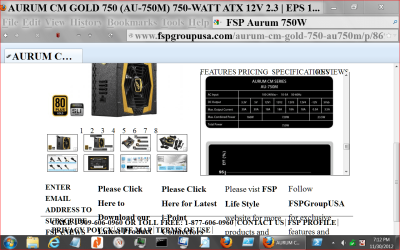
A 12+ volt rail at 38 amps. Your power supply has four 12+ volt rails at 18 amps each. Your power supply has more than the required watts but is under amped for your video card. This may or may not solve you problem you are having now but you do need a proper power supply if you want that card to work proper.
http://www.fspgroupusa.com/aurum-cm-gold-750-au750m/p/869.html

power supply 11 30.PNG
 

My Computer My Computer

At a glance

Windows 10 Pro. 64/ version 1709 Windows 7 Pr...Intel i7-6800K @ 4.3Corsair Platinum 16 gig @2400EVGA GTX 1070 OC
Computer type
PC/Desktop
Computer Manufacturer/Model Number
Home made Desktop
OS
Windows 10 Pro. 64/ version 1709 Windows 7 Pro/64
CPU
Intel i7-6800K @ 4.3
Motherboard
ASUS X-99 Deluxe II
Memory
Corsair Platinum 16 gig @2400
Graphics Card(s)
EVGA GTX 1070 OC
Monitor(s) Displays
Asus 27" LED LCD/VE278Q
Screen Resolution
1920-1080 or 1280-720 HDMI
Hard Drives
INTEL SSD 730-240 Gb Sata 3.0/
PSU
EVGA Platium 1200W
Case
Phanteks Luxe Tempered Glass 8 fans/ one radiator
Cooling
XSPC/ Water Cooled CPU
Keyboard
Das 4 Professional
Mouse
Logitech M705/MX Anywhere 2-S
Internet Speed
100 mbits
Antivirus
Microsoft Security Essentials/ Malwarebytes Premium 3.0/ SAS
Browser
I.E. 11 default/Firefox/ ISP Time Warner Cable/Spectrum
Other Info
LG BluRay Burner/
Sound system-KLipsch-THX/
Icy Dock ssd Hot Swap bays.
I would suggest looking into the power requirements of your GTX 460.
EVGA | Products | EVGA GeForce GTX 680 | 02G-P4-2680-KR
I requires a two 6 pin power supply connections.
A 12+ volt rail at 38 amps. Your power supply has four 12+ volt rails at 18 amps each. Your power supply has more than the required watts but is under amped for your video card. This may or may not solve you problem you are having now but you do need a proper power supply if you want that card to work proper.
AURUM CM GOLD 750 (AU-750M) 750-WATT ATX 12V 2.3 | EPS 12V 2.92 80 PLUS GOLD CERTIFIED POWER SUPPLY [PPA7501004] : FSP Group USA

View attachment 243819

I strongly doubt it's a PSU issue. I have no problem playing games for hours on end. This is a problem that occurs when I go to sleep, leave the system idle, and wake up to find my monitor is stuck in power saving mode. I strongly suspect it is because nVidia control panel is enabling 3D. I found the "Enable 3D Vision" shortcut in my list of recently executed applications.
 

My Computer My Computer

At a glance

Windows 7 Professional x64Intel Core i7-3770kPatriot 1333 mhz 4x4GBEVGA GeForce GTX 680
Computer Manufacturer/Model Number
Custom
OS
Windows 7 Professional x64
CPU
Intel Core i7-3770k
Motherboard
Asus P8Z77-V Deluxe
Memory
Patriot 1333 mhz 4x4GB
Graphics Card(s)
EVGA GeForce GTX 680
Sound Card
On board
Monitor(s) Displays
LG W86 Series
Screen Resolution
1920x1080
Hard Drives
WD Caviar Black 2TB HDD
Vertex 128 GB SSD
PSU
FSP Aurum 750W
Case
CoolerMaster Elite 430
Cooling
Hyper 612
Keyboard
Razer Blackwidow Ultimate
Mouse
Razer Imperator
Internet Speed
1.5 Mbps Down / .25 Mbps Up
Like I posted. This might not solve the problem you are having. It was something I discovered while researching your problem and thought I would share it with you.
You have a nice evening.
 

My Computer My Computer

At a glance

Windows 10 Pro. 64/ version 1709 Windows 7 Pr...Intel i7-6800K @ 4.3Corsair Platinum 16 gig @2400EVGA GTX 1070 OC
Computer type
PC/Desktop
Computer Manufacturer/Model Number
Home made Desktop
OS
Windows 10 Pro. 64/ version 1709 Windows 7 Pro/64
CPU
Intel i7-6800K @ 4.3
Motherboard
ASUS X-99 Deluxe II
Memory
Corsair Platinum 16 gig @2400
Graphics Card(s)
EVGA GTX 1070 OC
Monitor(s) Displays
Asus 27" LED LCD/VE278Q
Screen Resolution
1920-1080 or 1280-720 HDMI
Hard Drives
INTEL SSD 730-240 Gb Sata 3.0/
PSU
EVGA Platium 1200W
Case
Phanteks Luxe Tempered Glass 8 fans/ one radiator
Cooling
XSPC/ Water Cooled CPU
Keyboard
Das 4 Professional
Mouse
Logitech M705/MX Anywhere 2-S
Internet Speed
100 mbits
Antivirus
Microsoft Security Essentials/ Malwarebytes Premium 3.0/ SAS
Browser
I.E. 11 default/Firefox/ ISP Time Warner Cable/Spectrum
Other Info
LG BluRay Burner/
Sound system-KLipsch-THX/
Icy Dock ssd Hot Swap bays.
I don't know how to read/understand DxDiag reports so once again I will ask,

What drivers are you running and have you tried a couple of different sets to cure the issue?


Paul.
 

My Computer My Computer

At a glance

Windows 7 Professional 64 bit
OS
Windows 7 Professional 64 bit
I don't know how to read/understand DxDiag reports so once again I will ask,

What drivers are you running and have you tried a couple of different sets to cure the issue?


Paul.

driver version 301.42. No, I haven't tried different driver versions, but the issue takes several days to even happen, so it's difficult to test things to see if they work.
 

My Computer My Computer

At a glance

Windows 7 Professional x64Intel Core i7-3770kPatriot 1333 mhz 4x4GBEVGA GeForce GTX 680
Computer Manufacturer/Model Number
Custom
OS
Windows 7 Professional x64
CPU
Intel Core i7-3770k
Motherboard
Asus P8Z77-V Deluxe
Memory
Patriot 1333 mhz 4x4GB
Graphics Card(s)
EVGA GeForce GTX 680
Sound Card
On board
Monitor(s) Displays
LG W86 Series
Screen Resolution
1920x1080
Hard Drives
WD Caviar Black 2TB HDD
Vertex 128 GB SSD
PSU
FSP Aurum 750W
Case
CoolerMaster Elite 430
Cooling
Hyper 612
Keyboard
Razer Blackwidow Ultimate
Mouse
Razer Imperator
Internet Speed
1.5 Mbps Down / .25 Mbps Up
Back
Top