Internet connectivity drops; No change in taskbar icon

dragos240

New member
Local time
9:43 AM
Messages
13
Hello,

I'm using Win 7 64 bit. Recently, over the past week or so, I've noticed that the internet connectivity will drop after a little while. It can be 5m or perhaps an hour. After this, a reboot is required to reconnect. The strange part about this, is that the icon in the corner that tells you your network connectivity status stays at 5 bars rather than the familiar 5 bars with a caution sign as if there isn't an issue.

Some tests I've tried after this happened before a reboot:

1. ping google.com in cmd
RESULT: Strangely, I receive ping packets back from google, which may explain why the status in the corner stays the same.
2. telnet to google.com on port 80 and send a request.
RESULT: telnet acts strangely. Characters appear black on black and thus are unreadable. I was unable to send an HTTP request to google, and thus the result is inconclusive.
3. Check facebook notifications in chome
RESULT: Oddly enough, I can receive notifications, but I cannot reply, nor click on a new link to open the notification.

After the connection "drops", you will not be able to use chrome, nor firefox to access the internet. Both browsers will send requests that never return packets from the host. One guess I have is that the connectivity does not drop completely, but drops to a pace that is so slow, little information can be loaded.

My initial response to this was: "I have a virus". I downloaded AVG, ran a scan, it found a few viruses, removed them from the computer, rebooted, did another scan and it came up clean. The problem still persists. What disturbs me is that one of the viruses found on my computer ended up to be a "patching virus", a virus that will bind itself to other executables and windows .dll files, slowly taking down the target computer. If this network problem can be attributed to this virus that has been removed, then what should my next action be?

Assuming the virus is not the issue, what should my next course of action be? What are some good network monitoring tools that can monitor speed, and packets sent and received? I would like to get rid of this problem as it's an irritating hindrance to my work.

Thanks,
Dragos
 

My Computer My Computer

OS
Gentoo Linux x86_64
It sounds like either TCP/IP network stack or winsock is messed up which is a fairly typical problem but virus problems can look like many things.

If it's a virus problem run more scans.

You should also run malwarebytes to check for more virus's .
http://www.malwarebytes.org/products/malwarebytes_pro/

Windows security essentials is also worth using.
http://www.microsoft.com/en-us/download/details.aspx?id=5201

If you did have a virus it may have messed up the network stack or winsock.

Winsock entries tells Windows 7 how to access your network services. Additionally, your TCP/IP protocol can be corrupted. The TCP/IP protocol is a stack of 4 layers that includes several transport layers, but when this stack is corrupt you will constantly have connectivity issues.

Type or copy each command one at a time into an elevated command prompt then hit "enter" after each one, then reboot your machine.


netsh winsock reset catalog (reset winsock entries)

netsh int ip reset reset.log hit (reset TCP/IP stack)

If it's something on the wireless side then you should install Xirrus wifi inspector. A screen shot of this will show me the wireless landscape in your area and adjustments can be made from there.

http://www.xirrus.com/Products/Wi-Fi-Inspector
 

My Computer My Computer

Computer type
PC/Desktop
Computer Manufacturer/Model Number
Home built
OS
Windows 7 Ult, Windows 8.1 Pro,
CPU
Q9650-4.275GHz, E8600 4.5GHz, E6750-3.8GHz
Motherboard
Evga 780i FTW
Memory
G.Skill PC2 9600 1200Mhz 5 5 5 15 2T
Graphics Card(s)
GTX480
Sound Card
Asus Xonar D2
Monitor(s) Displays
HannsG
Screen Resolution
1680X1050
Hard Drives
GSkill Phoenix Pro 120GB SSD
PSU
ThermalTake Toughpower 1000Watt modular
Case
ThermalTake XaserV
Cooling
Xigmatek S1283
Keyboard
Logitech G15
Mouse
Logitech G9
Internet Speed
T1
I had kinda the same problem a while back. My internet would slow down to a snail pace every so often and couldn't figure it out for the longest time. Through googling and forum readings it came to be that the culprit was my old D-Link dsl-300g modem that was getting hot and would start burping and farting. I had a 2nd one on hand and replaced it and my internet worked as normal again. I still use that old modem and have a couple spares handy since then it happens not regularly but occasionally, I just swap it with another one and it works..weird but effective.
 

My Computer My Computer

Computer Manufacturer/Model Number
Custom Build
OS
Microsoft Windows 7 Ultimate 64-bit
CPU
Intel(R) Pentium(R) CPU G2030 @ 3.00GHz
Motherboard
ASUSTeK COMPUTER INC. P8H77-V LE
Memory
12.00 GB Kingston DIMM 3x4 gig sticks
Graphics Card(s)
AMD Radeon HD 5450
Sound Card
AMD High Definition Audio Device
Monitor(s) Displays
Dual displays
Screen Resolution
1280 x 1024 x 4294967296 colors
Hard Drives
ST3500320AS 465.76 GB
WDC WD10EZEX-00BN5A0 931.51 GB
WDC WD10 EARS-00MVWB0 USB Device 931.51 GB
PSU
XION SuperNova 600 watt
Keyboard
Razer Tarantula Gaming Keyboard
Mouse
Razer Imperator Gaming Mouse
Internet Speed
DSL 6 down & 1 up with Netgear R6300 Wireless router
It sounds like either TCP/IP network stack or winsock is messed up which is a fairly typical problem but virus problems can look like many things.

If it's a virus problem run more scans.

You should also run malwarebytes to check for more virus's .
Malwarebytes : Malwarebytes Anti-Malware PRO removes malware including viruses, spyware, worms and trojans, plus it protects your computer

Windows security essentials is also worth using.
Download Microsoft Security Essentials from Official Microsoft Download Center

If you did have a virus it may have messed up the network stack or winsock.

Winsock entries tells Windows 7 how to access your network services. Additionally, your TCP/IP protocol can be corrupted. The TCP/IP protocol is a stack of 4 layers that includes several transport layers, but when this stack is corrupt you will constantly have connectivity issues.

Type or copy each command one at a time into an elevated command prompt then hit "enter" after each one, then reboot your machine.


netsh winsock reset catalog (reset winsock entries)

netsh int ip reset reset.log hit (reset TCP/IP stack)

If it's something on the wireless side then you should install Xirrus wifi inspector. A screen shot of this will show me the wireless landscape in your area and adjustments can be made from there.

Wi-Fi Inspector | Xirrus


Thanks. Malwarebytes found some 15 odd things lurking in my system. Sadly, even though they were removed, the problem still persists. I have also entered those commands into an elevated command prompt. Unfortunately, the problem still persists. Can you recommend a program that monitors network activity and can report said activity in chart form?
 

My Computer My Computer

OS
Gentoo Linux x86_64
It sounds like either TCP/IP network stack or winsock is messed up which is a fairly typical problem but virus problems can look like many things.

If it's a virus problem run more scans.

You should also run malwarebytes to check for more virus's .
Malwarebytes : Malwarebytes Anti-Malware PRO removes malware including viruses, spyware, worms and trojans, plus it protects your computer

Windows security essentials is also worth using.
Download Microsoft Security Essentials from Official Microsoft Download Center

If you did have a virus it may have messed up the network stack or winsock.

Winsock entries tells Windows 7 how to access your network services. Additionally, your TCP/IP protocol can be corrupted. The TCP/IP protocol is a stack of 4 layers that includes several transport layers, but when this stack is corrupt you will constantly have connectivity issues.

Type or copy each command one at a time into an elevated command prompt then hit "enter" after each one, then reboot your machine.


netsh winsock reset catalog (reset winsock entries)

netsh int ip reset reset.log hit (reset TCP/IP stack)

If it's something on the wireless side then you should install Xirrus wifi inspector. A screen shot of this will show me the wireless landscape in your area and adjustments can be made from there.

Wi-Fi Inspector | Xirrus


Thanks. Malwarebytes found some 15 odd things lurking in my system. Sadly, even though they were removed, the problem still persists. I have also entered those commands into an elevated command prompt. Unfortunately, the problem still persists. Can you recommend a program that monitors network activity and can report said activity in chart form?

Windows task manager already does this. You should post the Xirrus results.
 

My Computer My Computer

Computer type
PC/Desktop
Computer Manufacturer/Model Number
Home built
OS
Windows 7 Ult, Windows 8.1 Pro,
CPU
Q9650-4.275GHz, E8600 4.5GHz, E6750-3.8GHz
Motherboard
Evga 780i FTW
Memory
G.Skill PC2 9600 1200Mhz 5 5 5 15 2T
Graphics Card(s)
GTX480
Sound Card
Asus Xonar D2
Monitor(s) Displays
HannsG
Screen Resolution
1680X1050
Hard Drives
GSkill Phoenix Pro 120GB SSD
PSU
ThermalTake Toughpower 1000Watt modular
Case
ThermalTake XaserV
Cooling
Xigmatek S1283
Keyboard
Logitech G15
Mouse
Logitech G9
Internet Speed
T1
it sounds like either tcp/ip network stack or winsock is messed up which is a fairly typical problem but virus problems can look like many things.

If it's a virus problem run more scans.

You should also run malwarebytes to check for more virus's .
malwarebytes : Malwarebytes anti-malware pro removes malware including viruses, spyware, worms and trojans, plus it protects your computer

windows security essentials is also worth using.
download microsoft security essentials from official microsoft download center

if you did have a virus it may have messed up the network stack or winsock.

Winsock entries tells windows 7 how to access your network services. Additionally, your tcp/ip protocol can be corrupted. The tcp/ip protocol is a stack of 4 layers that includes several transport layers, but when this stack is corrupt you will constantly have connectivity issues.

Type or copy each command one at a time into an elevated command prompt then hit "enter" after each one, then reboot your machine.


netsh winsock reset catalog (reset winsock entries)

netsh int ip reset reset.log hit (reset tcp/ip stack)

if it's something on the wireless side then you should install xirrus wifi inspector. A screen shot of this will show me the wireless landscape in your area and adjustments can be made from there.

wi-fi inspector | xirrus


thanks. Malwarebytes found some 15 odd things lurking in my system. Sadly, even though they were removed, the problem still persists. I have also entered those commands into an elevated command prompt. Unfortunately, the problem still persists. Can you recommend a program that monitors network activity and can report said activity in chart form?

windows task manager already does this. You should post the xirrus results.
Wifi.png
 

My Computer My Computer

OS
Gentoo Linux x86_64
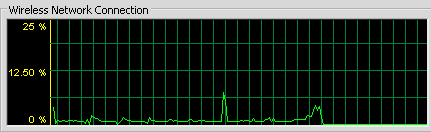
It may also help to see what the network does when it drops. This is a cropped screenshot of the network monitor:
NetworkFlatline.png
As you can see, the effect is instantaneous.
 

My Computer My Computer

OS
Gentoo Linux x86_64
You should try going into your routers wireless settings and change the encryption to AES rather than TKIP which tends to cause problems with Widows 7 drivers. Also change the DNS to something better, try using Google's DNS at 8.8.8.8 and 8.8.4.4

All those virus's may have done some damage but that is difficult to figure out from here.

If you can post a screen shot of the ipconfig/all from this machine it may help me to spot other potential problems. :)
 

My Computer My Computer

Computer type
PC/Desktop
Computer Manufacturer/Model Number
Home built
OS
Windows 7 Ult, Windows 8.1 Pro,
CPU
Q9650-4.275GHz, E8600 4.5GHz, E6750-3.8GHz
Motherboard
Evga 780i FTW
Memory
G.Skill PC2 9600 1200Mhz 5 5 5 15 2T
Graphics Card(s)
GTX480
Sound Card
Asus Xonar D2
Monitor(s) Displays
HannsG
Screen Resolution
1680X1050
Hard Drives
GSkill Phoenix Pro 120GB SSD
PSU
ThermalTake Toughpower 1000Watt modular
Case
ThermalTake XaserV
Cooling
Xigmatek S1283
Keyboard
Logitech G15
Mouse
Logitech G9
Internet Speed
T1
You should try going into your routers wireless settings and change the encryption to AES rather than TKIP which tends to cause problems with Widows 7 drivers. Also change the DNS to something better, try using Google's DNS at 8.8.8.8 and 8.8.4.4

All those virus's may have done some damage but that is difficult to figure out from here.

If you can post a screen shot of the ipconfig/all from this machine it may help me to spot other potential problems. :)

I'll change my DNS servers. For now, here is the result from ipconfig /all:
Code:
C:\Users\Harley>ipconfig /all

Windows IP Configuration

   Host Name . . . . . . . . . . . . : Harley-PC
   Primary Dns Suffix  . . . . . . . :
   Node Type . . . . . . . . . . . . : Hybrid
   IP Routing Enabled. . . . . . . . : No
   WINS Proxy Enabled. . . . . . . . : No
   DNS Suffix Search List. . . . . . : hsd1.ma.comcast.net.

Wireless LAN adapter Wireless Network Connection 4:

   Media State . . . . . . . . . . . : Media disconnected
   Connection-specific DNS Suffix  . :
   Description . . . . . . . . . . . : Microsoft Virtual WiFi Miniport Adapter #
2
   Physical Address. . . . . . . . . : 00-1D-7E-05-B8-BD
   DHCP Enabled. . . . . . . . . . . : Yes
   Autoconfiguration Enabled . . . . : Yes

Ethernet adapter Evolve Gaming Connection:

   Media State . . . . . . . . . . . : Media disconnected
   Connection-specific DNS Suffix  . :
   Description . . . . . . . . . . . : Evolve Virtual Ethernet Adapter
   Physical Address. . . . . . . . . : 00-00-83-A0-AA-FB
   DHCP Enabled. . . . . . . . . . . : Yes
   Autoconfiguration Enabled . . . . : Yes

Wireless LAN adapter Wireless Network Connection:

   Connection-specific DNS Suffix  . : hsd1.ma.comcast.net.
   Description . . . . . . . . . . . : Ralink RT61 Wireless LAN Card V2
   Physical Address. . . . . . . . . : 00-1D-7E-05-B8-BC
   DHCP Enabled. . . . . . . . . . . : Yes
   Autoconfiguration Enabled . . . . : Yes
   Link-local IPv6 Address . . . . . : fe80::f956:27d9:6531:a2b1%11(Preferred)
   IPv4 Address. . . . . . . . . . . : 192.168.1.106(Preferred)
   Subnet Mask . . . . . . . . . . . : 255.255.255.0
   Lease Obtained. . . . . . . . . . : Sunday, December 02, 2012 12:03:16
   Lease Expires . . . . . . . . . . : Monday, December 03, 2012 12:03:16
   Default Gateway . . . . . . . . . : 192.168.1.1
   DHCP Server . . . . . . . . . . . : 192.168.1.1
   DHCPv6 IAID . . . . . . . . . . . : 184556926
   DHCPv6 Client DUID. . . . . . . . : 00-01-00-01-17-3E-19-8F-20-CF-30-F0-E7-BF

   DNS Servers . . . . . . . . . . . : 75.75.75.75
                                       75.75.76.76
   NetBIOS over Tcpip. . . . . . . . : Enabled

Ethernet adapter Local Area Connection:

   Media State . . . . . . . . . . . : Media disconnected
   Connection-specific DNS Suffix  . :
   Description . . . . . . . . . . . : Realtek PCIe GBE Family Controller
   Physical Address. . . . . . . . . : 20-CF-30-F0-E7-BF
   DHCP Enabled. . . . . . . . . . . : Yes
   Autoconfiguration Enabled . . . . : Yes

Ethernet adapter Hamachi:

   Connection-specific DNS Suffix  . :
   Description . . . . . . . . . . . : Hamachi Network Interface
   Physical Address. . . . . . . . . : 7A-79-19-43-10-54
   DHCP Enabled. . . . . . . . . . . : Yes
   Autoconfiguration Enabled . . . . : Yes
   IPv6 Address. . . . . . . . . . . : 2620:9b::1943:1054(Preferred)
   Link-local IPv6 Address . . . . . : fe80::25c7:2a08:23ce:16b5%13(Preferred)
   IPv4 Address. . . . . . . . . . . : 25.67.16.84(Preferred)
   Subnet Mask . . . . . . . . . . . : 255.0.0.0
   Lease Obtained. . . . . . . . . . : Sunday, December 02, 2012 12:03:11
   Lease Expires . . . . . . . . . . : Monday, December 02, 2013 12:05:18
   Default Gateway . . . . . . . . . : 2620:9b::1900:1
   DHCP Server . . . . . . . . . . . : 25.0.0.1
   DHCPv6 IAID . . . . . . . . . . . : 226130201
   DHCPv6 Client DUID. . . . . . . . : 00-01-00-01-17-3E-19-8F-20-CF-30-F0-E7-BF

   DNS Servers . . . . . . . . . . . : fec0:0:0:ffff::1%1
                                       fec0:0:0:ffff::2%1
                                       fec0:0:0:ffff::3%1
   NetBIOS over Tcpip. . . . . . . . : Enabled

Ethernet adapter VirtualBox Host-Only Network:

   Connection-specific DNS Suffix  . :
   Description . . . . . . . . . . . : VirtualBox Host-Only Ethernet Adapter
   Physical Address. . . . . . . . . : 08-00-27-00-B4-BB
   DHCP Enabled. . . . . . . . . . . : Yes
   Autoconfiguration Enabled . . . . : Yes
   Link-local IPv6 Address . . . . . : fe80::4d52:3a0:f5b3:ac6%23(Preferred)
   Autoconfiguration IPv4 Address. . : 169.254.10.198(Preferred)
   Subnet Mask . . . . . . . . . . . : 255.255.0.0
   Default Gateway . . . . . . . . . :
   DHCPv6 IAID . . . . . . . . . . . : 386400295
   DHCPv6 Client DUID. . . . . . . . : 00-01-00-01-17-3E-19-8F-20-CF-30-F0-E7-BF

   DNS Servers . . . . . . . . . . . : fec0:0:0:ffff::1%1
                                       fec0:0:0:ffff::2%1
                                       fec0:0:0:ffff::3%1
   NetBIOS over Tcpip. . . . . . . . : Enabled

Tunnel adapter isatap.{BD0448C7-A99F-4299-93FF-FDF449BC44A1}:

   Media State . . . . . . . . . . . : Media disconnected
   Connection-specific DNS Suffix  . :
   Description . . . . . . . . . . . : Microsoft ISATAP Adapter #2
   Physical Address. . . . . . . . . : 00-00-00-00-00-00-00-E0
   DHCP Enabled. . . . . . . . . . . : No
   Autoconfiguration Enabled . . . . : Yes

Tunnel adapter isatap.{71593DCB-3FE2-4594-94BC-E9070D081CC4}:

   Media State . . . . . . . . . . . : Media disconnected
   Connection-specific DNS Suffix  . :
   Description . . . . . . . . . . . : Microsoft ISATAP Adapter #3
   Physical Address. . . . . . . . . : 00-00-00-00-00-00-00-E0
   DHCP Enabled. . . . . . . . . . . : No
   Autoconfiguration Enabled . . . . : Yes

Tunnel adapter Local Area Connection* 11:

   Media State . . . . . . . . . . . : Media disconnected
   Connection-specific DNS Suffix  . :
   Description . . . . . . . . . . . : Teredo Tunneling Pseudo-Interface
   Physical Address. . . . . . . . . : 00-00-00-00-00-00-00-E0
   DHCP Enabled. . . . . . . . . . . : No
   Autoconfiguration Enabled . . . . : Yes

Tunnel adapter isatap.hsd1.ma.comcast.net.:

   Media State . . . . . . . . . . . : Media disconnected
   Connection-specific DNS Suffix  . : hsd1.ma.comcast.net.
   Description . . . . . . . . . . . : Microsoft ISATAP Adapter #4
   Physical Address. . . . . . . . . : 00-00-00-00-00-00-00-E0
   DHCP Enabled. . . . . . . . . . . : No
   Autoconfiguration Enabled . . . . : Yes

Tunnel adapter isatap.{93C3ECEF-D627-46FD-8C02-3719E5BCBC91}:

   Media State . . . . . . . . . . . : Media disconnected
   Connection-specific DNS Suffix  . :
   Description . . . . . . . . . . . : Microsoft ISATAP Adapter #5
   Physical Address. . . . . . . . . : 00-00-00-00-00-00-00-E0
   DHCP Enabled. . . . . . . . . . . : No
   Autoconfiguration Enabled . . . . : Yes

Tunnel adapter isatap.{F4783B9D-FF40-4692-9A26-A9F3B0CCE1D8}:

   Media State . . . . . . . . . . . : Media disconnected
   Connection-specific DNS Suffix  . :
   Description . . . . . . . . . . . : Microsoft ISATAP Adapter #6
   Physical Address. . . . . . . . . : 00-00-00-00-00-00-00-E0
   DHCP Enabled. . . . . . . . . . . : No
   Autoconfiguration Enabled . . . . : Yes

Tunnel adapter isatap.{ED97B127-5359-4782-B3BD-886E9068DC19}:

   Media State . . . . . . . . . . . : Media disconnected
   Connection-specific DNS Suffix  . :
   Description . . . . . . . . . . . : Microsoft ISATAP Adapter #7
   Physical Address. . . . . . . . . : 00-00-00-00-00-00-00-E0
   DHCP Enabled. . . . . . . . . . . : No
   Autoconfiguration Enabled . . . . : Yes
 

My Computer My Computer

OS
Gentoo Linux x86_64
Ok here is the deal with virtual adaptors, every last one of them can and will cause connection problem on Windows systems, including Windows own virtual WiFi adaptor. Sometimes they work ok but after awhile they seem to end up causing problems on certain systems. Hamachi has caused this same problem a few times.

Sometimes uninstalling and reinstalling them fixes the problem but in general Windows sometimes has problems with multiple networks using virtual adaptors depending on the virtual adaptor or software being used.

You should go into Device Manager and disable all of them for now, test to see if that fixes the problem you are seeing.

You can enable them again, one at a time, to determine which ones may have been causing this problem.
 

My Computer My Computer

Computer type
PC/Desktop
Computer Manufacturer/Model Number
Home built
OS
Windows 7 Ult, Windows 8.1 Pro,
CPU
Q9650-4.275GHz, E8600 4.5GHz, E6750-3.8GHz
Motherboard
Evga 780i FTW
Memory
G.Skill PC2 9600 1200Mhz 5 5 5 15 2T
Graphics Card(s)
GTX480
Sound Card
Asus Xonar D2
Monitor(s) Displays
HannsG
Screen Resolution
1680X1050
Hard Drives
GSkill Phoenix Pro 120GB SSD
PSU
ThermalTake Toughpower 1000Watt modular
Case
ThermalTake XaserV
Cooling
Xigmatek S1283
Keyboard
Logitech G15
Mouse
Logitech G9
Internet Speed
T1
Back
Top