Solved PCI-e 3.0 GPU + MoBo + Ivy CPU = PCI-e 2.0 ???

Kenjiro

New member
Local time
6:26 AM
Messages
34
Hello,

I have Asrock Z77 Extreme4 Mobo + i3 3220 Ivy bridge CPU. I've just added a Sapphire HD 7850 to this and I was expecting it to run @PCI-e x16 v3.0.

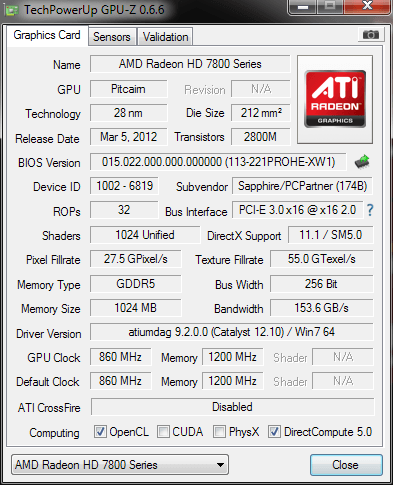
But GPU-z reports it's working @x16 v2.0

How can I fix that?
hce.png
 

My Computer My Computer

Computer Manufacturer/Model Number
SELF BUILT DESKTOP
OS
Microsoft Windows 7 Ultimate 64-bit Service Pack 1
CPU
Core i3 3220
Motherboard
Asrock Z77 Extreme4
Memory
8 GB
Graphics Card(s)
Sapphire HD 7850
Screen Resolution
1920 x 1080 x 32 bits (4294967296 colors) @ 59 Hz
Hard Drives
(1) SAMSUNG HD103SJ ATA Device (2) ST3250410AS ATA Device (3) TEAM XS3 SSD ATA Device (4) WDC WD6400AARS-00Y5B1 ATA Device (5) WDC WD6400AARS-00Y5B1 ATA Device
PSU
COUGAR 700 WATT
There's a BIOS setting for the PCI-E link speed. According to your manual (p. 62 of the downloadable English version, under north bridge configuration), its default setting is Auto. You could try manually setting it to Gen 3 compatibility, in whatever fashion Asrock defines it.
 

My Computer My Computer

Computer Manufacturer/Model Number
homegrown
OS
Windows 7 Pro X64 SP1
CPU
Intel Core I7-3930k
Motherboard
Asus P9X79 Pro
Memory
16 GB Gskill DDR3-2133
Graphics Card(s)
eVGA GTX680
Sound Card
Creative X-Fi Titanium
Monitor(s) Displays
As PA246Q
Screen Resolution
1920 X 1200
Hard Drives
Corsair Force GT, 120 GB
WDC 1.5TB Caviar Black
PSU
PCP&C Silencer 750 Crossfire
Case
Silverstone FT02
Cooling
Noctua NH-D14
Keyboard
cheap Logitech USB
Mouse
Microsoft Intellimouse Explorer (old optical) USB
Internet Speed
6Mb cable
Other Info
Pioneer BDR-205
Samsung SH-203B
Monsoon 5.1 speakers
That is perfectly normal. When your computer is not doing anything strenuous, the speed of the graphics interface drops (in my case to 1.1) because there isn't any demand graphically. However, when running a graphically intensive/demanding program, the speed will jump up to the maximum for the bus (in my case, this is 3.0). An example of a program that does this is Unigine Heaven 3.0, and if you have GPU-Z open whilst you run Heaven (you will need to change the resolution to 640x480 and deselect the Full Screen option), you will see the value change.

This feature works in much the same way as Cool'n'Quiet and SpeedStep does for AMD and Intel CPUs respectively.
 

My Computer My Computer

Computer type
PC/Desktop
Computer Manufacturer/Model Number
Dwarf Dwf/11/2012 r09/2013
OS
Windows 8.1 Pro RTM x64
CPU
Intel Core-i5-3570K 4-core @ 3.4GHz (Ivy Bridge) (OC 4.4GHz)
Motherboard
ASRock Z77 Extreme4-M
Memory
4 x 4GB DDR3-1600 Corsair Vengeance CMZ8GX3M2A1600C9B (16GB)
Graphics Card(s)
MSI GeForce GTX770 Gaming OC 2GB
Sound Card
Realtek High Definition on board solution (ALC 898)
Monitor(s) Displays
ViewSonic VA1912w Widescreen (VGA)
Screen Resolution
1440x900
Hard Drives
OCZ Agility 3 SSD 120GB SATA III x2 (RAID 0)
Samsung HD501LJ 500GB SATA II x2
Hitachi HDS721010CLA332 1TB SATA II
Iomega 1.5TB Ext USB 2.0
WD 2.0TB Ext USB 3.0
PSU
XFX Pro Series 850W Semi-Modular
Case
Gigabyte IF233
Cooling
1 x 120mm Front Inlet 1 x 120mm Rear Exhaust
Keyboard
Microsoft Comfort Curve Keyboard 3000 (USB)
Mouse
Microsoft Comfort Mouse 3000 for Business (USB)
Internet Speed
NetGear DG834Gv3 ADSL Modem/Router (Ethernet) ~4.0 Mb/s (O2)
Antivirus
Avast! 8.0.1497
Browser
IE 11
Other Info
Optical Drive: HL-DT-ST BD-RE BH10LS30 SATA Bluray
Lexmark S305 Printer/Scanner/Copier (USB)
WEI Score: 8.1/8.1/8.5/8.5/8.25
Asus Eee PC 1011PX Netbook (Windows 7 x86 Starter)
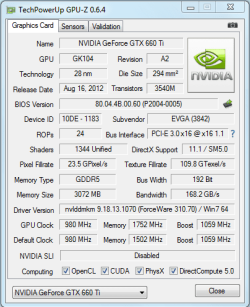
I have the same motherboard, but an Nvidia GPU. I didn't alter any settings after installing the motherboard and GPUz reports mine as being PCI-E 3.0

I will have a quick look in my bios to see how things are set.


Edit, scratch that, yes what Dwarf said, mine see my screenshot.


Paul.
 

Attachments

  • gpuz.PNG
    gpuz.PNG
    18.1 KB · Views: 4

My Computer My Computer

OS
Windows 7 Professional 64 bit
I've already set it to Gen3. No difference. There is also this:

When I open the Catalyst control center hardware tab. It also shows that Maximum Bus Setting is PCI Express 2.0 x16

Is this normal for 7850 ?

catalysth.png
 

My Computer My Computer

Computer Manufacturer/Model Number
SELF BUILT DESKTOP
OS
Microsoft Windows 7 Ultimate 64-bit Service Pack 1
CPU
Core i3 3220
Motherboard
Asrock Z77 Extreme4
Memory
8 GB
Graphics Card(s)
Sapphire HD 7850
Screen Resolution
1920 x 1080 x 32 bits (4294967296 colors) @ 59 Hz
Hard Drives
(1) SAMSUNG HD103SJ ATA Device (2) ST3250410AS ATA Device (3) TEAM XS3 SSD ATA Device (4) WDC WD6400AARS-00Y5B1 ATA Device (5) WDC WD6400AARS-00Y5B1 ATA Device
PSU
COUGAR 700 WATT
GPU-Z shows @x16 1.1 when idle. Steps up to x16 2.0 when running GPU-Z render test.
 

My Computer My Computer

Computer Manufacturer/Model Number
SELF BUILT DESKTOP
OS
Microsoft Windows 7 Ultimate 64-bit Service Pack 1
CPU
Core i3 3220
Motherboard
Asrock Z77 Extreme4
Memory
8 GB
Graphics Card(s)
Sapphire HD 7850
Screen Resolution
1920 x 1080 x 32 bits (4294967296 colors) @ 59 Hz
Hard Drives
(1) SAMSUNG HD103SJ ATA Device (2) ST3250410AS ATA Device (3) TEAM XS3 SSD ATA Device (4) WDC WD6400AARS-00Y5B1 ATA Device (5) WDC WD6400AARS-00Y5B1 ATA Device
PSU
COUGAR 700 WATT
Did you do what Dwarf said regarding running a program such as heaven and looking at GPUz while its running?
 

My Computer My Computer

OS
Windows 7 Professional 64 bit
Did you do what Dwarf said regarding running a program such as heaven and looking at GPUz while its running?

Downloading Heaven now. GPU-Z render test stepped it up to v2.0 only :(

I'm also bugged that Catalysts shows the card's Maximum Bus Setting as "PCI Express 2.0 x16" :(
 

My Computer My Computer

Computer Manufacturer/Model Number
SELF BUILT DESKTOP
OS
Microsoft Windows 7 Ultimate 64-bit Service Pack 1
CPU
Core i3 3220
Motherboard
Asrock Z77 Extreme4
Memory
8 GB
Graphics Card(s)
Sapphire HD 7850
Screen Resolution
1920 x 1080 x 32 bits (4294967296 colors) @ 59 Hz
Hard Drives
(1) SAMSUNG HD103SJ ATA Device (2) ST3250410AS ATA Device (3) TEAM XS3 SSD ATA Device (4) WDC WD6400AARS-00Y5B1 ATA Device (5) WDC WD6400AARS-00Y5B1 ATA Device
PSU
COUGAR 700 WATT
See how it goes with Heaven, but essentially you have a PCI-e 3.0 card and a PCI-e 3.0 Motherboard so at worst its just some kind of setting wrong.
 

My Computer My Computer

OS
Windows 7 Professional 64 bit
See how it goes with Heaven, but essentially you have a PCI-e 3.0 card and a PCI-e 3.0 Motherboard so at worst its just some kind of setting wrong.

Yes but that affects performance. I think My 3DMark'11 scores should be higher than this with i3 3220 Ivy CPU and HD 7850 ?

SCORE P4977 3DMarks

GRAPHICS SCORE 5217
PHYSICS SCORE 4394
COMBINED SCORE 4350

Will post result with Heaven soon...
 

My Computer My Computer

Computer Manufacturer/Model Number
SELF BUILT DESKTOP
OS
Microsoft Windows 7 Ultimate 64-bit Service Pack 1
CPU
Core i3 3220
Motherboard
Asrock Z77 Extreme4
Memory
8 GB
Graphics Card(s)
Sapphire HD 7850
Screen Resolution
1920 x 1080 x 32 bits (4294967296 colors) @ 59 Hz
Hard Drives
(1) SAMSUNG HD103SJ ATA Device (2) ST3250410AS ATA Device (3) TEAM XS3 SSD ATA Device (4) WDC WD6400AARS-00Y5B1 ATA Device (5) WDC WD6400AARS-00Y5B1 ATA Device
PSU
COUGAR 700 WATT
I really don't know what the graphics scores should be for a 7850 in 3D Mark 11, maybe do a little google search to see what others are scoring?
 

My Computer My Computer

OS
Windows 7 Professional 64 bit
It doesn't actually affect your performance. The extra bandwidth that PCI Express 3.0 provides is not used for graphical applications. As it currently stands, 2.0 is under-utilized at this time. In order to take advantage of the extra bandwidth you need to make extensive use of GPGPU technologies.
 

My Computer My Computer

Computer type
PC/Desktop
Computer Manufacturer/Model Number
Alienware Aurora ALX R4
OS
Windows 10 Pro (x64)
CPU
Intel Core i7-3930K (3.2GHz - 4.5GHz)
Motherboard
Alienware Aurora-R4 x79
Memory
4x Samsung 4GB PC3-12800 DDR3 (16GB 1600MHz)
Graphics Card(s)
Nvidia Geforce GTX 690
Sound Card
SteelSeries Siberia Elite
Monitor(s) Displays
Dell UltraSharp U3011
Screen Resolution
2560x1600
Hard Drives
Samsung 850 Pro 256 GB, Seagate 1TB Desktop Hybrid HDD, 2x Western Digital 4TB Green HDD
PSU
875W Some Dell PSU <.<
Case
Alienware Aurora ALX
Cooling
Custom Liquid Cooling (EK CPU & GPU blocks) dual EK 480RAD
Keyboard
Logitech G710+ Mechanical
Mouse
Logitech G700s
Internet Speed
Verizon Fios (50 mbps average)
Other Info
Server: Intel NUC D54250WYK: i5-4250U, 16GB, 256 GB mSATA, Windows Server 2012 R2
It doesn't actually affect your performance. The extra bandwidth that PCI Express 3.0 provides is not used for graphical applications. As it currently stands, 2.0 is under-utilized at this time. In order to take advantage of the extra bandwidth you need to make extensive use of GPGPU technologies.

Good point, I was thinking about it earlier in the thread but got tied up in looking into if it was actually running at 3.0 for him.

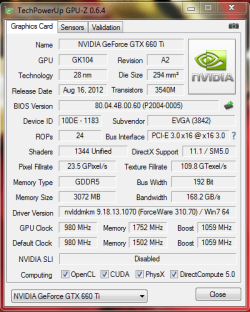
Not that its important, but here is a screenshot of when I have Heaven running in windowed, as you can see it's changed from 1.1 at idle to 3.0 just as Dwarf said it would.
 

Attachments

  • gpuz.PNG
    gpuz.PNG
    23.3 KB · Views: 1

My Computer My Computer

OS
Windows 7 Professional 64 bit
I really don't know what the graphics scores should be for a 7850 in 3D Mark 11, maybe do a little google search to see what others are scoring?


5200 graphics score seems to be absolute minimum for my rig. When you score 5199, 3D Mark website shows a red alert message: "It looks like your PC should score better."

So being just above the alert level (Not all the time, some runs trigger the alert) makes me think that there is something wrong with my computer :(
 

My Computer My Computer

Computer Manufacturer/Model Number
SELF BUILT DESKTOP
OS
Microsoft Windows 7 Ultimate 64-bit Service Pack 1
CPU
Core i3 3220
Motherboard
Asrock Z77 Extreme4
Memory
8 GB
Graphics Card(s)
Sapphire HD 7850
Screen Resolution
1920 x 1080 x 32 bits (4294967296 colors) @ 59 Hz
Hard Drives
(1) SAMSUNG HD103SJ ATA Device (2) ST3250410AS ATA Device (3) TEAM XS3 SSD ATA Device (4) WDC WD6400AARS-00Y5B1 ATA Device (5) WDC WD6400AARS-00Y5B1 ATA Device
PSU
COUGAR 700 WATT
Good point, I was thinking about it earlier in the thread but got tied up in looking into if it was actually running at 3.0 for him.

Not that its important, but here is a screenshot of when I have Heaven running in windowed, as you can see it's changed from 1.1 at idle to 3.0 just as Dwarf said it would.


What do you get when you run the GPU-Z render test? up to v3.0 from 1.1 ? or just to v2.0 as I do?
 

My Computer My Computer

Computer Manufacturer/Model Number
SELF BUILT DESKTOP
OS
Microsoft Windows 7 Ultimate 64-bit Service Pack 1
CPU
Core i3 3220
Motherboard
Asrock Z77 Extreme4
Memory
8 GB
Graphics Card(s)
Sapphire HD 7850
Screen Resolution
1920 x 1080 x 32 bits (4294967296 colors) @ 59 Hz
Hard Drives
(1) SAMSUNG HD103SJ ATA Device (2) ST3250410AS ATA Device (3) TEAM XS3 SSD ATA Device (4) WDC WD6400AARS-00Y5B1 ATA Device (5) WDC WD6400AARS-00Y5B1 ATA Device
PSU
COUGAR 700 WATT
I really don't know what the graphics scores should be for a 7850 in 3D Mark 11, maybe do a little google search to see what others are scoring?


5200 graphics score seems to be absolute minimum for my rig. When you score 5199, 3D Mark website shows a red alert message: "It looks like your PC should score better."

So being just above the alert level (Not all the time, some runs trigger the alert) makes me think that there is something wrong with my computer :(


Well I don't think you have anything to worry about, I googled your card, seems most score between 5000-5500 tops. Don't forget you have the 1GB version, do they take that into account on the alert level?

I would forget about it, it's within the margins and only a benchmark, as long as it plays games well then it's doing its job.
 

My Computer My Computer

OS
Windows 7 Professional 64 bit
Good point, I was thinking about it earlier in the thread but got tied up in looking into if it was actually running at 3.0 for him.

Not that its important, but here is a screenshot of when I have Heaven running in windowed, as you can see it's changed from 1.1 at idle to 3.0 just as Dwarf said it would.


What do you get when you run the GPU-Z render test? up to v3.0 from 1.1 ? or just to v2.0 as I do?


Give me a min to test.


Edit, tested, goes straight to 3.0 as soon as the test starts.
 

My Computer My Computer

OS
Windows 7 Professional 64 bit
Mine still goes up tp v2.0 while running Heaven :(
 

My Computer My Computer

Computer Manufacturer/Model Number
SELF BUILT DESKTOP
OS
Microsoft Windows 7 Ultimate 64-bit Service Pack 1
CPU
Core i3 3220
Motherboard
Asrock Z77 Extreme4
Memory
8 GB
Graphics Card(s)
Sapphire HD 7850
Screen Resolution
1920 x 1080 x 32 bits (4294967296 colors) @ 59 Hz
Hard Drives
(1) SAMSUNG HD103SJ ATA Device (2) ST3250410AS ATA Device (3) TEAM XS3 SSD ATA Device (4) WDC WD6400AARS-00Y5B1 ATA Device (5) WDC WD6400AARS-00Y5B1 ATA Device
PSU
COUGAR 700 WATT
Well as Logicearth has already pointed out, you will see no increase in performance so don't worry about it too much.

I know this as a fact as I have just switched from i7 2600k P67 PCI-E 2.0 to i7 3770K Z77 PCI-E 3.0 and my scores in 3D mark 11 and Heaven have remained the same with the same GPU.

Although it would bug me as to why it's not running at 3.0 and I can understand you want to get what you paid for.
 

My Computer My Computer

OS
Windows 7 Professional 64 bit
Take a look at the following links. Scroll down to the section Expansion Options and note what it says for PCI Express Revision.

My CPU: ARK | Intel® Core

Your CPU: ARK | Intel® Core

According to the above, your CPU only supports v2.0 whereas mine supports v3.0.
 

My Computer My Computer

Computer type
PC/Desktop
Computer Manufacturer/Model Number
Dwarf Dwf/11/2012 r09/2013
OS
Windows 8.1 Pro RTM x64
CPU
Intel Core-i5-3570K 4-core @ 3.4GHz (Ivy Bridge) (OC 4.4GHz)
Motherboard
ASRock Z77 Extreme4-M
Memory
4 x 4GB DDR3-1600 Corsair Vengeance CMZ8GX3M2A1600C9B (16GB)
Graphics Card(s)
MSI GeForce GTX770 Gaming OC 2GB
Sound Card
Realtek High Definition on board solution (ALC 898)
Monitor(s) Displays
ViewSonic VA1912w Widescreen (VGA)
Screen Resolution
1440x900
Hard Drives
OCZ Agility 3 SSD 120GB SATA III x2 (RAID 0)
Samsung HD501LJ 500GB SATA II x2
Hitachi HDS721010CLA332 1TB SATA II
Iomega 1.5TB Ext USB 2.0
WD 2.0TB Ext USB 3.0
PSU
XFX Pro Series 850W Semi-Modular
Case
Gigabyte IF233
Cooling
1 x 120mm Front Inlet 1 x 120mm Rear Exhaust
Keyboard
Microsoft Comfort Curve Keyboard 3000 (USB)
Mouse
Microsoft Comfort Mouse 3000 for Business (USB)
Internet Speed
NetGear DG834Gv3 ADSL Modem/Router (Ethernet) ~4.0 Mb/s (O2)
Antivirus
Avast! 8.0.1497
Browser
IE 11
Other Info
Optical Drive: HL-DT-ST BD-RE BH10LS30 SATA Bluray
Lexmark S305 Printer/Scanner/Copier (USB)
WEI Score: 8.1/8.1/8.5/8.5/8.25
Asus Eee PC 1011PX Netbook (Windows 7 x86 Starter)
Back
Top