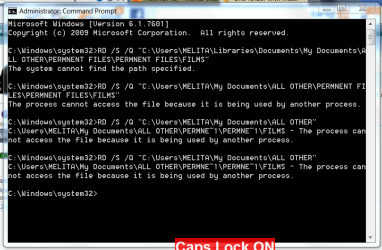
In one of my Windows 7 Libraries, I have a folder 'A'. When I click to open it, another folder 'B' opens. When I click on 'B', the real folder I need, 'C' opens. It is only 'C', that contain my files. A and B are empty folders. The result is that I have to make three clicks to get at my files. This mishap occurred when I was re-arranging my files and folders, probably due to finger trouble! 
Could you please help me remove A and B.
Regards.
Could you please help me remove A and B.
Regards.
My Computer
At a glance
Windows 7 Home Premium 64bitAMD Dual Core C-502GB DDR3/320GB HDDAMD Radeon HD 6250
- Computer Manufacturer/Model Number
- Laptop - Acer Aspire 5250-BZ479
- OS
- Windows 7 Home Premium 64bit
- CPU
- AMD Dual Core C-50
- Memory
- 2GB DDR3/320GB HDD
- Graphics Card(s)
- AMD Radeon HD 6250
- Monitor(s) Displays
- 15.6" HD LED LCD
- Internet Speed
- ADSL