IE 10 on Windows 7 SP1 x64 Professional: WebcacheV01.dat size

siliconman01

New member
Local time
7:39 AM
Messages
4
I recently changed from IE9 to IE 10 Preview on my Windows 7 SP1 x86 and x64 Professional systems. IE 10 is functioning very well on my systems.

Variable WebcacheV01.dat is located in the C:\Users\"MyName"\Appdata\Local\Microsoft\Windows\Webcache folder. This variable keeps increasing in size at a rate of 5-10 mbytes per day depending on my browsing requirements.

I have not been able to define a setting or method for limiting the size of WebcacheV01.dat or for clearing it.

Does anyone know how to control the size of this variable?
 

My Computer My Computer

At a glance

Windows 7 SP1 x64 & x86 Professional
OS
Windows 7 SP1 x64 & x86 Professional
Welcome to Seven Forums siliconman01. Only took you 3 years to have a problem to post? ;) I can find very little reference to WebcacheV01.dat at all. Mostly just logs saying

taskhostex (1768) An attempt to open the file "C:\Users\Damien\AppData\Local\Microsoft\Windows\W ebCache\WebCacheV01.dat" for read only access failed with system error 32 (0x00000020): "The process cannot access the file because it is being used by another process. ". The open file operation will fail with error -1032 (0xfffffbf8).

Or similar. Is the file getting abnormally large, or do you just want to keep control of everything? I can understand that. But hopefully someone who has IE10 installed will comment. I doubt they would know about limiting the size of a dat file though. I suspect you could delete it and it would be recreated, but I won't suggest that. Good luck. A Guy
 

My Computer My Computer

At a glance

Windows 10 Home x64INTEL Core i5-750 Quad-Core 3.37GHzHyperX Fury Black Series 8GB (2 x 4GB) 1866MhzEVGA GeForce GTX 750 Superclocked 1GB 128-Bit...
Computer type
PC/Desktop
OS
Windows 10 Home x64
CPU
INTEL Core i5-750 Quad-Core 3.37GHz
Motherboard
ASUS P7P55D
Memory
HyperX Fury Black Series 8GB (2 x 4GB) 1866Mhz
Graphics Card(s)
EVGA GeForce GTX 750 Superclocked 1GB 128-Bit GDDR5
Monitor(s) Displays
LG 32MA68HY 32" IPS
Screen Resolution
1920 x 1080
Hard Drives
Samsung 840 Evo 120GB, SEAGATE 500GB Barracuda® 7200.12, SATA 3 Gb/s, 7200 RPM, 16MB cache
PSU
ANTEC TruePower New TP-550, 80 PLUS, 550W
Case
ANTEC Three Hundred Illusion
Cooling
COOLER MASTER Hyper 212 Plus, 4 x 120mm 1 x 140mm Noctua's
Internet Speed
85 + Mbps
Antivirus
Avast
Browser
Vivaldi
My Google searches found nothing either. It's headed for 80-100+ mbytes in size from the 32 mbytes that it started at. I just do not like to see a file gobbling up disk space unless there are visible performance or security returns.
 

My Computer My Computer

At a glance

Windows 7 SP1 x64 & x86 Professional
OS
Windows 7 SP1 x64 & x86 Professional
It must be browsers cache - go to options -> general -> browsing history settings -> disk space to use :)
 

My Computer My Computer

At a glance

Windows 7 Pro x64Intel T32003 GBIntel X3100
Computer Manufacturer/Model Number
Asus X51L
OS
Windows 7 Pro x64
CPU
Intel T3200
Memory
3 GB
Graphics Card(s)
Intel X3100
Hard Drives
Crucial C300
It must be browsers cache - go to options -> general -> browsing history settings -> disk space to use :)

That was my thought too. However, those settings do not have any affect on limiting the size....or turning off web caching. I tried changes and nothing impacted webcacheV01.dat.
 

My Computer My Computer

At a glance

Windows 7 SP1 x64 & x86 Professional
OS
Windows 7 SP1 x64 & x86 Professional
It could be just a glitch in IE 10 given the fact it's still a beta for windows 7. I know when I was testing windows 8 and using ie 10 in metro some webpages had issues yet while using IE 10 in desktop mode the same webpage worked normally. Then when 8 was released those particular webpages worked as they should in both metro and desktop.
 

My Computer My Computer

At a glance

Windows 7 Ultimate 64 bitAMD Phenom II X4 965 Black EditionGSkill 4 X 2 GB PC 8500XFX Radeon HD 6790 D
Computer Manufacturer/Model Number
Custom built
OS
Windows 7 Ultimate 64 bit
CPU
AMD Phenom II X4 965 Black Edition
Motherboard
Gigabyte GA-MA790X-DS4
Memory
GSkill 4 X 2 GB PC 8500
Graphics Card(s)
XFX Radeon HD 6790 D
Sound Card
On board RealTek HD
Monitor(s) Displays
Dual monitors:Samsung SyncMaster S20B300
Screen Resolution
1600 X 900
Hard Drives
Seagate Barracuda 1TB (primary)
Seagate Barracuda 2 X 320 GB
PSU
Ultra X4 750 watt fully modular
Case
Thermaltake Overseer RX 1 full tower
Cooling
Core-Contact 92 mm CPU Cooler
Keyboard
Logitech G510
Mouse
Razor DeathAdder
Internet Speed
50/5 Mbps UL/DL
Other Info
Optical: Super Muliti DVD burner w/lightscribe, Hauppauge WinTV HVR-1800
IE 10 Web Cache

You people have me wondering. I did a search with very few results, none helpful.

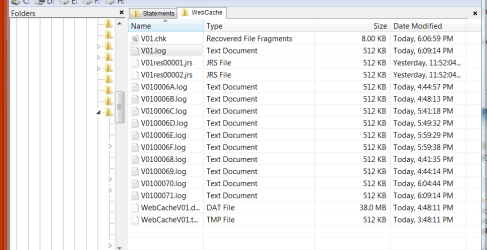
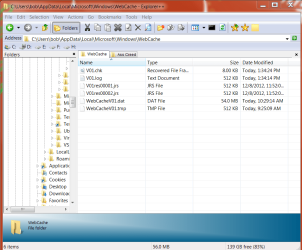
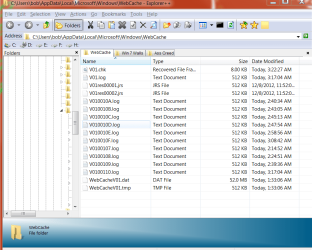
Here is a snip of my directory. IE 10 has only been installed for two days. I'll be watching this for size, etc.

Web.PNG
 

My Computer My Computer

At a glance

win 7 X64 Ultimate SP1I3770KG Skill F3-14900CL9-4GBXL x 4NVIDIA GeForce GTX670 + Intel 4000
Computer Manufacturer/Model Number
BGC (Bob's Garage Crew)
OS
win 7 X64 Ultimate SP1
CPU
I3770K
Motherboard
Asus P8Z77-V Deluxe
Memory
G Skill F3-14900CL9-4GBXL x 4
Graphics Card(s)
NVIDIA GeForce GTX670 + Intel 4000
Sound Card
Realtek HD 5.1 (MOB)
Monitor(s) Displays
Asus VW224T (1)
Screen Resolution
1920 x 1080
Hard Drives
SATA Corsair Force GT 2.5" 180GB (System) Sata 3
OCZ Vertex3 120GB
OCZ Vertex 2 120GB 2.5" SATA II
ST31000524AS 1000.2GB
WD15EARS (External)
PSU
CoolerMaster 1000 Watt
Case
CoolerMaster HAF X
Cooling
CPU -- CoolerMaster 520N
Keyboard
MS Wireless 3000 V2
Mouse
MS Wireless 3000 V2
Internet Speed
Cable
Antivirus
Norton Internet Security
Browser
IE9
Other Info
AMI Bios 1805
OC'd 3%
Flash

Is the same flash ver for IE9 good in IE10? I see on the Adobe site there are versions for Win 8 etc. I am using a 32 bit ver that is up to date for IE9.

I think I might be having flash problems.
 

My Computer My Computer

At a glance

win 7 X64 Ultimate SP1I3770KG Skill F3-14900CL9-4GBXL x 4NVIDIA GeForce GTX670 + Intel 4000
Computer Manufacturer/Model Number
BGC (Bob's Garage Crew)
OS
win 7 X64 Ultimate SP1
CPU
I3770K
Motherboard
Asus P8Z77-V Deluxe
Memory
G Skill F3-14900CL9-4GBXL x 4
Graphics Card(s)
NVIDIA GeForce GTX670 + Intel 4000
Sound Card
Realtek HD 5.1 (MOB)
Monitor(s) Displays
Asus VW224T (1)
Screen Resolution
1920 x 1080
Hard Drives
SATA Corsair Force GT 2.5" 180GB (System) Sata 3
OCZ Vertex3 120GB
OCZ Vertex 2 120GB 2.5" SATA II
ST31000524AS 1000.2GB
WD15EARS (External)
PSU
CoolerMaster 1000 Watt
Case
CoolerMaster HAF X
Cooling
CPU -- CoolerMaster 520N
Keyboard
MS Wireless 3000 V2
Mouse
MS Wireless 3000 V2
Internet Speed
Cable
Antivirus
Norton Internet Security
Browser
IE9
Other Info
AMI Bios 1805
OC'd 3%
Is the same flash ver for IE9 good in IE10? I see on the Adobe site there are versions for Win 8 etc. I am using a 32 bit ver that is up to date for IE9.

I think I might be having flash problems.

Flash Player V11.5.502.110 is working fine on my IE 10 on Win 7 SP1 x64 and x86 Professional.
 

My Computer My Computer

At a glance

Windows 7 SP1 x64 & x86 Professional
OS
Windows 7 SP1 x64 & x86 Professional
Flash Ver

OK Siliconman, that is the ver I am running. I must have a problem somewhere else.
 

My Computer My Computer

At a glance

win 7 X64 Ultimate SP1I3770KG Skill F3-14900CL9-4GBXL x 4NVIDIA GeForce GTX670 + Intel 4000
Computer Manufacturer/Model Number
BGC (Bob's Garage Crew)
OS
win 7 X64 Ultimate SP1
CPU
I3770K
Motherboard
Asus P8Z77-V Deluxe
Memory
G Skill F3-14900CL9-4GBXL x 4
Graphics Card(s)
NVIDIA GeForce GTX670 + Intel 4000
Sound Card
Realtek HD 5.1 (MOB)
Monitor(s) Displays
Asus VW224T (1)
Screen Resolution
1920 x 1080
Hard Drives
SATA Corsair Force GT 2.5" 180GB (System) Sata 3
OCZ Vertex3 120GB
OCZ Vertex 2 120GB 2.5" SATA II
ST31000524AS 1000.2GB
WD15EARS (External)
PSU
CoolerMaster 1000 Watt
Case
CoolerMaster HAF X
Cooling
CPU -- CoolerMaster 520N
Keyboard
MS Wireless 3000 V2
Mouse
MS Wireless 3000 V2
Internet Speed
Cable
Antivirus
Norton Internet Security
Browser
IE9
Other Info
AMI Bios 1805
OC'd 3%
File Size

The file size made a significant leap and today it hasn't increased.

120912 Web.PNG

121012 Web.PNG

121112 Web.PNG
 

My Computer My Computer

At a glance

win 7 X64 Ultimate SP1I3770KG Skill F3-14900CL9-4GBXL x 4NVIDIA GeForce GTX670 + Intel 4000
Computer Manufacturer/Model Number
BGC (Bob's Garage Crew)
OS
win 7 X64 Ultimate SP1
CPU
I3770K
Motherboard
Asus P8Z77-V Deluxe
Memory
G Skill F3-14900CL9-4GBXL x 4
Graphics Card(s)
NVIDIA GeForce GTX670 + Intel 4000
Sound Card
Realtek HD 5.1 (MOB)
Monitor(s) Displays
Asus VW224T (1)
Screen Resolution
1920 x 1080
Hard Drives
SATA Corsair Force GT 2.5" 180GB (System) Sata 3
OCZ Vertex3 120GB
OCZ Vertex 2 120GB 2.5" SATA II
ST31000524AS 1000.2GB
WD15EARS (External)
PSU
CoolerMaster 1000 Watt
Case
CoolerMaster HAF X
Cooling
CPU -- CoolerMaster 520N
Keyboard
MS Wireless 3000 V2
Mouse
MS Wireless 3000 V2
Internet Speed
Cable
Antivirus
Norton Internet Security
Browser
IE9
Other Info
AMI Bios 1805
OC'd 3%
Uninstalled

I had to take it off. One site that I use and need could not render correctly. I considered waiting for an update. But that could be a while. So I will just wait.

I noticed the directory we were discussing was still there after the uninstall. So I left it intact and renamed it to see if it is needed.
 

My Computer My Computer

At a glance

win 7 X64 Ultimate SP1I3770KG Skill F3-14900CL9-4GBXL x 4NVIDIA GeForce GTX670 + Intel 4000
Computer Manufacturer/Model Number
BGC (Bob's Garage Crew)
OS
win 7 X64 Ultimate SP1
CPU
I3770K
Motherboard
Asus P8Z77-V Deluxe
Memory
G Skill F3-14900CL9-4GBXL x 4
Graphics Card(s)
NVIDIA GeForce GTX670 + Intel 4000
Sound Card
Realtek HD 5.1 (MOB)
Monitor(s) Displays
Asus VW224T (1)
Screen Resolution
1920 x 1080
Hard Drives
SATA Corsair Force GT 2.5" 180GB (System) Sata 3
OCZ Vertex3 120GB
OCZ Vertex 2 120GB 2.5" SATA II
ST31000524AS 1000.2GB
WD15EARS (External)
PSU
CoolerMaster 1000 Watt
Case
CoolerMaster HAF X
Cooling
CPU -- CoolerMaster 520N
Keyboard
MS Wireless 3000 V2
Mouse
MS Wireless 3000 V2
Internet Speed
Cable
Antivirus
Norton Internet Security
Browser
IE9
Other Info
AMI Bios 1805
OC'd 3%
This is very simple. You have your setting for saving the sites you have visited with IE set to high. Reset them to 30 days.

I made the mistake of setting it to 160 day and couldn't figure out why my hard drive was running all of the time and IE was freezing up.
 

My Computer My Computer

At a glance

windows 7 64 bit
OS
windows 7 64 bit
webcacheV01.dat

Reduce your "Days to keep pages in history" to 30 days. All will be good.
 

My Computer My Computer

At a glance

windows 7 64 bit
OS
windows 7 64 bit
I recently changed from IE9 to IE 10 Preview on my Windows 7 SP1 x86 and x64 Professional systems. IE 10 is functioning very well on my systems.

Variable WebcacheV01.dat is located in the C:\Users\"MyName"\Appdata\Local\Microsoft\Windows\Webcache folder. This variable keeps increasing in size at a rate of 5-10 mbytes per day depending on my browsing requirements.

I have not been able to define a setting or method for limiting the size of WebcacheV01.dat or for clearing it.

Does anyone know how to control the size of this variable?


Reduce your "Days to keep pages in history" to 30 days. All will be good.
 

My Computer My Computer

At a glance

windows 7 64 bit
OS
windows 7 64 bit
Even if one doesn't use IE and have disabled it, a dllhost.exe runs in the system with ur username governing location AppData\Local\Microsoft\Windows\WebCache, the dllhost is related to Widows Internet - wininet ~ I'd love to get rid off the web cache dll I don't use it nor need it.
 

My Computer My Computer

At a glance

Windows 7 Professional x64INtel i5 3570KDDR3 8GB dual channel
Computer type
PC/Desktop
Computer Manufacturer/Model Number
custom build
OS
Windows 7 Professional x64
CPU
INtel i5 3570K
Memory
DDR3 8GB dual channel
Hard Drives
Intel SSD 330 120GB (sata3) OS & apps
+ HDD sata2 for storage
Antivirus
Avast
Browser
Opera
Back
Top