Strange Partiton

Mitch656

New member
Power User
VIP
Local time
9:11 PM
Messages
722
Location
Australia
Hi,
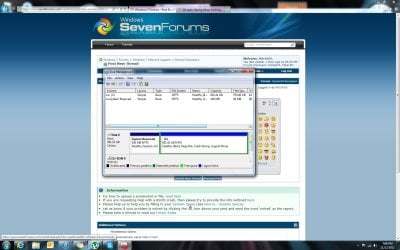
So i recenetly reinstailled Windows 7, and i had shrink my partition in CMD durning setup, anyway i went to delete my old Windows 7 Partition, and i find out that a new partition was created (System reserved) It was never there before
I don't know what it is??
Can i delete it??
 

Attachments
  • Untitled.jpg
    Untitled.jpg
    159 KB · Views: 21

My Computer

Computer type
PC/Desktop
Computer Manufacturer/Model Number
Custom Build
OS
Windows 7 Professional 64bit
CPU
Intel Core i5 - 2500K @ 3.30GHz
Motherboard
Gigabyte Z77-HD3
Memory
4GB DDR3
Graphics Card(s)
EVGA Nvidia GeForce GT 740 2GB DDR3
Screen Resolution
1680 x 1050
Hard Drives
1T Samaung HD/ 1T toshiba external drive/ 1T western digital external drive/ 2T seagate external drive/ 250gb samaung SSD
PSU
Antec 430W
Keyboard
Microsoft Wireless Keyboard 800
Mouse
Microsoft Wireless Mouse 1000
Antivirus
AVG
Browser
Internet Explorer
System Reserve is normally on every Win 7 install. You have to do special things to Not have it. It holds the files needed to boot Win 7.
I'm surprised this is the first time you are hearing and seeing it.
If you delete it your 7 won't boot.
 

My Computer

OS
7 x64
Quite normal to have it. It contains the bootmenu and bootmanager. It's created automatically when disk has no partitions at all. Maybe that what was happening in your case(?) But how come C-drive is a logical partition (green border in disk management?

You wanna get rid of "system reserved"? It can be merged to C
 

My Computer

Computer type
Laptop
Computer Manufacturer/Model Number
ACER ASPIRE 5742G
OS
Microsoft Windows 7 Home Premium 64-bits 7601 Multiprocessor Free Service Pack 1
CPU
Intel(R) Core(TM) i3 CPU M 370 @ 2.40GHz
Motherboard
Acer Aspire 5742G
Memory
4,00 GB
Graphics Card(s)
ATI Mobility Radeon HD 5400 Series
Sound Card
(1) AMD High Definition Audio Device (2) Realtek High Defi
Screen Resolution
1366 x 768 x 32 bits (4294967296 colors) @ 60 Hz
Hard Drives
WDC WD5000BEVT-22ZAT0
Quite normal to have it. It contains the bootmenu and bootmanager. It's created automatically when disk has no partitions at all. Maybe that what was happening in your case(?) But how come C-drive is a logical partition (green border in disk management?

You wanna get rid of "system reserved"? It can be merged to C
No idea why its a logical partition....
How might i go about merging it into the C drive?
 

My Computer

Computer type
PC/Desktop
Computer Manufacturer/Model Number
Custom Build
OS
Windows 7 Professional 64bit
CPU
Intel Core i5 - 2500K @ 3.30GHz
Motherboard
Gigabyte Z77-HD3
Memory
4GB DDR3
Graphics Card(s)
EVGA Nvidia GeForce GT 740 2GB DDR3
Screen Resolution
1680 x 1050
Hard Drives
1T Samaung HD/ 1T toshiba external drive/ 1T western digital external drive/ 2T seagate external drive/ 250gb samaung SSD
PSU
Antec 430W
Keyboard
Microsoft Wireless Keyboard 800
Mouse
Microsoft Wireless Mouse 1000
Antivirus
AVG
Browser
Internet Explorer
It is one hundred MBs. Do you really need that one hundred MBs?

Also Windows will not run from a Logic drive in an extended partition without the boot files, boot menu/manager, being on a Primary partition. So if you try to remove, merge, that sys reserve into the C drive, the logical drive in an extended partition, you may end up doing another Re-Install.
 

My Computer

OS
7 x64
It is one hundred MBs. Do you really need that one hundred MBs?

Also Windows will not run from a Logic drive in an extended partition without the boot files, boot menu/manager, being on a Primary partition. So if you try to remove, merge, that sys reserve into the C drive, the logical drive in an extended partition, you may end up doing another Re-Install.

Ok well one i have no idea what the difference between a logic and a logical drive.
I don't need the 100mb, I just prefer is it was all neat and in one thing so i wont get confused one day and ruin my system
 

My Computer

Computer type
PC/Desktop
Computer Manufacturer/Model Number
Custom Build
OS
Windows 7 Professional 64bit
CPU
Intel Core i5 - 2500K @ 3.30GHz
Motherboard
Gigabyte Z77-HD3
Memory
4GB DDR3
Graphics Card(s)
EVGA Nvidia GeForce GT 740 2GB DDR3
Screen Resolution
1680 x 1050
Hard Drives
1T Samaung HD/ 1T toshiba external drive/ 1T western digital external drive/ 2T seagate external drive/ 250gb samaung SSD
PSU
Antec 430W
Keyboard
Microsoft Wireless Keyboard 800
Mouse
Microsoft Wireless Mouse 1000
Antivirus
AVG
Browser
Internet Explorer
Quite normal to have it. It contains the bootmenu and bootmanager. It's created automatically when disk has no partitions at all. Maybe that what was happening in your case(?) But how come C-drive is a logical partition (green border in disk management?

You wanna get rid of "system reserved"? It can be merged to C
No idea why its a logical partition....
How might i go about merging it into the C drive?

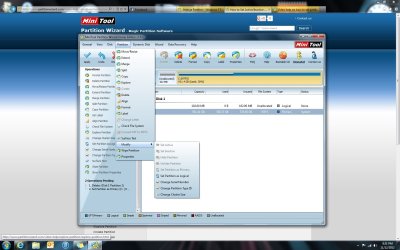
Download partition wizard HOME and install it Free download Magic Partition Manager Software, partition magic alternative, free partition magic, partition magic Windows 7 and server partition software - Partition Wizard Online (the one on top). Run it.
  1. Delete "system reserved" partition http://www.partitionwizard.com/video-help/delete-partition/delete-partition.html
  2. Set C primary instead of logical Video help on how to set partition as Primary or Logical.
  3. Mark C "active" How to Set Active/Inactive partition with partition magic? Partition Wizard Video Help.
  4. Resize C so it takes the space of old "system reserved". How to Move/Resize Partition with partition manager? Partition Wizard Move/Resize Partition Video Help.
Now you have 1 big C drive. Type PRIMARY and ACTIVE (so boot partition). Don't press APPLY yet!! But post screenshot, so I can check.

Do you have a win7 system repair disc or win7 install DVD? You need it later!
 

My Computer

Computer type
Laptop
Computer Manufacturer/Model Number
ACER ASPIRE 5742G
OS
Microsoft Windows 7 Home Premium 64-bits 7601 Multiprocessor Free Service Pack 1
CPU
Intel(R) Core(TM) i3 CPU M 370 @ 2.40GHz
Motherboard
Acer Aspire 5742G
Memory
4,00 GB
Graphics Card(s)
ATI Mobility Radeon HD 5400 Series
Sound Card
(1) AMD High Definition Audio Device (2) Realtek High Defi
Screen Resolution
1366 x 768 x 32 bits (4294967296 colors) @ 60 Hz
Hard Drives
WDC WD5000BEVT-22ZAT0
Quite normal to have it. It contains the bootmenu and bootmanager. It's created automatically when disk has no partitions at all. Maybe that what was happening in your case(?) But how come C-drive is a logical partition (green border in disk management?

You wanna get rid of "system reserved"? It can be merged to C
No idea why its a logical partition....
How might i go about merging it into the C drive?


Download partition wizard HOME and install it Free download Magic Partition Manager Software, partition magic alternative, free partition magic, partition magic Windows 7 and server partition software - Partition Wizard Online (the one on top). Run it.
  1. Delete "system reserved" partition Delete Partition - Partition Wizard Help Video
  2. Set C primary instead of logical Video help on how to set partition as Primary or Logical.
  3. Mark C "active" How to Set Active/Inactive partition with partition magic? Partition Wizard Video Help.
  4. Resize C so it takes the space of old "system reserved". How to Move/Resize Partition with partition manager? Partition Wizard Move/Resize Partition Video Help.
Now you have 1 big C drive. Type PRIMARY and ACTIVE (so boot partition). Don't press APPLY yet!! But post screenshot, so I can check.

Do you have a win7 system repair disc or win7 install DVD? You need it later!

Sounds Kind of risky D:
Yes i do have a windows 7 instaill disk
Anyway the cloest i have gotten is up to set 2. I can seem to get step 3 from following the video.
 

Attachments

  • fail.jpg
    fail.jpg
    150.8 KB · Views: 4

My Computer

Computer type
PC/Desktop
Computer Manufacturer/Model Number
Custom Build
OS
Windows 7 Professional 64bit
CPU
Intel Core i5 - 2500K @ 3.30GHz
Motherboard
Gigabyte Z77-HD3
Memory
4GB DDR3
Graphics Card(s)
EVGA Nvidia GeForce GT 740 2GB DDR3
Screen Resolution
1680 x 1050
Hard Drives
1T Samaung HD/ 1T toshiba external drive/ 1T western digital external drive/ 2T seagate external drive/ 250gb samaung SSD
PSU
Antec 430W
Keyboard
Microsoft Wireless Keyboard 800
Mouse
Microsoft Wireless Mouse 1000
Antivirus
AVG
Browser
Internet Explorer
use the bootable CD. You can find on same download page (the last one). Boot from it. Works quite the same.
But first question. Do you have a win7 install dvd or win7 system repair disc?
 

My Computer

Computer type
Laptop
Computer Manufacturer/Model Number
ACER ASPIRE 5742G
OS
Microsoft Windows 7 Home Premium 64-bits 7601 Multiprocessor Free Service Pack 1
CPU
Intel(R) Core(TM) i3 CPU M 370 @ 2.40GHz
Motherboard
Acer Aspire 5742G
Memory
4,00 GB
Graphics Card(s)
ATI Mobility Radeon HD 5400 Series
Sound Card
(1) AMD High Definition Audio Device (2) Realtek High Defi
Screen Resolution
1366 x 768 x 32 bits (4294967296 colors) @ 60 Hz
Hard Drives
WDC WD5000BEVT-22ZAT0
use the bootable CD. You can find on same download page (the last one). Boot from it. Works quite the same.
But first question. Do you have a win7 install dvd or win7 system repair disc?
Yea i do have the windows 7 instaill disk...
Is it possible to take a screen shit while not even booted into windows??

Should i just leave it and change my Windows 7 to Primary??
 

My Computer

Computer type
PC/Desktop
Computer Manufacturer/Model Number
Custom Build
OS
Windows 7 Professional 64bit
CPU
Intel Core i5 - 2500K @ 3.30GHz
Motherboard
Gigabyte Z77-HD3
Memory
4GB DDR3
Graphics Card(s)
EVGA Nvidia GeForce GT 740 2GB DDR3
Screen Resolution
1680 x 1050
Hard Drives
1T Samaung HD/ 1T toshiba external drive/ 1T western digital external drive/ 2T seagate external drive/ 250gb samaung SSD
PSU
Antec 430W
Keyboard
Microsoft Wireless Keyboard 800
Mouse
Microsoft Wireless Mouse 1000
Antivirus
AVG
Browser
Internet Explorer
From partition wizard bootable CD
  1. Delete "system reserved" partition Delete Partition - Partition Wizard Help Video
  2. Set C primary instead of logical Video help on how to set partition as Primary or Logical.
  3. Press APPLY. If step 4 is not working boot again from partitition wizard DVD and do step 4
  4. Mark C "active" How to Set Active/Inactive partition with partition magic? Partition Wizard Video Help.
  5. Resize C so it takes the space of old "system reserved". How to Move/Resize Partition with partition manager? Partition Wizard Move/Resize Partition Video Help.
Now boot into win7 recovery environment and do a startup repair http://www.sevenforums.com/tutorials/681-startup-repair.html

Be sure to do a startup reapir 3 times, with reboots in between. Then boot manager and boot menu are recreated on active primary partition. System boot fine now
 

My Computer

Computer type
Laptop
Computer Manufacturer/Model Number
ACER ASPIRE 5742G
OS
Microsoft Windows 7 Home Premium 64-bits 7601 Multiprocessor Free Service Pack 1
CPU
Intel(R) Core(TM) i3 CPU M 370 @ 2.40GHz
Motherboard
Acer Aspire 5742G
Memory
4,00 GB
Graphics Card(s)
ATI Mobility Radeon HD 5400 Series
Sound Card
(1) AMD High Definition Audio Device (2) Realtek High Defi
Screen Resolution
1366 x 768 x 32 bits (4294967296 colors) @ 60 Hz
Hard Drives
WDC WD5000BEVT-22ZAT0
It is one hundred MBs. Do you really need that one hundred MBs?

Also Windows will not run from a Logic drive in an extended partition without the boot files, boot menu/manager, being on a Primary partition. So if you try to remove, merge, that sys reserve into the C drive, the logical drive in an extended partition, you may end up doing another Re-Install.

Ok well one i have no idea what the difference between a logic and a logical drive.
I don't need the 100mb, I just prefer is it was all neat and in one thing so i wont get confused one day and ruin my system

Well I forgot the "al" off the logic, it should of been Logical.

In any event you will never see that 100MB partition unless you are in a Disk partitioning program like Disk Management or some other program. It will not show in Win Explorer as it is hidden and does not have a drive letter.
Do as you please but IMHO you are make much ado about nothing.

Good Luck.
 

My Computer

OS
7 x64
Really do you want to go through all those steps just to get rid of that 100MB partition?

Kaktussofts replies are all well and good but ask yourself, "Why do I need to remove that 100MB partition"?

Simple fact is you don't

Again Good Luck and Best Wishes.
 

My Computer

OS
7 x64

My Computer

Computer type
Laptop
Computer Manufacturer/Model Number
ACER ASPIRE 5742G
OS
Microsoft Windows 7 Home Premium 64-bits 7601 Multiprocessor Free Service Pack 1
CPU
Intel(R) Core(TM) i3 CPU M 370 @ 2.40GHz
Motherboard
Acer Aspire 5742G
Memory
4,00 GB
Graphics Card(s)
ATI Mobility Radeon HD 5400 Series
Sound Card
(1) AMD High Definition Audio Device (2) Realtek High Defi
Screen Resolution
1366 x 768 x 32 bits (4294967296 colors) @ 60 Hz
Hard Drives
WDC WD5000BEVT-22ZAT0

My Computer

Computer type
PC/Desktop
Computer Manufacturer/Model Number
Custom Build
OS
Windows 7 Professional 64bit
CPU
Intel Core i5 - 2500K @ 3.30GHz
Motherboard
Gigabyte Z77-HD3
Memory
4GB DDR3
Graphics Card(s)
EVGA Nvidia GeForce GT 740 2GB DDR3
Screen Resolution
1680 x 1050
Hard Drives
1T Samaung HD/ 1T toshiba external drive/ 1T western digital external drive/ 2T seagate external drive/ 250gb samaung SSD
PSU
Antec 430W
Keyboard
Microsoft Wireless Keyboard 800
Mouse
Microsoft Wireless Mouse 1000
Antivirus
AVG
Browser
Internet Explorer
Maybe easier for you. Convert C to primary and APPLY. Reboot.
Now do http://www.sevenforums.com/tutorials/71363-system-reserved-partition-delete.html

Sorry for all my posts... maybe to much info
Thats seems a lot easier... My only problem is I'm scared, I'm such a noob:p and always tend to ruin things.... Now the question that you ask me before.... Do i really need to do it
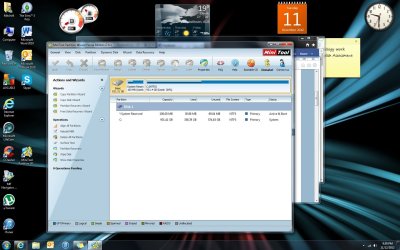
Shoud i just leave it and change it to logical
You didn't apply anything yet? Leave it is the way it's now. You only win 100MB.... what the heck.

Only thing I should do for sure.... convert C to primary! and of course apply. Post screenshot after reboot.
 

My Computer

Computer type
Laptop
Computer Manufacturer/Model Number
ACER ASPIRE 5742G
OS
Microsoft Windows 7 Home Premium 64-bits 7601 Multiprocessor Free Service Pack 1
CPU
Intel(R) Core(TM) i3 CPU M 370 @ 2.40GHz
Motherboard
Acer Aspire 5742G
Memory
4,00 GB
Graphics Card(s)
ATI Mobility Radeon HD 5400 Series
Sound Card
(1) AMD High Definition Audio Device (2) Realtek High Defi
Screen Resolution
1366 x 768 x 32 bits (4294967296 colors) @ 60 Hz
Hard Drives
WDC WD5000BEVT-22ZAT0
???
 

Attachments

  • Untitled.jpg
    Untitled.jpg
    170.1 KB · Views: 8

My Computer

Computer type
PC/Desktop
Computer Manufacturer/Model Number
Custom Build
OS
Windows 7 Professional 64bit
CPU
Intel Core i5 - 2500K @ 3.30GHz
Motherboard
Gigabyte Z77-HD3
Memory
4GB DDR3
Graphics Card(s)
EVGA Nvidia GeForce GT 740 2GB DDR3
Screen Resolution
1680 x 1050
Hard Drives
1T Samaung HD/ 1T toshiba external drive/ 1T western digital external drive/ 2T seagate external drive/ 250gb samaung SSD
PSU
Antec 430W
Keyboard
Microsoft Wireless Keyboard 800
Mouse
Microsoft Wireless Mouse 1000
Antivirus
AVG
Browser
Internet Explorer

My Computer

Computer type
Laptop
Computer Manufacturer/Model Number
ACER ASPIRE 5742G
OS
Microsoft Windows 7 Home Premium 64-bits 7601 Multiprocessor Free Service Pack 1
CPU
Intel(R) Core(TM) i3 CPU M 370 @ 2.40GHz
Motherboard
Acer Aspire 5742G
Memory
4,00 GB
Graphics Card(s)
ATI Mobility Radeon HD 5400 Series
Sound Card
(1) AMD High Definition Audio Device (2) Realtek High Defi
Screen Resolution
1366 x 768 x 32 bits (4294967296 colors) @ 60 Hz
Hard Drives
WDC WD5000BEVT-22ZAT0
Mitch, save a Win7 backup image externally so you can simply reimage the HD in 20 minutes the next time Win7 becomes unbootable. Backup Complete Computer - Create an Image Backup

I had you set up this way several years ago and you seem to have lost track of how to stay backed up correctly. But I understand you were 14 then, so it's time to do the big-boy things now. ;)
 
Having everything "neat" is actually taken care of for you already. The partition is not assigned a letter, so you don't see it outside of disk management and partitioning tools. While you can merge it with your primary drive, it's introducing a change from the default functionality. I wouldn't do this... even though it may work most of the time, you never know when you'll run into an incompatibility or unforeseen issue.
 

My Computer

Computer type
Laptop
Computer Manufacturer/Model Number
HP Pavillion dv6 (dv6-6165dx)
OS
Windows 7 Home Premium x64
CPU
AMD Vision A8-3500M 4 Core
Motherboard
AMD
Memory
8Gb
Graphics Card(s)
AMD Radeon HD 6620G
Screen Resolution
1366x768
Hard Drives
Hitachi Travelstar 500Gb
Internet Speed
Realtek RTL8188CE 802.11b/g/n
Back
Top