Limited/Slow/No access from laptop on WLAN

Ayson

New member
Local time
4:42 PM
Messages
18
Hello everybody. I would like some help on certain connectivity issues i'm experiencing with my laptop. Please help.

Here is the hardware. Laptop ASUS A8E with Intel Wireless WiFi Link 4965AGN and Realtek Ethernet, ADSL modem + router TP-Link TD-8961ND, Desktop with Atheros Ethernet. Both PCs running Win7 Pro.

I used to have a Netcomm NB6+4W modem + router and that was problem free. Now since I have started using the new router I can't use the wifi network at all. The laptop goes retard after connecting to the network. It cant access the internet when set in PPPoE mode, cant dial when set in bridged, can't see the homegroup, or share files. Keeps disconnecting, cant open the router config page, cant use remote desktop, . . . . . and most surprising, if I try to hibernate, the screen goes blank as usual, but then it just waits, and waits, till I switch off the router, then it continues to save to disk and go off. I have an android phone and that seems to be connecting to the network ok, but I have to confirm. I have the latest intel driver installed. I have tried 802.11 g+n, b+g+n on the router.

Thanks in advance for any help.

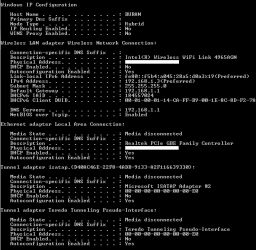
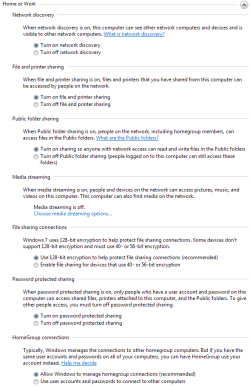
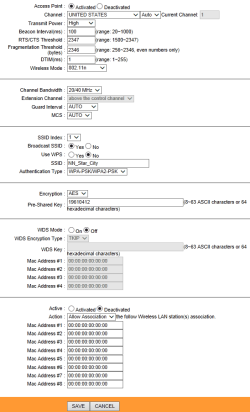
Here is my WLAN config from the router, config from laptop, and advanced sharing settings which are the same for both Laptop and Desktop:
 

Attachments
  • Modem_config.png
    Modem_config.png
    18.1 KB · Views: 32
  • NB_Config.png
    NB_Config.png
    9.7 KB · Views: 27
  • AdShSe.png
    AdShSe.png
    21.6 KB · Views: 25

My Computer My Computer

At a glance

Windows 7 Professional 32bitAMD Athlon II X2 4450e @2.8GHz (Sempron 145)2x2GB DDR3 1333MHz KingstonMSI R7750 PMD1GD5
Computer Manufacturer/Model Number
NA
OS
Windows 7 Professional 32bit
CPU
AMD Athlon II X2 4450e @2.8GHz (Sempron 145)
Motherboard
ASUS M4A78LT-M LE
Memory
2x2GB DDR3 1333MHz Kingston
Graphics Card(s)
MSI R7750 PMD1GD5
Sound Card
VIA HD 7.1 onboard
Monitor(s) Displays
Sony Bravia V Series - KLV-26V300A
Screen Resolution
1360x768
Hard Drives
WD Caviar Blue
WD5000AAKS
500GB SATA
PSU
Corsair CX500 V2
Case
Enterage Generic
Cooling
CM Hyper TX3 EVO, GPU 2x 80mm, Stock PSU fan, 1x80mm cab fan
Where is this modem configuration page coming from because it looks like this is from a router and not a modem.

This is the most likely problem you are seeing now, if you are trying to connect a router to another router that would explain the problems you are having.
 

My Computer My Computer

At a glance

Windows 7 Ult, Windows 8.1 Pro,Q9650-4.275GHz, E8600 4.5GHz, E6750-3.8GHzG.Skill PC2 9600 1200Mhz 5 5 5 15 2TGTX480
Computer type
PC/Desktop
Computer Manufacturer/Model Number
Home built
OS
Windows 7 Ult, Windows 8.1 Pro,
CPU
Q9650-4.275GHz, E8600 4.5GHz, E6750-3.8GHz
Motherboard
Evga 780i FTW
Memory
G.Skill PC2 9600 1200Mhz 5 5 5 15 2T
Graphics Card(s)
GTX480
Sound Card
Asus Xonar D2
Monitor(s) Displays
HannsG
Screen Resolution
1680X1050
Hard Drives
GSkill Phoenix Pro 120GB SSD
PSU
ThermalTake Toughpower 1000Watt modular
Case
ThermalTake XaserV
Cooling
Xigmatek S1283
Keyboard
Logitech G15
Mouse
Logitech G9
Internet Speed
T1
Where is this modem configuration page coming from .......

I am using an ADSL modem + router. It is a single device. That is the wireless settings page in the configuration of the device.
 

My Computer My Computer

At a glance

Windows 7 Professional 32bitAMD Athlon II X2 4450e @2.8GHz (Sempron 145)2x2GB DDR3 1333MHz KingstonMSI R7750 PMD1GD5
Computer Manufacturer/Model Number
NA
OS
Windows 7 Professional 32bit
CPU
AMD Athlon II X2 4450e @2.8GHz (Sempron 145)
Motherboard
ASUS M4A78LT-M LE
Memory
2x2GB DDR3 1333MHz Kingston
Graphics Card(s)
MSI R7750 PMD1GD5
Sound Card
VIA HD 7.1 onboard
Monitor(s) Displays
Sony Bravia V Series - KLV-26V300A
Screen Resolution
1360x768
Hard Drives
WD Caviar Blue
WD5000AAKS
500GB SATA
PSU
Corsair CX500 V2
Case
Enterage Generic
Cooling
CM Hyper TX3 EVO, GPU 2x 80mm, Stock PSU fan, 1x80mm cab fan
Somebody please help, this is driving me nuts. There is some info I would like to add. If the laptop is restarted or the router wireless de-activated and then activated, the problem goes away. But everything goes wrong again about 15-20 minutes later.
 

My Computer My Computer

At a glance

Windows 7 Professional 32bitAMD Athlon II X2 4450e @2.8GHz (Sempron 145)2x2GB DDR3 1333MHz KingstonMSI R7750 PMD1GD5
Computer Manufacturer/Model Number
NA
OS
Windows 7 Professional 32bit
CPU
AMD Athlon II X2 4450e @2.8GHz (Sempron 145)
Motherboard
ASUS M4A78LT-M LE
Memory
2x2GB DDR3 1333MHz Kingston
Graphics Card(s)
MSI R7750 PMD1GD5
Sound Card
VIA HD 7.1 onboard
Monitor(s) Displays
Sony Bravia V Series - KLV-26V300A
Screen Resolution
1360x768
Hard Drives
WD Caviar Blue
WD5000AAKS
500GB SATA
PSU
Corsair CX500 V2
Case
Enterage Generic
Cooling
CM Hyper TX3 EVO, GPU 2x 80mm, Stock PSU fan, 1x80mm cab fan
Where is this modem configuration page coming from .......

I am using an ADSL modem + router. It is a single device. That is the wireless settings page in the configuration of the device.

You see the problem is that you plugged a modem/router combo into another router which always causes problems unless you perform certain set up procedure's. You would start off by turning off DHCP on the second router. Then it usually takes an assigned IP for the second router to make sure it's inside the subnet of the first router. Although sometimes DHCP works for this.

You would also need to plug one of the second routers Ethernet LAN ports into one of the first routers LAN ports, not WAN to WAN.

Or if you don't require two wireless access points and want to greatly simplify your network set up, then remove the modem/router combo unit completely and install a regular modem, not a combo unit, then plug the new router's WAN/INTERNET port into the modem's Ethernet port. You also would need to do the wireless setup on the new router once it's hooked up by typing it's default gateway IP into the URL of your browser.
 

My Computer My Computer

At a glance

Windows 7 Ult, Windows 8.1 Pro,Q9650-4.275GHz, E8600 4.5GHz, E6750-3.8GHzG.Skill PC2 9600 1200Mhz 5 5 5 15 2TGTX480
Computer type
PC/Desktop
Computer Manufacturer/Model Number
Home built
OS
Windows 7 Ult, Windows 8.1 Pro,
CPU
Q9650-4.275GHz, E8600 4.5GHz, E6750-3.8GHz
Motherboard
Evga 780i FTW
Memory
G.Skill PC2 9600 1200Mhz 5 5 5 15 2T
Graphics Card(s)
GTX480
Sound Card
Asus Xonar D2
Monitor(s) Displays
HannsG
Screen Resolution
1680X1050
Hard Drives
GSkill Phoenix Pro 120GB SSD
PSU
ThermalTake Toughpower 1000Watt modular
Case
ThermalTake XaserV
Cooling
Xigmatek S1283
Keyboard
Logitech G15
Mouse
Logitech G9
Internet Speed
T1
You see the problem is that you plugged a modem/router combo into another router......

I feel you are still not clear about what I am saying. I do not have two routers. I have only this device TD-W8961ND - Welcome to TP-LINK. There is only a single network device. No two routers. The Netcomm modem I mentioned in the first post was damaged and has been replaced by the device in the link. I hope this clears the confusion.

I don't know whether it is a defective modem or some wrong setting. Restarting solves the problem for 15 minutes.
 

My Computer My Computer

At a glance

Windows 7 Professional 32bitAMD Athlon II X2 4450e @2.8GHz (Sempron 145)2x2GB DDR3 1333MHz KingstonMSI R7750 PMD1GD5
Computer Manufacturer/Model Number
NA
OS
Windows 7 Professional 32bit
CPU
AMD Athlon II X2 4450e @2.8GHz (Sempron 145)
Motherboard
ASUS M4A78LT-M LE
Memory
2x2GB DDR3 1333MHz Kingston
Graphics Card(s)
MSI R7750 PMD1GD5
Sound Card
VIA HD 7.1 onboard
Monitor(s) Displays
Sony Bravia V Series - KLV-26V300A
Screen Resolution
1360x768
Hard Drives
WD Caviar Blue
WD5000AAKS
500GB SATA
PSU
Corsair CX500 V2
Case
Enterage Generic
Cooling
CM Hyper TX3 EVO, GPU 2x 80mm, Stock PSU fan, 1x80mm cab fan
You see the problem is that you plugged a modem/router combo into another router......

I feel you are still not clear about what I am saying. I do not have two routers. I have only this device TD-W8961ND - Welcome to TP-LINK. There is only a single network device. No two routers. The Netcomm modem I mentioned in the first post was damaged and has been replaced by the device in the link. I hope this clears the confusion.

I don't know whether it is a defective modem or some wrong setting. Restarting solves the problem for 15 minutes.

Ok good, sorry I was confused when you said you can't open the routers configuration page but since you posted the configuration page, I thought it was from another router or something.

The ipconfig and the routers settings all look good to me. Have you tried updating the routers firmware?

What is the signal strength?

You should also use a Windows 7 certified driver so updating the wireless driver may work better.
 

My Computer My Computer

At a glance

Windows 7 Ult, Windows 8.1 Pro,Q9650-4.275GHz, E8600 4.5GHz, E6750-3.8GHzG.Skill PC2 9600 1200Mhz 5 5 5 15 2TGTX480
Computer type
PC/Desktop
Computer Manufacturer/Model Number
Home built
OS
Windows 7 Ult, Windows 8.1 Pro,
CPU
Q9650-4.275GHz, E8600 4.5GHz, E6750-3.8GHz
Motherboard
Evga 780i FTW
Memory
G.Skill PC2 9600 1200Mhz 5 5 5 15 2T
Graphics Card(s)
GTX480
Sound Card
Asus Xonar D2
Monitor(s) Displays
HannsG
Screen Resolution
1680X1050
Hard Drives
GSkill Phoenix Pro 120GB SSD
PSU
ThermalTake Toughpower 1000Watt modular
Case
ThermalTake XaserV
Cooling
Xigmatek S1283
Keyboard
Logitech G15
Mouse
Logitech G9
Internet Speed
T1
....you said you can't open the routers configuration page but since you posted the configuration page....

I can't open the config page from the laptop in question. Actually I can open it, but success is random. The laptop basically keeps loosing the wifi connection randomly, but it says 'connected' in the taskbar. These posts and the modem config page is from my desktop.

Have you tried updating the routers firmware?

Router firmware is newer than the one offered on the website. Router was purchased less than a month ago.

What is the signal strength?

On the router I have set it to low, but even on high the problem persists. The laptop is about 5 metres away from the modem, and says 'excellent' signal.

You should also use a Windows 7 certified driver so updating the wireless driver may work better.

Driver was updated before I posted here.

Now, I tried with my phone and, even when the laptop looses connection, the phone does not, and can access the internet. So the problem is specific to the laptop. This frequent disconnection is so very irritating. I can't do anything (wifi related) on the laptop without it getting stuck every few minutes.
 

My Computer My Computer

At a glance

Windows 7 Professional 32bitAMD Athlon II X2 4450e @2.8GHz (Sempron 145)2x2GB DDR3 1333MHz KingstonMSI R7750 PMD1GD5
Computer Manufacturer/Model Number
NA
OS
Windows 7 Professional 32bit
CPU
AMD Athlon II X2 4450e @2.8GHz (Sempron 145)
Motherboard
ASUS M4A78LT-M LE
Memory
2x2GB DDR3 1333MHz Kingston
Graphics Card(s)
MSI R7750 PMD1GD5
Sound Card
VIA HD 7.1 onboard
Monitor(s) Displays
Sony Bravia V Series - KLV-26V300A
Screen Resolution
1360x768
Hard Drives
WD Caviar Blue
WD5000AAKS
500GB SATA
PSU
Corsair CX500 V2
Case
Enterage Generic
Cooling
CM Hyper TX3 EVO, GPU 2x 80mm, Stock PSU fan, 1x80mm cab fan
Have you tried starting up the laptop in safemode to determine if the problem is from an installed program or not?

If the driver was Windows 7 certified it would also include the Msoft Virtual WiFi mini port which should be showing up in the ipconfig, so this may be part of the problem.

If the problem is only with this new router then you might want to make sure you are using the correct security and encryption which is WPA2 with AES encryption.
 

My Computer My Computer

At a glance

Windows 7 Ult, Windows 8.1 Pro,Q9650-4.275GHz, E8600 4.5GHz, E6750-3.8GHzG.Skill PC2 9600 1200Mhz 5 5 5 15 2TGTX480
Computer type
PC/Desktop
Computer Manufacturer/Model Number
Home built
OS
Windows 7 Ult, Windows 8.1 Pro,
CPU
Q9650-4.275GHz, E8600 4.5GHz, E6750-3.8GHz
Motherboard
Evga 780i FTW
Memory
G.Skill PC2 9600 1200Mhz 5 5 5 15 2T
Graphics Card(s)
GTX480
Sound Card
Asus Xonar D2
Monitor(s) Displays
HannsG
Screen Resolution
1680X1050
Hard Drives
GSkill Phoenix Pro 120GB SSD
PSU
ThermalTake Toughpower 1000Watt modular
Case
ThermalTake XaserV
Cooling
Xigmatek S1283
Keyboard
Logitech G15
Mouse
Logitech G9
Internet Speed
T1
Firstly, thank you for your quick replies. I have been trying some things the past few days. But im restricted by time.

Have you tried starting up the laptop in safemode to determine if the problem is from an installed program or not?
I did start in safe mode, but it did not help because I need some thing that uses the network constantly for about 15 to 20 minutes to see whether the network is jamming. There is no other indication, ie. it says 'connected' in the taskbar, and is listed in the modem page even when it is jammed.

Now I have to say, when this jam occurs, and as it is stuck jammed, the desktop, connected via lan cable, and phone connected via wifi, does not experience any problem with internet connectivity.

If the driver was Windows 7 certified it would also include the Msoft Virtual WiFi mini port which should be showing up in the ipconfig, so this may be part of the problem.
I updated the driver manually from the intel site, when this problem started. After you mentioned '7 certified', I tried updating from the device manager, and it says up to date. How do i get a '7 certified' driver?

If the problem is only with this new router then you might want to make sure you are using the correct security and encryption which is WPA2 with AES encryption.
I was using WPA-PSK/WPA2-PSK ; AES, then I tried unsecured and now im back to AES.

Now, you mentioned, a software could be causing the problem. I think that may be the case. Right now I am, using my desktop, playing a movie via remote desktop, from the laptop. No other programs are running on the laptop and there has been no jam for the past 20 minutes. I closed remote desktop, and tried reopening and it is still working. During problem times, the remote desktop usually looses connection pretty often.

I think the problem program is uTorrent. My ISP offers unlimited transfers between 0200-0800 and i have set up uTorrent to transfer only during this period. It is during this time that the freezes mostly occur, after u torrent has run for about 8-20 minutes.

After you mentioned the chance of a software, I googled 'utorrent freezes network' and the like, and found that when u torrent exceeds a certain number of connections, some routers tend to lock up. I don't know whether this is what im experiencing, since my router doesn't freeze, only the laptop-router link freezes, as I mentioned earlier with the desktop and phone.

I kept remote desktop open for about 20 min, with utorrent running, but not transferring, and no jam. Now I have to wait till 0200 to try anything else.
 

My Computer My Computer

At a glance

Windows 7 Professional 32bitAMD Athlon II X2 4450e @2.8GHz (Sempron 145)2x2GB DDR3 1333MHz KingstonMSI R7750 PMD1GD5
Computer Manufacturer/Model Number
NA
OS
Windows 7 Professional 32bit
CPU
AMD Athlon II X2 4450e @2.8GHz (Sempron 145)
Motherboard
ASUS M4A78LT-M LE
Memory
2x2GB DDR3 1333MHz Kingston
Graphics Card(s)
MSI R7750 PMD1GD5
Sound Card
VIA HD 7.1 onboard
Monitor(s) Displays
Sony Bravia V Series - KLV-26V300A
Screen Resolution
1360x768
Hard Drives
WD Caviar Blue
WD5000AAKS
500GB SATA
PSU
Corsair CX500 V2
Case
Enterage Generic
Cooling
CM Hyper TX3 EVO, GPU 2x 80mm, Stock PSU fan, 1x80mm cab fan
Firstly, thank you for your quick replies. I have been trying some things the past few days. But im restricted by time.

Have you tried starting up the laptop in safemode to determine if the problem is from an installed program or not?
I did start in safe mode, but it did not help because I need some thing that uses the network constantly for about 15 to 20 minutes to see whether the network is jamming. There is no other indication, ie. it says 'connected' in the taskbar, and is listed in the modem page even when it is jammed.

Now I have to say, when this jam occurs, and as it is stuck jammed, the desktop, connected via lan cable, and phone connected via wifi, does not experience any problem with internet connectivity.

If the driver was Windows 7 certified it would also include the Msoft Virtual WiFi mini port which should be showing up in the ipconfig, so this may be part of the problem.
I updated the driver manually from the intel site, when this problem started. After you mentioned '7 certified', I tried updating from the device manager, and it says up to date. How do i get a '7 certified' driver?

If the problem is only with this new router then you might want to make sure you are using the correct security and encryption which is WPA2 with AES encryption.
I was using WPA-PSK/WPA2-PSK ; AES, then I tried unsecured and now im back to AES.

Now, you mentioned, a software could be causing the problem. I think that may be the case. Right now I am, using my desktop, playing a movie via remote desktop, from the laptop. No other programs are running on the laptop and there has been no jam for the past 20 minutes. I closed remote desktop, and tried reopening and it is still working. During problem times, the remote desktop usually looses connection pretty often.

I think the problem program is uTorrent. My ISP offers unlimited transfers between 0200-0800 and i have set up uTorrent to transfer only during this period. It is during this time that the freezes mostly occur, after u torrent has run for about 8-20 minutes.

After you mentioned the chance of a software, I googled 'utorrent freezes network' and the like, and found that when u torrent exceeds a certain number of connections, some routers tend to lock up. I don't know whether this is what im experiencing, since my router doesn't freeze, only the laptop-router link freezes, as I mentioned earlier with the desktop and phone.

I kept remote desktop open for about 20 min, with utorrent running, but not transferring, and no jam. Now I have to wait till 0200 to try anything else.

Did you say uTorrent?

You do realize that uTorrent uses unlimited upload and download bandwidth unless you throttle it down? I won't get into the many other dangers of downloading torrents because I'm sure that you are aware of that. Needless to say this is enough to jam up or use up all of your band width.

You should throttle down uTorrent by going to lower right taskbar, small arrow, or just go into uTorrent settings and throttle down your uploads and downloads or better yet, turn it off completely and don't let it turn itself on which is the default setting.
 

My Computer My Computer

At a glance

Windows 7 Ult, Windows 8.1 Pro,Q9650-4.275GHz, E8600 4.5GHz, E6750-3.8GHzG.Skill PC2 9600 1200Mhz 5 5 5 15 2TGTX480
Computer type
PC/Desktop
Computer Manufacturer/Model Number
Home built
OS
Windows 7 Ult, Windows 8.1 Pro,
CPU
Q9650-4.275GHz, E8600 4.5GHz, E6750-3.8GHz
Motherboard
Evga 780i FTW
Memory
G.Skill PC2 9600 1200Mhz 5 5 5 15 2T
Graphics Card(s)
GTX480
Sound Card
Asus Xonar D2
Monitor(s) Displays
HannsG
Screen Resolution
1680X1050
Hard Drives
GSkill Phoenix Pro 120GB SSD
PSU
ThermalTake Toughpower 1000Watt modular
Case
ThermalTake XaserV
Cooling
Xigmatek S1283
Keyboard
Logitech G15
Mouse
Logitech G9
Internet Speed
T1
You do realize that uTorrent uses unlimited upload bandwidth unless you throttle it down? I won't get into the many other dangers of downloading torrents because I'm sure that you are aware of that. Needless to say this is enough to jam up or use up all of your band width.

You should throttle down uTorrent by going to lower right taskbar, small arrow, or just go into uTorrent settings and throttle down your uploads or better yet, turn it off completely and don't let it turn itself on which is the default setting.

The absolute max internet speed i get is about 190kB/s down and 70kB/s up, so, even at full speed, utorrent cant possibly jam a 87-144Mbps wifi connection, I hope. Secondly, when it is jammed nothings works, not even utorrent. The status bar shows 0.0 kB/s up and down. At this point, utorrent is stuck, browsers can't open anything, remote desktop won't connect, I cant open the modem config page, all from the laptop, and I cant see the laptop in the network from the desktop. The desktop itself even at this point can access the internet fine.
 

My Computer My Computer

At a glance

Windows 7 Professional 32bitAMD Athlon II X2 4450e @2.8GHz (Sempron 145)2x2GB DDR3 1333MHz KingstonMSI R7750 PMD1GD5
Computer Manufacturer/Model Number
NA
OS
Windows 7 Professional 32bit
CPU
AMD Athlon II X2 4450e @2.8GHz (Sempron 145)
Motherboard
ASUS M4A78LT-M LE
Memory
2x2GB DDR3 1333MHz Kingston
Graphics Card(s)
MSI R7750 PMD1GD5
Sound Card
VIA HD 7.1 onboard
Monitor(s) Displays
Sony Bravia V Series - KLV-26V300A
Screen Resolution
1360x768
Hard Drives
WD Caviar Blue
WD5000AAKS
500GB SATA
PSU
Corsair CX500 V2
Case
Enterage Generic
Cooling
CM Hyper TX3 EVO, GPU 2x 80mm, Stock PSU fan, 1x80mm cab fan
You do realize that uTorrent uses unlimited upload bandwidth unless you throttle it down? I won't get into the many other dangers of downloading torrents because I'm sure that you are aware of that. Needless to say this is enough to jam up or use up all of your band width.

You should throttle down uTorrent by going to lower right taskbar, small arrow, or just go into uTorrent settings and throttle down your uploads or better yet, turn it off completely and don't let it turn itself on which is the default setting.

The max internet speed i get is about 190kB/s down and 70kB/s up, so, even at full speed, utorrent cant possibly jam a 87-144Mbps wifi connection, I hope. Secondly, when it is jammed nothings works, not even utorrent. The status bar shows 0.0 kB/s up and down.

Yes it can and it will. It greatly depends on how many torrents and how many peers, there are too many variables involved and they have nothing to do with Windows 7. Turn off uTorrent of suffer the consequences.
 

My Computer My Computer

At a glance

Windows 7 Ult, Windows 8.1 Pro,Q9650-4.275GHz, E8600 4.5GHz, E6750-3.8GHzG.Skill PC2 9600 1200Mhz 5 5 5 15 2TGTX480
Computer type
PC/Desktop
Computer Manufacturer/Model Number
Home built
OS
Windows 7 Ult, Windows 8.1 Pro,
CPU
Q9650-4.275GHz, E8600 4.5GHz, E6750-3.8GHz
Motherboard
Evga 780i FTW
Memory
G.Skill PC2 9600 1200Mhz 5 5 5 15 2T
Graphics Card(s)
GTX480
Sound Card
Asus Xonar D2
Monitor(s) Displays
HannsG
Screen Resolution
1680X1050
Hard Drives
GSkill Phoenix Pro 120GB SSD
PSU
ThermalTake Toughpower 1000Watt modular
Case
ThermalTake XaserV
Cooling
Xigmatek S1283
Keyboard
Logitech G15
Mouse
Logitech G9
Internet Speed
T1
Yes it can and it will. It greatly depends on how many torrents and how many peers, there are too many variables involved and they have nothing to do with Windows 7. Turn off uTorrent of suffer the consequences.

Hear me out, please.

When it is jammed nothings works, not even utorrent.

Every thing is jammed, there is no data transfer taking place to/from the laptop. The status bar in u torrent shows 0.0 kB/s up and down.

At this point, utorrent is stuck, browsers can't open anything on the laptop, remote desktop won't connect from desktop to laptop, I cant open the modem config page from the laptop, and I cant see the laptop in the network from the desktop or desktop in the network page of the laptop.

The desktop and phone at this point can access the internet fine, and fast too, because there is no other traffic.

Even if I shut down utorrent after this jam, nothing happens. The connection still remains jammed.

And also, I was using utorrent just fine, with my older modem that doesn't even have 802.11 n, no settings have been changed since in utorrent.
 

My Computer My Computer

At a glance

Windows 7 Professional 32bitAMD Athlon II X2 4450e @2.8GHz (Sempron 145)2x2GB DDR3 1333MHz KingstonMSI R7750 PMD1GD5
Computer Manufacturer/Model Number
NA
OS
Windows 7 Professional 32bit
CPU
AMD Athlon II X2 4450e @2.8GHz (Sempron 145)
Motherboard
ASUS M4A78LT-M LE
Memory
2x2GB DDR3 1333MHz Kingston
Graphics Card(s)
MSI R7750 PMD1GD5
Sound Card
VIA HD 7.1 onboard
Monitor(s) Displays
Sony Bravia V Series - KLV-26V300A
Screen Resolution
1360x768
Hard Drives
WD Caviar Blue
WD5000AAKS
500GB SATA
PSU
Corsair CX500 V2
Case
Enterage Generic
Cooling
CM Hyper TX3 EVO, GPU 2x 80mm, Stock PSU fan, 1x80mm cab fan
Back
Top