
Hello everybody. I would like some help on certain connectivity issues i'm experiencing with my laptop. Please help.
Here is the hardware. Laptop ASUS A8E with Intel Wireless WiFi Link 4965AGN and Realtek Ethernet, ADSL modem + router TP-Link TD-8961ND, Desktop with Atheros Ethernet. Both PCs running Win7 Pro.
I used to have a Netcomm NB6+4W modem + router and that was problem free. Now since I have started using the new router I can't use the wifi network at all. The laptop goes retard after connecting to the network. It cant access the internet when set in PPPoE mode, cant dial when set in bridged, can't see the homegroup, or share files. Keeps disconnecting, cant open the router config page, cant use remote desktop, . . . . . and most surprising, if I try to hibernate, the screen goes blank as usual, but then it just waits, and waits, till I switch off the router, then it continues to save to disk and go off. I have an android phone and that seems to be connecting to the network ok, but I have to confirm. I have the latest intel driver installed. I have tried 802.11 g+n, b+g+n on the router.
Thanks in advance for any help.
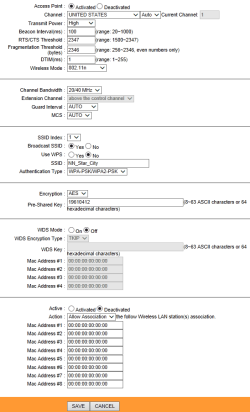
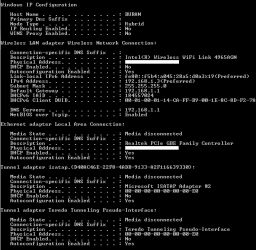
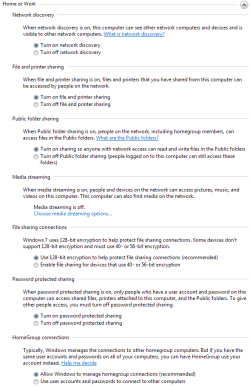
Here is my WLAN config from the router, config from laptop, and advanced sharing settings which are the same for both Laptop and Desktop:
Here is the hardware. Laptop ASUS A8E with Intel Wireless WiFi Link 4965AGN and Realtek Ethernet, ADSL modem + router TP-Link TD-8961ND, Desktop with Atheros Ethernet. Both PCs running Win7 Pro.
I used to have a Netcomm NB6+4W modem + router and that was problem free. Now since I have started using the new router I can't use the wifi network at all. The laptop goes retard after connecting to the network. It cant access the internet when set in PPPoE mode, cant dial when set in bridged, can't see the homegroup, or share files. Keeps disconnecting, cant open the router config page, cant use remote desktop, . . . . . and most surprising, if I try to hibernate, the screen goes blank as usual, but then it just waits, and waits, till I switch off the router, then it continues to save to disk and go off. I have an android phone and that seems to be connecting to the network ok, but I have to confirm. I have the latest intel driver installed. I have tried 802.11 g+n, b+g+n on the router.
Thanks in advance for any help.
Here is my WLAN config from the router, config from laptop, and advanced sharing settings which are the same for both Laptop and Desktop:
Attachments
My Computer
At a glance
Windows 7 Professional 32bitAMD Athlon II X2 4450e @2.8GHz (Sempron 145)2x2GB DDR3 1333MHz KingstonMSI R7750 PMD1GD5
- Computer Manufacturer/Model Number
- NA
- OS
- Windows 7 Professional 32bit
- CPU
- AMD Athlon II X2 4450e @2.8GHz (Sempron 145)
- Motherboard
- ASUS M4A78LT-M LE
- Memory
- 2x2GB DDR3 1333MHz Kingston
- Graphics Card(s)
- MSI R7750 PMD1GD5
- Sound Card
- VIA HD 7.1 onboard
- Monitor(s) Displays
- Sony Bravia V Series - KLV-26V300A
- Screen Resolution
- 1360x768
- Hard Drives
- WD Caviar Blue
WD5000AAKS
500GB SATA
- PSU
- Corsair CX500 V2
- Case
- Enterage Generic
- Cooling
- CM Hyper TX3 EVO, GPU 2x 80mm, Stock PSU fan, 1x80mm cab fan


