XFX Radeon HD4670, no signal on monitor when used.

It isn't a Windows problem if you don't get a signal as soon as you turn on the computer as Windows hasn't even started to load at that time. The computer has to load the bios and detect all hardware first before Windows begins to load. It is a hardware problem (either power supply or the card itself or motherboard as mentioned above), and not a driver problem.


Softwear aint the problem. Maybe that you didn't place the card in the slot, the mobo doesnt support the card... Did you screw in the 2 litle screws that hold the cable in the GPU??? Maybe the contact isn't good...

I've checked to make sure the card is definitely secure to the board, and that the cable has been screwed in where it needs to be. I'm not sure if my graphics card being a PCI-E 2.0 has anything to do with the problem.
 

My Computer My Computer

At a glance

Windows 7 Home Premium 64bitIntel Pentium E5300 Dual Core 2.6ghz4 GBXFX Radeon HD4670
Computer Manufacturer/Model Number
Custom Built
OS
Windows 7 Home Premium 64bit
CPU
Intel Pentium E5300 Dual Core 2.6ghz
Motherboard
MS-7525 (Boston)
Memory
4 GB
Graphics Card(s)
XFX Radeon HD4670
Monitor(s) Displays
Westinghouse L1920NW
Screen Resolution
1366x768
Hard Drives
Seagate Barracuda ST1000DM003 1TB
PSU
COOLMAX V-400 400W ATX v2.01 Power Supply
Case
COUGAR Solution Black Steel ATX Mid Tower Computer Case
Keyboard
KB555U Levetron USB Gaming Keyboard
I had a suspicion about the power supply, but a lot of my more tech-savvy friends have told me that they are sure it's not the problem. I thought it would be the PSU as the power button will turn the computer on (when the graphics card is secured in the motherboard) but it will not turn the computer back off. I haven't heard any beeping noises, and I obtained the graphics card and my motherboard from my friend who assured me that they both worked without a problem before they were given to me.

If the general consensus is that I need a better PSU, then I'll be looking to purchase that one you linked me to.

Edit: They keep telling me that it's not that the PSU isn't supplying enough power since the graphics card is one that just has to be seated in the MB and not connected directly to the PSU, and therefore it's the motherboard powering the PSU. Yet if I'm right the power supply powers the motherboard, so it just indirectly powers the card. I don't know, you can take this with a grain of sand if you wish, I think you guys know your stuff better than a few of my friends, lol


Yes, the PSU powerups the motherboard, and then the GPU...

I still think that the GPU is incompatible with the motherbard... That was my situaton...
 

My Computer My Computer

At a glance

Windows 7 x86 UltimateIntel Pentium 4 (3.2GHz) @3.6GHz3 GB DDR2 (2GB @800MHz + 1GB @533MHz)-3 inuvi...ATI Radeon HD 5450 1GB DDR3
Computer Manufacturer/Model Number
Me, Myself and I (:
OS
Windows 7 x86 Ultimate
CPU
Intel Pentium 4 (3.2GHz) @3.6GHz
Motherboard
Asus P5N-D SLI
Memory
3 GB DDR2 (2GB @800MHz + 1GB @533MHz)-3 inuvidual sticks
Graphics Card(s)
ATI Radeon HD 5450 1GB DDR3
Sound Card
Realtek HD Audio
Monitor(s) Displays
Philips Brilliance 170p 17" DVI/VGA
Screen Resolution
1280x1024 @60 Hz
Hard Drives
WDC WD400BD-08LRAO 40 GB Blue Caviar-Sata II
PSU
LC-Power LC6480S Scorpio-480W 18A@ +12V
Cooling
CPU~Arctic Freezer 7 Pro; 2 92mm case fans; HDD fan;
Keyboard
Logitec Usb
Mouse
Dell optical mouse Usb
Internet Speed
2 Mb/s
Other Info
SOLD MY PC 6 MONTHS AGO IN ORDER TO BUY A MOTORCYCLE :D I don't need a PC :D
I had a suspicion about the power supply, but a lot of my more tech-savvy friends have told me that they are sure it's not the problem. I thought it would be the PSU as the power button will turn the computer on (when the graphics card is secured in the motherboard) but it will not turn the computer back off. I haven't heard any beeping noises, and I obtained the graphics card and my motherboard from my friend who assured me that they both worked without a problem before they were given to me.

If the general consensus is that I need a better PSU, then I'll be looking to purchase that one you linked me to.

Edit: They keep telling me that it's not that the PSU isn't supplying enough power since the graphics card is one that just has to be seated in the MB and not connected directly to the PSU, and therefore it's the motherboard powering the PSU. Yet if I'm right the power supply powers the motherboard, so it just indirectly powers the card. I don't know, you can take this with a grain of sand if you wish, I think you guys know your stuff better than a few of my friends, lol


Yes, the PSU powerups the motherboard, and then the GPU...

I still think that the GPU is incompatible with the motherbard... That was my situaton...

My friend, who gave me both the mobo and the card, used them together before he gave them to me. According to him, they functioned just fine and he didn't have the same problems with the card that I am experiencing. I'm assuming that the mobo is detecting the card because as long as I have the card in, the onboard graphics disable themselves (or at least that is what I believe to be occurring). And the fan also spins on the card when the computer gets turned on. So I don't believe incompatibility to be an issue here.
 

My Computer My Computer

At a glance

Windows 7 Home Premium 64bitIntel Pentium E5300 Dual Core 2.6ghz4 GBXFX Radeon HD4670
Computer Manufacturer/Model Number
Custom Built
OS
Windows 7 Home Premium 64bit
CPU
Intel Pentium E5300 Dual Core 2.6ghz
Motherboard
MS-7525 (Boston)
Memory
4 GB
Graphics Card(s)
XFX Radeon HD4670
Monitor(s) Displays
Westinghouse L1920NW
Screen Resolution
1366x768
Hard Drives
Seagate Barracuda ST1000DM003 1TB
PSU
COOLMAX V-400 400W ATX v2.01 Power Supply
Case
COUGAR Solution Black Steel ATX Mid Tower Computer Case
Keyboard
KB555U Levetron USB Gaming Keyboard
I had a suspicion about the power supply, but a lot of my more tech-savvy friends have told me that they are sure it's not the problem. I thought it would be the PSU as the power button will turn the computer on (when the graphics card is secured in the motherboard) but it will not turn the computer back off. I haven't heard any beeping noises, and I obtained the graphics card and my motherboard from my friend who assured me that they both worked without a problem before they were given to me.

If the general consensus is that I need a better PSU, then I'll be looking to purchase that one you linked me to.

Edit: They keep telling me that it's not that the PSU isn't supplying enough power since the graphics card is one that just has to be seated in the MB and not connected directly to the PSU, and therefore it's the motherboard powering the PSU. Yet if I'm right the power supply powers the motherboard, so it just indirectly powers the card. I don't know, you can take this with a grain of sand if you wish, I think you guys know your stuff better than a few of my friends, lol


Yes, the PSU powerups the motherboard, and then the GPU...

I still think that the GPU is incompatible with the motherbard... That was my situaton...

My friend, who gave me both the mobo and the card, used them together before he gave them to me. According to him, they functioned just fine and he didn't have the same problems with the card that I am experiencing. I'm assuming that the mobo is detecting the card because as long as I have the card in, the onboard graphics disable themselves (or at least that is what I believe to be occurring). And the fan also spins on the card when the computer gets turned on. So I don't believe incompatibility to be an issue here.

hmmmm...

when you say that leaves only the psu to be the problem... What psu did he use (what wattage and how many Amps did it have on the 12V rail?- you can ask him that, im sure that he can answer you.)
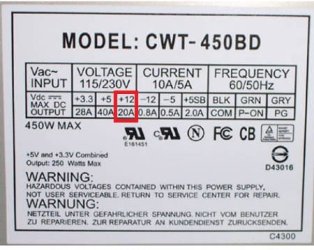
Open up your pc, look on the power supply sticker and see the table with the voltage, wattage and amperage. post here the +12V AMPERAGE


!image is an example!
 

Attachments

  • psu2.jpg
    psu2.jpg
    48.7 KB · Views: 3

My Computer My Computer

At a glance

Windows 7 x86 UltimateIntel Pentium 4 (3.2GHz) @3.6GHz3 GB DDR2 (2GB @800MHz + 1GB @533MHz)-3 inuvi...ATI Radeon HD 5450 1GB DDR3
Computer Manufacturer/Model Number
Me, Myself and I (:
OS
Windows 7 x86 Ultimate
CPU
Intel Pentium 4 (3.2GHz) @3.6GHz
Motherboard
Asus P5N-D SLI
Memory
3 GB DDR2 (2GB @800MHz + 1GB @533MHz)-3 inuvidual sticks
Graphics Card(s)
ATI Radeon HD 5450 1GB DDR3
Sound Card
Realtek HD Audio
Monitor(s) Displays
Philips Brilliance 170p 17" DVI/VGA
Screen Resolution
1280x1024 @60 Hz
Hard Drives
WDC WD400BD-08LRAO 40 GB Blue Caviar-Sata II
PSU
LC-Power LC6480S Scorpio-480W 18A@ +12V
Cooling
CPU~Arctic Freezer 7 Pro; 2 92mm case fans; HDD fan;
Keyboard
Logitec Usb
Mouse
Dell optical mouse Usb
Internet Speed
2 Mb/s
Other Info
SOLD MY PC 6 MONTHS AGO IN ORDER TO BUY A MOTORCYCLE :D I don't need a PC :D
They keep telling me that it's not that the PSU isn't supplying enough power since the graphics card is one that just has to be seated in the MB and not connected directly to the PSU, and therefore it's the motherboard powering the PSU.

Correct. The card doesn't need an external power connection to the power supply, and gets its power from the PCI-E slot; up to 75 W max.

Yet if I'm right the power supply powers the motherboard, so it just indirectly powers the card.

Also correct. That card draws around 60 W at load (why it doesn't require the extra power connection), which is also what it draws when you first power on the computer. So is everything else in the computer (CPU, hard drive(s), any optical drives, etc). It then drops down to low power mode (likely around 15-20 W).
 

My Computer My Computer

At a glance

Win 7 Ultimate x64FX-8350 @ 4.6 GHz so farADATA XPG V1 Series Black 8GB DDR3 1600Sapphire R9 270x Dual-X
Computer type
PC/Desktop
Computer Manufacturer/Model Number
Me
OS
Win 7 Ultimate x64
CPU
FX-8350 @ 4.6 GHz so far
Motherboard
Asus M5A97 EVO
Memory
ADATA XPG V1 Series Black 8GB DDR3 1600
Graphics Card(s)
Sapphire R9 270x Dual-X
Sound Card
Xonar DGX w/ Corsair Vengence 1300
Monitor(s) Displays
Acer S232HL Abid
Screen Resolution
1920x1080
Hard Drives
120 GB OCZ Vertex 3
500 GB Seagate 7200.12
PSU
Antec Earthwatts 650W Green
Case
Antec Three Hundred
Cooling
Cooler Master 212 EVO
Keyboard
Logitech G510
Mouse
Logitech G500s
Internet Speed
35000/3000
Yes, the PSU powerups the motherboard, and then the GPU...

I still think that the GPU is incompatible with the motherbard... That was my situaton...

My friend, who gave me both the mobo and the card, used them together before he gave them to me. According to him, they functioned just fine and he didn't have the same problems with the card that I am experiencing. I'm assuming that the mobo is detecting the card because as long as I have the card in, the onboard graphics disable themselves (or at least that is what I believe to be occurring). And the fan also spins on the card when the computer gets turned on. So I don't believe incompatibility to be an issue here.

hmmmm...

when you say that leaves only the psu to be the problem... What psu did he use (what wattage and how many Amps did it have on the 12V rail?- you can ask him that, im sure that he can answer you.)
Open up your pc, look on the power supply sticker and see the table with the voltage, wattage and amperage. post here the +12V AMPERAGE


!image is an example!

I'll get back to you on his power supply, he can't look right now, but he says it's a Corsair and it's either 600 or 800 watts. I'll be sure to get the exacts here soon, he's almost done with his game, lol.

Now for mine, I can just provide an image of the table. See the attachments.
 

Attachments

  • IMG_0251[1].jpg
    IMG_0251[1].jpg
    253.2 KB · Views: 6

My Computer My Computer

At a glance

Windows 7 Home Premium 64bitIntel Pentium E5300 Dual Core 2.6ghz4 GBXFX Radeon HD4670
Computer Manufacturer/Model Number
Custom Built
OS
Windows 7 Home Premium 64bit
CPU
Intel Pentium E5300 Dual Core 2.6ghz
Motherboard
MS-7525 (Boston)
Memory
4 GB
Graphics Card(s)
XFX Radeon HD4670
Monitor(s) Displays
Westinghouse L1920NW
Screen Resolution
1366x768
Hard Drives
Seagate Barracuda ST1000DM003 1TB
PSU
COOLMAX V-400 400W ATX v2.01 Power Supply
Case
COUGAR Solution Black Steel ATX Mid Tower Computer Case
Keyboard
KB555U Levetron USB Gaming Keyboard
Remove the power cable from all drives and try again. This might seem pointless, but what this does is reduce the power demand on the PSU, particularly on the +12V line (because of the drive motors), and this might just be enough to enable the card to function.
 

My Computer My Computer

At a glance

Windows 8.1 Pro RTM x64Intel Core-i5-3570K 4-core @ 3.4GHz (Ivy Brid...4 x 4GB DDR3-1600 Corsair Vengeance CMZ8GX3M2...MSI GeForce GTX770 Gaming OC 2GB
Computer type
PC/Desktop
Computer Manufacturer/Model Number
Dwarf Dwf/11/2012 r09/2013
OS
Windows 8.1 Pro RTM x64
CPU
Intel Core-i5-3570K 4-core @ 3.4GHz (Ivy Bridge) (OC 4.4GHz)
Motherboard
ASRock Z77 Extreme4-M
Memory
4 x 4GB DDR3-1600 Corsair Vengeance CMZ8GX3M2A1600C9B (16GB)
Graphics Card(s)
MSI GeForce GTX770 Gaming OC 2GB
Sound Card
Realtek High Definition on board solution (ALC 898)
Monitor(s) Displays
ViewSonic VA1912w Widescreen (VGA)
Screen Resolution
1440x900
Hard Drives
OCZ Agility 3 SSD 120GB SATA III x2 (RAID 0)
Samsung HD501LJ 500GB SATA II x2
Hitachi HDS721010CLA332 1TB SATA II
Iomega 1.5TB Ext USB 2.0
WD 2.0TB Ext USB 3.0
PSU
XFX Pro Series 850W Semi-Modular
Case
Gigabyte IF233
Cooling
1 x 120mm Front Inlet 1 x 120mm Rear Exhaust
Keyboard
Microsoft Comfort Curve Keyboard 3000 (USB)
Mouse
Microsoft Comfort Mouse 3000 for Business (USB)
Internet Speed
NetGear DG834Gv3 ADSL Modem/Router (Ethernet) ~4.0 Mb/s (O2)
Antivirus
Avast! 8.0.1497
Browser
IE 11
Other Info
Optical Drive: HL-DT-ST BD-RE BH10LS30 SATA Bluray
Lexmark S305 Printer/Scanner/Copier (USB)
WEI Score: 8.1/8.1/8.5/8.5/8.25
Asus Eee PC 1011PX Netbook (Windows 7 x86 Starter)
Remove the power cable from all drives and try again. This might seem pointless, but what this does is reduce the power demand on the PSU, particularly on the +12V line (because of the drive motors), and this might just be enough to enable the card to function.

One of my friends recommended that I try removing the power cable from both the CD and hard drive earlier. No change, sadly.
 

My Computer My Computer

At a glance

Windows 7 Home Premium 64bitIntel Pentium E5300 Dual Core 2.6ghz4 GBXFX Radeon HD4670
Computer Manufacturer/Model Number
Custom Built
OS
Windows 7 Home Premium 64bit
CPU
Intel Pentium E5300 Dual Core 2.6ghz
Motherboard
MS-7525 (Boston)
Memory
4 GB
Graphics Card(s)
XFX Radeon HD4670
Monitor(s) Displays
Westinghouse L1920NW
Screen Resolution
1366x768
Hard Drives
Seagate Barracuda ST1000DM003 1TB
PSU
COOLMAX V-400 400W ATX v2.01 Power Supply
Case
COUGAR Solution Black Steel ATX Mid Tower Computer Case
Keyboard
KB555U Levetron USB Gaming Keyboard
My friend, who gave me both the mobo and the card, used them together before he gave them to me. According to him, they functioned just fine and he didn't have the same problems with the card that I am experiencing. I'm assuming that the mobo is detecting the card because as long as I have the card in, the onboard graphics disable themselves (or at least that is what I believe to be occurring). And the fan also spins on the card when the computer gets turned on. So I don't believe incompatibility to be an issue here.

hmmmm...

when you say that leaves only the psu to be the problem... What psu did he use (what wattage and how many Amps did it have on the 12V rail?- you can ask him that, im sure that he can answer you.)
Open up your pc, look on the power supply sticker and see the table with the voltage, wattage and amperage. post here the +12V AMPERAGE


!image is an example!

I'll get back to you on his power supply, he can't look right now, but he says it's a Corsair and it's either 600 or 800 watts. I'll be sure to get the exacts here soon, he's almost done with his game, lol.

Now for mine, I can just provide an image of the table. See the attachments.


I think that 18 A is little for this card....before buying a new psu, wait for some more answers, maybe we have been wrong, so i don't want you to waste mony for nothing...
If your frend has a 600-800 w psu, and the mobo+gpu worked, then its clear that your psu is not up to the job.
 

My Computer My Computer

At a glance

Windows 7 x86 UltimateIntel Pentium 4 (3.2GHz) @3.6GHz3 GB DDR2 (2GB @800MHz + 1GB @533MHz)-3 inuvi...ATI Radeon HD 5450 1GB DDR3
Computer Manufacturer/Model Number
Me, Myself and I (:
OS
Windows 7 x86 Ultimate
CPU
Intel Pentium 4 (3.2GHz) @3.6GHz
Motherboard
Asus P5N-D SLI
Memory
3 GB DDR2 (2GB @800MHz + 1GB @533MHz)-3 inuvidual sticks
Graphics Card(s)
ATI Radeon HD 5450 1GB DDR3
Sound Card
Realtek HD Audio
Monitor(s) Displays
Philips Brilliance 170p 17" DVI/VGA
Screen Resolution
1280x1024 @60 Hz
Hard Drives
WDC WD400BD-08LRAO 40 GB Blue Caviar-Sata II
PSU
LC-Power LC6480S Scorpio-480W 18A@ +12V
Cooling
CPU~Arctic Freezer 7 Pro; 2 92mm case fans; HDD fan;
Keyboard
Logitec Usb
Mouse
Dell optical mouse Usb
Internet Speed
2 Mb/s
Other Info
SOLD MY PC 6 MONTHS AGO IN ORDER TO BUY A MOTORCYCLE :D I don't need a PC :D
Having seen the image you posted of the label on your PSU, I'd have to agree with the consensus that your PSU isn't up to par for your system. It has multiple +12V rails that are only capable of providing 18A and 16A, meaning that after the graphics card has drawn its power from that rail (I'm assuming the maximum permissible through the PCI-e slot here, i.e. 75W), only 11.75A or 9.75A (141W or 117W) is available to power the rest of the motherboard. A typical motherboard pulls ~30W, and each RAM module ~5W. So that leaves just 101W or 77W for your CPU, which is probably insufficient. (I've used 2 sets of figures here, the first being for the 18A rail and the second for the 16A one. I've also assumed 2 RAM modules.)

I recommend a quality PSU of 650W, with a single +12V rail.
 

My Computer My Computer

At a glance

Windows 8.1 Pro RTM x64Intel Core-i5-3570K 4-core @ 3.4GHz (Ivy Brid...4 x 4GB DDR3-1600 Corsair Vengeance CMZ8GX3M2...MSI GeForce GTX770 Gaming OC 2GB
Computer type
PC/Desktop
Computer Manufacturer/Model Number
Dwarf Dwf/11/2012 r09/2013
OS
Windows 8.1 Pro RTM x64
CPU
Intel Core-i5-3570K 4-core @ 3.4GHz (Ivy Bridge) (OC 4.4GHz)
Motherboard
ASRock Z77 Extreme4-M
Memory
4 x 4GB DDR3-1600 Corsair Vengeance CMZ8GX3M2A1600C9B (16GB)
Graphics Card(s)
MSI GeForce GTX770 Gaming OC 2GB
Sound Card
Realtek High Definition on board solution (ALC 898)
Monitor(s) Displays
ViewSonic VA1912w Widescreen (VGA)
Screen Resolution
1440x900
Hard Drives
OCZ Agility 3 SSD 120GB SATA III x2 (RAID 0)
Samsung HD501LJ 500GB SATA II x2
Hitachi HDS721010CLA332 1TB SATA II
Iomega 1.5TB Ext USB 2.0
WD 2.0TB Ext USB 3.0
PSU
XFX Pro Series 850W Semi-Modular
Case
Gigabyte IF233
Cooling
1 x 120mm Front Inlet 1 x 120mm Rear Exhaust
Keyboard
Microsoft Comfort Curve Keyboard 3000 (USB)
Mouse
Microsoft Comfort Mouse 3000 for Business (USB)
Internet Speed
NetGear DG834Gv3 ADSL Modem/Router (Ethernet) ~4.0 Mb/s (O2)
Antivirus
Avast! 8.0.1497
Browser
IE 11
Other Info
Optical Drive: HL-DT-ST BD-RE BH10LS30 SATA Bluray
Lexmark S305 Printer/Scanner/Copier (USB)
WEI Score: 8.1/8.1/8.5/8.5/8.25
Asus Eee PC 1011PX Netbook (Windows 7 x86 Starter)
Would it be better if I posted all of my system's specs in order to find the most suitable PSU? More specifically to my cpu so we can see if the power it is receiving is insufficient?
 
Last edited:

My Computer My Computer

At a glance

Windows 7 Home Premium 64bitIntel Pentium E5300 Dual Core 2.6ghz4 GBXFX Radeon HD4670
Computer Manufacturer/Model Number
Custom Built
OS
Windows 7 Home Premium 64bit
CPU
Intel Pentium E5300 Dual Core 2.6ghz
Motherboard
MS-7525 (Boston)
Memory
4 GB
Graphics Card(s)
XFX Radeon HD4670
Monitor(s) Displays
Westinghouse L1920NW
Screen Resolution
1366x768
Hard Drives
Seagate Barracuda ST1000DM003 1TB
PSU
COOLMAX V-400 400W ATX v2.01 Power Supply
Case
COUGAR Solution Black Steel ATX Mid Tower Computer Case
Keyboard
KB555U Levetron USB Gaming Keyboard
Having seen the image you posted of the label on your PSU, I'd have to agree with the consensus that your PSU isn't up to par for your system. It has multiple +12V rails that are only capable of providing 18A and 16A, meaning that after the graphics card has drawn its power from that rail (I'm assuming the maximum permissible through the PCI-e slot here, i.e. 75W), only 11.75A or 9.75A (141W or 117W) is available to power the rest of the motherboard. A typical motherboard pulls ~30W, and each RAM module ~5W. So that leaves just 101W or 77W for your CPU, which is probably insufficient. (I've used 2 sets of figures here, the first being for the 18A rail and the second for the 16A one. I've also assumed 2 RAM modules.)

I recommend a quality PSU of 650W, with a single +12V rail.

Thats exactly what i intended to say, but i was on my cell phone and unable to type so long!
 

My Computer My Computer

At a glance

Windows 7 x86 UltimateIntel Pentium 4 (3.2GHz) @3.6GHz3 GB DDR2 (2GB @800MHz + 1GB @533MHz)-3 inuvi...ATI Radeon HD 5450 1GB DDR3
Computer Manufacturer/Model Number
Me, Myself and I (:
OS
Windows 7 x86 Ultimate
CPU
Intel Pentium 4 (3.2GHz) @3.6GHz
Motherboard
Asus P5N-D SLI
Memory
3 GB DDR2 (2GB @800MHz + 1GB @533MHz)-3 inuvidual sticks
Graphics Card(s)
ATI Radeon HD 5450 1GB DDR3
Sound Card
Realtek HD Audio
Monitor(s) Displays
Philips Brilliance 170p 17" DVI/VGA
Screen Resolution
1280x1024 @60 Hz
Hard Drives
WDC WD400BD-08LRAO 40 GB Blue Caviar-Sata II
PSU
LC-Power LC6480S Scorpio-480W 18A@ +12V
Cooling
CPU~Arctic Freezer 7 Pro; 2 92mm case fans; HDD fan;
Keyboard
Logitec Usb
Mouse
Dell optical mouse Usb
Internet Speed
2 Mb/s
Other Info
SOLD MY PC 6 MONTHS AGO IN ORDER TO BUY A MOTORCYCLE :D I don't need a PC :D
Would it be better if I posted all of my system's specs in order to find the most suitable PSU? More specifically to my cpu so we can see if the power it is receiving is insufficient?

You should do that, it will help a lot. Don't forget mention if you are looking forward to upgrade any other component (cpu, ram ...you know what i mean...), because this will also have to be considered, in order to prevent money wasting ;) :D
 

My Computer My Computer

At a glance

Windows 7 x86 UltimateIntel Pentium 4 (3.2GHz) @3.6GHz3 GB DDR2 (2GB @800MHz + 1GB @533MHz)-3 inuvi...ATI Radeon HD 5450 1GB DDR3
Computer Manufacturer/Model Number
Me, Myself and I (:
OS
Windows 7 x86 Ultimate
CPU
Intel Pentium 4 (3.2GHz) @3.6GHz
Motherboard
Asus P5N-D SLI
Memory
3 GB DDR2 (2GB @800MHz + 1GB @533MHz)-3 inuvidual sticks
Graphics Card(s)
ATI Radeon HD 5450 1GB DDR3
Sound Card
Realtek HD Audio
Monitor(s) Displays
Philips Brilliance 170p 17" DVI/VGA
Screen Resolution
1280x1024 @60 Hz
Hard Drives
WDC WD400BD-08LRAO 40 GB Blue Caviar-Sata II
PSU
LC-Power LC6480S Scorpio-480W 18A@ +12V
Cooling
CPU~Arctic Freezer 7 Pro; 2 92mm case fans; HDD fan;
Keyboard
Logitec Usb
Mouse
Dell optical mouse Usb
Internet Speed
2 Mb/s
Other Info
SOLD MY PC 6 MONTHS AGO IN ORDER TO BUY A MOTORCYCLE :D I don't need a PC :D
Well having the "man-flu"... I take a nap and come back to this thread, it's now 4 pages....well at least we are getting some where with it now.
 

My Computer My Computer

At a glance

Windows 7 Ultimate 64 bitAMD Phenom II X4 965 Black EditionGSkill 4 X 2 GB PC 8500XFX Radeon HD 6790 D
Computer Manufacturer/Model Number
Custom built
OS
Windows 7 Ultimate 64 bit
CPU
AMD Phenom II X4 965 Black Edition
Motherboard
Gigabyte GA-MA790X-DS4
Memory
GSkill 4 X 2 GB PC 8500
Graphics Card(s)
XFX Radeon HD 6790 D
Sound Card
On board RealTek HD
Monitor(s) Displays
Dual monitors:Samsung SyncMaster S20B300
Screen Resolution
1600 X 900
Hard Drives
Seagate Barracuda 1TB (primary)
Seagate Barracuda 2 X 320 GB
PSU
Ultra X4 750 watt fully modular
Case
Thermaltake Overseer RX 1 full tower
Cooling
Core-Contact 92 mm CPU Cooler
Keyboard
Logitech G510
Mouse
Razor DeathAdder
Internet Speed
50/5 Mbps UL/DL
Other Info
Optical: Super Muliti DVD burner w/lightscribe, Hauppauge WinTV HVR-1800
It does have a conclusion! He now has to buy a PSU in order to use the system that he made, and thats what he came for :)

As for the nap, i totally agree... it's 1 am :shock: :sleep:
 

My Computer My Computer

At a glance

Windows 7 x86 UltimateIntel Pentium 4 (3.2GHz) @3.6GHz3 GB DDR2 (2GB @800MHz + 1GB @533MHz)-3 inuvi...ATI Radeon HD 5450 1GB DDR3
Computer Manufacturer/Model Number
Me, Myself and I (:
OS
Windows 7 x86 Ultimate
CPU
Intel Pentium 4 (3.2GHz) @3.6GHz
Motherboard
Asus P5N-D SLI
Memory
3 GB DDR2 (2GB @800MHz + 1GB @533MHz)-3 inuvidual sticks
Graphics Card(s)
ATI Radeon HD 5450 1GB DDR3
Sound Card
Realtek HD Audio
Monitor(s) Displays
Philips Brilliance 170p 17" DVI/VGA
Screen Resolution
1280x1024 @60 Hz
Hard Drives
WDC WD400BD-08LRAO 40 GB Blue Caviar-Sata II
PSU
LC-Power LC6480S Scorpio-480W 18A@ +12V
Cooling
CPU~Arctic Freezer 7 Pro; 2 92mm case fans; HDD fan;
Keyboard
Logitec Usb
Mouse
Dell optical mouse Usb
Internet Speed
2 Mb/s
Other Info
SOLD MY PC 6 MONTHS AGO IN ORDER TO BUY A MOTORCYCLE :D I don't need a PC :D
Don't wanna be that person, but *she, lol.

So I've updated (to the best of my ability) my system specs, so you guys can click on them to assess what would be the best PSU to remedy this problem. If there is anything else I can do to further this, let me know.
 

My Computer My Computer

At a glance

Windows 7 Home Premium 64bitIntel Pentium E5300 Dual Core 2.6ghz4 GBXFX Radeon HD4670
Computer Manufacturer/Model Number
Custom Built
OS
Windows 7 Home Premium 64bit
CPU
Intel Pentium E5300 Dual Core 2.6ghz
Motherboard
MS-7525 (Boston)
Memory
4 GB
Graphics Card(s)
XFX Radeon HD4670
Monitor(s) Displays
Westinghouse L1920NW
Screen Resolution
1366x768
Hard Drives
Seagate Barracuda ST1000DM003 1TB
PSU
COOLMAX V-400 400W ATX v2.01 Power Supply
Case
COUGAR Solution Black Steel ATX Mid Tower Computer Case
Keyboard
KB555U Levetron USB Gaming Keyboard

My Computer My Computer

At a glance

Win7 Enterprise, Win7 x86 (Ult 7600), Win7 x6...AMD fx8350 4ghz, AMD-32 2400mhz, AMD-64 3200m...2gb, 4gb on the Ult 7600, 4gb on Technet RTM,...Draw my own Graphics, several nVidia cards
Computer type
PC/Desktop
Computer Manufacturer/Model Number
Built them myself, Science Experiments !
OS
Win7 Enterprise, Win7 x86 (Ult 7600), Win7 x64 Ult 7600, TechNet RTM on AMD x64 (2.8Ghz)
CPU
AMD fx8350 4ghz, AMD-32 2400mhz, AMD-64 3200mhz, AMDx64 2.8G
Motherboard
SIS 755, ECS-K8M890M-M (Ult 7600), GigaByte & others
Memory
2gb, 4gb on the Ult 7600, 4gb on Technet RTM, 32gb on FX8350
Graphics Card(s)
Draw my own Graphics, several nVidia cards
Sound Card
on motherboard
Monitor(s) Displays
19" flat scr, 28" I-Inc widescr,22" Emprex Widescr, 23" Acer
Screen Resolution
1280 x 1024, 1440 x 900, 1920 x 1080
Hard Drives
6 pata Ide HD's & 2 Sata HD's
added 80gb external on Ult 7600 computer,
numerous extra 1tb, 2TB, 3Tb SATA HD's
A collection of ext HD Docks w/ HDs
PSU
430w, 550w, 600w, 700, 800, etc
Case
All Generic Full Towers
Cooling
Open Air & a few fans, some w/ colored LEDs
Keyboard
Compaq & Dell recycled from GoodWill
Mouse
Made in China Optical Wired Mouse
Internet Speed
Fast Cable InterNet
Antivirus
AVG Free on 24 different Desktops, NO Problems!
Browser
IE 8 is preferred, but use FireFox sometimes
Other Info
Linksys Routers, switches, & Hubs
Too Many USB Flash Drives to count, Biggest is 64GB !
Eight computers in my home network.
Sixteen computers at my business network.
Linked via TeamViewer !
Lots of old used spare computer parts everywhere!
Don't wanna be that person, but *she, lol.

So I've updated (to the best of my ability) my system specs, so you guys can click on them to assess what would be the best PSU to remedy this problem. If there is anything else I can do to further this, let me know.

You should edit the ram memory info- is it a single stick of 4 Gb or are there 2 sticks of 2 Gb. If you know @ wich frequency they are, it would be good to write that too. Use the PSU calculators to see how much are you using now and add ~200 W to be safe with the new graphics card.
 

My Computer My Computer

At a glance

Windows 7 x86 UltimateIntel Pentium 4 (3.2GHz) @3.6GHz3 GB DDR2 (2GB @800MHz + 1GB @533MHz)-3 inuvi...ATI Radeon HD 5450 1GB DDR3
Computer Manufacturer/Model Number
Me, Myself and I (:
OS
Windows 7 x86 Ultimate
CPU
Intel Pentium 4 (3.2GHz) @3.6GHz
Motherboard
Asus P5N-D SLI
Memory
3 GB DDR2 (2GB @800MHz + 1GB @533MHz)-3 inuvidual sticks
Graphics Card(s)
ATI Radeon HD 5450 1GB DDR3
Sound Card
Realtek HD Audio
Monitor(s) Displays
Philips Brilliance 170p 17" DVI/VGA
Screen Resolution
1280x1024 @60 Hz
Hard Drives
WDC WD400BD-08LRAO 40 GB Blue Caviar-Sata II
PSU
LC-Power LC6480S Scorpio-480W 18A@ +12V
Cooling
CPU~Arctic Freezer 7 Pro; 2 92mm case fans; HDD fan;
Keyboard
Logitec Usb
Mouse
Dell optical mouse Usb
Internet Speed
2 Mb/s
Other Info
SOLD MY PC 6 MONTHS AGO IN ORDER TO BUY A MOTORCYCLE :D I don't need a PC :D
Don't wanna be that person, but *she, lol.

So I've updated (to the best of my ability) my system specs, so you guys can click on them to assess what would be the best PSU to remedy this problem. If there is anything else I can do to further this, let me know.

You should edit the ram memory info- is it a single stick of 4 Gb or are there 2 sticks of 2 Gb. If you know @ wich frequency they are, it would be good to write that too. Use the PSU calculators to see how much are you using now and add ~200 W to be safe with the new graphics card.

Scrolling down, under Memory, is my ram. Friend gave that to me also.
I think I put in everything mostly correct in the calculator and got like 275, but I don't think that sounds right. Plus 200 would only be 475 w. I was just gonna go with a good 650 w or greater PSU, if anyone could point me in the direction of a good one. :p
 

My Computer My Computer

At a glance

Windows 7 Home Premium 64bitIntel Pentium E5300 Dual Core 2.6ghz4 GBXFX Radeon HD4670
Computer Manufacturer/Model Number
Custom Built
OS
Windows 7 Home Premium 64bit
CPU
Intel Pentium E5300 Dual Core 2.6ghz
Motherboard
MS-7525 (Boston)
Memory
4 GB
Graphics Card(s)
XFX Radeon HD4670
Monitor(s) Displays
Westinghouse L1920NW
Screen Resolution
1366x768
Hard Drives
Seagate Barracuda ST1000DM003 1TB
PSU
COOLMAX V-400 400W ATX v2.01 Power Supply
Case
COUGAR Solution Black Steel ATX Mid Tower Computer Case
Keyboard
KB555U Levetron USB Gaming Keyboard

My Computer My Computer

At a glance

Win7 Enterprise, Win7 x86 (Ult 7600), Win7 x6...AMD fx8350 4ghz, AMD-32 2400mhz, AMD-64 3200m...2gb, 4gb on the Ult 7600, 4gb on Technet RTM,...Draw my own Graphics, several nVidia cards
Computer type
PC/Desktop
Computer Manufacturer/Model Number
Built them myself, Science Experiments !
OS
Win7 Enterprise, Win7 x86 (Ult 7600), Win7 x64 Ult 7600, TechNet RTM on AMD x64 (2.8Ghz)
CPU
AMD fx8350 4ghz, AMD-32 2400mhz, AMD-64 3200mhz, AMDx64 2.8G
Motherboard
SIS 755, ECS-K8M890M-M (Ult 7600), GigaByte & others
Memory
2gb, 4gb on the Ult 7600, 4gb on Technet RTM, 32gb on FX8350
Graphics Card(s)
Draw my own Graphics, several nVidia cards
Sound Card
on motherboard
Monitor(s) Displays
19" flat scr, 28" I-Inc widescr,22" Emprex Widescr, 23" Acer
Screen Resolution
1280 x 1024, 1440 x 900, 1920 x 1080
Hard Drives
6 pata Ide HD's & 2 Sata HD's
added 80gb external on Ult 7600 computer,
numerous extra 1tb, 2TB, 3Tb SATA HD's
A collection of ext HD Docks w/ HDs
PSU
430w, 550w, 600w, 700, 800, etc
Case
All Generic Full Towers
Cooling
Open Air & a few fans, some w/ colored LEDs
Keyboard
Compaq & Dell recycled from GoodWill
Mouse
Made in China Optical Wired Mouse
Internet Speed
Fast Cable InterNet
Antivirus
AVG Free on 24 different Desktops, NO Problems!
Browser
IE 8 is preferred, but use FireFox sometimes
Other Info
Linksys Routers, switches, & Hubs
Too Many USB Flash Drives to count, Biggest is 64GB !
Eight computers in my home network.
Sixteen computers at my business network.
Linked via TeamViewer !
Lots of old used spare computer parts everywhere!
Back
Top