How do i install ssd on my laptop?

umairarif

New member
Member
Local time
5:47 AM
Messages
78
Hi all,
As title says i want to install ssd on my laptop and make it first drive with all windows files on it. I have bought samsung 840 250 gb ssd. I have sorted out my data that i want to keep on my laptop. I know how to physically install ssd but I want some one to help me on how to copy existing windows and data files some where, and then after installing ssd of course how to run those windows file on ssd. I hope my questions are clear enough. I tried to put this post on tutorial section but for some reason it did not allow me to post there.
million thanks in advance.
 

My Computer My Computer

At a glance

windows 7 home premium 64 bitintel quad core i7 2630qm 2ghz8 gb ddr3AMD Radeon HD 6490M
Computer Manufacturer/Model Number
hp dv 7t 6154ae
OS
windows 7 home premium 64 bit
CPU
intel quad core i7 2630qm 2ghz
Motherboard
hp
Memory
8 gb ddr3
Graphics Card(s)
AMD Radeon HD 6490M
Monitor(s) Displays
17'' led
Hard Drives
samsung 840 250gb ssd
toshiba 500gb 5400rpm hdd
Internet Speed
fiber optic 40mb
Umairarif, welcome to the windows 7 forum.

First great on the SSD, but, it won't work if all you do is copy the files from your old C drive to the SSD.
Windows has to either be installed on your new SSD or it has to be rewritten with an image of your older C drive.

As long as your old C drive is equal to or smaller than your new SSD, then windows Imaging utility will do the job.

If your old C partition is larger than your SSD, that won't work properly without doing some manipulation of your existing old C drive to reduce it's boot partition equal or less than your new SSD.

I use Acronis 2013 and make an image of the C drive on an external USB hard disk so that when Acronis (or the free Macrum) will create the necessary files and partition on your new SSD.

If your old C drive is = or smaller than your new SSD. All should be well but you have to first make an image of your boot C partition on an external USB disk or another spare hard disk.

Installing your SSD is pretty easy in most cases and then you can boot the recovery disk that you made in the windows image program or Acronis or Macrum. then select restore to your new SSD.

There could be some glitches as the drivers for your old Hard disk might need updating for the new SSD.

Give it a shot and let us know how it is going>

Rich
 

My Computer My Computer

At a glance

Windows 7 Pro x64 SP1Intel Core I716 GigsNVIDIA GeForce GTX 670M
Computer type
Laptop
Computer Manufacturer/Model Number
Toshiba Laptop Qosimo X870
OS
Windows 7 Pro x64 SP1
CPU
Intel Core I7
Motherboard
Toshiba Qosmio
Memory
16 Gigs
Graphics Card(s)
NVIDIA GeForce GTX 670M
Monitor(s) Displays
17.7" laptop
Screen Resolution
1600 x 900
Hard Drives
256 Gig SanDisk SSD for C
256 Gig Intel SSD for D
Internet Speed
50/25 FIOS
Antivirus
Vipre (all you can eat for 10 machines)
Browser
IE and FF
Other Info
I have dos 6.22, wfwg 3.11, win98, 2000 and xp VHD's available for testing. MS's Virtual PC works great.
ok I will take it one at a time, so just checked my OS(C) partition size by right clicking and then going to properties, it say total capacity 451 gb which is bigger than my ssd(250 gb). this means I have to do some thing to resize this partition?
regards
 

My Computer My Computer

At a glance

windows 7 home premium 64 bitintel quad core i7 2630qm 2ghz8 gb ddr3AMD Radeon HD 6490M
Computer Manufacturer/Model Number
hp dv 7t 6154ae
OS
windows 7 home premium 64 bit
CPU
intel quad core i7 2630qm 2ghz
Motherboard
hp
Memory
8 gb ddr3
Graphics Card(s)
AMD Radeon HD 6490M
Monitor(s) Displays
17'' led
Hard Drives
samsung 840 250gb ssd
toshiba 500gb 5400rpm hdd
Internet Speed
fiber optic 40mb

My Computer My Computer

At a glance

Windows 7 Home Premium 32-Bit - Build 7600 SP1Intel Core i3-2120 3.30GhzKingston 4 GB DDR3 1333 mhzAMD Radeon HD6670
Computer type
PC/Desktop
Computer Manufacturer/Model Number
Custom Build
OS
Windows 7 Home Premium 32-Bit - Build 7600 SP1
CPU
Intel Core i3-2120 3.30Ghz
Motherboard
Asus P8Z68-V LX Intel Z68 Socket H2 ATX
Memory
Kingston 4 GB DDR3 1333 mhz
Graphics Card(s)
AMD Radeon HD6670
Sound Card
Sound Blaster Audigy SE 24-Bit
Monitor(s) Displays
Asus VE228
Screen Resolution
1440 X 900
Hard Drives
OCZ Vertex 3 120 GB Sata 3 SSD ==
Kingston SH103/S3 120 G Hyper X 120 GB SSD ==
Western Digital 500 GB Caviar Green 7200 RPM ==
PSU
Corsair CX600M == 600 Watt
Case
NZXT Apollo - Silver with Clear Side Panel
Cooling
Three 120 mm Fans
Keyboard
Microsoft Natural 4000
Mouse
Microsoft Custom Optical 3000
Internet Speed
AT&T Fiber Optic Wireless Network
Antivirus
Microsoft Security Essentials
Browser
Chrome
Other Info
120 mm Blue LED Fan -- Three Blue LED Lazer Light Sticks
All of this is very complicated because I a basic home user. but I am sure I can do it. so do I need any hardware apart from ssd and all of its attachments? I have hp dv7 which has 2 hdds 500gb each. So my understanding is that I will take 1st hdd of my laptop and replace it with ssd. but I dont understand when should I use this paragon program? before installing ssd of after?

do I need this external enclosure?
 

My Computer My Computer

At a glance

windows 7 home premium 64 bitintel quad core i7 2630qm 2ghz8 gb ddr3AMD Radeon HD 6490M
Computer Manufacturer/Model Number
hp dv 7t 6154ae
OS
windows 7 home premium 64 bit
CPU
intel quad core i7 2630qm 2ghz
Motherboard
hp
Memory
8 gb ddr3
Graphics Card(s)
AMD Radeon HD 6490M
Monitor(s) Displays
17'' led
Hard Drives
samsung 840 250gb ssd
toshiba 500gb 5400rpm hdd
Internet Speed
fiber optic 40mb
The total capacity of the drive doesn't matter. It is how much stuff you have on the drive, Space used. If that Space Used is larger then the Total size of the SSD then you will need to Off Load some of those files to an External drive. Once that is done just use one of the free Imaging programs to Image your present drive to an External drive and then install the SSD and load that image on the SSD.
 

My Computer My Computer

At a glance

7 x64
OS
7 x64
My c: partition size is 451gb, from which used space is 48 gb, my ssd is 250 gb, this means I dont have to manipulate the files on c: partition?

when you say image the data, does this means copy the data ?
can I use one off my hhds to image this data and then load from it to ssd later?
 

My Computer My Computer

At a glance

windows 7 home premium 64 bitintel quad core i7 2630qm 2ghz8 gb ddr3AMD Radeon HD 6490M
Computer Manufacturer/Model Number
hp dv 7t 6154ae
OS
windows 7 home premium 64 bit
CPU
intel quad core i7 2630qm 2ghz
Motherboard
hp
Memory
8 gb ddr3
Graphics Card(s)
AMD Radeon HD 6490M
Monitor(s) Displays
17'' led
Hard Drives
samsung 840 250gb ssd
toshiba 500gb 5400rpm hdd
Internet Speed
fiber optic 40mb
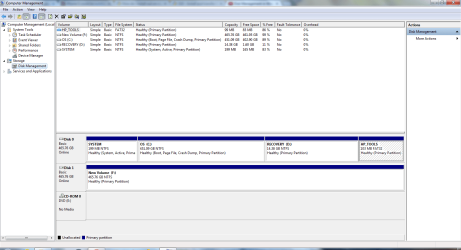
If you could go into disk management and use the Snipping Tool to take a screen shot of your current HDD setup, then post that screen shot here, it would be very helpful.
 

My Computer My Computer

At a glance

Windows 7 Home Premium 64bit SP 1Intel i5 2500k8 gigabytes Corsair PC3-12800 DDR3EVGA GeForce GTX 460 superclocked
Computer Manufacturer/Model Number
Customized build from CyberPower
OS
Windows 7 Home Premium 64bit SP 1
CPU
Intel i5 2500k
Motherboard
Asus P8P67 Deluxe
Memory
8 gigabytes Corsair PC3-12800 DDR3
Graphics Card(s)
EVGA GeForce GTX 460 superclocked
Sound Card
Integrated
Monitor(s) Displays
ViewSonic 23" LCD
Screen Resolution
1980 x 1080
Hard Drives
120 Gb Samsung 840 Pro SSD
120 Gb Kingston Hyper X SSD
1 Tb WD Caviar Black HDD
PSU
Coolermaster 1000 watt modular
Case
Coolermaster HAF X full tower
Cooling
Coolermaster Hyper 212 plus
Keyboard
Logitech USB
Mouse
Microsoft 3 button
Internet Speed
download 1.5 Mb/sec upload 300Kb/sec
If you could go into disk management and use the Snipping Tool to take a screen shot of your current HDD setup, then post that screen shot here, it would be very helpful.

how to get hdd setup?
 

My Computer My Computer

At a glance

windows 7 home premium 64 bitintel quad core i7 2630qm 2ghz8 gb ddr3AMD Radeon HD 6490M
Computer Manufacturer/Model Number
hp dv 7t 6154ae
OS
windows 7 home premium 64 bit
CPU
intel quad core i7 2630qm 2ghz
Motherboard
hp
Memory
8 gb ddr3
Graphics Card(s)
AMD Radeon HD 6490M
Monitor(s) Displays
17'' led
Hard Drives
samsung 840 250gb ssd
toshiba 500gb 5400rpm hdd
Internet Speed
fiber optic 40mb
Go to the start menu and type disk management into "search programs and features. It will show you a link to disk management that you can open.
 

My Computer My Computer

At a glance

Windows 7 Home Premium 64bit SP 1Intel i5 2500k8 gigabytes Corsair PC3-12800 DDR3EVGA GeForce GTX 460 superclocked
Computer Manufacturer/Model Number
Customized build from CyberPower
OS
Windows 7 Home Premium 64bit SP 1
CPU
Intel i5 2500k
Motherboard
Asus P8P67 Deluxe
Memory
8 gigabytes Corsair PC3-12800 DDR3
Graphics Card(s)
EVGA GeForce GTX 460 superclocked
Sound Card
Integrated
Monitor(s) Displays
ViewSonic 23" LCD
Screen Resolution
1980 x 1080
Hard Drives
120 Gb Samsung 840 Pro SSD
120 Gb Kingston Hyper X SSD
1 Tb WD Caviar Black HDD
PSU
Coolermaster 1000 watt modular
Case
Coolermaster HAF X full tower
Cooling
Coolermaster Hyper 212 plus
Keyboard
Logitech USB
Mouse
Microsoft 3 button
Internet Speed
download 1.5 Mb/sec upload 300Kb/sec
ok got it.
Capture.PNG
 

My Computer My Computer

At a glance

windows 7 home premium 64 bitintel quad core i7 2630qm 2ghz8 gb ddr3AMD Radeon HD 6490M
Computer Manufacturer/Model Number
hp dv 7t 6154ae
OS
windows 7 home premium 64 bit
CPU
intel quad core i7 2630qm 2ghz
Motherboard
hp
Memory
8 gb ddr3
Graphics Card(s)
AMD Radeon HD 6490M
Monitor(s) Displays
17'' led
Hard Drives
samsung 840 250gb ssd
toshiba 500gb 5400rpm hdd
Internet Speed
fiber optic 40mb
My c: partition size is 451gb, from which used space is 48 gb, my ssd is 250 gb, this means I dont have to manipulate the files on c: partition?

when you say image the data, does this means copy the data ?
can I use one off my hhds to image this data and then load from it to ssd later?

Right. You are only using 48GigaBytes of that 451GB so all you have to is Image old drive, load that image on the SSD.
 

My Computer My Computer

At a glance

7 x64
OS
7 x64
My c: partition size is 451gb, from which used space is 48 gb, my ssd is 250 gb, this means I dont have to manipulate the files on c: partition?

when you say image the data, does this means copy the data ?
can I use one off my hhds to image this data and then load from it to ssd later?

Sorry to be a pain, but image means copying? and can i do that on my spare HDD?
 

My Computer My Computer

At a glance

windows 7 home premium 64 bitintel quad core i7 2630qm 2ghz8 gb ddr3AMD Radeon HD 6490M
Computer Manufacturer/Model Number
hp dv 7t 6154ae
OS
windows 7 home premium 64 bit
CPU
intel quad core i7 2630qm 2ghz
Motherboard
hp
Memory
8 gb ddr3
Graphics Card(s)
AMD Radeon HD 6490M
Monitor(s) Displays
17'' led
Hard Drives
samsung 840 250gb ssd
toshiba 500gb 5400rpm hdd
Internet Speed
fiber optic 40mb
If you want to use the native Windows Imaging to install your C partition on the SSD, then you will need to shrink the size of it to fit on the SSD. Here is a tutorial that will show you how.

http://www.sevenforums.com/tutorials/2672-partition-volume-shrink.html?ltr=P

One you have done that you can then go into "Backup and Restore" and on the left hand side choose the "Create a system image" feature. Save the image to your 2nd HDD and when it is finished it wiill ask if you want to create a "system repair disk". If you don't already have then do so. Once that is done, install your SSD in the computer and boot up into the system repair disk. From there you can restore the image you created to your SDD from your 2nd HDD, which I assume you will be leaving in the computer.
 

My Computer My Computer

At a glance

Windows 7 Home Premium 64bit SP 1Intel i5 2500k8 gigabytes Corsair PC3-12800 DDR3EVGA GeForce GTX 460 superclocked
Computer Manufacturer/Model Number
Customized build from CyberPower
OS
Windows 7 Home Premium 64bit SP 1
CPU
Intel i5 2500k
Motherboard
Asus P8P67 Deluxe
Memory
8 gigabytes Corsair PC3-12800 DDR3
Graphics Card(s)
EVGA GeForce GTX 460 superclocked
Sound Card
Integrated
Monitor(s) Displays
ViewSonic 23" LCD
Screen Resolution
1980 x 1080
Hard Drives
120 Gb Samsung 840 Pro SSD
120 Gb Kingston Hyper X SSD
1 Tb WD Caviar Black HDD
PSU
Coolermaster 1000 watt modular
Case
Coolermaster HAF X full tower
Cooling
Coolermaster Hyper 212 plus
Keyboard
Logitech USB
Mouse
Microsoft 3 button
Internet Speed
download 1.5 Mb/sec upload 300Kb/sec
if i use acronis 2013 for true imaging my hdd, after installing ssd will it be a straight forward procedure to upload this image on to ssd? like from boot menu I will chose the location where image files are and then boot from there or is it some thing different i have to do?
thnakns

also if you can see my HDD snapshot, can you please tell me which file do i need to image?
 

My Computer My Computer

At a glance

windows 7 home premium 64 bitintel quad core i7 2630qm 2ghz8 gb ddr3AMD Radeon HD 6490M
Computer Manufacturer/Model Number
hp dv 7t 6154ae
OS
windows 7 home premium 64 bit
CPU
intel quad core i7 2630qm 2ghz
Motherboard
hp
Memory
8 gb ddr3
Graphics Card(s)
AMD Radeon HD 6490M
Monitor(s) Displays
17'' led
Hard Drives
samsung 840 250gb ssd
toshiba 500gb 5400rpm hdd
Internet Speed
fiber optic 40mb
I have never used Acronis software before, so I don't know what the capabilities are. You might have to read the manual first, unless someone else, who is more familiar with it will post here.
 

My Computer My Computer

At a glance

Windows 7 Home Premium 64bit SP 1Intel i5 2500k8 gigabytes Corsair PC3-12800 DDR3EVGA GeForce GTX 460 superclocked
Computer Manufacturer/Model Number
Customized build from CyberPower
OS
Windows 7 Home Premium 64bit SP 1
CPU
Intel i5 2500k
Motherboard
Asus P8P67 Deluxe
Memory
8 gigabytes Corsair PC3-12800 DDR3
Graphics Card(s)
EVGA GeForce GTX 460 superclocked
Sound Card
Integrated
Monitor(s) Displays
ViewSonic 23" LCD
Screen Resolution
1980 x 1080
Hard Drives
120 Gb Samsung 840 Pro SSD
120 Gb Kingston Hyper X SSD
1 Tb WD Caviar Black HDD
PSU
Coolermaster 1000 watt modular
Case
Coolermaster HAF X full tower
Cooling
Coolermaster Hyper 212 plus
Keyboard
Logitech USB
Mouse
Microsoft 3 button
Internet Speed
download 1.5 Mb/sec upload 300Kb/sec
which files do i need to make image of? is it just c: where os file are?
 

My Computer My Computer

At a glance

windows 7 home premium 64 bitintel quad core i7 2630qm 2ghz8 gb ddr3AMD Radeon HD 6490M
Computer Manufacturer/Model Number
hp dv 7t 6154ae
OS
windows 7 home premium 64 bit
CPU
intel quad core i7 2630qm 2ghz
Motherboard
hp
Memory
8 gb ddr3
Graphics Card(s)
AMD Radeon HD 6490M
Monitor(s) Displays
17'' led
Hard Drives
samsung 840 250gb ssd
toshiba 500gb 5400rpm hdd
Internet Speed
fiber optic 40mb
A system image should contain all the files on the C partition. And since you have a system reserved partition, you will need to include that in your image as well, because that is where your boot files are located.
 

My Computer My Computer

At a glance

Windows 7 Home Premium 64bit SP 1Intel i5 2500k8 gigabytes Corsair PC3-12800 DDR3EVGA GeForce GTX 460 superclocked
Computer Manufacturer/Model Number
Customized build from CyberPower
OS
Windows 7 Home Premium 64bit SP 1
CPU
Intel i5 2500k
Motherboard
Asus P8P67 Deluxe
Memory
8 gigabytes Corsair PC3-12800 DDR3
Graphics Card(s)
EVGA GeForce GTX 460 superclocked
Sound Card
Integrated
Monitor(s) Displays
ViewSonic 23" LCD
Screen Resolution
1980 x 1080
Hard Drives
120 Gb Samsung 840 Pro SSD
120 Gb Kingston Hyper X SSD
1 Tb WD Caviar Black HDD
PSU
Coolermaster 1000 watt modular
Case
Coolermaster HAF X full tower
Cooling
Coolermaster Hyper 212 plus
Keyboard
Logitech USB
Mouse
Microsoft 3 button
Internet Speed
download 1.5 Mb/sec upload 300Kb/sec
Yes it is. But you should get the Bootable Media version of TI2013 from the Acronis website so you can create a bootable DVD or USB thumb of it, USB thumb made with a program like ISO to USB to burn it to a USB stick, and start the computer from that to do the imaging and Re-Loading of that image on the SSD.

You MUST save that image to an external drive. You should not try to save it to your present internal drive as that will just screw up the image.
 

My Computer My Computer

At a glance

7 x64
OS
7 x64
which files do i need to make image of? is it just c: where os file are?

Yes IMAGE the Complete Drive. Everything, All Partitions, Complete Drive.
 

My Computer My Computer

At a glance

7 x64
OS
7 x64
Back
Top