How do I install Windows 7 on a GPT disk with UEFI enabled in my bios?

Ten2O

New member
Local time
7:22 PM
Messages
21
I've been trying for a long time. I've tried various solutions out there, but all of them either lead up to an unbootable drive or it just getting stuck on "Starting Windows". I tried it normally, without making any modifications to the files, but I get stuck on the "Starting Windows" screen. The computer doesn't freeze on the screen, as I can still see the windows logo pulsating. I've heard you can try booting it in safe mode, but I have no idea how to boot a usb in safe mode. I've heard you can install windows using WinPE, but I have no idea how to do that either, as WinPE has no file explorer.
 

My Computer My Computer

At a glance

Windows 10 Pro x64Processor Intel(R) Core(TM) i7-9700K CPU @ 3....16gb Corsair Vengeance ProGeForce GTX 1660 TI
Computer type
PC/Desktop
Computer Manufacturer/Model Number
custom build
OS
Windows 10 Pro x64
CPU
Processor Intel(R) Core(TM) i7-9700K CPU @ 3.60GHz, 3600 Mhz
Motherboard
Z390 Aorus Pro Wifi
Memory
16gb Corsair Vengeance Pro
Graphics Card(s)
GeForce GTX 1660 TI
Case
Cooler Master MB500
Browser
Google Chrome

My Computer My Computer

At a glance

W7 home premium 32bit/W7HP 64bit/w10 tp insid...E5300 dual core3gbNvidia Geforce 7100 Nforce 630i
Computer type
PC/Desktop
Computer Manufacturer/Model Number
medionl/Aspire 6930G/acer x55a
OS
W7 home premium 32bit/W7HP 64bit/w10 tp insider ring
CPU
E5300 dual core
Motherboard
medion MS7366
Memory
3gb
Graphics Card(s)
Nvidia Geforce 7100 Nforce 630i
Monitor(s) Displays
avixc
Internet Speed
n (isp resticted to 72)
Antivirus
mse/pands
Browser
palemoon
Other Info
Belkin Fd7050 n USB using Railink RT2870 drivers, more upto date
That tutorial tells me to boot from the UEFI Windows 7 usb, but when I do that I just get stuck on "Starting Windows".
 

My Computer My Computer

At a glance

Windows 10 Pro x64Processor Intel(R) Core(TM) i7-9700K CPU @ 3....16gb Corsair Vengeance ProGeForce GTX 1660 TI
Computer type
PC/Desktop
Computer Manufacturer/Model Number
custom build
OS
Windows 10 Pro x64
CPU
Processor Intel(R) Core(TM) i7-9700K CPU @ 3.60GHz, 3600 Mhz
Motherboard
Z390 Aorus Pro Wifi
Memory
16gb Corsair Vengeance Pro
Graphics Card(s)
GeForce GTX 1660 TI
Case
Cooler Master MB500
Browser
Google Chrome
if this pc comes with USB3 ports then further changes will need to be made to the install media (Pro or higher)

Whats wrong with using MBR - fast start-up will need to be Dissabled


Roy
 

My Computer My Computer

At a glance

W7 home premium 32bit/W7HP 64bit/w10 tp insid...E5300 dual core3gbNvidia Geforce 7100 Nforce 630i
Computer type
PC/Desktop
Computer Manufacturer/Model Number
medionl/Aspire 6930G/acer x55a
OS
W7 home premium 32bit/W7HP 64bit/w10 tp insider ring
CPU
E5300 dual core
Motherboard
medion MS7366
Memory
3gb
Graphics Card(s)
Nvidia Geforce 7100 Nforce 630i
Monitor(s) Displays
avixc
Internet Speed
n (isp resticted to 72)
Antivirus
mse/pands
Browser
palemoon
Other Info
Belkin Fd7050 n USB using Railink RT2870 drivers, more upto date
if this pc comes with USB3 ports then further changes will need to be made to the install media (Pro or higher)

Whats wrong with using MBR - fast start-up will need to be Dissabled


Roy

1. I can't use UEFI with it, which means I'll have to keep going into the bios and changing the mode every time I wanna switch OS's.

2. I can't dual boot a gpt and an mbr os on the same disk.
 

My Computer My Computer

At a glance

Windows 10 Pro x64Processor Intel(R) Core(TM) i7-9700K CPU @ 3....16gb Corsair Vengeance ProGeForce GTX 1660 TI
Computer type
PC/Desktop
Computer Manufacturer/Model Number
custom build
OS
Windows 10 Pro x64
CPU
Processor Intel(R) Core(TM) i7-9700K CPU @ 3.60GHz, 3600 Mhz
Motherboard
Z390 Aorus Pro Wifi
Memory
16gb Corsair Vengeance Pro
Graphics Card(s)
GeForce GTX 1660 TI
Case
Cooler Master MB500
Browser
Google Chrome
???

MBR and EUFI are totally different

Mbr was the for-runner, Eufi is the latest - as your motherboard was first sold during 2012 it was likely set-up as Eufi
BUT there is nothing stopping you from using MBR check your Bios settings look for Legacy/CSM
Option should be availble

Correct you cant load both if ONLY using >> 1 << OS
Dual booting different OS's is another kettle of fish

What are you trying to run IF its only W7 then i'd opt for MBR unless your running a 3TB+ SSD

Roy
 

My Computer My Computer

At a glance

W7 home premium 32bit/W7HP 64bit/w10 tp insid...E5300 dual core3gbNvidia Geforce 7100 Nforce 630i
Computer type
PC/Desktop
Computer Manufacturer/Model Number
medionl/Aspire 6930G/acer x55a
OS
W7 home premium 32bit/W7HP 64bit/w10 tp insider ring
CPU
E5300 dual core
Motherboard
medion MS7366
Memory
3gb
Graphics Card(s)
Nvidia Geforce 7100 Nforce 630i
Monitor(s) Displays
avixc
Internet Speed
n (isp resticted to 72)
Antivirus
mse/pands
Browser
palemoon
Other Info
Belkin Fd7050 n USB using Railink RT2870 drivers, more upto date
???

MBR and EUFI are totally different

Mbr was the for-runner, Eufi is the latest - as your motherboard was first sold during 2012 it was likely set-up as Eufi
BUT there is nothing stopping you from using MBR check your Bios settings look for Legacy/CSM
Option should be availble

Correct you cant load both if ONLY using >> 1 << OS
Dual booting different OS's is another kettle of fish

What are you trying to run IF its only W7 then i'd opt for MBR unless your running a 3TB+ SSD

Roy

Holy crap, I am EXTREMELY sorry about that. I forgot to mention I was dual booting Windows 10. It won't let me edit the original post. I have had Windows 7 installed on this PC before using legacy bios and mbr. I have no option for csm. The bios let's me change between "Legacy" "UEFI" "UEFI and Legacy".
 

My Computer My Computer

At a glance

Windows 10 Pro x64Processor Intel(R) Core(TM) i7-9700K CPU @ 3....16gb Corsair Vengeance ProGeForce GTX 1660 TI
Computer type
PC/Desktop
Computer Manufacturer/Model Number
custom build
OS
Windows 10 Pro x64
CPU
Processor Intel(R) Core(TM) i7-9700K CPU @ 3.60GHz, 3600 Mhz
Motherboard
Z390 Aorus Pro Wifi
Memory
16gb Corsair Vengeance Pro
Graphics Card(s)
GeForce GTX 1660 TI
Case
Cooler Master MB500
Browser
Google Chrome
Legacy = CSM

some UEFIs use different "terms" or words to describe booting into either CSM or Legacy mode [like on my dad's Toshiba Satellite C55Dt laptop, there are different boot modes in Toshiba UEFI setup, UEFI boot and CSM [btw, the Toshiba laptop's UEFI is made by Insyde]

another problem with installing Win7 on "pure" UEFI is that Windows 7's VGA driver (vga.sys) is totally incompatible with UEFI; that will work only with legacy or CSM modes and vga.sys "hangs" in UEFI mode

check out some of these topics I've dug up through a google search on "windows 7 uefi vga.sys":

https://www.reddit.com/r/windows/comments/5p7a7f/make_windows_7s_default_graphics_drivers_vgasys/
Disable CSM - Boot Windows 7 x64? - Page 2
Is it somehow possible to install Windows 7 on UEFI (non CSM) laptop ? | Page 2 | My Digital Life Forums
Installing Windows 7 on a UEFI Computer - BlueCompute

so far, I can only successfully install & run Win7 on the Toshiba laptop in CSM + MBR mode but not in pure UEFI + GPT mode (because 3rd party graphics drivers from Intel/AMD/nVidia may have to be integrated or slipstreamed onto the Win7 install media)
 

My Computer My Computer

At a glance

Windows 7 SP1 Home Premium 64bit [x64]Intel(R) Core(TM) i5-2310 CPU @ 2.90GHz6 GBIntel HD Graphics 2000
Computer type
PC/Desktop
Computer Manufacturer/Model Number
Dell Inspiron 620
OS
Windows 7 SP1 Home Premium 64bit [x64]
CPU
Intel(R) Core(TM) i5-2310 CPU @ 2.90GHz
Memory
6 GB
Graphics Card(s)
Intel HD Graphics 2000
Sound Card
Conexant CX20641 HD Audio
Hard Drives
Western Digital 1TB (1024GB) WD10EALX-759BA1
Internet Speed
Spectrum Cable Internet up to 100Mbps

My Computer My Computer

At a glance

W7 home premium 32bit/W7HP 64bit/w10 tp insid...E5300 dual core3gbNvidia Geforce 7100 Nforce 630i
Computer type
PC/Desktop
Computer Manufacturer/Model Number
medionl/Aspire 6930G/acer x55a
OS
W7 home premium 32bit/W7HP 64bit/w10 tp insider ring
CPU
E5300 dual core
Motherboard
medion MS7366
Memory
3gb
Graphics Card(s)
Nvidia Geforce 7100 Nforce 630i
Monitor(s) Displays
avixc
Internet Speed
n (isp resticted to 72)
Antivirus
mse/pands
Browser
palemoon
Other Info
Belkin Fd7050 n USB using Railink RT2870 drivers, more upto date
Same disk can't be GPT and MBR.
When you install Windows as UEFI it makes the disk as GPT and when you install as Legacy it makes the disk as MBR.
To do what you want (dual boot Win 7 and Win 10 in the same disk as UEFI) you must first convert the disk from Legacy - MBR into UEFI - GPT.
You can do it under Win 10.
Convert Windows 10 from Legacy BIOS to UEFI without Data Loss | Tutorials

Once the disk is converted to UEFI - GPT, you can install Win 7 as UEFI
 

My Computers My Computers

  • At a glance

    Windows 7 HP 64i5 6600K - 800MHz to 4200MHz4+4G GSkill DDR4 3000IG - Intel 530
    Computer type
    PC/Desktop
    Computer Manufacturer/Model Number
    custom build
    OS
    Windows 7 HP 64
    CPU
    i5 6600K - 800MHz to 4200MHz
    Motherboard
    GA-Z170-HD3P
    Memory
    4+4G GSkill DDR4 3000
    Graphics Card(s)
    IG - Intel 530
    Monitor(s) Displays
    Samsung 226BW
    Screen Resolution
    1680x1050
    Hard Drives
    (1) -1 SM951 – 128GB M.2 AHCI PCIe SSD drive for Windows 7 and Lubuntu
    (2) -1 WD SATA 3 - 1T for Data
    (3) -1 WD SATA 3 - 1T for backup
    PSU
    Thermaltake 450W TR2 gold
    Keyboard
    Old and good Chicony mechanical keyboard
    Mouse
    Logitech mX performance - 9 buttons (had to disable some)
    Internet Speed
    500Mb/s
    Browser
    Firefox 64
    Other Info
    TinyWall firewall
  • At a glance

    Windows 7 Proi7-4500U 800MHz to 3.0GHz(4+4)G DDR3 1600IG intel 4400 + NVIDIA GeForce GT 745M
    Computer type
    Laptop
    System Manufacturer/Model Number
    Asus Q550LF
    OS
    Windows 7 Pro
    CPU
    i7-4500U 800MHz to 3.0GHz
    Motherboard
    Asus Q550LF
    Memory
    (4+4)G DDR3 1600
    Graphics Card(s)
    IG intel 4400 + NVIDIA GeForce GT 745M
    Sound Card
    Realtek
    Monitor(s) Displays
    LG Display LP156WF4-SPH1
    Screen Resolution
    1920 x 1080
    Hard Drives
    BX500 120G SSD for Windows and programs +
    1T HDD for data
    Internet Speed
    500 Mb/s
    Browser
    Firefox
    Other Info
    TinyWall firewall
Same disk can't be GPT and MBR.
When you install Windows as UEFI it makes the disk as GPT and when you install as Legacy it makes the disk as MBR.
To do what you want (dual boot Win 7 and Win 10 in the same disk as UEFI) you must first convert the disk from Legacy - MBR into UEFI - GPT.
You can do it under Win 10.
Convert Windows 10 from Legacy BIOS to UEFI without Data Loss | Tutorials

Once the disk is converted to UEFI - GPT, you can install Win 7 as UEFI

I know that. The disk IS GPT. I just said I have installed Windows 7 on GPT BEFORE.
 

My Computer My Computer

At a glance

Windows 10 Pro x64Processor Intel(R) Core(TM) i7-9700K CPU @ 3....16gb Corsair Vengeance ProGeForce GTX 1660 TI
Computer type
PC/Desktop
Computer Manufacturer/Model Number
custom build
OS
Windows 10 Pro x64
CPU
Processor Intel(R) Core(TM) i7-9700K CPU @ 3.60GHz, 3600 Mhz
Motherboard
Z390 Aorus Pro Wifi
Memory
16gb Corsair Vengeance Pro
Graphics Card(s)
GeForce GTX 1660 TI
Case
Cooler Master MB500
Browser
Google Chrome
Hi All,
Greets,

Ten20 : I have worked with the same thing & luckily have a good little experience establishing it. Shall we go ?

1) Disable Fast Boot option in BIOS if it's there!
2) Disable Fast Startup in Win 10 settings How to Turn On or Off Fast Startup in Windows 10
3) Disable Secure Boot in BIOS.
Take care! : On some systems, its very straight forward to disable Secure Boot with just disabling it in one or two clicks but with newer ones, the option would be grayed out & will be active only after some initial steps. Proceed only if you are sure or report the things.

4)Once done the above three successfully, make sure you can boot & work with your installed Win 10 OS normally.
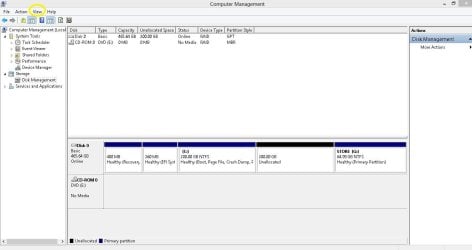
5) I would like to have two snaps on / from the Win 10 Disk Management.

Taking Screenshot of Disk Management in Windows 10

How to Upload and Post a Screenshot and File in Seven Forums

(i) Standard

(ii) Navigate : View > Top > Disk List
For eg.

Disk Management Capture.JPG

Let me know.

Thanks & Regards. ...
 

My Computer My Computer

At a glance

Windows 7 Ultimate x32 With Sp1 + Vista Ultim...Intel Mobile Core 2 Duo T5750 @ 2.00GHz Merom...2.00GB Dual-Channel DDR2 @ 332MHz (5-5-5-15)Mobile Intel(R) 965 Express Chipset Family
Computer type
Laptop
Computer Manufacturer/Model Number
hp compaq presario c795VU notebook pc
OS
Windows 7 Ultimate x32 With Sp1 + Vista Ultimate x32 with Sp1 & Sp2 !!
CPU
Intel Mobile Core 2 Duo T5750 @ 2.00GHz Merom 65nm Technolog
Motherboard
Hewlett-Packard 30D9 (CPU)
Memory
2.00GB Dual-Channel DDR2 @ 332MHz (5-5-5-15)
Graphics Card(s)
Mobile Intel(R) 965 Express Chipset Family
Sound Card
High Definition Audio Device
Monitor(s) Displays
LP154WX4-TLCB on Mobile Intel 965 Express Chipset Family
Screen Resolution
1280x800 @ 60Hz
Hard Drives
149GB Western Digital WDC WD1600BEVS-60VAT0 ATA Device (SATA)
Keyboard
Standard 101/102-Key or Microsoft Natural PS/2 Key + HP QLB
Mouse
ALPS pointing device
Antivirus
Kaspersky AV 2017(Win 7) & AVG AntiVirus Free 2016 (VISTA)
Browser
google chrome
Hi All,
Greets,

Ten20 : I have worked with the same thing & luckily have a good little experience establishing it. Shall we go ?

1) Disable Fast Boot option in BIOS if it's there!
2) Disable Fast Startup in Win 10 settings How to Turn On or Off Fast Startup in Windows 10
3) Disable Secure Boot in BIOS.
Take care! : On some systems, its very straight forward to disable Secure Boot with just disabling it in one or two clicks but with newer ones, the option would be grayed out & will be active only after some initial steps. Proceed only if you are sure or report the things.

4)Once done the above three successfully, make sure you can boot & work with your installed Win 10 OS normally.
5) I would like to have two snaps on / from the Win 10 Disk Management.

Taking Screenshot of Disk Management in Windows 10

How to Upload and Post a Screenshot and File in Seven Forums

(i) Standard

(ii) Navigate : View > Top > Disk List
For eg.

View attachment 409635

Let me know.

Thanks & Regards. ...

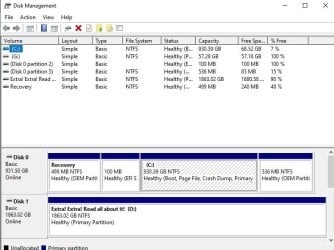
Sorry for the late reply. Here is a snip from disk management: (picture attached) (trying to install it on disk 1)

My bios has no secure boot option, and in System Information it says that secure boot is "Unsupported".

My Windows 10 has no fast boot option in the power options. It also doesn't support hibernation, if that's helpful info.

Fast Boot in my bios is disabled.
 

Attachments

  • Disk Management Snapshot.jpg
    Disk Management Snapshot.jpg
    54.1 KB · Views: 29

My Computer My Computer

At a glance

Windows 10 Pro x64Processor Intel(R) Core(TM) i7-9700K CPU @ 3....16gb Corsair Vengeance ProGeForce GTX 1660 TI
Computer type
PC/Desktop
Computer Manufacturer/Model Number
custom build
OS
Windows 10 Pro x64
CPU
Processor Intel(R) Core(TM) i7-9700K CPU @ 3.60GHz, 3600 Mhz
Motherboard
Z390 Aorus Pro Wifi
Memory
16gb Corsair Vengeance Pro
Graphics Card(s)
GeForce GTX 1660 TI
Case
Cooler Master MB500
Browser
Google Chrome
Is G: your Win 7 installation disk?
 

My Computers My Computers

  • At a glance

    Windows 7 HP 64i5 6600K - 800MHz to 4200MHz4+4G GSkill DDR4 3000IG - Intel 530
    Computer type
    PC/Desktop
    Computer Manufacturer/Model Number
    custom build
    OS
    Windows 7 HP 64
    CPU
    i5 6600K - 800MHz to 4200MHz
    Motherboard
    GA-Z170-HD3P
    Memory
    4+4G GSkill DDR4 3000
    Graphics Card(s)
    IG - Intel 530
    Monitor(s) Displays
    Samsung 226BW
    Screen Resolution
    1680x1050
    Hard Drives
    (1) -1 SM951 – 128GB M.2 AHCI PCIe SSD drive for Windows 7 and Lubuntu
    (2) -1 WD SATA 3 - 1T for Data
    (3) -1 WD SATA 3 - 1T for backup
    PSU
    Thermaltake 450W TR2 gold
    Keyboard
    Old and good Chicony mechanical keyboard
    Mouse
    Logitech mX performance - 9 buttons (had to disable some)
    Internet Speed
    500Mb/s
    Browser
    Firefox 64
    Other Info
    TinyWall firewall
  • At a glance

    Windows 7 Proi7-4500U 800MHz to 3.0GHz(4+4)G DDR3 1600IG intel 4400 + NVIDIA GeForce GT 745M
    Computer type
    Laptop
    System Manufacturer/Model Number
    Asus Q550LF
    OS
    Windows 7 Pro
    CPU
    i7-4500U 800MHz to 3.0GHz
    Motherboard
    Asus Q550LF
    Memory
    (4+4)G DDR3 1600
    Graphics Card(s)
    IG intel 4400 + NVIDIA GeForce GT 745M
    Sound Card
    Realtek
    Monitor(s) Displays
    LG Display LP156WF4-SPH1
    Screen Resolution
    1920 x 1080
    Hard Drives
    BX500 120G SSD for Windows and programs +
    1T HDD for data
    Internet Speed
    500 Mb/s
    Browser
    Firefox
    Other Info
    TinyWall firewall
Ten20 : Greets,
Time no worries but be very sure of whatever you do!

1. trying to install it on disk 1
No, you said earlier that you want to make dual boot on the same disk with win 10 & That's disk 0 ? What are your plan(s) ?

2. My Windows 10 has no fast boot option in the power options
That's strange, It can show as On or Off but it has to be there!
Again check the link : How to Turn On or Off Fast Startup in Windows 10

3. What is G: & Where is it ? Not showing in the Graph > Scroll it!

4. Only 7% free on C: ? That is terrible! Your C: partition is so big that you have not landed in problems. It will severely impact the performance of your OS ( Win 10 ). Ideally it should be 60% free, make it at least 25% free!
If you plan to make dual boot on Disk 0, you would need to shrink C: partition from right to make a separate partition for windows 7 (100 GB) but where you will allocate space for it ? its all full on disk 0!
Actually, you did not use a separate partition for your data / files. All default folders for user files ( My documents, Downloads, My Music, Desktop, My Pictures, My Videos, etc. ) are allocated on C: by default. Probably, you kept on saving them in their default locations & now it's all full!
( While making space on C:, take care that you don't touch system files & only move your personal interest files to a separate partition or disk.) (If you don't plan to install win 7 on Disk 1, a lot of free space is there to use for the data & files)

5. Your Disk Management snap (Standard) is not so good. Follow the given link to make a good view of it & then take the shot. Specifically interested in Status & G:.

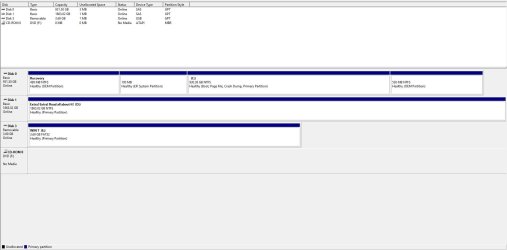
6. You shared snap only for the Standard View. I also asked for a snap of the Advanced View. In the Disk Management Window, click View tab from the top menu bar. Then navigate & select View > Top > Disk List . Then take the snap.

Let me know.

Thanks & Regards. ...
 

My Computer My Computer

At a glance

Windows 7 Ultimate x32 With Sp1 + Vista Ultim...Intel Mobile Core 2 Duo T5750 @ 2.00GHz Merom...2.00GB Dual-Channel DDR2 @ 332MHz (5-5-5-15)Mobile Intel(R) 965 Express Chipset Family
Computer type
Laptop
Computer Manufacturer/Model Number
hp compaq presario c795VU notebook pc
OS
Windows 7 Ultimate x32 With Sp1 + Vista Ultimate x32 with Sp1 & Sp2 !!
CPU
Intel Mobile Core 2 Duo T5750 @ 2.00GHz Merom 65nm Technolog
Motherboard
Hewlett-Packard 30D9 (CPU)
Memory
2.00GB Dual-Channel DDR2 @ 332MHz (5-5-5-15)
Graphics Card(s)
Mobile Intel(R) 965 Express Chipset Family
Sound Card
High Definition Audio Device
Monitor(s) Displays
LP154WX4-TLCB on Mobile Intel 965 Express Chipset Family
Screen Resolution
1280x800 @ 60Hz
Hard Drives
149GB Western Digital WDC WD1600BEVS-60VAT0 ATA Device (SATA)
Keyboard
Standard 101/102-Key or Microsoft Natural PS/2 Key + HP QLB
Mouse
ALPS pointing device
Antivirus
Kaspersky AV 2017(Win 7) & AVG AntiVirus Free 2016 (VISTA)
Browser
google chrome
Ten20 : Greets,
Time no worries but be very sure of whatever you do!

1. trying to install it on disk 1
No, you said earlier that you want to make dual boot on the same disk with win 10 & That's disk 0 ? What are your plan(s) ?

2. My Windows 10 has no fast boot option in the power options
That's strange, It can show as On or Off but it has to be there!
Again check the link : How to Turn On or Off Fast Startup in Windows 10

3. What is G: & Where is it ? Not showing in the Graph > Scroll it!

4. Only 7% free on C: ? That is terrible! Your C: partition is so big that you have not landed in problems. It will severely impact the performance of your OS ( Win 10 ). Ideally it should be 60% free, make it at least 25% free!
If you plan to make dual boot on Disk 0, you would need to shrink C: partition from right to make a separate partition for windows 7 (100 GB) but where you will allocate space for it ? its all full on disk 0!
Actually, you did not use a separate partition for your data / files. All default folders for user files ( My documents, Downloads, My Music, Desktop, My Pictures, My Videos, etc. ) are allocated on C: by default. Probably, you kept on saving them in their default locations & now it's all full!
( While making space on C:, take care that you don't touch system files & only move your personal interest files to a separate partition or disk.) (If you don't plan to install win 7 on Disk 1, a lot of free space is there to use for the data & files)

5. Your Disk Management snap (Standard) is not so good. Follow the given link to make a good view of it & then take the shot. Specifically interested in Status & G:.

6. You shared snap only for the Standard View. I also asked for a snap of the Advanced View. In the Disk Management Window, click View tab from the top menu bar. Then navigate & select View > Top > Disk List . Then take the snap.

Let me know.

Thanks & Regards. ...

1. I am dual booting it with Windows 10 on disk 0 and Windows 7 on disk 1. If I install Windows 7 as MBR in disk 1, and Windows 10 as GPT in disk 0, then I have to keep switching between UEFI and Legacy mode in the BIOS.

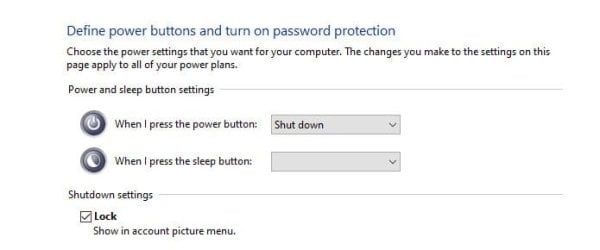
2: I have attached an image of what I see in power options.

3: G: is my installation media. I know it won't work, as I can't format it as Fat32. I have another one with 4gb in it that I can use, and it's ready for UEFI installation. So just ignore G:.

4: I can't free up space on C: because I have nowhere to put all of my stuff. It's almost full because I've had to reinstall Windows multiple times, and the windows.old folders are filling up space. If I move my files to another drive, I can't readily access them on my desktop (C: is an SSD, so it's much faster to modify files, too).

5: The link is broken. (It says there's a screenshot, but there isn't one, so I don't understand what to do)

6: Attached it a much better screenshot of disk management.
 

Attachments

  • Power Options Snapshot.jpg
    Power Options Snapshot.jpg
    16.1 KB · Views: 34
  • Disk Management Snapshot.jpg
    Disk Management Snapshot.jpg
    76.4 KB · Views: 4

My Computer My Computer

At a glance

Windows 10 Pro x64Processor Intel(R) Core(TM) i7-9700K CPU @ 3....16gb Corsair Vengeance ProGeForce GTX 1660 TI
Computer type
PC/Desktop
Computer Manufacturer/Model Number
custom build
OS
Windows 10 Pro x64
CPU
Processor Intel(R) Core(TM) i7-9700K CPU @ 3.60GHz, 3600 Mhz
Motherboard
Z390 Aorus Pro Wifi
Memory
16gb Corsair Vengeance Pro
Graphics Card(s)
GeForce GTX 1660 TI
Case
Cooler Master MB500
Browser
Google Chrome
- Do you want to install Win 7 on disk 1 completely independent of disk 0 or you want to have the Win 7 boot loader on disk 0 (every time you boot you will have to choose witch OS to boot from)?

Edit:
Now I understand why you can't make the USB disk "active". It's because your USB disk is a GPT disk.
My suggestion is to open disk manager (C:\Windows\System32\diskmgmt.msc) and delete all partitions and make a new mbr style formatted as Fat32.
To make it UEFI boot able, follow the instructions How to install Windows 7 in UEFI Mode with a USB
 
Last edited:

My Computers My Computers

  • At a glance

    Windows 7 HP 64i5 6600K - 800MHz to 4200MHz4+4G GSkill DDR4 3000IG - Intel 530
    Computer type
    PC/Desktop
    Computer Manufacturer/Model Number
    custom build
    OS
    Windows 7 HP 64
    CPU
    i5 6600K - 800MHz to 4200MHz
    Motherboard
    GA-Z170-HD3P
    Memory
    4+4G GSkill DDR4 3000
    Graphics Card(s)
    IG - Intel 530
    Monitor(s) Displays
    Samsung 226BW
    Screen Resolution
    1680x1050
    Hard Drives
    (1) -1 SM951 – 128GB M.2 AHCI PCIe SSD drive for Windows 7 and Lubuntu
    (2) -1 WD SATA 3 - 1T for Data
    (3) -1 WD SATA 3 - 1T for backup
    PSU
    Thermaltake 450W TR2 gold
    Keyboard
    Old and good Chicony mechanical keyboard
    Mouse
    Logitech mX performance - 9 buttons (had to disable some)
    Internet Speed
    500Mb/s
    Browser
    Firefox 64
    Other Info
    TinyWall firewall
  • At a glance

    Windows 7 Proi7-4500U 800MHz to 3.0GHz(4+4)G DDR3 1600IG intel 4400 + NVIDIA GeForce GT 745M
    Computer type
    Laptop
    System Manufacturer/Model Number
    Asus Q550LF
    OS
    Windows 7 Pro
    CPU
    i7-4500U 800MHz to 3.0GHz
    Motherboard
    Asus Q550LF
    Memory
    (4+4)G DDR3 1600
    Graphics Card(s)
    IG intel 4400 + NVIDIA GeForce GT 745M
    Sound Card
    Realtek
    Monitor(s) Displays
    LG Display LP156WF4-SPH1
    Screen Resolution
    1920 x 1080
    Hard Drives
    BX500 120G SSD for Windows and programs +
    1T HDD for data
    Internet Speed
    500 Mb/s
    Browser
    Firefox
    Other Info
    TinyWall firewall
as WinPE has no file explorer.
Type notepad at cmd prompt. When notepad pops up, click File >Save. Then select All Files in the dropdown.
Alternatively, borrow a customized winpe from someone who has made one.


1. I am dual booting it with Windows 10 on disk 0 and Windows 7 on disk 1. If I install Windows 7 as MBR in disk 1, and Windows 10 as GPT in disk 0, then I have to keep switching between UEFI and Legacy mode in the BIOS.

Yet

The bios let's me change between "Legacy" "UEFI" "UEFI and Legacy".
If you set it to "uefi and legacy" does it not work for both?


4: I can't free up space on C: because I have nowhere to put all of my stuff. It's almost full because I've had to reinstall Windows multiple times, and the windows.old folders are filling up space
.
Any reason why you haven't deleted those windows.old folders?
 
Last edited:

My Computers My Computers

  • At a glance

    7 X64i5 84002x8gb 3200mhz
    Computer type
    PC/Desktop
    OS
    7 X64
    CPU
    i5 8400
    Motherboard
    gigabyte b365m ds3h
    Memory
    2x8gb 3200mhz
    Hard Drives
    various
    PSU
    pure power 11 400w cm
    Case
    Coolermaster
    Cooling
    cryorig m9i
  • At a glance

    7x64g54008gb ddr4 2400
    Computer type
    PC/Desktop
    OS
    7x64
    CPU
    g5400
    Motherboard
    ga b365m ds3h
    Memory
    8gb ddr4 2400
    PSU
    xfx pro 450w
Type notepad at cmd prompt. When notepad pops up, click File >Save. Then select All Files in the dropdown.
Alternatively, borrow a customized winpe from someone who has made one.


Yet


If you set it to "uefi and legacy" does it not work for both?


.
Any reason why you haven't deleted those windows.old folders?

1. I've tried borrowing it but it hasn't worked.

2. If I set it to "UEFI and Legacy" then the description for it in the bios reads: "Tries to boot from UEFI, and if that doesn't work, boots from legacy".

3. They have important files on them and I don't have time to sift through them and delete everything else.
 

My Computer My Computer

At a glance

Windows 10 Pro x64Processor Intel(R) Core(TM) i7-9700K CPU @ 3....16gb Corsair Vengeance ProGeForce GTX 1660 TI
Computer type
PC/Desktop
Computer Manufacturer/Model Number
custom build
OS
Windows 10 Pro x64
CPU
Processor Intel(R) Core(TM) i7-9700K CPU @ 3.60GHz, 3600 Mhz
Motherboard
Z390 Aorus Pro Wifi
Memory
16gb Corsair Vengeance Pro
Graphics Card(s)
GeForce GTX 1660 TI
Case
Cooler Master MB500
Browser
Google Chrome
Hi All,
Greets,

Ten20 :

1.
I am dual booting it with Windows 10 on disk 0 and Windows 7 on disk 1.

If you don't disconnect / Power off Disk 0 & proceed for win 7 installation on disk 1, you will be writing Win 7 boot material on Windows 10 disk ( Disk 0 ). It means that your win 7 disk ( Disk 1) will not boot independently. Your win 7 will always look for disk 0 to boot. It means if you detach Disk 0, you will not be able to boot into win 7. And if something happens to your win 10 disk, there are chances that you will not be able to boot into win 7 as well ( depending on the corruption )!
So,
Detach / turn off Disk 0 & then only go for Win 7 installation on Disk 1. It will make sure that all the boot material for win 7 is placed on Disk 1 only.
( In your case, you need a few steps before proceeding with win 7 installation on Disk 1!)

2.
If I install Windows 7 as MBR in disk 1, and Windows 10 as GPT in disk 0, then I have to keep switching between UEFI and Legacy mode in the BIOS.

That's not true. Your BIOS is good enough to carry both UEFI & MBR at the same time but certainly not on the same disk! ;) . Only the boot preference will come into play & that will be clear with a look on One Time Boot Menu Entries.
But...
Your BIOS is also good enough to carry both win 7 & win 10 in GPT. So, why to think about MBR ?

3. Power Options : Strange!

Are you logged in as Admin ? Just have a look on your snap & the one in tutorial, So much stuff / settings are missing !?

Fast_Startup with Ten20.jpg

Fast_Startup.jpg

4.
If I set it to "UEFI and Legacy" then the description for it in the bios reads: "Tries to boot from UEFI, and if that doesn't work, boots from legacy

Your BIOS is all good!

Windows 7 is not a full UEFI OS. The UEFI and Legacy setting should open the back door support for booting into a pure UEFI + GPT : Win 7 Installation Media!.
Now you would not hang at graphical startup in win 7 installation media.

Let's see how far we get. Shall we go ?

(i) Turn on the BIOS setting & save it : UEFI and Legacy.

(ii) Make sure you can boot & work well in windows 10.

(iii) Try to boot into your Win 7 UEFI + GPT Installation Media. ( I would suggest using Rufus & USB 2.0 port )

Notes :

*We need not detach or power off any disk for / during this test.
**We are not going to make any installation right now.
***I would suggest using Rufus to make a pure UEFI Installation Media. In some ways, the made UEFI + GPT media is compatible with Legacy as well but we need to check pure UEFI. Otherwise it will always boot well in Legacy under this setting & the test is of no use!
****I would suggest use of untouched M$ Win 7 SP1 ISO.
***I would suggest use of USB 2.0 Port because Win 7 does not support USB 3.0 ports Out Of The Box.

5. What BIOS say when you try to select single option of UEFI & single option of Legacy. Does it allow enabling both at the same time ? In one BIOS, It was not saying clearly whether both can be enabled but there was option to enable both at the same time. That BIOS was not saying anything but it was UEFI First & Legacy Second!
This would be another setting to try if 4 ( above ) is not working.

Let me know.

Thanks & Regards. ...
 
Last edited:

My Computer My Computer

At a glance

Windows 7 Ultimate x32 With Sp1 + Vista Ultim...Intel Mobile Core 2 Duo T5750 @ 2.00GHz Merom...2.00GB Dual-Channel DDR2 @ 332MHz (5-5-5-15)Mobile Intel(R) 965 Express Chipset Family
Computer type
Laptop
Computer Manufacturer/Model Number
hp compaq presario c795VU notebook pc
OS
Windows 7 Ultimate x32 With Sp1 + Vista Ultimate x32 with Sp1 & Sp2 !!
CPU
Intel Mobile Core 2 Duo T5750 @ 2.00GHz Merom 65nm Technolog
Motherboard
Hewlett-Packard 30D9 (CPU)
Memory
2.00GB Dual-Channel DDR2 @ 332MHz (5-5-5-15)
Graphics Card(s)
Mobile Intel(R) 965 Express Chipset Family
Sound Card
High Definition Audio Device
Monitor(s) Displays
LP154WX4-TLCB on Mobile Intel 965 Express Chipset Family
Screen Resolution
1280x800 @ 60Hz
Hard Drives
149GB Western Digital WDC WD1600BEVS-60VAT0 ATA Device (SATA)
Keyboard
Standard 101/102-Key or Microsoft Natural PS/2 Key + HP QLB
Mouse
ALPS pointing device
Antivirus
Kaspersky AV 2017(Win 7) & AVG AntiVirus Free 2016 (VISTA)
Browser
google chrome
Back
Top